1
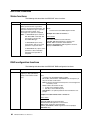
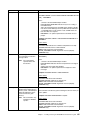
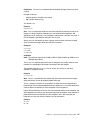
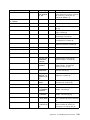
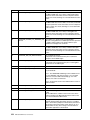
Function
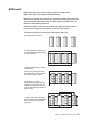
What it does
Command
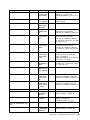
setconfig
Resets the controller’s
configuration. Logical drives are
deleted, hard drives are reset to
the READY state, and any
controller settings are reset to
default values.
ARCCONF SETCONFIG controller DEFAULT [NOPROMPT]
where
•
controller is the ServeRAID adapter number
•
NOPROMPT is an optional parameter that overrides the user
prompt.
Example: ARCCONF SETCONFIG 1 DEFAULT
Return Values
SUCCESS: 0x00 Indicates the command completed successfully.
FAILURE: 0x01 Indicates the command failed.
ABORT: 0x02: Parameters failed validation
INVALID_ARGUMENTS: 0x03: Arguments incorrect (displays
COMMAND help)
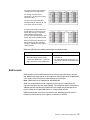
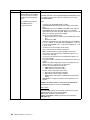
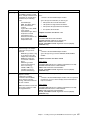
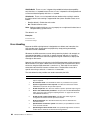
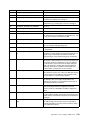
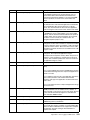
setname
Renames a logical drive
ARCCONF SETNAME controller LOGICALDRIVE LD#
newname
where
•
controller is the ServeRAID adapter number
•
LOGICALDRIVE indicates that the next parameter is the logical
drive ID.
•
LD# is the logical drive number of the drive to be renamed
•
newname is the new name of the logical drive
Example: ARCCONF SETNAME 1LOGICALDRIVE 1 backup
Return Values
SUCCESS: 0x00 Indicates the command completed successfully.
FAILURE: 0x01 Indicates the command failed.
ABORT: 0x02: Parameters failed validation
INVALID_ARGUMENTS: 0x03: Arguments incorrect (displays
COMMAND help)
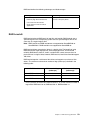
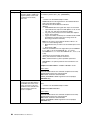
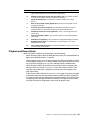
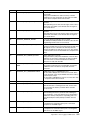
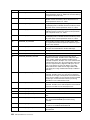
setstate
Changes the state of a physical
drive from its current state to
the designated state
(Hotspare).
ARCCONF SETSTATE controller channel# device# newstate
where
•
controller is the ServeRAID adapter number
•
channel# is the channel number for the drive
•
device# is the device number for the drive
•
newstate is one of the following options:
— HSP stands for hotspare
— RDY removes the hotspare designation
— DDD stands for defunct disk drive
Example: ARCCONF SETSTATE 1 1 0 HSP
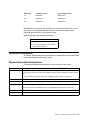
Return Values
SUCCESS: 0x00 Indicates the command completed successfully.
FAILURE: 0x01 Indicates the command failed.
ABORT: 0x02: Parameters failed validation
INVALID_ARGUMENTS: 0x03: Arguments incorrect (displays
COMMAND help)
Installing and Using the ARCCONF Command-Line Program
71