1
4.3.2 Replacing a Power Supply
1.
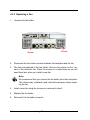
Remove the screws located at the corners of the power supply. Place the
screws in a safe place as you will need them later when you install a new
power supply.
Screw
Screw
2.
Use the handle to pull out the defective power supply.
3.
Replace it with a 460W power supply.
4.
Slide the new power supply in until it clicks into place.
5.
Replace the screws you removed in step 1.
Array Maintenance
4-11