1
Chapter 6: EASM
8.
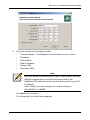
Optional. If you chose Specify an IP address, enter the following settings in
the fields provided:
•
IP Address
•
Subnet Mask
•
Default Gateway IP Address
•
Primary Domain Name Server IP Address
•
Secondary Domain Name Server IP Address
See your Network Administrator for help in making these settings.
9.
Click the OK button to save your settings.
Working with Jumbo Frames
The term jumbo frame refers to a frame on a local area network that is larger than
the standard 1518 byte size. EdgeStore supports jumbo frames up to 9000 bytes.
On EdgeStore, the frame size setting is called Maximum Transmission Unit
(MTU). The default MTU or frame is 1500 bytes. This setting is appropriate for
most users. See your Network Administrator before you change this setting.
To make frame size settings:
1.
In the Tree, click the + beside the Network icon.
2.
Click the Network Setup icon.
3.
Click the Jumbo Frame tab.
4.
From the MTU dropdown menu, choose the maximum MTU or frame size:
5.
•
1500 bytes (default)
•
4000 bytes
•
7000 bytes
•
9000 bytes
Click the OK button to save your setting.
89