1
Maintenance and Troubleshooting
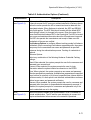
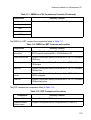
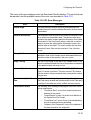
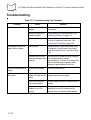
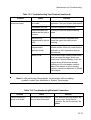
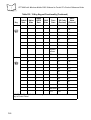
Table 13-1. Troubleshooting Your Terminal (continued)
Problem
Cause
Your terminal does not
accept scan input.
Solution
Scanning application is
not loaded.
Verify that the unit is loaded with a scanning
application. See your System Administrator.
Unreadable bar code.
Ensure the symbol is not defaced.
Distance between exit
window and bar code is
incorrect.
Ensure you are within proper scanning
range.
Terminal is not
programmed for the bar
code.
Ensure the terminal is programmed to
accept the type of bar code you are
scanning.
Terminal is not
programmed to
generate a beep.
If you are expecting a beep on a good
decode and don’t hear one, check that the
application is set to generate a beep on
good decode.
Battery is low.
If the scanner stops emitting a laser beam
when you press the trigger, check your
battery level. When the battery is low, the
scanner shuts off before the terminal
notifies you of the low battery condition.
Note: If the scanner is still not reading
symbols, contact your distributor or Symbol
Technologies.
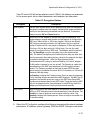
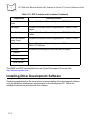
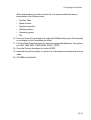
Note: If, after performing these checks, the terminal is still not reading
symbols, contact your distributor or Symbol Technologies.
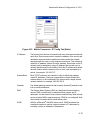
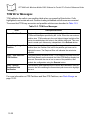
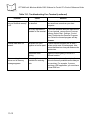
Table 13-2. Troubleshooting Bluetooth Connection
Problem
Cannot connect to a
device in my folder.
Cause
The services for the devices
have not been discovered.
Solution
In the Bluetooth Devices window, tap
the device icon. Select Device Properties. Tap the Services tab. Tap
Update.
13-13