1
PPT 8800 with Windows® Mobile
2003 Software for Pocket PCs
Product Reference Guide
PPT 8800 with Windows® Mobile 2003 Software
for Pocket PCs
Product Reference Guide
72E-63154-05
Revision A
February 2005
© 2003-2005 by Symbol Technologies, Inc. All rights reserved.
No part of this publication may be reproduced or used in any form, or by any electrical or
mechanical means, without permission in writing from Symbol. This includes electronic or
mechanical means, such as photocopying, recording, or information storage and retrieval
systems. The material in this manual is subject to change without notice.
The software is provided strictly on an “as is” basis. All software, including firmware,
furnished to the user is on a licensed basis. Symbol grants to the user a non-transferable
and non-exclusive license to use each software or firmware program delivered hereunder
(licensed program). Except as noted below, such license may not be assigned,
sublicensed, or otherwise transferred by the user without prior written consent of Symbol.
No right to copy a licensed program in whole or in part is granted, except as permitted under
copyright law. The user shall not modify, merge, or incorporate any form or portion of a
licensed program with other program material, create a derivative work from a licensed
program, or use a licensed program in a network without written permission from Symbol.
The user agrees to maintain Symbol’s copyright notice on the licensed programs delivered
hereunder, and to include the same on any authorized copies it makes, in whole or in part.
The user agrees not to decompile, disassemble, decode, or reverse engineer any licensed
program delivered to the user or any portion thereof.
Symbol reserves the right to make changes to any software or product to improve reliability,
function, or design.
Symbol does not assume any product liability arising out of, or in connection with, the
application or use of any product, circuit, or application described herein.
No license is granted, either expressly or by implication, estoppel, or otherwise under any
Symbol Technologies, Inc., intellectual property rights. An implied license only exists for
equipment, circuits, and subsystems contained in Symbol products.
Symbol, Spectrum One, and Spectrum24 are registered trademarks of Symbol
Technologies, Inc. Bluetooth is a registered trademark of Bluetooth SIG. Microsoft,
Windows and ActiveSync are either registered trademarks or trademarks of Microsoft
Corporation. Other product names mentioned in this manual may be trademarks or
registered trademarks of their respective companies and are hereby acknowledged.
Symbol Technologies, Inc.
One Symbol Plaza
Holtsville, New York 11742-1300
http://www.symbol.com
ii
Revision History
Changes to the original manual are listed below:
Change
Date
-01
Description
Initial release.
-02
10/2003
Add Bluetooth functionality. Add MSR operation instructions.
-03
1/2004
Add Mobile Companion V3.9.2 information.
-04
7/1/2004
Add PPT 8866 configuration.
-05
2/2005
Update battery charging temperature; add mobile computer and
cradle connection cleaning procedures.
iii
iv
Contents
About This Guide
Introduction . . . . . . . . . . . . . . . . . . . . . . . . . . . . . . . . . . . . . . . . . . . . . . . . . . . . . . . . . . . . . . . . . . xvii
Chapter Descriptions . . . . . . . . . . . . . . . . . . . . . . . . . . . . . . . . . . . . . . . . . . . . . . . . . . . . . . . . . . . xviii
Related Material. . . . . . . . . . . . . . . . . . . . . . . . . . . . . . . . . . . . . . . . . . . . . . . . . . . . . . . . . . . . . . . . xx
Service Information . . . . . . . . . . . . . . . . . . . . . . . . . . . . . . . . . . . . . . . . . . . . . . . . . . . . . . . . . . . . . xxi
Symbol Support Center . . . . . . . . . . . . . . . . . . . . . . . . . . . . . . . . . . . . . . . . . . . . . . . . . . . . . xxii
Chapter 1. Getting Started
Introduction . . . . . . . . . . . . . . . . . . . . . . . . . . . . . . . . . . . . . . . . . . . . . . . . . . . . . . . . . . . . . . . . . . 1-3
Unpacking the Terminal . . . . . . . . . . . . . . . . . . . . . . . . . . . . . . . . . . . . . . . . . . . . . . . . . . . . . . . . . 1-3
Parts of the Terminal . . . . . . . . . . . . . . . . . . . . . . . . . . . . . . . . . . . . . . . . . . . . . . . . . . . . . . . . . . . 1-4
Accessories . . . . . . . . . . . . . . . . . . . . . . . . . . . . . . . . . . . . . . . . . . . . . . . . . . . . . . . . . . . . . . . . . . 1-6
Getting Started. . . . . . . . . . . . . . . . . . . . . . . . . . . . . . . . . . . . . . . . . . . . . . . . . . . . . . . . . . . . . . . . 1-8
Installing the Battery . . . . . . . . . . . . . . . . . . . . . . . . . . . . . . . . . . . . . . . . . . . . . . . . . . . . . . . . . . . 1-8
Installing the Standard Battery . . . . . . . . . . . . . . . . . . . . . . . . . . . . . . . . . . . . . . . . . . . . . . . . 1-8
Installing the Optional Larger Capacity Battery . . . . . . . . . . . . . . . . . . . . . . . . . . . . . . . . . . 1-10
Charging the Terminal Battery . . . . . . . . . . . . . . . . . . . . . . . . . . . . . . . . . . . . . . . . . . . . . . . . . . . 1-11
Charging the Main Battery and Memory Backup Battery . . . . . . . . . . . . . . . . . . . . . . . . . . . 1-11
Using the Serial Charging Cable . . . . . . . . . . . . . . . . . . . . . . . . . . . . . . . . . . . . . . . . . . . . . 1-12
Using the Single-Slot Serial Cradles. . . . . . . . . . . . . . . . . . . . . . . . . . . . . . . . . . . . . . . . . . . 1-12
Using the Four-Slot Cradles . . . . . . . . . . . . . . . . . . . . . . . . . . . . . . . . . . . . . . . . . . . . . . . . . 1-15
Using the Universal Cable Cup. . . . . . . . . . . . . . . . . . . . . . . . . . . . . . . . . . . . . . . . . . . . . . . 1-16
Charging Spare Batteries. . . . . . . . . . . . . . . . . . . . . . . . . . . . . . . . . . . . . . . . . . . . . . . . . . . . . . . 1-18
Using the CRD8800 Single-Slot Cradle . . . . . . . . . . . . . . . . . . . . . . . . . . . . . . . . . . . . . . . . 1-18
Using the CRD8800B Single-Slot Cradle . . . . . . . . . . . . . . . . . . . . . . . . . . . . . . . . . . . . . . . 1-19
Using the UBC Battery Adapter . . . . . . . . . . . . . . . . . . . . . . . . . . . . . . . . . . . . . . . . . . . . . . 1-20
Charge LED Indicator . . . . . . . . . . . . . . . . . . . . . . . . . . . . . . . . . . . . . . . . . . . . . . . . . . . . . . 1-21
Starting the Terminal . . . . . . . . . . . . . . . . . . . . . . . . . . . . . . . . . . . . . . . . . . . . . . . . . . . . . . . . . . 1-21
Calibrating the Screen . . . . . . . . . . . . . . . . . . . . . . . . . . . . . . . . . . . . . . . . . . . . . . . . . . . . . 1-21
Setting Time and Date . . . . . . . . . . . . . . . . . . . . . . . . . . . . . . . . . . . . . . . . . . . . . . . . . . . . . 1-23
v
PPT 8800 with Windows Mobile 2003 Software for Pocket PCs Product Reference Guide
Checking Battery Status . . . . . . . . . . . . . . . . . . . . . . . . . . . . . . . . . . . . . . . . . . . . . . . . . . . . . . . . 1-24
Replacing the Handstrap. . . . . . . . . . . . . . . . . . . . . . . . . . . . . . . . . . . . . . . . . . . . . . . . . . . . . . . . 1-25
Magnetic Strip Reader . . . . . . . . . . . . . . . . . . . . . . . . . . . . . . . . . . . . . . . . . . . . . . . . . . . . . . . . . 1-27
Installing the MSR . . . . . . . . . . . . . . . . . . . . . . . . . . . . . . . . . . . . . . . . . . . . . . . . . . . . . . . . . 1-27
Removing the MSR . . . . . . . . . . . . . . . . . . . . . . . . . . . . . . . . . . . . . . . . . . . . . . . . . . . . . . . . 1-28
Using the MSR. . . . . . . . . . . . . . . . . . . . . . . . . . . . . . . . . . . . . . . . . . . . . . . . . . . . . . . . . . . . 1-28
Charging the Terminal’s Battery . . . . . . . . . . . . . . . . . . . . . . . . . . . . . . . . . . . . . . . . . . . . . . 1-30
Configuring the Terminal. . . . . . . . . . . . . . . . . . . . . . . . . . . . . . . . . . . . . . . . . . . . . . . . . . . . . . . . 1-31
Chapter 2. Operating the PPT 8800
Introduction . . . . . . . . . . . . . . . . . . . . . . . . . . . . . . . . . . . . . . . . . . . . . . . . . . . . . . . . . . . . . . . . . . . 2-3
Using the Power Button . . . . . . . . . . . . . . . . . . . . . . . . . . . . . . . . . . . . . . . . . . . . . . . . . . . . . . . . . 2-3
Adjusting the Backlight . . . . . . . . . . . . . . . . . . . . . . . . . . . . . . . . . . . . . . . . . . . . . . . . . . . . . . . . . . 2-3
Standard 6-Key Configuration . . . . . . . . . . . . . . . . . . . . . . . . . . . . . . . . . . . . . . . . . . . . . . . . . 2-3
15-Key Configuration . . . . . . . . . . . . . . . . . . . . . . . . . . . . . . . . . . . . . . . . . . . . . . . . . . . . . . . . 2-4
Using the Stylus . . . . . . . . . . . . . . . . . . . . . . . . . . . . . . . . . . . . . . . . . . . . . . . . . . . . . . . . . . . . . . . 2-4
Using a Headset . . . . . . . . . . . . . . . . . . . . . . . . . . . . . . . . . . . . . . . . . . . . . . . . . . . . . . . . . . . . . . . 2-5
Using the Keypad . . . . . . . . . . . . . . . . . . . . . . . . . . . . . . . . . . . . . . . . . . . . . . . . . . . . . . . . . . . . . . 2-5
Standard 6-Key Configuration . . . . . . . . . . . . . . . . . . . . . . . . . . . . . . . . . . . . . . . . . . . . . . . . . 2-6
15-Key Configuration . . . . . . . . . . . . . . . . . . . . . . . . . . . . . . . . . . . . . . . . . . . . . . . . . . . . . . . . 2-7
Key Mode Icon . . . . . . . . . . . . . . . . . . . . . . . . . . . . . . . . . . . . . . . . . . . . . . . . . . . . . . . . . 2-9
Today Screen . . . . . . . . . . . . . . . . . . . . . . . . . . . . . . . . . . . . . . . . . . . . . . . . . . . . . . . . . . . . . . . . 2-11
Using the Navigation Bar and Command Bar . . . . . . . . . . . . . . . . . . . . . . . . . . . . . . . . . . . . . . . . 2-12
Status Icons . . . . . . . . . . . . . . . . . . . . . . . . . . . . . . . . . . . . . . . . . . . . . . . . . . . . . . . . . . . . . . 2-13
Task Tray Icons . . . . . . . . . . . . . . . . . . . . . . . . . . . . . . . . . . . . . . . . . . . . . . . . . . . . . . . . . . . 2-14
Speaker Icon . . . . . . . . . . . . . . . . . . . . . . . . . . . . . . . . . . . . . . . . . . . . . . . . . . . . . . . . . . . . . 2-15
Battery Icon . . . . . . . . . . . . . . . . . . . . . . . . . . . . . . . . . . . . . . . . . . . . . . . . . . . . . . . . . . . . . . 2-16
Connectivity Icon . . . . . . . . . . . . . . . . . . . . . . . . . . . . . . . . . . . . . . . . . . . . . . . . . . . . . . . . . . 2-17
Time Icon . . . . . . . . . . . . . . . . . . . . . . . . . . . . . . . . . . . . . . . . . . . . . . . . . . . . . . . . . . . . . . . . 2-18
Instant Message Icon. . . . . . . . . . . . . . . . . . . . . . . . . . . . . . . . . . . . . . . . . . . . . . . . . . . . . . . 2-19
E-Mail Icon . . . . . . . . . . . . . . . . . . . . . . . . . . . . . . . . . . . . . . . . . . . . . . . . . . . . . . . . . . . . . . . 2-20
Multiple Notification Icon . . . . . . . . . . . . . . . . . . . . . . . . . . . . . . . . . . . . . . . . . . . . . . . . . . . . 2-20
Selecting Programs. . . . . . . . . . . . . . . . . . . . . . . . . . . . . . . . . . . . . . . . . . . . . . . . . . . . . . . . . . . . 2-21
Using Pop-up Menus. . . . . . . . . . . . . . . . . . . . . . . . . . . . . . . . . . . . . . . . . . . . . . . . . . . . . . . . . . . 2-22
Notifications. . . . . . . . . . . . . . . . . . . . . . . . . . . . . . . . . . . . . . . . . . . . . . . . . . . . . . . . . . . . . . . . . . 2-23
Entering Information . . . . . . . . . . . . . . . . . . . . . . . . . . . . . . . . . . . . . . . . . . . . . . . . . . . . . . . . . . . 2-23
Entering Information Using the Input Panel . . . . . . . . . . . . . . . . . . . . . . . . . . . . . . . . . . . . . . 2-23
Using the Soft Keyboard. . . . . . . . . . . . . . . . . . . . . . . . . . . . . . . . . . . . . . . . . . . . . . . . . 2-24
Using the Block Recognizer . . . . . . . . . . . . . . . . . . . . . . . . . . . . . . . . . . . . . . . . . . . . . . 2-25
Using the Letter Recognizer . . . . . . . . . . . . . . . . . . . . . . . . . . . . . . . . . . . . . . . . . . . . . . 2-26
Using the Transcriber . . . . . . . . . . . . . . . . . . . . . . . . . . . . . . . . . . . . . . . . . . . . . . . . . . . 2-26
Writing on the Screen . . . . . . . . . . . . . . . . . . . . . . . . . . . . . . . . . . . . . . . . . . . . . . . . . . . . . . 2-26
Converting Writing to Text . . . . . . . . . . . . . . . . . . . . . . . . . . . . . . . . . . . . . . . . . . . . . . . 2-28
vi
Contents
Writing Tips . . . . . . . . . . . . . . . . . . . . . . . . . . . . . . . . . . . . . . . . . . . . . . . . . . . . . . . . . .
Selecting Text . . . . . . . . . . . . . . . . . . . . . . . . . . . . . . . . . . . . . . . . . . . . . . . . . . . . . . . . . . . .
Selecting Writing . . . . . . . . . . . . . . . . . . . . . . . . . . . . . . . . . . . . . . . . . . . . . . . . . . . . . .
Drawing on the Screen . . . . . . . . . . . . . . . . . . . . . . . . . . . . . . . . . . . . . . . . . . . . . . . . . . . . .
Selecting a Drawing . . . . . . . . . . . . . . . . . . . . . . . . . . . . . . . . . . . . . . . . . . . . . . . . . . .
Recording a Message. . . . . . . . . . . . . . . . . . . . . . . . . . . . . . . . . . . . . . . . . . . . . . . . . . . . . .
Using My Text. . . . . . . . . . . . . . . . . . . . . . . . . . . . . . . . . . . . . . . . . . . . . . . . . . . . . . . . . . . .
Entering Information Using 15-Key Keypad . . . . . . . . . . . . . . . . . . . . . . . . . . . . . . . . . . . . .
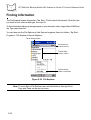
Finding Information . . . . . . . . . . . . . . . . . . . . . . . . . . . . . . . . . . . . . . . . . . . . . . . . . . . . . . . . . . .
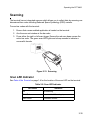
Scanning . . . . . . . . . . . . . . . . . . . . . . . . . . . . . . . . . . . . . . . . . . . . . . . . . . . . . . . . . . . . . . . . . . .
Scan LED Indicator. . . . . . . . . . . . . . . . . . . . . . . . . . . . . . . . . . . . . . . . . . . . . . . . . . . . . . . .
Resetting the Terminal. . . . . . . . . . . . . . . . . . . . . . . . . . . . . . . . . . . . . . . . . . . . . . . . . . . . . . . . .
Performing a Soft Reset . . . . . . . . . . . . . . . . . . . . . . . . . . . . . . . . . . . . . . . . . . . . . . . . . . . .
Performing a Hard Reset . . . . . . . . . . . . . . . . . . . . . . . . . . . . . . . . . . . . . . . . . . . . . . . . . . .
2-29
2-30
2-30
2-31
2-31
2-32
2-33
2-33
2-34
2-35
2-35
2-36
2-36
2-36
Chapter 3. Settings
Introduction . . . . . . . . . . . . . . . . . . . . . . . . . . . . . . . . . . . . . . . . . . . . . . . . . . . . . . . . . . . . . . . . . . 3-3
Adjusting Settings . . . . . . . . . . . . . . . . . . . . . . . . . . . . . . . . . . . . . . . . . . . . . . . . . . . . . . . . . . . . . 3-3
Personal Tab . . . . . . . . . . . . . . . . . . . . . . . . . . . . . . . . . . . . . . . . . . . . . . . . . . . . . . . . . . . . . 3-3
System Tab . . . . . . . . . . . . . . . . . . . . . . . . . . . . . . . . . . . . . . . . . . . . . . . . . . . . . . . . . . . . . . 3-5
Buttons. . . . . . . . . . . . . . . . . . . . . . . . . . . . . . . . . . . . . . . . . . . . . . . . . . . . . . . . . . . . . . . . . . . . . . 3-8
Program Buttons. . . . . . . . . . . . . . . . . . . . . . . . . . . . . . . . . . . . . . . . . . . . . . . . . . . . . . . . . . . 3-8
Up/Down Control . . . . . . . . . . . . . . . . . . . . . . . . . . . . . . . . . . . . . . . . . . . . . . . . . . . . . . . . . . 3-9
Input . . . . . . . . . . . . . . . . . . . . . . . . . . . . . . . . . . . . . . . . . . . . . . . . . . . . . . . . . . . . . . . . . . . . . . . 3-11
Input Method. . . . . . . . . . . . . . . . . . . . . . . . . . . . . . . . . . . . . . . . . . . . . . . . . . . . . . . . . . . . . 3-11
Word Completion . . . . . . . . . . . . . . . . . . . . . . . . . . . . . . . . . . . . . . . . . . . . . . . . . . . . . . . . . 3-12
Options . . . . . . . . . . . . . . . . . . . . . . . . . . . . . . . . . . . . . . . . . . . . . . . . . . . . . . . . . . . . . . . . . 3-13
Menus . . . . . . . . . . . . . . . . . . . . . . . . . . . . . . . . . . . . . . . . . . . . . . . . . . . . . . . . . . . . . . . . . . . . . 3-14
Start Menu . . . . . . . . . . . . . . . . . . . . . . . . . . . . . . . . . . . . . . . . . . . . . . . . . . . . . . . . . . . . . . 3-14
New Menu . . . . . . . . . . . . . . . . . . . . . . . . . . . . . . . . . . . . . . . . . . . . . . . . . . . . . . . . . . . . . . 3-15
Owner Information . . . . . . . . . . . . . . . . . . . . . . . . . . . . . . . . . . . . . . . . . . . . . . . . . . . . . . . . . . . . 3-16
Identification . . . . . . . . . . . . . . . . . . . . . . . . . . . . . . . . . . . . . . . . . . . . . . . . . . . . . . . . . . . . . 3-16
Notes . . . . . . . . . . . . . . . . . . . . . . . . . . . . . . . . . . . . . . . . . . . . . . . . . . . . . . . . . . . . . . . . . . 3-17
Passwords . . . . . . . . . . . . . . . . . . . . . . . . . . . . . . . . . . . . . . . . . . . . . . . . . . . . . . . . . . . . . . . . . . 3-19
Password . . . . . . . . . . . . . . . . . . . . . . . . . . . . . . . . . . . . . . . . . . . . . . . . . . . . . . . . . . . . . . . 3-19
Hint . . . . . . . . . . . . . . . . . . . . . . . . . . . . . . . . . . . . . . . . . . . . . . . . . . . . . . . . . . . . . . . . . . . . 3-21
Sounds & Notifications. . . . . . . . . . . . . . . . . . . . . . . . . . . . . . . . . . . . . . . . . . . . . . . . . . . . . . . . . 3-22
Volume . . . . . . . . . . . . . . . . . . . . . . . . . . . . . . . . . . . . . . . . . . . . . . . . . . . . . . . . . . . . . . . . . 3-22
Notifications . . . . . . . . . . . . . . . . . . . . . . . . . . . . . . . . . . . . . . . . . . . . . . . . . . . . . . . . . . . . . 3-23
Today . . . . . . . . . . . . . . . . . . . . . . . . . . . . . . . . . . . . . . . . . . . . . . . . . . . . . . . . . . . . . . . . . . . . . . 3-24
Appearance . . . . . . . . . . . . . . . . . . . . . . . . . . . . . . . . . . . . . . . . . . . . . . . . . . . . . . . . . . . . . 3-24
Items . . . . . . . . . . . . . . . . . . . . . . . . . . . . . . . . . . . . . . . . . . . . . . . . . . . . . . . . . . . . . . . . . . . 3-25
About . . . . . . . . . . . . . . . . . . . . . . . . . . . . . . . . . . . . . . . . . . . . . . . . . . . . . . . . . . . . . . . . . . . . . . 3-26
vii
PPT 8800 with Windows Mobile 2003 Software for Pocket PCs Product Reference Guide
Version. . . . . . . . . . . . . . . . . . . . . . . . . . . . . . . . . . . . . . . . . . . . . . . . . . . . . . . . . . . . . . . . . . 3-26
Device ID . . . . . . . . . . . . . . . . . . . . . . . . . . . . . . . . . . . . . . . . . . . . . . . . . . . . . . . . . . . . . . . . 3-27
Copyrights . . . . . . . . . . . . . . . . . . . . . . . . . . . . . . . . . . . . . . . . . . . . . . . . . . . . . . . . . . . . . . . 3-28
Backlight . . . . . . . . . . . . . . . . . . . . . . . . . . . . . . . . . . . . . . . . . . . . . . . . . . . . . . . . . . . . . . . . . . . . 3-29
Battery Power . . . . . . . . . . . . . . . . . . . . . . . . . . . . . . . . . . . . . . . . . . . . . . . . . . . . . . . . . . . . 3-29
External Power . . . . . . . . . . . . . . . . . . . . . . . . . . . . . . . . . . . . . . . . . . . . . . . . . . . . . . . . . . . 3-31
Bluetooth Versions . . . . . . . . . . . . . . . . . . . . . . . . . . . . . . . . . . . . . . . . . . . . . . . . . . . . . . . . . . . . 3-32
Certificates . . . . . . . . . . . . . . . . . . . . . . . . . . . . . . . . . . . . . . . . . . . . . . . . . . . . . . . . . . . . . . . . . . 3-33
Personal. . . . . . . . . . . . . . . . . . . . . . . . . . . . . . . . . . . . . . . . . . . . . . . . . . . . . . . . . . . . . . . . . 3-33
Root . . . . . . . . . . . . . . . . . . . . . . . . . . . . . . . . . . . . . . . . . . . . . . . . . . . . . . . . . . . . . . . . . . . . 3-34
Clock . . . . . . . . . . . . . . . . . . . . . . . . . . . . . . . . . . . . . . . . . . . . . . . . . . . . . . . . . . . . . . . . . . . . . . . 3-35
Time . . . . . . . . . . . . . . . . . . . . . . . . . . . . . . . . . . . . . . . . . . . . . . . . . . . . . . . . . . . . . . . . . . . . 3-35
Alarms . . . . . . . . . . . . . . . . . . . . . . . . . . . . . . . . . . . . . . . . . . . . . . . . . . . . . . . . . . . . . . . . . . 3-37
IrDA . . . . . . . . . . . . . . . . . . . . . . . . . . . . . . . . . . . . . . . . . . . . . . . . . . . . . . . . . . . . . . . . . . . . . . . . 3-39
Memory . . . . . . . . . . . . . . . . . . . . . . . . . . . . . . . . . . . . . . . . . . . . . . . . . . . . . . . . . . . . . . . . . . . . . 3-40
Main . . . . . . . . . . . . . . . . . . . . . . . . . . . . . . . . . . . . . . . . . . . . . . . . . . . . . . . . . . . . . . . . . . . . 3-40
Storage Card . . . . . . . . . . . . . . . . . . . . . . . . . . . . . . . . . . . . . . . . . . . . . . . . . . . . . . . . . . . . . 3-41
Running Programs . . . . . . . . . . . . . . . . . . . . . . . . . . . . . . . . . . . . . . . . . . . . . . . . . . . . . . . . . 3-42
Power . . . . . . . . . . . . . . . . . . . . . . . . . . . . . . . . . . . . . . . . . . . . . . . . . . . . . . . . . . . . . . . . . . . . . . 3-43
Battery . . . . . . . . . . . . . . . . . . . . . . . . . . . . . . . . . . . . . . . . . . . . . . . . . . . . . . . . . . . . . . . . . . 3-43
Wireless . . . . . . . . . . . . . . . . . . . . . . . . . . . . . . . . . . . . . . . . . . . . . . . . . . . . . . . . . . . . . . . . . 3-44
Advanced . . . . . . . . . . . . . . . . . . . . . . . . . . . . . . . . . . . . . . . . . . . . . . . . . . . . . . . . . . . . . . . . 3-45
Optimizing Battery Life. . . . . . . . . . . . . . . . . . . . . . . . . . . . . . . . . . . . . . . . . . . . . . . . . . . . . . 3-45
Regional Settings . . . . . . . . . . . . . . . . . . . . . . . . . . . . . . . . . . . . . . . . . . . . . . . . . . . . . . . . . . . . . 3-47
Remove Programs . . . . . . . . . . . . . . . . . . . . . . . . . . . . . . . . . . . . . . . . . . . . . . . . . . . . . . . . . . . . 3-50
Screen. . . . . . . . . . . . . . . . . . . . . . . . . . . . . . . . . . . . . . . . . . . . . . . . . . . . . . . . . . . . . . . . . . . . . . 3-51
Symbol Settings . . . . . . . . . . . . . . . . . . . . . . . . . . . . . . . . . . . . . . . . . . . . . . . . . . . . . . . . . . . . . . 3-52
Wakeups . . . . . . . . . . . . . . . . . . . . . . . . . . . . . . . . . . . . . . . . . . . . . . . . . . . . . . . . . . . . . . . . 3-52
Settings . . . . . . . . . . . . . . . . . . . . . . . . . . . . . . . . . . . . . . . . . . . . . . . . . . . . . . . . . . . . . . . . . 3-53
System . . . . . . . . . . . . . . . . . . . . . . . . . . . . . . . . . . . . . . . . . . . . . . . . . . . . . . . . . . . . . . . . . . 3-54
Processor. . . . . . . . . . . . . . . . . . . . . . . . . . . . . . . . . . . . . . . . . . . . . . . . . . . . . . . . . . . . . . . . 3-57
Change Speed Registry Settings . . . . . . . . . . . . . . . . . . . . . . . . . . . . . . . . . . . . . . . . . . 3-58
Brightness . . . . . . . . . . . . . . . . . . . . . . . . . . . . . . . . . . . . . . . . . . . . . . . . . . . . . . . . . . . . . . . 3-60
Wireless Adapter Control . . . . . . . . . . . . . . . . . . . . . . . . . . . . . . . . . . . . . . . . . . . . . . . . . . . . 3-61
Chapter 4. Communication
Introduction . . . . . . . . . . . . . . . . . . . . . . . . . . . . . . . . . . . . . . . . . . . . . . . . . . . . . . . . . . . . . . . . . . . 4-3
Installing Communication Software. . . . . . . . . . . . . . . . . . . . . . . . . . . . . . . . . . . . . . . . . . . . . . . . . 4-3
Installing ActiveSync . . . . . . . . . . . . . . . . . . . . . . . . . . . . . . . . . . . . . . . . . . . . . . . . . . . . . . . . 4-3
Setting up a Partnership . . . . . . . . . . . . . . . . . . . . . . . . . . . . . . . . . . . . . . . . . . . . . . . . . . 4-4
Installing eConnect . . . . . . . . . . . . . . . . . . . . . . . . . . . . . . . . . . . . . . . . . . . . . . . . . . . . . . . . . 4-8
Communication Setup. . . . . . . . . . . . . . . . . . . . . . . . . . . . . . . . . . . . . . . . . . . . . . . . . . . . . . . . . . . 4-9
Using the Serial Charging Cable . . . . . . . . . . . . . . . . . . . . . . . . . . . . . . . . . . . . . . . . . . . . . . . 4-9
viii
Contents
Using the Single-Slot Serial Cradles. . . . . . . . . . . . . . . . . . . . . . . . . . . . . . . . . . . . . . . . . . .
Using a Four-Slot Ethernet Cradle . . . . . . . . . . . . . . . . . . . . . . . . . . . . . . . . . . . . . . . . . . . .
DHCP Mode . . . . . . . . . . . . . . . . . . . . . . . . . . . . . . . . . . . . . . . . . . . . . . . . . . . . . . . . .
Static Mode . . . . . . . . . . . . . . . . . . . . . . . . . . . . . . . . . . . . . . . . . . . . . . . . . . . . . . . . . .
Connecting the Cradle to a Network . . . . . . . . . . . . . . . . . . . . . . . . . . . . . . . . . . . . . . .
Configuring the Cradle for DHCP Address Mode . . . . . . . . . . . . . . . . . . . . . . . . . . . . .
Configuring the Cradle for Static Mode . . . . . . . . . . . . . . . . . . . . . . . . . . . . . . . . . . . . .
Network Address Translation (NAPT) . . . . . . . . . . . . . . . . . . . . . . . . . . . . . . . . . . . . . .
Inter-Connecting Cradles . . . . . . . . . . . . . . . . . . . . . . . . . . . . . . . . . . . . . . . . . . . . . . .
Configuration of the Host Computer . . . . . . . . . . . . . . . . . . . . . . . . . . . . . . . . . . . . . . .
Configuration of the Terminal . . . . . . . . . . . . . . . . . . . . . . . . . . . . . . . . . . . . . . . . . . . .
Communication . . . . . . . . . . . . . . . . . . . . . . . . . . . . . . . . . . . . . . . . . . . . . . . . . . . . . . .
Communication LED Indicator. . . . . . . . . . . . . . . . . . . . . . . . . . . . . . . . . . . . . . . . . . . .
Using the Universal Cable Cup. . . . . . . . . . . . . . . . . . . . . . . . . . . . . . . . . . . . . . . . . . . . . . .
Serial Communication . . . . . . . . . . . . . . . . . . . . . . . . . . . . . . . . . . . . . . . . . . . . . . . . . . . . . . . . .
Connecting to the Internet on a Wireless Network. . . . . . . . . . . . . . . . . . . . . . . . . . . . . . . . . . . .
Infrared Communication. . . . . . . . . . . . . . . . . . . . . . . . . . . . . . . . . . . . . . . . . . . . . . . . . . . . . . . .
Send Information . . . . . . . . . . . . . . . . . . . . . . . . . . . . . . . . . . . . . . . . . . . . . . . . . . . . . . . . .
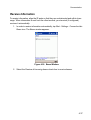
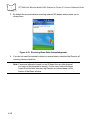
Receive Information . . . . . . . . . . . . . . . . . . . . . . . . . . . . . . . . . . . . . . . . . . . . . . . . . . . . . . .
4-11
4-14
4-14
4-15
4-15
4-16
4-18
4-20
4-21
4-22
4-23
4-24
4-25
4-26
4-28
4-29
4-35
4-35
4-37
Chapter 5. Spectrum24 Network Configuration (V 3.9.1)
Introduction . . . . . . . . . . . . . . . . . . . . . . . . . . . . . . . . . . . . . . . . . . . . . . . . . . . . . . . . . . . . . . . . . . 5-3
Mobile Companion . . . . . . . . . . . . . . . . . . . . . . . . . . . . . . . . . . . . . . . . . . . . . . . . . . . . . . . . . . . . . 5-4
Finding WLANs. . . . . . . . . . . . . . . . . . . . . . . . . . . . . . . . . . . . . . . . . . . . . . . . . . . . . . . . . . . . 5-6
Status . . . . . . . . . . . . . . . . . . . . . . . . . . . . . . . . . . . . . . . . . . . . . . . . . . . . . . . . . . . . . . . . . . 5-13
Setting Options . . . . . . . . . . . . . . . . . . . . . . . . . . . . . . . . . . . . . . . . . . . . . . . . . . . . . . . . . . . 5-19
Changing Profiles . . . . . . . . . . . . . . . . . . . . . . . . . . . . . . . . . . . . . . . . . . . . . . . . . . . . . . . . . 5-20
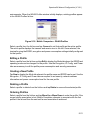
Editing a Profile . . . . . . . . . . . . . . . . . . . . . . . . . . . . . . . . . . . . . . . . . . . . . . . . . . . . . . . 5-21
Creating a New Profile . . . . . . . . . . . . . . . . . . . . . . . . . . . . . . . . . . . . . . . . . . . . . . . . . 5-21
Deleting a Profile . . . . . . . . . . . . . . . . . . . . . . . . . . . . . . . . . . . . . . . . . . . . . . . . . . . . . . 5-21
Ordering Profiles . . . . . . . . . . . . . . . . . . . . . . . . . . . . . . . . . . . . . . . . . . . . . . . . . . . . . . 5-21
Configuring the Radio Using a Registration File . . . . . . . . . . . . . . . . . . . . . . . . . . . . . . . . . . . . . 5-22
Chapter 6. Spectrum24 Network Configuration (V 3.9.2)
Introduction . . . . . . . . . . . . . . . . . . . . . . . . . . . . . . . . . . . . . . . . . . . . . . . . . . . . . . . . . . . . . . . . . . 6-3
Mobile Companion . . . . . . . . . . . . . . . . . . . . . . . . . . . . . . . . . . . . . . . . . . . . . . . . . . . . . . . . . . . . . 6-4
Finding WLANs. . . . . . . . . . . . . . . . . . . . . . . . . . . . . . . . . . . . . . . . . . . . . . . . . . . . . . . . . . . . 6-6
Status . . . . . . . . . . . . . . . . . . . . . . . . . . . . . . . . . . . . . . . . . . . . . . . . . . . . . . . . . . . . . . . . . . 6-17
Setting Options . . . . . . . . . . . . . . . . . . . . . . . . . . . . . . . . . . . . . . . . . . . . . . . . . . . . . . . . . . . 6-23
Changing Profiles . . . . . . . . . . . . . . . . . . . . . . . . . . . . . . . . . . . . . . . . . . . . . . . . . . . . . . . . . 6-25
Editing a Profile . . . . . . . . . . . . . . . . . . . . . . . . . . . . . . . . . . . . . . . . . . . . . . . . . . . . . . . 6-25
Creating a New Profile . . . . . . . . . . . . . . . . . . . . . . . . . . . . . . . . . . . . . . . . . . . . . . . . . 6-26
ix
PPT 8800 with Windows Mobile 2003 Software for Pocket PCs Product Reference Guide
Deleting a Profile . . . . . . . . . . . . . . . . . . . . . . . . . . . . . . . . . . . . . . . . . . . . . . . . . . . . . . 6-26
Ordering Profiles. . . . . . . . . . . . . . . . . . . . . . . . . . . . . . . . . . . . . . . . . . . . . . . . . . . . . . . 6-26
Configuring the Radio Using a Registration File . . . . . . . . . . . . . . . . . . . . . . . . . . . . . . . . . . . . . . 6-27
Chapter 7. PPT 8860 Bluetooth
Introduction . . . . . . . . . . . . . . . . . . . . . . . . . . . . . . . . . . . . . . . . . . . . . . . . . . . . . . . . . . . . . . . . . . . 7-3
Turning Bluetooth On and Off . . . . . . . . . . . . . . . . . . . . . . . . . . . . . . . . . . . . . . . . . . . . . . . . . 7-3
Connecting to a Bluetooth Phone . . . . . . . . . . . . . . . . . . . . . . . . . . . . . . . . . . . . . . . . . . . . . . . . . . 7-5
Ericsson, Nokia 6210, NTT DoCoMo, Sony Phones . . . . . . . . . . . . . . . . . . . . . . . . . . . . . . . . 7-5
Motorola Timeport 270C, Nokia 3650/6310/7650/8910/8910i . . . . . . . . . . . . . . . . . . . . . . . . . 7-8
Bluetooth Configuration. . . . . . . . . . . . . . . . . . . . . . . . . . . . . . . . . . . . . . . . . . . . . . . . . . . . . . . . . 7-11
Configuring the Terminal . . . . . . . . . . . . . . . . . . . . . . . . . . . . . . . . . . . . . . . . . . . . . . . . . . . . 7-11
Assigning COM Ports. . . . . . . . . . . . . . . . . . . . . . . . . . . . . . . . . . . . . . . . . . . . . . . . . . . . . . . 7-12
Object Sharing . . . . . . . . . . . . . . . . . . . . . . . . . . . . . . . . . . . . . . . . . . . . . . . . . . . . . . . . . . . . 7-13
Discovering Bluetooth Device(s) . . . . . . . . . . . . . . . . . . . . . . . . . . . . . . . . . . . . . . . . . . . . . . 7-15
Bonding with Discovered Device(s) . . . . . . . . . . . . . . . . . . . . . . . . . . . . . . . . . . . . . . . . . . . . 7-18
View Device Properties . . . . . . . . . . . . . . . . . . . . . . . . . . . . . . . . . . . . . . . . . . . . . . . . . . . . . 7-22
Setting Up A Favorite Device. . . . . . . . . . . . . . . . . . . . . . . . . . . . . . . . . . . . . . . . . . . . . . . . . 7-24
Change Views . . . . . . . . . . . . . . . . . . . . . . . . . . . . . . . . . . . . . . . . . . . . . . . . . . . . . . . . . . . . 7-24
Deleting a Device. . . . . . . . . . . . . . . . . . . . . . . . . . . . . . . . . . . . . . . . . . . . . . . . . . . . . . . . . . 7-26
Bluetooth Communications . . . . . . . . . . . . . . . . . . . . . . . . . . . . . . . . . . . . . . . . . . . . . . . . . . . . . . 7-27
Dial-up to Your Network. . . . . . . . . . . . . . . . . . . . . . . . . . . . . . . . . . . . . . . . . . . . . . . . . . . . . 7-27
Dial Automatically from the Application . . . . . . . . . . . . . . . . . . . . . . . . . . . . . . . . . . . . . 7-34
Bluetooth ActiveSync . . . . . . . . . . . . . . . . . . . . . . . . . . . . . . . . . . . . . . . . . . . . . . . . . . . . . . . 7-35
ActiveSync with a Favorite Computer. . . . . . . . . . . . . . . . . . . . . . . . . . . . . . . . . . . . . . . 7-37
ActiveSync with a Discovered Computer . . . . . . . . . . . . . . . . . . . . . . . . . . . . . . . . . . . . 7-38
ActiveSync with Undiscovered Computer. . . . . . . . . . . . . . . . . . . . . . . . . . . . . . . . . . . . 7-39
Bluetooth LAN Access . . . . . . . . . . . . . . . . . . . . . . . . . . . . . . . . . . . . . . . . . . . . . . . . . . . . . . 7-41
Connecting to a Favorite Access Point. . . . . . . . . . . . . . . . . . . . . . . . . . . . . . . . . . . . . . 7-41
Connecting to a Discovered Access Point . . . . . . . . . . . . . . . . . . . . . . . . . . . . . . . . . . . 7-42
Connecting to an Undiscovered Access Point . . . . . . . . . . . . . . . . . . . . . . . . . . . . . . . . 7-43
Automatic Connection . . . . . . . . . . . . . . . . . . . . . . . . . . . . . . . . . . . . . . . . . . . . . . . . . . 7-44
Socket OBEX . . . . . . . . . . . . . . . . . . . . . . . . . . . . . . . . . . . . . . . . . . . . . . . . . . . . . . . . . . . . . . . . 7-46
Exchange Business Cards. . . . . . . . . . . . . . . . . . . . . . . . . . . . . . . . . . . . . . . . . . . . . . . . . . . 7-46
Send a Contact . . . . . . . . . . . . . . . . . . . . . . . . . . . . . . . . . . . . . . . . . . . . . . . . . . . . . . . . . . . 7-49
Sending a File . . . . . . . . . . . . . . . . . . . . . . . . . . . . . . . . . . . . . . . . . . . . . . . . . . . . . . . . . . . . 7-50
Browse Remote Device . . . . . . . . . . . . . . . . . . . . . . . . . . . . . . . . . . . . . . . . . . . . . . . . . . . . . 7-51
Prepare for File Transfer . . . . . . . . . . . . . . . . . . . . . . . . . . . . . . . . . . . . . . . . . . . . . . . . . . . . 7-52
Send or Receive a File or Folder . . . . . . . . . . . . . . . . . . . . . . . . . . . . . . . . . . . . . . . . . . 7-53
Create a Folder. . . . . . . . . . . . . . . . . . . . . . . . . . . . . . . . . . . . . . . . . . . . . . . . . . . . . . . . 7-54
Delete a File or Folder . . . . . . . . . . . . . . . . . . . . . . . . . . . . . . . . . . . . . . . . . . . . . . . . . . 7-55
Refresh Remote View. . . . . . . . . . . . . . . . . . . . . . . . . . . . . . . . . . . . . . . . . . . . . . . . . . . 7-57
Connecting or Disconnecting to a Remote Device . . . . . . . . . . . . . . . . . . . . . . . . . . . . . 7-57
x
Contents
Exit Bluetooth File Explorer . . . . . . . . . . . . . . . . . . . . . . . . . . . . . . . . . . . . . . . . . . . . . .
Receive Contact or File . . . . . . . . . . . . . . . . . . . . . . . . . . . . . . . . . . . . . . . . . . . . . . . . . . . .
Enable File Sharing . . . . . . . . . . . . . . . . . . . . . . . . . . . . . . . . . . . . . . . . . . . . . . . . . . . . . . .
Bluetooth Printing . . . . . . . . . . . . . . . . . . . . . . . . . . . . . . . . . . . . . . . . . . . . . . . . . . . . . . . . . . . .
7-59
7-59
7-59
7-60
Chapter 8. PPT 8866 Bluetooth
Introduction . . . . . . . . . . . . . . . . . . . . . . . . . . . . . . . . . . . . . . . . . . . . . . . . . . . . . . . . . . . . . . . . . . 8-3
Turning the Bluetooth Radio Mode On and Off . . . . . . . . . . . . . . . . . . . . . . . . . . . . . . . . . . . . . . . 8-3
Bluetooth Power States . . . . . . . . . . . . . . . . . . . . . . . . . . . . . . . . . . . . . . . . . . . . . . . . . . . . . 8-4
Cold Boot. . . . . . . . . . . . . . . . . . . . . . . . . . . . . . . . . . . . . . . . . . . . . . . . . . . . . . . . . . . . . 8-4
Warm Boot . . . . . . . . . . . . . . . . . . . . . . . . . . . . . . . . . . . . . . . . . . . . . . . . . . . . . . . . . . . 8-4
Suspend . . . . . . . . . . . . . . . . . . . . . . . . . . . . . . . . . . . . . . . . . . . . . . . . . . . . . . . . . . . . . 8-4
Resume . . . . . . . . . . . . . . . . . . . . . . . . . . . . . . . . . . . . . . . . . . . . . . . . . . . . . . . . . . . . . . 8-4
Turning the Bluetooth Radio Mode Off . . . . . . . . . . . . . . . . . . . . . . . . . . . . . . . . . . . . . . . . . . 8-5
Turning the Bluetooth Radio Mode On . . . . . . . . . . . . . . . . . . . . . . . . . . . . . . . . . . . . . . . . . . 8-6
Discovering Bluetooth Device(s) . . . . . . . . . . . . . . . . . . . . . . . . . . . . . . . . . . . . . . . . . . . . . . . . . . 8-7
Bonding with Discovered Device(s) . . . . . . . . . . . . . . . . . . . . . . . . . . . . . . . . . . . . . . . . . . . . 8-7
Renaming a Bonded Device . . . . . . . . . . . . . . . . . . . . . . . . . . . . . . . . . . . . . . . . . . . . . . . . . 8-11
Deleting a Bonded Device . . . . . . . . . . . . . . . . . . . . . . . . . . . . . . . . . . . . . . . . . . . . . . . . . . 8-12
Receiving Incoming Beams . . . . . . . . . . . . . . . . . . . . . . . . . . . . . . . . . . . . . . . . . . . . . . . . . . . . . 8-14
Accepting a Bond . . . . . . . . . . . . . . . . . . . . . . . . . . . . . . . . . . . . . . . . . . . . . . . . . . . . . . . . . 8-15
Beaming Information . . . . . . . . . . . . . . . . . . . . . . . . . . . . . . . . . . . . . . . . . . . . . . . . . . . . . . . . . . 8-17
Sending an Appointment or Task . . . . . . . . . . . . . . . . . . . . . . . . . . . . . . . . . . . . . . . . . . . . . 8-17
Sending a Contact . . . . . . . . . . . . . . . . . . . . . . . . . . . . . . . . . . . . . . . . . . . . . . . . . . . . . . . . 8-19
Sending a File. . . . . . . . . . . . . . . . . . . . . . . . . . . . . . . . . . . . . . . . . . . . . . . . . . . . . . . . . . . . 8-21
Bluetooth Communications . . . . . . . . . . . . . . . . . . . . . . . . . . . . . . . . . . . . . . . . . . . . . . . . . . . . . 8-23
Dial-up to the Network . . . . . . . . . . . . . . . . . . . . . . . . . . . . . . . . . . . . . . . . . . . . . . . . . . . . . 8-23
Dial Automatically from an Application . . . . . . . . . . . . . . . . . . . . . . . . . . . . . . . . . . . . . 8-31
Bluetooth LAN Access . . . . . . . . . . . . . . . . . . . . . . . . . . . . . . . . . . . . . . . . . . . . . . . . . . . . . 8-32
Connecting to a Bluetooth Access Point . . . . . . . . . . . . . . . . . . . . . . . . . . . . . . . . . . . . 8-32
Automatic Connection . . . . . . . . . . . . . . . . . . . . . . . . . . . . . . . . . . . . . . . . . . . . . . . . . . 8-37
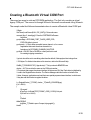
Creating a Bluetooth Virtual COM Port . . . . . . . . . . . . . . . . . . . . . . . . . . . . . . . . . . . . . . . . . . . . 8-39
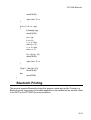
Bluetooth Printing . . . . . . . . . . . . . . . . . . . . . . . . . . . . . . . . . . . . . . . . . . . . . . . . . . . . . . . . . . . . 8-41
Chapter 9. AirBEAM Smart
Introduction . . . . . . . . . . . . . . . . . . . . . . . . . . . . . . . . . . . . . . . . . . . . . . . . . . . . . . . . . . . . . . . . . .
AirBEAM Package Builder . . . . . . . . . . . . . . . . . . . . . . . . . . . . . . . . . . . . . . . . . . . . . . . . . . . . . . .
AirBEAM Smart Client . . . . . . . . . . . . . . . . . . . . . . . . . . . . . . . . . . . . . . . . . . . . . . . . . . . . . . . . . .
AirBEAM License . . . . . . . . . . . . . . . . . . . . . . . . . . . . . . . . . . . . . . . . . . . . . . . . . . . . . . . . . .
Configuring the AirBEAM Smart Client . . . . . . . . . . . . . . . . . . . . . . . . . . . . . . . . . . . . . . . . . .
Packages(1) Tab . . . . . . . . . . . . . . . . . . . . . . . . . . . . . . . . . . . . . . . . . . . . . . . . . . . . . . .
Packages(2) Tab . . . . . . . . . . . . . . . . . . . . . . . . . . . . . . . . . . . . . . . . . . . . . . . . . . . . . . .
9-3
9-3
9-4
9-4
9-4
9-5
9-5
xi
PPT 8800 with Windows Mobile 2003 Software for Pocket PCs Product Reference Guide
Server Tab - - - - - - - - - - - - - - - - - - - - - - - - - - - - - - - - - - - - - - - - - - - - - - - - - - - - - - 9-6
Misc(1) Tab - - - - - - - - - - - - - - - - - - - - - - - - - - - - - - - - - - - - - - - - - - - - - - - - - - - - - 9-7
Misc(2) Tab - - - - - - - - - - - - - - - - - - - - - - - - - - - - - - - - - - - - - - - - - - - - - - - - - - - - - 9-9
Misc(3) Tab - - - - - - - - - - - - - - - - - - - - - - - - - - - - - - - - - - - - - - - - - - - - - - - - - - - - 9-10
Synchronizing with the Server . . . . . . . . . . . . . . . . . . . . . . . . . . . . . . . . . . . . . . . . . . . . . . . . 9-10
Manual Synchronization - - - - - - - - - - - - - - - - - - - - - - - - - - - - - - - - - - - - - - - - - - - 9-11
Automatic Synchronization . . . . . . . . . . . . . . . . . . . . . . . . . . . . . . . . . . . . . . . . . . . . . . . 9-11
AirBEAM Staging . . . . . . . . . . . . . . . . . . . . . . . . . . . . . . . . . . . . . . . . . . . . . . . . . . . . . . . . . . . . . 9-12
Chapter 10. Applications
Introduction . . . . . . . . . . . . . . . . . . . . . . . . . . . . . . . . . . . . . . . . . . . . . . . . . . . . . . . . . . . . . . . . . . 10-3
Calendar . . . . . . . . . . . . . . . . . . . . . . . . . . . . . . . . . . . . . . . . . . . . . . . . . . . . . . . . . . . . . . . . . . . . 10-3
Creating Appointments . . . . . . . . . . . . . . . . . . . . . . . . . . . . . . . . . . . . . . . . . . . . . . . . . . . . . 10-4
Using the Summary Screen . . . . . . . . . . . . . . . . . . . . . . . . . . . . . . . . . . . . . . . . . . . . . . . . . . 10-5
Creating Meeting Requests . . . . . . . . . . . . . . . . . . . . . . . . . . . . . . . . . . . . . . . . . . . . . . . . . . 10-5
Contacts . . . . . . . . . . . . . . . . . . . . . . . . . . . . . . . . . . . . . . . . . . . . . . . . . . . . . . . . . . . . . . . . . . . . 10-6
Using the Summary Screen . . . . . . . . . . . . . . . . . . . . . . . . . . . . . . . . . . . . . . . . . . . . . . . . . . 10-8
Tasks . . . . . . . . . . . . . . . . . . . . . . . . . . . . . . . . . . . . . . . . . . . . . . . . . . . . . . . . . . . . . . . . . . . . . . 10-9
Using the Summary Screen . . . . . . . . . . . . . . . . . . . . . . . . . . . . . . . . . . . . . . . . . . . . . . . . . 10-11
Notes. . . . . . . . . . . . . . . . . . . . . . . . . . . . . . . . . . . . . . . . . . . . . . . . . . . . . . . . . . . . . . . . . . . . . . 10-12
Inbox . . . . . . . . . . . . . . . . . . . . . . . . . . . . . . . . . . . . . . . . . . . . . . . . . . . . . . . . . . . . . . . . . . . . . . 10-14
Synchronizing E-mail Messages . . . . . . . . . . . . . . . . . . . . . . . . . . . . . . . . . . . . . . . . . . . . . 10-14
Connecting Directly to an E-mail Server . . . . . . . . . . . . . . . . . . . . . . . . . . . . . . . . . . . . . . . 10-14
Setting Up an E-mail Service . . . . . . . . . . . . . . . . . . . . . . . . . . . . . . . . . . . . . . . . . . . . 10-15
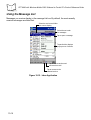
Using the Message List . . . . . . . . . . . . . . . . . . . . . . . . . . . . . . . . . . . . . . . . . . . . . . . . . . . . 10-16
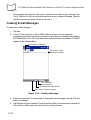
Creating E-mail Messages. . . . . . . . . . . . . . . . . . . . . . . . . . . . . . . . . . . . . . . . . . . . . . . . . . 10-18
Managing E-mail Messages and Folders. . . . . . . . . . . . . . . . . . . . . . . . . . . . . . . . . . . . . . . 10-19
Folder Behavior with ActiveSync and Direct Connection to Server . . . . . . . . . . . . . . . 10-19
Pocket Word . . . . . . . . . . . . . . . . . . . . . . . . . . . . . . . . . . . . . . . . . . . . . . . . . . . . . . . . . . . . . . . . 10-20
Typing Mode . . . . . . . . . . . . . . . . . . . . . . . . . . . . . . . . . . . . . . . . . . . . . . . . . . . . . . . . . . . . 10-21
Writing Mode . . . . . . . . . . . . . . . . . . . . . . . . . . . . . . . . . . . . . . . . . . . . . . . . . . . . . . . . . . . . 10-22
Drawing Mode . . . . . . . . . . . . . . . . . . . . . . . . . . . . . . . . . . . . . . . . . . . . . . . . . . . . . . . . . . . 10-22
Recording Mode . . . . . . . . . . . . . . . . . . . . . . . . . . . . . . . . . . . . . . . . . . . . . . . . . . . . . . . . . 10-23
Pocket Excel . . . . . . . . . . . . . . . . . . . . . . . . . . . . . . . . . . . . . . . . . . . . . . . . . . . . . . . . . . . . . . . . 10-24
Tips for Working in Pocket Excel . . . . . . . . . . . . . . . . . . . . . . . . . . . . . . . . . . . . . . . . . . . . . 10-25
MSN® Messenger. . . . . . . . . . . . . . . . . . . . . . . . . . . . . . . . . . . . . . . . . . . . . . . . . . . . . . . . . . . . 10-26
Setting Up Your Account . . . . . . . . . . . . . . . . . . . . . . . . . . . . . . . . . . . . . . . . . . . . . . . . . . . 10-26
Working with Contacts . . . . . . . . . . . . . . . . . . . . . . . . . . . . . . . . . . . . . . . . . . . . . . . . . . . . . 10-27
Chatting with Contacts . . . . . . . . . . . . . . . . . . . . . . . . . . . . . . . . . . . . . . . . . . . . . . . . . . . . . 10-28
Windows Media Player . . . . . . . . . . . . . . . . . . . . . . . . . . . . . . . . . . . . . . . . . . . . . . . . . . . . . . . . 10-30
Microsoft Reader. . . . . . . . . . . . . . . . . . . . . . . . . . . . . . . . . . . . . . . . . . . . . . . . . . . . . . . . . . . . . 10-30
Getting Books on Your Device. . . . . . . . . . . . . . . . . . . . . . . . . . . . . . . . . . . . . . . . . . . . . . . 10-31
Using the Library . . . . . . . . . . . . . . . . . . . . . . . . . . . . . . . . . . . . . . . . . . . . . . . . . . . . . . . . . 10-31
xii
Contents
Reading a Book . . . . . . . . . . . . . . . . . . . . . . . . . . . . . . . . . . . . . . . . . . . . . . . . . . . . . . . . .
Using Reader Features . . . . . . . . . . . . . . . . . . . . . . . . . . . . . . . . . . . . . . . . . . . . . . . . . . .
Removing a Book . . . . . . . . . . . . . . . . . . . . . . . . . . . . . . . . . . . . . . . . . . . . . . . . . . . . . . . .
Pocket Internet Explorer . . . . . . . . . . . . . . . . . . . . . . . . . . . . . . . . . . . . . . . . . . . . . . . . . . . . . .
Mobile Favorites . . . . . . . . . . . . . . . . . . . . . . . . . . . . . . . . . . . . . . . . . . . . . . . . . . . . . . . . .
Favorite Links . . . . . . . . . . . . . . . . . . . . . . . . . . . . . . . . . . . . . . . . . . . . . . . . . . . . . . .
Creating Mobile Favorites . . . . . . . . . . . . . . . . . . . . . . . . . . . . . . . . . . . . . . . . . . . . . .
Saving Memory on your Terminal . . . . . . . . . . . . . . . . . . . . . . . . . . . . . . . . . . . . . . . .
Using AvantGo Channels . . . . . . . . . . . . . . . . . . . . . . . . . . . . . . . . . . . . . . . . . . . . . . . . . .
Using Pocket Internet Explorer . . . . . . . . . . . . . . . . . . . . . . . . . . . . . . . . . . . . . . . . . . . . . .
Browsing the Web . . . . . . . . . . . . . . . . . . . . . . . . . . . . . . . . . . . . . . . . . . . . . . . . . . . . . . .
Pictures . . . . . . . . . . . . . . . . . . . . . . . . . . . . . . . . . . . . . . . . . . . . . . . . . . . . . . . . . . . . . . . . . . .
Copy Pictures to your Device . . . . . . . . . . . . . . . . . . . . . . . . . . . . . . . . . . . . . . . . . . . . . . .
Edit Pictures . . . . . . . . . . . . . . . . . . . . . . . . . . . . . . . . . . . . . . . . . . . . . . . . . . . . . . . . . . . .
Send Pictures . . . . . . . . . . . . . . . . . . . . . . . . . . . . . . . . . . . . . . . . . . . . . . . . . . . . . . . . . . .
Set Picture as Background . . . . . . . . . . . . . . . . . . . . . . . . . . . . . . . . . . . . . . . . . . . . . . . . .
View Pictures . . . . . . . . . . . . . . . . . . . . . . . . . . . . . . . . . . . . . . . . . . . . . . . . . . . . . . . . . . .
View Slideshow of Pictures. . . . . . . . . . . . . . . . . . . . . . . . . . . . . . . . . . . . . . . . . . . . . . . . .
10-32
10-32
10-33
10-34
10-34
10-34
10-34
10-35
10-35
10-36
10-38
10-39
10-39
10-39
10-39
10-39
10-40
10-40
Chapter 11. Software Installation on Development PC
Introduction . . . . . . . . . . . . . . . . . . . . . . . . . . . . . . . . . . . . . . . . . . . . . . . . . . . . . . . . . . . . . . . . . 11-3
Installing Other Development Software . . . . . . . . . . . . . . . . . . . . . . . . . . . . . . . . . . . . . . . . . . . . 11-6
Chapter 12. Configuring the Terminal
Introduction . . . . . . . . . . . . . . . . . . . . . . . . . . . . . . . . . . . . . . . . . . . . . . . . . . . . . . . . . . . . . . . . . 12-2
Starting Terminal Configuration Manager . . . . . . . . . . . . . . . . . . . . . . . . . . . . . . . . . . . . . . . . . . 12-3
Defining Script Properties . . . . . . . . . . . . . . . . . . . . . . . . . . . . . . . . . . . . . . . . . . . . . . . . . . . . . . 12-5
Creating a Hex Image Script . . . . . . . . . . . . . . . . . . . . . . . . . . . . . . . . . . . . . . . . . . . . . . . . . . . . 12-7
Open a New or Existing Script File . . . . . . . . . . . . . . . . . . . . . . . . . . . . . . . . . . . . . . . . . . . . 12-7
Copy Components to the Script Window . . . . . . . . . . . . . . . . . . . . . . . . . . . . . . . . . . . . . . . 12-7
Save the Script File . . . . . . . . . . . . . . . . . . . . . . . . . . . . . . . . . . . . . . . . . . . . . . . . . . . . . . . 12-7
Building the Image . . . . . . . . . . . . . . . . . . . . . . . . . . . . . . . . . . . . . . . . . . . . . . . . . . . . . . . . . . . . 12-7
Sending the Hex File . . . . . . . . . . . . . . . . . . . . . . . . . . . . . . . . . . . . . . . . . . . . . . . . . . . . . . . . . . 12-9
Error Messages . . . . . . . . . . . . . . . . . . . . . . . . . . . . . . . . . . . . . . . . . . . . . . . . . . . . . . . . . . . . . 12-18
IPL Error Detection . . . . . . . . . . . . . . . . . . . . . . . . . . . . . . . . . . . . . . . . . . . . . . . . . . . . . . . 12-18
TCM Error Messages . . . . . . . . . . . . . . . . . . . . . . . . . . . . . . . . . . . . . . . . . . . . . . . . . . . . . 12-20
Creating and Loading a Splash Screen . . . . . . . . . . . . . . . . . . . . . . . . . . . . . . . . . . . . . . . . . . . 12-21
Loading the Splash Screen via TCM . . . . . . . . . . . . . . . . . . . . . . . . . . . . . . . . . . . . . . . . . 12-21
Flash Storage . . . . . . . . . . . . . . . . . . . . . . . . . . . . . . . . . . . . . . . . . . . . . . . . . . . . . . . . . . . . . . 12-22
FFS Partitions . . . . . . . . . . . . . . . . . . . . . . . . . . . . . . . . . . . . . . . . . . . . . . . . . . . . . . . . . . . 12-22
Working with FFS Partitions . . . . . . . . . . . . . . . . . . . . . . . . . . . . . . . . . . . . . . . . . . . . . . . . 12-22
RegMerge.dll . . . . . . . . . . . . . . . . . . . . . . . . . . . . . . . . . . . . . . . . . . . . . . . . . . . . . . . . 12-23
xiii
PPT 8800 with Windows Mobile 2003 Software for Pocket PCs Product Reference Guide
CopyFile . . . . . . . . . . . . . . . . . . . . . . . . . . . . . . . . . . . . . . . . . . . . . . . . . . . . . . . . . . . . 12-23
Non-FFS Partitions . . . . . . . . . . . . . . . . . . . . . . . . . . . . . . . . . . . . . . . . . . . . . . . . . . . . . . . 12-24
Assigning User-Written Applications to Buttons . . . . . . . . . . . . . . . . . . . . . . . . . . . . . . . . . . . . . 12-25
Adding Programs . . . . . . . . . . . . . . . . . . . . . . . . . . . . . . . . . . . . . . . . . . . . . . . . . . . . . . . . . . . . 12-25
Adding a Program from the Internet. . . . . . . . . . . . . . . . . . . . . . . . . . . . . . . . . . . . . . . . . . . 12-26
Update the ROM Image Using IPL . . . . . . . . . . . . . . . . . . . . . . . . . . . . . . . . . . . . . . . . . . . . . . . 12-27
Chapter 13. Maintenance and Troubleshooting
Introduction . . . . . . . . . . . . . . . . . . . . . . . . . . . . . . . . . . . . . . . . . . . . . . . . . . . . . . . . . . . . . . . . . . 13-3
Safely Maintaining the PPT 8800 . . . . . . . . . . . . . . . . . . . . . . . . . . . . . . . . . . . . . . . . . . . . . . . . . 13-3
Terminal and Cradle Connector Cleaning Guidelines. . . . . . . . . . . . . . . . . . . . . . . . . . . . . . . . . . 13-4
Required Materials. . . . . . . . . . . . . . . . . . . . . . . . . . . . . . . . . . . . . . . . . . . . . . . . . . . . . . . . . 13-4
Cleaning the Terminal Connector . . . . . . . . . . . . . . . . . . . . . . . . . . . . . . . . . . . . . . . . . . . . . 13-4
Cleaning the Cradle Connector . . . . . . . . . . . . . . . . . . . . . . . . . . . . . . . . . . . . . . . . . . . . . . . 13-7
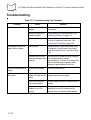
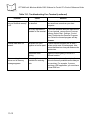
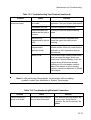
Troubleshooting . . . . . . . . . . . . . . . . . . . . . . . . . . . . . . . . . . . . . . . . . . . . . . . . . . . . . . . . . . . . . 13-10
Appendix A. Block Recognizer Characters
Introduction . . . . . . . . . . . . . . . . . . . . . . . . . . . . . . . . . . . . . . . . . . . . . . . . . . . . . . . . . . . . . . . . . . .A-1
Appendix B. Demo Program
Introduction . . . . . . . . . . . . . . . . . . . . . . . . . . . . . . . . . . . . . . . . . . . . . . . . . . . . . . . . . . . . . . . . . . .B-1
Notify . . . . . . . . . . . . . . . . . . . . . . . . . . . . . . . . . . . . . . . . . . . . . . . . . . . . . . . . . . . . . . . . . . . .B-2
Scan. . . . . . . . . . . . . . . . . . . . . . . . . . . . . . . . . . . . . . . . . . . . . . . . . . . . . . . . . . . . . . . . . . . . .B-3
Scanning Data Fields . . . . . . . . . . . . . . . . . . . . . . . . . . . . . . . . . . . . . . . . . . . . . . . . . . . .B-3
Scanning Options . . . . . . . . . . . . . . . . . . . . . . . . . . . . . . . . . . . . . . . . . . . . . . . . . . . . . . .B-4
Files . . . . . . . . . . . . . . . . . . . . . . . . . . . . . . . . . . . . . . . . . . . . . . . . . . . . . . . . . . . . . . . . . . . . .B-4
Ctl Panel . . . . . . . . . . . . . . . . . . . . . . . . . . . . . . . . . . . . . . . . . . . . . . . . . . . . . . . . . . . . . . . . .B-5
About . . . . . . . . . . . . . . . . . . . . . . . . . . . . . . . . . . . . . . . . . . . . . . . . . . . . . . . . . . . . . . . .B-5
System Versions. . . . . . . . . . . . . . . . . . . . . . . . . . . . . . . . . . . . . . . . . . . . . . . . . . . . . . . .B-6
Unique Unit ID . . . . . . . . . . . . . . . . . . . . . . . . . . . . . . . . . . . . . . . . . . . . . . . . . . . . . . . . .B-7
Persist. . . . . . . . . . . . . . . . . . . . . . . . . . . . . . . . . . . . . . . . . . . . . . . . . . . . . . . . . . . . . . . .B-7
Date and Time . . . . . . . . . . . . . . . . . . . . . . . . . . . . . . . . . . . . . . . . . . . . . . . . . . . . . . . . .B-8
Touch Calibrate . . . . . . . . . . . . . . . . . . . . . . . . . . . . . . . . . . . . . . . . . . . . . . . . . . . . . . . .B-9
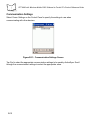
Communication Settings. . . . . . . . . . . . . . . . . . . . . . . . . . . . . . . . . . . . . . . . . . . . . . . . .B-10
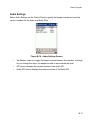
Audio Settings . . . . . . . . . . . . . . . . . . . . . . . . . . . . . . . . . . . . . . . . . . . . . . . . . . . . . . . .B-11
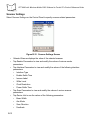
Scanner Settings . . . . . . . . . . . . . . . . . . . . . . . . . . . . . . . . . . . . . . . . . . . . . . . . . . . . . .B-12
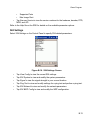
S24 Settings . . . . . . . . . . . . . . . . . . . . . . . . . . . . . . . . . . . . . . . . . . . . . . . . . . . . . . . . . .B-13
Scan Wedge . . . . . . . . . . . . . . . . . . . . . . . . . . . . . . . . . . . . . . . . . . . . . . . . . . . . . . . . . .B-14
Print . . . . . . . . . . . . . . . . . . . . . . . . . . . . . . . . . . . . . . . . . . . . . . . . . . . . . . . . . . . . . . . . . . . .B-15
About . . . . . . . . . . . . . . . . . . . . . . . . . . . . . . . . . . . . . . . . . . . . . . . . . . . . . . . . . . . . . . . . . .B-16
Exit . . . . . . . . . . . . . . . . . . . . . . . . . . . . . . . . . . . . . . . . . . . . . . . . . . . . . . . . . . . . . . . . . . . . .B-16
xiv
Contents
Appendix C. Technical Specifications
Environment. . . . . . . . . . . . . . . . . . . . . . . . . . . . . . . . . . . . . . . . . . . . . . . . . . . . . . . . . . . . . . . . . . C-1
COM Port Definitions . . . . . . . . . . . . . . . . . . . . . . . . . . . . . . . . . . . . . . . . . . . . . . . . . . . . . . . . . . . C-3
Pin-Outs . . . . . . . . . . . . . . . . . . . . . . . . . . . . . . . . . . . . . . . . . . . . . . . . . . . . . . . . . . . . . . . . . . . . . C-4
Appendix D. Keypad Maps
Introduction . . . . . . . . . . . . . . . . . . . . . . . . . . . . . . . . . . . . . . . . . . . . . . . . . . . . . . . . . . . . . . . . . . D-1
Keypads . . . . . . . . . . . . . . . . . . . . . . . . . . . . . . . . . . . . . . . . . . . . . . . . . . . . . . . . . . . . . . . . . . . . . D-2
Appendix E. Bluetooth Regulatory Information
FHSS Descriptions. . . . . . . . . . . . . . . . . . . . . . . . . . . . . . . . . . . . . . . . . . . . . . . . . . . . . . . . . . . . . E-1
Index
xv
PPT 8800 with Windows Mobile 2003 Software for Pocket PCs Product Reference Guide
xvi
About This Guide
Introduction
The PPT 8800 with Windows Mobile 2003 Software for Pocket PCs Product Reference
Guide provides information about the PPT 8800 Series terminal using the Microsoft
Windows Mobile 2003 Operating System, and its accessories. The PPT 8800 Series
includes the following variations of the terminal:
PPT 8800
Performs 1-dimensional scanning and batch communication. Memory configuration:
64 MB ROM/64 MB RAM.
PPT 8846
Performs 1-dimensional scanning and uses the Symbol Spectrum24® radio to
perform 11 MB local area network (LAN) wireless communication. Memory
configuration: 64 MB ROM/64 MB RAM.
PPT 8860
Performs 1-dimensional scanning with Bluetooth® wireless technology to perform
personal area network (PAN) communication. Memory configuration: 64 MB ROM/
64 MB RAM.
PPT 8866
Performs 1-dimensional scanning with Symbol Spectrum24® radio to perform 11 MB
local area network (LAN) wireless communication and Bluetooth® wireless
technology to perform personal area network (PAN) communication. Memory
configuration: 64 MB ROM/64 MB RAM.
Note: Some configurations support 128MB RAM.
xvii
PPT 8800 with Windows Mobile 2003 Software for Pocket PCs Product Reference Guide
Chapter Descriptions
Topics covered in this guide are as follows:
•
Chapter 1, Getting Started explains the physical buttons and controls on the
terminal, how to install and charge the batteries, replace the handstrap, and start
your terminal for the first time.
•
Chapter 2, Operating the PPT 8800 explains how to use your terminal, including
instructions for powering on and resetting the terminal, using the stylus and a
headset, entering information, and scanning.
•
Chapter 3, Settings explains how to adjust settings on the terminal, and add and
delete programs.
•
Chapter 4, Communication explains how to use Microsoft® ActiveSync™ for
communication between the terminal and host computer.
•
Chapter 5, Spectrum24 Network Configuration (V 3.9.1) describes how to
configure the Spectrum24 wireless connection using Mobile Companion version
3.9.1.
•
Chapter 6, Spectrum24 Network Configuration (V 3.9.2) describes how to
configure the Spectrum24 wireless connection using Mobile Companion version
3.9.2.
•
Chapter 7, PPT 8860 Bluetooth describes how to use and configure the Bluetooth
wireless connection on the PPT 8860.
•
Chapter 8, PPT 8866 Bluetooth describes how to use and configure the Bluetooth
wireless connection on the PPT 8866.
•
Chapter 9, AirBEAM Smart explains how to set up your terminal to synchronize
with a server using the AirBEAM Client and AirBEAM Staging applications.
•
Chapter 10, Applications describes how to use the applications installed on the
terminal.
•
Chapter 11, Software Installation on Development PC provides instructions for
installing the Software Developer’s Kit on your host computer.
•
Chapter 12, Configuring the Terminal describes how to install and use the Terminal
Configuration Manager (TCM) and Initial Program Loader (IPL).
•
Chapter 13, Maintenance and Troubleshooting provides information to help you
take proper care of your terminal and solve problems that may come up.
•
Appendix A, Block Recognizer Characters describes how to using the Block
Recognizer to write characters.
xviii
About This Guide
•
Appendix B, Demo Program provides an overview of the terminal demo program
applications, such as scanning, setup, diagnostic utilities, and file management.
•
Appendix C, Technical Specifications includes a table listing the technical
specifications for the terminal.
•
Appendix D, Keypad Maps includes tables listing key functionality for the keypad.
•
Appendix E, Bluetooth Regulatory Information includes Bluetooth regulatory
information.
xix
PPT 8800 with Windows Mobile 2003 Software for Pocket PCs Product Reference Guide
Notational Conventions
This document uses these conventions:
•
“terminal” or “PPT 8800” refers to any model of the terminal.
•
“User” refers to anyone using an application on the terminal.
•
“You” refers to the End User, System Administrator or Technical Support person
using this manual as a reference to install, configure, operate, maintain and
troubleshoot the terminal.
•
Italics are used to highlight specific items in the general text, and to identify
chapters and sections in this and related documents. It also identifies names of
windows, menus, menu items, and fields within windows.
•
Bold identifies buttons to be tapped or clicked.
•
Bullets (•) indicate:
•
•
lists of alternatives or action items.
•
lists of required steps that are not necessarily sequential.
Numbered lists indicate a set of sequential steps, i.e., those that describe step-bystep procedures.
Related Material
The following items provide more information about your terminal and accessories.
•
PPT 8800 with Windows Mobile 2003 Software for Pocket PCs Quick Reference
Guide, p/n 72-63153-xx
•
CRD8800-1000S Serial Cradle Quick Reference Guide, p/n 72-58095-xx
•
CRD8800B-1000S Serial Cradle Quick Reference Guide, p/n 72-64181-xx
•
CRD8800-4000S Serial Cradle Quick Reference Guide, p/n 72-58096-xx
•
CRD8800-4000E Serial Cradle Quick Reference Guide, p/n 72-59203-xx
•
MSR8800 Magnetic Stripe Reader Quick Reference Guide, p/n 72-64824-xx
•
TRG8800 Trigger Handle Quick Reference Guide, p/n 72-64623-xx
•
UBC 2000 Product Guide, p/n 70-33188-xx
•
AirBEAM Package Builder Product Reference Guide, p/n 72-55769-xx
•
Windows CE Help File for Symbol Terminals, p/n 72E-38880-xx
xx
About This Guide
•
Symbol Mobility Developer’s Kit for .NET,
http://software.symbol.com/devzone
•
Symbol Mobility Developer’s Kit for Embedded Visual C 4.0,
http://software.symbol.com/devzone
•
Device Configuration Package for PPT 8800, available at
http://software.symbol.com/devzone
•
PPT 8860 Socket Bluetooth Software Developer’s Kit, available at
http://software.symbol.com/devzone
•
ActiveSync software, available at http://www.microsoft.com.
Service Information
If you have a problem with your equipment, contact the Symbol Support Center for your
region. See page xxii for contact information. Before calling, have the model number, serial
number, and several of your bar code symbols at hand.
Call the Support Center from a phone near the scanning equipment so that the service
person can try to talk you through your problem. If the equipment is found to be working
properly and the problem is symbol readability, the Support Center will request samples of
your bar codes for analysis at our plant.
If your problem cannot be solved over the phone, you may need to return your equipment
for servicing. If that is necessary, you will be given specific directions.
Note: Symbol Technologies is not responsible for any damages incurred
during shipment if the approved shipping container is not used.
Shipping the units improperly can possibly void the warranty. If the
original shipping container was not kept, contact Symbol to have
another sent to you.
xxi
PPT 8800 with Windows Mobile 2003 Software for Pocket PCs Product Reference Guide
Symbol Support Center
For service information, warranty information or technical assistance contact or call the
Symbol Support Center in:
United States
Symbol Technologies, Inc.
One Symbol Plaza
Holtsville, New York 11742-1300
1-800-653-5350
Canada
Symbol Technologies Canada, Inc.
2540 Matheson Boulevard East
Mississauga, Ontario, Canada L4W 4Z2
905-629-7226
United Kingdom
Symbol Technologies
Symbol Place
Winnersh Triangle, Berkshire RG41 5TP
United Kingdom
0800 328 2424 (Inside UK)
+44 118 945 7529 (Outside UK)
Asia/Pacific
Symbol Technologies Asia, Inc (Singapore
Branch)
230 Victoria Street #05-07/09
Bugis Junction Office Tower
Singapore 188024
Tel: +65-6796-9600
Fax: +65-6337-6488
Australia
Symbol Technologies Pty. Ltd.
432 St. Kilda Road
Melbourne, Victoria 3004
1-800-672-906 (Inside Australia)
+61-3-9866-6044 (Outside Australia)
Austria/Österreich
Symbol Technologies Austria GmbH
Prinz-Eugen Strasse 70 / 2.Haus
1040 Vienna, Austria
01-5055794-0 (Inside Austria)
+43-1-5055794-0 (Outside Austria)
Denmark/Danmark
Symbol Technologies AS
Dr. Neergaardsvej 3
2970 Hørsholm
7020-1718 (Inside Denmark)
+45-7020-1718 (Outside Denmark)
Europe/Mid-East Distributor Operations
Contact your local distributor or call
+44 118 945 7360
xxii
About This Guide
Finland/Suomi
Oy Symbol Technologies
Kaupintie 8 A 6
FIN-00440 Helsinki, Finland
9 5407 580 (Inside Finland)
+358 9 5407 580 (Outside Finland)
France
Symbol Technologies France
Centre d'Affaire d'Antony
3 Rue de la Renaissance
92184 Antony Cedex, France
01-40-96-52-21 (Inside France)
+33-1-40-96-52-50 (Outside France)
Germany/Deutchland
Symbol Technologies GmbH
Waldstrasse 66
D-63128 Dietzenbach, Germany
6074-49020 (Inside Germany)
+49-6074-49020 (Outside Germany)
Italy/Italia
Symbol Technologies Italia S.R.L.
Via Cristoforo Columbo, 49
20090 Trezzano S/N Navigilo
Milano, Italy
2-484441 (Inside Italy)
+39-02-484441 (Outside Italy)
Latin America Sales Support
2730 University Dr.
Coral Springs, FL 33065 USA
1-800-347-0178 (Inside United States)
+1-954-255-2610 (Outside United States)
954-340-9454 (Fax)
Mexico/México
Symbol Technologies Mexico Ltd.
Torre Picasso
Boulevard Manuel Avila Camacho No 88
Lomas de Chapultepec CP 11000
Mexico City, DF, Mexico
5-520-1835 (Inside Mexico)
+52-5-520-1835 (Outside Mexico)
Netherlands/Nederland
Symbol Technologies
Kerkplein 2, 7051 CX
Postbus 24 7050 AA
Varsseveld, Netherlands
315-271700 (Inside Netherlands)
+31-315-271700 (Outside Netherlands)
Norway/Norge
Symbol’s registered and mailing address:
Symbol Technologies Norway
Hoybratenveien 35 C
N-1055 OSLO, Norway
Symbol’s repair depot and shipping address:
Symbol Technologies Norway
Enebakkveien 123
N-0680 OSLO, Norway
+47 2232 4375
xxiii
PPT 8800 with Windows Mobile 2003 Software for Pocket PCs Product Reference Guide
South Africa
Symbol Technologies Africa Inc.
Block B2
Rutherford Estate
1 Scott Street
Waverly 2090 Johannesburg
Republic of South Africa
11-809 5311 (Inside South Africa)
+27-11-809 5311 (Outside South Africa)
Spain/España
Symbol Technologies S.L.
C/ Peonias, 2
Edificio Piovera Azul
28042 Madrid, Spain
91 324 40 00 (Inside Spain)
+34 91 324 40 00 (Outside Spain)
Sweden/Sverige
“Letter” address:
Symbol Technologies AB
Box 1354
S-171 26 SOLNA
Sweden
Visit/shipping address:
Symbol Technologies AB
Solna Strandväg 78
S-171 54 SOLNA
Sweden
Switchboard: 08 445 29 00 (domestic)
Call Center: +46 8 445 29 29 (international)
Support E-Mail:
[email protected]
If you purchased your Symbol product from a Symbol Business Partner, contact that
Business Partner for service.
For the latest version of this guide go to:http://www.symbol.com/manuals.
xxiv
Chapter 1
Getting Started
Chapter Contents
Introduction . . . . . . . . . . . . . . . . . . . . . . . . . . . . . . . . . . . . . . . . . . . . . . . . . . . . . . . . . . . . . . . . . . 1-3
Unpacking the Terminal . . . . . . . . . . . . . . . . . . . . . . . . . . . . . . . . . . . . . . . . . . . . . . . . . . . . . . . . . 1-3
Parts of the Terminal . . . . . . . . . . . . . . . . . . . . . . . . . . . . . . . . . . . . . . . . . . . . . . . . . . . . . . . . . . . 1-4
Accessories . . . . . . . . . . . . . . . . . . . . . . . . . . . . . . . . . . . . . . . . . . . . . . . . . . . . . . . . . . . . . . . . . . 1-6
Getting Started. . . . . . . . . . . . . . . . . . . . . . . . . . . . . . . . . . . . . . . . . . . . . . . . . . . . . . . . . . . . . . . . 1-8
Installing the Battery . . . . . . . . . . . . . . . . . . . . . . . . . . . . . . . . . . . . . . . . . . . . . . . . . . . . . . . . . . . 1-8
Installing the Standard Battery . . . . . . . . . . . . . . . . . . . . . . . . . . . . . . . . . . . . . . . . . . . . . . . . 1-8
Installing the Optional Larger Capacity Battery . . . . . . . . . . . . . . . . . . . . . . . . . . . . . . . . . . 1-10
Charging the Terminal Battery . . . . . . . . . . . . . . . . . . . . . . . . . . . . . . . . . . . . . . . . . . . . . . . . . . . 1-11
Charging the Main Battery and Memory Backup Battery . . . . . . . . . . . . . . . . . . . . . . . . . . . 1-11
Using the Serial Charging Cable . . . . . . . . . . . . . . . . . . . . . . . . . . . . . . . . . . . . . . . . . . . . . 1-12
Using the Single-Slot Serial Cradles. . . . . . . . . . . . . . . . . . . . . . . . . . . . . . . . . . . . . . . . . . . 1-12
Using the Four-Slot Cradles . . . . . . . . . . . . . . . . . . . . . . . . . . . . . . . . . . . . . . . . . . . . . . . . . 1-14
Using the Universal Cable Cup. . . . . . . . . . . . . . . . . . . . . . . . . . . . . . . . . . . . . . . . . . . . . . . 1-15
Charging Spare Batteries. . . . . . . . . . . . . . . . . . . . . . . . . . . . . . . . . . . . . . . . . . . . . . . . . . . . . . . 1-17
Using the CRD8800 Single-Slot Cradle . . . . . . . . . . . . . . . . . . . . . . . . . . . . . . . . . . . . . . . . 1-17
Using the CRD8800B Single-Slot Cradle . . . . . . . . . . . . . . . . . . . . . . . . . . . . . . . . . . . . . . . 1-18
Using the UBC Battery Adapter . . . . . . . . . . . . . . . . . . . . . . . . . . . . . . . . . . . . . . . . . . . . . . 1-19
Charge LED Indicator . . . . . . . . . . . . . . . . . . . . . . . . . . . . . . . . . . . . . . . . . . . . . . . . . . . . . . 1-20
Starting the Terminal . . . . . . . . . . . . . . . . . . . . . . . . . . . . . . . . . . . . . . . . . . . . . . . . . . . . . . . . . . 1-20
Calibrating the Screen . . . . . . . . . . . . . . . . . . . . . . . . . . . . . . . . . . . . . . . . . . . . . . . . . . . . . 1-20
Setting Time and Date . . . . . . . . . . . . . . . . . . . . . . . . . . . . . . . . . . . . . . . . . . . . . . . . . . . . . 1-22
Checking Battery Status . . . . . . . . . . . . . . . . . . . . . . . . . . . . . . . . . . . . . . . . . . . . . . . . . . . . . . . 1-23
Replacing the Handstrap . . . . . . . . . . . . . . . . . . . . . . . . . . . . . . . . . . . . . . . . . . . . . . . . . . . . . . . 1-24
Magnetic Strip Reader . . . . . . . . . . . . . . . . . . . . . . . . . . . . . . . . . . . . . . . . . . . . . . . . . . . . . . . . . 1-26
Installing the MSR . . . . . . . . . . . . . . . . . . . . . . . . . . . . . . . . . . . . . . . . . . . . . . . . . . . . . . . . 1-26
1-1
PPT 8800 with Windows Mobile 2003 Software for Pocket PCs Product Reference Guide
Removing the MSR . . . . . . . . . . . . . . . . . . . . . . . . . . . . . . . . . . . . . . . . . . . . . . . . . . . . . . . . 1-27
Using the MSR. . . . . . . . . . . . . . . . . . . . . . . . . . . . . . . . . . . . . . . . . . . . . . . . . . . . . . . . . . . . 1-27
Charging the Terminal’s Battery . . . . . . . . . . . . . . . . . . . . . . . . . . . . . . . . . . . . . . . . . . . . . . 1-29
Configuring the Terminal. . . . . . . . . . . . . . . . . . . . . . . . . . . . . . . . . . . . . . . . . . . . . . . . . . . . . . . . 1-30
1-2
Getting Started
Introduction
This chapter explains the physical buttons and controls on your terminal, how to install and
charge the batteries, replace the handstrap, and start your terminal for the first time.
Unpacking the Terminal
Carefully remove all protective material from around the terminal and save the shipping
container for later storage and shipping.
Verify that you received all equipment listed below:
•
terminal
•
lithium-ion battery
•
handstrap, attached to the terminal
•
case
•
stylus, in the stylus silo
•
Quick Reference Guide.
Inspect the equipment for damage. If you are missing any equipment or if you find any
damaged equipment, contact the Symbol Technologies Support Center immediately. See
page xxii for contact information.
1-3
PPT 8800 with Windows Mobile 2003 Software for Pocket PCs Product Reference Guide
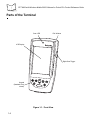
Parts of the Terminal
Scan LED
Exit Window
LCD Display
Right Scan Trigger
Keypad
(Standard 6-key
shown)
Figure 1-1. Front View
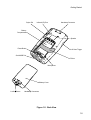
1-4
Getting Started
Stylus Silo
Infrared (IR) Port
Handstrap Connector
Battery
Compartment
Speaker
Reset Button
Left Scan Trigger
Serial/USB Port
Tether
Microphone
Battery Cover
Locking Screw
Handstrap Connectors
Figure 1-2. Back View
1-5
PPT 8800 with Windows Mobile 2003 Software for Pocket PCs Product Reference Guide
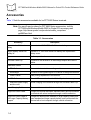
Accessories
Table 1-1lists the accessories available for he PPT 8800 Series terminals.
Note: For specific part numbers for PPT 8800 Series accessories, visit the
PPT 8800 with Windows Mobile 2003 for Pocket PCs accessory web
page: http://www.symbol.com/products/mobile_computers/
ppt8800acc.html.
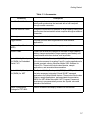
Table 1-1. Accessories
Accessory
Description
Spare standard lithium-ion
battery
Spare standard 3.7V 1700 mAh lithium-ion battery.
Larger capacity lithium-ion
battery kit.
Optional 3.7V 3400 mAh lithium-ion battery with replacement
battery cover.
Stylus
Performs pen functions.
Universal Cable Cup
Connects to the terminal to an autocharge adapter and various
cables.
Attachable Cables:
DEX Cable
Connects the terminal to a vending machine.
Autocharger
Connects to the cigarette lighter in a vehicle to charge the terminal.
Printer Cables
Adds printing capabilities to the terminal.
USB Cable
Allows USB connection from the Cable Cup to a host computer
Attachable power supply
and line cord
Allows charging of the terminal through the Universal Cable Cup.
Serial Charging Cable
Allows serial connection of the terminal to a host computer.
Single-Slot Serial Cradle
Charges the terminal and spare standard battery and synchronizes
the terminal with a host computer through a serial connection.
Single-Slot Serial Cradle B
with Larger Capacity Battery
Support
Charges the terminal with standard or larger capacity battery and
spare standard and larger capacity battery; and synchronizes the
terminal with a host computer through a serial connection.
1-6
Getting Started
Table 1-1. Accessories
Accessory
Description
Four-Slot Serial Cradle
Charges up to four terminals with standard or larger capacity
battery and synchronizes the terminals with a host computer
through a serial connection.
Four-Slot Ethernet Cradle
Charges the terminals with standard or larger capacity battery and
synchronizes the terminal with a host computer through an ethernet
connection.
Holster(s)
Stores the terminal when not in use.
Trigger Handle
Provides gun form factor ergonomics for scan intensive
applications.
Magnetic Stripe Reader
(MSR)
Snaps on to the terminal to add magstripe capabilities.
Vehicle Cradle
Powers the terminal and charges its standard or larger capacity
battery, charges a standard or larger capacity spare battery and
communicates with other devices such as printers.
Symbol Mobility Developer’s
Kit (SMDK) for Embedded
Visual C 4.0
The Symbol Mobility Developer Kit (SMDK) for eVC4, provides all
of the tools necessary for creating C and C++ native applications for
Symbol terminals running Windows Mobile 2003 Software for
Pocket PCs. These tools include class libraries, sample
applications, and associated documentation.
Symbol Mobility Developer’s
Kit (SMDK) for .NET
The Symbol Mobility Developer Kit (SMDK) for .NET provides all of
the tools necessary to develop C# and VB.NET managed
applications for Symbol Mobile devices. These tools include class
libraries, sample applications, and associated documentation.
SMDK for .NET allows Microsoft® .NET Compact Framework
developers to programmatically access the Symbol value-add
features of the terminal.
Device Configuration
Package for PPT 8800
Used to customize and deploy software for the terminal.
1-7
PPT 8800 with Windows Mobile 2003 Software for Pocket PCs Product Reference Guide
Getting Started
In order to start using the terminal for the first time:
•
install the battery
•
charge the battery and backup battery
•
start the terminal
•
configure the terminal.
Installing the Battery
Installing the Standard Battery
Before using your terminal, install a lithium-ion battery:
1. Turn the locking screw counterclockwise until the cover releases from the terminal.
2. Lift the battery door away from the terminal.
Locking
Screw
Figure 1-3. Locking Screw
1-8
Getting Started
3. Insert the lithium-ion battery in the battery compartment with the battery tether
positioned as shown, ensuring the battery snaps into place.
Tether
Figure 1-4. Inserting the Standard Battery
Note: Ensure the battery is positioned correctly. The battery charging
contacts should be placed on top of the charging contacts in the
battery compartment.
4. Replace the battery cover by inserting the top first, then pressing the bottom down
firmly.
Figure 1-5. Closing the Back Cover
5. Turn the locking screw clockwise to secure the battery cover to the terminal.
1-9
PPT 8800 with Windows Mobile 2003 Software for Pocket PCs Product Reference Guide
Installing the Optional Larger Capacity Battery
To install the optional larger capacity battery:
1. Remove the bottom of the handstrap from the battery cover.
2. Unscrew the locking screw and remove the battery cover.
Figure 1-6. Unscrew Locking Screw
3. If a battery is installed, pull tether up to release battery.
4. Insert the larger capacity battery in the battery compartment with the battery tether
positioned as shown, ensuring the battery snaps into place.
Figure 1-7. Installing the Larger Capacity Battery
1-10
Getting Started
5. Replace the new battery cover by inserting the top first, then pressing the bottom
down firmly.
Figure 1-8. Secure New Battery Cover
6. Tighten the locking screw to secure the new battery cover to the terminal.
7. Re-attach the handstrap to the handstrap connector on the new battery cover.
Charging the Terminal Battery
Charging the Main Battery and Memory Backup Battery
Note: To charge the battery for your mobile device, battery and charger
temperatures must be between +32° F and +104° F
(0° C and +40° C).
Before using your terminal for the first time, charge the standard lithium-ion battery in the
terminal for approximately 2 1/2 hours, using a cradle or the serial charging cable. The
optional larger capacity battery charges in approximately five hours.
Note: To ensure the quickest charging time, turn the terminal off while
charging.
Your terminal is equipped with a memory backup battery which automatically charges from
the fully-charged lithium-ion battery. This backup battery retains data in memory when the
terminal’s battery is removed. When you first use your terminal, it takes about 24 hours to
charge the backup battery from the main battery.
1-11
PPT 8800 with Windows Mobile 2003 Software for Pocket PCs Product Reference Guide
Note: If you remove your lithium-ion battery before the backup battery is
fully charged, data may be lost. For this reason, DO NOT remove the
battery within the first 24 hours of use.
Using the Serial Charging Cable
AC Line
Cord
Serial Charging
Cable
Power
Supply
Figure 1-9. Power Set Up
The standard battery usually fully charges in approximately 2 1/2 hours and the optional
larger capacity battery usually fully charges in approximately five hours.
Using the Single-Slot Serial Cradles
You can charge the battery in the terminal using either the CRD8800 or CRD8800B SingleSlot Serial Cradle. The CRD8800B cradle accepts a terminal with the larger capacity
battery kit installed on the terminal. To charge the terminal’s battery using the Single-Slot
Serial cradle:
1-12
Getting Started
1. Connect the cradle to a power source.
AC Line
Cord
Power
Port
Power
Supply
Figure 1-10. Connecting Power to the CRD8800 Cradle
Power
Port
Power
Supply
AC Line
Cord
Figure 1-11. Connecting Power to the CRD8800B Cradle
1-13
PPT 8800 with Windows Mobile 2003 Software for Pocket PCs Product Reference Guide
2. Insert the terminal into the cradle. The terminal starts to charge automatically.
ENTER
CRD8800
CRD8800B
Figure 1-12. Inserting the Terminal into the Single-Slot Serial Cradle
The standard battery usually fully charges in approximately 2 1/2 hours and the optional
larger capacity battery usually fully charges in approximately five hours.
1-14
Getting Started
Using the Four-Slot Cradles
To charge the terminal’s battery using the Four-Slot Charging Cradle or the Four-Slot
Ethernet Cradle:
1. Connect the cradle to a power source.
Power
Port
AC Line
Cord
Power
Supply
Figure 1-13. Connecting Power to the Four-Slot Cradle
2. Insert the terminal into the cradle. The terminal starts to charge automatically.
Figure 1-14. Inserting the Terminal into the Four-Slot Cradle
The standard battery usually fully charges in approximately 2 1/2 hours and the optional
larger capacity battery usually fully charges in approximately five hours.
1-15
PPT 8800 with Windows Mobile 2003 Software for Pocket PCs Product Reference Guide
Using the Universal Cable Cup
To charge the terminal’s battery using the Universal Cable Cup with the vehicle charging
adapter or the wall outlet power supply and line cord:
1. Ensure the locking tabs are in the open position (up).
2. Insert the terminal into the cable cup.
3. Press down on the two locking tabs.
4. Pull on the cable cup to ensure that it is securely attached to the terminal.
Locking Tabs
Figure 1-15. Attaching the Universal Cable Cup to the Terminal
5. Open the rubber cap covering the power port.
Rubber
Cap
Figure 1-16. Connecting the Power Cable
6. Plug the power connector into the power port.
1-16
Getting Started
7. Wrap the cable around the cable support.
Cable
Support
Back of
Cable Cup
Figure 1-17. Securing the Cable
8. Connect the other end of the cable to a vehicle power adapter or appropriate power
source.
Vehicle Charging Adapter
Power Supply
Figure 1-18. Connecting to Power Source
The standard battery usually fully charges in approximately 2 1/2 hours and the optional
larger capacity battery usually fully charges in approximately five hours.
1-17
PPT 8800 with Windows Mobile 2003 Software for Pocket PCs Product Reference Guide
Charging Spare Batteries
A spare battery can be charged using the single-slot cradle(s).
Note: You can also use a UBC adapter to charge spare batteries. Refer to
the UBC 2000 Universal Battery Charge Product Guide for more
information.
Using the CRD8800 Single-Slot Cradle
The CRD8800 Single-Slot Serial Cradle charges only the standard battery.
1. Connect the cradle to a power source.
AC Line
Cord
Power
Supply
Spare Battery
Charging Slot
Power
Port
Figure 1-19. Connecting Power to the CRD8800 Cradle
2. Insert the battery into the spare battery charging slot on the back of the cradle.
Position it with the charging contacts facing down (over charging pins) and gently
press down on the battery to ensure proper contact.
The spare battery charging LED turns red to indicate that the spare battery is charging. The
battery fully charges in approximately 2 1/2 hours. See Charge LED Indicator on page 1-21
for spare battery charging indications.
1-18
Getting Started
Using the CRD8800B Single-Slot Cradle
The CRD8800B Single-Slot Serial Cradle charges either the standard and larger capacity
battery in the spare battery well.
1. Connect the cradle to a power source.
Spare Battery
Charging Well
Power
Port
Line
Cord
Power
Supply
Figure 1-20. Connecting Power to the CRD8800B Cradle
2. Insert the battery into the spare battery charging well on the back of the cradle.
Insert the contact end first and then press the back end into the well.
Standard Battery
Larger Capacity Battery
Figure 1-21. Inserting the Spare Battery into the Battery Well
The spare battery charging LED turns red to indicate that the spare battery is charging. The
standard battery usually fully charges in approximately 2 1/2 hours and the optional larger
1-19
PPT 8800 with Windows Mobile 2003 Software for Pocket PCs Product Reference Guide
capacity battery usually fully charges in approximately five hours. See Charge LED
Indicator on page 1-21 for spare battery charging indications.
Using the UBC Battery Adapter
1. Insert the appropriate battery adapter (up to four) into the UBC 2000 charger base.
2. Insert the battery into its appropriate adapter. Ensure the polarity markings on the
battery (+, -) match with those of the adapter.
Battery Adapter
Battery status
display
Charger base
Figure 1-22. Inserting the Spare Battery
When the battery is inserted, the charging system begins the rapid charge cycle. When this
cycle is completed, the "READY" indicator on the battery status display turns solid green,
and the battery is charged to approximately 95% of its rated capacity. To attain 100% of its
capacity the battery should remain in the charger for 3 hours. A charged battery may be
stored in the charger indefinitely. Upon completion of the charging cycle, the charger
switches to "Maintenance Mode" where it maintains the battery at 100% of its rated
capacity.
Caution
Do not charge a battery that is below 0° C (32° F) or above 45° C (113° F).
Allow the battery to warm up to room temperature before charging.
1-20
Getting Started
Charge LED Indicator
Table 1-2. Charge LED Indicator
LED
Indication
Spare Battery Charging (Cradle LED)
Off
No spare battery in slot; spare battery not placed
correctly; cradle is not powered.
Solid red
Spare battery is charging.
Flashing red
Error in charging; check placement of spare
battery.
Solid green
Charging is complete.
Starting the Terminal
Press the Power button to turn on the terminal. If the terminal does not power on, perform
a hard reset. See Resetting the Terminal on page 2-36.
When turning the terminal on for the first time, the terminal initializes its Flash File system,
the Symbol splash screen displays for about a minute followed by the calibration window.
Note that these windows also appear every time you perform a hard reset.
Calibrating the Screen
To calibrate the screen so the cursor on the touch screen aligns with the tip of your stylus:
1. Remove the stylus from its storage silo on the back of the terminal.
1-21
PPT 8800 with Windows Mobile 2003 Software for Pocket PCs Product Reference Guide
2. Carefully press and briefly hold the tip of stylus on the center of each target that
appears on the screen.
Figure 1-23. Align Screen
Note: To re-calibrate the screen at anytime, press FUNC + 6 on a 15-key
terminal or press Function + F4 on the standard 6-key terminal to
launch the calibration screen application.
3. Follow the directions on the screen which lead you through a simple exercise
illustrating how to use the stylus and pop-up menus.
Figure 1-24. Using Pop-up Menus
1-22
Getting Started
4. Use the drop-down list to set your time zone, and tap Next.
Figure 1-25. Setting Time Zone
Note: These initial setup screens appear each time you perform a hard
reset.
Setting Time and Date
The Time and Date window does not appear after setting the time zone. Tap Start - Settings
- System tab - Clock icon to use the clock control panel applet to set the time and date after
a hard reset.
Figure 1-26. Setting Time and Date
1-23
PPT 8800 with Windows Mobile 2003 Software for Pocket PCs Product Reference Guide
Checking Battery Status
To check whether the main battery or backup battery in the terminal is charged, tap Start Settings - System tab - Power icon to display the Battery Status window.
Figure 1-27. Battery Status Screen
To save battery power, set your terminal to turn off after a specified number of minutes. See
Power on page 3-43 to set power management options.
1-24
Getting Started
Replacing the Handstrap
The terminal has a factory-installed handstrap which increases comfort when holding the
terminal for extended periods of time. The handstrap may be removed or replaced, if
damaged.
To replace the handstrap:
1. Unhook the bottom of the handstrap from the handstrap connector on the battery
cover.
2. Unhook the top of the handstrap from the handstrap connector on the back of the
terminal.
Handstrap
connector
Handstrap
connector
Figure 1-28. Handstrap Replacement
1-25
PPT 8800 with Windows Mobile 2003 Software for Pocket PCs Product Reference Guide
3. Slide the flat metal piece of the new handstrap into the handstrap connector on the
back of the terminal.
4. Slide the flat metal piece on the other end of the handstrap into the handstrap
connector on the battery cover.
1-26
Getting Started
Magnetic Strip Reader
The MSR8800 Magnetic Stripe Reader is an essential accessory for the PPT 8800 Series
terminal, allowing easy data capture with the swipe of a magnetic stripe card. The magnetic
stripe reader snaps easily on to the bottom of the terminal and can be easily removed when
not in use.
Installing the MSR
1. Ensure that locking tabs are in the open position (up).
2. Insert the terminal into the MSR.
3. Press down on the two locking tabs.
4. Pull on the MSR to ensure that it is securely seated on the terminal.
Locking Tabs
Figure 1-29. MSR Installation
1-27
PPT 8800 with Windows Mobile 2003 Software for Pocket PCs Product Reference Guide
Removing the MSR
1. Lift the two locking tabs.
2. Pull the MSR8800 from the terminal.
Using the MSR
In order to use the MSR, your terminal must have an application installed which accepts
magnetic stripe data. Your terminal has a terminal emulator installed which can be used to
access data acquired by the MSR.
To use the terminal emulator you must create a new session or connect using an existing
one. Depending on your terminal’s operating system, use the appropriate set of steps
below to create a new terminal session.
1. Select Start - Settings and tap the Connections tab.
2. Tap the Connections icon.
3. Select Add a new modem connection.
4. In the Session Name box, enter a name for the session.
5. In the Select a Modem list, select the name of your modem or Hayes Compatible
on Com1:.
6. Tap Next and enter any number. It does not need to be a valid number. Tap Next.
7. Tap Advanced.
8. From the Baud Rate: drop-down list, select 9600.
9. Tap the Port Settings tab and check all three boxes.
10. Tap Ok and then Finish. Hide the soft keyboard.
11. Select Manage existing connections.
12. Tap and hold on the new connection name.
13. Select Connect from the pop-up menu.
14. In the Network Log On window, tap Ok.
15. In the Connecting dialog box, tap Hide.
16. Hide the soft keyboard. The Manual Dial Terminal window is now visible.
1-28
Getting Started
Swipe the magnetic stripe card through the reader, ensuring the magnetic stripe on the card
is positioned as shown. Data encoded on the magnetic stripe displays in the terminal
window on the terminal.
Figure 1-30. Swiping a Card
Note: The card may be swiped in either direction, from left to right, or from
right to left. For best results, gently press down on the card while
swiping to ensure contact with the bottom of the reader.
If the terminal is left idle long enough to go into the Suspend-Resume state, or the power
is turned off and then on again, it may be necessary to close and restart the terminal
program to reinitialize the serial port.
To disconnect the terminal emulation, select File - Cancel. The session you created
appears as an icon in the Terminal folder. You can create a desktop shortcut for the session,
and connect by double-tapping it.
1-29
PPT 8800 with Windows Mobile 2003 Software for Pocket PCs Product Reference Guide
Charging the Terminal’s Battery
The terminal’s battery can be charged while the MSR is installed on the bottom of the
terminal, using the Serial Charging Cable (p/n 25-38383-01) and power supply (p/n 5014000-107). The standard battery charges in approximately 2 1/2 hours.
Power Supply
Serial Charging Cable
Figure 1-31. Charging the Terminal Using the MSR
1-30
Getting Started
Configuring the Terminal
Refer to the following chapters to configure the terminal:
•
For customizing the settings on your terminal, see Chapter 3, Settings.
•
To set up ActiveSync to synchronize your terminal with your host computer, see
Chapter 4, Communication.
•
To configure your terminal for Spectrum24, see Chapter 5, Spectrum24 Network
Configuration (V 3.9.1) or Chapter 6, Spectrum24 Network Configuration (V 3.9.2).
•
To configure your terminal for Bluetooth, see Chapter 7, PPT 8860 Bluetooth or
Chapter 8, PPT 8866 Bluetooth.
•
To set up AirBEAM to synchronize your terminal with your host server, see Chapter
9, AirBEAM Smart.
•
To install development software on your development PC, see Chapter 11,
Software Installation on Development PC.
•
To configure your terminal using the Terminal Configuration Manager, see Chapter
12, Configuring the Terminal.
1-31
PPT 8800 with Windows Mobile 2003 Software for Pocket PCs Product Reference Guide
1-32
Chapter 2
Operating the PPT 8800
Chapter Contents
Introduction . . . . . . . . . . . . . . . . . . . . . . . . . . . . . . . . . . . . . . . . . . . . . . . . . . . . . . . . . . . . . . . . . . 2-3
Using the Power Button . . . . . . . . . . . . . . . . . . . . . . . . . . . . . . . . . . . . . . . . . . . . . . . . . . . . . . . . . 2-3
Adjusting the Backlight . . . . . . . . . . . . . . . . . . . . . . . . . . . . . . . . . . . . . . . . . . . . . . . . . . . . . . . . . 2-3
Standard 6-Key Configuration . . . . . . . . . . . . . . . . . . . . . . . . . . . . . . . . . . . . . . . . . . . . . . . . 2-3
15-Key Configuration . . . . . . . . . . . . . . . . . . . . . . . . . . . . . . . . . . . . . . . . . . . . . . . . . . . . . . . 2-4
Using the Stylus . . . . . . . . . . . . . . . . . . . . . . . . . . . . . . . . . . . . . . . . . . . . . . . . . . . . . . . . . . . . . . . 2-4
Using a Headset . . . . . . . . . . . . . . . . . . . . . . . . . . . . . . . . . . . . . . . . . . . . . . . . . . . . . . . . . . . . . . 2-5
Using the Keypad . . . . . . . . . . . . . . . . . . . . . . . . . . . . . . . . . . . . . . . . . . . . . . . . . . . . . . . . . . . . . 2-5
Standard 6-Key Configuration . . . . . . . . . . . . . . . . . . . . . . . . . . . . . . . . . . . . . . . . . . . . . . . . 2-6
15-Key Configuration . . . . . . . . . . . . . . . . . . . . . . . . . . . . . . . . . . . . . . . . . . . . . . . . . . . . . . . 2-7
Key Mode Icon . . . . . . . . . . . . . . . . . . . . . . . . . . . . . . . . . . . . . . . . . . . . . . . . . . . . . . . . 2-9
Today Screen . . . . . . . . . . . . . . . . . . . . . . . . . . . . . . . . . . . . . . . . . . . . . . . . . . . . . . . . . . . . . . . 2-11
Using the Navigation Bar and Command Bar . . . . . . . . . . . . . . . . . . . . . . . . . . . . . . . . . . . . . . . 2-12
Status Icons . . . . . . . . . . . . . . . . . . . . . . . . . . . . . . . . . . . . . . . . . . . . . . . . . . . . . . . . . . . . . 2-13
Task Tray Icons . . . . . . . . . . . . . . . . . . . . . . . . . . . . . . . . . . . . . . . . . . . . . . . . . . . . . . . . . . 2-14
Speaker Icon . . . . . . . . . . . . . . . . . . . . . . . . . . . . . . . . . . . . . . . . . . . . . . . . . . . . . . . . . . . . 2-15
Battery Icon . . . . . . . . . . . . . . . . . . . . . . . . . . . . . . . . . . . . . . . . . . . . . . . . . . . . . . . . . . . . . 2-16
Connectivity Icon . . . . . . . . . . . . . . . . . . . . . . . . . . . . . . . . . . . . . . . . . . . . . . . . . . . . . . . . . 2-17
Time Icon . . . . . . . . . . . . . . . . . . . . . . . . . . . . . . . . . . . . . . . . . . . . . . . . . . . . . . . . . . . . . . . 2-18
Instant Message Icon . . . . . . . . . . . . . . . . . . . . . . . . . . . . . . . . . . . . . . . . . . . . . . . . . . . . . . 2-19
E-Mail Icon . . . . . . . . . . . . . . . . . . . . . . . . . . . . . . . . . . . . . . . . . . . . . . . . . . . . . . . . . . . . . . 2-20
Multiple Notification Icon. . . . . . . . . . . . . . . . . . . . . . . . . . . . . . . . . . . . . . . . . . . . . . . . . . . . 2-20
Selecting Programs . . . . . . . . . . . . . . . . . . . . . . . . . . . . . . . . . . . . . . . . . . . . . . . . . . . . . . . . . . . 2-21
Using Pop-up Menus . . . . . . . . . . . . . . . . . . . . . . . . . . . . . . . . . . . . . . . . . . . . . . . . . . . . . . . . . . 2-22
Notifications . . . . . . . . . . . . . . . . . . . . . . . . . . . . . . . . . . . . . . . . . . . . . . . . . . . . . . . . . . . . . . . . . 2-23
Entering Information . . . . . . . . . . . . . . . . . . . . . . . . . . . . . . . . . . . . . . . . . . . . . . . . . . . . . . . . . . 2-23
2-1
PPT 8800 with Windows Mobile 2003 Software for Pocket PCs Product Reference Guide
Entering Information Using the Input Panel . . . . . . . . . . . . . . . . . . . . . . . . . . . . . . . . . . . . . . 2-23
Using the Soft Keyboard. . . . . . . . . . . . . . . . . . . . . . . . . . . . . . . . . . . . . . . . . . . . . . . . . 2-24
Using the Block Recognizer . . . . . . . . . . . . . . . . . . . . . . . . . . . . . . . . . . . . . . . . . . . . . . 2-25
Using the Letter Recognizer . . . . . . . . . . . . . . . . . . . . . . . . . . . . . . . . . . . . . . . . . . . . . . 2-26
Using the Transcriber . . . . . . . . . . . . . . . . . . . . . . . . . . . . . . . . . . . . . . . . . . . . . . . . . . . 2-26
Writing on the Screen . . . . . . . . . . . . . . . . . . . . . . . . . . . . . . . . . . . . . . . . . . . . . . . . . . . . . . 2-26
Converting Writing to Text . . . . . . . . . . . . . . . . . . . . . . . . . . . . . . . . . . . . . . . . . . . . . . . 2-28
Writing Tips. . . . . . . . . . . . . . . . . . . . . . . . . . . . . . . . . . . . . . . . . . . . . . . . . . . . . . . . . . . 2-29
Selecting Text . . . . . . . . . . . . . . . . . . . . . . . . . . . . . . . . . . . . . . . . . . . . . . . . . . . . . . . . . . . . 2-30
Selecting Writing. . . . . . . . . . . . . . . . . . . . . . . . . . . . . . . . . . . . . . . . . . . . . . . . . . . . . . . 2-30
Drawing on the Screen . . . . . . . . . . . . . . . . . . . . . . . . . . . . . . . . . . . . . . . . . . . . . . . . . . . . . 2-31
Selecting a Drawing . . . . . . . . . . . . . . . . . . . . . . . . . . . . . . . . . . . . . . . . . . . . . . . . . . . . 2-31
Recording a Message . . . . . . . . . . . . . . . . . . . . . . . . . . . . . . . . . . . . . . . . . . . . . . . . . . . . . . 2-32
Using My Text . . . . . . . . . . . . . . . . . . . . . . . . . . . . . . . . . . . . . . . . . . . . . . . . . . . . . . . . . . . . 2-33
Entering Information Using 15-Key Keypad. . . . . . . . . . . . . . . . . . . . . . . . . . . . . . . . . . . . . . 2-33
Finding Information . . . . . . . . . . . . . . . . . . . . . . . . . . . . . . . . . . . . . . . . . . . . . . . . . . . . . . . . . . . . 2-34
Scanning . . . . . . . . . . . . . . . . . . . . . . . . . . . . . . . . . . . . . . . . . . . . . . . . . . . . . . . . . . . . . . . . . . . . 2-35
Scan LED Indicator . . . . . . . . . . . . . . . . . . . . . . . . . . . . . . . . . . . . . . . . . . . . . . . . . . . . . . . . 2-35
Resetting the Terminal . . . . . . . . . . . . . . . . . . . . . . . . . . . . . . . . . . . . . . . . . . . . . . . . . . . . . . . . . 2-36
Performing a Soft Reset. . . . . . . . . . . . . . . . . . . . . . . . . . . . . . . . . . . . . . . . . . . . . . . . . . . . . 2-36
Performing a Hard Reset . . . . . . . . . . . . . . . . . . . . . . . . . . . . . . . . . . . . . . . . . . . . . . . . . . . . 2-36
2-2
Operating the PPT 8800
Introduction
This chapter provides basic instructions for using and navigating the terminal.
Using the Power Button
Press the
button to turn the terminal on and off. See Starting the Terminal on page 1-21.
Adjusting the Backlight
Standard 6-Key Configuration
Use the key combinations listed in Table 2-1 to control the display and keypad backlight.
Table 2-1. Standard 6-Key Keypad Backlight Controls
Keys
Press and hold
Description
Turns the display backlight and keypad backlight on and off.
When both backlights are off, the backlights turn on in the following order
when the button is held:
The display backlight turns on first, continue to hold and the keypad
backlight turns on.
When either backlight is on, the backlights turn off when the button is
pressed and held.
Press
+
Decrease display backlight (decrease brightness).
Press
+
Increase display backlight (increase brightness).
2-3
PPT 8800 with Windows Mobile 2003 Software for Pocket PCs Product Reference Guide
15-Key Configuration
Use the key combinations listed in Table 2-2 to control the display and keypad backlight.
Table 2-2. 15-Key Keypad Backlight Controls
Keys
Press and hold
Description
Turns the display backlight and keypad backlight on and off.
When both backlights are off, the backlights turn on in the following order
when the button is held:
The display backlight turns on first, continue to hold and the keypad
backlight turns on.
When either backlight is on, the backlights turn off when the button is
pressed and held.
Press
+
Decrease display backlight (decrease brightness).
Press
+
Increase display backlight (increase brightness).
Using the Stylus
Your terminal has a stylus for selecting items and entering information. The stylus functions
as a mouse.
•
Tap: Touch the screen once with the stylus to press option buttons and open menu
items.
•
Tap and Hold: Tap and hold the stylus on an item to see a list of actions available
for that item. On the pop-up menu that appears, tap the action you want to perform.
•
Drag: Hold the stylus on the screen and drag across the screen to select text and
images. Drag in a list to select multiple items.
2-4
Operating the PPT 8800
Using a Headset
You can use a stereo headset to listen to audio playback. To use a headset, plug the
headset jack into the audio connector on the top of the terminal. Ensure that the terminal’s
volume is set appropriately before putting the headset on. When a headset is plugged into
the jack, the speaker is muted.
Note: The audio connector does not support headsets with a microphone.
Figure 2-1. Using a Headset
Using the Keypad
The terminal has two backlit keypad configurations: a standard 6-key configuration and a
15-key configuration.
2-5
PPT 8800 with Windows Mobile 2003 Software for Pocket PCs Product Reference Guide
Standard 6-Key Configuration
The standard 6-key keypad contains a power button, application keys, scroll keys, an Enter
key and a function key. See Table 2-3 for descriptions of the keypad buttons and keys.
App 2 Key
Scroll Up/Down Keys
App 3 Key
App 1 Key
App 4 Key
Function Key
Power Button
Enter Key
Figure 2-2. Standard 6-Key Configuration
Table 2-3. 6-Key Keypad Actions
Key
Action
App 1 - App 4
These keys can be assigned to an application. See Buttons on
page 3-8 for default settings.
Scroll Up
Moves up from one item to another.
Increases the brightness of the backlight when simultaneously
pressed with the Function key.
Scroll Down
Moves down from one item to another.
Decreases the brightness of the backlight when simultaneously
pressed with the Function key.
Function
Executes an operation when it's pressed with another key
(keys) simultaneously, such as one of the Scroll keys.
Power
Powers the terminal on and off and turns the backlight on and
off when held.
Enter
Executes a selected item or function.
2-6
Operating the PPT 8800
15-Key Configuration
The 15-key keypad uses an alphanumeric keypad that produces the 26-character alphabet
(A-Z, both lowercase and uppercase), numbers (0-9), function keys (F1 - F10) and assorted
characters. The keypad is color-coded to indicate which modifier key (ALPHA or FUNC) to
press to produce a particular character or action. The keypad default is numeric, producing
numbers.
Scroll Keys
Enter Key
Power Button
*
Function Key
.
Alpha Key
Alphanumberic
Keys
Figure 2-3. 15-Key Configuration
Table 2-4. 15-Key Keypad Actions
Key
Action
Alpha
Press the ALPHA key to cycle through the input modes (Alpha Lowercase,
Alpha Uppercase, Numeric). The default is numeric mode. In both alpha
modes, pressing a key produces the yellow letter on that key; in numeric
mode, pressing a key produces the white number on that key. See Table 2-5.
Scroll Up
In the numeric mode, moves the cursor up on the window. In the function
mode, moves the cursor to the right. In the alpha mode, is a space key.
Scroll Down
In the numeric mode, moves the cursor down on the screen. In the function
mode, moves the cursor to the left. In the alpha mode, is a backspace key.
Function
Executes an operation when pressed with another key or keys simultaneously,
such as one of the Scroll keys. Refer to Table 2-5. Executes the same function
in both the alpha and numeric modes.
2-7
PPT 8800 with Windows Mobile 2003 Software for Pocket PCs Product Reference Guide
Table 2-4. 15-Key Keypad Actions (Continued)
Key
Action
Power
Powers the terminal on and off and turns the backlight on and off when held.
Enter
Executes a selected item or function.
Table 2-5. 15-Key Keypad Input Modes
Numeric Mode
Key
Alpha Lowercase Mode
FUNC+
Key
1st
Press
Alpha Uppercase Mode
2nd
3rd
4th
Press Press Press
1
1
F1
@
-
_
2
2
F2
a
b
3
3
F3
d
4
4
F4
5
5
6
2nd
3rd
4th
Press Press Press
:
?
!
c
A
B
C
e
f
D
E
F
g
h
i
G
H
I
F5
j
k
l
J
K
L
6
F6
m
n
o
M
N
O
7
7
F7
p
q
r
P
Q
R
8
8
F8
t
u
v
T
U
V
9
9
F9
w
x
y
W
X
Y
0
0
F10
UP
UP
RIGHT
SPACE
SPACE
DOWN
DOWN
LEFT
BK SPC
BK SPC
ACTION
ACTION
ENTER ACTION
/
1st
Press
s
z
,
S
Z
Note: The key functions can be changed by an application. The keypad may not function
exactly as described.
2-8
Operating the PPT 8800
Note: For detailed keypad configurations including ASCII values and VK
codes, see Appendix D, Keypad Maps.
For information about using the soft keyboard from the input panel, see to Entering
Information on page 2-23.
Key Mode Icon
When you press the ALPHA or FUNC key, the Key Mode icon appears in the command bar
indicating the key state. The icon disappears when in numeric mode.
Lowercase Alpha Key
Uppercase Alpha Key
Function Key
Figure 2-4. Alpha Key Icon
When a program, such as Pocket Word, is open the icon appears in the command bar. You
can move the icon anywhere on the screen by dragging it to a new location. Double-tap the
icon to return it to it’s default location in the command bar. To hide the icon, tap the icon and
then tap Hide. To un-hide the icon, tap Start - Today. Tap the icon and then tap Show.
2-9
PPT 8800 with Windows Mobile 2003 Software for Pocket PCs Product Reference Guide
In either alpha mode, when a key is pressed a list of characters assigned to that key
appears in the command bar with the selected key highlighted. Repeated pressing of the
key highlights the next key in the display.
Figure 2-5. Key Icon Selection
2-10
Operating the PPT 8800
Today Screen
When you turn on your terminal for the first time each day (or after 4 hours of inactivity), the
Today screen appears. You can also display it by tapping Start - Today. On the Today
screen, you can see important information for the day.
Tap to switch
to a program
Tap to change volume or mute all sounds
Tap to change the date and time
Tap to open an item
Your day at a glance
Tap to create a new item
Tap to view connection status
Figure 2-6. Today Screen
Note: The Today screen may vary depending on your terminal
configuration.
The Today screen is customizable. Tap Start - Settings - Today icon. Use the Appearance
tab to customize the background and the Items tab to change the list and order of items that
appear on the screen.
2-11
PPT 8800 with Windows Mobile 2003 Software for Pocket PCs Product Reference Guide
Using the Navigation Bar and Command Bar
The navigation bar at the top of the screen displays the active program, various status icons
(see Table 2-6) and current time. It also allows you to select programs and close screens.
Use the command bar (task tray) at the bottom of the screen to perform tasks in programs.
The command bar includes menu names, buttons, and the input panel button. It can also
include icons of active radios or programs, where applicable (see Table 2-6 on page 2-13).
To create a new item in the current program, tap New. To see the name of a button, hold
the stylus on the button. Drag the stylus off the button so the command is not carried out.
Tap to change volume or mute all sounds
Tap to close program
Tap to quickly select a program
you have recently used
Tap to select a program
Tap to see additional programs
Tap to customize the device
New button.
Menu Buttons
names
Figure 2-7. Screen Navigation
2-12
Input panel
button
Operating the PPT 8800
Status Icons
You may see the status icons listed in Table 2-6 on the navigation bar located at the top of
the screen.
Table 2-6. Status Icons
Icon
Function
Description
Speaker
Turns all sounds on and off.
Battery
Backup battery is very low.
Main battery is charging.*
Main battery is low.
Main battery is very low.
Main battery is full.*
Connectivity
Connection is active.
Synchronization is occurring.
IrDA connection is occurring.
Instant Message
Notification that one or more instant
messages were received.
E-Mail
Notification that one or more e-mail
messages were received.
Time and Next
Appointment
Displays current time in analog or digital
format.
Multiple Notifications
There are more notification icons than can
be displayed. Tap to display remaining
icons.
* Only appears in the Time and Next Appointment dialog box.
2-13
PPT 8800 with Windows Mobile 2003 Software for Pocket PCs Product Reference Guide
Task Tray Icons
You may see the task tray icons listed in Table 2-7 on the command bar located at the
bottom of the screen.
Table 2-7. Task Tray Icons
Icon
Description
The Mobile Companion icon appears in the task tray and indicates mobile computer
signal strength. See Chapter 5, Spectrum24 Network Configuration (V 3.9.1) or
Chapter 6, Spectrum24 Network Configuration (V 3.9.2) for more information.
The Bluetooth icon appears in the task tray and indicates that the Bluetooth radio is
on. The Bluetooth icon disappears when the radio is off. The Bluetooth icon is for
display purposes only. See Chapter 7, PPT 8860 Bluetooth or Chapter 8, PPT 8866
Bluetooth for more information.
The ActiveSync icon appears in the task tray and indicates an active connection
between the mobile computer and the development PC.
2-14
Operating the PPT 8800
Speaker Icon
You can adjust the system volume using the Speaker icon in the Navigation bar.
1. Tap the Speaker icon. The Volume dialog box appears.
Figure 2-8. Volume Dialog Box
2. Tap and move the slide bar to adjust the volume.
3. Select the On or Off radio button to turn the volume on or off.
Note: Use can also adjust the system volume using the Sounds &
Notifications window. See Sounds & Notifications on page 3-22 for
more information.
2-15
PPT 8800 with Windows Mobile 2003 Software for Pocket PCs Product Reference Guide
Battery Icon
Battery icons display on the Navigation Bar when the main battery or backup battery power
falls below a predetermined level. A Battery dialog box also appears indicating the status
of the main or backup battery.
Figure 2-9. Battery Status Dialog Box
Note: You can also view the battery status using the Power window. See
Power on page 3-43 for more information.
2-16
Operating the PPT 8800
Connectivity Icon
The Connectivity icon indicates the communication status of the terminal when it’s
connecting to the internet or host computer.
Figure 2-10. Connectivity Dialog Box
2-17
PPT 8800 with Windows Mobile 2003 Software for Pocket PCs Product Reference Guide
Time Icon
The Time icon displays the current time in a digital or analog format. To change the time
format, tap and hold the Time icon until a menu appears. Select the format you want.
Digital Clock
Analog Clock
Figure 2-11. Time Icon Format Menu
To display current date, time and appointments:
1. Tap the Time icon to display the Time and Next Appointment dialog box.
Battery Status Icon
Current Date and Time
Upcoming Appointments
Figure 2-12. Time and Next Appointment Dialog Box
2-18
Operating the PPT 8800
2. The dialog box displays the current date and time, the battery status and any
upcoming appointments in the Calendar.
Instant Message Icon
The Instant Message icon notifies you when MSN Messenger has received a new incoming
message. See MSN® Messenger on page 10-26 for more information.
Figure 2-13. MSN Messenger Dialog Box
2-19
PPT 8800 with Windows Mobile 2003 Software for Pocket PCs Product Reference Guide
E-Mail Icon
The E-Mail icon notifies you when you have received incoming e-mails. See Inbox on page
10-14 for more information.
Figure 2-14. New E-mail Messages Dialog Box
Multiple Notification Icon
The Multiple Notification icon appears when two or more message notifications occur. Tap
the icon to display the multiple notification icons.
Figure 2-15. Multiple Notifications Icon
2-20
Operating the PPT 8800
Selecting Programs
To select a program, tap Start - Programs, then the program name. (To select which
programs appear on the Program menu, see Chapter 3, Settings.)
Figure 2-16. Start Menu
Note: Some programs have abbreviated labels for check boxes and dropdown list. To see the full label, hold the stylus on the label. Drag the
stylus off the label so that the command is not carried out.
2-21
PPT 8800 with Windows Mobile 2003 Software for Pocket PCs Product Reference Guide
Using Pop-up Menus
With pop-up menus, you can quickly choose an action for an item. For example, use the
pop-up menu in the contact list to delete a contact, make a copy of a contact, or send an email message to a contact. The actions in the pop-up menus vary from program to program.
To access a pop-up menu, hold the stylus on the item you want to perform the action on.
When the menu appears, lift the stylus, and tap the action to perform, or tap outside the
menu to close it without performing an action.
Tap and hold to display
the pop-up menu.
Lift the stylus and tap
the action you want.
Tap outside the menu
to close it without
performing an action.
Figure 2-17. Pop-up Menu
2-22
Operating the PPT 8800
Notifications
Your terminal notifies you when you have something to do. For example, if you've set up an
appointment in Calendar, a task with a due date in Tasks, or an alarm in Clock, you'll be
notified in any of the following ways:
•
a message box appears on the screen
•
a sound, which you can set, is played
•
the terminal vibrates (this is a programmable feature).
To choose reminder types and sounds for your terminal, tap Start - Settings - Personal tab
- Sounds & Notifications icon. Select the desired options. See Sounds & Notifications on
page 3-22 for more information.
Entering Information
To enter information, you may:
•
Use the keypad. (See Using the Keypad on page 2-5 and Appendix D, Keypad
Maps for keypad functions.)
•
Use the input panel to enter typed text, either using the soft keyboard or writing
characters.
•
Write directly on the screen.
•
Draw pictures on the screen.
•
Speak into the microphone to record a message.
•
Scan bar code data into data fields.
•
Use Microsoft® ActiveSync® to synchronize or copy information from your host
computer to your terminal. For more information on ActiveSync, see Chapter 4,
Communication or ActiveSync Help on your host computer.
Entering Information Using the Input Panel
Use the input panel to enter information in any program. You can either type using the soft
keyboard or write using Block Recognizer, Letter Recognizer, or Transcriber. In any case,
the characters appear as typed text on the screen.
2-23
PPT 8800 with Windows Mobile 2003 Software for Pocket PCs Product Reference Guide
To show or hide the input panel, tap the Input Panel button. Tap the arrow next to this
button to view input methods.
Select an input method.
Tap to see your choices.
Input Panel Button
Figure 2-18. Input Panel Button
When you use the input panel, your terminal anticipates the word you are typing or writing
and displays it above the input panel. When you tap the displayed word, it is inserted into
your text at the insertion point. The more you use your terminal, the more words it learns to
anticipate.
To change input settings, such as the number of words suggested at one time, select
Options from the Input Panel menu, and tap the tabs to see each setting screen.
Figure 2-19. Input Panel Options
Using the Soft Keyboard
To type with the Soft Keyboard:
1. Tap the arrow next to the Input Panel button, then Keyboard.
2-24
Operating the PPT 8800
2. On the Soft Keyboard, tap the keys with your stylus.
Tap here if this is the right word.
Figure 2-20. Soft Keyboard
Using the Block Recognizer
To use the Block Recognizer:
1. Tap the arrow next to the Input Panel button, then Block Recognizer.
2. Write a letter in the left side of the box, or a number in the right side, using special
character strokes.
Figure 2-21. Block Recognizer
When you write a letter, it is converted to typed text on the screen. For specific instructions
on using Block Recognizer, with Block Recognizer open, tap the question mark next to the
writing area, or see Appendix A, Block Recognizer Characters.
2-25
PPT 8800 with Windows Mobile 2003 Software for Pocket PCs Product Reference Guide
Using the Letter Recognizer
To use Letter Recognizer:
1. Tap the arrow next to the Input Panel button, then Letter Recognizer.
2. Write letters or numbers in the writing area, just as you would on paper. Write
capital letters in the left side of the box, numbers in the right side, and lower case
letters in the center.
Figure 2-22. Letter Recognizer
When you write a letter, it is converted to typed text on the screen. For specific instructions
on using Letter Recognizer, with Letter Recognizer open, tap the question mark next to the
writing area.
Using the Transcriber
To use Transcriber:
1. Tap the arrow next to the Input Panel button, then Transcriber.
Figure 2-23. Transcriber
2. Write anywhere on the screen.
When you write anywhere on the screen, Transcriber changes the written characters to
typed characters. For specific instructions on using Transcriber, with Transcriber open, tap
the question mark under to the writing area.
Writing on the Screen
In any program that accepts writing, such as the Notes program and the Notes tab in
Calendar, Contacts, and Tasks, you can use your stylus to write directly on the screen.
2-26
Operating the PPT 8800
To write on the screen, tap the Pen button to switch to writing mode. Lines appear on the
screen to guide you.
Tap the Pen button and
use your stylus like a pen.
Figure 2-24. Writing on the Screen
Note: Some programs that accept writing do not have the Pen button. See
the documentation for that program to find out how to switch to
writing mode.
2-27
PPT 8800 with Windows Mobile 2003 Software for Pocket PCs Product Reference Guide
Converting Writing to Text
To convert your writing to text, tap Tools - Recognize.
To convert certain words, select them before tapping Recognize on the Tools menu (or tap
and hold the selected words, then tap Recognize on the pop-up menu). If a word is not
recognized, it is left as writing.
Select the text you want to convert and
tap Recognize on the pop-up menu.
The writing is
turned into text.
Figure 2-25. Writing on the Screen
If the conversion is incorrect, select different words from a list of alternates or return to the
original writing. Tap and hold the incorrect word only. On the pop-up menu, tap Alternates.
2-28
Operating the PPT 8800
A list of alternate words appears. Tap the word you want to use, or tap the writing at the top
of the menu to return to the original writing.
Tap to return to your
original writing.
Or, tap the word you
want to use.
Figure 2-26. Alternate List
Writing Tips
•
Write neatly.
•
Write on the lines and draw descenders below the line. Cross off the "t" and write
apostrophes below the top line so they are not confused with the word above. Write
periods and commas above the line.
•
For better recognition, try increasing the zoom level to 300% using the Tools menu.
•
Leave large gaps between words so your terminal can easily tell where words
begin and end.
•
Hyphenated words, foreign words that use special characters such as accents, and
some punctuation cannot be converted.
•
If you add writing to a word to change it (such as changing a "3" to an "8") after you
attempt to recognize the word, the writing you add is not included if you try to
recognize the writing again.
2-29
PPT 8800 with Windows Mobile 2003 Software for Pocket PCs Product Reference Guide
Selecting Text
To edit or format typed text, select it by dragging the stylus across the text. Cut, copy, and/
or paste text by holding the selected words then tapping an editing command on the popup menu, or by tapping the command on the Edit menu.
Selecting Writing
To select writing to edit or format:
1. Tap and hold the stylus next to the text you want to select until the insertion point
appears.
2. Drag the stylus across the text.
If you accidentally write on the screen, tap Tools - Undo and try again. You can also select
text by tapping the Pen button to deselect it, then dragging the stylus across the screen.
You can cut, copy, and paste written text in the same way you work with typed text: tap and
hold the selected words, then tap the command from the pop-up menu, or select the
command from the Edit menu.
2-30
Operating the PPT 8800
Drawing on the Screen
Drawing on the screen is similar to writing on the screen. To create a drawing, cross three
ruled lines on your first stroke. A drawing box appears. Subsequent strokes in or touching
the drawing box become part of the drawing. Drawings that do not cross three ruled lines
are treated as writing.
The drawing box indicates the
boundaries of the drawing.
Pen button.
Figure 2-27. Drawing on the Screen
Note: To change the zoom level, select a zoom level from the Tools menu.
Selecting a Drawing
To select a drawing to edit or format, tap and hold the stylus on the drawing until the
selection handle appears.
To select multiple drawings, deselect the Pen button, then drag to select the drawings you
want.
To cut, copy, and paste drawings, tap and hold the selected drawing, then tap an editing
command on the pop-up menu, or tap the command from the Edit menu. To resize a
drawing, deselect the Pen button and drag a selection handle.
2-31
PPT 8800 with Windows Mobile 2003 Software for Pocket PCs Product Reference Guide
Recording a Message
You may record a message to capture thoughts, reminders, and phone numbers. In
Calendar, Tasks, and Contacts, you can include a recording in the Notes tab. In the Notes
program, you can either create a stand-alone recording or include a recording in a written
note.
To create a recording:
1. Start the Notes application.
2. Tap the Record icon to begin recording.
3. Hold the terminal’s microphone near your mouth or other source of sound.
Indicates an embedded
recording.
Tap to begin recording.
Tap to show or hide the
recording toolbar.
Figure 2-28. Recording Screen
4. When you are finished, tap the Stop button. The new recording appears in the note
list or as an embedded icon.
5. To play a recording, tap it in the list or tap its icon in the note.
2-32
Operating the PPT 8800
Using My Text
When using Inbox or MSN Messenger, use My Text to quickly insert preset or frequently
used messages into the text entry area. To insert a message, tap My Text and tap a
message.
Tap to select a
prewritten message.
Figure 2-29. Using My Text
Note: You can add text after inserting a My Text message before sending
it.
To edit a My Text message, tap Tools - Edit - My Text Messages. Select the message you
wish to edit and make the changes.
Entering Information Using 15-Key Keypad
The 15-key keypad uses an alphanumeric keypad that produces the 26-character alphabet
(A-Z, a-z), numbers (0-9), function keys (F1 - F10) and assorted characters. The keypad is
color-coded to indicate which modifier key (ALPHA or function) to press to produce a
particular character or action. The keypad default is numeric, producing numbers. See
Using the Keypad on page 2-5 and Appendix D, Keypad Maps for keypad functions.
2-33
PPT 8800 with Windows Mobile 2003 Software for Pocket PCs Product Reference Guide
Finding Information
The Find feature locates information. Tap Start - Find to launch this feature. Enter the text
you want to find, select a data type, then tap Go.
To find information taking up storage space on your terminal, select Larger than 64 KB from
the Type drop-down list.
You can also use the File Explorer to find files and organize them into folders. Tap Start Programs - File Explorer to launch Explorer.
Tap to change folders.
Select the sort
order for the list.
Tap the folder
name to open it.
Tap and hold to
create a new folder.
Figure 2-30. File Explorer
Note: To move files in File Explorer, tap and hold the item, then tap Cut or
Copy and Paste on the pop-up menu.
2-34
Operating the PPT 8800
Scanning
The terminal has an integrated scanner which allows you to collect data by scanning one
dimensional bar codes including Reduced Space Symbology (RSS) variants.
To scan bar codes with the terminal:
1. Ensure that a scan enabled application is loaded on the terminal.
2. Aim the scan exit window at the bar code.
3. Press either the right or left scan trigger. Ensure the red scan beam covers the
entire bar code. The green scan LED lights and a beep sounds to indicate a
successful decode.
Figure 2-31. Scanning
Scan LED Indicator
See Parts of the Terminal on page 1-4 for the location of the scan LED on the terminal.
Table 2-8. Scan LED Indicator
LED Status
Indication
Off
Not scanning.
Solid Red
Laser enabled. Scanning in process.
Solid Green
Successful decode.
2-35
PPT 8800 with Windows Mobile 2003 Software for Pocket PCs Product Reference Guide
Resetting the Terminal
If the terminal stops responding to input, reset it.
Performing a Soft Reset
A soft reset restarts the terminal and saves all stored records and entries.
Caution
Files that remain open during a soft reset may not be retained.
DO NOT perform a soft reset if the terminal is suspended. Press the power
button to wake the terminal.
To perform a soft reset on the standard 6-key keypad, press the Enter and Function keys
while holding down either the left or right scan trigger and then release the keys.
To perform a soft reset on the 15-key keypad, press ENTER and FUNC keys while holding
down either the left or right scan trigger and then release the keys.
Performing a Hard Reset
A hard reset also restarts the terminal, but erases all stored records and entries. Therefore,
never perform a hard reset unless a soft reset does not solve the problem.
Note: You can restore any data previously synchronized with a computer
during the next ActiveSync operation. See Chapter 4,
Communication for detailed ActiveSync instructions.
2-36
Operating the PPT 8800
To perform a hard reset:
Caution
With a hard reset, formats, preferences, and other settings are restored to
their factory default settings.
1. Remove the battery cover.
2. While holding down the Function key, use the stylus to gently press the reset
button.
Reset
Button
Figure 2-32. Reset Button
3. Release the Function key.
4. Replace the battery cover.
5. Press the Power button.
6. As the terminal initializes its Flash File system, the Symbol splash screen displays
for about a minute.
7. Calibrate the screen. See Calibrating the Screen on page 1-21 to perform an initial
setup of the terminal.
2-37
PPT 8800 with Windows Mobile 2003 Software for Pocket PCs Product Reference Guide
2-38
Chapter 3
Settings
Chapter Contents
Introduction . . . . . . . . . . . . . . . . . . . . . . . . . . . . . . . . . . . . . . . . . . . . . . . . . . . . . . . . . . . . . . . . . . 3-3
Adjusting Settings . . . . . . . . . . . . . . . . . . . . . . . . . . . . . . . . . . . . . . . . . . . . . . . . . . . . . . . . . . . . . 3-3
Personal Tab . . . . . . . . . . . . . . . . . . . . . . . . . . . . . . . . . . . . . . . . . . . . . . . . . . . . . . . . . . . . . 3-3
System Tab . . . . . . . . . . . . . . . . . . . . . . . . . . . . . . . . . . . . . . . . . . . . . . . . . . . . . . . . . . . . . . 3-5
Buttons. . . . . . . . . . . . . . . . . . . . . . . . . . . . . . . . . . . . . . . . . . . . . . . . . . . . . . . . . . . . . . . . . . . . . . 3-8
Program Buttons. . . . . . . . . . . . . . . . . . . . . . . . . . . . . . . . . . . . . . . . . . . . . . . . . . . . . . . . . . . 3-8
Up/Down Control . . . . . . . . . . . . . . . . . . . . . . . . . . . . . . . . . . . . . . . . . . . . . . . . . . . . . . . . . . 3-9
Input . . . . . . . . . . . . . . . . . . . . . . . . . . . . . . . . . . . . . . . . . . . . . . . . . . . . . . . . . . . . . . . . . . . . . . . 3-11
Input Method. . . . . . . . . . . . . . . . . . . . . . . . . . . . . . . . . . . . . . . . . . . . . . . . . . . . . . . . . . . . . 3-11
Word Completion . . . . . . . . . . . . . . . . . . . . . . . . . . . . . . . . . . . . . . . . . . . . . . . . . . . . . . . . . 3-12
Options . . . . . . . . . . . . . . . . . . . . . . . . . . . . . . . . . . . . . . . . . . . . . . . . . . . . . . . . . . . . . . . . . 3-13
Menus . . . . . . . . . . . . . . . . . . . . . . . . . . . . . . . . . . . . . . . . . . . . . . . . . . . . . . . . . . . . . . . . . . . . . 3-14
Start Menu . . . . . . . . . . . . . . . . . . . . . . . . . . . . . . . . . . . . . . . . . . . . . . . . . . . . . . . . . . . . . . 3-14
New Menu . . . . . . . . . . . . . . . . . . . . . . . . . . . . . . . . . . . . . . . . . . . . . . . . . . . . . . . . . . . . . . 3-15
Owner Information . . . . . . . . . . . . . . . . . . . . . . . . . . . . . . . . . . . . . . . . . . . . . . . . . . . . . . . . . . . . 3-16
Identification . . . . . . . . . . . . . . . . . . . . . . . . . . . . . . . . . . . . . . . . . . . . . . . . . . . . . . . . . . . . . 3-16
Notes . . . . . . . . . . . . . . . . . . . . . . . . . . . . . . . . . . . . . . . . . . . . . . . . . . . . . . . . . . . . . . . . . . 3-17
Passwords . . . . . . . . . . . . . . . . . . . . . . . . . . . . . . . . . . . . . . . . . . . . . . . . . . . . . . . . . . . . . . . . . . 3-19
Password . . . . . . . . . . . . . . . . . . . . . . . . . . . . . . . . . . . . . . . . . . . . . . . . . . . . . . . . . . . . . . . 3-19
Hint . . . . . . . . . . . . . . . . . . . . . . . . . . . . . . . . . . . . . . . . . . . . . . . . . . . . . . . . . . . . . . . . . . . . 3-21
Sounds & Notifications. . . . . . . . . . . . . . . . . . . . . . . . . . . . . . . . . . . . . . . . . . . . . . . . . . . . . . . . . 3-22
Volume . . . . . . . . . . . . . . . . . . . . . . . . . . . . . . . . . . . . . . . . . . . . . . . . . . . . . . . . . . . . . . . . . 3-22
Notifications . . . . . . . . . . . . . . . . . . . . . . . . . . . . . . . . . . . . . . . . . . . . . . . . . . . . . . . . . . . . . 3-23
Today . . . . . . . . . . . . . . . . . . . . . . . . . . . . . . . . . . . . . . . . . . . . . . . . . . . . . . . . . . . . . . . . . . . . . . 3-24
Appearance . . . . . . . . . . . . . . . . . . . . . . . . . . . . . . . . . . . . . . . . . . . . . . . . . . . . . . . . . . . . . 3-24
Items . . . . . . . . . . . . . . . . . . . . . . . . . . . . . . . . . . . . . . . . . . . . . . . . . . . . . . . . . . . . . . . . . . . 3-25
3-1
PPT 8800 with Windows Mobile 2003 Software for Pocket PCs Product Reference Guide
About. . . . . . . . . . . . . . . . . . . . . . . . . . . . . . . . . . . . . . . . . . . . . . . . . . . . . . . . . . . . . . . . . . . . . . . 3-26
Version. . . . . . . . . . . . . . . . . . . . . . . . . . . . . . . . . . . . . . . . . . . . . . . . . . . . . . . . . . . . . . . . . . 3-26
Device ID . . . . . . . . . . . . . . . . . . . . . . . . . . . . . . . . . . . . . . . . . . . . . . . . . . . . . . . . . . . . . . . . 3-27
Copyrights . . . . . . . . . . . . . . . . . . . . . . . . . . . . . . . . . . . . . . . . . . . . . . . . . . . . . . . . . . . . . . . 3-28
Backlight . . . . . . . . . . . . . . . . . . . . . . . . . . . . . . . . . . . . . . . . . . . . . . . . . . . . . . . . . . . . . . . . . . . . 3-29
Battery Power . . . . . . . . . . . . . . . . . . . . . . . . . . . . . . . . . . . . . . . . . . . . . . . . . . . . . . . . . . . . 3-29
External Power . . . . . . . . . . . . . . . . . . . . . . . . . . . . . . . . . . . . . . . . . . . . . . . . . . . . . . . . . . . 3-31
Bluetooth Versions . . . . . . . . . . . . . . . . . . . . . . . . . . . . . . . . . . . . . . . . . . . . . . . . . . . . . . . . . . . . 3-32
Certificates . . . . . . . . . . . . . . . . . . . . . . . . . . . . . . . . . . . . . . . . . . . . . . . . . . . . . . . . . . . . . . . . . . 3-33
Personal. . . . . . . . . . . . . . . . . . . . . . . . . . . . . . . . . . . . . . . . . . . . . . . . . . . . . . . . . . . . . . . . . 3-33
Root . . . . . . . . . . . . . . . . . . . . . . . . . . . . . . . . . . . . . . . . . . . . . . . . . . . . . . . . . . . . . . . . . . . . 3-34
Clock . . . . . . . . . . . . . . . . . . . . . . . . . . . . . . . . . . . . . . . . . . . . . . . . . . . . . . . . . . . . . . . . . . . . . . . 3-35
Time . . . . . . . . . . . . . . . . . . . . . . . . . . . . . . . . . . . . . . . . . . . . . . . . . . . . . . . . . . . . . . . . . . . . 3-35
Alarms . . . . . . . . . . . . . . . . . . . . . . . . . . . . . . . . . . . . . . . . . . . . . . . . . . . . . . . . . . . . . . . . . . 3-37
IrDA . . . . . . . . . . . . . . . . . . . . . . . . . . . . . . . . . . . . . . . . . . . . . . . . . . . . . . . . . . . . . . . . . . . . . . . . 3-39
Memory . . . . . . . . . . . . . . . . . . . . . . . . . . . . . . . . . . . . . . . . . . . . . . . . . . . . . . . . . . . . . . . . . . . . . 3-40
Main . . . . . . . . . . . . . . . . . . . . . . . . . . . . . . . . . . . . . . . . . . . . . . . . . . . . . . . . . . . . . . . . . . . . 3-40
Storage Card . . . . . . . . . . . . . . . . . . . . . . . . . . . . . . . . . . . . . . . . . . . . . . . . . . . . . . . . . . . . . 3-41
Running Programs . . . . . . . . . . . . . . . . . . . . . . . . . . . . . . . . . . . . . . . . . . . . . . . . . . . . . . . . . 3-42
Power . . . . . . . . . . . . . . . . . . . . . . . . . . . . . . . . . . . . . . . . . . . . . . . . . . . . . . . . . . . . . . . . . . . . . . 3-43
Battery . . . . . . . . . . . . . . . . . . . . . . . . . . . . . . . . . . . . . . . . . . . . . . . . . . . . . . . . . . . . . . . . . . 3-43
Wireless . . . . . . . . . . . . . . . . . . . . . . . . . . . . . . . . . . . . . . . . . . . . . . . . . . . . . . . . . . . . . . . . . 3-44
Advanced . . . . . . . . . . . . . . . . . . . . . . . . . . . . . . . . . . . . . . . . . . . . . . . . . . . . . . . . . . . . . . . . 3-45
Optimizing Battery Life. . . . . . . . . . . . . . . . . . . . . . . . . . . . . . . . . . . . . . . . . . . . . . . . . . . . . . 3-45
Regional Settings . . . . . . . . . . . . . . . . . . . . . . . . . . . . . . . . . . . . . . . . . . . . . . . . . . . . . . . . . . . . . 3-47
Remove Programs . . . . . . . . . . . . . . . . . . . . . . . . . . . . . . . . . . . . . . . . . . . . . . . . . . . . . . . . . . . . 3-50
Screen. . . . . . . . . . . . . . . . . . . . . . . . . . . . . . . . . . . . . . . . . . . . . . . . . . . . . . . . . . . . . . . . . . . . . . 3-51
Symbol Settings . . . . . . . . . . . . . . . . . . . . . . . . . . . . . . . . . . . . . . . . . . . . . . . . . . . . . . . . . . . . . . 3-52
Wakeups . . . . . . . . . . . . . . . . . . . . . . . . . . . . . . . . . . . . . . . . . . . . . . . . . . . . . . . . . . . . . . . . 3-52
Settings . . . . . . . . . . . . . . . . . . . . . . . . . . . . . . . . . . . . . . . . . . . . . . . . . . . . . . . . . . . . . . . . . 3-53
System . . . . . . . . . . . . . . . . . . . . . . . . . . . . . . . . . . . . . . . . . . . . . . . . . . . . . . . . . . . . . . . . . . 3-54
Processor. . . . . . . . . . . . . . . . . . . . . . . . . . . . . . . . . . . . . . . . . . . . . . . . . . . . . . . . . . . . . . . . 3-57
Change Speed Registry Settings . . . . . . . . . . . . . . . . . . . . . . . . . . . . . . . . . . . . . . . . . . 3-58
Brightness . . . . . . . . . . . . . . . . . . . . . . . . . . . . . . . . . . . . . . . . . . . . . . . . . . . . . . . . . . . . . . . 3-60
Wireless Adapter Control . . . . . . . . . . . . . . . . . . . . . . . . . . . . . . . . . . . . . . . . . . . . . . . . . . . . 3-61
3-2
Settings
Introduction
This chapter provides basic instructions for customizing your terminal by adjusting settings.
Adjusting Settings
To view available options for your terminal settings, tap Start - Settings. You can adjust
settings in either the Personal tab or the System tab.
Personal Tab
Figure 3-1. Settings - Personal Tab
Table 3-1 lists the applications available in the Personal tab.
Table 3-1. Personal Tab Applications
Icon
Description
Assign programs to the application hardware buttons. See Buttons on page 3-8
for more information.
Switch input methods and set input options. See Input on page 3-11 for more
information.
3-3
PPT 8800 with Windows Mobile 2003 Software for Pocket PCs Product Reference Guide
Table 3-1. Personal Tab Applications (Continued)
Icon
Description
Configure the items that appear in the Start menu. See Menus on page 3-14 for
more information.
Change owner's personal profiles. See Owner Information on page 3-16 for more
information.
Change owner's password and set security options. See Passwords on page 319 for more information.
Select the type of actions for which you want to hear sounds and customize how
you are notified about different events. See Sounds & Notifications on page 3-22
for more information.
Customize the information displayed on the Today screen. See Today on page
3-24 for more information.
3-4
Settings
System Tab
Figure 3-2. Settings - System Tab
Table 3-2 lists the applications available in the System tab.
Table 3-2. System Tab Applications
Icon
Description
Provides device information and name. See About on page 3-26 for more
information.
Customize when and for how long the backlight should stay on. See Backlight on
page 3-29 for more information.
Provides Bluetooth software information. See Bluetooth Versions on page 3-32.
Available only on PPT 8866 configurations.
View and modify digital certificates which are used by some applications for
establishing trust for secure communications. See Certificates on page 3-33 for
more information.
3-5
PPT 8800 with Windows Mobile 2003 Software for Pocket PCs Product Reference Guide
Table 3-2. System Tab Applications (Continued)
Icon
Description
Change date, time and time zone information. See Clock on page 3-35 for more
information.
Turns the IrDA port on or off to allow the Bluetooth radio access to two more
COM ports (PPT 8860 only). See IrDA on page 3-39 for more information.
Adjust the allocation of storage and program memory. See Memory on page 340 for more information.
View battery status and change power management options. See Power on
page 3-43 for more information.
Change how numbers, currencies, dates, and times are displayed. See Regional
Settings on page 3-47 for more information.
Remove loaded programs from RAM. See Remove Programs on page 3-50 for
more information.
Align the touch screen and enable ClearType fonts. See Screen on page 3-51
for more information.
Change settings unique to the terminal. See Symbol Settings on page 3-52 for
more information.
3-6
Settings
Table 3-2. System Tab Applications (Continued)
Icon
Description
Turns the Spectrum24 wireless radio on or off. See Wireless Adapter Control on
page 3-61. Available only on PPT 8846 and PPT 8866 configurations.
3-7
PPT 8800 with Windows Mobile 2003 Software for Pocket PCs Product Reference Guide
Buttons
In addition to key functions, you can assign an application to a key. Then you can open a
frequently used application by pressing one key.
Program Buttons
To assign an application to a key on the keypad:
1. Tap Start - Settings - Personal tab - Buttons icon - Program Buttons tab.
Figure 3-3. Buttons Window - Program Buttons Tab
2. Select a key from the Button list.
3. Select a key or application from the Button assignment: drop-down list.
4. Tap ok.
To restore defaults at anytime tap Restore Defaults. Defaults are also restored
when you hard reset the terminal. Table 3-3 lists the default button/key
assignments.
Table 3-3. Default Button Assignments
Standard 6-key Keypad
Button/Key
3-8
Default
15-key Keypad
Button/Key
Default
Trigger
Trigger
Trigger
Trigger
Enter
Action
Enter
Action
Settings
Table 3-3. Default Button Assignments (Continued)
Standard 6-key Keypad
Button/Key
Default
15-key Keypad
Button/Key
Default
APP1
Calendar
F1
<None>
APP2
Contacts
F2
<None>
APP3
Tasks
F3
<None>
APP4
Record
F4
<None>
Func + APP1
<None>
F5
Soft Keyboard
Func + APP2
Soft keyboard
F6
Recalibrate
Func + APP3
<None>
F7
Decrease brightness
Func + APP4
Recalibrate
F8
Increase brightness
F9
Escape
F10
Tab
Up/Down Control
To set the key repeat rate:
1. Tap Start - Settings - Personal tab - Buttons icon - Up/Down Control tab.
Figure 3-4. Buttons Window - Up/Down Control Tab
3-9
PPT 8800 with Windows Mobile 2003 Software for Pocket PCs Product Reference Guide
2. Adjust the Delay before first repeat: slide bar to change the time elapsed before
scrolling begins.
3. Adjust the Repeat rate slide bar to change the time it takes to scroll from one item
to the next.
4. Tap ok.
3-10
Settings
Input
Use the Input window to switch input methods and set input options.
Input Method
To select an input method:
1. Tap Start - Settings - Personal tab - Input icon - Input Method tab.
Figure 3-5. Input Window - Input Method Tab
2. From the Input method: drop-down list, select the input method.
3. Make any additional desired changes to the settings.
4. Tap ok.
3-11
PPT 8800 with Windows Mobile 2003 Software for Pocket PCs Product Reference Guide
Word Completion
To adjust how suggested words pop-up in a window above the input panel:
1. Tap Start - Settings - Personal tab - Input icon - Word Completion tab.
Figure 3-6. Input Window - Word Completion Tab
2. Make the desired changes to the settings.
3. Tap ok.
3-12
Settings
Options
To adjust the options for writing and recording:
1. Tap Start - Settings - Personal tab - Input icon - Options tab.
Figure 3-7. Input Window - Options tab
2. Make the desired changes to the settings.
3. Tap ok.
3-13
PPT 8800 with Windows Mobile 2003 Software for Pocket PCs Product Reference Guide
Menus
Use Menus window to change the items that appear in the Start menu.
Start Menu
To change the items that appear in the Start menu:
1. Tap Start - Settings - Personal tab - Menus icon - Start Menu tab.
Figure 3-8. Menus Window - Start Menu Tab
2. Select the programs that you want to appear in the Start menu.
3. Tap ok.
You can create subfolders and shortcuts to appear under Start menu. In ActiveSync on the
host computer, click Explore. Double-click My Pocket PC, double-click Windows, doubleclick Start Menu, and then create the folders and shortcuts that you want.
3-14
Settings
New Menu
To enable the New menu:
Tap Start - Settings - Personal tab - Menus icon - New Menu tab.
Figure 3-9. Menus Window - New Menu Tab
1. Select the Turn on the New button menu check box.
2. Select the items to appear on the menu.
An arrow appears next to New in the command bar of certain programs such as
Pocket Word, Pocket Excel, Contacts, Calendar, and Tasks. You can tap this arrow
and then tap a new item to create.
3. Tap ok.
3-15
PPT 8800 with Windows Mobile 2003 Software for Pocket PCs Product Reference Guide
Owner Information
Use the Owner Information window to enter information about the owner. The information
can be displayed when the terminal is turned on.
Identification
To enter personal information:
1. Tap Start - Settings - Personal tab - Owner Information icon - Identification tab.
Figure 3-10. Owner Information Window - Identification Tab
2. Fill in or edit the data as desired.
3. To have this information display when you start the terminal, select the Show
information when device is turned on check box.
4. Tap ok.
3-16
Settings
Notes
To add more information about the owner:
1. Tap Start - Settings - Personal tab - Owner Information icon - Notes tab.
Figure 3-11. Owner Information Window - Notes Tab
2. Enter information in the Notes: box.
3. To have this information display when you start the terminal, select the Show
information when device is turned on check box.
4. Tap ok.
3-17
PPT 8800 with Windows Mobile 2003 Software for Pocket PCs Product Reference Guide
After the information is entered and the Show information when device is turned on
check boxes are selected, the Welcome window appears whenever the terminal is
powered on.
Figure 3-12. Welcome Screen
3-18
Settings
Passwords
Use the Password window to set a password to disable unauthorized access to the
terminal.
Password
If your device is configured to connect to a network, use a strong (difficult to figure out)
password to help protect network security. Password cracking tools continue to improve
and the computers used to crack passwords are more powerful than ever.
Caution
If you forget your password, or if your terminal has become corrupted and
soft resetting doesn't work, you must perform a hard reset. Performing a
hard reset erases all files and data that you have created, and programs
you have installed.
1. Tap Start - Settings - Personal tab - Password icon - Password tab.
Figure 3-13. Password Window - Password Tab
2. Select Prompt if device unused for check box to enable password protection.
3. From the drop down list, select a time value for the protection to take affect after
non-use.
3-19
PPT 8800 with Windows Mobile 2003 Software for Pocket PCs Product Reference Guide
4. Select either Simple 4 digit password or Strong alphanumeric password radio
button to set a password.
5. For a simple password, In the Password field, enter a four digit password.
6. For a stronger password:
a. In the Password: field, enter a seven character password . A strong password
must contain at least seven characters that are a combination of uppercase and
lowercase letters, numerals, and punctuation.
Figure 3-14. Alphanumeric Password
b. In the Confirm: field, re-enter the password.
7. Tap ok.
3-20
Settings
Hint
To set hint so that you can remember your password:
1. Tap Start - Settings - Personal tab - Password icon - Hint tab.
Figure 3-15. Password Window - Hint Tab
2. In the text box, enter a password hint that would remind you of the password you
set.
3. Tap ok.
3-21
PPT 8800 with Windows Mobile 2003 Software for Pocket PCs Product Reference Guide
Sounds & Notifications
Use the Sounds & Notifications window to set event sounds and volume options.
Volume
To adjust the system volume and enable event sounds:
1. Tap Start - Settings - Personal tab - Sounds & Notifications icon - Volume tab.
Figure 3-16. Sounds & Notifications Window - Volume Tab
2. Use the slide bar to change the system volume.
3. Select the desired Enable Sound options.
Note: Turning off sounds saves power and prolongs battery life.
4. Tap ok.
3-22
Settings
Notifications
On the Notifications tab, you can customize how you are notified about different events.
1. Tap Start - Settings - Personal tab - Sounds & Notifications icon - Notifications tab.
Figure 3-17. Sounds & Notifications Window - Notifications Tab
2. Select the event name from the Select an event list drop-down list.
3. Select the Play sound check box to enable the sound notification.
4. Select a sound from the drop-down list.
5. Tap ok.
3-23
PPT 8800 with Windows Mobile 2003 Software for Pocket PCs Product Reference Guide
Today
Use the Today window to customize the Today screen.
Appearance
To change the appearance of the Today screen:
1. Tap Start - Settings - Personal tab - Today icon - Appearance tab.
Figure 3-18. Today Window - Appearance Tab
2. Select the desired theme for the Today screen background. To use your own
background, select Use this picture as the background check box and tap Browse
to locate the desired file on the terminal.
3. To beam a theme to another terminal, select the desired theme and tap Beam.
4. To delete a theme, select the desired theme and tap Delete.
5. Tap ok.
3-24
Settings
Items
To select items that appear on the Today screen:
1. Tap Start - Settings Personal tab - Today icon - Appearance tab.
Figure 3-19. Today Window - Items Tab
2. Select the items you want to appear on the Today screen. To customize the
information further, select an information type, and then tap Options (not available
for all information types).
3. Tap ok.
3-25
PPT 8800 with Windows Mobile 2003 Software for Pocket PCs Product Reference Guide
About
Use the About window to view general system properties, change memory settings, input
device name and view copyright information.
Version
The Version tab view displays general system settings:
1. Tap Start - Settings - System tab - About icon - Version tab.
Figure 3-20. About Window - Version Tab
2. Tap ok.
3-26
Settings
Device ID
The Device ID tab allows you to customize the name and description of the terminal:
1. Tap Start - Settings - System tab - About icon - Device ID tab.
Figure 3-21. About Window - Device ID Tab
2. In the Device name: field, enter a name for the terminal. Ensure that you do not use
spaces.
3. In the Description: field, enter a description for the terminal.
4. Tap ok.
3-27
PPT 8800 with Windows Mobile 2003 Software for Pocket PCs Product Reference Guide
Copyrights
The Copyrights tab allows you to view any relevant copyright information.
1. Tap Start - Settings - System tab - About icon - Copyrights tab.
Figure 3-22. About Window - Copyrights Tab
2. Tap ok.
3-28
Settings
Backlight
Use the Backlight window to conserve battery power or to turn off the backlight when the
terminal is idle. You also have options to turn on the backlight when you tap the screen or
press a key.
Battery Power
To set the backlight settings when using battery power:
1. Tap Start - Settings - System tab - Backlight icon - Battery Power tab.
Figure 3-23. Backlight Window - Battery Power Tab
2. Make the desired selections. See Table 3-4 for backlight settings.
3. Tap ok.
3-29
PPT 8800 with Windows Mobile 2003 Software for Pocket PCs Product Reference Guide
Note: When you perform a hard reset all settings selected in this view
return to the default settings. The settings are maintained after a soft
reset.
Table 3-4. Battery Power Backlight Settings
Status
Conditions of light On/Off
Default (Hard Reset)
On Battery Power
Select the Turn off backlight if device is
not used for check box to turn off the
backlight after a certain period of time
has passed unused. Period of time can
be selected from the list. Available
timings are 10 sec, 30 sec, 1 min, 2
min, 3 min, 4 min and 5 min.
Check box is selected.
Default time is one
minute.
Select the Turn on backlight when a
button is pressed or the screen is
tapped check box to turn on the
backlight when a key is pressed or the
screen is tapped.
Check Box is not
selected.
Note: To change display brightness level, see Symbol Settings on page 352.
3-30
Settings
External Power
To set the backlight settings when using external AC power:
1. Tap Start - Settings - System tab - Backlight icon - External Power tab.
Figure 3-24. Backlight Window - External Power Tab
2. Make the desired selections. See Table 3-5 for backlight settings.
3. Tap ok.
Table 3-5. External Power Backlight Settings
Status
On External
Power
Conditions of light On/Off
Default (Hard Reset)
Select the Turn off backlight if device is not
used for check box to turn off the backlight
after a certain period of time has passed
unused. Period of time can be selected
from the list. Available timings are 1 min, 2
min, 3 min, 4 min, 5 min, 6 min, 7 min, 8
min, 9 min and 10 min.
Check Box is selected.
Default time is one
minute.
Select the Turn on backlight when a button
is pressed or the screen is tapped check
box to turn on the backlight when a key is
pressed or the screen is tapped.
Check Box is not
selected.
3-31
PPT 8800 with Windows Mobile 2003 Software for Pocket PCs Product Reference Guide
Bluetooth Versions
Note: This feature is only available on PPT 8866 configurations.
To view the Bluetooth version information:
1. Tap Start - Settings - System tab - Bluetooth Versions icon.
Figure 3-25. Bluetooth Versions Window
2. Tap ok to close the window.
3-32
Settings
Certificates
On your terminal you can add and delete public key certificates. These certificates help
establish your identity when you are logging onto a secured network, such as a corporate
network. Certificates also help establish the identity of other computers, such as servers,
with which you connect. This helps prevent unauthorized users from accessing your
terminal and information.
You can store two types of certificates on your terminal: personal certificates that establish
your identity, and root certificates that establish the identity of servers with which you
connect. Your terminal may include a set of preinstalled certificates. For information about
viewing and deleting certificates, see the sections below.
Personal
1. Tap Start - Settings - System tab - Certificates icon - Personal tab.
Figure 3-26. Certificates Window - Personal Tab
The list box displays the name of the certificate issuer and the expiration date.
2. To view more information about a certificate, select it from the list box.
3. To delete a certificate, tap and hold it in the list box, and then tap Delete.
4. Tap ok.
3-33
PPT 8800 with Windows Mobile 2003 Software for Pocket PCs Product Reference Guide
Root
1. Tap Start - Settings - System tab - Certificates icon - Root tab.
Figure 3-27. Certificates Window - Root Tab
The list box displays the name of the certificate issuer and the expiration date.
2. To view more information about a certificate, select it from the list box.
3. To delete a certificate, tap and hold it in the list box, and then tap Delete.
4. Tap ok.
3-34
Settings
Clock
Use the Clock window to change the date, time, time zone and set alarms.
Time
To set the date, time and time zone:
1. Tap Start - Settings - System tab - Clock icon - Time tab.
Figure 3-28. Clock Window - Time Tab
2. Select the Home radio button.
3. Select your current time zone from the time zone drop-down list.
4. To set the hour:
a. Tap on the hour field and use the up and down arrows to the right of the time to
adjust the hour.
b. On the clock face, tap and drag the hour hand to the current hour.
5. To set the minutes:
a. tap on the minute field and use the up and down arrows to the right of the time
to adjust the minutes
b. On the clock face, tap and drag the minute hand to the current minutes.
6. To set the date, tap in the date field.
3-35
PPT 8800 with Windows Mobile 2003 Software for Pocket PCs Product Reference Guide
7. Tap the down arrow to the right of the date field. The calendar displays.
Figure 3-29. Calendar
8. To select the month and year, tap the arrows to the right or left of the month until
the current month displays.
9. Tap the day of the month. The calendar disappears.
10. Tap ok.
If you visit a particular time zone often, set it as your Visiting time zone so that you can
quickly see the correct date and time.
A clock displays on the Navigation bar. To view the current date and time, tap the Time icon
to see today's date. See Time Icon on page 2-18 for more information.
Figure 3-30. Time and Next Appointment Message
To switch from analog to digital clock display, tap and hold the Time icon. Select Analog or
Digital.
3-36
Settings
Alarms
You can use your terminal as a travel alarm clock by setting a wake-up alarm.
1. Tap Start - Settings - System tab - Clock icon - Alarms tab.
Figure 3-31. Clock Window - Alarms Tab
2. In the Description field, enter a name for the alarm.
3. Tap the letter(s) representing the day(s) of the week that the alarm be enabled.
4. Tap the bell icon to set alarm features. The alarm settings window appears.
Figure 3-32. Alarm Settings Window
3-37
PPT 8800 with Windows Mobile 2003 Software for Pocket PCs Product Reference Guide
5. Select the Play sound check box to enable a sound when the alarm starts.
6. From the drop-down list, select the sound that plays when the alarm goes off.
7. Select Repeat sound check box to repeat the sound notification.
8. Select Display message checkbox to enable a message to appear on the screen
when the alarm goes off.
9. Tap ok.
10. Tap the time field to set the alarm time. The clock window appears.
Figure 3-33. Alarm Clock Setting Window
11. Use the time field and arrow buttons to set the time.
12. Tap ok.
13. Set up to three more alarms.
14. Tap ok.
15. To change the way the date or time is displayed on the terminal, see Regional
Settings on page 3-47.
3-38
Settings
IrDA
Use the IrDA Settings window to enable or disable the IrDA.
1. Select Start - Settings - Control Panel.
2. Double-tap the IrDA icon. The IrDA Settings window appears.
Figure 3-34. IrDA Settings Window
3. Select either Enable IrDA ports or Disable IrDA ports radio button.
4. Tap OK. A confirmation box appears requesting to reset the terminal. Tap OK.
Figure 3-35. Reset Confirmation Box
5. Perform a soft reset. See Resetting the Terminal on page 2-36.
3-39
PPT 8800 with Windows Mobile 2003 Software for Pocket PCs Product Reference Guide
Memory
Use the Memory window to adjust RAM allocation, view storage card memory usage and
stop active programs.
Main
To temporarily adjust the allocation of storage and program memory:
1. Tap Start - Settings - System tab - Memory icon - Main tab.
Figure 3-36. Memory Window - Main Tab
2. To adjust RAM allocation move the slider to allocate more memory for programs or
storage. If you don't have enough space for a file, increase the amount of storage
memory. If your terminal is running slowly, try increasing the amount of program
memory.
3. Tap ok.
Note: Resetting your terminal can make additional storage or program
memory available. If you continue to experience memory problems,
reset your terminal.
Programs supplied with the terminal are located in ROM and remain after a hard reset.
Programs you install are located in RAM and need to be reinstalled after a hard reset. If you
have trouble reinstalling programs, adjust RAM allocation.
3-40
Settings
Storage Card
The Storage Card tab displays how much memory is available in the terminal’s partitions.
1. Tap Start - Settings - System tab - Memory icon - Storage Card tab.
Figure 3-37. Memory Window - Storage Card Tab
2. Tap the drop-down list and then the name of the partition whose information you
want to view.
3. Tap ok.
3-41
PPT 8800 with Windows Mobile 2003 Software for Pocket PCs Product Reference Guide
Running Programs
The Running Programs tab displays the list of currently active programs.
1. Tap Start - Settings - System tab - Memory icon - Running Programs tab.
Figure 3-38. Memory Window - Running Programs Tab
The Running Program List: lists all running (active) programs.
2. To stop an active program, select the program from the Running Program List: list
and tap Stop.
3. To display an active program, select the program from the Running Program List:
list box and tap Activate.
4. To stop all active programs tap Stop All.
5. Tap ok.
3-42
Settings
Power
Use the Power window to view the status of the main and backup batteries and set power
management options.
Battery
To check the main battery and backup battery status:
1. Tap Start - Settings - System tab - Power icon - Battery tab.
Figure 3-39. Power Window - Battery Tab
The Battery tab provides general information about battery conditions. The amount
of useful operating time remaining varies depending on battery type and how you
use the terminal.
2. Tap ok.
3-43
PPT 8800 with Windows Mobile 2003 Software for Pocket PCs Product Reference Guide
Wireless
To turn the PPT 8866 terminal's bluetooth wireless capabilities on and off:
1. Tap Start - Settings - System tab - Power icon - Wireless tab.
Figure 3-40. Power Window - Wireless Tab
2. In the list box, select the wireless device check box.
3. Select Wireless signals off radio button or Wireless signals on radio button.
4. Tap ok.
3-44
Settings
Advanced
You can select options for turning off the terminal to conserve battery power. To conserve
the most power, select the option to turn off the device after 3 minutes or less.
1. Tap Start - Settings - System tab - Power icon - Advanced tab.
Figure 3-41. Power Window - Advanced Tab
2. Select On battery power: Turn off device if not used for check box.
3. Select time value from the drop-down list.
4. Select On external power: Turn off device if not used for check box.
5. Select time value from the drop-down list.
6. Tap ok.
Optimizing Battery Life
You want your batteries to last as long as possible, especially when you're on the road.
Under normal conditions, you can get many hours of use from a single charge. Here are a
few tips to help you get the most of the battery:
•
Use external power whenever possible, especially when:
•
Using the backlight.
•
Connecting to a host computer.
•
Using accessories.
3-45
PPT 8800 with Windows Mobile 2003 Software for Pocket PCs Product Reference Guide
•
Set the terminal to turn off when idle. While on battery power, the terminal
automatically turns off, or suspends operation, if you don't touched the keyboard or
used the stylus for three minutes. Maximize battery life by shortening this time.
•
Turn off sounds you don't need. By default, the terminal produces sounds in
response to a number of events, such as warnings, appointments, and key
presses. To optimize battery life, turn off any sounds you don't need. See Sounds
& Notifications on page 3-22 for instructions.
Note: When batteries are low, a battery icon appears in the Navigation bar.
See Status Icons on page 2-13 for more information.
3-46
Settings
Regional Settings
With regional settings, you can change the way the terminal displays dates, times, currency
amounts, large numbers, and numbers with decimal fractions. You can also choose the
metric or U.S. system of measurement.
You can also choose from a large number of input locales. When you switch to another
input locale, some programs offer special features, such as font characters or spell
checkers designed for different languages.
1. Tap Start - Settings - System tab - Regional Settings icon - Region tab.
Figure 3-42. Regional Settings Window - Region Tab
2. From the drop-down list, select the country in which you are currently located.
3-47
PPT 8800 with Windows Mobile 2003 Software for Pocket PCs Product Reference Guide
3. Select the Number tab.
Figure 3-43. Regional Settings Window - Number Tab
4. Select the desired options. The characteristics available are determined by the
region selected on the Region tab.
5. Select the Currency tab.
Figure 3-44. Regional Settings Window - Currency Tab
6. Select the desired options. The characteristics available are determined by the
region selected on the Regional tab.
3-48
Settings
7. Select the Time tab.
Figure 3-45. Regional Settings Window - Time Tab
8. Select the desired options. The characteristics available are determined by the
region selected on the Region tab.
9. Select the Date tab.
Figure 3-46. Regional Settings Window - Date Tab
10. Select the desired options. The characteristics available are determined by the
region selected on the Region tab.
11. Tap ok.
3-49
PPT 8800 with Windows Mobile 2003 Software for Pocket PCs Product Reference Guide
Remove Programs
Use the Remove Programs window to remove programs that were loaded onto the
terminal:
1. Tap Start - Settings - System tab - Remove Programs icon.
Figure 3-47. Remove Programs Window
2. From the Programs in storage memory: list box, select the program you want to
remove.
3. Tap Remove.
Note: You can only remove programs that you have installed in RAM.
4. Tap ok.
3-50
Settings
Screen
Use the Screen window to align the screen and to enable ClearType fonts.
1. Tap Start - Settings - System tab - Screen icon.
Figure 3-48. Screen Window
2. Tap Align Screen.
3. The align screen appears. Tap each target with the stylus and following the onscreen messages.
4. Select the Enable ClearType check box to enable easier reading of text in
programs that support ClearType.
5. Tap ok.
3-51
PPT 8800 with Windows Mobile 2003 Software for Pocket PCs Product Reference Guide
Symbol Settings
Use the Symbol Settings window to set specific settings for the terminal.
Wakeups
The terminal can be configured to wakeup from sleep mode.
1. Tap Start - Settings - System tab - Symbol Settings icon - Wakeups tab.
PPT 8846 and 8866 Only
Figure 3-49. Symbol Settings Window - Wakeups Tab
1. Select the Trigger, Any Key and/or WLAN check box in the Power Off or Auto Off
list box. See Table 3-6 for a list of wakeup conditions settings.
2. Tap ok.
3-52
Settings
Note: All wakeup condition settings are not retained after a hard reset.
After a hard reset, wakeup only occurs with the Power button.
However, all settings are maintained after a soft reset.
Table 3-6. Wakeup Conditions
Status
Description
Power Off When the terminal goes into
sleep mode by pressing the
Power button, these actions
wake the terminal up.
Auto Off
Action
Conditions for wakeup
Trigger
Trigger button is pressed.
Any Key
Any key on the keypad is pressed.
WLAN
Not supported. See Note.
When the terminal goes into Trigger
sleep mode by an automatic
Any Key
power-off function, these
actions wake the terminal up. WLAN
Trigger button is pressed.
Any key on the keypad is pressed.
Not supported. See Note.
Note: When the terminal suspends it will not resume based on any type of WLAN activity.
Power to the radio remains on when the terminal is suspended. Upon a resume the
reassociation to an access point (AP) is quicker since the radio drivers do not need to be
reloaded.
Settings
Use the Settings tab to control power to the external connector and decode beep volume.
3-53
PPT 8800 with Windows Mobile 2003 Software for Pocket PCs Product Reference Guide
1. Tap Start - Settings - System tab - Symbol Settings icon - Settings tab.
Figure 3-50. Symbol Settings Window - Settings Tab
2. From the External 5 volts power drop-down list select the appropriate options to
control power to the external connector. The settings listed in Table 3-7 can be
selected from the External 5 volts power drop-down list.
Table 3-7. External 5 Volts Power Settings
Setting
Description
Off
5V is not supplied to the serial port.
Active On
The terminal outputs 5V while the serial port is open (by an application).
Always On
5V is always available at the serial port
The default setting is Off after a hard reset. The selected setting is maintained after soft
reset.
3. From the Standard decode beep volume drop-down list, select the appropriate
volume setting.
4. Tap ok.
System
The System tab displays terminal system data.
3-54
Settings
1. Tap Start - Settings - System tab - Symbol Settings icon - System tab.
Figure 3-51. Symbol Setting Window - System Tab
2. In the System tab you can view the system data listed in Table 3-8.
Table 3-8. System Tab Data
Item
Description
Format
UUID
Inherent value of built-in flash
XXXXXXXXXXXXXXXX
ROM.
(where X is an alphanumeric character)
Part 1: Flash ROM of data bus high
order word.
Part 2: Flash ROM of data bus low
order word.
Build ID
Control version of when OS image X.XX.XXXXX
is built.
(where X is an alphanumeric character)
IPL ID
Version of IPL.
X.XX.XX
(where X is an alphanumeric character)
Boot ID
Version of Boot.
X.XX.XX
(where X is an alphanumeric character)
Platform ID
Version of Platform.
88XXw_OSXXXXXX
(where X is an alphanumeric character)
Decoder Rev Version of scan decoder.
XXXXXXXX
(where X is an alphanumeric character)
3-55
PPT 8800 with Windows Mobile 2003 Software for Pocket PCs Product Reference Guide
3. Tap ok.
3-56
Settings
Processor
The Process tab controls the speed at which the processor is running. It can operate at
either 400 MHz or 300 MHz.
Note: Older versions allow changing the processor speed but the bus
speed is set to 100 MHz. Newer versions allow changing the bus
speed for the 400 MHz CPU speed.
1. Tap Start - Settings - System tab - Symbol Settings icon - Processor tab.
Older Screen
Newer Screen
Figure 3-52. Symbol Settings Window - Processor Tab
2. Select either the 400 MHz CPU Speed or 300 MHz CPU Speed radio button.
If 400 MHz CPU Speed was selected, select either 100 MHz PxBus Speed or 200
MHz PxBus Speed.
3. Tap CHANGE.
3-57
PPT 8800 with Windows Mobile 2003 Software for Pocket PCs Product Reference Guide
4. A notification window appears.
Figure 3-53. Processor Setting Notification Window
5. Tap Yes to change the processor speed or No to keep the current processor speed.
6. The terminal performs a soft reset.
7. Tap ok.
Change Speed Registry Settings
Note: If the terminal displays the older Processor tab screen, see Figure 353, the processor speed cannot be set using registry settings.
The processor speed can be changed using the terminal’s registry settings in registry file
ChangeSpeed.reg.
~~~~~~~~~~~~~~~~~~~~~~~~~~~~~~~~~
[HKEY_LOCAL_MACHINE\SOFTWARE\OST\SysDrvr]
"CpuSpeed"=dword:00000190
"PxBusSpeed"=dword:00000064
"ChangeSpeed"=dword:00000000
"NoCsMsgWindow"=dword:00000000
~~~~~~~~~~~~~~~~~~~~~~~~~~~~~~~~~
Note:Do not change the registry key order and format.
Table 3-9. Registry Key Definitions
Setting
CPU Speed
3-58
Description
400MHz = dword:00000190 (Default)
300MHz = dword:0000012C
Settings
Table 3-9. Registry Key Definitions
Setting
Description
PxBusSpeed
100MHz = dword:00000064 (Default)
200MHz = dword:000000C8
Note: If CPU Speed is set to 300MHz, PxBus can ONLY be set to
100MHz.
ChangeSpeed
If the default values have not been changed or you do not want to persist
the non-default settings then the dword should be set to '00000000'
If you want to persist the non-default setting the dword should be set to
'00000001'. When set to '00000001', then after a cold boot a message
window will appear with an option to continue with changing the CPU
speed or to cancel the process. The option to select 'OK' or 'Cancel' can
be made after the Microsoft Welcome Screen process is completed.
Selecting 'OK' will suspend the unit for up to 3 seconds.
NoCsMsgWindow
The No ChangeSpeed Message Window registry is used to prevent the
Change Speed message window from appearing after a cold boot. The
customer application can now take control of invoking the ChangeSpeed
application at the appropriate time after the cold boot instead of relying
on the end user to make a selection. Along with setting the
NoCsMsgWindow value to '00000001', you will need to remove the
ChangeSpeed.lnk command from the ChangeSpeed.cpy copy file. (i.e.
remove or comment out the following line from ChangeSpeed.cpy,
"\platform\ChangeSpeed.lnk > \windows\startup\ChangeSpeed.lnk").
Then the customer application will need to launch ChangeSpeed.exe at
the appropriate time.
3-59
PPT 8800 with Windows Mobile 2003 Software for Pocket PCs Product Reference Guide
Brightness
The Brightness tab allows you to change the brightness of the backlight.
1. Tap Start - Settings - System tab - Symbol Settings icon - Brightness tab.
Figure 3-54. Symbol Settings Window - Brightness Tab
2. Select one of the brightness levels listed in Table 3-10 from the Brightness Level
drop-down list.
Table 3-10. Brightness Level Settings
Brightness
Comment
Power save
Power-saving mode. Default after hard reset.
Low Bright
Slightly dark
Med Bright
Medium
High Bright
Slightly bright
Super Bright
Very bright
Note: Backlight brightness goes to “Power save” automatically when the
battery is low, regardless of the setting.
3-60
Settings
Wireless Adapter Control
Note: This feature is only available on PPT 8846 and PPT 8866
configurations.
This feature can also be controlled by an application via APIs. Refer
to the Device Configuration Package (DCP) for the PPT 8800 for
more information.
To turn the Spectrum24 wireless radio on or off:
1. Tap Start - Settings - System tab - WIreless Adapter Control icon.
Figure 3-55. Wireless Adapter Control Window
2. Tap the Radio On button to turn the wireless radio on.
3. Tap the Radio Off button to turn the wireless radio off.
3-61
PPT 8800 with Windows Mobile 2003 Software for Pocket PCs Product Reference Guide
3-62
Chapter 4
Communication
Chapter Contents
Introduction . . . . . . . . . . . . . . . . . . . . . . . . . . . . . . . . . . . . . . . . . . . . . . . . . . . . . . . . . . . . . . . . . . 4-3
Installing Communication Software . . . . . . . . . . . . . . . . . . . . . . . . . . . . . . . . . . . . . . . . . . . . . . . . 4-3
Installing ActiveSync. . . . . . . . . . . . . . . . . . . . . . . . . . . . . . . . . . . . . . . . . . . . . . . . . . . . . . . . 4-3
Setting up a Partnership . . . . . . . . . . . . . . . . . . . . . . . . . . . . . . . . . . . . . . . . . . . . . . . . . 4-4
Installing eConnect . . . . . . . . . . . . . . . . . . . . . . . . . . . . . . . . . . . . . . . . . . . . . . . . . . . . . . . . . 4-8
Communication Setup . . . . . . . . . . . . . . . . . . . . . . . . . . . . . . . . . . . . . . . . . . . . . . . . . . . . . . . . . . 4-9
Using the Serial Charging Cable . . . . . . . . . . . . . . . . . . . . . . . . . . . . . . . . . . . . . . . . . . . . . . 4-9
Using the Single-Slot Serial Cradles. . . . . . . . . . . . . . . . . . . . . . . . . . . . . . . . . . . . . . . . . . . 4-11
Using a Four-Slot Ethernet Cradle . . . . . . . . . . . . . . . . . . . . . . . . . . . . . . . . . . . . . . . . . . . . 4-14
DHCP Mode . . . . . . . . . . . . . . . . . . . . . . . . . . . . . . . . . . . . . . . . . . . . . . . . . . . . . . . . . 4-14
Static Mode . . . . . . . . . . . . . . . . . . . . . . . . . . . . . . . . . . . . . . . . . . . . . . . . . . . . . . . . . . 4-15
Connecting the Cradle to a Network . . . . . . . . . . . . . . . . . . . . . . . . . . . . . . . . . . . . . . . 4-15
Configuring the Cradle for DHCP Address Mode . . . . . . . . . . . . . . . . . . . . . . . . . . . . . 4-16
Configuring the Cradle for Static Mode . . . . . . . . . . . . . . . . . . . . . . . . . . . . . . . . . . . . . 4-18
Network Address Translation (NAPT) . . . . . . . . . . . . . . . . . . . . . . . . . . . . . . . . . . . . . . 4-20
Inter-Connecting Cradles . . . . . . . . . . . . . . . . . . . . . . . . . . . . . . . . . . . . . . . . . . . . . . . 4-21
Configuration of the Host Computer . . . . . . . . . . . . . . . . . . . . . . . . . . . . . . . . . . . . . . . 4-22
Configuration of the Terminal . . . . . . . . . . . . . . . . . . . . . . . . . . . . . . . . . . . . . . . . . . . . 4-23
Communication . . . . . . . . . . . . . . . . . . . . . . . . . . . . . . . . . . . . . . . . . . . . . . . . . . . . . . . 4-24
Communication LED Indicator. . . . . . . . . . . . . . . . . . . . . . . . . . . . . . . . . . . . . . . . . . . . 4-25
Using the Universal Cable Cup. . . . . . . . . . . . . . . . . . . . . . . . . . . . . . . . . . . . . . . . . . . . . . . 4-26
Serial Communication . . . . . . . . . . . . . . . . . . . . . . . . . . . . . . . . . . . . . . . . . . . . . . . . . . . . . . . . . 4-28
Connecting to the Internet on a Wireless Network. . . . . . . . . . . . . . . . . . . . . . . . . . . . . . . . . . . . 4-29
Infrared Communication. . . . . . . . . . . . . . . . . . . . . . . . . . . . . . . . . . . . . . . . . . . . . . . . . . . . . . . . 4-34
Send Information . . . . . . . . . . . . . . . . . . . . . . . . . . . . . . . . . . . . . . . . . . . . . . . . . . . . . . . . . 4-34
Receive Information . . . . . . . . . . . . . . . . . . . . . . . . . . . . . . . . . . . . . . . . . . . . . . . . . . . . . . . 4-36
4-1
PPT 8800 with Windows Mobile 2003 Software for Pocket PCs Product Reference Guide
4-2
Communication
Introduction
Your terminal is capable of communicating with a number of hosts, including development
PCs, serial devices, printers, etc. The available accessories serve as essential data
communication devices, enabling you to synchronize the information on your terminal with
the information on your host device using ActiveSync. With the appropriate accessory and
software, the terminal can establish a number of connection types, such as a serial or
ethernet connection.
This chapter provides information on installing the appropriate communication software
and setting up the appropriate accessory to enable communication between the terminal
and the host device.
Installing Communication Software
Below is a list of software applications you need to successfully communicate with the
various host devices:
•
Microsoft ActiveSync 3.7 or higher
•
eConnect.
Installing ActiveSync
Using ActiveSync, you can synchronize the information on your terminal with the
information on your host computer. Changes you make on your terminal or host computer
appear in both places after you synchronize.
With ActiveSync software you can:
•
Work with terminal-compatible host applications on your host computer.
ActiveSync replicates data from your terminal so you can view, enter and modify
any data stored on your terminal with the host application.
•
Synchronize files between your terminal and host computer. Your files are
automatically converted to the correct format.
•
Back up the data stored on your terminal. Synchronization is a one-step procedure
that ensures your data is always safe and up-to-date.
•
Copy (rather than synchronize) files between your terminal and host computer.
•
Control when synchronization occurs by selecting a synchronization mode. For
example, you may synchronize continually while the terminal is connected to the
host computer, or only when you select the synchronize command.
4-3
PPT 8800 with Windows Mobile 2003 Software for Pocket PCs Product Reference Guide
•
Select the types of information to synchronize, and control how much data is
synchronized.
To install ActiveSync on your host computer:
1. Download version 3.7 or higher of the software from http://www.microsoft.com.
Refer to the installation and RAS instructions included with the ActiveSync
software you download.
2. Set up a partnership between the terminal and host computer through the
ActiveSync connection using a serial connection or Universal Cable Cup/USB
cable.
Setting up a Partnership
After installation is complete, the ActiveSync Setup Wizard helps you connect your terminal
to your host computer, set up a partnership so you can synchronize information between
your terminal and host computer, and customize synchronization settings.
1. If the Get Connected window does not appear on the host computer, select Start Programs - Microsoft ActiveSync.
Figure 4-1. Get Connected Window
2. Connect the terminal to the host computer. See Communication Setup on page 49.
4-4
Communication
3. Select Next in the Getting Connected window.
4. The host computer and the terminal attempts to synchronize. The New Partnership
window appears.
Figure 4-2. New Partnership Window
4-5
PPT 8800 with Windows Mobile 2003 Software for Pocket PCs Product Reference Guide
5. Click the Yes radio button and then select Next. The New Partnership/Select
Number of Partnerships window appears.
Figure 4-3. Select Number of Partnerships
6. Select Next. The New Partnership/Select Synchronization Settings window
appears.
Figure 4-4. Select Synchronization Settings Window
4-6
Communication
7. To synchronize a particular type of information, select its check box. To stop
synchronization of that information, clear its check box.
8. Select Next.
Figure 4-5. Setup Complete Window
9. Select Finish. The Microsoft ActiveSync window appears.
Figure 4-6. ActiveSync Connected Window
4-7
PPT 8800 with Windows Mobile 2003 Software for Pocket PCs Product Reference Guide
During the first synchronization, information stored on your host computer is copied to your
terminal. When the copy is complete and all data is synchronized, you can disconnect your
terminal from your host computer.
Note: You must perform your first ActiveSync operation with a local, direct
connection.
To retain partnerships after a hard reset, capture partnership registry
information in a .reg file and save it in the Flash File System. See the
Windows CE Help File for Symbol Terminals for details.
For more information about using ActiveSync, start ActiveSync on your host computer, then
see ActiveSync Help.
Installing eConnect
eConnect is a control panel applet you may install on a terminal; it automates the launch of
a ethernet connection and applications, such as ActiveSync or Internet Explorer.
Note: eConnect is needed only when establishing a connection using the
the Four-Slot Ethernet cradle.
To install eConnect, download it from http://devzone.symbol.com. Follow the installation
instructions included to install the software on your terminal.
4-8
Communication
Communication Setup
The terminal can communicate with the host computer to exchange data using the following
accessories:
•
Serial Charging Cable (through a serial connection)
•
Universal Cable Cup (through a USB/serial connection)
•
Single-Slot Serial Cradle (through a serial connection)
•
Four -Slot Ethernet Cradle (through an Ethernet connection).
For each accessory, you need to follow instructions on configuring your host computer,
setting up the connection between the terminal and the host computer, and configuring the
terminal.
Using the Serial Charging Cable
1. Ensure that ActiveSync was installed on the host computer and a partnership was
created. See Installing ActiveSync on page 4-3 and Setting up a Partnership on
page 4-4.
2. Start ActiveSync on the host computer, if it is not running. To start, select Start Programs - Microsoft ActiveSync. The Microsoft ActiveSync window appears.
Figure 4-7. ActiveSync - Not Connected
4-9
PPT 8800 with Windows Mobile 2003 Software for Pocket PCs Product Reference Guide
Note: Every terminal should have a unique device name. Never try to
synchronize more than one terminal to the same name. See Device
ID on page 3-27 for instructions on changing the device name.
3. Connect the Serial Charging Cable to your terminal and host computer as shown
in Figure 4-8.
AC Line Cord
To serial port of
host computer
Serial Charging
Cable
Figure 4-8. Connecting the Serial Charging Cable
Note: The Serial Charging Cable requires a dedicated port. It cannot share
a port with an internal modem or other device. If you are unsure
about the location of the serial port on your computer, refer to the
user’s manual supplied with the computer.
4. Upon connection, synchronization occurs automatically.
4-10
Communication
Using the Single-Slot Serial Cradles
1. Ensure that ActiveSync was installed on the host computer and a partnership was
created. See Installing ActiveSync on page 4-3 and Setting up a Partnership on
page 4-4.
2. Start ActiveSync on the host computer, if it is not running. To start, select Start Programs - Microsoft ActiveSync. The Microsoft ActiveSync window appears.
Figure 4-9. ActiveSync - Not Connected
Note: Every terminal should have a unique device name. Never try to
synchronize more than one terminal to the same name. See Device
ID on page 3-27 for instructions on changing the device name.
4-11
PPT 8800 with Windows Mobile 2003 Software for Pocket PCs Product Reference Guide
3. Connect your CRD8800-1000S or CRD8800B-1000S cradle to your host computer
as shown in Figure 4-10.
Serial device
cable
Figure 4-10. Connecting the Cradle to the Host
Note: The cradle requires a dedicated port. It cannot share a port with an
internal modem or other device. If you are unsure about the location
of the serial port on your host computer, refer to the user’s manual
supplied with the computer.
4-12
Communication
4. Turn on the terminal and slide it into the cradle.
F1
F2
F3
F4
ENTER
Figure 4-11. Inserting the Terminal in the Cradle
5. Upon connection, synchronization occurs automatically.
4-13
PPT 8800 with Windows Mobile 2003 Software for Pocket PCs Product Reference Guide
Using a Four-Slot Ethernet Cradle
The CRD8800-4000E Four-Slot Ethernet Cradle allows communication between terminals
and their associated host computers connected to an Ethernet network using ActiveSync
and eConnect. The CRD8800-4000E must be connected to an Ethernet network which is
connected to the same network as the host computers, or an Ethernet network connected
to the larger Internet via an Internet gateway. The cradle uses one of two configurations to
accomplish this: DHCP mode or Static mode.
ActiveSync only allows one terminal to connect to a host at a time. eConnect is a required
control panel applet that is installed on the terminal and allows ActiveSync, or any custom
synchronization application, to be launched when the terminal is inserted into the cradle.
eConnect can also be set up to start a TCP/IP connection with the cradle, allowing any IPbased application to communicate through the cradle. When the terminals are inserted in
the cradle, the cradle appears to be a direct-connect PPP service.
The cradle must be properly configured for use with the terminal. The configuration steps
include:
•
Connecting the cradle to a network
•
Configuring the cradle
•
Configuring the host computer
•
Configuring the terminal.
DHCP Mode
1 DHCP Address Mode
When using DHCP mode, the cradle acquires its IP address dynamically from the DHCP
server. There must be a DHCP server or a DHCP relay agent on the same subnet as the
CRD8800-4000E with IP addresses, a gateway IP address, at least one DNS address, at
least one WINS server address, and a subnet mask for the unit to be automatically
configured. The cradle acquires one DHCP address from the DHCP server.
6 DHCP Address Mode
The 6 DHCP address mode is the cradle’s default mode. When using this mode, the cradle
acquires 6 IP addresses dynamically from the DHCP server: one for the cradle, one for
each of the 4 slots, and one for the expansion slot.
In this mode, each slot has its own IP address and may be directly accessed by the
network. On power-up, the 6 IP addresses are acquired. Periodically, the lease times are
checked and renewed as required. If the renewal request is NAKed by the server, the cradle
4-14
Communication
enters Panic mode and re-boots. If the cradle receives no response from the server and is
unable to re-bind, it enters Panic mode and re-boots.
Caution
In 6 DHCP address mode, the cradle must acquire 6 addresses from the
DHCP server by requesting addresses with different requestor IDs. Some
DHCP servers use the MAC address instead and with those cradles the
cradle only receives one address and will not operate. This situation has
occurred on some Novel servers. To remedy the situation, use static mode.
Static Mode
If there is no DHCP server on the network, the cradle must be manually configured with IP
addresses and other network-related information.
Connecting the Cradle to a Network
To set up network communications:
1. Ensure there is a DHCP server accessible to the cradle on the subnet.
2. Connect one end of a standard 10 Base-T network cable to the connector labelled
Host on the back of the cradle. Connect the other end of the cable to a subnet hub.
Ethernet Cable
To Ethernet hub
Figure 4-12. Connecting the Four-Slot Ethernet Cradle
4-15
PPT 8800 with Windows Mobile 2003 Software for Pocket PCs Product Reference Guide
3. Configure the cradle. See Configuring the Cradle for DHCP Address Mode on page
4-16 or Configuring the Cradle for Static Mode on page 4-18.
4. Power up the cradle; the cradle performs a power-up sequence, then attempts to
collect its network parameters from the DHCP server. While collecting network
parameters, all LEDs flash green. Once configuration completes, all LEDs shut off.
If configuration of the cradle from the DHCP server fails, all LEDs flash red. The cradle
retries the DHCP request every 10 minutes.
Configuring the Cradle for DHCP Address Mode
1. Start a terminal emulation session for the cradle:
a. Connect the modular end of cable (p/n 170013-000) and a null modem adapter
between the expansion port of the cradle and the COM port on a host computer.
Figure 4-13. Connecting the Four-Slot Ethernet Cradle to Host Computer
b. Start a terminal emulation session on the host computer. Use standard terminal
emulator software, such as Pro-CommTM or HyperterminalTM. Use the following
terminal emulation settings: 115200 bps, 8N1, XON/XOFF flow control, ASCII
file transfer protocol.
c. Power on the cradle. Before the power up LED sequence begins, on the host
computer press “a” from the terminal program to load the Cradle Utilities
4-16
Communication
configuration interface. The Cradle Utilities Version screen appears on the host
computer:
Cradle Utilities Version x.xx
Firmware Datecode: xxxxxxxx
1: Public network settings
2: Advanced settings
3: PPP settings
4: Private network settings
5: Firmware Download
Select a submenu OR:
Q: Discard changes and restart
F: Save changes and restart
2. Press 1 to display the Public network settings menu:
Public network settings
1: Static Mode: 1
2: NAPT Mode: 1
The following settings are only used when Static
mode is 1
3: Cradle IP Address: 0.0.0.0
4: Router (Gateway) IP Address: 0.0.0.0
5: 1st DNS IP Address: 0.0.0.0
6: 2nd DNS IP Address: 0.0.0.0
7: 1st WINS IP Address: 0.0.0.0
8: 2nd WINS IP Address: 0.0.0.0
9: Subnet Mask: 0.0.0.0
The following settings are only used when
NAPT mode is 0 and Static mode is 1
A: Terminal 1 IP Address: 0.0.0.0
B: Terminal 2 IP Address: 0.0.0.0
C: Terminal 3 IP Address: 0.0.0.0
D: Terminal 4 IP Address: 0.0.0.0
E: Expansion Port IP Address: 0.0.0.0
3. From the Public network settings menu:
a. Press 1 to set the Static Mode. The Static Mode selection appears:
Enter ‘1’ to enable Static mode
Enter ‘0’ to disable Static mode
Enter new value:
4-17
PPT 8800 with Windows Mobile 2003 Software for Pocket PCs Product Reference Guide
b. Press 1 to enable or 0 to disable Static mode. The Public network settings menu
re-appears with the new Static Mode value.
c. Press 2 to set the NAPT Mode. The NAPT Mode selection appears:
Enter ‘1’ to enable NAPT mode
Enter ‘0’ to disable NAPT mode
Enter new value:
d. Press 1 to enable NAPT or 0 to disable NAPT mode. The Public network
settings menu re-appears with the new NAPT Mode value.
e. Set the DHCP Address Mode as follows:
For the 6 DHCP Address Mode: Set NAPT Mode to 0 (see step c).
When Static Mode and NAPT Mode are both set to 0, the cradle acquires 6 IP
addresses from the DHCP server.
For the 1 DHCP Address NAPT Mode: Set NAPT Mode to 1 (see step c).
When NAPT Mode is set to 1, the cradle uses 5 private NAPT addresses
(192.168.1.1 through 192.168.1.5 by default; the network does not see these
addresses).
f. Press Q to return to the main Cradle Utilities menu.
g. Press F to write these values to flash memory and reset the cradle.
Configuring the Cradle for Static Mode
1. Start a cradle terminal emulation session:
a. Connect the modular end of the cable (p/n 170013-000) and a null modem
adapter between the expansion port of the cradle and a COM port on a host
computer. See Figure 4-13 on page 4-16.
b. Start a terminal emulation session on the host computer. Use standard terminal
emulator software, such as Pro-CommTM or HyperterminalTM. Use the following
terminal emulation settings: 115200 bps, 8N1, XON/XOFF flow control, ASCII
file transfer protocol.
c. Power on the cradle. Before the power up LED sequence begins, on the host
computer press “a” from the terminal program to load the Cradle Utilities
4-18
Communication
configuration interface. The Cradle Utilities Version screen appears on the host
computer:
Cradle Utilities Version x.xx
Firmware Datecode: xxxxxxxx
1: Public network settings
2: Advanced settings
3: PPP settings
4: Private network settings
5: Firmware Download
Select a submenu OR:
Q: Discard changes and restart
F: Save changes and restart
2. Press 1 to display the Public Network Settings menu:
Public Network Settings
1: Static Mode: 0
2: NAPT Mode: 1
The following settings are only used when Static
mode is 1
3: Cradle IP Address: 0.0.0.0
4: Router (Gateway) IP Address: 0.0.0.0
5: 1st DNS IP Address: 0.0.0.0
6: 2nd DNS IP Address: 0.0.0.0
7: 1st WINS IP Address: 0.0.0.0
8: 2nd WINS IP Address: 0.0.0.0
9: Subnet Mask: 0.0.0.0
The following settings are only used when
NAPT mode is 0 and Static mode is 1
A: Terminal 1 IP Address: 0.0.0.0
B: Terminal 2 IP Address: 0.0.0.0
C: Terminal 3 IP Address: 0.0.0.0
D: Terminal 4 IP Address: 0.0.0.0
E: Expansion Port IP Address: 0.0.0.0
3. From the Public network settings menu:
a. Set Static Mode to 1 (see page 4-18).
b. Set NAPT Mode to 0 (see page 4-18).
c. Select 3 to access the set cradle IP address prompt.
Enter the new cradle IP Address at the prompt.
d. Select 4 to access the set Router IP address prompt.
4-19
PPT 8800 with Windows Mobile 2003 Software for Pocket PCs Product Reference Guide
Enter the new internet gateway IP address at the prompt.
e. Select 5 to access the first set the DNS IP addresses prompt.
Enter the first new DNS IP address at the prompt.
f. Select 6 to access the second set the DNS IP addresses prompt.
Enter the second new DNS IP address at the prompt.
g. Select 7 to access the set the first WINS IP addresses prompt. This is required
for ActiveSync to function properly.
Enter the first new WINS IP address at the prompt.
h. Select 8 to access the set the second WINS IP addresses prompt.
Enter the second new WINS IP address at the prompt.
i. Select 9 to access the set the correct subnet mask IP addresses prompt.
Enter the new subnet mask IP address at the prompt.
j. Select A to access the Terminal 1 IP addresses prompt.
Enter the new Terminal 1, IP address at the prompt.
k. Select B to access the Terminal 2 IP addresses prompt.
Enter the new Terminal 2, IP address at the prompt.
l. Select C to access the Terminal 3 IP addresses prompt.
Enter the new Terminal 3, IP address at the prompt.
m. Select D to access the Terminal 4 IP addresses prompt.
Enter the new Terminal 4, IP address at the prompt.
4. Select Q to return to the main Cradle Utilities menu.
5. Select F to reset cradle and write values to flash memory.
Network Address Translation (NAPT)
In both DHCP and Static mode, the cradle assigns private IP addresses to each terminal
and performs Network Address Translation (NAPT) on all TCP/IP and UDP/IP packets as
they transmit through the cradle between the outside network and the cradle’s private
network. The terminals are assigned private addresses specified in options A through E in
the Public network setting menu.
4-20
Communication
The cradle modifies one IP address and port number pair inside a TCP/IP and UDP/IP
packet header. Those packets going to the outside network have their source address
translated to the IP address of the cradle and their source port changed to a unique port
number associated with the cradle slot from which it came. Conversely, packets designated
to the cradle’s private network have their destination IP address and port number mapped
to the equivalent private network IP address and port number. The differences in the port
numbers distinguish between packets for different slots in the cradle. The benefit of both IP
address and port translation is that multiple slots can simultaneously share the one network
IP address of the cradle.
Accessing the outside network with the CRD8800-4000E is not the same as a direct
connection to the outside network. When using NAPT, many network services do not
function at all. Since NAPT modifies addresses in TCP/IP and UDP/IP headers, it is
insufficient for network services that embed IP addresses inside packet data. Also, the
CRD 8800-4000E assumes that terminals sending data with one TCP or UDP source port
expects to receive replies on the same port number, but some network services may reply
with data over a range of ports. These network services are unusable with the CRD88004000E. Also, some services listen to incoming requests from the network. Since port
numbers are usually fixed for a given service, no terminals can be set up as listeners.
Note: Turn off NAPT mode before using ActiveSync.
Inter-Connecting Cradles
Up to four 4-slot serial cradles (CRD8800-4000S) may be inter-connected (daisy-chained)
with the CRD8800-4000E using an RJ-45/10 to RJ-45/10 inter-cradle cable (p/n 70349001). This cable is required for each cradle to be connected.
WARNING
Each cradle must have its own power supply. Any other
method of power hookup is unsafe.
To inter-connect cradles:
1. Connect the power supply to the second 4-slot cradle.
Note: You must use a 8 VDC 5 A power supply on the serial cradle being
connected to the ethernet cradle.
4-21
PPT 8800 with Windows Mobile 2003 Software for Pocket PCs Product Reference Guide
2. Plug one end of the inter-cradle cable into the Expansion Connector modular jack
labeled EXP on the back of the first cradle.
Serial Cradle
Ethernet Cradle
Inter-Cradle Cable
1. Plug the other end of the inter-cradle cable into the modular jack labeled Host on
the back of the second serial cradle.
2. Repeat these steps for any additional 4-slot serial cradles you want to connect.
Note: This only works with the CRD8800-4000S 4-Slot Serial cradle. It
does not work with the single-slot cradle.
Configuration of the Host Computer
The host computer that you intend to synchronize with the terminal must be setup with the
appropriate communication software and connection settings. This guide assumes that you
are using Microsoft® ActiveSync software on both the terminal and the host computer. To
configure the host computer:
1. Download and install ActiveSync. See Installing ActiveSync on page 4-3.
2. Configure the connection settings. The host computer must be configured for TCP/
IP network communications.
a. Click on the ActiveSync icon from the system tray
b. Tap File - Connection settings.
c. In the Connection settings dialog box, select the Allow Network (Ethernet) and
Remote Access Service (RAS) server connection with this desktop computer
option.
You may have other options selected, for example, Allow serial cable or infrared
connection to this COM port.
d. Click OK.
4-22
Communication
Note: Before communicating through an ethernet connection, you must
create a partnership between your terminal and your host computer.
See Setting up a Partnership on page 4-4 for detailed instructions.
Configuration of the Terminal
When you insert a terminal into the cradle, the cradle provides a direct-connect RAS
service. You need to configure each terminal for use with the cradle, just as you would
configure any remote client to connect to an Internet Service Provider (ISP). To configure
the terminal install eConnect. See Installing eConnect on page 4-8.
1. On the terminal, tap Start - Settings - System - eConnect and ensure the following
settings are made:
Figure 4-1. eConnect Settings Window
2. Tap OK.
4-23
PPT 8800 with Windows Mobile 2003 Software for Pocket PCs Product Reference Guide
Communication
To communicate with a host computer over a network:
1. Insert the terminal into the cradle or a slot on an interconnected serial cradle.This
initiates the communication between the terminal and the host computer to
automatically ActiveSync the terminal. All local slots in the cradle operate
simultaneously.
Figure 4-2. Insert Terminal Into the Cradle
2. The cradle’s communication LED turns red, then flashes green, indicating that the
host computer and terminal are communicating. See Communication LED
Indicator on page 4-25 for other indications.
Note: If you remove the terminal from the cradle while the LED is flashing
green, you disrupt communication and data may be lost. When the
terminal finishes communicating, the slot’s LED turns solid green
until the terminal is removed from the slot.
3. On the terminal, a succession of dialog boxes appear, indicating the status of the
connection. When successfully connected and synchronized, the status of the host
computer is Connected/Synchronized.
If the terminal is inserted into an interconnected serial cradle slot while another terminal on
the serial cradle chain is communicating with a host computer, the terminal waits (its LED
remains red) until the first terminal finishes communicating. Then the slot’s LED turns green
until the terminal is removed from the slot. To remove the terminal, pull it straight up from
the cradle slot.
4-24
Communication
Communication LED Indicator
Table 4-1. Communication LED Indicator
LED
Indication
Off
Terminal not in cradle; terminal not placed
correctly; cradle is not powered.
Solid Red
Terminal is present, but communication has not
started.
Flashing Green
Terminal is in the cradle, and communicating with
the host computer.
Slow Flashing Red
Error, communication did not start.
Fast Flashing Red
Warning: Terminal inactivity timeout. The terminal
did not finish data synchronization or had an open
connection for more than 15 minutes. This time is
programmable in the cradle flash parameters.
Solid Green
Terminal is present in the slot and communication
is complete.
All LEDs Flashing Red
Failed automatic cradle configuration via local
DHCP Service.
4-25
PPT 8800 with Windows Mobile 2003 Software for Pocket PCs Product Reference Guide
Using the Universal Cable Cup
1. Ensure that ActiveSync was installed on the host computer and a partnership was
created. See Installing ActiveSync on page 4-3 and Setting up a Partnership on
page 4-4.
2. Start ActiveSync if it is not running on the host computer. To start, select Start Programs - Microsoft ActiveSync. The Microsoft ActiveSync window appears.
Figure 4-3. ActiveSync - Not Connected
Note: Every terminal should have a unique device name. Never try to
synchronize more than one terminal to the same name. See Device
ID on page 3-27 for instructions on changing the device name.
3. Ensure that locking tabs on the cable cup are in the open position (up).
4. Insert the terminal into the cable cup.
5. Press down on the two locking tabs.
6. Pull on the cable cup to ensure that it is securely seated on the terminal.
4-26
Communication
7. Open the rubber cap covering the serial port.
Rubber
Cap
Connector
Screws
Figure 4-4. Connecting the Communication Cable
8. Connect the cable connector to the serial port.
9. Secure the connector to the cable cup by tightening the two connector screws.
10. Connect the other end of the USB cable to the USB port on your host computer.
USB Cable
Figure 4-5. Connecting the Cable Cup to Host Computer
11. Turn on the terminal.
12. Upon connection, synchronization occurs automatically.
4-27
PPT 8800 with Windows Mobile 2003 Software for Pocket PCs Product Reference Guide
Serial Communication
The UCC 8800 Universal Cable Cup provides the ability to connect the terminal to printers
and vending machines.
1. Ensure that locking tabs are in the open position (up).
2. Insert the terminal into the cable cup.
3. Press down on the two locking tabs.
4. Pull on the cable cup to ensure that it is securely seated on the terminal.
5. Open the rubber cap covering the serial port.
Rubber
Cap
Connector
Screws
6. Connect the cable connector to the serial port.
7. Secure the connector to the cable cup by tightening the two connector screws.
8. Connect the other end of the serial cable to the appropriate device.
4-28
Communication
Connecting to the Internet on a Wireless Network
With a PPT 8846 or PPT 8866 terminal, you can connect to the Internet across a wireless
network. To set up a wireless connection:
1. Tap the Mobile Companion icon on the task tray. The Mobile Companion menu
appears.
Mobile Companion Menu
Mobile Companion
icon
Figure 4-6. Mobile Companion Menu
2. Tap Find WLANs. The Mobile Companion window appears.
Figure 4-7. Mobile Companion Window
4-29
PPT 8800 with Windows Mobile 2003 Software for Pocket PCs Product Reference Guide
3. The terminal tries to locate Access Points (APs) in the area. When it locates a
wireless LAN(s), the ESSID name displays in the Available WLAN Networks list.
4. Tap the ESSID name and then tap Connect.
5. The Mobile Companion Mode tab appears.
Figure 4-8. Mobile Companion - Mode Tab
6. The profile name and ESSID name appears in the respective fields.
7. Select Infrastructure from the Operating Mode: drop-down list.
Note: Mobile Companion 3.9.2 contains an Authentication and Encryption
tab. Version 3.9.1 only contains an Encryption tab. Refer to Chapter
5, Spectrum24 Network Configuration (V 3.9.1) for information on
Mobile Companion version 3.9.1 settings and to Chapter 6,
Spectrum24 Network Configuration (V 3.9.2) for information on
Mobile Companion Version 3.9.2 settings.
4-30
Communication
8. Tap the Encryption and/or Authentication tabs.
Figure 4-9. Mobile Companion - Authentication Tab
Figure 4-10. Mobile Companion - Encryption Tab
9. Select the encryption and/or authentication information used on the wireless
network. Refer to Chapter 5, Spectrum24 Network Configuration (V 3.9.1) for
information on Mobile Companion version 3.9.1 settings and to Chapter 6,
Spectrum24 Network Configuration (V 3.9.2) for information on Mobile Companion
Version 3.9.2 settings. See your network administrator for this information.
4-31
PPT 8800 with Windows Mobile 2003 Software for Pocket PCs Product Reference Guide
10. Tap the IP Config tab.
Figure 4-11. Mobile Companion - IP Config Tab (DHCP)
11. Select either DHCP or Static from the IP Type drop-down list.
If you select Static IP, enter the required data in the fields that appear in the window.
See your network administrator for this information.
12. Tap ok.
13. Tap ok.
14. The Mobile Companion wireless status icon should indicate that the terminal is
connected to the AP. If the status icon does not indicate that the terminal is
connected to the AP, see your network administrator.
4-32
Communication
15. Tap Start - Settings - Connections tab - Connections icon - Advanced tab.
Figure 4-12. Connections Window - Advanced Tab
16. Tap Network Card. The Configure Network Adapters window appears.
Figure 4-13. Configure Network Adapters Window
17. Select The Internet from the My network card connects to: drop-down list.
18. Tap ok.
19. Tap ok.
4-33
PPT 8800 with Windows Mobile 2003 Software for Pocket PCs Product Reference Guide
20. Tap Start - Internet Explorer. The Pocket Internet Explorer window appears.
Figure 4-14. Pocket Internet Explorer Window
21. In the address bar, enter the URL for a web site.
4-34
Communication
Infrared Communication
Using Infrared Receive (IR), you can send and receive information, such as contacts,
appointments and files between two terminals.
Send Information
To send information:
1. Open the program in which you created the item you want to send and locate the
item in the list. For example, a contact name in the Contacts application.
Note: Ensure that the receiving terminal is enabled to accept IR beams.
See Receive Information on page 4-37.
2. Align the IR port of your terminal with the IR port of the receiving device so that they
are unobstructed and within close range.
3. Tap and hold the item to send until the menu appears.
Figure 4-15. Beaming Contact Information
4-35
PPT 8800 with Windows Mobile 2003 Software for Pocket PCs Product Reference Guide
4. Tap Beam [Item] on the menu. A window displays showing the terminal searching
for a device.
Figure 4-16. Searching for a Device
5. After the file is sent a message appears indicating successful data transfer.
Note: You can also send items, but not folders, from File Explorer. Tap and
hold the item, then tap Beam File on the pop-up menu.
Figure 4-17. Beaming a File from File Explorer
4-36
Communication
Receive Information
To receive information, align the IR ports so that they are unobstructed and within close
range. When information is sent from the other terminal, your terminal (if configured)
receives it automatically.
1. In order to receive information automatically, tap Start - Settings - Connection tab Beam icon. The Beam window appears.
Figure 4-18. Beam Window
2. Select the Receive all incoming beams check box to receive beams.
4-37
PPT 8800 with Windows Mobile 2003 Software for Pocket PCs Product Reference Guide
3. By default the terminal detects incoming infrared (IR) beams and prompts you to
accept them.
Figure 4-19. Receiving Beam Data Acknowledgement
4. If you do not want the terminal to detect or receive beams, deselect the Receive all
incoming beams check box.
Note: If someone attempts to send you an IR beam from an older terminal,
you may not be prompted to accept it. In this case, before the beam
is sent from the other terminal, tap Receive an infrared beam at the
bottom of the Beam window.
4-38
Chapter 5
Spectrum24 Network Configuration (V 3.9.1)
Chapter Contents
Introduction . . . . . . . . . . . . . . . . . . . . . . . . . . . . . . . . . . . . . . . . . . . . . . . . . . . . . . . . . . . . . . . . . . 5-3
Mobile Companion . . . . . . . . . . . . . . . . . . . . . . . . . . . . . . . . . . . . . . . . . . . . . . . . . . . . . . . . . . . . . 5-4
Finding WLANs. . . . . . . . . . . . . . . . . . . . . . . . . . . . . . . . . . . . . . . . . . . . . . . . . . . . . . . . . . . . 5-6
Status . . . . . . . . . . . . . . . . . . . . . . . . . . . . . . . . . . . . . . . . . . . . . . . . . . . . . . . . . . . . . . . . . . 5-13
Setting Options . . . . . . . . . . . . . . . . . . . . . . . . . . . . . . . . . . . . . . . . . . . . . . . . . . . . . . . . . . . 5-19
Changing Profiles . . . . . . . . . . . . . . . . . . . . . . . . . . . . . . . . . . . . . . . . . . . . . . . . . . . . . . . . . 5-20
Editing a Profile . . . . . . . . . . . . . . . . . . . . . . . . . . . . . . . . . . . . . . . . . . . . . . . . . . . . . . . 5-21
Creating a New Profile . . . . . . . . . . . . . . . . . . . . . . . . . . . . . . . . . . . . . . . . . . . . . . . . . 5-21
Deleting a Profile . . . . . . . . . . . . . . . . . . . . . . . . . . . . . . . . . . . . . . . . . . . . . . . . . . . . . . 5-21
Ordering Profiles . . . . . . . . . . . . . . . . . . . . . . . . . . . . . . . . . . . . . . . . . . . . . . . . . . . . . . 5-21
Configuring the Radio Using a Registration File . . . . . . . . . . . . . . . . . . . . . . . . . . . . . . . . . . . . . 5-22
5-1
PPT 8800 with Windows Mobile 2003 Software for Pocket PCs Product Reference Guide
5-2
Spectrum24 Network Configuration (V 3.9.1)
Introduction
Wireless LANs allow PPT 8846 and PPT 8866 terminals to communicate wirelessly, and to
send captured data “real time” to a host device. Before a terminal can be used on a
Spectrum24 LAN your facility must be set up with the equipment required to run the
wireless LAN and the terminal must be properly configured. Refer to the documentation that
came with your Access Points (APs) for instructions on setting up the required hardware.
Note: In Symbol PPT 8866 terminals with Bluetooth Extension Version 3.2
(see Figure 3-25 on page 3-32), only one radio can be on at a time.
Bluetooth can not be used when 802.11b is in use. To enable
simultaneous mode, Bluetooth Extensions Version 3.3 or greater is
required. For information about Bluetooth wireless communication,
see Chapter 8, PPT 8866 Bluetooth.
The terminal Network Adapter settings and Spectrum24 settings configure and monitor the
wireless connection. The Mobile Companion icon appears in the task tray, and indicates
terminal signal strength as follows:
Icon
Status
Excellent signal strength
Very good signal strength
Good signal strength
Fair signal strength
Poor signal strength
Out-of-network range (not associated)
5-3
PPT 8800 with Windows Mobile 2003 Software for Pocket PCs Product Reference Guide
Mobile Companion
The Mobile Companion utility is used to configure the terminal’s wireless network settings.
The Mobile Companion utility starts automatically and appears as an icon on the task tray.
The status icon changes in real-time to reflect the signal strength and availability of the
adapter and the wireless network. Tap the icon on the task tray to open the Mobile
Companion menu.
Mobile Companion Menu
Mobile Companion
icon
Figure 5-1. Mobile Companion Menu
5-4
Spectrum24 Network Configuration (V 3.9.1)
When the menu opens, select Status, WLAN Profiles, Find WLANs or Options from menu.
Table 5-1. Mobile Companion Menu Descriptions
Menu Item
Status
Description
Displays the current status and information for the wireless
connection.
Signal tab view - displays radio signal transmission strength from
the adapter (using its current profile) to the associated AP.
Info tab view - displays software, driver, firmware, hardware, and
country information and the current profile name, ESSID and
encryption mode.
IP Status tab view - displays network address information.
Ping tab view - displays signal strength data, data rate, and
conduct data transmission tests between the terminal and
associated AP or client.
Status (Cont’d)
APs tab view - displays APs with the same ESSID within the
current WLAN profile. The terminal's roaming capabilities can be
set from this tab. When not in Ad Hoc operating mode, the APs tab
displays instead of the Peers tab.
Peers tab view - displays the BSSIDs, power modes, transmit rates
and data rates of other networked clients within the Ad Hoc (peerto-peer) network. When in Ad Hoc operating mode, the Peers tab
view displays instead of the APs tab.
WLAN Profiles
Displays the current profiles and allows the user to add, edit and
delete profiles.
Find WLANs
Displays a list of Spectrum24 networks (APs and networked peers)
available to the terminal for association. The networks are listed by
their ESSID. To the right of each network is a signal strength icon.
Networks with a signal strength of Good (three green bars out of
five) or better should be considered for connection. Tap a network
and tap Connect to interoperate with the AP representing that
network. Once connected, the Mode, Encryption, IP Config and
Power tab views display the ESSID, security settings, network
address information and power consumption level set for that
network. See Finding WLANs on page 5-6 for more information.
5-5
PPT 8800 with Windows Mobile 2003 Software for Pocket PCs Product Reference Guide
Table 5-1. Mobile Companion Menu Descriptions (Continued)
Menu Item
Options
Description
Displays settings for configuring system sounds, AP and terminal
association capabilities, profile roaming options, as well as
password protecting the Mobile Companion utility.
Finding WLANs
A completed profile is a set of terminal configuration settings that can be used in different
locations to connect to a Spectrum24 network. Creating different profiles is a good way of
having pre-defined terminal operating parameters available for use in various Spectrum24
network environments.
Select Find WLANs from the Mobile Companion menu to locate the APs in the area. The
Mobile Companion window displays the available WLAN networks.
Figure 5-2. Available WLAN Networks
1. Select an available WLAN network from the list box.
5-6
Spectrum24 Network Configuration (V 3.9.1)
2. Tap Connect. The Mode tab appears.
Ad Hoc Mode
Infrastructure Mode
Figure 5-3. Mode Tab
3. The Profile Name: and 802.11 ESSID: fields are populated with the name and
(WLAN) identifier of the network connection. You can change the Profile Name: if
desired.
Use the Profile Name field to enter the name of the terminal profile used to transmit
with either an AP or another networked computer.
The ESSID is the 802.11 Extended Service Set Identifier. The ESSID is 32character (maximum) string identifying the WLAN. The ESSID assigned to the
terminal is required to match the AP ESSID for the terminal to communicate with
the AP.
4. Select the operating mode from the Operating Mode: drop-down list:
Infrastructure
Select Infrastructure to enable the terminal to transmit and
receive data with an AP. Infrastructure is the terminal default
mode when Mobile Companion initially displays.
5-7
PPT 8800 with Windows Mobile 2003 Software for Pocket PCs Product Reference Guide
Ad Hoc
Select Ad Hoc to enable the terminal to form its own local
network where terminals communicate peer-to-peer without
APs using a shared ESSID. Select the Long preamble check
box if the terminal and its profile are using a long preamble
when transmitting data. A long preamble is approximately 8
bytes of the packet header attached to the packet prior to
transmission. Devices in Ad Hoc mode are required to use
the same preamble length to interoperate. The terminal
initiating the Ad Hoc network sets the channel (using the
Channel drop-down list) used by each peer in the Ad Hoc
network.
Note: For terminals with a Bluetooth radio, the Bluetooth
radio must be turned off when using 802.11b Ad Hoc mode.
If the Bluetooth radio is not turned off, the Ad Hoc connection
fails while using Bluetooth. See Chapter 8, PPT 8866
Bluetooth for more information about Bluetooth.
5. Select the country of operation for the terminal from the Country: drop-down list.
This ensures the terminal is using country code information compatible with the
country code data used by the associated AP.
6. Select the Encryption tab to set the terminal profile security level.
Figure 5-4. Encryption Tab
The terminal supports Open System (no encryption), 40-bit Shared Key, 128-bit
Shared Key, Kerberos and LEAP encryption algorithms. The absence of a physical
connection makes wireless links vulnerable to information theft. Encryption is an
efficient method of preventing data theft and improving data security.
The AP and the terminal are required to use the same encryption algorithm to
associate and transmit data. If an AP is set to Open System and an adapter is set
5-8
Spectrum24 Network Configuration (V 3.9.1)
to 40-bit or 128-bit, no association takes place. Similarly, if an adapter is set to
Open System and an AP is set to 40-bit or 128-bit, no association takes place.
If an AP is set to 40-bit and a terminal is set to 128-bit the terminal can associate
with the AP, but no data transmission and reception can take place.
7. Select one of the following Encryption options from the Algorithm: drop-down list:
Open System
(no encryption)
Use the Open System option as the default setting when no
data packet encryption is needed over the network. Selecting
Open System provides no security for the data being
transmitted over the network.
40-bit Shared
Key
Select 40-bit encryption and enter a 10-digit hex encryption
key. Tap Reset Keys to set the encryption key to the default
values.
128-bit Shared
Key
Select 128-bit encryption and enter a 26-digit hex encryption
key. The 128-bit encryption option provides a higher level of
security than 40-bit encryption while maintaining an 11 Mbps
data rate. Tap Reset Keys to set the encryption key to the
default values.
Note: The default Hex digit keys are visible any time they are
used. As a security precaution after setting the key values for
the network, the digits are replaced with asterisks * within the
encryption key fields.
If the associated AP is using an optional Passkey, the "active"
terminal profile is required to use one as well. The Passkey is
a plain text representation of the WEP keys displayed in the
Encryption tab. The Passkey provides an easy way to enter
WEP key data without having to remember the entire 40-bit
(10 character) or 128-bit (26 character) Hex digit string.
Tap Passkey to display the Passkey window. Enter an easyto-remember 4 to 26 character string to be used as the WEP
algorithm. Tap OK. The AP transforms the Passkey string into
a set of four WEP keys using MD5 algorithms and displays
them in the WEP fields. These are the new WEP keys for the
terminal profile. Once displayed in the WEP key fields, the
adapter profile behaves as if the keys were entered manually.
5-9
PPT 8800 with Windows Mobile 2003 Software for Pocket PCs Product Reference Guide
Kerberos
Kerberos is a different form of 128-bit data security whereby a
terminal is required to have its request for AP resources
authenticated with a Kerberos server before the server
permits the AP to transmit and receive data with the
associated terminal.
Select Kerberos and enter the key distribution center (KDC)
and Realm values. The KDC is located on a server and
maintains information about the APs and users it supports.
The KDC also permits the transmission and receipt of data
once the credentials of the user are verified. The KDC field
should remain with the default KDC name (krbtgt) unless it is
changed in the server. Enter the name of the server that hosts the
Kerberos KDC in the Realm field.
LEAP
LEAP (Lightweight Extensible Authentication Protocol) is an
802.1X authentication type for wireless LANs that supports
strong mutual authentication between the client and a
RADIUS server. It provides dynamic per-user, per-session
Wired Equivalent Privacy (WEP) key enhancements to
mitigate a variety of network attacks.
Select LEAP. When you attempt to connect to the server, the
Network Log On screen displays. Enter your user name,
password and if necessary, the domain name. Consult your
system administrator for this information.
1. Select the IP Config tab to configure the following terminal profile network address
parameters: IP address, subnet, gateway, DNS and WINS. Changes made within
the IP Config tab only impact the profile selected in the Mode tab and do not impact
the network address parameters configured for other profiles.
Figure 5-5. Mobile Companion - IP Config Tab (DHCP)
5-10
Spectrum24 Network Configuration (V 3.9.1)
•
Select Dynamic Host Configuration Protocol (DHCP) from the IP Type dropdown list to obtain a leased IP address and network configuration information
from a remote server. DHCP is the default setting for the terminal profile. When
DHCP is selected, the IP address fields are read-only.
•
Select Static to manually assign the IP, subnet mask, default gateway, DNS and
WINS addresses used by the terminal profile.
Figure 5-6. Mobile Companion - IP Config Tab (Static)
IP Address
The Internet is a collection of networks with users that
communicate with each other. Each communication carries
the address of the source and destination networks and the
particular machine within the network associated with the user
or host computer at each end. This address is called the IP
address (Internet Protocol address). Each node on the IP
network must be assigned a unique IP address that is made
up of a network identifier and a host identifier. Enter the IP
address as a dotted-decimal notation with the decimal value of
each octet separated by a period, for example, 192.168.7.27.
Subnet Mask
Most TCP/IP networks use subnets in order to effectively
manage routed IP addresses. Having an organization's
network divided into subnets allows it to be connected to the
Internet with a single shared network address, for example,
255.255.255.0.
Gateway
The default gateway is a device that is used to forward IP
packets to and from a remote destination.
5-11
PPT 8800 with Windows Mobile 2003 Software for Pocket PCs Product Reference Guide
DNS
The Domain Name System (DNS) is a distributed Internet
directory service. DNS is used mostly to translate domain
names and IP addresses. It is also used to control Internet
email delivery. Most Internet service requires DNS to operate
properly. If DNS is not configured, Web sites cannot be located
and/or email delivery fails.
WINS
WINS is a Microsoft® Net BIOS name server. WINS eliminates
the broadcasts needed to resolve computer names to IP
addresses by providing a cache or database of translations.
2. Select the Power tab to set the Radio Transmission Power level and the Power
Saving Modes for the terminal profile.
Infrastructure Mode
Ad Hoc Mode
Figure 5-7. Mobile Companion - Power Tab
Adjusting the Radio Transmission Power level enables you to expand or confine
the transmission area with respect to other wireless devices that could be operating
nearby. Reducing a coverage area in high traffic areas improves transmission
quality by reducing the number of noises in that coverage area.
•
•
5-12
In Infrastructure mode there are two transmission power options:
•
Select Automatic to use the AP power level. Automatic is the default mode
for terminals operating in Infrastructure mode.
•
Select Power Plus to set the terminal transmission power one level higher
than the level set for the AP.
In Ad Hoc mode there are five transmission power options:
Spectrum24 Network Configuration (V 3.9.1)
•
Select Maximum power to set the terminal to the highest transmission
power level. Select Maximum power when operating in highly
reflective environments and areas where other devices could be
operating nearby. Additionally, use the maximum power level when
attempting to communicate with devices at the outer edge of a
coverage area.
•
Select 50%, 25% or 10% to set the transmit power level to that
percentage of the maximum power level.
•
Select Minimum power to set the terminal to the lowest transmission
power level. Use the minimum power level when communicating with
other devices in very close proximity. Additionally, select minimum
power in instances where little or no radio interference from other
devices is anticipated.
The Automatic Power Saving Mode switches to Best Network Performance when
an AC power supply is detected. If a battery is used, an appropriate setting
between Best Network Performance and Acceptable Network Performance is
automatically chosen based on a real-time analysis of network usage. The
Automatic Power Saving Mode is the default setting and extends the operating time
before the battery is recharged.
The Manual Power Saving Mode allows you to select a performance level suited to
intended operation. There are six settings ranging from the Best Network
Performance (using the most battery power) to Acceptable Network Performance
(using the least battery power). A network performance description is displayed for
each power range.
3. Tap OK to implement power consumption changes for the terminal profile.
Status
To view the status of the wireless network connection, select Status from the Mobile
Companion menu.
1. Select the Signal tab to display a real-time graph of the signal quality of the terminal
to the associated AP (Infrastructure Mode only). The number of times the terminal
has roamed to and from APs, the current data rate, and the network status are
5-13
PPT 8800 with Windows Mobile 2003 Software for Pocket PCs Product Reference Guide
displayed. Signal quality is an indicator of how clearly the adapter can hear the
associated AP.
Figure 5-8. Mobile Companion - Signal Tab
Note: The Signal tab is view only and is not available if the current
operating mode is Ad Hoc.
Missed Beacons Displays the amount of beacons (uniform system packets
broadcast by the AP to keep the network synchronized)
missed by the terminal. The fewer the missed beacons the
better the signal. As long as the LED to the right of the graph
is green the AP association is not jeopardized by an excess of
missed AP beacons. If the LED is Red, an association with a
different AP could be warranted to reduce the amount of
missed beacons and improve the signal.
5-14
Txmit Retries
(Transmit
Retries)
Displays the number of data packets retransmitted by the
terminal. The fewer transmit retries the stronger the signal. As
long as the LED to the right of the graph is green the AP
association is not jeopardized. If the LED is red, an association
with a different AP could be warranted to reduce the amount of
transmit retries and improve the signal.
Signal
Displays the Relative Signal Strength Indicator (RSSI) of the
signal transmitted between the AP and terminal. As long as the
LED to the right of the graph is green the AP association is not
jeopardized. If the LED is red, an association with a different
AP could be warranted to improve the signal.
Spectrum24 Network Configuration (V 3.9.1)
2. Select the Info tab to view the terminal’s current software and driver revision data
as well as the operating parameters of the current profile.
Figure 5-9. Mobile Companion - Info Tab
Version
Information
Displays the terminal's software, driver, firmware and
hardware versions as well as country information. This data is
consistent for the terminal regardless of which terminal profile
is the current profile.
Current Status
Displays the terminal’s current Profile Name, ESSID, and
Encryption mode. Terminal performance is displayed using a
verbal indicator of signal strength. Terminal operating
information differs depending on which profile has been
enabled as the current profile.
5-15
PPT 8800 with Windows Mobile 2003 Software for Pocket PCs Product Reference Guide
3. Select the IP Status tab to view the terminal’s network address information. Unlike
the IP Config tab in Finding WLANs, the IP Status tab is view only with no userconfigurable data fields.
Figure 5-10. Mobile Companion - IP Status Tab
5-16
IP Type
If DHCP was selected from the IP Config tab, leased IP
address and network address data displays for the terminal. If
Static was selected, the values displayed were input manually
in the IP Config tab on page 5-11.
IP Address
The Internet is a collection of networks with users that
communicate with each other. Each communication carries
the address of the source and destination networks and the
particular machine within the network associated with the user
or host computer at each end. This address is called the IP
address. Each node on the IP network must be assigned a
unique IP address that is made up of a network identifier and
a host identifier. Enter the IP address as a dotted-decimal
notation with the decimal value of each octet separated by a
period, for example, 192.168.7.27.
Subnet Mask
Most TCP/IP networks use subnets in order to effectively
manage routed IP addresses. Having an organization's
network divided into subnets allows it to be connected to the
Internet with a single shared network address, for example,
255.255.255.0.
Gateway
The gateway is a device that is used to forward IP packets to
and from a remote destination.
Spectrum24 Network Configuration (V 3.9.1)
DNS
The Domain Name System (DNS) is a distributed Internet
directory service. DNS is used mostly to translate domain
names and IP addresses. It is also used to control Internet email delivery. Most Internet service requires DNS to operate
properly. If DNS is not configured, Web sites cannot be located
or e-mail delivery fails.
WINS
WINS is a Microsoft Net BIOS name server. WINS eliminates
the broadcasts needed to resolve computer names to IP
addresses by providing a cache or database of translations.
MAC Address
An IEEE 48-bit address the terminal is assigned at the factory
that uniquely identifies the adapter at the physical layer.
Host Name
Displays the name of the terminal.
4. Tap Renew to refresh the information displayed (through a DHCP request) within
the IP Status tab.
5. Select the Ping tab to send and receive ICMP ping packets across the network to
the specified IP address.
Figure 5-11. Mobile Companion - Ping Tab
6. Select a target device IP address from the IP drop-down list.
7. Select the size of the packet transmission from the Size drop-down list.
8. Tap Start Test to begin the ping test.
9. Tap Stop Test to terminate the ping test.
The average mega-bits per second, signal strength, data rate currently in use, test
statistics and round trip (RT) times are displayed for each test. The associated AP
MAC address is also displayed. The signal strength level and the data transmission
rate are displayed in real-time bar graphs.
5-17
PPT 8800 with Windows Mobile 2003 Software for Pocket PCs Product Reference Guide
10. Select the APs tab to view APs with the same ESSID as the terminal’s profile.
Figure 5-12. Mobile Companion - APs Tab
The associated AP displays a radio wave radiating from its antenna to indicate its
associated status. Tapping on the icon displays a menu with Set Mandatory and
Set Roaming options.
Selecting the Set Mandatory item prohibits the terminal from associating with a
different AP. The letter M displays on top of the icon when the Set Mandatory option
has been selected.
Selecting Set Roaming allows the terminal to roam to any AP with a better signal.
These settings are temporary and never saved to the registry.
Tap Refresh to update the list of the APs with the same ESSID. A signal strength
value of 32 is the highest possible. The APs tab only displays when Infrastructure
is selected as the terminal operating mode from the Mode tab.
11. If the terminal is in Ad Hoc mode, select the Peers tab to display the BSSID or MAC
addresses of the other terminals in the network, their operating mode (PSP or
CAM), their transmit rate, their supported data rate and the length of time an
5-18
Spectrum24 Network Configuration (V 3.9.1)
adapter has been out of the Ad Hoc network. Tap Refresh to update the Peers tab
to the latest Ad Hoc network performance and terminal membership data.
Figure 5-13. Mobile Companion - Peers Tab
Setting Options
Select Options from the Mobile Companion menu to enable or disable international
roaming, configure consumption avoidance capabilities, enable system sounds, and set
temporary settings.
Figure 5-14. Mobile Companion - Option Settings
1. Select the Access AP networks check box to display available AP networks and
their signal strength within the Available WLAN Networks tab. These are the APs
available to the terminal profile for association. If this option was previously
disabled, refresh the Available WLAN Networks tab to display the AP networks
available to the terminal.
2. Select the Access Ad-Hoc networks check box to display available peer (adapter)
networks and their signal strength within the Available WLAN Networks tab. These
are peers available to the terminal profile for association. If this option was
previously disabled, refresh the Available WLAN Networks tab to display the Ad
Hoc networks available to the terminal.
5-19
PPT 8800 with Windows Mobile 2003 Software for Pocket PCs Product Reference Guide
3. Select the Disable Profile Roaming checkbox to configure the adapter WLAN
profile to not roam to the next available WLAN profile when the terminal moves out
of range of the current WLAN profile.
4. Select the Enable Sounds check box to initiate an audible signal when performing
a ping test and associating with an AP. The tones are important to notify users if
the pinging is received or if the terminal has roamed to another AP.
Note: Mobile Companion has a password protection feature. When Mobile
Companion initially displays, the password is off by default.
5. To create a password, tap Change Password.
Figure 5-15. Mobile Companion - Change Password
6. Enter a case sensitive password (10 characters maximum) in the Current
Password field and tap OK. To change the current password, enter the current
password in the Current Password field and enter a new password in the New
Password and Confirm Password fields and tap OK.
Changing Profiles
Select WLAN Profiles from the Mobile Companion menu to view, connect to, create and edit
a profile. A completed profile is a set of adapter configuration settings that can be used in
different locations to connect to a wireless network. Creating different profiles is a good way
of having pre-defined operating parameters available for use in various network
5-20
Spectrum24 Network Configuration (V 3.9.1)
environments. When the WLAN Profiles window initially displays, existing profiles appear
in the WLAN Profiles list box.
Figure 5-16. Mobile Companion - WLAN Profiles
Select a profile from the list box and tap Connect to set that profile as the active profile.
The active profile displays the transmit and receive icon to the left. Once selected, the
terminal is using the ESSID, encryption and power consumption settings initially configured
for that profile.
Editing a Profile
Select a profile from the list box and tap Edit to display the Mode tab where the ESSID and
operating mode can be changed for the profile. Use the Encryption, IP Config, and Power
tabs as necessary to edit the profile power consumption and security parameters.
Creating a New Profile
Tap New to display the Mode tab wherein the profile name and ESSID can be set. Use the
Encryption, IP Config and Power tabs as required to set security, network address
information and power consumption level for the new profile.
Deleting a Profile
Select a profile to delete from the list box and tap Delete to remove the selected profile.
Ordering Profiles
Select a profile from the list box and tap Move Up or Move Down to order the profile. If the
current profile association is lost, Mobile Companion attempts to associate with the first
profile in the list and then the next until a new association is achieved.
5-21
PPT 8800 with Windows Mobile 2003 Software for Pocket PCs Product Reference Guide
Configuring the Radio Using a Registration File
Default settings for the Spectrum24 radio card can be set on the terminal using a
registration (.reg) file. A sample .reg file is provided on the SMDK. Edit the file using a text
editor. See notes in the sample file for the key information that can be modified.
Save this text file as SPECTRUM24DS.REG. Use ActiveSync to copy this file to the
Platform folder on the terminal. Once this file is loaded onto the terminal, these settings are
restored after a hard reset.
Note: Refer to the SMDK for the latest sample file.
5-22
Chapter 6
Spectrum24 Network Configuration (V 3.9.2)
Chapter Contents
Introduction . . . . . . . . . . . . . . . . . . . . . . . . . . . . . . . . . . . . . . . . . . . . . . . . . . . . . . . . . . . . . . . . . . 6-3
Mobile Companion . . . . . . . . . . . . . . . . . . . . . . . . . . . . . . . . . . . . . . . . . . . . . . . . . . . . . . . . . . . . . 6-4
Finding WLANs. . . . . . . . . . . . . . . . . . . . . . . . . . . . . . . . . . . . . . . . . . . . . . . . . . . . . . . . . . . . 6-6
Status . . . . . . . . . . . . . . . . . . . . . . . . . . . . . . . . . . . . . . . . . . . . . . . . . . . . . . . . . . . . . . . . . . 6-17
Setting Options . . . . . . . . . . . . . . . . . . . . . . . . . . . . . . . . . . . . . . . . . . . . . . . . . . . . . . . . . . . 6-23
Changing Profiles . . . . . . . . . . . . . . . . . . . . . . . . . . . . . . . . . . . . . . . . . . . . . . . . . . . . . . . . . 6-25
Editing a Profile . . . . . . . . . . . . . . . . . . . . . . . . . . . . . . . . . . . . . . . . . . . . . . . . . . . . . . . 6-25
Creating a New Profile . . . . . . . . . . . . . . . . . . . . . . . . . . . . . . . . . . . . . . . . . . . . . . . . . 6-26
Deleting a Profile . . . . . . . . . . . . . . . . . . . . . . . . . . . . . . . . . . . . . . . . . . . . . . . . . . . . . . 6-26
Ordering Profiles . . . . . . . . . . . . . . . . . . . . . . . . . . . . . . . . . . . . . . . . . . . . . . . . . . . . . . 6-26
Configuring the Radio Using a Registration File . . . . . . . . . . . . . . . . . . . . . . . . . . . . . . . . . . . . . 6-27
6-1
PPT 8800 with Windows Mobile 2003 Software for Pocket PCs Product Reference Guide
6-2
Spectrum24 Network Configuration (V 3.9.2)
Introduction
Wireless LANs allow PPT 8846 and PPT 8866 terminals to communicate wirelessly, and to
send captured data “real time” to a host device. Before a terminal can be used on a
Spectrum24 LAN the facility must be set up with the equipment required to run the wireless
LAN and the terminal must be properly configured. Refer to the Access Points (APs)
documentation for instructions on setting up the required hardware.
Note: In Symbol PPT 8866 terminals with Bluetooth Extension Version 3.2
(see Figure 3-25 on page 3-32), only one radio can be on at a time.
Bluetooth can not be used when 802.11b is in use. To enable
simultaneous mode, Bluetooth Extensions Version 3.3 or greater is
required. For information about Bluetooth wireless communication,
see Chapter 8, PPT 8866 Bluetooth.
The terminal Network Adapter settings and Spectrum24 settings configure and monitor the
wireless connection. The Mobile Companion icon appears in the task tray, and indicates
terminal signal strength as follows:
Icon
Status
Excellent signal strength
Very good signal strength
Good signal strength
Fair signal strength
Poor signal strength
Out-of-network range (not associated)
6-3
PPT 8800 with Windows Mobile 2003 Software for Pocket PCs Product Reference Guide
Mobile Companion
The Mobile Companion utility is used to configure the terminal’s wireless network settings.
The Mobile Companion utility starts automatically and appears as an icon on the task tray.
The status icon changes in real-time to reflect the signal strength and availability of the
adapter and the wireless network. Tap the icon on the task tray to open the Mobile
Companion menu.
Mobile Companion Menu
Mobile Companion
icon
Figure 6-1. Mobile Companion Menu
6-4
Spectrum24 Network Configuration (V 3.9.2)
When the menu opens, select Status, WLAN Profiles, Find WLANs or Options from menu.
Table 6-1. Mobile Companion Menu Descriptions
Menu Item
Status
Description
Displays the current status and information for the wireless
connection.
Signal tab view - displays radio signal transmission strength from
the adapter (using its current profile) to the associated AP.
Info tab view - displays software, driver, firmware, hardware, and
country information and the current profile name, ESSID and
encryption mode.
IP Status tab view - displays network address information.
Ping tab view - displays signal strength data, data rate, and
conduct data transmission tests between the terminal and
associated AP or client.
Status (Cont’d)
APs tab view - displays APs with the same ESSID as the current
WLAN profile. The terminal's roaming capabilities can be set from
this tab. When not in Ad Hoc operating mode, the APs tab displays
instead of the Peers tab.
Peers tab view - displays the BSSIDs, power modes, transmit rates
and data rates of other networked clients within the Ad Hoc (peerto-peer) network. When in Ad Hoc operating mode, the Peers tab
view displays instead of the APs tab.
WLAN Profiles
Displays the current profiles and allows the user to add, edit and
delete profiles.
Find WLANs
Displays a list of Spectrum24 networks (APs and networked peers)
available to the terminal for association. The networks are listed by
their ESSID. To the right of each network is a signal strength icon.
Networks with a signal strength of Good (three green bars out of
five) or better should be considered for connection. Tap a network
and tap Connect to interoperate with the AP representing that
network. Once connected, the Mode, Encryption, IP Config and
Power tab views display the ESSID, security settings, network
address information and power consumption level set for that
network. See Finding WLANs on page 6-6 for more information.
6-5
PPT 8800 with Windows Mobile 2003 Software for Pocket PCs Product Reference Guide
Table 6-1. Mobile Companion Menu Descriptions (Continued)
Menu Item
Options
Description
Displays settings for configuring system sounds, AP and terminal
association capabilities, profile roaming options, as well as the password
protecting the Mobile Companion utility.
Finding WLANs
A completed profile is a set of terminal configuration settings that can be used in different
locations to connect to a Spectrum24 network. Creating different profiles is a good way of
having pre-defined terminal operating parameters available for use in various Spectrum24
network environments.
Select Find WLANs from the Mobile Companion menu to locate the APs in the area. The
Mobile Companion window displays the available WLAN networks.
Figure 6-2. Available WLAN Networks
1. Select an available WLAN network from the list box.
6-6
Spectrum24 Network Configuration (V 3.9.2)
2. Tap Connect. The Mode tab appears.
Ad Hoc Mode
Infrastructure Mode
Figure 6-3. Mode Tab
3. The Profile Name: and 802.11 ESSID: fields are populated with the name and
(WLAN) identifier of the network connection. You can change the Profile Name: if
desired.
Use the Profile Name field to enter the name of the terminal profile used to transmit
with either an AP or another networked computer.
4. The ESSID is the 802.11 Extended Service Set Identifier. The ESSID is 32character (maximum) string identifying the WLAN. The ESSID assigned to the
terminal is required to match the AP ESSID for the terminal to communicate with
the AP.
5. Select the operating mode from the Operating Mode: drop-down list:
Infrastructure
Select Infrastructure to enable the terminal to transmit and
receive data with an AP. Infrastructure is the terminal default
mode when Mobile Companion initially displays.
6-7
PPT 8800 with Windows Mobile 2003 Software for Pocket PCs Product Reference Guide
Ad Hoc
Select Ad Hoc to enable the terminal to form its own local
network where terminals communicate peer-to-peer without
APs using a shared ESSID. Select the Long preamble check
box if the terminal and its profile are using a long preamble
when transmitting data. A long preamble is approximately 8
bytes of the packet header attached to the packet prior to
transmission. Devices in Ad Hoc mode are required to use
the same preamble length to interoperate. The terminal
initiating the Ad Hoc network sets the channel (using the
Channel drop-down list) used by each peer in the Ad Hoc
network.
Note: On the PPT 8866, the Bluetooth radio must be turned
off when using 802.11b Ad Hoc mode. If the Bluetooth radio
is not turned off, the Ad Hoc connection fails while using
Bluetooth. See Chapter 8, PPT 8866 Bluetooth for more
information about Bluetooth.
6. Select the country of operation for the terminal from the Country: drop-down list.
This ensures the terminal is using country code information compatible with the
country code data used by the associated AP.
7. Select the Authentication tab to configure server-based authentication. Select an
option (None, Kerberos, LEAP, EAP-TLS, PEAP) from the Authentication dropdown list. See Table 6-2 on page 6-10 for Authentication option descriptions.
Kerberos Authentication
Credential Caching Settings
(Kerberos Options)
Figure 6-4. Mobile Companion - Authentication Tab (Kerberos)
6-8
Spectrum24 Network Configuration (V 3.9.2)
Figure 6-5. Mobile Companion - Authentication Tab (LEAP)
Figure 6-6. Mobile Companion - Authentication Tab (EAP-TLS)
6-9
PPT 8800 with Windows Mobile 2003 Software for Pocket PCs Product Reference Guide
PEAP Authentication
Install / View Certificates
Figure 6-7. Mobile Companion - Authentication Tab (PEAP)
Table 6-2. Authentication Options
Authentication
None
6-10
Description
None is the default setting when authentication is not required on the
network. The client adapter does not use any authentication scheme when
Open System is selected on the Encryption tab.
Spectrum24 Network Configuration (V 3.9.2)
Table 6-2. Authentication Options (Continued)
Authentication
Description
Kerberos
(see Figure 6-4)
Kerberos is a different form of 128-bit data security. An adapter is required
to have its request for AP resources authenticated with a Kerberos server
before the server permits the AP to transmit and receive data with the
associated adapter. When Kerberos is selected, the KDC and REALM
entry fields appear. The KDC field should remain with the default KDC
name (krbtgt) unless it is changed in the server. Enter the name of the
server that hosts the Kerberos KDC in the Realm field. The KDC is located
on a server and maintains information about the APs and users it supports.
The KDC also permits the transmission and receipt of data once the
credentials of the user are verified.
Tap Kerberos Options to configure different caching modes for Kerberos
credentials. When connecting to a Kerberos supported profile, the system
can prompt for the associated user name and password at specified
instances during the authentication process. Caching of credentials is
optional.
Kerberos Options:
Select any combination of the following Kerberos Credential Caching
settings:
Reset: When selected, the system prompts the user for the username and
password upon a warm boot.
Connect: When selected, the system prompts the user for login
information when the system initiates a connection to the ESSID.
Time: When selected, the system requests a user name and password
after the specified time parameter. Available time parameters are specified
as an Interval (in minutes) or At (hh:mm) a specified time (chosen with the
pull-down menu). If a time option is not selected, authentication continues
without a user name and password verification.
Resume: When enabled, the system prompts the user for username and
password after the system is suspended and subsequently resumed. If
disabled, the system prompts for a username and password only if the
user's credentials are not in the registry.
LEAP
(see Figure 6-5)
Select this option to enable LEAP authentication. LEAP is founded on
mutual authentication. The AP and the user attempting to connect to it
require authentication before access to the network is permitted.
6-11
PPT 8800 with Windows Mobile 2003 Software for Pocket PCs Product Reference Guide
Table 6-2. Authentication Options (Continued)
Authentication
Description
EAP/TLS
(see Figure 6-6)
EAP/TLS is an authentication scheme through IEEE 802.1x. It
authenticates users and ensures only valid users can connect to the
network. It also restricts unauthorized users from accessing transmitted
information. EAP/TLS achieves this through secure authentication
certificates. Tap Install/View Certificates to invoke a dialog box
requesting the installation or retrieval of EAP certificates.
PEAP
(see Figure 6-7)
Select this option to enable PEAP authentication. This method uses a
digital certificate to verify and authenticate a user's identity.
8. Select the Encryption tab to set the adapter profile security level by configuring the
encryption scheme and corresponding keys. Select an option (Open System, WEP,
or TKIP (WPA)) from the Encryption drop-down list. See Table 6-3 on page 6-13 for
Encryption option descriptions.
Figure 6-8. Mobile Companion - Encryption Tab
The absence of a physical connection makes wireless links vulnerable to
information theft. Encryption is an efficient method of preventing data theft and
improving data security.
The AP and the terminal are required to use the same encryption algorithm to
associate and transmit data. If an AP is set to Open System and an adapter is set
to 40-bit or 128-bit, no association takes place. Similarly, if an adapter is set to
Open System and an AP is set to 40-bit or 128-bit, no association takes place.
6-12
Spectrum24 Network Configuration (V 3.9.2)
If an AP is set to 40-bit and an adapter is set to 128-bit, the adapter can associate
to the access point, but no data transmission and reception can take place.
Table 6-3. Encryption Options
Encryption
Description
Open System
Use the Open System option as the default setting when no data packet
encryption is needed over the network. Selecting this option provides no
security for the data being transmitted over the network. The window
displays only the OK and Cancel buttons.
WEP
Select WEP for the adapter to use the WEP keys for encryption. The
window displays several radio buttons and edit buttons to configure the
WEP keys. Select 40-bit or 128-bit key lengths (128-bit is the default).
WEP keys are manually entered in the edit boxes. Only the required
number of edit boxes for a key length is displayed (10 Hex digit value for
40-bit keys, 26 Hex digit values for 128-bit keys). Use the Key radio
buttons to configure the four WEP keys. The adapter uses the selected
key. Tap ResetKeys to set the encryption key to the default values.
Note: The default Hex digit keys are visible any time they are used. As a
security precaution after setting the key values for the network, the digits
are replaced with asterisks * within the Encryption key fields.
If the associated AP is using an optional Passkey, the “active” adapter
WLAN profile is required to use one as well. The Passkey is a plain text
representation of the WEP keys displayed in the Encryption property
window. The Passkey provides an easy way to enter WEP key data
without having to remember the entire 40-bit (10 character) or 128-bit (26
character) Hex digit string.
Tap Passkey to display the Passkey screen. Enter an easy-to-remember
4 to 32 character string to be used as the WEP algorithm. Tap OK. The AP
transforms the Passkey string into a set of four WEP keys using MD5
algorithms and displays them in the WEP fields. These are the new WEP
keys for the adapter profile. Once displayed in the WEP key fields, the
adapter profile behaves as if the keys were entered manually.
TKIP (WPA)
Select this option for the client adapter to use Wireless Protected Access
(WPA) via TKIP. Manually enter the pre-shared keys in the edit boxes. Tap
ClearKey to clear all previous keys and enter new key values. Tap
Passkey to display the Passkey screen. Enter an easy-to-remember 8 to
63 character string.
9. Select the IP Config tab to configure the following terminal profile network address
parameters: IP address, subnet, gateway, DNS and WINS. Changes made within
6-13
PPT 8800 with Windows Mobile 2003 Software for Pocket PCs Product Reference Guide
the IP Config tab only impact the profile selected in the Mode tab and do not impact
the network address parameters configured for other profiles.
Figure 6-9. Mobile Companion - IP Config Tab (DHCP)
6-14
•
Select Dynamic Host Configuration Protocol (DHCP) from the IP Type dropdown list to obtain a leased IP address and network configuration information
from a remote server. DHCP is the default setting for the terminal profile. When
DHCP is selected, the IP address fields are read-only.
•
Select Static to manually assign the IP, subnet mask, default gateway, DNS and
WINS addresses used by the terminal profile.
Spectrum24 Network Configuration (V 3.9.2)
Figure 6-10. Mobile Companion - IP Config Tab (Static)
IP Address
The Internet is a collection of networks with users that communicate with
each other. Each communication carries the address of the source and
destination networks and the particular machine within the network
associated with the user or host computer at each end. This address is
called the IP address (Internet Protocol address). Each node on the IP
network must be assigned a unique IP address that is made up of a
network identifier and a host identifier. Enter the IP address as a dotteddecimal notation with the decimal value of each octet separated by a
period, for example, 192.168.7.27.
Subnet Mask
Most TCP/IP networks use subnets in order to effectively manage
routed IP addresses. Having an organization's network divided into
subnets allows it to be connected to the Internet with a single shared
network address, for example, 255.255.255.0.
Gateway
The default gateway is a device that is used to forward IP packets to and
from a remote destination.
DNS
The Domain Name System (DNS) is a distributed Internet directory
service. DNS is used mostly to translate domain names and IP
addresses. It is also used to control Internet email delivery. Most Internet
service requires DNS to operate properly. If DNS is not configured, Web
sites cannot be located and/or email delivery fails.
WINS
WINS is a Microsoft® Net BIOS name server. WINS eliminates the
broadcasts needed to resolve computer names to IP addresses by
providing a cache or database of translations.
6-15
PPT 8800 with Windows Mobile 2003 Software for Pocket PCs Product Reference Guide
10. Select the Power tab to set the Radio Transmission Power level and the Power
Saving Modes for the terminal profile.
Infrastructure Mode
Ad Hoc Mode
Figure 6-11. Mobile Companion - Power Tab
Adjusting the Radio Transmission Power level enables expanding or confining the
transmission area with respect to other wireless devices that could be operating
nearby. Reducing a coverage area in high traffic areas improves transmission
quality by reducing the number of noises in that coverage area.
•
•
In Infrastructure mode there are two transmission power options:
•
Select Automatic to use the AP power level. Automatic is the default mode
for terminals operating in Infrastructure mode.
•
Select Power Plus to set the terminal transmission power one level higher
than the level set for the AP.
In Ad Hoc mode there are five transmission power options:
•
6-16
Select Maximum power to set the terminal to the highest transmission
power level. Select Maximum power when operating in highly
reflective environments and areas where other devices could be
operating nearby. Additionally, use the maximum power level when
attempting to communicate with devices at the outer edge of a
coverage area.
Spectrum24 Network Configuration (V 3.9.2)
•
Select 50%, 25% or 10% to set the transmit power level to that
percentage of the maximum power level.
•
Select Minimum power to set the terminal to the lowest transmission
power level. Use the minimum power level when communicating with
other devices in very close proximity. Additionally, select minimum
power in instances where little or no radio interference from other
devices is anticipated.
The Automatic Power Saving Mode switches to Best Network Performance when
an AC power supply is detected. If a battery is used, an appropriate setting
between Best Network Performance and Acceptable Network Performance is
automatically chosen based on a real-time analysis of network usage. The
Automatic Power Saving Mode is the default setting and extends the operating time
before the battery is recharged.
The Manual Power Saving Mode allows you to select a performance level suited to
intended operation. There are six settings ranging from the Best Network
Performance (using the most battery power) to Acceptable Network Performance
(using the least battery power). A network performance description is displayed for
each power range.
11. Tap OK to implement power consumption changes for the terminal profile.
Status
To view the status of the wireless network connection, select Status from the Mobile
Companion menu.
1. Select the Signal tab to display a real-time graph of the signal quality of the terminal
to the associated AP (Infrastructure Mode only). The number of times the terminal
has roamed to and from APs, the current data rate, and the network status are
6-17
PPT 8800 with Windows Mobile 2003 Software for Pocket PCs Product Reference Guide
displayed. Signal quality is an indicator of how clearly the adapter can hear the
associated AP.
Figure 6-12. Mobile Companion - Signal Tab
Note: The Signal tab is view only and is not available if the current
operating mode is Ad Hoc.
6-18
Missed Beacons
Displays the amount of beacons (uniform system packets broadcast
by the AP to keep the network synchronized) missed by the terminal.
The fewer the missed beacons the better the signal. As long as the
LED to the right of the graph is green the AP association is not
jeopardized by an excess of missed AP beacons. If the LED is Red,
an association with a different AP could be warranted to reduce the
amount of missed beacons and improve the signal.
Txmit Retries
(Transmit Retries)
Displays the number of data packets retransmitted by the terminal.
The fewer transmit retries the stronger the signal. As long as the LED
to the right of the graph is green the AP association is not jeopardized.
If the LED is red, an association with a different AP could be
warranted to reduce the amount of transmit retries and improve the
signal.
Spectrum24 Network Configuration (V 3.9.2)
Signal
Displays the Relative Signal Strength Indicator (RSSI) of the signal
transmitted between the AP and terminal. As long as the LED to the
right of the graph is green the AP association is not jeopardized. If the
LED is red, an association with a different AP could be warranted to
improve the signal.
2. Select the Info tab to view the terminal’s current software and driver revision data
as well as the operating parameters of the current profile.
Figure 6-13. Mobile Companion - Info Tab
Version
Information
Displays the terminal's software, driver, firmware and hardware
versions as well as country information. This data is consistent for the
terminal regardless of which terminal profile is the current profile.
Current Status
Displays the terminal’s current Profile Name, ESSID, and Encryption
mode. Terminal performance is displayed using a verbal indicator of
signal strength. Terminal operating information differs depending on
which profile has been enabled as the current profile.
6-19
PPT 8800 with Windows Mobile 2003 Software for Pocket PCs Product Reference Guide
3. Select the IP Status tab to view the terminal’s network address information. Unlike
the IP Config tab in Finding WLANs, the IP Status tab is view only with no userconfigurable data fields.
Figure 6-14. Mobile Companion - IP Status Tab
6-20
IP Type
If DHCP was selected from the IP Config tab, leased IP address and
network address data displays for the terminal. If Static was selected,
the values displayed were input manually in the IP Config tab on page
6-15.
IP Address
The Internet is a collection of networks with users that communicate
with each other. Each communication carries the address of the
source and destination networks and the particular machine within
the network associated with the user or host computer at each end.
This address is called the IP address. Each node on the IP network
must be assigned a unique IP address that is made up of a network
identifier and a host identifier. Enter the IP address as a dotteddecimal notation with the decimal value of each octet separated by a
period, for example, 192.168.7.27.
Subnet Mask
Most TCP/IP networks use subnets in order to effectively manage
routed IP addresses. Having an organization's network divided into
subnets allows it to be connected to the Internet with a single shared
network address, for example, 255.255.255.0.
Gateway
The gateway is a device that is used to forward IP packets to and from
a remote destination.
Spectrum24 Network Configuration (V 3.9.2)
DNS
The Domain Name System (DNS) is a distributed Internet directory
service. DNS is used mostly to translate domain names and IP
addresses. It is also used to control Internet e-mail delivery. Most
Internet service requires DNS to operate properly. If DNS is not
configured, Web sites cannot be located or e-mail delivery fails.
WINS
WINS is a Microsoft Net BIOS name server. WINS eliminates the
broadcasts needed to resolve computer names to IP addresses by
providing a cache or database of translations.
MAC Address
An IEEE 48-bit address the terminal is assigned at the factory that
uniquely identifies the adapter at the physical layer.
Host Name
Displays the name of the terminal.
4. Tap Renew to refresh the information displayed (through a DHCP request) within
the IP Status tab.
5. Select the Ping tab to send and receive ICMP ping packets across the network to
the specified IP address.
Figure 6-15. Mobile Companion - Ping Tab
6. Select or enter a target device IP address from the IP drop-down list.
7. Select the size of the packet transmission from the Size drop-down list.
8. Tap Start Test to begin the ping test.
9. Tap Stop Test to terminate the ping test.
6-21
PPT 8800 with Windows Mobile 2003 Software for Pocket PCs Product Reference Guide
The average mega-bits per second, signal strength, data rate currently in use, test
statistics and round trip (RT) times are displayed for each test. The associated AP
MAC address is also displayed. The signal strength level and the data transmission
rate are displayed in real-time bar graphs.
10. Select the APs tab to view APs with the same ESSID as the terminal’s profile.
Figure 6-16. Mobile Companion - APs Tab
The associated AP displays a radio wave radiating from its antenna to indicate its
associated status. Tapping on the icon displays a menu with Set Mandatory and
Set Roaming options.
Selecting the Set Mandatory item prohibits the terminal from associating with a
different AP. The letter M displays on top of the icon when the Set Mandatory option
has been selected.
Selecting Set Roaming allows the terminal to roam to any AP with a better signal.
These settings are temporary and never saved to the registry.
Tap Refresh to update the list of the APs with the same ESSID. A signal strength
value of 32 is the highest possible. The APs tab only displays when Infrastructure
is selected as the terminal operating mode from the Mode tab.
11. If the terminal is in Ad Hoc mode, select the Peers tab to display the BSSID or MAC
addresses of the other terminals in the network, their operating mode (PSP or
CAM), their transmit rate, their supported data rate and the length of time an
6-22
Spectrum24 Network Configuration (V 3.9.2)
adapter has been out of the Ad Hoc network. Tap Refresh to update the Peers tab
to the latest Ad Hoc network performance and terminal membership data.
Figure 6-17. Mobile Companion - Peers Tab
Setting Options
Select Options from the Mobile Companion menu to access AP and Ad-Hoc networks,
disable profile roaming and enable system sounds.
Figure 6-18. Mobile Companion - Option Settings
6-23
PPT 8800 with Windows Mobile 2003 Software for Pocket PCs Product Reference Guide
1. Select the Access AP networks check box to display available AP networks and
their signal strength within the Available WLAN Networks window (see Finding
WLANs on page 6-6). These are the APs available to the terminal profile for
association. If this option was previously disabled, refresh the Available WLAN
Networks window to display the AP networks available to the terminal.
2. Select the Access Ad-Hoc networks check box to display available peer (adapter)
networks and their signal strength within the Available WLAN Networks tab. These
are peers available to the terminal profile for association. If this option was
previously disabled, refresh the Available WLAN Networks tab to display the Ad
Hoc networks available to the terminal.
3. Select the Disable Profile Roaming checkbox to configure the adapter WLAN
profile to not roam to the next available WLAN profile when the terminal moves out
of range of the current WLAN profile.
4. Select the Enable Sounds check box to initiate an audible signal when performing
a ping test and associating with an AP. The tones are important to notify users if
the pinging is received or if the terminal has roamed to another AP.
5. Select Rogue AP Detection to inform the system of unauthorized APs on the
network.
Note: Mobile Companion has a password protection feature. When Mobile
Companion initially displays, the password is off by default.
6. To create a password, tap Change Password.
Figure 6-19. Mobile Companion - Change Password
6-24
Spectrum24 Network Configuration (V 3.9.2)
7. Enter a case sensitive password (10 characters maximum) in the Current
Password field and tap OK. To change the current password, enter the current
password in the Current Password field and enter a new password in the New
Password and Confirm Password fields and tap OK.
Changing Profiles
Select WLAN Profiles from the Mobile Companion menu to view, connect to, create and edit
a profile. A completed profile is a set of adapter configuration settings that can be used in
different locations to connect to a wireless network. Creating different profiles is a good way
of having pre-defined operating parameters available for use in various network
environments. When the WLAN Profiles window initially displays, existing profiles appear
in the WLAN Profiles list box.
Figure 6-20. Mobile Companion - WLAN Profiles
Select a profile from the list box and tap Connect to set that profile as the active profile.
The active profile displays the transmit and receive icon to the left. Once selected, the
terminal is using the authentication, encryption, ESSID, IP Config and power consumption
settings initially configured for that profile.
Editing a Profile
Select a profile from the list box and tap Edit to display the Mode tab where the ESSID and
operating mode can be changed for the profile. Use the Encryption, IP Config, and Power
tabs as necessary to edit the profile power consumption and security parameters.
6-25
PPT 8800 with Windows Mobile 2003 Software for Pocket PCs Product Reference Guide
Creating a New Profile
Tap New to display the Mode tab wherein the profile name and ESSID can be set. Use the
Encryption, IP Config and Power tabs as required to set security, network address
information and power consumption level for the new profile.
Deleting a Profile
Select a profile to delete from the list box and tap Delete to remove the selected profile.
Ordering Profiles
Select a profile from the list box and tap Move Up or Move Down to order the profile. If the
current profile association is lost, Mobile Companion attempts to associate with the first
profile in the list and then the next until a new association is achieved.
6-26
Spectrum24 Network Configuration (V 3.9.2)
Configuring the Radio Using a Registration File
Default settings for the Spectrum24 radio card can be set on the terminal using registration
(.reg) files. There are two registry files: Spectrum24DS.reg contains the global registry
settings for Mobile Companion and S24Profiles.reg contains the profile specific and
operating registry settings for Mobile Companion.
A sample S24Profiles.reg file is provided as part of the DCP for PPT 8800. Edit the file using
a text editor. See notes in the sample file for the key information that can be modified.
Save this text file as S24PROFILES.REG. Use ActiveSync to copy this file to the Platform
folder on the terminal. Once this file is loaded onto the terminal, these settings are restored
after a hard reset.
6-27
PPT 8800 with Windows Mobile 2003 Software for Pocket PCs Product Reference Guide
6-28
Chapter 7
PPT 8860 Bluetooth
Chapter Contents
Introduction . . . . . . . . . . . . . . . . . . . . . . . . . . . . . . . . . . . . . . . . . . . . . . . . . . . . . . . . . . . . . . . . . . 7-3
Turning Bluetooth On and Off. . . . . . . . . . . . . . . . . . . . . . . . . . . . . . . . . . . . . . . . . . . . . . . . . 7-3
Connecting to a Bluetooth Phone . . . . . . . . . . . . . . . . . . . . . . . . . . . . . . . . . . . . . . . . . . . . . . . . . 7-5
Ericsson, Nokia 6210, NTT DoCoMo, Sony Phones . . . . . . . . . . . . . . . . . . . . . . . . . . . . . . . 7-5
Motorola Timeport 270C, Nokia 3650/6310/7650/8910/8910i . . . . . . . . . . . . . . . . . . . . . . . . 7-8
Bluetooth Configuration . . . . . . . . . . . . . . . . . . . . . . . . . . . . . . . . . . . . . . . . . . . . . . . . . . . . . . . . 7-11
Configuring the Terminal . . . . . . . . . . . . . . . . . . . . . . . . . . . . . . . . . . . . . . . . . . . . . . . . . . . 7-11
Assigning COM Ports . . . . . . . . . . . . . . . . . . . . . . . . . . . . . . . . . . . . . . . . . . . . . . . . . . . . . . 7-12
Object Sharing . . . . . . . . . . . . . . . . . . . . . . . . . . . . . . . . . . . . . . . . . . . . . . . . . . . . . . . . . . . 7-13
Discovering Bluetooth Device(s). . . . . . . . . . . . . . . . . . . . . . . . . . . . . . . . . . . . . . . . . . . . . . 7-15
Bonding with Discovered Device(s) . . . . . . . . . . . . . . . . . . . . . . . . . . . . . . . . . . . . . . . . . . . 7-18
View Device Properties. . . . . . . . . . . . . . . . . . . . . . . . . . . . . . . . . . . . . . . . . . . . . . . . . . . . . 7-22
Setting Up A Favorite Device . . . . . . . . . . . . . . . . . . . . . . . . . . . . . . . . . . . . . . . . . . . . . . . . 7-24
Change Views . . . . . . . . . . . . . . . . . . . . . . . . . . . . . . . . . . . . . . . . . . . . . . . . . . . . . . . . . . . 7-24
Deleting a Device . . . . . . . . . . . . . . . . . . . . . . . . . . . . . . . . . . . . . . . . . . . . . . . . . . . . . . . . . 7-26
Bluetooth Communications . . . . . . . . . . . . . . . . . . . . . . . . . . . . . . . . . . . . . . . . . . . . . . . . . . . . . 7-27
Dial-up to Your Network . . . . . . . . . . . . . . . . . . . . . . . . . . . . . . . . . . . . . . . . . . . . . . . . . . . . 7-27
Dial Automatically from the Application . . . . . . . . . . . . . . . . . . . . . . . . . . . . . . . . . . . . . 7-34
Bluetooth ActiveSync . . . . . . . . . . . . . . . . . . . . . . . . . . . . . . . . . . . . . . . . . . . . . . . . . . . . . . 7-35
ActiveSync with a Favorite Computer . . . . . . . . . . . . . . . . . . . . . . . . . . . . . . . . . . . . . . 7-37
ActiveSync with a Discovered Computer. . . . . . . . . . . . . . . . . . . . . . . . . . . . . . . . . . . . 7-38
ActiveSync with Undiscovered Computer . . . . . . . . . . . . . . . . . . . . . . . . . . . . . . . . . . . 7-39
Bluetooth LAN Access . . . . . . . . . . . . . . . . . . . . . . . . . . . . . . . . . . . . . . . . . . . . . . . . . . . . . 7-41
Connecting to a Favorite Access Point . . . . . . . . . . . . . . . . . . . . . . . . . . . . . . . . . . . . . 7-41
Connecting to a Discovered Access Point. . . . . . . . . . . . . . . . . . . . . . . . . . . . . . . . . . . 7-42
Connecting to an Undiscovered Access Point. . . . . . . . . . . . . . . . . . . . . . . . . . . . . . . . 7-43
7-1
PPT 8800 with Microsoft® Windows® Mobile 2003 for Pocket PCs
Automatic Connection . . . . . . . . . . . . . . . . . . . . . . . . . . . . . . . . . . . . . . . . . . . . . . . . . . 7-44
Socket OBEX . . . . . . . . . . . . . . . . . . . . . . . . . . . . . . . . . . . . . . . . . . . . . . . . . . . . . . . . . . . . . . . . 7-46
Exchange Business Cards. . . . . . . . . . . . . . . . . . . . . . . . . . . . . . . . . . . . . . . . . . . . . . . . . . . 7-46
Send a Contact . . . . . . . . . . . . . . . . . . . . . . . . . . . . . . . . . . . . . . . . . . . . . . . . . . . . . . . . . . . 7-49
Sending a File . . . . . . . . . . . . . . . . . . . . . . . . . . . . . . . . . . . . . . . . . . . . . . . . . . . . . . . . . . . . 7-50
Browse Remote Device . . . . . . . . . . . . . . . . . . . . . . . . . . . . . . . . . . . . . . . . . . . . . . . . . . . . . 7-51
Prepare for File Transfer . . . . . . . . . . . . . . . . . . . . . . . . . . . . . . . . . . . . . . . . . . . . . . . . . . . . 7-52
Send or Receive a File or Folder . . . . . . . . . . . . . . . . . . . . . . . . . . . . . . . . . . . . . . . . . . 7-53
Create a Folder. . . . . . . . . . . . . . . . . . . . . . . . . . . . . . . . . . . . . . . . . . . . . . . . . . . . . . . . 7-54
Delete a File or Folder . . . . . . . . . . . . . . . . . . . . . . . . . . . . . . . . . . . . . . . . . . . . . . . . . . 7-55
Refresh Remote View. . . . . . . . . . . . . . . . . . . . . . . . . . . . . . . . . . . . . . . . . . . . . . . . . . . 7-57
Connecting or Disconnecting to a Remote Device . . . . . . . . . . . . . . . . . . . . . . . . . . . . . 7-57
Exit Bluetooth File Explorer . . . . . . . . . . . . . . . . . . . . . . . . . . . . . . . . . . . . . . . . . . . . . . 7-59
Receive Contact or File . . . . . . . . . . . . . . . . . . . . . . . . . . . . . . . . . . . . . . . . . . . . . . . . . . . . . 7-59
Enable File Sharing . . . . . . . . . . . . . . . . . . . . . . . . . . . . . . . . . . . . . . . . . . . . . . . . . . . . . . . . 7-59
Bluetooth Printing . . . . . . . . . . . . . . . . . . . . . . . . . . . . . . . . . . . . . . . . . . . . . . . . . . . . . . . . . . . . . 7-60
7-2
PPT 8860 Bluetooth
Introduction
The PPT 8860 terminal provides Bluetooth communication with Bluetooth enabled devices
such as phones, printers, access points (APs) and other terminals.
Turning Bluetooth On and Off
Turn off the Bluetooth radio to save power or if entering an area with radio restrictions (e.g.,
an airplane).
1. Tap the Bluetooth icon - Turn Transmitter OFF.
Figure 7-1. Bluetooth Menu - Turn Transmitter Off
7-3
PPT 8800 with Microsoft® Windows® Mobile 2003 for Pocket PCs
2. The Bluetooth radio transmitter turns off. The Bluetooth icon becomes gray, as well
as relevant menu options.
Figure 7-2. Bluetooth Menu - Turning Transmitter On
3. To turn the Bluetooth radio transmitter back on, tap the gray Bluetooth icon.
4. Select Turn Transmitter ON.
Note: When the terminal is placed in suspend mode, the Bluetooth radio
turns off. When the terminal resumes, it take approximately 10
seconds for the Bluetooth radio driver to re-initialize the radio.
7-4
PPT 8860 Bluetooth
Connecting to a Bluetooth Phone
The Get Connected! Wizard guides you through a one-time setup process that prepares
the terminal and a Bluetooth enabled phone for connection. The wizard varies depending
on the phone.
Ericsson, Nokia 6210, NTT DoCoMo, Sony Phones
1. Tap the Bluetooth icon - Get Connected! The Get Connected! Wizard window
appears.
Figure 7-3. Get Connected! Wizard Window
7-5
PPT 8800 with Microsoft® Windows® Mobile 2003 for Pocket PCs
2. Tap Next >.
Figure 7-4. Select Your Phone Window
3. In the My Bluetooth phone is: drop-down list, select a Bluetooth phone. The wizard
provides tailored instructions based on the selection. Tap Next >.
4. The next window(s) vary and provide instructions for preparing the phone for
Bluetooth connections. Some or all of the following may need to be performed:
•
Naming the Bluetooth phone
•
Setting the Bluetooth phone in discoverable mode
•
Preparing a Bluetooth passkey.
Figure 7-5. Get Connected! Wizard Windows
7-6
PPT 8860 Bluetooth
5. Read the instructions and perform the task on the phone then tap Next >. The
terminal searches for a Bluetooth phone. When the search is complete, a list of
discovered Bluetooth phones appears.
Figure 7-6. Get Connected! - Select Device Window
6. Select the phone to connect to and tap Select. A service discovery phase begins
which lasts for about 5 to 10 seconds.
7. As prompted in the next window, prepare the phone for bonding. For instructions
on setting the phone to “Bondable” or “Pairable” mode, refer to the phone’s user
manual. Have the passkey ready, then tap Next >. The Bluetooth Passkey window
appears.
Figure 7-7. Bluetooth Passkey Window
7-7
PPT 8800 with Microsoft® Windows® Mobile 2003 for Pocket PCs
8. Enter the passkey. Tap Reply.
9. The phone may then either automatically accept the passkey or ask you to enter
one. If prompted for a passkey, use the same one entered on the terminal.
Note: Ericsson T68/T68i only: When the phone requests to bond, select 2:
Add to paired devices. Do not tap ACCEPT.
10. Tap Finish. After successfully connecting, the phone appears in the Bluetooth
Devices folder. In the Today screen, the Bluetooth icon blinks.
Note: You may also switch between different phones by assigning a new
“favorite phone” in the Bluetooth Devices folder.
Motorola Timeport 270C, Nokia 3650/6310/7650/8910/8910i
1. Tap the Bluetooth icon - Get Connected! The Get Connected! Wizard window
appears.
Figure 7-8. Get Connected! Wizard Window
7-8
PPT 8860 Bluetooth
2. Tap Next >.
Figure 7-9. Select Your Phone Window
3. In the My Bluetooth phone is drop-down list, select a Bluetooth phone. The wizard
provides tailored instructions based on the selection. Tap Next >.
4. The next window(s) vary and provide instructions for preparing the phone for
Bluetooth connections. Some or all of the following may need to be performed:
•
Naming the Bluetooth phone.
•
Setting the Bluetooth phone in Discoverable mode.
•
Preparing a Bluetooth passkey.
Figure 7-10. Get Connected! Wizard Windows
7-9
PPT 8800 with Microsoft® Windows® Mobile 2003 for Pocket PCs
5. Read the instructions and perform the task on the phone. Tap Next >. The terminal
searches for a Bluetooth phone. When the search is complete, a list of discovered
Bluetooth phones appears.
Figure 7-11. Get Connected! - Select Device Window
6. Select the phone to connect to and tap Select. A service discovery phase begins
which lasts for about 5 to 10 seconds.
7. The next two screens describe procedures you can only complete after the wizard
is completed. Read through each screen but do not complete the described
procedures until you exit the wizard.
8. Continue to the last screen of the wizard and tap Finish. See Bonding with
Discovered Device(s) on page 7-18 to complete the bonding process and, if
desired, set up automatic connections.
7-10
PPT 8860 Bluetooth
Bluetooth Configuration
The terminal uses a Bluetooth radio to communicate with other Bluetooth enabled devices
and must be set up properly to do so. This section provides instructions for setting up the
terminal to enable, find and communicate with other devices.
Configuring the Terminal
To configure the PPT 8860:
1. Tap the Bluetooth icon - Advanced Features - My Bluetooth Device. The Device
Manager window appears.
Figure 7-12. Device Manager - General Tab
2. In the Friendly Name field, enter a name for the terminal.
Note: In normal phone connect operation, Discoverable mode is not
needed and should be disabled. If you do enable Discoverable mode
(e.g., for ActiveSync), note that it does not shut off by itself. To save
power, disable it when not needed.
3. Select the Discoverable checkbox to make the terminal discoverable by other
Bluetooth devices.
Note: Connectable, Use Authentication, and Use Encryption are also not
required for printing or dial-up networking applications.
7-11
PPT 8800 with Microsoft® Windows® Mobile 2003 for Pocket PCs
4. Select the Connectable checkbox to enable other Bluetooth device to connect to
the terminal.
5. Select the Use Authentication checkbox to enable other Bluetooth device to
connect to the terminal.
Note: Check Use Authentication to enable the Use Encryption option.
6. Select the Use Encryption checkbox to enable other Bluetooth device to connect
to the terminal.
7. Tap ok.
Assigning COM Ports
To communicate with Bluetooth phones, printers, APs, computers and FAXs, the
appropriate COM ports must be enabled.
1. Tap Bluetooth icon - Advanced Features - My Bluetooth Device. The Device
Manager window appears.
Figure 7-13. Device Manager - COM Ports
2. Tap the COM Ports tab.
Note: The Bluetooth COM port cannot be disabled. To free COM ports,
disable IrDA COM ports, see IrDA on page 3-39.
3. As required, enable or disable the Bluetooth COM port assignments.
7-12
PPT 8860 Bluetooth
4. Tap ok.
Object Sharing
Use the Object Sharing tab to set the default directory for storing files to share with other
devices and for setting a contact for exchanging business cards.
1. Tap Bluetooth icon - Advanced Features - My Bluetooth Device - Object Sharing
tab.
Figure 7-14. Device Manager - Object Sharing Tab
2. See Exchange Business Cards on page 7-46 for information on exchanging
business cards.
7-13
PPT 8800 with Microsoft® Windows® Mobile 2003 for Pocket PCs
3. To assign a folder for access by other devices, tap the Assign next to the My
Shared Folder: field. The Add/Delete Folders window appears.
Figure 7-15. Add/Delete Folders Window
4. Select a folder or tap New to create a new folder.
5. Tap ok.
6. Tap ok.
7-14
PPT 8860 Bluetooth
Discovering Bluetooth Device(s)
Use the Bluetooth Device Discovery wizard to discover other Bluetooth devices nearby.
The Bluetooth Device Discovery wizard is a more detailed alternative to using the Bluetooth
“Get Connected!” Wizard, Bluetooth ActiveSync or Bluetooth LAN Access options.
1. Tap the Bluetooth icon - Advanced Features - Bluetooth Devices. The Bluetooth
Devices window appears.
Figure 7-16. Bluetooth Devices Window
2. Select Tools - Device Discovery. The Discovery window appears.
Figure 7-17. Bluetooth Device Discovery Window
7-15
PPT 8800 with Microsoft® Windows® Mobile 2003 for Pocket PCs
3. Tap Next >.
4. Select the device type to search for.
Figure 7-18. Select Bluetooth Device to Search For
5. Tap Next >.
6. The terminal searches for Bluetooth devices in the area.
Figure 7-19. Searching for Bluetooth Devices
7-16
PPT 8860 Bluetooth
7. When the search is complete, a window appears listing the discovered Bluetooth
devices.
Figure 7-20. Discovered Bluetooth Devices
8. Select the checkbox next to the device(s).
9. Tap Next >.
10. A service discovery phase begins, which last about 5 to 10 seconds per chosen
device. When completed the Congratulations! window appears.
Figure 7-21. Bluetooth Device Discovery Congratulations Window
11. Tap Finish.
7-17
PPT 8800 with Microsoft® Windows® Mobile 2003 for Pocket PCs
Bonding with Discovered Device(s)
Follow these steps to bond with an already discovered Bluetooth device. In most cases,
bonding is for establishing secure communications with a Bluetooth-enabled phone. This is
a more detailed alternative to using the Bluetooth Get Connected! Wizard.
Caution
Do not bond with a Motorola Timeport 270C or Nokia 6310 phones.
Do not use this method to bond with a printer.
1. Tap the Bluetooth icon - Advanced Features - Bluetooth Devices.
Figure 7-22. Bluetooth Devices Window
7-18
PPT 8860 Bluetooth
2. Tap and hold the device icon to bond with. In the pop-up menu, select Bond.
Figure 7-23. Bonding a Device
3. Select Device - Bond. The Bluetooth Device Bonding window appears.
Figure 7-24. Bluetooth Bonding Window
4. Tap Next >.
7-19
PPT 8800 with Microsoft® Windows® Mobile 2003 for Pocket PCs
Note: Ensure that the Bluetooth device you want to bond with is in
Bondable mode. Refer to the device’s user documentation.
Figure 7-25. BT Device Manager Window
5. Tap Next >.
6. If the remote device is set up to accept bonding, a Bluetooth Passkey Required
window appears.
Figure 7-26. Password Required Window
7-20
PPT 8860 Bluetooth
7. In the Bluetooth passkey: field, enter the passkey.
8. Tap Reply.
9. If required, enter the passkey on the other Bluetooth device.
10. When you have successfully bonded with the other device, tap Finish.
Figure 7-27. Bonding Complete Window
7-21
PPT 8800 with Microsoft® Windows® Mobile 2003 for Pocket PCs
View Device Properties
To view the properties of an already discovered device:
1. Tap the Bluetooth icon - Advanced Features - Bluetooth Devices. The Bluetooth
Device window appears.
Figure 7-28. Bluetooth Device Window
2. Select a device. Tap the Properties icon, or tap Device - Properties. Alternatively,
you can tap and hold the stylus on the Bluetooth device you want to view
information about. In the pop-up menu, select Properties.
Figure 7-29. Device Properties
7-22
PPT 8860 Bluetooth
3. The Bluetooth Devices Property window appears.
Figure 7-30. Bluetooth Devices Property Window
4. Use the General and Services tabs to view device properties.
5. If needed, assign a new device type icon by tapping on the arrow buttons in the
General tab. You can also use the Device name field to rename the device. When
done, tap ok for the setting to take effect.
7-23
PPT 8800 with Microsoft® Windows® Mobile 2003 for Pocket PCs
Setting Up A Favorite Device
To set up default devices in the Bluetooth Devices folder:
1. Tap the Bluetooth icon - Advanced Features - Bluetooth Devices.
2. Select Tools - My Favorites. The My Favorites window appears.
Figure 7-31. My Favorites Window
Note: Tabs appear only for COM ports you have enabled. To enable a port,
see Assigning COM Ports on page 7-12.
3. Tap the tab for the type of device you would like to set a favorite for. If needed, use
the arrow buttons to scroll and find the tab you need.
4. To select a favorite device, select Use the favorite selected above radio button.
5. In the drop-down list, select your device.
6. Tap ok. After setting a device as your favorite, its icon appears in the Bluetooth
Devices window with a heart next to it.
Change Views
To switch between the large icons or details views in the Bluetooth Devices window:
1. Tap the Bluetooth icon - Advanced Features - Bluetooth Devices.
7-24
PPT 8860 Bluetooth
2. Select View. Choose between Large Icons or Details.
Figure 7-32. Large Icons View
Figure 7-33. Details View
Note: In Details view, scroll right to see the current Bonded status.
7-25
PPT 8800 with Microsoft® Windows® Mobile 2003 for Pocket PCs
Deleting a Device
If you no longer plan to connect with a device, delete it from the Bluetooth Devices window.
1. Tap the Bluetooth icon - Advanced Features - Bluetooth Devices.
2. Tap and hold the device to delete. In the pop-up menu, select Delete.
Figure 7-34. Delete Device
3. Alternatively, after selecting a device, tap the Delete icon or tap Device - Delete.
4. A confirmation dialog appears. Tap Yes.
Figure 7-35. Delete Device Confirmation Dialog Box
7-26
PPT 8860 Bluetooth
Bluetooth Communications
Dial-up to Your Network
Complete the following steps to create a new Bluetooth connection. Before setting up dialup networking, obtain dial-up information and other necessary settings for your office
network or ISP.
1. Tap Start - Settings - Connections - Connections icon. The Connections window
appears.
Figure 7-36. Connection Window
7-27
PPT 8800 with Microsoft® Windows® Mobile 2003 for Pocket PCs
2. Tap the Advanced tab.
Figure 7-37. Connections - Advanced Tab
3. Tap Select Networks. The Network Management window appears.
Figure 7-38. Network Management Window
4. In the top drop-down list, select My ISP.
5. In the bottom drop-down list, select My Work Network.
6. Tap ok.
7. Tap Task tab.
7-28
PPT 8860 Bluetooth
8. Tap Add a new modem connection under My ISP. The Make New Connection
window appears.
Figure 7-39. Make New Connection Window
9. In the Enter a name for the connection: field, enter a name, such as ISP via
Bluetooth.
10. In the Select a modem: field, select Bluetooth Phone.
11. Tap Next.
Figure 7-40. Enter Dial-Up Number
7-29
PPT 8800 with Microsoft® Windows® Mobile 2003 for Pocket PCs
12. Enter the dial-up number exactly how it should be dialed from your Bluetooth
phone. Include the country and area code as required.
13. Tap Next.
Figure 7-41. My Connection Window
14. In the User name: field, enter your username.
15. In the Password: field, enter your password.
16. Tap Advanced. The Advanced window appears.
Figure 7-42. Advanced Window - General Tab
17. Tap the General tab.
7-30
PPT 8860 Bluetooth
18. In the Baud Rate: drop-down list, select 115200.
19. Un-check the Wait for dial tone before dialing check box.
20. If your network uses DHCP, tap ok.
21. If you need to enter IP addresses, tap the TCP/IP and Servers tabs to enter the
necessary settings. Tap ok.
Figure 7-43. Advanced Window - TCP/IP and Servers Tabs
22. Tap Finish.
23. Tap the Connection icon in the navigation bar at the top of the screen. An “X”
indicates that the terminal is not connected.
7-31
PPT 8800 with Microsoft® Windows® Mobile 2003 for Pocket PCs
24. The Connectivity dialog box appears with the dial-up connection just created.
Verify the phone number, then tap the phone number.
Figure 7-44. Connecting to a Bluetooth Phone
Note: Multiple connections may be listed. Tap on the phone number of the
connection you want to dial.
If the connection you want is not listed, tap on Settings. Tap Manage
Existing Connections and select the connection you want to use.
Tap ok.
25. Depending on your phone and connection settings, you may need to enter a
passkey and/or a password before the phone starts to dial.
26. If you have a Nokia 3650/6310/7650/8910/8910i or Motorola Timeport 270C, you
must complete the bonding process:
a. The first time you try to connect, the phone asks if you want to bond. On the
Motorola phone, enter GRANT; on the Nokia phone, enter ACCEPT.
b. Enter a 4-16 digit passkey on the phone, then enter it on the terminal.
c. After successfully bonding with the phone, you may want to set up your phone
for automatic connections. See Automatic Connection on page 7-44.
7-32
PPT 8860 Bluetooth
27. If you did not save the dial-up password, the Network Log On screen appears.
Figure 7-45. Network Log On Window
28. Enter the Password and tap ok.
29. The device begins dialing.
Figure 7-46. Dialing the Bluetooth Phone
7-33
PPT 8800 with Microsoft® Windows® Mobile 2003 for Pocket PCs
Note: To use a different Bluetooth enabled phone for dial-up networking,
you can use the same connection setup, but you must make the new
phone your favorite. Run the Get Connected! Wizard again, select
the new phone, and make it your new Favorite when prompted.
30. Alternatively, you can use the Bluetooth Devices folder to change your favorite
phone (see Setting Up A Favorite Device on page 7-24).
Dial Automatically from the Application
Note: After you have set up a dial-up connection, the Connection Manager
automatically tries to connect whenever you try to use Pocket
Internet Explorer, Pocket Inbox, or any other program that uses a
dial-up connection.
1. Start the program that uses a dial-up connection. Enter a request for receiving and/
or transmitting information (e.g., in Pocket Internet Explorer, enter a new URL and
tap “Go”). The terminal automatically tries to connect.
Note: If the phone number of dialing location is wrong, tap Settings. Tap
Manage Connections and Edit the properties of your connection.
2. Depending on your phone and connection settings, you may need to enter a
passkey and/or a password before the phone will start to dial:
3. If you have a Nokia 3650/6310/7650/8910/8910i or Motorola Timeport 270C, you
must complete the bonding process:
a. The first time you try to connect, the phone asks if you want to bond. On
Motorola, enter GRANT; on Nokia, enter ACCEPT.
b. Make up a 4-16 digit passkey, enter it on the phone, then enter it on the terminal.
c. After successfully bonding with your phone, you may want to set up your phone
for automatic connections. See Automatic Connection on page 7-44 for
instructions.
4. If you did not save the dial-up password, the Network Log On screen may appear.
Enter the Password and tap ok.
7-34
PPT 8860 Bluetooth
5. When the terminal starts calling, you see the call status on both the terminal and
phone display. After the terminal connects, it receives/transmits the information as
requested (e.g., Pocket Internet Explorer displays the requested website).
6. To use a different Bluetooth enabled phone for dial-up networking, you can use the
same connection setup, but you must make the new phone your favorite. Run the
Get Connected! Wizard again, select the new phone, and make it your new
Favorite when prompted.
7. Alternatively, you can use the Bluetooth Devices folder to change your favorite
phone, see Setting Up A Favorite Device on page 7-24.
Bluetooth ActiveSync
This section explains how to use the Bluetooth ActiveSync option to quickly and easily
ActiveSync to a Bluetooth enabled notebook or host computer with ActiveSync installed.
The procedures vary depending upon if you:
•
ActiveSync with a favorite computer
•
ActiveSync with a discovered computer
•
ActiveSync with an un-discovered computer.
7-35
PPT 8800 with Microsoft® Windows® Mobile 2003 for Pocket PCs
Ensure that ActiveSync on the desktop is set to the proper com port. Determine what com
port the Bluetooth device is set to on the desktop.
Figure 7-47. Sample Bluetooth Configuration Window
7-36
PPT 8860 Bluetooth
Set the com port in ActiveSync’s Connection Settings window.
Figure 7-48. Connection Setting Window
ActiveSync with a Favorite Computer
To ActiveSync with a computer that the terminal discovered and is a favorite:
1. Tap Bluetooth icon - Bluetooth ActiveSync.
2. The terminal automatically tries to connect to the favorite computer.
3. The Connect To dialog appears, indicating that it is trying to connect to wireless
ActiveSync.
Figure 7-49. Connecting to Host
7-37
PPT 8800 with Microsoft® Windows® Mobile 2003 for Pocket PCs
4. After a successful connection is made, the dialog indicates Connected.
Figure 7-50. Connected to Host
5. Now you are ready to synchronize files.
ActiveSync with a Discovered Computer
To ActiveSync with a computer that the terminal discovered but is not a favorite:
1. Tap Bluetooth icon - Bluetooth ActiveSync. The Bluetooth Devices window
appears.
Figure 7-51. Bluetooth Devices Window
2. Choose a computer from the list and tap Select, or tap Find to search for another
computer.
7-38
PPT 8860 Bluetooth
3. The terminal attempts to connect to the selected host computer.
Figure 7-52. Connecting to Host
4. After a successful connection is made, the status dialog indicates Connected.
Figure 7-53. Connected to Host
5. Now you are ready to synchronize files.
ActiveSync with Undiscovered Computer
To ActiveSync with a computer that the terminal has not discovered:
1. Tap Bluetooth icon - Bluetooth ActiveSync. A Bluetooth device search
automatically begins.
Figure 7-54. Searching for Bluetooth Devices
7-39
PPT 8800 with Microsoft® Windows® Mobile 2003 for Pocket PCs
2. Choose a computer from the list and tap Select. If the computer is not listed, make
sure the computer is discoverable and tap Refresh to search again.
Figure 7-55. Select ActiveSync Device
3. The service discovery phase begins.
4. The terminal attempts to connect to the selected host computer.
Figure 7-56. Connecting to Host
5. After a successful connection is made, the status dialog indicates Connected.
Figure 7-57. Connected to Host
6. Now you are ready to synchronize files.
7-40
PPT 8860 Bluetooth
Bluetooth LAN Access
This section explains how to use the Bluetooth LAN access feature to quickly and easily
connect to a Bluetooth-enabled LAN access point. The procedures vary depending upon if
you:
•
Connect with a favorite AP
•
Connect with a discovered AP
•
Connect with an un-discovered AP.
Connecting to a Favorite Access Point
To communicate with a favorite AP:
1. Tap the Bluetooth icon - Bluetooth LAN Access. A screen appears that allows you
to choose which AP to connect to in your Bluetooth Devices folder.
2. Choose an AP from the list and tap Select.
3. If you would like to save the new AP to your Bluetooth Devices manager, check
Save selection for future use.
Note: If your AP is not listed, tap Find and follow the instructions provided
in Connecting to an Undiscovered Access Point on page 7-43.
7-41
PPT 8800 with Microsoft® Windows® Mobile 2003 for Pocket PCs
4. Your terminal tries to connect to the selected AP.
Figure 7-58. Connecting to LAN
5. If your LAN requires a passkey, a screen appears, asking for the passkey. Enter
the passkey, then tap ok.
6. After a successful connection is made, the dialog box indicated Connected.
Figure 7-59. Connected to LAN
7. You are now ready to access your LAN for Internet and file access.
Connecting to a Discovered Access Point
To communicate with an AP that the terminal discovered but is not a favorite:
1. Tap the Bluetooth icon - Bluetooth LAN Access.
2. The terminal tries to connect automatically to the favorite AP.
Figure 7-60. Connecting to Favorite LAN
3. A screen appears that allows you to choose which AP to connect to in your
Bluetooth Devices folder.
7-42
PPT 8860 Bluetooth
4. If your LAN requires a passkey, a screen appears, asking for the passkey. Enter
the passkey, then tap ok.
5. After a successful connection is made, the dialog box indicated Connected.
Figure 7-61. Connected to LAN
6. You are now ready to access your LAN for Internet and file access.
Connecting to an Undiscovered Access Point
To connect to an AP that the terminal has not discovered:
1. Tap the Bluetooth icon - Bluetooth LAN Access.
2. The terminal automatically searches for new Bluetooth devices.
Figure 7-62. Searching for Bluetooth Devices
3. After the search is complete, select the AP you wish to connect to.
7-43
PPT 8800 with Microsoft® Windows® Mobile 2003 for Pocket PCs
4. Tap Select. If the AP is not listed, tap Refresh to search again.
Figure 7-63. New Bluetooth Devices Window
5. A service discovery phase begins.
6. If the LAN requires a Passkey, a screen appears, asking for the Passkey. Enter the
passkey, then tap ok.
7. After a successful connection is made, the screen indicates Connected.
Figure 7-64. Connected to LAN
8. Now you are ready to access your LAN for Internet access, files, etc.
Automatic Connection
Some Bluetooth enabled phones let you set up automatic connections with devices they
have successfully bonded with, without requiring you to manually enter a password every
time you try to connect. To set up automatic connections between your phone and your
terminal, follow the appropriate instructions below for your specific phone.
1. Motorola Timeport 270C:
a. On the phone, press MENU.
b. Scroll to Settings, then press SELECT.
7-44
PPT 8860 Bluetooth
c. Scroll to Connection, then press ON.
d. On Bluetooth Link, press SELECT.
e. Scroll to Devices, then press SELECT.
f. Choose your terminal, then press EDIT.
g. Scroll to Access:Ask, then press CHANGE.
h. Scroll to Automatic, then press SELECT. Press DONE.
2. Nokia 3650/7650:
a. On the phone, press MENU.
b. Scroll to Connectivity, then press Options.
c. The Open option should be highlighted. Press Select.
d. The Bluetooth option should be highlighted. Press Options.
e. The Open option should be highlighted. Press Select.
f. Scroll to the right tab to access the Paired devices list. Highlight your terminal,
then press Options.
g. Scroll to Set as authorised, then press Select.
h. In the confirmation screen, press Yes.
3. Nokia 6310/8910/8910i:
a. On the phone, press MENU.
b. Scroll to 10 Bluetooth, then press SELECT.
c. Scroll to 4 View Paired Devices, then press SELECT.
d. Highlight the Pocket PC, then press OPTIONS.
e. Scroll to 3 Request Connection Authorization, then press NO.
7-45
PPT 8800 with Microsoft® Windows® Mobile 2003 for Pocket PCs
Socket OBEX
This section explains how to use the Socket object exchange (OBEX) application to trade
files with another Bluetooth device that supports OBEX.
The OBEX application supports:
•
exchanging business cards
•
sending a contact
•
sending a file
•
browsing remote devices
•
receiving a contact or file
•
enabling file sharing.
The first four operations - exchange business cards, send a contact, send a file, and browse
remote device - are client-oriented. They involve initiating an object exchange. The last two
operations are server-oriented and involve accepting objects in an exchange initiated by
another Bluetooth device.
Exchange Business Cards
1. Ensure both Bluetooth devices have a business card assigned to it.
Note: If each device does not have a business card assigned to it, you
cannot exchange business cards.
2. To assign a business card to your terminal:
a. Tap the Bluetooth icon - Advanced Features - My Bluetooth Device. The Device
Manager window appears.
7-46
PPT 8860 Bluetooth
b. Tap the Object Sharing tab.
Figure 7-65. Device Manager - Object Sharing Tab
c. Under My business card, tap Assign… The My Business Card window
appears.
Figure 7-66. My Business Card Window
d. Select your business card and tap ok.
e. If your business card is not listed, tap on Contacts to create one. When you
return to the Object Sharing screen, tap ok.
3. Ensure the other Bluetooth device is set up to receive a contact. The device must
support the OBEX Object Push profile.
4. Tap the Bluetooth icon - Transfer via Bluetooth - Exchange Business Cards.
7-47
PPT 8800 with Microsoft® Windows® Mobile 2003 for Pocket PCs
5. If your terminal does not have a device in the Bluetooth Devices Folder, it begins
to search for Bluetooth devices nearby.
6. Select the Bluetooth device you wish to exchange business cards with. If the
device is not listed, tap Find.
Figure 7-67. Socket OBEX Window
7. The terminal begins to exchange business cards.
Figure 7-68. Exchanging Business Cards
8. After the exchange, the new business card appears in your Contacts list.
7-48
PPT 8860 Bluetooth
Send a Contact
1. Ensure the other Bluetooth device is set up to receive a contact.
2. Tap Start - Contacts. The Contacts window appears.
3. Tap and hold the contact(s) you want to send. In the pop-up menu, select Send Via
Bluetooth.
Figure 7-69. Contact Window
4. If your mobile computer has no devices in the Bluetooth Devices folder, then it
begins to search for Bluetooth devices nearby.
Figure 7-70. Searching for Bluetooth Devices
7-49
PPT 8800 with Microsoft® Windows® Mobile 2003 for Pocket PCs
5. Select the Bluetooth device you wish to send the contact(s) to. If the desired device
is not listed, tap Find.
Figure 7-71. Socket OBEX Window
6. Your terminal processes and sends the contact(s).
Figure 7-72. Sending Contact Information
Sending a File
To send a file to another Bluetooth device:
1. Ensure the other Bluetooth device is set up to receive a file.
2. Tap the Bluetooth icon - Transfer via Bluetooth - Send a File.
3. If your terminal does not have a device in the Bluetooth Devices Folder, it begins
to search for Bluetooth devices nearby.
4. Select the Bluetooth device you wish to send a file and tap Select. If the desired
device is not listed, tap Find.
7-50
PPT 8860 Bluetooth
5. The Open window appears.
Figure 7-73. Open Window
6. In the Folder drop-down list, select the folder where the file resides.
7. In the file list, tap the file to send.
8. The terminal sends the file to the other Bluetooth device.
Figure 7-74. Sending a File
Browse Remote Device
The Bluetooth File Explorer enables the terminal to share files with another Bluetooth
device. The other device must support the OBEX File Transfer server profile.
This section covers the following file transfer operations:
•
Prepare for file transfer
•
Send/receive file(s) or folder(s)
•
Create a folder
•
Delete file(s) or folder(s)
7-51
PPT 8800 with Microsoft® Windows® Mobile 2003 for Pocket PCs
•
Refresh remote view
•
Connect/disconnect
•
Exit the program.
Note: “Local device” refers to the terminal you are running the Socket
OBEX from. “Remote device” refers to the Bluetooth device you are
trying to transfer files with.
Prepare for File Transfer
1. Ensure the remote device has file sharing enabled. It must support the OBEX File
Transfer server profile.
2. Tap the Bluetooth icon - Transfer via Bluetooth - Browse Remote Device.
3. If the terminal has no devices in the Bluetooth Devices folder that supports OBEX
File Transfer, then it begins to search for Bluetooth devices nearby.
4. Select the Bluetooth device you wish to browse and tap Select. If the desired
device is not listed, tap Find.
Figure 7-75. Finding Bluetooth Devices
5. The terminal begins to establish a file sharing connection.
7-52
PPT 8860 Bluetooth
6. After the devices successfully connect, the Bluetooth File Explorer appears.
Figure 7-76. Bluetooth File Explorer Window
7. Half of the window shows contents of the remote device, while the other half shows
contents of your terminal (the local device). The very bottom of the window displays
the connection status.
Note: A copy of the selected items will be transferred, not the original.
Send or Receive a File or Folder
Select the file or folder that you wish to transfer. You can only select items from one device
per transfer session.
1. Tap items for transfer. (Double-tap a folder to open it.)
2. There are two different ways to initiate a transfer.
a. Select File - Send to remote or Get from remote, as applicable. The
inappropriate option should be gray.
b. Tap the Send to remote icon or Get from remote icon, as applicable. The
inappropriate icon should be gray.
3. A dialog box reports the status of the transfer.
4. After the transfer, a copy of each selected item appears in the other device.
7-53
PPT 8800 with Microsoft® Windows® Mobile 2003 for Pocket PCs
Create a Folder
To create a folder:
1. Select File - Remote device or Local device.
Figure 7-77. Create Folder
2. Select Create remote folder or Create local folder, as applicable.
3. Enter a name for the new folder.
Figure 7-78. Create New Folder
7-54
PPT 8860 Bluetooth
4. Tap ok.
Figure 7-79. New Folder in File Explorer
5. The new folder should be listed under the appropriate device.
Delete a File or Folder
To delete a file or folder:
1. Select item(s) that you wish to delete. You can only delete item(s) from one device
at a time.
7-55
PPT 8800 with Microsoft® Windows® Mobile 2003 for Pocket PCs
2. Select File - Remote device or Local device, wherever the item(s) are located, then
select Delete remote item(s) or Delete local item(s), as applicable.
Figure 7-80. Delete a File or Folder
3. In the Confirm dialog, tap Yes.
Figure 7-81. Confirm File or Folder Deletion
7-56
PPT 8860 Bluetooth
Refresh Remote View
1. Select the Device - Refresh remote view.
Figure 7-82. Refresh Remote View
2. Your local device reads the contents of the remote device.
3. After a few seconds, the view of the contents of the remote device refreshes.
Connecting or Disconnecting to a Remote Device
To connect to the remote device:
1. Ensure the remote device has file sharing enabled.
7-57
PPT 8800 with Microsoft® Windows® Mobile 2003 for Pocket PCs
2. Select Device - Connect or tap the Connect icon.
Figure 7-83. Connecting to a Remote Device
3. Select the device to connect to. Tap Select. The terminal attempts to connect to
the selected device.
To disconnect from the remote device:
1. Select Device - Disconnect or tap the Disconnect icon.
Figure 7-84. Disconnecting from a Remote Device
2. The terminal disconnects from the remote device. No contents is listed in the
remote device area.
7-58
PPT 8860 Bluetooth
Exit Bluetooth File Explorer
To exit the Bluetooth File Explorer, select File - Exit.
Receive Contact or File
To receive a file or contact from another Bluetooth device:
1. Tap the Bluetooth icon - Transfer via Bluetooth - Receive Contact or File.
2. The Receive Contact or File status screen appears. Your mobile computer will wait
two minutes for the contact or file.
3. After successfully connecting to the remote device, the screen indicates that it is
connected then disappear after the file is transferred. The new contact or file is now
on the terminal.
4. If two minutes passes before you receive the item, tap Wait Again.
Enable File Sharing
To enable file sharing:
1. Tap the Bluetooth icon - Transfer via Bluetooth - Enable File Sharing. The Enable
File Sharing status screen appears.
Figure 7-85. Enable File Sharing Window
2. The terminal waits two minutes for the remote device to connect.
3. After successfully connecting to the remote device, the screen reports Connected.
4. If two minutes passes before you connect, tap Wait Again.
5. File sharing is enabled until you tap Cancel.
7-59
PPT 8800 with Microsoft® Windows® Mobile 2003 for Pocket PCs
Bluetooth Printing
Printing to a Bluetooth printer requires a print-enabled application to be installed on the
terminal. To print to a printer:
1. Ensure that the terminal’s COM port for printing is enabled. See Assigning COM
Ports on page 7-12.
2. Ensure that a Bluetooth printer has been discovered. See Discovering Bluetooth
Device(s) on page 7-15.
3. Set the printer as the terminal’s default printer. See Setting Up A Favorite Device
on page 7-24.
4. Open a printer application and print.
7-60
Chapter 8
PPT 8866 Bluetooth
Contents
Introduction . . . . . . . . . . . . . . . . . . . . . . . . . . . . . . . . . . . . . . . . . . . . . . . . . . . . . . . . . . . . . . . . . . 8-3
Turning the Bluetooth Radio Mode On and Off . . . . . . . . . . . . . . . . . . . . . . . . . . . . . . . . . . . . . . . 8-3
Bluetooth Power States . . . . . . . . . . . . . . . . . . . . . . . . . . . . . . . . . . . . . . . . . . . . . . . . . . . . . 8-4
Cold Boot. . . . . . . . . . . . . . . . . . . . . . . . . . . . . . . . . . . . . . . . . . . . . . . . . . . . . . . . . . . . . 8-4
Warm Boot . . . . . . . . . . . . . . . . . . . . . . . . . . . . . . . . . . . . . . . . . . . . . . . . . . . . . . . . . . . 8-4
Suspend . . . . . . . . . . . . . . . . . . . . . . . . . . . . . . . . . . . . . . . . . . . . . . . . . . . . . . . . . . . . . 8-4
Resume . . . . . . . . . . . . . . . . . . . . . . . . . . . . . . . . . . . . . . . . . . . . . . . . . . . . . . . . . . . . . . 8-4
Turning the Bluetooth Radio Mode Off . . . . . . . . . . . . . . . . . . . . . . . . . . . . . . . . . . . . . . . . . . 8-5
Turning the Bluetooth Radio Mode On . . . . . . . . . . . . . . . . . . . . . . . . . . . . . . . . . . . . . . . . . . 8-6
Discovering Bluetooth Device(s) . . . . . . . . . . . . . . . . . . . . . . . . . . . . . . . . . . . . . . . . . . . . . . . . . . 8-7
Bonding with Discovered Device(s) . . . . . . . . . . . . . . . . . . . . . . . . . . . . . . . . . . . . . . . . . . . . 8-7
Renaming a Bonded Device . . . . . . . . . . . . . . . . . . . . . . . . . . . . . . . . . . . . . . . . . . . . . . . . . 8-11
Deleting a Bonded Device . . . . . . . . . . . . . . . . . . . . . . . . . . . . . . . . . . . . . . . . . . . . . . . . . . 8-12
Receiving Incoming Beams . . . . . . . . . . . . . . . . . . . . . . . . . . . . . . . . . . . . . . . . . . . . . . . . . . . . . 8-14
Accepting a Bond . . . . . . . . . . . . . . . . . . . . . . . . . . . . . . . . . . . . . . . . . . . . . . . . . . . . . . . . . 8-15
Beaming Information . . . . . . . . . . . . . . . . . . . . . . . . . . . . . . . . . . . . . . . . . . . . . . . . . . . . . . . . . . 8-17
Sending an Appointment or Task . . . . . . . . . . . . . . . . . . . . . . . . . . . . . . . . . . . . . . . . . . . . . 8-17
Sending a Contact . . . . . . . . . . . . . . . . . . . . . . . . . . . . . . . . . . . . . . . . . . . . . . . . . . . . . . . . 8-19
Sending a File. . . . . . . . . . . . . . . . . . . . . . . . . . . . . . . . . . . . . . . . . . . . . . . . . . . . . . . . . . . . 8-21
Bluetooth Communications . . . . . . . . . . . . . . . . . . . . . . . . . . . . . . . . . . . . . . . . . . . . . . . . . . . . . 8-23
Dial-up to the Network . . . . . . . . . . . . . . . . . . . . . . . . . . . . . . . . . . . . . . . . . . . . . . . . . . . . . 8-23
Dial Automatically from an Application . . . . . . . . . . . . . . . . . . . . . . . . . . . . . . . . . . . . . 8-31
Bluetooth LAN Access . . . . . . . . . . . . . . . . . . . . . . . . . . . . . . . . . . . . . . . . . . . . . . . . . . . . . 8-32
Connecting to a Bluetooth Access Point . . . . . . . . . . . . . . . . . . . . . . . . . . . . . . . . . . . . 8-32
Automatic Connection . . . . . . . . . . . . . . . . . . . . . . . . . . . . . . . . . . . . . . . . . . . . . . . . . . 8-37
Creating a Bluetooth Virtual COM Port . . . . . . . . . . . . . . . . . . . . . . . . . . . . . . . . . . . . . . . . . . . . 8-39
8-1
PPT 8800 with Windows Mobile 2003 Software for Pocket PCs Product Reference Guide
Bluetooth Printing . . . . . . . . . . . . . . . . . . . . . . . . . . . . . . . . . . . . . . . . . . . . . . . . . . . . . . . . . . . . . 8-41
8-2
PPT 8866 Bluetooth
Introduction
Bluetooth-equipped devices can communicate without wires, using frequency-hopping
spread spectrum (FHSS) RF to transmit and receive data in the 2.4 GHz Industry Scientific
and Medical (ISM) band (802.15.1). Bluetooth wireless technology is specifically designed
for short-range (30 feet/10 meters) communications and low power consumption.
Terminals with Bluetooth capabilities can exchange information (e.g., files, appointments
and tasks) with other Bluetooth enabled devices such as phones, printers, access points
and other terminals. In addition, a dial-up modem connection can be created between the
Bluetooth terminal and a Bluetooth enabled phone. The Bluetooth phone can then be used
as a modem.
Symbol terminals with Bluetooth technology use the Microsoft Bluetooth stack. To program
Bluetooth within the terminal see the Microsoft Embedded Visual C++ help.
Turning the Bluetooth Radio Mode On and Off
Turn off the Bluetooth radio mode to save power or if entering an area with radio restrictions
(e.g., an airplane). When the mode is off, the terminal can not be seen or connected to by
other Bluetooth devices. Turn on the Bluetooth radio mode to exchange information with
other Bluetooth devices (within range). Communicate only with Bluetooth radios in close
proximity.
Note: In Symbol PPT 8866 terminals with Bluetooth Extension Version 3.2
(see Figure 3-25 on page 3-32), only one radio can be on at a time.
Bluetooth can not be used when 802.11b is in use. To enable
simultaneous mode, Bluetooth Extensions Version 3.3 or greater is
required. For information about Spectrum24, see Chapter 5,
Spectrum24 Network Configuration (V 3.9.1) or Chapter 6,
Spectrum24 Network Configuration (V 3.9.2).
To achieve the best battery life in terminals with multiple radios, turn off the radios that are
not being used. Turn off the Spectrum24 radio via the Wireless Adapter Control applet in
the Settings window, see Wireless Adapter Control on page 3-61. Turn off the Bluetooth
radio see Turning the Bluetooth Radio Mode Off on page 8-5.
8-3
PPT 8800 with Windows Mobile 2003 Software for Pocket PCs Product Reference Guide
Bluetooth Power States
Cold Boot
When a cold boot is performed on the terminal, Bluetooth turns off after initialization (which
takes a few moments). It is normal to see the Bluetooth icon appear and disappear, as well
as a wait cursor, when initialization proceeds in all modes.
Warm Boot
When a warm boot is performed on the terminal, Bluetooth returns to the last state after
initialization.
Suspend
When the terminal suspends, Bluetooth turns off.
Note: When the terminal is placed in suspend mode, the Bluetooth radio
mode powers off and the piconet (Bluetooth connection) is dropped
(see Table 13-2 on page 13-13 for more information). When the
terminal resumes, it take approximately 10 seconds for the
Bluetooth radio driver to re-initialize the radio.
Resume
When the terminal resumes, Bluetooth turns on if it was on prior to suspend.
8-4
PPT 8866 Bluetooth
Turning the Bluetooth Radio Mode Off
1. Tap Start - Settings - Connections tab - Bluetooth icon - Mode tab.
Figure 8-1. Bluetooth Window - Mode Tab
2. Select the Off radio button to turn the Bluetooth radio transmitter off.
3. Tab ok to return to the Connections tab.
or
8-5
PPT 8800 with Windows Mobile 2003 Software for Pocket PCs Product Reference Guide
4. Tap
on the navigation bar at the top of the screen to display the Connectivity
dialog box.
Tap to turn Bluetooth off.
Figure 8-2. Connectivity Dialog Box
5. Tap Turn on flight mode to turn off the Bluetooth radio mode.
Turning the Bluetooth Radio Mode On
1. Tap Start - Settings - Settings tab - Wireless Adapter Control icon.
2. Tap the Radio Off button to turn the wireless radio off.
3. Tap ok to close the window.
4. Tap Start - Settings - Connections tab - Bluetooth icon - Mode tab.
5. Select the On radio button or the Discoverable radio button to turn the Bluetooth
radio transmitter on.
8-6
•
In On mode, the terminal is connectable allowing it to locate and connect to
bonded Bluetooth devices within range (30 feet/10 meters). In this mode, the
terminal can detect other devices without allowing other devices to detect the
terminal.
•
In Discoverable mode, the terminal can be seen and connected to by other
devices allowing all Bluetooth devices within range (30 feet/10 meters) to detect
the terminal and attempt to beam information to it and/or establish a bond. In
this mode, other Bluetooth devices can detect the terminal whether or not a
bond was created, however, in order to receive a beam form another device it
must be accepted on the terminal.
PPT 8866 Bluetooth
or
6. Tap
on the navigation bar at the top of the screen to display the Connectivity
dialog box.
Tap to turn Bluetooth on.
Figure 8-3. Connectivity Dialog Box
7. Tap Turn off flight mode to turn on the Bluetooth radio mode.
Discovering Bluetooth Device(s)
Follow the steps below to discover and create bonds with other Bluetooth devices. The
terminal can receive information from discovered devices, without creating a bond.
However, once bonded, an exchange of information between the terminal and a bonded
device occurs automatically when the Bluetooth radio in turned on.
Bonding with Discovered Device(s)
A bond is a relationship created between the terminal and another Bluetooth device in order
to exchange information in a secure manner. Creating a bond involves entering the same
PIN on the two devices to bond. Once a bond is created, and the Bluetooth radios are
turned on, the devices recognize the bond and are able to exchange information without reentering a PIN.
To bond with a discovered Bluetooth device:
1. Ensure that the Bluetooth device being looked for is in discoverable mode.
8-7
PPT 8800 with Windows Mobile 2003 Software for Pocket PCs Product Reference Guide
2. Ensure that the two devices are within 30 feet (10 meters) of one another.
3. Tap Start - Settings - Connections tab.
Figure 8-4. Settings Window - Connections Tab
4. Tap Bluetooth icon - Bonded Devices tab.
Figure 8-5. Bluetooth Window - Bonded Devices Tab
8-8
PPT 8866 Bluetooth
5. Tap New... . The terminal searches for other Bluetooth devices and displays them
in the list.
Figure 8-6. Select a Bluetooth Device Window
6. In the list, tap the device with which to create a bond and then tap Next.
Figure 8-7. Enter Device Bluetooth PIN Window
Note: If the device to which the terminal is bonding does not appear in the
list, ensure it is turned on, in discoverable mode, and within range
(30 feet/10 meters) of the terminal.
8-9
PPT 8800 with Windows Mobile 2003 Software for Pocket PCs Product Reference Guide
Note: The Device Pin can only be numeric characters.
7. In the Device PIN: text box, enter a PIN (between 1 and 16 characters) and tap
Next. The terminal sends the PIN request to the device for bonding.
8. When prompted, the same PIN must be entered on the other device. When the PIN
is entered correctly on the other device, the Name the Bluetooth Device window
appears.
Figure 8-8. Name the Bluetooth Device Window
9. In the Name: text box, edit the name of the other device, if desired.
10. Tap Finish. The bonded device appears in the list.
Figure 8-9. Bluetooth Bonded Devices Window
8-10
PPT 8866 Bluetooth
Renaming a Bonded Device
If it is necessary to rename a bonded device, it can be done from the Bluetooth Bonded
Devices window.
1. Tap Start - Settings - Connections tab - Bluetooth icon - Bonded Devices tab.
2. Tap and hold the device to rename. In the pop-up menu, select Rename.
Figure 8-10. Rename Device Selection Dialog Box
3. The Rename bonded device window appears.
Figure 8-11. Rename Bonded Device Window
8-11
PPT 8800 with Windows Mobile 2003 Software for Pocket PCs Product Reference Guide
4. Enter a new name for the bonded device in the Name: text box. Tap ok.
Note: Tap Delete in this window to delete a bonded device.
Deleting a Bonded Device
If it is no longer necessary to connect with a device, delete it from the Bluetooth Bonded
Devices window.
1. Tap Start - Settings - Connections tab - Bluetooth icon - Bonded Devices tab.
2. Tap and hold the device to delete. In the pop-up menu, select Delete.
Figure 8-12. Delete Device
8-12
PPT 8866 Bluetooth
3. A confirmation dialog appears. Tap Yes.
Figure 8-13. Delete Device Confirmation Dialog Box
8-13
PPT 8800 with Windows Mobile 2003 Software for Pocket PCs Product Reference Guide
Receiving Incoming Beams
By default, the terminal detects incoming Bluetooth beams and prompts the user to accept
them. Clear the Receive all incoming beams check box to prevent the terminal from
detecting or receiving beams.
To turn off incoming beams:
1. Tap Start - Settings - Connections tab - Beam icon.
Figure 8-14. Beam Window
2. Tap the Receive all incoming beams check box to clear the box.
3. Tap ok.
Note: Ensure the Receive all incoming beams check box is checked to
receive all incoming beams.
8-14
PPT 8866 Bluetooth
Accepting a Bond
1. Ensure that the Bluetooth device is turned on and in discoverable mode.
2. When prompted to bond with the other device, tap OK.
Figure 8-15. Accept a Bond Request Window
Note: The Device Pin can only be numeric characters.
3. In the Device PIN: text box, enter the same PIN that was entered on the device
requesting the bond. The PIN must be between 1 and 16 characters.
Figure 8-16. Enter Device Bluetooth PIN Window
8-15
PPT 8800 with Windows Mobile 2003 Software for Pocket PCs Product Reference Guide
4. Tap Next.
5. In the Name: text box, edit the name of the device requesting the bond, if desired.
Figure 8-17. Name the Bluetooth Device Window
6. Tap Finish.
7. The bond is created and the terminal can now exchange information with the other
device.
8-16
PPT 8866 Bluetooth
Beaming Information
The terminal can beam information such as an appointment in Calendar, a task in Tasks, a
contact card in Contacts or a file in File Explorer. To beam information to another device:
Sending an Appointment or Task
1. Ensure the other Bluetooth device is set up to receive an appointment or task.
2. Tap Start - Today to display the Today screen.
Figure 8-18. Today Screen
3. On the Today screen, tap either an appointment or a task to beam.
8-17
PPT 8800 with Windows Mobile 2003 Software for Pocket PCs Product Reference Guide
4. Tap and hold the appointment or task to send. In the pop-up menu, select Beam
Appointment.../Task... .
Calendar Appointment Window
Task Window
Figure 8-19. Appointment/Task Windows
5. The terminal begins to search for Bluetooth devices within range.
Figure 8-20. Calendar/Tasks Windows - Beam
Note: If the terminal is bonded to a device but it does not appear in the list,
ensure it is turned on, in discoverable mode, and within range (30
8-18
PPT 8866 Bluetooth
feet/10 meters) of the terminal. In addition, ensure the mobile
device’s Bluetooth radio is turned on.
6. On the Calendar or Tasks window, tap Tap to send to the Bluetooth device
receiving the appointment or task. (Tap Pending to cancel.)
7. The terminal processes and sends the file(s).
Sending a Contact
1. Ensure the other Bluetooth device is set up to receive a contact.
2. Tap Start - Contacts. The Contacts window appears.
3. Tap and hold the contact(s) to send. In the pop-up menu, select Beam Contact....
Figure 8-21. Contact Window
8-19
PPT 8800 with Windows Mobile 2003 Software for Pocket PCs Product Reference Guide
4. The terminal begins to search for Bluetooth devices within range.
Figure 8-22. Contacts Window - Beam
Note: If the terminal is bonded to a device but it does not appear in the list,
ensure it is turned on, in discoverable mode, and within range (30
feet/10 meters) of the terminal. In addition, ensure the mobile
device’s Bluetooth radio is turned on.
5. On the Contacts window, tap Tap to send to the Bluetooth device receiving the
contact. (Tap Pending to cancel.)
6. The terminal processes and sends the file(s).
8-20
PPT 8866 Bluetooth
Sending a File
1. Ensure the other Bluetooth device is set up to receive a file.
2. Tap Start - Programs - File Explorer icon to search for a file to send.
3. Tap and hold the file(s) to send. In the pop-up menu, select Beam File....
Figure 8-23. File Explorer Window
4. The terminal begins to search for Bluetooth devices within range.
Figure 8-24. File Window - Beam
Note: If the terminal is bonded to a device but it does not appear in the list,
ensure it is turned on, in discoverable mode, and within range (30
8-21
PPT 8800 with Windows Mobile 2003 Software for Pocket PCs Product Reference Guide
feet/10 meters) of the terminal. In addition, ensure the mobile
device’s Bluetooth radio is turned on.
5. On the File window, tap Tap to send to the Bluetooth device receiving the file(s).
(Tap Pending to cancel.)
6. The terminal processes and sends the file(s).
8-22
PPT 8866 Bluetooth
Bluetooth Communications
To use a phone that has Bluetooth capabilities as a modem for the terminal, create a
Bluetooth modem connection on the terminal and send information to the phone using
Bluetooth. The phone relays the information over the phone line and sends back to the
terminal any information that was requested over the connection. Once a modem
connection is created to the Bluetooth phone, it can be reused.
Prior to creating a connection, ensure the following:
•
Bluetooth phone is turned on.
•
Bluetooth phone is discoverable. (Some phones may also need to be pairable in
order to accept a bonding request. For more information, see the phone
documentation.)
•
terminal’s and phone's Bluetooth radios are turned on.
•
terminal and phone are within range of each other (30 feet/10 meters).
Dial-up to the Network
Complete the following steps to create a new Bluetooth connection. Before setting up dialup networking, obtain dial-up information and other necessary settings for the office
network or ISP.
1. Tap Start - Settings - Connections tab - Connections icon. The Connections window
appears.
Figure 8-25. Connections Window
8-23
PPT 8800 with Windows Mobile 2003 Software for Pocket PCs Product Reference Guide
2. Tap the Advanced tab.
Figure 8-26. Connections - Advanced Tab
3. Tap Select Networks. The Network Management window appears.
Figure 8-27. Network Management Window
4. In the top drop-down list, select My ISP.
5. In the bottom drop-down list, select My Work Network.
6. Tap ok.
7. Tap the Tasks tab.
8-24
PPT 8866 Bluetooth
8. Tap Add a new modem connection under My ISP. The My Connection window
appears.
Figure 8-28. My Connection Window
9. In the Enter a name for the connection: text box, enter a name, such as ISP via
Bluetooth.
10. In the Select a modem: drop-down list, select BluetoothDUN.
11. Tap Next.
Figure 8-29. New Dial-Up Window
8-25
PPT 8800 with Windows Mobile 2003 Software for Pocket PCs Product Reference Guide
12. Ensure the Bluetooth phone is discoverable. Tap New... . The terminal searches for
other Bluetooth devices and displays them in the list.
Figure 8-30. Select Bluetooth Device Window
13. In the list, select the device and then tap Next.
Figure 8-31. Enter Bluetooth Device PIN Window
Note: The Device Pin can only be numeric characters.
8-26
PPT 8866 Bluetooth
14. In the Device PIN: text box, enter a PIN (between 1 and 16 characters) and tap
Next. The terminal sends the PIN request to the phone. When prompted, enter the
same PIN on the phone.
15. In the Name: text box, edit the name of the device requesting the bond, if desired.
Figure 8-32. Name the Bluetooth Device Window
16. Tap Finish.
17. Enter the dial-up number exactly how it should be dialed. Include the country and
area code as required.
Figure 8-33. Enter Dial-Up Number Window
8-27
PPT 8800 with Windows Mobile 2003 Software for Pocket PCs Product Reference Guide
18. Tap Next.
Figure 8-34. My Connection Window
19. In the User name: text box, enter the user name for this connection.
20. In the Password: text box, enter the password for this connection.
21. In the Domain: text box, enter the domain for this connection, if required.
22. Tap Advanced. The Advanced window appears.
Figure 8-35. Advanced Window - General Tab
23. Tap the General tab.
24. In the Baud Rate: drop-down list, select 115200.
8-28
PPT 8866 Bluetooth
25. Un-check the Wait for dial tone before dialing check box.
26. If the network uses DHCP, tap ok.
27. If IP addresses are required, tap the TCP/IP and Servers tabs to enter the
necessary settings. Tap ok.
Figure 8-36. Advanced Window - TCP/IP and Servers Tabs
28. Tap Finish.
29. Tap the Connection icon in the navigation bar at the top of the screen. An “X”
indicates that the terminal is not connected.
30. The Connectivity dialog box appears with the dial-up connection just created.
Verify the phone number, then tap the phone number.
Figure 8-37. Connecting to a Bluetooth Phone
8-29
PPT 8800 with Windows Mobile 2003 Software for Pocket PCs Product Reference Guide
Note: Multiple connections may be listed. Tap on the phone number of the
connection to dial.
31. Depending on the phone and connection settings, entering a passkey and/or a
password may be required before the phone starts to dial.
32. If the dial-up password was not saved, the Network Log On screen appears.
Figure 8-38. Network Log On Window
33. Enter the Password and tap ok.
8-30
PPT 8866 Bluetooth
34. The device begins dialing.
Figure 8-39. Dialing the Bluetooth Phone
Dial Automatically from an Application
After a dial-up connection is set up, the Connection Manager automatically tries to connect
whenever Pocket Internet Explorer, Pocket Inbox, or any other program that uses a dial-up
connection is used.
To dial automatically:
1. Start the program that uses a dial-up connection. Enter a request for receiving and/
or transmitting information (e.g., in Pocket Internet Explorer, enter a new URL and
tap “Go”). The terminal automatically tries to connect.
Note: If the phone number or dialing location is wrong, tap Settings. Tap
Manage existing connections and edit the properties of the
connection.
2. Depending on the phone and connection settings, entering a passkey and/or a
password may be required before the phone starts to dial.
3. If the dial-up password was not saved, the Network Log On screen may appear.
Enter the Password and tap ok.
4. When the terminal starts calling, the call status can be seen on both the terminal
and phone display. After the terminal connects, it receives/transmits the
information as requested (e.g., Pocket Internet Explorer displays the requested
web site).
8-31
PPT 8800 with Windows Mobile 2003 Software for Pocket PCs Product Reference Guide
Bluetooth LAN Access
This section explains how to use dial-up networking to access a Bluetooth-enabled LAN
access point (AP) for a network connection. To use this method for LAN access, ensure the
Bluetooth AP supports communication as a Bluetooth dial-up modem. With this method of
communication the Internet Explorer can be used to connect to the server.
The steps required to create a Bluetooth-enabled LAN connection via APs are similar to
creating a new dial-up. A valid telephone number and other advanced settings for the office
network or ISP are not required.
Connecting to a Bluetooth Access Point
1. Tap Start - Settings - Connections tab - Connections icon. The Connections window
appears.
Figure 8-40. Connections Window
8-32
PPT 8866 Bluetooth
2. On the Tasks tab, tap Add a new modem connection under My ISP. The My
Connection window appears.
Figure 8-41. My Connection Window
3. In the Enter a name for the connection: text box, enter a name, such as AP via
Bluetooth.
4. In the Select a modem: drop-down list, select BluetoothDUN.
5. Tap Next.
Figure 8-42. New Dial-Up Window
8-33
PPT 8800 with Windows Mobile 2003 Software for Pocket PCs Product Reference Guide
6. Ensure the Bluetooth AP is discoverable. Tap New... . The terminal searches for
other Bluetooth devices and displays them in the list.
Figure 8-43. Select Bluetooth Device Window
7. In the list, select the appropriate Bluetooth AP and then tap Next.
Figure 8-44. Enter Bluetooth Device PIN Window
Note: The Device Pin can only be numeric characters.
8. In the Device PIN: text box, enter the PIN (between 1 and 16 characters) the AP is
set to and tap Next. The terminal sends the PIN request to the AP.
8-34
PPT 8866 Bluetooth
9. In the Name: text box, edit the name of the AP, if desired.
10. Tap Finish.
11. In the My Connections list, tap the phone, and then Next.
Figure 8-45. Enter Dial-Up Number
12. Enter any string of numbers.
Note: An actual telephone number is not required however, the Bluetooth
AP must support connections as Bluetooth modem.
13. Tap Next.
Figure 8-46. My Connection Window
8-35
PPT 8800 with Windows Mobile 2003 Software for Pocket PCs Product Reference Guide
14. In the User name: text box, enter the user name for this connection.
15. In the Password: text box, enter the password for this connection.
16. In the Domain: text box, enter the domain for this connection, if required.
17. Tap Finish.
18. Tap the Connection icon in the navigation bar at the top of the screen. An “X”
indicates that the terminal is not connected.
19. The Connectivity dialog box appears with the AP connection just created. Tap the
phone number to start connecting.
Figure 8-47. Connecting to a Bluetooth AP
Note: Multiple connections may be listed. Tap on the phone number of the
AP connection.
20. Depending on the AP and connection settings, entering a passkey and/or a
password may be required.
8-36
PPT 8866 Bluetooth
21. If a password is required and it was not saved, the Network Log On screen
appears.
Figure 8-48. Network Log On Window
22. Enter the Password and tap ok.
23. The terminal attempts to connect to the AP.
Figure 8-49. Connecting Dialog Box
Automatic Connection
Some Bluetooth enabled phones allow automatic connections to be set up with devices
they have successfully bonded with, without requiring a password to be entered manual for
8-37
PPT 8800 with Windows Mobile 2003 Software for Pocket PCs Product Reference Guide
each connection attempt. To set up automatic connections between the phone and the
terminal, follow the appropriate instructions below for the specific phone.
1. Motorola Timeport 270C:
a. On the phone, press MENU.
b. Scroll to Settings, then press SELECT.
c. Scroll to Connection, then press ON.
d. On Bluetooth Link, press SELECT.
e. Scroll to Devices, then press SELECT.
f. Choose the terminal, then press EDIT.
g. Scroll to Access:Ask, then press CHANGE.
h. Scroll to Automatic, then press SELECT. Press DONE.
2. Nokia 3650/7650:
a. On the phone, press MENU.
b. Scroll to Connectivity, then press Options.
c. The Open option should be highlighted. Press Select.
d. The Bluetooth option should be highlighted. Press Options.
e. The Open option should be highlighted. Press Select.
f. Scroll to the right tab to access the Paired devices list. Highlight the terminal,
then press Options.
g. Scroll to Set as authorised, then press Select.
h. In the confirmation screen, press Yes.
3. Nokia 6310/8910/8910i:
a. On the phone, press MENU.
b. Scroll to 10 Bluetooth, then press SELECT.
c. Scroll to 4 View Paired Devices, then press SELECT.
d. Highlight the Pocket PC, then press OPTIONS.
e. Scroll to 3 Request Connection Authorization, then press NO.
8-38
PPT 8866 Bluetooth
Creating a Bluetooth Virtual COM Port
There are two ways to write an RFCOMM application. The first is by creating a virtual
legacy COM port. The second is through Winsock. Microsoft recommends using Winsock.
The sample code that follows demonstrates how to create a Bluetooth virtual COM port.
// Begin
SetCursor(LoadCursor(NULL, IDC_WAIT));// Set a wait cursor
memset (&pp, 0, sizeof(pp));// Clear the PORTEMUPortParams
// structure.
pp.uiportflags = RFCOMM_PORT_FLAGS_KEEP_DCD;
// DCD ON while in piconet
pp.channel = 1;// Set to either an explicit server channel, or, for a server
// application that wants the server channel to be
// autobound, to RFCOMM_CHANNEL_MULTIPLE.
pp.flocal = FALSE;// Set to FALSE for a client port that is used
// to creating outgoing connections.
// pp.imtu should be set to something other than the default, if data payload size is larger than
// 128 /bytes. For further information on this structure, refer to the Microsoft Help.
GetBA(_T("53594D421722"), &pp.device);// ** Set your slave's BDADDR here
nIndex = 8;// This must be the same as the COM port number.
// For devices that expose the stream interface, the drivers are DLL files. Each driver is initialized by
// a call to the RegisterDevice function. The Device Manager calls this function on behalf of the
// driver. However, applications can load their own special-purpose stream interface, in which case
// they also call this function to register the driver.
h = RegisterDevice(_T("COM"), nIndex, _T("btd.dll"), (DWORD)&pp);
if (h != NULL)
{
// Success!
hComPort = InitSerial(TEXT("COM8:"), CBR_115200);// Init port.
if (hComPort == NULL)
{
// Failure!
#ifdef DEBUG
LogData(_T("Failed to open Comport, trying again"));
#endif
8-39
PPT 8800 with Windows Mobile 2003 Software for Pocket PCs Product Reference Guide
hComPort = InitSerial(TEXT("COM8:"), CBR_115200);// Init port.
}
// Perform serial operations here...
}
#ifdef DEBUG
else
{
// Failure!
LogData(_T("Failed to register Comport device"));
}
#endif
SetCursor(LoadCursor(NULL, NULL));// Clear the wait cursor
// End
***********************************************************************
FUNCTION:GetBA
PROTOTYPE:int GetBA (WCHAR *pp, BT_ADDR *pba)
PURPOSE:Form the BDADDR in a way the PORTEMUPortParams structure understands.
***********************************************************************
/int GetBA (WCHAR *pp, BT_ADDR *pba)
{
// Bump pointer through any leading spaces
while (*pp == ' ')
++pp;
for (int i = 0 ; i < 4 ; ++i, ++pp)
{
if (!iswxdigit (*pp))
return(FALSE);
int c = *pp;
if (c >= 'a')
c = c - 'a' + 0xa;
else if (c >= 'A')
c = c - 'A' + 0xa;
else c = c - '0';
if ((c < 0) || (c > 16))
8-40
PPT 8866 Bluetooth
return(FALSE);
*pba = *pba * 16 + c;
}
for (i = 0; i < 8 ; ++i, ++pp)
{
if (!iswxdigit (*pp))
return(FALSE);
int c = *pp;
if (c >= 'a')
c = c - 'a' + 0xa;
else if (c >= 'A')
c = c - 'A' + 0xa;
else c = c - '0';
if ((c < 0) || (c > 16))
return(FALSE);
*pba = *pba * 16 + c;
}
if ((*pp != ' ') && (*pp != '\0'))
return(FALSE);
else
return(TRUE);
}
Bluetooth Printing
The terminal supports Bluetooth printers that support a serial port profile. Printing to a
Bluetooth printer requires a print-enabled application to be installed on the terminal. Refer
to the DCP for the PPT 8800 for more information.
8-41
PPT 8800 with Windows Mobile 2003 Software for Pocket PCs Product Reference Guide
8-42
Chapter 9
AirBEAM Smart
Chapter Contents
Introduction . . . . . . . . . . . . . . . . . . . . . . . . . . . . . . . . . . . . . . . . . . . . . . . . . . . . . . . . . . . . . . . . . . 9-3
AirBEAM Package Builder . . . . . . . . . . . . . . . . . . . . . . . . . . . . . . . . . . . . . . . . . . . . . . . . . . . . . . . 9-3
AirBEAM Smart Client . . . . . . . . . . . . . . . . . . . . . . . . . . . . . . . . . . . . . . . . . . . . . . . . . . . . . . . . . . 9-4
AirBEAM License . . . . . . . . . . . . . . . . . . . . . . . . . . . . . . . . . . . . . . . . . . . . . . . . . . . . . . . . . . 9-4
Configuring the AirBEAM Smart Client . . . . . . . . . . . . . . . . . . . . . . . . . . . . . . . . . . . . . . . . . . 9-4
Packages(1) Tab . . . . . . . . . . . . . . . . . . . . . . . . . . . . . . . . . . . . . . . . . . . . . . . . . . . . . . . 9-5
Packages(2) Tab . . . . . . . . . . . . . . . . . . . . . . . . . . . . . . . . . . . . . . . . . . . . . . . . . . . . . . . 9-5
Server Tab - - - - - - - - - - - - - - - - - - - - - - - - - - - - - - - - - - - - - - - - - - - - - - - - - - - - - - -9-6
Misc(1) Tab - - - - - - - - - - - - - - - - - - - - - - - - - - - - - - - - - - - - - - - - - - - - - - - - - - - - - -9-7
Misc(2) Tab - - - - - - - - - - - - - - - - - - - - - - - - - - - - - - - - - - - - - - - - - - - - - - - - - - - - - -9-9
Misc(3) Tab - - - - - - - - - - - - - - - - - - - - - - - - - - - - - - - - - - - - - - - - - - - - - - - - - - - - -9-10
Synchronizing with the Server . . . . . . . . . . . . . . . . . . . . . . . . . . . . . . . . . . . . . . . . . . . . . . . 9-10
Manual Synchronization - - - - - - - - - - - - - - - - - - - - - - - - - - - - - - - - - - - - - - - - - - - -9-11
Automatic Synchronization . . . . . . . . . . . . . . . . . . . . . . . . . . . . . . . . . . . . . . . . . . . . . . 9-11
AirBEAM Staging9-12
9-1
PPT 8800 with Windows Mobile 2003 Software for Pocket PCs Product Reference Guide
9-2
AirBEAM Smart
Introduction
The AirBEAM Smart product allows specially designed software packages to be transferred
between a host server and Symbol wireless handheld devices. Before transfer, AirBEAM
Smart checks and compares package version, so that only updated packages are loaded.
AirBEAM Smart resides on radio-equipped client devices, and allows them to request,
download, and install software, as well as to upload files and status data. Both download
and upload of files can be accomplished in a single communications session. The ability to
transfer software over a radio network can greatly reduce the logistical efforts of client
software management.
In an AirBEAM Smart system, a network-accessible host server acts as the storage point
for the software transfer. The AirBEAM Smart Client uses the industry standard FTP or
TFTP file transfer protocols to check the host system for updates, and if necessary, to
transfer updated software.
AirBEAM Package Builder
In a typical distributed AirBEAM system, software to be transferred is organized into
packages. In general, an AirBEAM package is simply a set of files that are assigned
attributes both as an entire package and as individual component files. The package is
assigned a version number, and the transfer occurs when an updated version is available.
An AirBEAM package can optionally contain developer-specified logic to be used to install
the package. Installation logic is typically used to update client device flash images or radio
firmware. Examples of common AirBEAM packages would include packages for custom
client application software, radio firmware and AirBEAM Smart Client software.
Once these packages are built, they are installed on the host server for retrieval by the
handheld device. The AirBEAM Package Builder is a utility used to define, generate and
install AirBEAM packages to a server. The packages are then loaded from the server onto
a client device equipped with an AirBEAM Smart Client executable.
For detailed instructions on how to define, generate and install AirBEAM packages to the
server, refer to the AirBEAM Package Builder Product Reference Guide, p/n 72-55769-xx.
9-3
PPT 8800 with Windows Mobile 2003 Software for Pocket PCs Product Reference Guide
AirBEAM Smart Client
The AirBEAM Smart Client is installed on your handheld terminal. It is configured with the
server access information, the names of the packages to be downloaded and other
controlling parameters. When the AirBEAM Smart Client is launched, the device connects
to the specified FTP server and checks the packages it is configured to look for. If the
package version was updated, the client requests the transfer.
AirBEAM License
The AirBEAM Smart Client is a licensed software product. The AirBEAM Smart Client's
version synchronization functionality is enabled through a license key file that is stored on
the client device. The license key file can be built into AirBEAM Smart Client's image, or
downloaded in a special AirBEAM package.
The AirBEAM license key file contains a unique key and a customer specific banner that is
displayed when the AirBEAM Smart Client version synchronization logic is invoked.
Configuring the AirBEAM Smart Client
1. Tap Start - Programs - AirBEAM Smart Client. The AirBEAM Smart CE window
appears.
2. Tap File - Configure. The AirBEAM configuration window appears.
Figure 9-1. AirBEAM Configuration Window
9-4
AirBEAM Smart
The configuration window is used to view and edit AirBEAM Smart Client configurations.
This dialog box has six tabs that you can modify - Packages(1), Packages(2), Server,
Misc(1), Misc(2) and Misc(3).
Packages(1) Tab
This tab is used to specify the package name of the first four of eight
packages that are to be loaded during the AirBEAM synchronization
process. The specified package name must correspond to a package
that is available on the specified package server.
Field
Description
Package 1
Package name of the first of eight packages. This is an optional field.
Package 2
Package name of the second of eight packages. This is an optional field.
Package 3
Package name of the third of eight packages. This is an optional field.
Package 4
Package name of the fourth of eight packages. This is an optional field.
Packages(2) Tab
This tab is used to specify the package name of the last four of eight
packages that are to be loaded during the AirBEAM synchronization
process. The specified package name must correspond to a package
that is available on the specified package server.
Field
Description
Package 5
Package name of the fifth of eight packages. This is an optional field.
Package 6
Package name of the sixth of eight packages. This is an optional field.
Package 7
Package name of the seventh of eight packages. This is an optional field.
Package 8
Package name of the eighth of eight packages. This is an optional field.
Upload Pkg
Package name of a package that is to be processed for “upload files” during the
AirBEAM synchronization process. The specified package name must correspond
to a package that is available on the specified package server. This is an optional
field.
9-5
PPT 8800 with Windows Mobile 2003 Software for Pocket PCs Product Reference Guide
Server Tab
This tab is used to specify the configurations of the server to which the
client connects during the package synchronization process.
Field
Description
IP Address
The IP Address of the server. It may be a host name or a dot notation format.
Directory
The directory on the server that contains the AirBEAM package definition files. All
AirBEAM package definition files are retrieved from this directory during the
package synchronization process.
User
The FTP user name that is used during the login phase of the package
synchronization process.
Password
The FTP password that corresponds to the FTP user specified in the User field. The
specified password is used during the login phase of the package synchronization
process.
9-6
AirBEAM Smart
Misc(1) Tab
This tab is used to configure various miscellaneous features.
Field
Auto-load
Description
This drop-down list is used to specify how the AirBEAM Smart Client is to be invoked
automatically when the client device is rebooted. The selections are:
Disable: the AirBEAM Smart Client is not invoked automatically during the boot
sequence.
Interactive: the AirBEAM Smart Client is invoked automatically during the boot
sequence. The package synchronization process is started automatically. The
Synchronization Dialog box appears, and the user is required to press the OK
button when the process is complete.
Non-interactive: the AirBEAM Smart Client is invoked automatically during the
boot sequence. The package synchronization process is started automatically.
The Synchronization Dialog box is displayed, but the user is not required to tap
OK when the process is complete. The Synchronization Dialog box terminates
automatically.
Background: the AirBEAM Smart Client is invoked automatically during the
boot sequence. The package synchronization process is started automatically.
Nothing is displayed while the synchronization process is occurring.
RAM
Management
This check box specifies whether the automatic RAM management is enabled
during the package synchronization process.
If enabled, RAM management logic is invoked when there is not enough free disk
space to download a package. The RAM management logic attempts to remove any
discardable AirBEAM packages resident on the client.
9-7
PPT 8800 with Windows Mobile 2003 Software for Pocket PCs Product Reference Guide
Field
Description
Suppress
Separator
This check box specifies whether the automatic insertion of a file path separator
character should be suppressed when the client generated server package
definition file names.
When enabled, the parameter also disables the appending of .apd to the package.
This feature is useful for AS/400 systems, in which the file path separator character
is a period. When this feature is enabled, the server directory (Directory) and
package name (Package 1, Package 2, Package 3, and Package 4) are appended
"as is” when building the name for the server package definition file.
When this feature is disabled, a standard file path separator is used to separate the
server directory (Directory) and package name (Package 1, Package 2, Package 3,
and Package 4) when building the name for the server package definition file. In
addition, an .apd extension is appended automatically.
TFTP
This check box specifies whether the TFTP protocol is to be used to download files.
By default, the AirBEAM Smart Client uses the FTP protocol.
WNMS
This check box specifies whether the AirBEAM Smart Client uploads a WNMS
information file at the end of each version synchronization.
9-8
AirBEAM Smart
Misc(2) Tab
This tab is used to configure various miscellaneous features.
Field
Auto-retry
Description
This field is used to specify whether the AirBEAM Smart Client automatically
retries if there is a failure during the synchronization process.
If this feature is enabled, the AirBEAM Smart Client displays a popup dialog
indicating the attempt of a retry. The popup dialog is displayed for the number of
seconds specified in the Retry Delay field.
The valid values for this field are:
-1: the AirBEAM Smart Client automatically retries indefinitely.
0: the AirBEAM Smart Client does not automatically retry.
-0: the AirBEAM Smart Client automatically retries up to the number of times
specified.
Retry Delay
This field specifies the amount of time, in seconds, that the AirBEAM Smart Client
delays before automatically retrying after a synchronization failure.
In-use Test
This check box specifies whether the AirBEAM Smart Client tests to determine if
a file is in-use before downloading. If the In-use Test feature is enabled, the
AirBEAM Smart Client downloads a temporary copy of any files that are in-use. If
any temporary in-use files are downloaded the AirBEAM Smart Client
automatically resets the client to complete the copy of the in-use files. If the Inuse Test feature is disabled, the synchronization process fails (-813) if any
download files are in-use.
Wait Welcome
This check box specifies whether the AirBEAM Smart Client waits for the
WELCOME windows to be completed before automatically launching the
synchronization process after a reset.
Close Apps
This check box specifies whether the AirBEAM Smart Client automatically
attempts to close non-system applications prior to resetting the mobile unit. If
enabled the AirBEAM Smart Client sends a WM_CLOSE message to all nonsystem applications before resetting the mobile unit. This feature offers
applications the opportunity to prepare (i.e. close open files) for the pending reset.
9-9
PPT 8800 with Windows Mobile 2003 Software for Pocket PCs Product Reference Guide
Misc(3) Tab
This tab is used to configure various miscellaneous features.
Field
Description
Use DHCP
server
This check box control specifies whether the AirBEAM Smart Client uses the
DHCP response option 66 to specify the IP address of the FTP/TFTP server.
If enabled, special RF network registry settings are required to force the DHCP
server to return the "TFTP server name" field (option 66). The special RF network
registry settings are included, but commented out, in the radio network registry
initialization files (essid_xxxx_yy.reg).
Use DHCP
bootfile
This check box control specifies whether the AirBEAM Smart Client uses the
DHCP response option 67 to specify the Package and Package 1 parameters.
If enabled, special RF network registry settings are required to force the DHCP
server to return the "Bootfile name" field (option 67). The special RF network
registry settings are included, but commented out, in the radio network registry
initialization files (essid_xxxx_yy.reg).
Synchronizing with the Server
When the synchronization process is initiated, the AirBEAM Smart Client attempts to open
an FTP session using the AirBEAM Smart Client configuration. Once connected, the client
processes the specified packages. Packages are loaded only if the server version of a
given package is different from the version loaded on the client. Once the upload process
is complete, the AirBEAM Smart Client closes the FTP session with the server.
The AirBEAM Smart Client can launch an FTP session with the server either manually,
when initiated by the user, or automatically.
9-10
AirBEAM Smart
Manual Synchronization
1. Configure the AirBEAM Smart Client. See Configuring the AirBEAM Smart Client
on page 9-4.
2. From the main AirBEAM CE window, tap File - Synchronize.
3. Once connected, the AirBEAM Synchronize window
appears.
•
The Status List displays status messages that indicate the
progress of the synchronization process.
•
Tap OK to return to the Main Menu. This button remains
inactive until the synchronization process is complete.
•
Tap Retry to restart the synchronization process. This
button is activated only if there is an error during the
synchronization process.
Automatic Synchronization
The AirBEAM Smart Client can be configured to launch automatically using the Misc(1)
Preference tab (see Misc(1) Tab on page 9-7). When setting automatic synchronization,
use the Auto-load drop-down list to specify how the AirBEAM Smart Client should be
invoked automatically when the client device is rebooted. Refer to Misc(1) Tab on page 97 for instructions on enabling Auto Sync.
9-11
PPT 8800 with Windows Mobile 2003 Software for Pocket PCs Product Reference Guide
AirBEAM Staging
The AirBEAM Smart staging support is intended to speed up and simplify the process of
staging custom or updated operating software onto mobile devices directly from
manufacturing. The staging support is part of the AirBEAM Smart CE Client that is
integrated into the terminal.
The AirBEAM Smart support works by defaulting the AirBEAM Client configuration to a
known set of values and launching the AirBEAM Smart package download logic. A staging
environment, including an RF network, FTP server and AirBEAM packages must be setup.
Ideally a staging network and server should be setup to match the default AirBEAM Staging
client configuration.
The AirBEAM Smart staging utility is invoked by tapping Start - Programs - AirBEAM
Staging.
The AirBEAM Staging support provides several benefits:
•
Many devices can be simultaneously loaded over the RF network.
•
The AirBEAM staging utility provides a simple single dialog user interface that is
used to quickly start the software installation process.
9-12
Chapter 10
Applications
Chapter Contents
Introduction . . . . . . . . . . . . . . . . . . . . . . . . . . . . . . . . . . . . . . . . . . . . . . . . . . . . . . . . . . . . . . . . . 10-3
Calendar . . . . . . . . . . . . . . . . . . . . . . . . . . . . . . . . . . . . . . . . . . . . . . . . . . . . . . . . . . . . . . . . . . . 10-3
Creating Appointments . . . . . . . . . . . . . . . . . . . . . . . . . . . . . . . . . . . . . . . . . . . . . . . . . . . . . 10-4
Using the Summary Screen . . . . . . . . . . . . . . . . . . . . . . . . . . . . . . . . . . . . . . . . . . . . . . . . . 10-5
Creating Meeting Requests . . . . . . . . . . . . . . . . . . . . . . . . . . . . . . . . . . . . . . . . . . . . . . . . . 10-5
Contacts. . . . . . . . . . . . . . . . . . . . . . . . . . . . . . . . . . . . . . . . . . . . . . . . . . . . . . . . . . . . . . . . . . . . 10-6
Using the Summary Screen . . . . . . . . . . . . . . . . . . . . . . . . . . . . . . . . . . . . . . . . . . . . . . . . . 10-8
Tasks . . . . . . . . . . . . . . . . . . . . . . . . . . . . . . . . . . . . . . . . . . . . . . . . . . . . . . . . . . . . . . . . . . . . . . 10-9
Using the Summary Screen . . . . . . . . . . . . . . . . . . . . . . . . . . . . . . . . . . . . . . . . . . . . . . . . 10-11
Notes . . . . . . . . . . . . . . . . . . . . . . . . . . . . . . . . . . . . . . . . . . . . . . . . . . . . . . . . . . . . . . . . . . . . . 10-12
Inbox . . . . . . . . . . . . . . . . . . . . . . . . . . . . . . . . . . . . . . . . . . . . . . . . . . . . . . . . . . . . . . . . . . . . . 10-14
Synchronizing E-mail Messages. . . . . . . . . . . . . . . . . . . . . . . . . . . . . . . . . . . . . . . . . . . . . 10-14
Connecting Directly to an E-mail Server. . . . . . . . . . . . . . . . . . . . . . . . . . . . . . . . . . . . . . . 10-14
Setting Up an E-mail Service. . . . . . . . . . . . . . . . . . . . . . . . . . . . . . . . . . . . . . . . . . . . 10-15
Using the Message List . . . . . . . . . . . . . . . . . . . . . . . . . . . . . . . . . . . . . . . . . . . . . . . . . . . 10-16
Creating E-mail Messages . . . . . . . . . . . . . . . . . . . . . . . . . . . . . . . . . . . . . . . . . . . . . . . . . 10-18
Managing E-mail Messages and Folders . . . . . . . . . . . . . . . . . . . . . . . . . . . . . . . . . . . . . . 10-19
Folder Behavior with ActiveSync and Direct Connection to Server. . . . . . . . . . . . . . . 10-19
Pocket Word . . . . . . . . . . . . . . . . . . . . . . . . . . . . . . . . . . . . . . . . . . . . . . . . . . . . . . . . . . . . . . . 10-20
Typing Mode . . . . . . . . . . . . . . . . . . . . . . . . . . . . . . . . . . . . . . . . . . . . . . . . . . . . . . . . . . . . 10-21
Writing Mode . . . . . . . . . . . . . . . . . . . . . . . . . . . . . . . . . . . . . . . . . . . . . . . . . . . . . . . . . . . 10-22
Drawing Mode . . . . . . . . . . . . . . . . . . . . . . . . . . . . . . . . . . . . . . . . . . . . . . . . . . . . . . . . . . 10-22
Recording Mode . . . . . . . . . . . . . . . . . . . . . . . . . . . . . . . . . . . . . . . . . . . . . . . . . . . . . . . . . 10-23
Pocket Excel . . . . . . . . . . . . . . . . . . . . . . . . . . . . . . . . . . . . . . . . . . . . . . . . . . . . . . . . . . . . . . . 10-24
Tips for Working in Pocket Excel . . . . . . . . . . . . . . . . . . . . . . . . . . . . . . . . . . . . . . . . . . . . 10-25
MSN® Messenger . . . . . . . . . . . . . . . . . . . . . . . . . . . . . . . . . . . . . . . . . . . . . . . . . . . . . . . . . . . 10-26
10-1
PPT 8800 with Windows Mobile 2003 Software for Pocket PCs Product Reference Guide
Setting Up Your Account . . . . . . . . . . . . . . . . . . . . . . . . . . . . . . . . . . . . . . . . . . . . . . . . . . . 10-26
Working with Contacts . . . . . . . . . . . . . . . . . . . . . . . . . . . . . . . . . . . . . . . . . . . . . . . . . . . . . 10-27
Chatting with Contacts . . . . . . . . . . . . . . . . . . . . . . . . . . . . . . . . . . . . . . . . . . . . . . . . . . . . . 10-28
Windows Media Player . . . . . . . . . . . . . . . . . . . . . . . . . . . . . . . . . . . . . . . . . . . . . . . . . . . . . . . . 10-30
Microsoft Reader. . . . . . . . . . . . . . . . . . . . . . . . . . . . . . . . . . . . . . . . . . . . . . . . . . . . . . . . . . . . . 10-30
Getting Books on Your Device. . . . . . . . . . . . . . . . . . . . . . . . . . . . . . . . . . . . . . . . . . . . . . . 10-31
Using the Library . . . . . . . . . . . . . . . . . . . . . . . . . . . . . . . . . . . . . . . . . . . . . . . . . . . . . . . . . 10-31
Reading a Book . . . . . . . . . . . . . . . . . . . . . . . . . . . . . . . . . . . . . . . . . . . . . . . . . . . . . . . . . . 10-32
Using Reader Features . . . . . . . . . . . . . . . . . . . . . . . . . . . . . . . . . . . . . . . . . . . . . . . . . . . . 10-32
Removing a Book . . . . . . . . . . . . . . . . . . . . . . . . . . . . . . . . . . . . . . . . . . . . . . . . . . . . . . . . 10-33
Pocket Internet Explorer . . . . . . . . . . . . . . . . . . . . . . . . . . . . . . . . . . . . . . . . . . . . . . . . . . . . . . . 10-34
Mobile Favorites. . . . . . . . . . . . . . . . . . . . . . . . . . . . . . . . . . . . . . . . . . . . . . . . . . . . . . . . . . 10-34
Favorite Links . . . . . . . . . . . . . . . . . . . . . . . . . . . . . . . . . . . . . . . . . . . . . . . . . . . . . . . . 10-34
Creating Mobile Favorites. . . . . . . . . . . . . . . . . . . . . . . . . . . . . . . . . . . . . . . . . . . . . . . 10-34
Saving Memory on your Terminal. . . . . . . . . . . . . . . . . . . . . . . . . . . . . . . . . . . . . . . . . 10-35
Using AvantGo Channels. . . . . . . . . . . . . . . . . . . . . . . . . . . . . . . . . . . . . . . . . . . . . . . . . . . 10-35
Using Pocket Internet Explorer . . . . . . . . . . . . . . . . . . . . . . . . . . . . . . . . . . . . . . . . . . . . . . 10-36
Browsing the Web . . . . . . . . . . . . . . . . . . . . . . . . . . . . . . . . . . . . . . . . . . . . . . . . . . . . . . . . 10-38
Pictures . . . . . . . . . . . . . . . . . . . . . . . . . . . . . . . . . . . . . . . . . . . . . . . . . . . . . . . . . . . . . . . . . . . . 10-39
Copy Pictures to your Device. . . . . . . . . . . . . . . . . . . . . . . . . . . . . . . . . . . . . . . . . . . . . . . . 10-39
Edit Pictures. . . . . . . . . . . . . . . . . . . . . . . . . . . . . . . . . . . . . . . . . . . . . . . . . . . . . . . . . . . . . 10-39
Send Pictures . . . . . . . . . . . . . . . . . . . . . . . . . . . . . . . . . . . . . . . . . . . . . . . . . . . . . . . . . . . 10-39
Set Picture as Background . . . . . . . . . . . . . . . . . . . . . . . . . . . . . . . . . . . . . . . . . . . . . . . . . 10-39
View Pictures . . . . . . . . . . . . . . . . . . . . . . . . . . . . . . . . . . . . . . . . . . . . . . . . . . . . . . . . . . . . 10-40
View Slideshow of Pictures . . . . . . . . . . . . . . . . . . . . . . . . . . . . . . . . . . . . . . . . . . . . . . . . . 10-40
10-2
Applications
Introduction
Your terminal includes Calendar, Contacts, Tasks, Inbox, and Notes applications. You can
use these programs individually or together. For example, e-mail addresses stored in
Contacts can be used to address e-mail messages in Inbox.
Using ActiveSync, you can synchronize information in these applications between your
host computer and your terminal. Each time you synchronize, ActiveSync compares the
changes you made on your terminal and host computer and updates both with the latest
information. For information on using ActiveSync, see Chapter 4, Communication, and
ActiveSync Help on the host computer.
You can switch to any of these programs by tapping them on the Start menu.
Calendar
Use Calendar to schedule appointments such as meetings. You can view your
appointments in different ways (Agenda, Day, Week, Month, and Year) and easily change
views using the View menu.
Tap to go to today.
Tap to display or edit the
appointment details.
Tap to create a new appointment.
Figure 10-1. Calendar Application
10-3
PPT 8800 with Windows Mobile 2003 Software for Pocket PCs Product Reference Guide
Note: You can customize the Calendar display, such as changing the first
day of the week, by tapping Tools - Options.
Creating Appointments
To create an appointment:
1. Tap Start - Calendar to open the application.
2. If you are in Day or Week view, tap the desired date and time for the appointment.
3. Tap New.
Tap to return to the calendar (the
appointment is saved automatically).
Tap to choose from
predefined text.
Tap to choose from
previously entered locations.
Tap to select a time.
Tap to select a date.
Notes is a good place
for maps and directions.
Figure 10-2. Entering an Appointment
4. Using the input panel, enter the subject and a location. Tap first to select the field.
5. If needed, tap the date and time to change them.
6. Enter other desired information. Hide the input panel to see all available fields.
7. To add notes, tap the Notes tab. You can enter text, draw, or create a recording.
For more information on creating notes, see Notes on page 10-12.
8. When finished, tap OK to return to the Calendar.
10-4
Applications
Note: If you select Remind me in an appointment, your terminal notifies
you according to the options set in Start - Settings - Personal tab Sounds & Notifications.
Using the Summary Screen
When you tap an appointment in Calendar, a summary screen displays. Tap Edit to change
the appointment.
View appointment details.
View notes.
Tap to change
appointment.
Figure 10-3. Appointment Summary Screen
Creating Meeting Requests
You can use Calendar to set up meetings with users of Outlook or Pocket Outlook. The
meeting notice is created automatically and sent either when you synchronize Inbox or
when you connect to your e-mail server. Indicate how you want meeting requests sent by
tapping Tools - Options. If you send and receive e-mail messages through ActiveSync,
select ActiveSync.
To schedule a meeting:
1. Create an appointment.
2. In the appointment details, hide the input panel, then tap Attendees.
10-5
PPT 8800 with Windows Mobile 2003 Software for Pocket PCs Product Reference Guide
3. From the list of e-mail addresses you've entered in Contacts, select the meeting
attendees.
The meeting notice is created and placed in the Outbox folder. For more information on
sending and receiving meeting requests, see Calendar Help and Inbox Help on your
terminal.
Contacts
Contacts maintains a list of associates and friends so you can easily locate information at
home or on the road. Using the infrared (IR) port, you can share Contacts information with
other users.
Select the category of contacts
you want displayed in the list
Tap and enter part of a name
to quickly find it in the list
Tap to see additional phone
numbers and e-mail addresses
Tap to display or edit
the contact details
Tap and hold to display a
pop-up menu of actions
Tap to create a new contact.
Figure 10-4. Contact Application
Note: To change the way information is listed, tap Tools - Options.
To create a contact:
1. Tap Start - Contacts to open the application.
10-6
Applications
2. Tap New.
Tap to return to the contact list (the
contact is saved automatically).
Scroll to see more fields.
Notes is a good place for
maps and directions.
Figure 10-5. Creating a Contact
3. Using the input panel, enter a name and other contact information. Scroll down to
see all fields.
4. To assign the contact to a category, scroll to and tap Categories. Select a category
from the drop-down list. In the contact list, you can display contacts by category.
5. To add notes, tap the Notes tab. You can enter text, draw, or create a recording.
For more information on creating notes, see Notes on page 10-12.
6. When finished, tap OK to return to the contact list.
10-7
PPT 8800 with Windows Mobile 2003 Software for Pocket PCs Product Reference Guide
You may find a contact in one of four ways:
•
In the contact list, enter a contact name in the box under the navigation bar. To
show all contacts again, clear text from the box or tap the button to the right of the
box.
•
In the contact list, tap the category list (labeled All Contacts by default) and select
the type of contact to display. To show all contacts again, select All Contacts. To
view a contact not assigned to a category, select None.
•
To view the names of companies your contacts work for, in the contact list, tap View
- By Company. The number of contacts that work for that company appears to the
right of the company name.
•
Tap Start - Find, enter the contact name, select Contacts for the type, then tap Go.
Using the Summary Screen
When you tap a contact in the contact list, a summary screen displays. Tap Edit to change
the information.
View contact details.
Tap to view notes.
Tap to change contact information.
Figure 10-6. Contacts Summary Screen
10-8
Applications
Tasks
Use Tasks to keep a “to do” list.
Select the category of tasks
you want displayed in the list.
Select the sort
order of the list.
Indicates high priority.
Tap to display or edit
the task details.
Tap and hold to display a
pop-up menu of actions.
Tap to create a new contact.
Figure 10-7. Task Application
Note: To change the way information displays in the list, tap Tools Options.
To create a task:
1. Tap Start - Tasks to open the application.
10-9
PPT 8800 with Windows Mobile 2003 Software for Pocket PCs Product Reference Guide
2. Tap New.
Tap to return to the task list (the
task is saved automatically).
Tap to choose from
predefined subjects.
Notes is a good place for
maps and directions.
Figure 10-8. Creating a Task
3. Using the input panel, enter a description in the Subject field.
4. You can enter a start date and due date or enter other information by first tapping
the field. If the input panel is open, hide it to see all available fields.
5. To assign the task to a category, tap Categories and select a category from the list.
In the task list, you can display tasks by category.
6. To add notes, tap the Notes tab. You can enter text, draw, or create a recording.
For more information on creating notes, see Notes on page 10-12.
7. Tap OK to return to the task list.
Note: To create a task with only a subject, tap Tools - Entry Bar. Then tap
in the Tap here to add a new task field and enter your task
information.
10-10
Applications
Using the Summary Screen
When you tap a task in the task list, a summary screen displays. To change the task, tap
Edit.
View task details.
Tap to show and hide additional
summary information.
View notes.
Tap to change task.
Figure 10-9. Task Summary Screen
10-11
PPT 8800 with Windows Mobile 2003 Software for Pocket PCs Product Reference Guide
Notes
Capture thoughts, reminders, ideas, drawings, and phone numbers with Notes. You can
create a written note or a recording. You can also include a recording in a note. If a note is
open when you create the recording, it is included in the note as an icon. If the note list is
displayed, it is created as a stand-alone recording.
Tap to change the
sort order of the list.
Tap to open a note or
play a recording.
Tap and hold to display a
pop-up menu of actions.
Tap to record.
Tap to create a new contact.
Figure 10-10. Notes Application
10-12
Tap to show or hide the
Recording toolbar.
Applications
To create a note:
1. Tap Start - Notes to open the application.
2. Tap New.
3. Create your note by writing, drawing, typing, and recording. For more information
about using the input panel, writing and drawing on the screen, and creating
recordings, see Chapter 2, Operating the PPT 8800.
Tap to return to the task list (the
task is saved automatically).
Tap to show or hide
the input panel.
Tap to write on the screen.
Tap to add a recording
to the note.
Figure 10-11. Creating a Note
10-13
PPT 8800 with Windows Mobile 2003 Software for Pocket PCs Product Reference Guide
Inbox
Use Inbox to send and receive e-mail messages in the following ways:
•
Synchronize e-mail messages with Microsoft Exchange or Outlook on your host
computer.
•
Send and receive e-mail messages by connecting directly to an e-mail server
through an Internet service provider (ISP) or a network.
Synchronizing E-mail Messages
To synchronize e-mail messages, first enable Inbox synchronization in ActiveSync options.
For information on enabling Inbox synchronization, see ActiveSync Help on the host
computer.
During synchronization:
•
E-mail messages are copied from the Inbox folder of Exchange or Outlook on your
host computer to the ActiveSync folder on your terminal. By default, you receive
messages from the last three days only, the first 100 lines of each message, and
file attachments of less than 100 KB in size.
•
E-mail messages in the Outbox folder on your terminal are transferred to Exchange
or Outlook, then sent from those programs.
•
E-mail messages in subfolders must be selected in ActiveSync on your host
computer to be transferred.
Connecting Directly to an E-mail Server
You can set up a connection to an e-mail server to send and receive e-mail messages using
a network connection and Inbox on your terminal.
Note: The ISP or network must use a POP3 e-mail server and an SMTP
gateway.
When you connect to the e-mail server, new messages are downloaded to the terminal
Inbox folder, messages in the terminal Outbox folder are sent, and messages that were
deleted on the e-mail server are removed from the terminal Inbox.
10-14
Applications
Messages that you receive directly from an e-mail server are linked to your e-mail server
rather than your host computer. When you delete a message on your terminal, it's also
deleted from the e-mail server the next time you connect.
You can work online or offline. When working online, you read and respond to messages
while connected to the e-mail server. Messages are sent as soon as you tap Send, which
saves space on your terminal.
When working offline, once you've downloaded new message headers or partial
messages, you can disconnect from the e-mail server, then decide which messages to
download completely. The next time you connect, Inbox downloads the complete
messages you've marked for retrieval and sends the messages you've created.
You can use multiple e-mail services to receive your messages. For each e-mail service
you intend to use, first set up and name the e-mail service. If you use the same service to
connect to different mailboxes, set up and name each mailbox connection.
Setting Up an E-mail Service
In Inbox on your terminal, tap Accounts, then New Account. Follow the instructions in the
wizard on the screen. For an explanation of a screen, tap Start, then Help.
When finished, tap Accounts, then Connect to connect to your e-mail server. For more
information on using the Inbox program, see Inbox on page 10-14.
10-15
PPT 8800 with Windows Mobile 2003 Software for Pocket PCs Product Reference Guide
Using the Message List
Messages you receive display in the message list box. By default, the most recently
received messages are listed first.
Select the service and folder
you want to display
Select the sort order
for messages
Tap to open a message
Tap and hold to display a
pop-up menu of actions
Tap to connect and to send
and receive e-mail
Tap to connect to the
selected service
Figure 10-12. Inbox Application
10-16
Applications
When you receive a message, tap it in the list box to open it. Unread messages display in
bold.
Tap to return to
the message list.
Tap to delete
this message.
Tap to view the previous
or next message.
Tap to reply to or
forward this message.
Figure 10-13. Viewing a Message
When you connect to your e-mail server or synchronize with your host computer, Inbox
downloads by default only messages from the last three days, the first 100 lines of each
new message, and file attachments of less than 100 KB in size. The original messages
remain on the e-mail server or your host computer.
You can mark the messages that you want to retrieve completely the next time you
synchronize or connect to your e-mail server. In the message list, tap and hold the message
you want to retrieve. On the pop-up menu, tap Mark for Download. The icons in the Inbox
message list indicates message status.
You specify your downloading preferences when you set up the service or select your
synchronization options. You can change them at any time:
•
Change options for Inbox synchronization using ActiveSync options. For more
information, see ActiveSync Help.
10-17
PPT 8800 with Windows Mobile 2003 Software for Pocket PCs Product Reference Guide
•
Change options for direct e-mail server connections in Inbox on your terminal. Tap
Tools - Options. On the Accounts tab, tap the account you want to change. Tap and
hold the account and select Delete to remove it.
Creating E-mail Messages
To create an e-mail message:
1. Tap New.
2. In the To field, enter an e-mail or SMS address of one or more recipients,
separating each with a semicolon, or select a name from the contact list by tapping
the Address Book icon. All e-mail addresses entered in the e-mail fields in Contacts
appear in the Address Book.
Tap to send the message.
Tap to show or hide
the complete header
Tap to show/hide
the recording tool
Tap to display the Address Book
Tap to insert common messages
Figure 10-14. Creating a Message
3. Enter your message. To enter preset or frequently used messages, tap My Text and
select a message.
4. Tap Send when you're finished. If you’re working offline, the message is transferred
to the Outbox folder and sent the next time you synchronize.
10-18
Applications
If you are sending an SMS message and want to know if it was received, tap Edit - Options,
and select the Request SMS text message delivery notification checkbox before sending
the message.
Managing E-mail Messages and Folders
By default, messages are displayed in one of five folders for each account you've created:
Inbox, Deleted Items, Drafts, Outbox, and Sent Items. The Deleted Items folder contains
messages that have been deleted on the terminal. The behavior of the Deleted and Sent
Items folders depends on the options you selected. In the message list, tap Tools - Options.
On the Message tab, select your options.
To organize messages into additional folders, tap Tools - Manage Folders to create new
folders. To move a message to another folder, in the message list, tap and hold the
message, then tap Move to on the pop-up menu.
Folder Behavior with ActiveSync and Direct Connection to Server
The behavior of the folders you create depends on whether you are using ActiveSync,
SMS, POP3, or IMAP4.
•
If you use ActiveSync, e-mail messages in the Inbox folder in Outlook are
automatically synchronized with your terminal. You can select to synchronize
additional folders by designating them for ActiveSync. The folders you create and
the messages you move are mirrored on the server. For example, if you move two
messages from the Inbox folder to a folder named Family, and you have
designated Family for synchronization, the server creates a copy of the Family
folder and copies the messages into that folder. You can then read the messages
while away from your host computer.
•
If you use SMS, messages are stored in the Inbox folder.
•
If you use POP3 and you move e-mail messages to a folder you created, the link
is broken between the messages on your terminal and their copies on the mail
server. The next time you connect, the mail server notes the messages missing
from the terminal Inbox and deletes them from the server. This prevents you from
having duplicate copies of a message, but it also means that you no longer have
access to messages moved to folders created from anywhere except the terminal.
•
If you use IMAP4, the folders you create and the e-mail messages you move are
mirrored on the server. Therefore, messages are available to you anytime you
connect to your mail server, whether it is from your terminal or host computer. This
synchronization of folders occurs whenever you connect to your mail server, create
new folders, or rename/delete folders when connected.
10-19
PPT 8800 with Windows Mobile 2003 Software for Pocket PCs Product Reference Guide
Pocket Word
Pocket Word works with Microsoft Word on your host computer to give you access to copies
of your documents. You can create new documents on your terminal, or copy documents
from your host computer to your terminal. Synchronize documents between your host
computer and your terminal so that you have the most up-to-date information in both
locations.
To create a new document in Pocket Word, such as a letter, meeting minutes, or a trip
report, tap Start - Programs - Pocket Word - New icon. A blank document appears. Or, if
you've selected a template for new documents in the Options dialog box, that template
appears with appropriate formatting applied. You can open only one document at a time;
when you open a second document, you'll be asked to save the first. You can save a
document in a variety of formats, including Word (.doc), Pocket Word (.psw), Rich Text
Format (.rtf), and Plain Text (.txt).
Pocket Word contains a list of the files stored on your terminal. Tap a file in the list to open
it. To delete, make copies of, or send a file, tap and hold a file in the list. Then, select the
appropriate action on the pop-up menu.
Select the type of folder you
want displayed in the list.
Tap to change the
sort order of the list.
Tap to open a document.
Tap and hold an item to see
a pop-up menu of actions.
Tap to create a new item.
Figure 10-15. Using Pocket Word
10-20
Applications
You can enter information in Pocket Word in one of four modes (writing, drawing, typing,
and recording) displayed on the View menu. Tap the Show/Hide Toolbar icon on the
command bar to show or hide each mode’s toolbar.
To change the zoom magnification, tap View - Zoom. Select the percentage. Select a higher
percentage to enter text and a lower one to see more of your document.
If you're opening a Word document created on a host computer, tap View - Wrap to Window
to see the entire document.
Typing Mode
Use the input panel to enter typed text into a document. See Entering Information on page
2-23 for more information.
To format or edit text, select the text using your stylus instead of the mouse to drag across
the text. To search a document for the text you want, tap Edit - Find/Replace.
Tap and hold to see a
pop-up menu of actions
Tap to return to the
document list (changes are
saved automatically)
Tap to change
formatting options
Use buttons to format text
Tap to show or hide the toolbar
Figure 10-16. Formatting Text
10-21
PPT 8800 with Windows Mobile 2003 Software for Pocket PCs Product Reference Guide
Writing Mode
In writing mode, use your stylus to write directly on the screen. Ruled lines are displayed
as a guide, and the zoom magnification increases to allow you to write more easily. For
more information, see Writing on the Screen on page 2-26.
With Space button selected,
drag to insert space. An
arrow appears showing the
space direction and size.
Tap to highlight selected text.
Pen
Button.
Space
Button.
Tap to select formatting options,
such as pen weight and line color.
Figure 10-17. Writing on the Screen in Pocket Word
If you cross three ruled lines in a single stylus stroke, the writing becomes a drawing, and
can be edited and manipulated as described in the following section.
Written words are converted to graphics (metafiles) when a Pocket Word document is
converted to a Word document on your host computer.
Drawing Mode
In drawing mode, use your stylus to draw on the screen. Gridlines appear as a guide. When
you lift your stylus after the first stroke, a drawing box indicates the boundaries of the
10-22
Applications
drawing. Every subsequent stroke within or touching the drawing box becomes part of the
drawing. For more information, see Drawing on the Screen on page 2-31.
Select Shape on the popup menu to convert objects
to proper shapes.
Resize an object by dragging
the selection handles.
Tap to select formatting options, such
as line weight, fill color, and line color.
Tap an arrow to see your choices.
Pen button.
Figure 10-18. Drawing on the Screen in Pocket Word
Recording Mode
In recording mode, you may embed a recording into your document. Recordings are saved
as .wav files. For more information, see Recording a Message on page 2-32.
For more information on using Pocket Word, tap Start - Help.
10-23
PPT 8800 with Windows Mobile 2003 Software for Pocket PCs Product Reference Guide
Pocket Excel
Pocket Excel works with Microsoft Excel on your host computer to provide easy access to
copies of your workbooks. You can create new workbooks on your terminal, or copy
workbooks from your host computer to your terminal. Synchronize workbooks between
your host computer and your terminal so you have up-to-date content in both locations.
To create a new workbook in Pocket Excel, such as an expense report or mileage log, tap
Start - Programs - Pocket Excel - New. A blank workbook appears. Or, if you've selected a
template for new workbooks in the Options dialog box, that template appears with
appropriate text and formatting already provided. You can open only one workbook at a
time; when you open a second workbook, you'll be asked to save the first. You can save a
workbook in a variety of formats, including Pocket Excel (.pxl) and Excel (.xls).
Pocket Excel lists the files stored on your terminal. Tap a file in the list to open it. To delete,
make copies of, or send a file, tap and hold a file in the list, then select the appropriate
action from the pop-up menu.
10-24
Applications
Pocket Excel provides fundamental spreadsheet tools, such as formulas, functions, sorting,
and filtering. To display the toolbar, tap View - Toolbar.
Cell contents appear here
as you enter them.
Format button.
AutoSum button.
Zoom button.
Figure 10-19. Using Pocket Excel
If your workbook contains sensitive information, you can protect it with a password. Open
the workbook, tap Edit - Password. Every time you open the workbook, you must enter the
password, so choose one easy for you to remember but hard for others to guess.
Tips for Working in Pocket Excel
When working in large worksheets in Pocket Excel:
•
View in full-screen mode to see as much of your worksheet as possible. Tap View
- Full Screen. To exit full-screen mode, tap Restore.
•
Show and hide window elements. Tap View, then the elements you want to show
or hide.
•
Freeze panes on a worksheet. First select the cell where you want to freeze panes.
Tap View - Freeze Panes. You may want to freeze the top and leftmost panes in a
worksheet to keep row and column labels visible as you scroll through a sheet.
•
Split panes to view different areas of a large worksheet. Tap View - Split. Drag the
split bar to where you want it. To remove the split, tap View - Remove Split.
•
Show and hide rows and columns. To hide a row or column, select a cell in that row
or column. Tap Format - Row or Column - Hide. To show a hidden row or column,
10-25
PPT 8800 with Windows Mobile 2003 Software for Pocket PCs Product Reference Guide
tap Tools - Go To, then type a reference that is in the hidden row or column. Tap
Format - Row or Column - Unhide.
For more information on using Pocket Excel, tap Start - Help.
MSN® Messenger
With the MSN Messenger instant messaging program on your terminal you can:
•
see who is online
•
send and receive instant messages
•
have instant message conversations with groups of contacts.
To use MSN Messenger, you need a Microsoft Passport™ account or a Microsoft Exchange
e-mail account. You need a Passport to use MSN Messenger Service. If you have a
Hotmail® or MSN account, you already have a Passport. Once you have either a Microsoft
Passport or a Microsoft Exchange account, you can set up your account.
To switch to MSN Messenger, tap Start - Programs - MSN Messenger icon.
Setting Up Your Account
Before you can connect, set up the Passport or Exchange account and sign in:
1. Tap Tools - Options.
2. Enter your e-mail address and password.
3. Tap Sign In.
If you use MSN Messenger on your host computer, your contacts automatically appear on
your terminal.
10-26
Applications
Working with Contacts
The MSN Messenger window is divided into Online and Not Online categories. From this
view, while connected, you can chat, send e-mail, block the contact from chatting with you,
or delete contacts from your list using the pop-up menu.
Tap a contact to start a chat.
Tap and hold to display a
pop-up menu of actions.
Figure 10-20. MSN Messenger Contacts
Note: To see others online without being seen, tap Tools - My Status Appear Offline. You appear offline but remain on the blocked
contact's list.
To unblock a contact, tap and hold the contact, then tap Unblock on
the pop-up menu.
10-27
PPT 8800 with Windows Mobile 2003 Software for Pocket PCs Product Reference Guide
Chatting with Contacts
Tap a contact name to open a chat window. Enter your message in the text entry area at
the bottom of the screen, or tap My Text to enter a preset message, and tap Send. To invite
another contact to a multi-user chat, tap Tools - Invite and tap the contact you want to invite.
Enter a message.
Tap to send a message.
Figure 10-21. Sending a Message
To switch back to the main window without closing a chat, tap Contacts. To revert back to
your chat window, tap Chats and select the person you were chatting with.
10-28
Applications
To know if the contact you are chatting with is responding, look for the message under the
text entry area.
View full chat.
View the status of the chat.
Figure 10-22. Receiving a Message
For more information on using MSN Messenger, tap Start - Help.
10-29
PPT 8800 with Windows Mobile 2003 Software for Pocket PCs Product Reference Guide
Windows Media Player
With Windows Media Player on your terminal you can play digital audio and video files that
are stored on your terminal. To switch to Windows Media Player, tap Start - Windows Media.
Indicates the progress
of the current track.
Slide to adjust volume.
Tap to turn volume on/off.
Tap to skip to the next song.
Tap to play a previous song.
Tap to stop.
Tap to play or pause.
Figure 10-23. Using Windows Media Player
Use your host computer to copy digital audio and video files to your terminal. Your terminal
can play Windows Media and MP3 files.
For more information on using Windows Media Player, tap Start - Help.
Microsoft Reader
Use Microsoft Reader to read eBooks on your terminal. Download books to your host
computer from your favorite eBook Web site. Then, use ActiveSync to copy the book files
to your terminal. The books appear in the Reader Library, where you can tap them in the
list to open them.
10-30
Applications
Each book consists of a cover page, an optional table of contents, and the pages of the
book. You can:
•
Page through the book by using the Up/Down control on your device or by tapping
the page number on each page.
•
Annotate the book with highlighting, bookmarks, notes, and drawings.
•
Search for text and look up definitions for words.
To switch to Microsoft Reader, tap Start - Programs - Microsoft Reader.
Getting Books on Your Device
You can download book files from the Web. Just visit your favorite eBook retailer and follow
the instructions to download the book files. Use ActiveSync to download the files from your
host computer to your terminal as described in the Read Me file in the MSReader folder.
Using the Library
The Library is your Reader home page; it displays a list of all books stored on your terminal.
To open the Library:
1. On the Reader command bar, tap Library.
2. On a book page, tap the book title, and then tap Library on the pop-up menu.
3. To open a book, tap its title in the Library list box.
Tap to scroll through
the Library list.
Tap to select a
sort order.
Tap to specify the
books you want to
display in the list.
Tap to open a book.
Tap here to navigate to
other parts of the Reader.
10-31
PPT 8800 with Windows Mobile 2003 Software for Pocket PCs Product Reference Guide
Reading a Book
Each book consists of a cover page, an optional table of contents, and the pages of the
book. Navigation options are listed in the bottom portion of the cover page.
The first time you open a book, you'll probably want to go to the first page or to the table of
contents, if there is one. Subsequently, whenever you open the book, you'll be
automatically taken to the last page read.
In addition to the text, each book page includes a page number and book title.
Tap to select a
navigation option.
Drag to select text and
then tap an option.
Tap arrows to turn the
page, or tap and hold page
# to bring up page riffle.
You can also page through a book using the Up/Down arrow keys on the keypad of your
terminal.
Using Reader Features
Reading a book electronically gives you several options not available with paper books.
These options are available from any book page.
•
10-32
Select text by dragging across the text on the page. Then, tap an option on the popup menu, as described here:
•
Search for Text. Find text in a book by tapping Find on the pop-up menu. Enter
the word you want to search for, and tap the desired Find option. Reader
highlights found text on the page. To close Find, tap outside the box. To return
to your original page, tap the title and then tap Return on the pop-up menu.
•
Copy Text. You can copy text from books that support this feature into any
Applications
program that accepts text. On a book page, select the text you want to copy.
Then, tap Copy Text on the pop-up menu. The text can be pasted into the
program of your choice.
•
•
Bookmarks. When you add a bookmark to a book, a color-coded bookmark icon
appears in the right margin. You can add multiple bookmarks to a book. Then,
from anywhere in the book, tap the bookmark icon to go to the bookmarked
page.
•
Highlights. When you highlight text, it appears with a colored background.
•
Notes. When you attach a note to text, you enter the text in a note pad that
appears on top of the book page. A Note icon displays in the left margin. To
show or hide the note, tap the icon.
•
Drawings. When you add a drawing, a Drawing icon appears in the bottom-left
corner of the page, and drawing tools appear across the bottom of the page.
Draw by dragging your stylus.
To see a list of a book's annotations, including bookmarks, highlights, text notes,
and drawings, tap Annotations Index on the book's cover page. You can tap an
entry in the list to go to the annotated page.
Removing a Book
When you finish reading a book, you can delete it to conserve space on your terminal. If a
copy of the book is stored on your host computer, you can download it again at any time.
To remove a book from your device, tap and hold the title in the Library list, and then tap
Delete on the pop-up menu.
For more information on using Microsoft Reader, tap Start - Help.
10-33
PPT 8800 with Windows Mobile 2003 Software for Pocket PCs Product Reference Guide
Pocket Internet Explorer
With Microsoft Pocket Internet Explorer, you can view Web or Wireless Application Protocol
(WAP) pages in the following ways:
•
During synchronization with your host computer, download your favorite links and
mobile favorites stored in the Mobile Favorites subfolder in Internet Explorer on the
host computer.
•
Connect to an Internet service provider (ISP) or network and browse the Web. First
create the connection (see Connecting to the Internet on a Wireless Network on
page 4-29).
To select Pocket Internet Explorer, tap Start - Internet Explorer.
Mobile Favorites
Items stored in the Mobile Favorites subfolder in the Favorites folder in Internet Explorer on
your host computer are synchronized with your terminal. This folder was created
automatically when you installed ActiveSync.
Favorite Links
Synchronization updates the list of favorite links both in the Mobile Favorites folder on your
host computer and in Pocket Internet Explorer on your terminal. Unless you mark the
favorite link as a mobile favorite, only the link is downloaded to your terminal; you must
connect to your ISP or network to view the content. For more information on
synchronization, see ActiveSync Help on the host computer.
Creating Mobile Favorites
If you are using Microsoft Internet Explorer 5 or later on your host computer, you can
download mobile favorites. Synchronizing mobile favorites downloads Web content to your
terminal so you can view Web pages while disconnected from your ISP and host computer.
Use the Internet Explorer plug-in installed with ActiveSync to create mobile favorites:
1. In Internet Explorer on your host computer, click Tools - Create Mobile Favorite.
2. To change the link name, enter a new name in the Name field.
3. If desired, select a desired update schedule in Update.
4. Click OK. Internet Explorer downloads the latest version of the Web page to your
host computer.
10-34
Applications
5. To download the pages linked to the mobile favorite you just created, in Internet
Explorer on the host computer, right-click the mobile favorite, then click Properties.
On the Download tab, specify the number of links deep you want to download. To
conserve terminal memory, only go one level deep.
6. Synchronize your terminal and host computer. Mobile favorites stored in the Mobile
Favorites folder in Internet Explorer are downloaded to your terminal.
If you did not specify an update schedule in step 3, you must manually download
content to keep the information updated on your host computer and terminal.
Before synchronizing, in Internet Explorer on your host computer, click Tools Synchronize. Note the last time content was downloaded to the host computer; if
necessary, manually download content.
You can add a button to the Internet Explorer toolbar for creating mobile favorites.
In Internet Explorer on your host computer, click View - Toolbars - Customize.
Saving Memory on your Terminal
Mobile favorites take up storage memory on your terminal. To minimize the amount of
memory used:
•
In the settings for the Favorites information type in ActiveSync options, turn off
pictures and sounds or stop some mobile favorites from downloading. For more
information, see ActiveSync Help.
•
Limit the number of downloaded linked pages. In Internet Explorer on the host
computer, right-click the mobile favorite you want to change, then select
Properties. On the Download tab, specify 0 or 1 for the number of linked pages to
download.
Using AvantGo Channels
AvantGo is a free interactive service that gives you access to personalized content and
thousands of popular Web sites. Subscribe to AvantGo channels directly from your
terminal, then synchronize with your host computer, or connect to the Internet to download
the content. For more information, visit the AvantGo Web site.
To sign up for AvantGo:
1. In ActiveSync options on the host computer, turn on synchronization for the
AvantGo information type.
2. In Pocket Internet Explorer on your terminal, tap Favorites icon to display your list
of favorites.
10-35
PPT 8800 with Windows Mobile 2003 Software for Pocket PCs Product Reference Guide
3. Tap AvantGo Channels.
4. Tap Activate .
5. Follow the directions on the screen. You must synchronize your terminal with your
host computer, then tap My Channels to complete setup.
When synchronization is complete, tap AvantGo Channels in your list of favorites to see a
few of the most popular channels. To add or remove channels, tap Add or Remove.
Using Pocket Internet Explorer
With Pocket Internet Explorer, you can browse mobile favorites and channels downloaded
to your terminal without connecting to the Internet. You can also connect to the Internet
through an ISP or a network connection and browse the Web.
Favorites Button
Home Button
Refresh Button
Back Button
Figure 10-24. Pocket Internet Explorer
10-36
Applications
To view mobile favorites and channels, tap Favorites icon to display your list of favorites,
then tap the page you want to view.
Tap the favorite you
want to view.
Tap to add or delete a
folder or favorite link.
Figure 10-25. Mobile Favorites
You'll see the page that was downloaded the last time you synchronized with your host
computer. If the page is not on your terminal, the favorite is dimmed. Synchronize with your
host computer again to download the page to your terminal, or connect to the Internet to
view the page.
10-37
PPT 8800 with Windows Mobile 2003 Software for Pocket PCs Product Reference Guide
Browsing the Web
1. Connect to your ISP or network using a Spectrum24 connection; see Connecting
to the Internet on a Wireless Network on page 4-29.
2. Once connected, go to a specific Web page in one of the following ways:
•
Tap Favorites, then tap the favorite you want to view.
•
In the address bar at the top of the screen, enter the Web address and tap the
go button or tap the arrow to choose from previously entered addresses.
Note: If you select Pocket Internet Explorer before setting up the network
connections, a screen may appear allowing you to proceed to the
connection settings screen. After you select your settings, you return
to Pocket Internet Explorer.
To add a favorite link while using the terminal, go to the Web page
you want to add, tap and hold on the page, and tap Add to Favorites.
10-38
Applications
Pictures
Use Pictures to view .jpg format pictures stored on the terminal, send pictures to others,
view a slideshow of your pictures or set a picture as the background on the Today screen.
Copy Pictures to your Device
You can copy .jpg pictures from your PC and view them in Pictures.
Copy the picture files from your PC to the My Pictures folder, within the My Documents
folder on your terminal. For more information on copying files from your PC to your terminal,
see ActiveSync Help on your PC.
Edit Pictures
You can rotate, crop, zoom, and adjust the brightness and color contrast of your .jpg
pictures.
1. Tap
to rotate a picture 90 degrees counter-clockwise.
2. Tap
to crop a picture by dragging and selecting the crop area. Tap outside of
the box to stop cropping.
3. Tap
to display the Zoom panel, from which you can zoom in or out of a picture,
or return a picture to full-screen size.
4. Tap Edit - Brightness and Contrast to adjust the brightness and contrast levels of a
picture.
Send Pictures
You can send a .jpg picture to others as an e-mail attachment. The picture is resized to
approximately 30 KB, making it easier to send over wireless connections.
1. In Pictures, tap the picture you want to send as an e-mail attachment.
2. Tap Tools - Send via E-mail to create an e-mail message with the picture attached.
Set Picture as Background
You can use one of your own .jpg pictures as the background on the Today screen, and
specify how you want it displayed on the screen, such as adjusting the transparency level.
1. In Pictures, tap the picture you want to set as the background.
2. Tap Tools - Set as Today Wallpaper.
10-39
PPT 8800 with Windows Mobile 2003 Software for Pocket PCs Product Reference Guide
View Pictures
Using Pictures, you can view thumbnails of .jpg pictures stored in your My Pictures folder
and select a picture that you want to see in full-screen view.
1. In Pictures, tap the thumbnail of the picture you want to view.
2. Tap
to view pictures stored on a storage card.
3. Tap
to view pictures stored in your My Pictures folder.
View Slideshow of Pictures
You can view your .jpg pictures as a slideshow. Pictures displays slides of the pictures
shown in thumbnail view with 5-second intervals between slides.
1. In Pictures, tap
to view pictures as a slideshow.
2. Tap anywhere on the screen to display the Slideshow toolbar, which you can use
to pause the slideshow, rotate the view, and more.
3. Press the left/right controls to move forward or backward through the slides.
10-40
Chapter 11
Software Installation on Development PC
Chapter Contents
Introduction . . . . . . . . . . . . . . . . . . . . . . . . . . . . . . . . . . . . . . . . . . . . . . . . . . . . . . . . . . . . . . . . . 11-3
Installing Other Development Software . . . . . . . . . . . . . . . . . . . . . . . . . . . . . . . . . . . . . . . . . . . . 11-6
11-1
PPT 8800 with Windows Mobile 2003 Software for Pocket PCs Product Reference Guide
11-2
Software Installation on Development PC
Introduction
To develop applications to run on the terminal, the following are required:
•
Symbol Mobility Developer’s Kit (SMDK) for Embedded Visual C 4.0 (eVC4)
•
Symbol Mobility Developer’s Kit (SMDK) for .NET
•
Symbol Device Configuration Package (DCP) for PPT 8800.
The SMDK for eVC4 is a development tool used to create native C and C++ applications
for all Symbol terminals running the Microsoft Windows Mobile 2003 Software for Pocket
PCs operating system. It includes documentation, header files (.H), and library files (.LIB)
for native code application development that targets Symbol value-add APIs.
The SMDK for .NET provides all of the tools necessary to develop C# and VB.NET
managed applications for Symbol terminals. These tools include class libraries, sample
applications, and associated documentation. SMDK for .NET allows Microsoft® .NET
Compact Framework developers to programmatically access the Symbol value-add
features of the terminal.
The DCP provides the Product Reference Guide (PRG), flash partitions, Terminal
Configuration Manager (TCM) and the associated TCM scripts. With this package hex
images that represent flash partitions can be created and downloaded to the terminal.
The minimum system configuration required to install the SMDK and DCP is:
• IBM-compatible host computer with Pentium 450 MHz processor or higher
•
Microsoft Windows XP or Microsoft Windows 2000 operating system
•
128 MB RAM
•
100 MB available hard disk space
•
CD-ROM drive
•
One available serial port
•
Mouse
•
ActiveSync software, available at http://www.microsoft.com.
In order to install the SMDK for eVC4, the following components must first be installed on
the development PC:
•
Microsoft Windows XP or Windows 2000
•
Microsoft Embedded Visual C++ v4.0 with SP2
11-3
PPT 8800 with Windows Mobile 2003 Software for Pocket PCs Product Reference Guide
•
Microsoft Windows Mobile 2003 SDK
•
Microsoft ActiveSync version 3.7 or higher
•
Adobe® Acrobat® Reader® 3.0 or higher.
In order to install the SMDK for .NET, the following components must first be installed on
the development PC:
•
Microsoft® Windows 2000 or Microsoft® Windows XP
•
Microsoft® Visual Studio .NET 2003
•
Microsoft® Visual Studio .NET 2003 Add-on Pack*
•
Microsoft® ActiveSync 3.7 or higher
•
Adobe® Acrobat® Reader® 3.0 or higher.
* To connect Microsoft Visual Studio .NET 2003 to terminals running Windows CE 4.1:
1. Download and install the “Windows CE Utilities for Visual Studio .NET 2003 Addon Pack” from Microsoft.
2. From the Tools menu, select Select Windows Device CPU and change the targeted
CPU type from to ARMV4T for PPT8800 4.1 devices.
3. Restart your computer to be sure that the new settings take effect.
The SMDK for eVC4 contains the components listed in Table 11-1.
Table 11-1. SMDK for eCV4 Contents and Location
Components
Directory Location
Readme/Release
Notes/License
\Program Files\Symbol Mobility Developer Kit v1.0 for eVC4\
C\C++ Samples
(Standard)
\Program Files\Symbol Mobility Developer Kit v1.0 for
eVC4\Samples\evc\standard
C\C++ Samples
(Basic)
\Program Files\Symbol Mobility Developer Kit v1.0 for
eVC4\Samples\evc\basic
HTML Help (APIs)
\Program Files\ Symbol Mobility Developer Kit v1.0 for eVC4\
Symbol Libraries (.LIB) \Program Files\Windows CE Tools\wce420\POCKET PC
2003\Lib\armv4
Symbol Headers (.H)
11-4
\Program Files\Windows CE Tools\wce420\POCKET PC
2003\Include\armv4
Software Installation on Development PC
Table 11-1. SMDK for eCV4 Contents and Location (Continued)
Components
Directory Location
Start Menu
\Documents and Settings\All Users\Start Menu\Programs
Readme
Help
Samples
WEB Updates
The SMDK for .NET contains the components listed in Table 11-1.
Table 11-2. SMDK for .NET Contents and Location
Components
Directory Location
Class library
assemblies
\Program Files\Microsoft Visual Studio .NET
2003\CompactFrameworkSDK\v1.0.5000\Windows CE
Forms source code
\Program Files\Symbol Mobility Developer Kit for .NET\v1.1\Windows
CE\Source
Sample applications
\Program Files\Symbol Mobility Developer Kit for .NET\v1.1\Windows
CE\Samples
Help files
\Program Files\Symbol Mobility Developer Kit for .NET\v1.1\Windows
CE\Help Files
Updates to native
drivers
\Program Files\Symbol Mobility Developer Kit for .NET\v1.1\Windows
CE\DriverUpdates
CAB files
\Program Files\Symbol Mobility Developer Kit for .NET\v1.1\Windows
CE\MassDeployment
The DCP contains the components listed in Table 11-3.
Table 11-3. DCP Contents and Locations
Components
Directory Location
TCM (and INI file)
\Program Files\Symbol\TCM
Readme/Release
Notes/License
\Program Files\Symbol Device Configurations\PPT 8800\v1.0
11-5
PPT 8800 with Windows Mobile 2003 Software for Pocket PCs Product Reference Guide
Table 11-3. DCP Contents and Locations (Continued)
Components
Directory Location
Product Reference
Guide
\Program Files\Symbol Device Configurations\PPT 8800\v1.0
HexImages
\Program Files\Symbol Device Configurations\PPT 8800\v1.0\Hex
Images
Flash File Folders
\Program Files\Symbol Device Configurations\PPT 8800\v1.0\Flash
Folders
Tools (ex Keyboard
remap, if any)
\Program Files\Symbol Device Configurations\PPT 8800\v1.0\Tools
TCM Scripts
\Program Files\Symbol Device Configurations\PPT
8800\v1.0\TCMScripts
Start Menu
\Documents and Settings\All Users\Start Menu\Programs
Readme
PRG
TCM PPT 8800
WEB Updates
The SMDK and DCP are available from the Symbol Developer’s Zone web site,
http://devzone.symbol.com.
Installing Other Development Software
Developing applications for the terminal may require installing other development software
such as application development environments on the development PC. Follow the
installation instructions provided with this software.
11-6
Chapter 12
Configuring the Terminal
Chapter Contents
Introduction . . . . . . . . . . . . . . . . . . . . . . . . . . . . . . . . . . . . . . . . . . . . . . . . . . . . . . . . . . . . . . . . . 12-2
Starting Terminal Configuration Manager . . . . . . . . . . . . . . . . . . . . . . . . . . . . . . . . . . . . . . . . . . 12-3
Defining Script Properties . . . . . . . . . . . . . . . . . . . . . . . . . . . . . . . . . . . . . . . . . . . . . . . . . . . . . . 12-5
Creating a Hex Image Script . . . . . . . . . . . . . . . . . . . . . . . . . . . . . . . . . . . . . . . . . . . . . . . . . . . . 12-7
Open a New or Existing Script File . . . . . . . . . . . . . . . . . . . . . . . . . . . . . . . . . . . . . . . . . . . . 12-7
Copy Components to the Script Window . . . . . . . . . . . . . . . . . . . . . . . . . . . . . . . . . . . . . . . 12-7
Save the Script File . . . . . . . . . . . . . . . . . . . . . . . . . . . . . . . . . . . . . . . . . . . . . . . . . . . . . . . 12-7
Building the Image . . . . . . . . . . . . . . . . . . . . . . . . . . . . . . . . . . . . . . . . . . . . . . . . . . . . . . . . . . . . 12-7
Sending the Hex File . . . . . . . . . . . . . . . . . . . . . . . . . . . . . . . . . . . . . . . . . . . . . . . . . . . . . . . . . . 12-9
Error Messages . . . . . . . . . . . . . . . . . . . . . . . . . . . . . . . . . . . . . . . . . . . . . . . . . . . . . . . . . . . . . 12-18
IPL Error Detection . . . . . . . . . . . . . . . . . . . . . . . . . . . . . . . . . . . . . . . . . . . . . . . . . . . . . . . 12-18
TCM Error Messages . . . . . . . . . . . . . . . . . . . . . . . . . . . . . . . . . . . . . . . . . . . . . . . . . . . . . 12-20
Creating and Loading a Splash Screen . . . . . . . . . . . . . . . . . . . . . . . . . . . . . . . . . . . . . . . . . . . 12-21
Loading the Splash Screen via TCM . . . . . . . . . . . . . . . . . . . . . . . . . . . . . . . . . . . . . . . . . 12-21
Flash Storage . . . . . . . . . . . . . . . . . . . . . . . . . . . . . . . . . . . . . . . . . . . . . . . . . . . . . . . . . . . . . . 12-22
FFS Partitions . . . . . . . . . . . . . . . . . . . . . . . . . . . . . . . . . . . . . . . . . . . . . . . . . . . . . . . . . . . 12-22
Working with FFS Partitions . . . . . . . . . . . . . . . . . . . . . . . . . . . . . . . . . . . . . . . . . . . . . . . . 12-22
RegMerge.dll . . . . . . . . . . . . . . . . . . . . . . . . . . . . . . . . . . . . . . . . . . . . . . . . . . . . . . . . 12-23
CopyFile . . . . . . . . . . . . . . . . . . . . . . . . . . . . . . . . . . . . . . . . . . . . . . . . . . . . . . . . . . . 12-23
Non-FFS Partitions . . . . . . . . . . . . . . . . . . . . . . . . . . . . . . . . . . . . . . . . . . . . . . . . . . . . . . . 12-24
Assigning User-Written Applications to Buttons. . . . . . . . . . . . . . . . . . . . . . . . . . . . . . . . . . . . . 12-25
Adding Programs . . . . . . . . . . . . . . . . . . . . . . . . . . . . . . . . . . . . . . . . . . . . . . . . . . . . . . . . . . . . 12-25
Adding a Program from the Internet . . . . . . . . . . . . . . . . . . . . . . . . . . . . . . . . . . . . . . . . . . 12-26
Update the ROM Image Using IPL . . . . . . . . . . . . . . . . . . . . . . . . . . . . . . . . . . . . . . . . . . . . . . 12-27
12-1
PPT 8800 with Windows Mobile 2003 Software for Pocket PCs Product Reference Guide
Introduction
Terminal Configuration Manager (TCM) is an application that allows developers to
customize flash file system partitions for the terminal. The most common use is to create
an Application partition hex file that contains the customer's application. TCM can also be
used to load hex files to the flash memory of the terminal.
The program resident on the terminal that receives the hex file and burns it to the flash
memory is called Initial Program Loader (IPL).
The customization of partitions is controlled by TCM scripts. The scripts contain all of the
necessary information for building an image. The script is essentially a list of copy
commands specifying the files to copy from the host computer to the partition.
TCM works with a pair of directory windows, one displaying the script and the other
displaying the source files resident on the host computer. Using standard windows drag and
drop operations, files can be added and deleted from the script window.
The Device Configuration Package (DCP) includes scripts used by Symbol Technologies
to build the standard Platform and Application partitions that are resident on the terminal
when the terminal ships from the factory. The standard Platform partition contains drivers
while the Application partition contains Demo applications and optional components. The
standard TCM scripts can be found in the following folder:
\Program Files\Symbol Device Configurations\PPT 8800\v1.0\TCMScripts
The process for building and loading a hex file can be summarized in the following steps:
1. Start Terminal Configuration Manager
2. Create a new script or modify an existing one
3. Build the hex file
4. Load the hex file to the terminal.
12-2
Configuring the Terminal
Starting Terminal Configuration Manager
To start TCM on the host computer, select Start - Programs - Symbol - TCM. The following
window appears, displaying two sub-windows. One contains a newly created script and the
other contains a file explorer view used for selecting files to be placed in the script.
Figure 12-1. TCM Window
Table 12-1 lists the main components for the TCM main window.
Table 12-1. TCM Window Components
Component
Script Window
Icon
Description
Displays the files to be used in the creation of the partition(s).
12-3
PPT 8800 with Windows Mobile 2003 Software for Pocket PCs Product Reference Guide
Table 12-1. TCM Window Components (continued)
Component
Icon
Description
File Explorer
Used to select the files to be added to the script.
Create
Create a new script file.
Open
Open a existing script file.
Save
Save the current script file.
Large Icon
View the current script items as large icons.
Small Icon
View the current script items as small icons.
List
View the current script items as a list.
Details
View the current script items with more details.
About
Displays version information for TCM.
Properties
View or change the current script properties.
Build
Build the current script into a set of hex images.
Check
Check the script for errors (files not found).
Send
Download the hex image to the terminal.
Tile
Arrange the sub-windows in a tiled orientation.
12-4
Configuring the Terminal
Table 12-1. TCM Window Components (continued)
Component
Icon
Description
Preferences
View or change the global TCM options.
Build and Send
Build the current script into a set of hex images and send the hex
images to the terminal.
Defining Script Properties
Before a script is created, the script properties must be defined. The properties include the
terminal type, the flash type, the number of disks being created and the memory
configuration of each disk partition.
To define the script properties:
1. With TCM open, click on the Script Window to make it the active window.
2. Select Script - Properties or click the Properties button. The SCRIPT
PROPERTIES window displays.
12-5
PPT 8800 with Windows Mobile 2003 Software for Pocket PCs Product Reference Guide
Figure 12-2. Script Properties Window
3. Select FF2-64M from the Terminal drop-down list.
4. Use the default flash type.
5. Select the number of disk partitions to create from the Disks drop-down list.
6. Select the memory size for each partition from the Size list boxes. Note that added
space on one disk partition subtracts it from the other partition.
7. Each each partition, select read/write access from the Access drop-down lists.
8. The file path displays in the Script File Path field.
9. Select a cushion percentage from the Cushion drop-down list to specify the percent
of flash reserved for cushion. Choosing a higher number reduces disk storage
space, but also increases write performance on fragmented disks or disks
becoming full. To speed the writing process, select as high a number as storage
needs permit (up to 25%).
10. Click OK to complete the settings.
12-6
Configuring the Terminal
Creating a Hex Image Script
TCM operations are controlled by script files. Script files are created using the following
steps:
1. Open a new or existing script file
2. Copy components to the script window
3. Save the script file.
Open a New or Existing Script File
A script file can be created from scratch or based on an existing script file. Click the New
button to create a new script or click the Open button to open an existing script (for
example, a script provided in the DCP). If an existing script is opened and changes are
made, saving the changes overwrites the original script. To use an original or Symbol
supplied standard script as a base and save the changes in a new script, use the Save As
function which allows saving to a different filename.
Copy Components to the Script Window
Script contents are managed using standard file operations such as New Folder, Delete
and Rename. Items can be added to the script by selecting files and folders in the File
Explorer window and dragging them to the Script window. The File Explorer window
supports standard windows; multiple file selection using SHIFT and CTRL and mouse
clicking.
Save the Script File
Modifications to a script file can be saved using the Save or the Save As function. Saving
changes to an existing script, writes over the original script. To use a Symbol-supplied
standard script as a base and save the changes in a new script, use the Save As function.
Building the Image
Once the script has been created, the hex image defined by the script can be built.
As part of the build, TCM performs a check on the script which verifies that all files
referenced in the script exist. This check is important for previously created scripts to
ensure that files referenced in the script are still in the designated locations.
Scripts are built using the following steps:
12-7
PPT 8800 with Windows Mobile 2003 Software for Pocket PCs Product Reference Guide
1. Click the Build button. The Configure Build window appears.
Figure 12-3. Configure Build Window
2. Select the partitions to build using the check boxes to the left of each partition
name.
3. Select the filename and location for each partition file using the BROWSE button.
4. Select Compression for the hex image, which reduces the size and speeds up the
download.
5. Click OK and follow the on-screen instructions:
If one of the partitions being built is the Splash Screen partition, the Splash Screen
Creation Dialog window appears prompting you for both the source Bitmap file. as
well as the destination HEX file.
Figure 12-4. Splash Screen Creation Dialog Window
12-8
Configuring the Terminal
6. A check will be performed and if there are no errors, the partition hex files are
created.
If the build fails, the hex files are not be created and TCM displays an error message. Two
of the most common reasons for a build failure are:
•
Files defined in the script can not be found. This error can occur when the files
referenced by the script are no longer stored on the host computer or the folders
where they are stored were renamed.
•
The total amount of flash memory space required by the script exceeds the image
size. To correct this, reduce the number of files in the partition or increase the size
of the partition. See Defining Script Properties on page 12-5 for more information
on setting the image size appropriately.
Sending the Hex File
Once the hex file is built, it can be downloaded to the terminal.
1. Connect the Serial Charging Cable or the Single-Slot Cradle to the development
computer.
Serial device
cable
Figure 12-5. Cradle Connection to Development Computer
12-9
PPT 8800 with Windows Mobile 2003 Software for Pocket PCs Product Reference Guide
2. Connect the power supply to the Serial Charging Cable or the cradle and the AC
line cord to the power supply and the AC outlet.
3. Perform a hard reset of the terminal, see Performing a Hard Reset on page 2-36.
4. Replace the battery cover.
5. On the Standard 6-key keypad, simultaneously press and hold the APP 1 and the
APP 4 keys then press and release the Power button.
6. On the 15-key keypad, simultaneously press and hold the 1 and 4 keys then press
and release the Power button.
7. Continue to hold down the keys until the IPL screen appears.
IPL VER X.XX
WARNING
IPL Requires AC
Plug in AC Power then
reset device
Figure 12-6. IPL AC Power Warning Screen
8. Place the terminal into the cradle or connect the Serial Charging Cable to the
terminal.
Caution
Do not remove power from the terminal while in IPL mode. If the battery
fully depletes during OS upgrade, serious damage to the terminal can occur.
12-10
Configuring the Terminal
9. IPL displays the Baud Rate screen which lists the available baud rates for the serial
connection.
IPL VER X.XX
IPL Key Sequence
-> 115,200
57,600
38,400
19,200
9600
Auto Baud
Press Up/Down to
select Baud Rate
Enter to Continue
Figure 12-7. Baud Rate Screen
10. Use the up and down keys to select the appropriate baud rate, then press the Enter
key or wait 10 seconds for the 115,200 default baud rate.
12-11
PPT 8800 with Windows Mobile 2003 Software for Pocket PCs Product Reference Guide
11. The IPL Main Menu screen lists the partitions and/or applications that can be
downloaded.
IPL VER X.XX
IPL Key Sequence
Windows CE
Platform
Application
Splash Screen
IPL
Partition Table
Auto Select
Press Up/Down to
select partition
Press Enter to
begin download
Figure 12-8. IPL Main Menu Screen
12-12
Configuring the Terminal
•
Use the up and down keys to select Auto Select, then press the Enter key. Auto
Select is the default, and is selected if no other selection is made within three
seconds.
IPL VER X.XX
Auto Select
Waiting for Data
at Baud Rate 115,200
Press Enter to
return to Main Menu
Figure 12-9. Waiting for Data
When downloading more than one hex file, if is recommended that they be
downloaded in the following order:
•
Partition Table
•
Splash Screen
•
Application partition
•
Platform partition
•
Operating system
•
IPL.
12. On the development PC:
12-13
PPT 8800 with Windows Mobile 2003 Software for Pocket PCs Product Reference Guide
13. Open the ActiveSync Connection Settings window and ensure that the Allow serial
cable or infrared connection to this COM port checkbox is disabled.
Figure 12-10. ActiveSync Connection Settings Window
14. In TCM, press the Load button on the TCM toolbar. The Load Terminal Dialog
window appears.
Figure 12-11. Load Terminal Dialog Window
15. If the correct hex file is not displayed in the HEX FILE TO LOAD field, click Browse
and navigate to the correct hex file to be downloaded.
12-14
Configuring the Terminal
When downloading more than one hex file, if is recommended that they be
downloaded in the following order:
•
Partition Table
•
Splash Screen
•
Application partition
•
Platform partition
•
Operating system
•
IPL.
16. From the Comm Port drop-down list, select the COM port being used. Ports already
in use display in the Unavailable ports field.
17. From the Baud Rate drop-down list, select the appropriate baud rate. Your options
are 2400, 4800, 9600, 19200,38400, 57600, 115200.
18. From the Protocol drop-down list, select NONE.
19. Insert the terminal in a cradle, or connect it to a development computer with a serial
cable.
20. Click OK to load the file.
12-15
PPT 8800 with Windows Mobile 2003 Software for Pocket PCs Product Reference Guide
21. As soon as the first character of data is received, IPL displays the Receiving Data
screen.
IPL VER X.XX
Partition Name
Downloading Data
Processing XXXXX KB
of YYYYY KB image
Figure 12-12. Receiving Data Screen
Note: If the partition being downloaded was set to first erase the flash, the
message “Pre-Erasing Flash” first appears before downloading
begins.
This screen indicates that the area selected in the Main Menu is currently
downloading and displays until an entire image is received, or until an error is
detected. As more data is received, the Receiving Data screen is updated to reflect
the current status.
12-16
Configuring the Terminal
22. When the entire image is received, IPL displays the Download Complete screen to
indicate that the download is complete.
IPL VER X.XX
Partition Name
Download Complete
Press Enter to
return to Main Menu
Cold Boot Exits IPL
Figure 12-13. Download Complete Screen
23. Press the Enter key to return to the Main Menu screen.
24. Repeat for each hex file.
25. Hard reset the terminal (see Performing a Hard Reset on page 2-36) when all
partitions are downloaded successfully.
26. On the development computer, select File - Exit to exit TCM.
12-17
PPT 8800 with Windows Mobile 2003 Software for Pocket PCs Product Reference Guide
Error Messages
IPL Error Detection
While receiving data, IPL performs many checks on the data to ensure that the data is
received correctly. If an error is detected, IPL immediately aborts the download, and reports
the error on the terminal.
IPL VER X.XX
Download Failed!
Error Condition
Press Enter to
return to Main Menu
Figure 12-14. IPL Error Message
This screen displays until you press the Enter key. Once the screen is acknowledged, IPL
returns to the Main Menu screen to wait for a new selection.
12-18
Configuring the Terminal
The cause of the error displays under the Download Failed! indication. The errors that can
be reported, and the probable cause of the error, are described in Table 12-2.
Table 12-2. IPL Error Messages
Error
Description
Invalid Image
This error occurs if another record is received before the
Header Record. Ensure the Header Record is the first record
downloaded.
Partition Not Defined
The destination code is a part of the Header record and is used
as an index into the partition table. The partition table entry
located at this index contains partition information for the data
downloaded. If the Auto Select option is selected, a check is
made to ensure that valid partition information exists in the
partition table at this index. The check verifies that the Area
Name and Sector Size are both non-zero. If not, this error
occurs.
Wrong Partition
If a specific partition is selected from the partition list, and the
destination code of the Header record downloaded does not
match the index of that partition, this error occurs.
Image Too Big
The size of the image is also part of the Header record. If the
data to be written exceeds the size of the partition as indicated
in the partition table, this error occurs.
Incorrect Byte Count
Image data is processed until the End Of File (EOF - Record
Type 01) record is received. This error occurs if IPL detects
that the number of bytes received does not equal the number
of bytes sent.
Unable to Verify Partition
Data
If the Receive and Verify bit is set for that partition, the data
(the Flash sector erased and the data written to the Flash part)
is verified. If this data can not be verified, this error occurs.
Transmission Errors
The following error messages may appear if an error occurs
during transmission:
•
“Checksum Error" occurs if an invalid checksum is
detected in the record.
•
“Invalid Record" occurs if a record is not defined in
the Symbol Hex File Format.
•
“Connection Lost" occurs if one of the handshaking
lines is de-asserted during download.
•
“Address Out of Sequence" occurs if the address of
the data received is not sequential.
12-19
PPT 8800 with Windows Mobile 2003 Software for Pocket PCs Product Reference Guide
TCM Error Messages
TCM validates the cells in your partition table when you press the Enter button. Cells
highlighted in red contain an error. Partition loading is disabled until all errors are corrected.
The errors that TCM may encounter and possible solutions are described in Table 12-3.
Table 12-3. TCM Error Messages
Error
Error - Partition Size
Description/Solution
The size of a partition must be an integral multiple of the
FFSSectorSizeInBytes specified by the .ini file. When the user enters a
partition size, TCM rounds up to the next highest integral multiple of the
sector size and displays this value in the partition table grid. This error
check is made upon value entry, independent of the Execute button.
Error - Image Larger than If the required size of the binary image file is larger than the associated
Partition
partition size, the Partition Size cell in the partition grid turns red to
highlight the error. The Required Size cell indicates the actual size
required.
Error - Total size of all
FFS Partition
If the total memory allocated to the 3 FFS partitions is greater than the
total Flash Memory on the terminal, the Used FFS Memory display box
turns red. Decrease the size of one or more of the partitions, then
recheck the configuration using the Execute button.
Error - Source/
Destination Path
Verification
If the directory paths specified by the Source and Destination cells do
not exist, the cell containing the non-existent path turns red to highlight
the error.
For more information on FFS Partitions and Non-FFS Partitions, see Flash Storage on
page 12-22.
12-20
Configuring the Terminal
Creating and Loading a Splash Screen
To generate a custom splash screen, use a bitmap editor.
1. Create a color bitmap with dimensions of BX x BY where:
•
BX is less than or equal to 240 pixels
•
BY is less than or equal to 320 pixels
Note: For best quality use a relatively high resolution color image (256
color). Lower resolution images also work.
2. Save the file as a 256 color bitmap.
3. Use TCM to convert the bitmap image file to a Hex file (see Building the Image on
page 12-7).
Loading the Splash Screen via TCM
To load the bitmap:
1. Click TCM.exe in the TCM directory.
2. Connect the terminal to the host computer and invoke IPL to prepare the terminal
to receive the splash screen download.
3. In TCM, select File - Load Terminal.
4. Select your splash screen Hex file to begin downloading to the terminal.
5. Close TCM.
12-21
PPT 8800 with Windows Mobile 2003 Software for Pocket PCs Product Reference Guide
Flash Storage
Programs pre-installed on your terminal are stored in read-only memory (ROM). You
cannot remove, modify, or accidentally lose this software. You may add programs and data
files to random access memory (RAM).
In addition to the RAM-based storage standard on Windows CE terminals, the terminal is
also equipped with a non-volatile Flash-based storage area which can store data
(partitions) that can not be corrupted by a hard reset. This Flash area is divided into two
categories: Flash File System (FFS) Partitions and Non-FFS Partitions.
FFS Partitions
The terminal includes two FFS partitions. These partitions appear to the terminal as a hard
drive that the OS file system can write files to and read files from. Data is retained even if
power is removed.
The two FFS partitions appear as two separate folders in the Windows CE file system and
are as follows:
•
Platform: The Platform FFS partition contains Symbol-supplied programs and
Dynamic Link Libraries (DLLs). This FFS is configured to include DLLs that control
system operation. Since these drivers are required for basic terminal operation,
only experienced users should modify the content of this partition.
•
Application: The Application FFS partition is used to store application programs
needed to operate the terminal.
Working with FFS Partitions
Because the FFS partitions appear as folders under the Windows CE file system, they can
be written to and read like any other folder. For example, an application program can write
data to a file located in the Application folder just as it would to the Windows folder.
However, the file in the Application folder is in non-volatile storage and is not lost on a hard
reset (e.g., when power is removed for a long period of time).
Standard tools such as ActiveSync can be used to copy files to and from the FFS partitions.
They appear as the “Application,” and “Platform” folders to the ActiveSync explorer. This is
useful when installing applications on the terminal. Applications stored in the Application
folder are retained even when the terminal is hard reseted, just as the PPT 8800 Demo
program is retained in memory.
12-22
Configuring the Terminal
Windows CE expects certain files to be in the Windows folder, residing in volatile storage.
Windows CE maintains the System Registry in volatile storage. There are two device
drivers included in the Windows CE image to assist developers in configuring the terminal
following a hard reset: RegMerge and CopyFile.
RegMerge.dll
RegMerge.dll is a built-in driver that allows registry edits to be made to the Windows CE
Registry. Regmerge.dll runs very early in the boot process and looks for registry files (.reg
files) in certain Flash File System folders during a hard reset. It then merges the registry
changes that are in these files into the system registry located in RAM.
Since the registry is re-created on every hard reset from the default ROM image, the
RegMerge driver is necessary to make registry modifications persistent over hard resets.
RegMerge is configured to look in three specific folders for .reg files in the following order:
\Platform
\Application
Regmerge continues to look for .reg files in these folders until all folders are checked. This
allows folders later in the list to override folders earlier in the list. This way, it is possible to
override Registry changes made by the Platforms partitions folders. Take care when using
Regmerge to make Registry changes. The SMDK contains examples of .reg files.
Note: Regmerge only merges the .reg files on hard resets. The merge
process is skipped during a soft reset.
Typically, you should not need to make modifications to registry values for drivers loaded
before RegMerge. However, sometimes during software development, you may need to
modify these values. Since these early loading drivers read these keys before RegMerge
gets a chance to change them, you must soft reset the terminal after a hard reset. The soft
reset does not re-initialize the registry, and the early loading driver reads the new registry
values.
Do not use Regmerge to modify built-in driver registry values, or merge the same Registry
value to two files in the same folder, as the results are undefined.
CopyFile
CopyFile copies files from one folder to another on a hard reset. Files can be copied from
a non-volatile partition (Application or Platform) to the Windows or other volatile partition
12-23
PPT 8800 with Windows Mobile 2003 Software for Pocket PCs Product Reference Guide
during a hard reset. During a hard reset CopyFile looks for files with a .CPY extension on
the FFS partition. These files are text files containing the source and destination for the
desired files to be copied separated by “>”.
Non-FFS Partitions
Non-FFS Partitions include additional software and data pre-loaded on your terminal that
can be upgraded. Unlike FFS Partitions, these partitions are not visible when the operating
system is running. They also contain system information. Non-FFS partitions include the
following:
•
Windows CE: The complete Windows CE operating system is stored on Flash
devices. If necessary, the entire OS image may be downloaded to the terminal
using files provided by Symbol. The current OS partition on the terminal is included
as part of the TCM installation package. Any upgrades must be obtained from
Symbol. This partition is mandatory for the terminal.
•
Splash Screen: a bitmap smaller than 16 Kb, displayed as the terminal hard
resets. You may download a customized screen to display (see Configuring the
Terminal on page 12-1).
•
IPL (Initial Program Loader): This program interfaces with the host computer and
allows you to download via cradle or serial cable any or all of the partitions listed
above, as well as updated versions of IPL. Use caution downloading updated IPL
versions; incorrect downloading of an IPL causes permanent damage to your
terminal. IPL is mandatory for the terminal.
•
Partition Table: Identifies where each partition is loaded in the terminal.
12-24
Configuring the Terminal
Assigning User-Written Applications to Buttons
Use RegMerge to modify the registry during a hard reset to assign user-written applications
to the application buttons. These buttons remain assigned after a hard reset.
Note: Although located in the Flash File System, we recommend copying
user applications to the Windows directory (using CopyFile) and
running them from there. See the WinCE Help file on the SMDK for
more information.
Adding Programs
Install the appropriate software on your host computer before installing it on your terminal.
1. Select Start - Settings - About icon - Version tab. Note the information in Processor
field.
2. Download the program to your host computer (or insert the CD or disk that contains
the program into your host computer). You may see a single *.xip file, *.exe file, a
*.zip file, or a Setup.exe file.
3. Read any installation instructions, Read Me files, or documentation that comes with
the program. Many programs provide special installation instructions.
4. Connect your terminal to the host computer.
5. Double-click the executable file on the host computer.
If the file is an installer, the installation wizard begins. Follow the directions on the
window. Once the software is installed on your host computer, the installer
transfers the software to your terminal.
If the file is not an installer, an error message states that the program is valid but is
designed for a different type of computer. Move this file to your terminal. If you
cannot find installation instructions for the program in the Read Me file or
documentation, use ActiveSync Explore to copy the program file to the Program
Files folder on your terminal. For more information on copying files using
ActiveSync, see ActiveSync Help.
6. When installation is complete, tap Start - Programs on the terminal, then tap the
program icon.
12-25
PPT 8800 with Windows Mobile 2003 Software for Pocket PCs Product Reference Guide
Adding a Program from the Internet
1. Select Start - Settings - About icon - Version tab. Note the information in Processor
field.
2. Download the program to your terminal from the Internet using Pocket Internet
Explorer. You may see a single *.xip, *.exe, *.zip file, or a Setup.exe file.
3. Read any installation instructions, Read Me files, or documentation that comes with
the program. Many programs provide special installation instructions.
4. Tap the file, such as a *.xip or *.exe file, to launch the installation wizard. Follow the
directions on the window.
12-26
Configuring the Terminal
Update the ROM Image Using IPL
To update the ROM Image on the terminal using IPL:
1. Connect the Serial Charging Cable or the CRD8800 Single-Slot Cradle to the host
computer.
Serial device
cable
2. Connect the power supply to the Serial Charging Cable or the cradle and the AC
line cord to the power supply and the AC outlet.
3. Perform a hard reset, see Performing a Hard Reset on page 2-36.
4. Replace the battery cover.
5. On the standard 6-key keypad, simultaneously press and hold the APP 1 and
APP 4 keys and then press and release the Power button. Continue to hold the
APP 1 and APP 4 keys the IPL screen appears.
12-27
PPT 8800 with Windows Mobile 2003 Software for Pocket PCs Product Reference Guide
6. On the 15-key keypad, simultaneously press and hold the 1 and 4 keys then press
and release the Power button. Continue to hold the 1 and 4 keys until the IPL
screen appears.
IPL VER X.XX
WARNING
IPL Requires AC
Plug in AC Power then
reset device
Figure 12-15. IPL AC Power Warning Screen
7. Place the terminal into the cradle or connect the Serial Charging Cable to the
terminal.
Caution
Do not remove power from the terminal while in IPL mode. If the battery
fully depletes during OS upgrade, serious damage to the terminal can occur.
12-28
Configuring the Terminal
8. The Baud Rate Selection screen appears.
IPL VER X.XX
IPL Key Sequence
-> 115,200
57,600
38,400
19,200
9600
Auto Baud
Press Up/Down to
select Baud Rate
Enter to Continue
Figure 12-16. IPL Baud Rate Screen
12-29
PPT 8800 with Windows Mobile 2003 Software for Pocket PCs Product Reference Guide
9. Select a baud rate of 115,200 then press the Enter key or wait till it times out. The
IPL Download screen displays.
IPL VER X.XX
IPL Key Sequence
Windows CE
Platform
Application
Splash Screen
IPL
Partition Table
Auto Select
Press Up/Down to
select partition
Press Enter to
begin download
Figure 12-17. IPL Download Screen
10. Select Auto Select.
11. Press the Enter key.
12. On the host computer, launch TCM.
12-30
Configuring the Terminal
13. Select File - Load Terminal. The Load Terminal Dialog window appears.
Figure 12-18. Load Terminal Dialog Window
14. Select the COMM port to be the comm port on the host computer from the Comm
Port drop-down list.
15. Select 115,200 from the Baud Rate drop-down list.
16. Select None from the Protocol drop-down list.
17. Click Multiple Hex File Download. The Multiple File Transfer window appears.
Change the directory to the subdirectory where the hex images are located
(C:\Program Files\Symbol Device Configuration Packages\PPT8800\v1.0\Flash
Folders\Hex Images.)
The specific files that you select depends upon the model number of the terminal
you are downloading to.
18. Click Open and start the download. The terminal indicates it is pre-erasing the flash
for each file separately and displays a progress status for the download.
Note: The host computer progress status screen may be completed but
the terminal might still be updating.
19. TCM also displays a status update for the download.
Caution
Do not remove the terminal from the cradle until the TCM progress dialog
box has disappeared and the terminal indicates it has downloaded successfully.
12-31
PPT 8800 with Windows Mobile 2003 Software for Pocket PCs Product Reference Guide
20. When completed the Download Complete screen appears:
IPL VER X.XX
Partition Name
Download Complete
Press Enter to
return to Main Menu
Cold Boot Exits IPL
Figure 12-19. Download Complete Screen
21. Perform a hard reset, see Performing a Hard Reset on page 2-36.
22. Tap Start - Settings - System tab - Symbol Settings icon - System tab to view the
new system information.
Figure 12-20. Symbol Settings Window - System Tab
12-32
Chapter 13
Maintenance and Troubleshooting
Chapter Contents
Introduction . . . . . . . . . . . . . . . . . . . . . . . . . . . . . . . . . . . . . . . . . . . . . . . . . . . . . . . . . . . . . . . . . 13-3
Safely Maintaining the PPT 8800. . . . . . . . . . . . . . . . . . . . . . . . . . . . . . . . . . . . . . . . . . . . . . . . . 13-3
Terminal and Cradle Connector Cleaning Guidelines . . . . . . . . . . . . . . . . . . . . . . . . . . . . . . . . . 13-4
Required Materials . . . . . . . . . . . . . . . . . . . . . . . . . . . . . . . . . . . . . . . . . . . . . . . . . . . . . . . . 13-4
Cleaning the Terminal Connector . . . . . . . . . . . . . . . . . . . . . . . . . . . . . . . . . . . . . . . . . . . . . 13-4
Cleaning the Cradle Connector . . . . . . . . . . . . . . . . . . . . . . . . . . . . . . . . . . . . . . . . . . . . . . 13-7
Troubleshooting . . . . . . . . . . . . . . . . . . . . . . . . . . . . . . . . . . . . . . . . . . . . . . . . . . . . . . . . . . . . . 13-10
13-1
PPT 8800 with Windows Mobile 2003 Software for Pocket PCs Product Reference Guide
13-2
Maintenance and Troubleshooting
Introduction
This chapter includes instructions on cleaning and storing your terminal, and provides
troubleshooting solutions for potential problems during terminal operating.
Safely Maintaining the PPT 8800
For trouble-free service, observe the following tips when using your terminal:
•
Take care not to scratch the screen of your terminal. When working with your
terminal, use the supplied stylus or plastic-tipped pens intended for use with a
touch-sensitive screen. Never use an actual pen or pencil or other sharp object on
the surface of the terminal screen.
•
Although your terminal is water and dust resistant, do not expose it to rain or
moisture for an extended period of time. In general, treat your terminal as you
would a pocket calculator or other small electronic instrument.
•
The touch-sensitive screen of your terminal contains glass. Take care not to drop
your terminal or subject it to strong impact.
•
Protect your terminal from temperature extremes. Do not leave it on the dashboard
of a car on a hot day, and keep it away from heat sources.
•
Do not store or use your terminal in any location that is extremely dusty, damp or
wet.
•
Use a soft lens cloth to clean your terminal. If the surface of the terminal screen
becomes soiled, clean it with a soft cloth moistened with a diluted window-cleaning
solution. (See Terminal and Cradle Connector Cleaning Guidelines on page 13-4
for additional information about cleaning the terminal and cradle connectors.)
WARNING
Avoid exposing the PPT 8800, including its cradle, to contact with hot oil or other flammable liquids. If such exposure
occurs, immediately clean the terminal (or cradle) in accordance with the cleaning guidelines at the end of this guide.
13-3
PPT 8800 with Windows Mobile 2003 Software for Pocket PCs Product Reference Guide
Terminal and Cradle Connector Cleaning Guidelines
This section explains the proper way to clean the connector area of the PPT 8800 terminal
and cradle.
Required Materials
Use the following cleaning materials:
•
Cotton tipped applicators (Puritan)
•
Isopropyl alcohol
•
Can of compressed air with a tube/nozzle (Micro Blast)
•
Lint free cloth.
WARNING
Read the warning label on compressed air and alcohol
products before using and ALWAYS wear eye protection.
Cleaning the Terminal Connector
To clean the terminal connector, follow the steps below.
1. Remove the main battery from the terminal.
2. Replace the battery cover (see Installing the Battery on page 1-8).
3. Dip the cotton portion of the cotton tipped applicator in isopropyl alcohol.
13-4
Maintenance and Troubleshooting
4. Insert the cotton portion of the cotton tipped applicator inside the connector on the
bottom of the terminal as shown in Figure 13-1. (Ensure the tip of the cotton
touches the back of the connector.)
Figure 13-1. Inserting the Cotton Tipped Applicator
5. Twist the cotton tipped applicator and slowly move it back-and-forth from one side
of the connector to the other.
Figure 13-2. Cleaning the Connector
6. Repeat step 5 at least three times.
7. Remove the cotton tipped applicator from the connector.
Note: The cotton tipped applicator dipped in alcohol can also be used to
scrub off any grease and dirt near the connector area.
8. Using a dry cotton tipped applicator, repeat steps 3-5.
13-5
PPT 8800 with Windows Mobile 2003 Software for Pocket PCs Product Reference Guide
9. Spray compressed air in the connector area by pointing the tube/nozzle
approximately 1/2 inch away from the surface.
1/2"
Figure 13-3. Air Spray Terminal Connector
WARNING
Do not point the tube/nozzle at yourself and others. Ensure
the tube or nozzle is away from your face.
10. Inspect the area for any grease or dirt.
11. Repeat steps 3-9 as required.
12. Ensure there is no lint left by the cotton tipped applicator.
13. Remove lint, if found.
13-6
Maintenance and Troubleshooting
Cleaning the Cradle Connector
To clean the cradle connector, follow the steps below.
1. Remove the power to the cradle by unplugging the DC cable.
2. Position the cradle as shown in Figure 13-4.
Figure 13-4. Preparing the Cradle
3. Dip the cotton portion of the cotton tipped applicator in isopropyl alcohol.
4. Scrub the cotton portion of the cotton tipped applicator along the pins as shown in
Figure 13-5, slowly moving back-and-forth from one side of the connector to the
other.
Figure 13-5. Cleaning the Cradle Connector Pins
13-7
PPT 8800 with Windows Mobile 2003 Software for Pocket PCs Product Reference Guide
5. All sides of the connector should also be scrubbed with the cotton tipped applicator,
illustrated by the arrows in Figure 13-6.
Figure 13-6. Cleaning the Cradle Connector
6. Spray compressed air in the connector area by pointing the tube/nozzle
approximately 1/2 inch away from the surface.
Figure 13-7. Air Spray Cradle Connector
WARNING
Do not point the tube/nozzle at yourself and others. Ensure
the tube or nozzle is away from your face.
7. Ensure there is no lint left by the cotton tipped applicator.
8. Remove lint, if found.
13-8
Maintenance and Troubleshooting
9. If grease and other dirt is found on other areas of the cradle, use a lint free cloth
and alcohol to remove.
10. Allow at least 10-30 minutes (depending on ambient temperature/humidity) for the
alcohol to air dry before apply power to cradle.
Note: If temperature is low and humidity is high, longer drying time is
needed. Warm and dry requires less drying time. DO NOT PLACE
PRODUCTS IN AN OVEN OR UNDER HEAT LAMPS!
WARNING
Avoid exposing this product to contact with hot oil or other
flammable liquids. If such exposure occurs, unplug the unit
and clean the product immediately in accordance with
these guidelines.
13-9
PPT 8800 with Windows Mobile 2003 Software for Pocket PCs Product Reference Guide
Troubleshooting
Table 13-1. Troubleshooting Your Terminal
Problem
Terminal does not turn on.
Rechargeable lithium-ion
battery did not charge.
Cause
Solution
Lithium-ion battery not
charged.
Charge or replace the lithium-ion battery in
the terminal.
Lithium-ion battery not
installed properly.
Ensure battery is installed properly. See
Installing the Battery on page 1-8.
System crash.
Perform a soft reset. If the terminal still does
not turn on, perform a hard reset. See
Resetting the Terminal on page 2-36.
Battery failed.
Replace battery. If your terminal still does
not operate, try a soft reset, then a hard
reset. See Resetting the Terminal on page
2-36.
Terminal removed from Insert terminal in cradle and begin charging.
cradle while battery was The standard battery requires
charging.
approximately 2 1/2 hours to recharge fully
and the optional larger capacity battery
charges in approximately five hours.
Cannot see characters on
display.
Terminal not powered
on.
Fail to communicate with
IrDA printer.
Distance from printer is Bring the terminal closer to the printer and
between 5 inches and 39 attempt communication again.
inches.
13-10
Press the Power button.
Obstruction interfered
with communication.
Check the path to ensure no objects were in
the way.
Application is not
enabled to run IrDA
printing.
Printer support must be included with the
application to run IrDA printing on the
terminal. See your System Administrator.
Maintenance and Troubleshooting
Table 13-1. Troubleshooting Your Terminal (continued)
Problem
During data
communication, no data
was transmitted, or
transmitted data was
incomplete.
Cause
Solution
Terminal removed from
cradle or unplugged
from host PC during
communication.
Replace the terminal in the cradle, or
replace the Synchronization cable, and retransmit.
Incorrect cable
configuration.
See your System Administrator.
Communication
Perform setup. See Chapter 4,
software was incorrectly Communication for details.
installed or configured.
No sound is audible.
Volume setting is low or
turned off.
Check the volume slider in the Volume &
Sound properties dialog box in the Control
Panel to ensure the volume is not turned
down.
Terminal turns itself off.
Terminal is inactive.
Your terminal turns off after a period of
inactivity. If the terminal is running on battery
power, this period can be set from 1 to 5
minutes, in one-minute intervals. If the
terminal is running on external power, this
period can be set to 1, 2, 5, 10, 15, and 30
minutes.
Check the Power dialog box (in the Control
Panel), and change the setting if you need a
longer delay before the automatic shutoff
feature activates.
Battery is depleted.
Replace the battery.
Battery cover is
removed.
Replace the battery cover.
Tapping the window
LCD screen not aligned
buttons or icons does not correctly.
activate the corresponding
feature.
The system is hung.
Re-calibrate the screen. See Screen on
page 3-51.
Soft reset the system. To perform a soft
reset, see Resetting the Terminal on page 236.
13-11
PPT 8800 with Windows Mobile 2003 Software for Pocket PCs Product Reference Guide
Table 13-1. Troubleshooting Your Terminal (continued)
Problem
Cause
Solution
A message appears stating Too many files stored on Delete unused memos and records. You
that your terminal memory the terminal.
can save these records on your host
is full.
computer.
Too many applications
If you have installed additional applications
installed on the terminal. on your terminal, remove them to recover
memory. Select Start - Settings -Control
Panel. Double-tap the Remove Programs
icon. Select the unused program and tap
Remove.
Beamed data does not
transmit.
Terminals too close
Confirm that the terminals are at least 5
together or too far apart. inches and at most 39 inches apart. Also
ensure that there is a clear path between the
two devices.
Insufficient room
lighting.
When receiving beamed
data an out of memory
message appears.
13-12
Adjust the room lighting or move to a
different location.
Not enough free memory Your terminal requires at least twice the
available for receiving
amount of memory available as the data you
data.
are receiving. For example, if you are
receiving a 30K application, you must have
at least 60K free.
Maintenance and Troubleshooting
Table 13-1. Troubleshooting Your Terminal (continued)
Problem
Cause
Your terminal does not
accept scan input.
Solution
Scanning application is
not loaded.
Verify that the unit is loaded with a scanning
application. See your System Administrator.
Unreadable bar code.
Ensure the symbol is not defaced.
Distance between exit
window and bar code is
incorrect.
Ensure you are within proper scanning
range.
Terminal is not
programmed for the bar
code.
Ensure the terminal is programmed to
accept the type of bar code you are
scanning.
Terminal is not
programmed to
generate a beep.
If you are expecting a beep on a good
decode and don’t hear one, check that the
application is set to generate a beep on
good decode.
Battery is low.
If the scanner stops emitting a laser beam
when you press the trigger, check your
battery level. When the battery is low, the
scanner shuts off before the terminal
notifies you of the low battery condition.
Note: If the scanner is still not reading
symbols, contact your distributor or Symbol
Technologies.
Note: If, after performing these checks, the terminal is still not reading
symbols, contact your distributor or Symbol Technologies.
Table 13-2. Troubleshooting Bluetooth Connection
Problem
Cannot connect to a
device in my folder.
Cause
The services for the devices
have not been discovered.
Solution
In the Bluetooth Devices window, tap
the device icon. Select Device Properties. Tap the Services tab. Tap
Update.
13-13
PPT 8800 with Windows Mobile 2003 Software for Pocket PCs Product Reference Guide
Table 13-2. Troubleshooting Bluetooth Connection (continued)
Problem
Cause
Solution
When using the Get
The phone is not in Bondable
Connected! Wizard to
mode.
connect to a phone, I get
a screen that says Partial
The passkey is incorrect.
Success.
Set the phone to Bondable mode. If
needed, consult your phone’s user
documentation for help.
The terminal cannot find
any Bluetooth devices
nearby.
Move closer to the other Bluetooth
device(s), within a range of 10 meters.
Too far from other Bluetooth
devices.
Ensure the same passkey is entered
on the phone and the terminal. If using
a pre-assigned passkey for the phone,
verify that your passkey is accurate.
The Bluetooth device(s) nearby Turn on the Bluetooth device(s) you
are not turned on.
wish to find.
The Bluetooth device(s) are not Set the Bluetooth device(s) to
in discoverable mode.
discoverable mode. If needed, refer to
the device’s user documentation for
help.
The terminal keeps
The terminal’s battery is low.
powering down to protect
The Bluetooth radio has been
memory contents.
in Discoverable mode for a
long time. This mode requires a
lot of battery power and should
be turned off whenever not
needed.
Recharge the battery.
Tap the Bluetooth icon, then select My
Bluetooth Device. Uncheck
Discoverable.
When trying to connect a
Bluetooth phone and
terminal, the phone
thinks that I am using a
different terminal that I
previously paired with the
phone.
The phone remembers the
name and address of the
terminal it last paired with via
your Bluetooth radio.
Can’t make my Ericsson
R520 phone
discoverable.
You attempted to bond with the Reset the phone by removing its
battery.
phone, and when the phone
presented a “pairing query,”
you entered No. This prevents
the phone from being
discoverable until it is reset.
13-14
Manually delete the pairing device and
name from your phone. Refer to your
phone’s user documentation for
instructions.
Appendix A
Block Recognizer Characters
Introduction
Using the Block Recognizer, you can write characters directly on your terminal screen with
your stylus. These characters are translated into typed text. Use Block Recognizer to enter
text, for example, to write a note or to fill in fields in a dialog box.
Figure A-2 provides examples of how to write characters in lowercase. The Block
Recognizer input panel is divided into two writing areas. Letters written in the left area
A-1
PPT 8800 with Windows Mobile 2003 Software for Pocket PCs Product Reference Guide
(labeled abc) create lowercase letters. Use the right area (labeled 123) for writing numbers,
symbols, special characters, and punctuation.
Figure A-1. Using Block Recognizer
A-2
Block Recognizer Characters
The following chart illustrates some of the characters you can write (the dot on each
character is the starting point for writing).
Figure A-2. Character Chart
For specific instructions on using Block Recognizer, with Block Recognizer open, tap the
question mark next to the writing area.
A-3
PPT 8800 with Windows Mobile 2003 Software for Pocket PCs Product Reference Guide
A-4
Appendix B
Demo Program
Introduction
The demo program illustrates how to use some of the terminal’s many applications. If the
demo program is not already on the terminal, it can be downloaded from the Symbol Device
Configuration Package for PPT 8800. See Chapter 12, Configuring the Terminal for
instructions on adding programs to your terminal.
The demo program could be loaded in the terminal’s Application directory in a compressed
cab file. To install the demo program from the cab file:
1. Tap Start - Programs - File Explorer.
2. Select the Application directory.
3. Tap the filename: ppt8800 demos.cab.
4. A dialog box appears. Enter “demo” and tap the OK button.
5. The demo program installs and appears in the Start menu.
The following options are available via the demo program.
•
Notify - tests the green/amber/yellow LED, vibrator and beeper functionality
•
Scan - sample scanning application for Visual C/C++
•
Files - sample file management utility
•
Ctl. Panel - accesses the Control Panel screen
•
Scan Wedge - integrates bar code scanning into applications.
•
Print - sample print utility.
•
About - provides version number, and other information, for the Demo program
B-1
PPT 8800 with Windows Mobile 2003 Software for Pocket PCs Product Reference Guide
•
Exit - exits the Demo program.
To launch the Demo program, tap Start - PPT 8800 Demo. The PPT8800 Demo window
appears.
Figure B-1. PPT 8800 Demo Window
Notify
Notify tests the LED, vibrator and beeper functionality of the terminal.
1. Tap the Notify button. The Notify Example window appears.
Figure B-2. Notify Window
B-2
Demo Program
2. Select one of the items from the list.
3. Tap the On button. The selected item is activated.
4. Tap the Off button.
5. Tap Exit to closed the application.
Scan
The Visual C/C++ sample scanning application enables the terminal’s scanner, allows the
user to change scan parameters, and displays scanned data. To access the Scan demo,
tap Scan on the Symbol Launcher window.
Figure B-3. Scan Sample Screen
Scanning Data Fields
After a bar code is scanned, the following data appears in the screen:
•
Data displays the data encoded in the scanned bar code.
•
Type indicates the hex type scanned.
•
SRC indicates the scanner being used, and the bar code type scanned
(e.g., Code 128).
•
Time displays the time the bar code was scanned.
•
Len indicates the number of digits in the bar code.
•
Evt. indicates the status of the application, “Waiting for Trigger” or “Scanning.”
B-3
PPT 8800 with Windows Mobile 2003 Software for Pocket PCs Product Reference Guide
Scanning Options
The following options are available in the Scan screen:
•
Scan provides an alternative to the trigger buttons on the terminal.
•
View displays the bar code content in a separate screen.
•
Params is used to change scanning parameter options, such as:
•
beep time (length of decode beep)
•
beeper frequency (tone)
•
LED-on time (length of time LED remains on upon decode)
•
Code ID (AIM, Symbol)
•
Wav File (sound of decode beep).
•
Codes selects the code types the terminal is able to decode, and sets the options
for each code type.
•
Cancel closes the Scan screen.
Files
Tap Files on the Symbol Launcher window for a file browser utility, InkWiz Example, It
provides similar Windows Explorer-like functionality and allows the user to browse, cut,
copy, paste and delete files as well as execute the program.
Figure B-4. InkWiz Example Window
B-4
Demo Program
Ctl Panel
Tap Ctl Panel on the Symbol Launcher window to access the Control Panel, where you can
specify settings for your terminal.
Figure B-5. Control Panel Screen
About
Tap About on the Control Panel to view the version of the Control Panel.
Figure B-6. About Screen
B-5
PPT 8800 with Windows Mobile 2003 Software for Pocket PCs Product Reference Guide
System Versions
Tap System Versions to view version information for the applications on your terminal.
Figure B-7. System Versions Screen
On the System Versions window:
•
Platform indicates the operating system running on the terminal (Pocket PC).
•
OS Version specifies the version of the operating system.
•
OEM Name is the OEM name of the terminal.
•
OEM Version indicates the build version of the operating system.
•
IPL Version identifies the build version of the system loader.
B-6
Demo Program
Unique Unit ID
Tap Unique Unit ID on the Control Panel to view the terminal’s unique unit ID (a 16-byte hex
number identifier), and the version numbers for RCM (Resource Coordinator Manager)
API, Rescoord (Resource Coordinator) DLL, UUID DLL, and Temperature DLL.
Figure B-8. Unique Unit ID Screen
Note: PDT 8800 terminals do not support the Temperature DLL.
Persist
Persist allows changes made by the Control Panel to remain in effect after a hard reset.
When enabled, Persist creates .reg files which save specific settings that are made and
restore the settings to the registry after a hard reset.
B-7
PPT 8800 with Windows Mobile 2003 Software for Pocket PCs Product Reference Guide
Toggle Persist to Yes to retain these changes made after a hard reset.
Figure B-9. Persist
Note: Not all options support Permanent Persistence.
Date and Time
Tap Date and Time on the Control Panel to change the date and time. The Date and Time
window appears.
Figure B-10. Date and Time Window
B-8
Demo Program
To change the time, tap the Time: field and up the up and down arrows to change the value.
To change the date, tap the down arrow in the Date: field. A calendar box appears. Select
the month and then select the day.
Figure B-11. Date Selection
Touch Calibrate
Select Touch Calibrate to re-align the screen.
Figure B-12. Align Screen
B-9
PPT 8800 with Windows Mobile 2003 Software for Pocket PCs Product Reference Guide
Communication Settings
Select Comm Settings on the Control Panel to specify the settings to use when
communicating with other devices.
Figure B-13. Communication Settings Screen
Tap Port to select the appropriate communication settings to be used by ActiveSync. Scroll
through the communication settings to select the appropriate value.
B-10
Demo Program
Audio Settings
Select Audio Settings on the Control Panel to specify the beeper volume and view the
version numbers for the Audio and Notify APIs.
Figure B-14. Audio Settings Screen
•
Tap Beeper Volume to toggle the beeper volume between low, medium, and high.
As you change the value, the beeper sounds to demonstrate the level.
•
API Version displays the version number of the Audio API.
•
Notify API Version displays the version number of the Notify API.
B-11
PPT 8800 with Windows Mobile 2003 Software for Pocket PCs Product Reference Guide
Scanner Settings
Select Scanner Settings on the Control Panel to specify scanner-related parameters.
Figure B-15. Scanner Settings Screen
•
Selected Scanner displays the value of the selected scanner.
•
Tap Reader Parameters to view and modify the values of various reader
parameters.
•
Tap Interface Parameters to view and modify the values of the following interface
parameters:
•
Interface Type
•
Enable Settle Time
•
Inverse Label
•
White Level
•
Clock Resolution
•
Power Settle Time.
•
Tap Scan Parameters to view and modify the values of various scanner
parameters.
•
Tap Device Info to see the values of the following parameters:
B-12
•
Beam Width
•
Aim Mode
•
Scan Direction
•
Feedback
Demo Program
•
•
Supported Fmts
•
Max Image Rect.
Tap Scanner Version to view the version numbers for the hardware, decoder, PPD,
MDD, and API.
Refer to the Help file on the SDK for details on the available parameter options.
S24 Settings
Select S24 Settings on the Control Panel to specify S24-related parameters.
Figure B-16. S24 Settings Screen
•
Tap View Config to view the current S24 settings.
•
Tap S24 System to view and modify the system parameters.
•
Tap Signal to view the signal strength in your current location.
•
Tap Ping Test to view and modify settings for a ping test and perform a ping test.
•
Tap S24 Network to view and modify the network parameters.
•
Tap S24 WEP Config to view and modify the WEP configuration.
B-13
PPT 8800 with Windows Mobile 2003 Software for Pocket PCs Product Reference Guide
Scan Wedge
Scan Wedge allows bar code integration in applications. Tap the Scan Wedge icon to load.
A Scan Wedge icon appears in the task tray.
Figure B-17. Scan Wedge Icon
Tap the Scan Wedge icon to display a menu for setup and configuration of the demo.
Figure B-18. Scan Wedge Menu
To scan bar codes in an application such as Pocket Word:
1. Tap Start - PPT 8800 Demo - Scan Wedge icon.
B-14
Demo Program
2. Tap Start - Programs - Word icon.
3. Tap New to open a new document.
4. Scan a bar code. The data appears in the Word document.
Figure B-19. Scan Data in Pocket Word
Print
The Print application illustrates how an application should handle print outputs.
1. Tap Start - PPT 8800 Demo - Print icon. The Win32PrintSamp window appears.
Figure B-20. Win32PrintSamp Window
B-15
PPT 8800 with Windows Mobile 2003 Software for Pocket PCs Product Reference Guide
2. Tap Settings - Printer to select a print.
3. Select a printer name and then tap the OK button.
4. Tap Settings - Font to select a font.
5. Tap File - Print to print a sample to the printer.
About
Select the About icon on the PPT 8800 Demo window to view information about the demo
program.
Exit
Select the Exit button to exit the demo program.
B-16
Appendix C
Technical Specifications
Environment
The following table summarizes the terminal’s intended operating environment.
Table C-1. Technical Specifications
Operating Temperature
14° to 122° F (-10° to +50° C)
Storage Temperature
-13° to 158° F (-25° to 70° C)
Battery Charging
Temperature
0° C to +40° C (+32° F to +104° F)
Note: To charge the battery for the mobile device,
battery and charger temperature must be between
+32° F and +104° F (0° C and +40° C).
Humidity
5% to 90% non-condensing
Electrostatic Discharge (ESD) +/-15 kVDC (air); +/- 8 kVDC (contact)
Drop to Concrete
4 feet (1.2 meters)
Sealing
IP54 (dust category 2)
Dimensions
1.28 in. H x 3.22 in. W x 5.75 in. L
(32.4 mm H x 81.8 mm W x 146 mm L)
Weight (including battery)
PPT 8800 with battery: 10.4 oz. (295 grams)
PPT 8846 with battery: 11.1 oz. (315 grams)
PPT 8860 with battery: 10.8 oz. (305 grams)
PPT 8866 with battery: 10.9 oz. (309 grams)
C-1
PPT 8800 with Windows Mobile 2003 Software for Pocket PCs Product Reference Guide
Table C-1. Technical Specifications (Continued)
C-2
Display
Transflective color TFT-LCD, 65K colors, 240 (W) x 320
(L) (QVGA size)
Touch Panel
Glass analog resistive touch
Main Battery
Standard:
Rechargeable Lithium-Ion 1700 mAh minimum (3.7V)
Optional: Larger capacity rechargeable Lithium-Ion
3400 mAh minimum (3.7V)
Backup Battery
Ni-MH battery (rechargeable), 15mAh (2.4V) 2 cells
CPU
Intel® XScale™ PXA255
Operating Platform
Microsoft® Windows® Mobile 2003 Software for Pocket
PCs
Memory
64 MB RAM/ 64 MB ROM
Interface
RS-232, max. 115.2 kbps min. 1200bps, USB Client
CF Card Slot
Type II (not user accessible)
Options:
802.11b radio (PPT 8846 and 8866)
Bluetooth radio (PPT 8860)
Keypad Options
Standard backlit 6-key and 15-key versions with power
button.
1D Decode Capability
UPC/EAN/JAN, Code 39, Code 93, Code 128,
Interleaved 2 of 5, Discrete 2 of 5, Codabar (NW-7),
UCC/EAN-128, RSS variants, RSS Linear variants.
Technical Specifications
COM Port Definitions
Table C-2. PPT 8800 COM Port Definitions
COM Port
Definition
COM1
Serial/Cradle
COM2
USB
COM3
IRComm
PPT 8866 Only: BTCOMM
COM4
Raw IrDA
COM5
Available
PPT 8866 Only: IRComm
COM6
Scanner
COM7
VCOM Ext Power
COM8
Available
COM9
Available
C-3
PPT 8800 with Windows Mobile 2003 Software for Pocket PCs Product Reference Guide
Pin-Outs
Pin 1
Figure C-1. ActiveSync Port (COM1)
Table C-3. PPT 8800 ActiveSync Port (COM1) Pin-Outs
Pin
C-4
Description
1
ext ±5 volts
2
DSR
3
RXD
4
RTS
5
TXD
6
CTS
7
DCD
8
RI
9
DTR
10
RS232_gnd
11
Power_GND
12
9 Volts_In
13
NC
14
NC
Appendix D
Keypad Maps
Introduction
This appendix contains the keypad map for the keypad configuration of the terminal. Each
key is listed in the table with its value, depending on the state of the keypad.
As shown below, when the
key is pressed on the keypad, the default state displays
the number ‘1’. After pressing the Shift key, the press of the ‘1’ key acts as a Clear button.
Key
Default
State
Shift
State
1
Clear
VK
Code
(Decimal)
ASCII
Value
(Decimal)
49
49
46
In addition to key values, VK codes and ASCII values are listed for each key, where
applicable.
D-1
PPT 8800 with Windows Mobile 2003 Software for Pocket PCs Product Reference Guide
Keypads
Figure D-1. Standard 6-Key Keypad
Table D-1. Standard 6-Key Keypad Functionality
Key
Default
State
Shift
State
Func
State
Calendar
Contacts
VK Code
(Decimal)
9
9
-
-
37
-
Software Keyboard
Tasks
Notes
Calibrate
UP
Lighten
screen
DOWN
Darken
screen
D-2
ASCII Value
(Decimal)
-
39
-
-
-
27
27
-
-
38
-
-
-
40
-
-
-
Keypad Maps
Table D-1. Standard 6-Key Keypad Functionality (Continued)
Key
Default
State
ENTER
Shift
State
Func
State
VK Code
(Decimal)
ASCII Value
(Decimal)
13
13
-
-
D-3
PPT 8800 with Windows Mobile 2003 Software for Pocket PCs Product Reference Guide
*
.
Figure D-2. 15-Key Keypad
Table D-2. 15-Key Keypad Functionality
Key
Default
State
Alpha
CAPS
State
Alpha
State
Shift
State
Func
State
1
*
ASCII
Value
(Decimal)
VK Code
(Decimal)
49
49
@
16+50
64
-
189
45
_
16+189
95
/
191
47
:
16+186
58
?
16+191
63
!
16+49
33
,
188
44
112
-
F1
* F6, F7, F8, F9 and F10 VK codes are generated when no function is defined on each
key at Control Panel.
D-4
Keypad Maps
Table D-2. 15-Key Keypad Functionality (Continued)
Key
Default
State
Alpha
CAPS
State
Alpha
State
Shift
State
Func
State
2
ASCII
Value
(Decimal)
VK Code
(Decimal)
50
50
a
65
97
b
66
98
c
67
99
A
65
65
B
66
66
C
67
67
113
-
51
51
d
68
100
e
69
101
f
70
102
D
68
68
E
69
69
F
70
70
114
-
F2
3
F3
* F6, F7, F8, F9 and F10 VK codes are generated when no function is defined on each
key at Control Panel.
D-5
PPT 8800 with Windows Mobile 2003 Software for Pocket PCs Product Reference Guide
Table D-2. 15-Key Keypad Functionality (Continued)
Key
Default
State
Alpha
CAPS
State
Alpha
State
Shift
State
Func
State
4
ASCII
Value
(Decimal)
VK Code
(Decimal)
52
52
d
71
103
e
72
104
f
73
105
D
71
71
E
72
72
F
73
73
115
-
53
53
j
74
106
k
75
107
l
76
108
J
74
74
K
75
75
L
76
76
116
-
F3
5
F5
* F6, F7, F8, F9 and F10 VK codes are generated when no function is defined on each
key at Control Panel.
D-6
Keypad Maps
Table D-2. 15-Key Keypad Functionality (Continued)
Key
Default
State
Alpha
CAPS
State
Alpha
State
Shift
State
Func
State
6
ASCII
Value
(Decimal)
VK Code
(Decimal)
54
54
m
77
109
n
78
110
o
79
111
M
77
77
N
78
78
O
79
79
calibrate
*F6
117
-
55
55
p
80
112
q
81
113
r
82
114
s
83
115
P
80
80
Q
81
81
R
82
82
S
83
83
7
Darken
screen
*F7
118
-
* F6, F7, F8, F9 and F10 VK codes are generated when no function is defined on each
key at Control Panel.
D-7
PPT 8800 with Windows Mobile 2003 Software for Pocket PCs Product Reference Guide
Table D-2. 15-Key Keypad Functionality (Continued)
Key
Default
State
Alpha
CAPS
State
Alpha
State
Shift
State
Func
State
8
ASCII
Value
(Decimal)
VK Code
(Decimal)
56
56
t
84
116
u
85
117
v
86
118
T
84
84
U
85
85
V
86
86
119
-
57
57
w
87
119
x
88
120
y
89
121
z
90
122
W
87
87
X
88
88
Y
89
89
Z
90
90
ESCAPE 27
27
*F9
-
Lighten
screen
*F8
9
120
* F6, F7, F8, F9 and F10 VK codes are generated when no function is defined on each
key at Control Panel.
D-8
Keypad Maps
Table D-2. 15-Key Keypad Functionality (Continued)
Key
Default
State
Alpha
CAPS
State
Alpha
State
Shift
State
Func
State
0
48
48
190
46
190
46
TAB
9
9
*F10
121
-
38
-
32
32
32
32
39
-
40
-
8
8
8
8
37
-
13
13
13
13
13
13
.
.
UP
SPACE
SPACE
RIGHT
DOWN
BK SPC
BK SPC
LEFT
ENTER
ENTER
ENTER
ASCII
Value
(Decimal)
VK Code
(Decimal)
* F6, F7, F8, F9 and F10 VK codes are generated when no function is defined on each
key at Control Panel.
D-9
PPT 8800 with Windows Mobile 2003 Software for Pocket PCs Product Reference Guide
D-10
Appendix E
Bluetooth Regulatory Information
FHSS Descriptions
1. Output Power and Channel Separation of a Bluetooth Device in the
Different Operating Modes
The different operating modes (data-mode, acquisition-mode) of a Bluetooth device don't
influence the output power and the channel spacing. There is only one transmitter, which is
driven by identical input parameters concerning these two parameters. Only a different
hopping sequence will be used. For this reason, the RF parameters in one op-mode are
sufficient.
2. Frequency Range of a Bluetooth Device
The maximum frequency of the device is 2402MHz - 2480 MHz. This is according the
Bluetooth Core Specification V 1.1.
3. Co-Ordination of the Hopping Sequence in Data Mode to Avoid
Simultaneous Occupancy by Multiple Transmitters
Bluetooth units, which want to communicate with other units, must be organized in a
structure called piconet. This piconet consist of maximum 8 Bluetooth units. One unit is the
master the other seven are the slaves. The master co-ordinates frequency occupation in
this piconet for all units. As the master hop sequence is derived from it's BD address which
is unique for every Bluetooth device, additional masters intending to establish new piconets
will always use different hop sequences.
E-1
PPT 8800 with Windows Mobile 2003 Software for Pocket PCs Product Reference Guide
4. Example of a Hopping Sequence in Data Mode: Example of a 79
hopping sequence in data mode:
40, 21, 44, 23, 42, 53, 46, 55, 48, 33, 52, 35, 50, 65, 54, 67, 56, 37, 60, 39, 58, 69, 62, 71,
64, 25, 68, 27, 66, 57, 70, 59, 72, 29, 76, 31, 74, 61, 78, 63, 01, 41, 05, 43, 03, 73, 07, 75,
09, 45, 13, 47, 11, 77, 15, 00, 64, 49, 66, 53, 68, 02, 70, 06, 01, 51, 03, 55, 05, 04
5. Equally Average Use of Frequencies in Data Mode and Short
Transmissions
The generation of the hopping sequence in connection mode depends essentially on two
input values:
1. LAP/UAP of the master of the connection
2. Internal master clock.
The LAP (lower address part) is the 24 LSB's of the 48 BD-ADDRESS. The BD ADDRESS
is an unambiguous number of every Bluetooth unit. The UAP (upper address part) are the
24 MSB's of the 48 BD-ADDRESS. The internal clock of a Bluetooth unit is derived from a
free running clock, which is never adjusted and is never turned off. For synchronization with
other units, only the offsets are used. It has no relation to the time of the day. Its resolution
is at least half the RX/TX slot length of 312.5IJs. The clock has a cycle of about one day
(23h30). In most case it is implemented as a 28-bit counter. For the deriving of the hopping
sequence the entire LAP (24 bits), 4 LSB's (4 bits) (Input 1) and the 27 MSB's of the clock
(Input 2) are used. With this input values different mathematical procedures (permutations,
additions, XOR-operations) are performed to generate the sequence. This will be done at
the beginning of every new transmission.
Regarding short transmissions, the Bluetooth system has the following behavior:
The first connection between the two devices is established, a hopping sequence is
generated. For transmitting the wanted data, the complete hopping sequence is not used
and the connection ends. The second connection will be established. A new hopping
sequence is generated. Due to the fact that the Bluetooth clock has a different value,
because the period between the two transmission is longer (and it cannot be shorter) than
the minimum resolution of the clock (312.5 ms). The hopping sequence will always differ
from the first one.
6. Receiver Input Bandwidth, Synchronization and Repeated Single or
Multiple Packets
The input bandwidth of the receiver is 1 MHz. In every connection, one Bluetooth device is
the master and the other one is the slave. The master determines the hopping sequence
(see section 5). The slave follows this sequence. Both devices shift between RX and TX
E-2
Bluetooth Regulatory Information
time slot according to the clock of the master. Additionally the type of connection (e.g. single
or multi-slot packet) is set up at the beginning of the connection. The master adapts its
hopping frequency and its TX/RX timing is according to the packet type of the connection.
Also, the slave of the connection uses these settings. Repeating of a packet has no
influence on the hopping sequence. The hopping sequence generated by the master of the
connection will be followed in any case. That means, a repeated packet will not be send on
the same frequency, it is send on the next frequency of the hopping sequence.
7. Dwell Time in Data Mode
The dwell time of 0.3797s within a 30 seconds period in data mode is independent from the
packet type (packet length). The calculation for a 30 seconds period is as follows:
Dwell time = time slot length * hop rate / number of hopping channels *30s
Example for a DH1 packet (with a maximum length of one time slot) Dwell time = 625 IJs *
1600 1/s /79 * 30s = 0.3797s (in a 30s period)
For multi-slot packet the hopping is reduced according to the length of the packet.
Example for a DH5 packet (with a maximum length of five time slots)
Dwell time = 5 * 625 ms * 1600 * 1/5 *1/s / 79 * 30s = 0.3797s (in a 30s period)
This is according the Bluetooth Core Specification V 1.1 for all Bluetooth devices.
Therefore, all Bluetooth devices comply with the FCC dwell time requirement in the data
mode. This was checked during the Bluetooth Qualification tests. The Dwell time in hybrid
mode is approximately 2.6ms (in a 12.8s period).
8. Channel Separation in Hybrid Mode
The nominal channel spacing of the Bluetooth system is 1 MHz independent of the
operating mode. The maximum “initial carrier frequency tolerance” which is allowed for
Bluetooth is fcenter = 75 kHz.
This was checked during the Bluetooth Qualification tests (Test Case: TRM/CA/07-E) for
three frequencies (2402MHz, 2441MHz, 2480 MHz).
9. Derivation and Examples for a Hopping Sequence in Hybrid Mode
For the generation of the inquiry and page hop sequences the same procedures as
described for the data mode are used (see section 5), but this time with different input
vectors:
E-3
PPT 8800 with Windows Mobile 2003 Software for Pocket PCs Product Reference Guide
•
For the inquiry hop sequence, a predefined fixed address is always used. This
result in the same 32 frequencies used by all devices doing an inquiry but every
time with a different start frequency and phase in this sequence.
•
For the page hop sequence, the device address of the paged unit is used as the
input vector. This results in the use of a subset of 32 frequencies, which is specific
for that initial state of the connection establishment between the two units. A page
to different devices would result in a different subset of 32 frequencies.
So it is ensured that also in hybrid mode, the frequency is used equally on average.
Example of a hopping sequence in inquiry mode:
48, 50, 09, 13, 52, 54, 41, 45, 56, 58, 11, 15, 60, 62, 43, 47,00, 02, 64, 68, 04, 06, 17, 21,08,
10, 66,70, 12, 14,19, 23
Example of a hopping sequence in paging mode:
08, 57, 68, 70, 51, 02, 42, 40, 04, 61, 44, 46, 63, 14, 50, 48, 16, 65, 52, 54, 67, 18, 58, 56,
20, 53, 60, 62, 55, 06, 66, 64
10. Receiver Input Bandwidth and Synchronization in Hybrid Mode
The receiver input bandwidth is the same as in the data mode (1 MHz). When two Bluetooth
devices establish contact for the first time, one device sends an inquiry access code and
the other device is scanning for this inquiry access code. If two devices have been
connected previously and want to start a new transmission, a similar procedure takes
place. The only difference is, instead of the inquiry access code, a special access code,
derived from the BD-ADDRESS of the paged device will be, will be sent by the master of
this connection. Due to the fact that both units have been connected before (in the inquiry
procedure) the paging unit has timing and frequency information about the page scan of the
paged unit. For this reason the time to establish the connection is reduced.
11. Spread Rate I Data Rate of the Direct Sequence Signal
The spread rate / data rate in inquiry and paging mode can be defined via the access code.
The access code is the only criterion for the system to check if there is a valid transmission
or not. If you regard the presence of a valid access code as one bit of information, and
compare it with the length of the access code of 68 bits, the spread rate / data rate will be
68/1.
12. Spurious Emission in Hybrid Mode
The dwell in hybrid mode is shorter than in data mode. For this reason the spurious
emissions average level in data mode is worst case. The spurious emissions peak level is
the same for both modes.
E-4
Tell Us What You Think...
We’d like to know what you think about this Manual. Please take a moment
to fill out this questionnaire and fax this form to: (631) 738-3318, or mail to:
Symbol Technologies, Inc.
One Symbol Plaza M/S B-4
Holtsville, NY 11742-1300
Attention: Technical Publications Manager
IMPORTANT: If you need product support, please call the appropriate
customer support number provided. Unfortunately, we cannot provide
customer support at the fax number above.
User’s Manual Title:___________________________________________
(please include revision level)
How familiar were you with this product before using this manual?
Very familiar
Slightly familiar
Not at all familiar
Did this manual meet your needs? If not, please explain.
___________________________________________________________
___________________________________________________________
What topics need to be added to the index, if applicable?
___________________________________________________________
___________________________________________________________
What topics do you feel need to be better discussed? Please be specific.
___________________________________________________________
___________________________________________________________
What can we do to further improve our manuals?
___________________________________________________________
___________________________________________________________
Index
Numerics
128-bit shared key . . . . . . . . . . . . . . . 5-8, 5-9
15-key keypad . . . . . . . . . . . . . . . . . . . . . 2-33
40-bit shared key . . . . . . . . . . . . . . . . 5-8, 5-9
A
about . . . . . . . . . . . . . . . . . . . . . . . . . . . . . 3-26
access points . . . . . . . . . . . . . . . . . . . . . . 4-30
accessories . . . . . . . . . . . . . . . . . . . . . 1-6, 1-7
cables . . . . . . . . . . . . . . . . . . . . . . . . . 1-6
holster . . . . . . . . . . . . . . . . . . . . . . . . . 1-7
large capacity battery . . . . . . . . . . . . . 1-6
serial charging cable . . . . . . . . . . . . . . 1-6
serial cradle . . . . . . . . . . . . . . . . . 1-6, 1-7
snap-on autocharger . . . . . . . . . . . . . . 1-6
snap-on DEX cable . . . . . . . . . . . . . . . 1-6
snap-on printer cable . . . . . . . . . . . . . . 1-6
spare battery . . . . . . . . . . . . . . . . . . . . 1-6
stylus . . . . . . . . . . . . . . . . . . . . . . . . . . 1-6
trigger handle . . . . . . . . . . . . . . . . . . . . 1-7
vehicle cradle . . . . . . . . . . . . . . . . . . . . 1-7
ActiveSync
icon . . . . . . . . . . . . . . . . . . . . . . . . . . 2-14
using ethernet cradle . . . . . . . . . . . . . 4-14
using serial cable . . . . . . . . . . . . . . . . . 4-9
using serial cradle . . . . . . . . . . . . . . . 4-11
ad hoc . . . . . . . . . 5-5, 5-8, 5-12, 6-5, 6-8, 6-16
adding programs . . . . . . . . . . . . . . . . . . . 12-25
adjusting memory . . . . . . . . . . . . . . . . . . . 3-40
adjusting terminal settings . . . . . . . . . . . . . 3-3
adjusting the backlight . . . . . . . . . . . . . . . . 2-3
AirBEAM . . . . . . . . . . . . . . . . . . . . . . . . . . . 9-1
Client . . . . . . . . . . . . . . . . . . . . . . . . . . 9-4
configuring . . . . . . . . . . . . . . . . . . . . . 9-4
package builder . . . . . . . . . . . . . . . . . 9-3
staging . . . . . . . . . . . . . . . . . . . . . . . 9-12
synchronization with server . . . . . . . 9-10
AirBEAM configuration
Misc(1) tab . . . . . . . . . . . . . . . . . . . . . 9-7
Misc(2) tab . . . . . . . . . . . . . . . . . . . . . 9-9
Packages(2) tab . . . . . . . . . . . . . . . . . 9-5
Server tab . . . . . . . . . . . . . . . . . . . . . . 9-6
alarm . . . . . . . . . . . . . . . . . . . . . . . . . . . . 3-37
aligning screen . . . . . . . . . . . . . . . . . . . . . . B-9
alpha key mode . . . . . . . . . . . . . . . . . . . . . 2-9
applications
button assignment . . . . . . . . . . . . . 12-25
calendar . . . . . . . . . . . . . . . . . . . . . . 10-3
meeting requests . . . . . . . . . . . . 10-5
summary screen . . . . . . . . . . . . 10-5
contacts . . . . . . . . . . . . . . . . . . . . . . 10-6
summary screen . . . . . . . . . . . . 10-8
inbox . . . . . . . . . . . . . . . . . . . . . . . . 10-14
connecting to e-mail server . . . 10-14
creating messages . . . . . . . . . 10-18
managing . . . . . . . . . . . . . . . . . 10-19
message list . . . . . . . . . . . . . . . 10-16
synchronizing e-mail . . . . . . . . 10-14
notes . . . . . . . . . . . . . . . . . . . . . . . . 10-12
tasks . . . . . . . . . . . . . . . . . . . . . . . . . 10-9
summary screen . . . . . . . . . . . 10-11
appointments . . . . . . . . . . . . . . . . . . . . . . 10-4
attaching handstrap . . . . . . . . . . . . . . . . . 1-25
audio settings . . . . . . . . . . . . . . . . . . . . . . B-11
authentication . . . . . . . . . . . . . . . . . . . . . . . 6-8
EAP-TLS . . . . . . . . . . . . . . . . . . . . . . 6-12
kerberos . . . . . . . . . . . . . . . . . . . . . . 6-11
Index-1
PPT 8800 with Windows Mobile 2003 Software for Pocket PCs Product Reference Guide
LEAP . . . . . . . . . . . . . . . . . . . . . . . . . 6-11
none . . . . . . . . . . . . . . . . . . . . . . . . . 6-10
PEAP . . . . . . . . . . . . . . . . . . . . . . . . 6-12
AvantGo channels . . . . . . . . . . . . . . . . . 10-35
B
backlight . . . . . . . . . . . . . . . . . . . . . . 3-29, 3-60
adjusting . . . . . . . . . . . . . . . . . . . . . . . 2-3
backup battery . . . . . . . . . . . . . . . . . . . . . 3-43
charging . . . . . . . . . . . . . . . . . . . . . . 1-11
batteries
charging . . . . . . . . . . . . . . . . . . . . . . 1-11
battery
check status . . . . . . . . . . . . . . . . . . . 1-24
installing . . . . . . . . . . . . . . . . . . . . . . . 1-8
installing larger capacity . . . . . . . . . . 1-10
installing standard . . . . . . . . . . . . . . . . 1-8
battery and backup battery status . . . . . . 3-43
beam data . . . . . . . . . . . . . . . . . . . . . . . 13-12
beaming information via bluetooth . . . . . . 8-17
block recognizer . . . . . . . . . . . . . . . . . . . . 2-25
Bluetooth
receiving a contact . . . . . . . . . . . . . . 7-59
receiving a file . . . . . . . . . . . . . . . . . . 7-59
bluetooth . . . . . . . . . . . . . . . . . . . . . . . . . 3-44
beaming information . . . . . . . . . . . . . 8-17
bonding . . . . . . . . . . . . . . . . . . . . . . . . 8-7
deleting bonded device . . . . . . . . . . . 8-12
discoverable mode . . . . . . . . . . . 8-6, 8-15
discovering devices . . . . . . . . . . . . . . . 8-7
icon . . . . . . . . . . . . . . . . . . . . . . . . . . 2-14
receiving beams . . . . . . . . . . . . . . . . 8-14
renaming bonded device . . . . . . . . . 8-11
turning off . . . . . . . . . . . . . . . . . . . . . . 8-5
turning on . . . . . . . . . . . . . . . . . . . . . . 8-6
Bluetooth resume . . . . . . . . . . . . . . . . . . . . 7-4
bonding, bluetooth . . . . . . . . . . . . . . . . . . . 8-7
boot
cold . . . . . . . . . . . . . . . . . . . . . . . . . . . 8-4
warm . . . . . . . . . . . . . . . . . . . . . . . . . . 8-4
brightness . . . . . . . . . . . . . . . . . . . . . . . . 3-60
button settings . . . . . . . . . . . . . . . . . . . . . . 3-8
buttons
Index-2
assigning applications . . . . . . . . . . . 12-25
keypads . . . . . . . . . . . . . . . . . . . . . . . . 2-5
power . . . . . . . . . . . . . . . . . . . . . . . . . . 2-3
C
cable
pinouts . . . . . . . . . . . . . . . . . . . . . . . . .C-4
cable cup . . . . . . . . . . . . . . . . . . . . . . . . . . 1-16
universal cable cup . . . . . . . . . . . . . . 4-26
cables . . . . . . . . . . . . . . . . . . . . . . . . . . . . . 1-6
serial charging cable . . . . . . . . . . . . . . 1-6
snap-on autocharger . . . . . . . . . . . . . . 1-6
snap-on DEX cable . . . . . . . . . . . . . . . 1-6
snap-on printer cable . . . . . . . . . . . . . . 1-6
calendar application . . . . . . . . . . . . . . . . . 10-3
creating appointments . . . . . . . . . . . . 10-4
meeting requests . . . . . . . . . . . . . . . . 10-5
summary screen . . . . . . . . . . . . . . . . 10-5
calibrating screen . . . . . . . . . . . . . . . . . . . .B-9
calibrating the screen . . . . . . . . . . . . . . . . 1-21
CE applications . . . . . . . . . . . . . . . . . . . . .B-16
changing processor speed . . . . . . . . . . . . 3-57
changing profiles . . . . . . . . . . . . . . . 5-20, 6-25
changing the date . . . . . . . . . . . . . . . . . . . 3-35
changing the time . . . . . . . . . . . . . . . . . . . 3-35
channels . . . . . . . . . . . . . . . . . . . . . . . . . 10-35
Charge LED Indicator . . . . . . . . . . . . . . . . 1-21
charging . . . . . . . . . . . . . . . . . . . . . 1-12, 1-15
spare battery . . . . . . . . . . . . . . . . . . . 1-20
using four-slot cradle . . . . . . . . . . . . . 1-15
using MSR . . . . . . . . . . . . . . . . . . . . . 1-30
using single-slot cradle . . . . . . . . . . . 1-12
using UBC 2000 . . . . . . . . . . . . . . . . . 1-20
using universal cable cup . . . . . . . . . . 1-16
charging batteries . . . . . . . . . . . . . . . . . . . 1-11
charging spare batteries . . . . . . . . . . . . . . 1-18
Chart . . . . . . . . . . . . . . . . . . . . . . . . . . . . . .A-3
cleaning
cradle connector . . . . . . . . . . . . . . . . 13-7
terminal connector . . . . . . . . . . . . . . . 13-4
cleaning terminal . . . . . . . . . . . . . . . . . . . . 13-3
clear type fonts . . . . . . . . . . . . . . . . . . . . . 3-51
cold boot . . . . . . . . . . . . . . . . . . . . . . . . . . . 8-4
Index
command bar . . . . . . . . . . . . . . . . . . . . . . 2-12
icons . . . . . . . . . . . . . . . . . . . . 2-13, 2-14
command bar icons . . . . . . . . . . . . . . . . . . 2-14
communicating with printers
communicating with
vending machines . . . . . . . . . . . 4-28
communication
infrared . . . . . . . . . . . . . . . . . . . . . . . 4-35
single-slot cradle . . . . . . . . . . . . . . . . . 4-9
using the universal cable cup . . . . . . 4-26
communication LED Indicator . . . . . . . . . . 4-25
communication LED indicator . . . . . . . . . . 4-25
communication setup . . . . . . . . . . . . . . . . . 4-9
companion programs
infrared receive . . . . . . . . . . . . . . . . . 4-35
Media Player . . . . . . . . . . . . . . . . . . 10-30
Microsoft Reader . . . . . . . . . . . . . . . 10-30
MSN Messenger . . . . . . . . . . . . . . . 10-26
Pocket Excel . . . . . . . . . . . . . . . . . . 10-24
Pocket Word . . . . . . . . . . . . . . . . . . 10-20
contacting Symbol . . . . . . . . . . . . . . . . . . . xxi
contacts application . . . . . . . . . . . . . . . . . 10-6
summary screen . . . . . . . . . . . . . . . . 10-8
country code . . . . . . . . . . . . . . . . . . . . 5-8, 6-8
cradle
inserting terminal . . . . . . . . . . . . . . . . 4-13
performing ActiveSync . . . . 4-9, 4-11, 4-14
cradles
serial cradle . . . . . . . . . . . . . . . . . 1-6, 1-7
creating messages . . . . . . . . . . . . . . . . . 10-18
creating splash screen . . . . . . . . . . . . . . 12-21
Device Configuration Package . . . . . . 1-7, 11-3
device name . . . . . . . . . . . . . . . . . . . . . . . 3-27
DHCP . . . . . . . . . . . . . . . . . . . 4-32, 5-11, 6-14
discoverable mode . . . . . . . . . . . . . . . 8-6, 8-15
DNS . . . . . . . . . . . . . . . .5-11, 5-12, 6-14, 6-15
drawing on screen . . . . . . . . . . . . . . . . . . 2-31
E
EAP-TLS . . . . . . . . . . . . . . . . . . . . . . 6-9, 6-12
e-mail connection
creating messages . . . . . . . . . . . . . 10-18
inbox . . . . . . . . . . . . . . . . . . . . . . . . 10-14
encryption . . . . . . . . . 4-31, 5-5, 5-8, 6-5, 6-12
open system . . . . . . . . . . . . . . . . . . . 6-13
TKIP (WPA) . . . . . . . . . . . . . . . . . . . 6-13
WEP . . . . . . . . . . . . . . . . . . . . . . . . . 6-13
entering characters . . . . . . . . . . . . . 2-25, 2-26
entering information . . . . . . . . . . . . . . . . . 2-23
drawing on screen . . . . . . . . . . . . . . 2-31
recording message . . . . . . . . . . . . . . 2-32
writing on screen . . . . . . . . . . . . . . . . 2-26
entering text . . . . . . . . . . . . . . . . . . . . . . . 2-23
error messages . . . . . . . . . . . . . . 12-18, 12-20
ESSID . . . . . . . . . . . . . . . .5-5, 5-18, 6-5, 6-22
ESSIDs . . . . . . . . . . . . . . . . . . . 4-30, 5-5, 6-5
Excel
pocket . . . . . . . . . . . . . . . . . . . . . . . 10-24
external 5 volts . . . . . . . . . . . . . . . . . . . . . 3-53
external power . . . . . . . . . . . . . . . . . . . . . 3-31
F
D
date . . . . . . . . . . . . . . . . . . . . . . . . . . . . . . 3-35
default gateway . . . . . . . . . . . . . . . . 5-11, 6-14
deleting bluetooth bond . . . . . . . . . . . . . . 8-12
demo program . . . . . . . . . . . . . . . . . . . . . . B-1
about . . . . . . . . . . . . . . . . . . . . . . . . . B-16
audio settings . . . . . . . . . . . . . . . . . . B-11
CE applications . . . . . . . . . . . . . . . . . B-16
file explorer . . . . . . . . . . . . . . . . . . . . . B-4
scanner . . . . . . . . . . . . . . . . . . . . . . . . B-3
scanner settings . . . . . . . . . . . B-12, B-13
favorite links . . . . . . . . . . . . . . . . . . . . . . 10-34
file explorer . . . . . . . . . . . . . . . . . . . .2-34, B-4
finding information . . . . . . . . . . . . . . . . . . 2-34
flash file system . . . . . . . . . . . . . . . . . . . 12-22
non-FFS partitions . . . . . . . . . . . . . 12-24
IPL . . . . . . . . . . . . . . . . . . . . . . 12-24
splash screen . . . . . . . . . . . . . 12-24
partitions . . . . . . . . . . . . . . . . . . . . . 12-22
copyfile . . . . . . . . . . . . . . . . . . 12-23
regmerge . . . . . . . . . . . . . . . . . 12-23
flash storage . . . . . . . . . . . . . . . . . . . . . 12-22
Index-3
PPT 8800 with Windows Mobile 2003 Software for Pocket PCs Product Reference Guide
G
gateway . . . . . . . . . . . . . . . . . . . . . . 5-11, 6-15
H
handstrap . . . . . . . . . . . . . . . . . . . . . . . . . . 1-3
attaching . . . . . . . . . . . . . . . . . . . . . . 1-25
hard reset . . . . . . . . . . . . . . . . . . . . . . 2-36, 8-4
headset . . . . . . . . . . . . . . . . . . . . . . . . . . . 2-5
hex file
sending a hex file . . . . . . . . . . . . . . . 12-9
hex image
hex image script . . . . . . . . . . . . . . . . 12-7
holster . . . . . . . . . . . . . . . . . . . . . . . . . . . . 1-7
IP address . . . . . . . . . . . . . . . .4-32, 5-11, 6-15
IPL . . . . . . . . . . . . . . . . . . . . . . . . 12-10, 12-24
error messages . . . . . . . . . . . . . . . . 12-18
K
kerberos . . . . . . . . . . . . . . 5-8, 5-10, 6-8, 6-11
key mode icon . . . . . . . . . . . . . . . . . . . . . . . 2-9
keyboard . . . . . . . . . . . . . . . . . . . . . . . . . . . 2-5
15-key . . . . . . . . . . . . . . . . . . . . . . . . . 2-5
standard 6-key . . . . . . . . . . . . . . . . . . . 2-5
keypad
15-key . . . . . . . . . . . . . . . . . . . . . . . . . 2-7
6-key . . . . . . . . . . . . . . . . . . . . . . . . . . 2-6
I
L
icons
ActiveSync . . . . . . . . . . . . . . . . . . . . 2-14
bluetooth . . . . . . . . . . . . . . . . . . . . . . 2-14
mobile companion . . . . . . . . . . . . . . . 2-14
status . . . . . . . . . . . . . . . . . . . . 2-13, 2-14
image
building
building an image . . . . . . . . . . . 12-7
inbox application . . . . . . . . . . . . . 10-14, 10-18
connecting to e-mail server . . . . . . . 10-14
managing . . . . . . . . . . . . . . . . . . . . 10-19
message list . . . . . . . . . . . . . . . . . . 10-16
synchronizing e-mail . . . . . . . . . . . . 10-14
infrared
IR
infrared communication . . . . . . . 4-35
infrared port . . . . . . . . . . . . . . . . . . . . . . 13-12
infrared receive . . . . . . . . . . . . . . . . . . . . 4-35
infrastructure . . . . . . . . . . .5-7, 5-12, 6-7, 6-16
Initial Program Loader . . . . . . . . . . . . . . 12-24
input method . . . . . . . . . . . . . . . . . . . . . . 3-11
input panel . . . . . . . . . . . . . . . . . . . . . . . . 2-23
block recognizer . . . . . . . . . . . . . . . . 2-25
letter recognizer . . . . . . . . . . . . . . . . 2-26
transcriber . . . . . . . . . . . . . . . . . . . . . 2-26
installing development tools . . . . . . . . . . . 11-6
internet
wireless connection . . . . . . . . . . . . . . 4-29
LEAP . . . . . . . . . . . . . . . . . . . . .5-10, 6-9, 6-11
letter recognizer . . . . . . . . . . . . . . . . . . . . 2-26
Lightweight Extensible Authentication Protocol
5-10
lithium-ion battery . . . . . . . . . . . . . . . . . . . . 1-3
loading splash screen . . . . . . . . . . . . . . . 12-21
locating WLANs . . . . . . . . . . . . . . . . . . 5-5, 6-5
Index-4
M
magnetic stripe reader . . . . . . . . . . . . . . . 1-27
main battery . . . . . . . . . . . . . . . . . . . . . . . 3-43
charging . . . . . . . . . . . . . . . . . . . 1-8, 1-11
installing . . . . . . . . . . . . . . . . . . . . . . . . 1-8
maintenance . . . . . . . . . . . . . . . . . . . . . . . 13-3
Media Player . . . . . . . . . . . . . . . . . . . . . . 10-30
memory . . . . . . . . . . . . . . . . . . . . . . . . . . . 3-40
program . . . . . . . . . . . . . . . . . . . . . . . 3-40
storage . . . . . . . . . . . . . . . . . . . . . . . . 3-40
menus . . . . . . . . . . . . . . . . . . . . . . . . . . . . 3-14
Microsoft Reader . . . . . . . . . . . . . . . . . . . 10-30
Missed . . . . . . . . . . . . . . . . . . . . . . . 5-14, 6-18
missed AP beacons . . . . . . . . . . . . 5-14, 6-18
mobile channels . . . . . . . . . . . . . . . . . . . 10-35
mobile companion . . . . . . . . . . . . . . . . 5-3, 6-3
icons . . . . . . . . . . . . . . . . . . . . . . . . . . 2-14
menu . . . . . . . . . . . . . . . . . . . . . . . . . 4-29
mobile favorites . . . . . . . . . . . . . . 10-34, 10-37
Index
creating . . . . . . . . . . . . . . . . . . . . . . 10-34
MSN Messenger . . . . . . . . . . . . . . . . . . . 10-26
my info . . . . . . . . . . . . . . . . . . . . . . . . . . . 3-18
N
navigation bar . . . . . . . . . . . . . . . . . . . . . . 2-12
notational conventions . . . . . . . . . . . . . . . . . xx
notes application . . . . . . . . . . . . . . . . . . . 10-12
notifications . . . . . . . . . . . . . . . . . . . . . . . . . 3-4
O
object sharing
setup . . . . . . . . . . . . . . . . . . . . . . . . . 7-13
open system . . . . . . . . . . . . . . . . . . . 5-9, 6-13
operating environment . . . . . . . . . . . . . . . . C-1
optimizing battery life . . . . . . . . . . . . . . . . 3-45
options . . . . . . . . . . . . . . . . . . . . . . . . 5-5, 6-5
owner information . . . . . . . . . . . . . . . . . . . 3-16
owner notes . . . . . . . . . . . . . . . . . . . . . . . 3-17
P
partitions
FFS . . . . . . . . . . . . . . . . . . . . . . . . . 12-22
non-FFS . . . . . . . . . . . . . . . . . . . . . . 12-24
IPL . . . . . . . . . . . . . . . . . . . . . . 12-24
splash screen . . . . . . . . . . . . . . 12-24
parts of the terminal . . . . . . . . . . . . . . . . . . 1-4
password . . . . . . . . . . . . . . . . . . . . . . . . . . 3-4
password hint . . . . . . . . . . . . . . . . . . . . . . 3-21
passwords . . . . . . . . . . . . . . . . . . . . . 3-4, 3-19
PEAP . . . . . . . . . . . . . . . . . . . . . . . 6-10, 6-12
ping . . . . . . . . . . . . . . . . . . 5-5, 5-17, 6-5, 6-21
pin-outs . . . . . . . . . . . . . . . . . . . . . . . . . . . . C-4
Pocket Excel . . . . . . . . . . . . . . . . . . . . . . 10-24
Pocket Internet Explorer
browsing web . . . . . . . . . . . . . . . . . . 10-38
channels . . . . . . . . . . . . . . . . . . . . . 10-35
favorite links . . . . . . . . . . . . . . . . . . . 10-34
mobile favorites . . . . . . . . . . 10-34, 10-37
using . . . . . . . . . . . . . . . . . . . . . . . . 10-36
Pocket Word . . . . . . . . . . . . . . . . . . . . . . 10-20
pop-up menus . . . . . . . . . . . . . . . . . . . . . . 2-22
power button . . . . . . . . . . . . . . . . . . . . . . . 2-3
power management . . . . . . . . . . . . . . . . . 3-43
Power Saving Modes . . . . . . . . . . . . 5-12, 6-16
processor
changing speed . . . . . . . . . . . . . . . . 3-57
profile
create new . . . . . . . . . . . . . . . . 5-21, 6-26
delete . . . . . . . . . . . . . . . . . . . . 5-21, 6-26
edit . . . . . . . . . . . . . . . . . . . . . . 5-21, 6-25
profiles . . . . . . . . . . . . . . . . . . . . . . . . . 5-5, 6-5
programs
adding . . . . . . . . . . . . . . . . . . . . . . . 12-25
button assignment . . . . . . . . . . . . . 12-25
flash file system . . . . . . . . . . . . . . . 12-22
removing . . . . . . . . . . . . . . . . . . . . . . 3-50
running . . . . . . . . . . . . . . . . . . . . . . . 3-42
selecting . . . . . . . . . . . . . . . . . . . . . . 2-21
stop running programs . . . . . . . . . . . 3-42
R
radio signal transmission strength . . . . 5-5, 6-5
radio transmission power . . . . . . . . . 5-12, 6-16
Reader
Microsoft . . . . . . . . . . . . . . . . . . . . . 10-30
receiving a contact . . . . . . . . . . . . . . . . . . 7-59
receiving a file . . . . . . . . . . . . . . . . . . . . . 7-59
recording . . . . . . . . . . . . . . . . . . . . . 2-32, 3-13
recording settings . . . . . . . . . . . . . . . . . . . 3-13
regional settings . . . . . . . . . . . . . . . . . . . . 3-47
currency . . . . . . . . . . . . . . . . . . . . . . 3-48
date . . . . . . . . . . . . . . . . . . . . . . . . . . 3-49
numbers . . . . . . . . . . . . . . . . . . . . . . 3-48
time . . . . . . . . . . . . . . . . . . . . . . . . . . 3-49
related material . . . . . . . . . . . . . . . . . . . . . . xx
removing programs . . . . . . . . . . . . . . . . . . 3-6
renaming bluetooth bond . . . . . . . . . . . . . 8-11
repeat rate . . . . . . . . . . . . . . . . . . . . . . . . . 3-9
reset
hard . . . . . . . . . . . . . . . . . . . . . . . . . . . 8-4
soft . . . . . . . . . . . . . . . . . . . . . . . . . . . 8-4
resetting . . . . . . . . . . . . . . . . . . . . . . . . . . 2-36
resume . . . . . . . . . . . . . . . . . . . . . . . . . . . . 8-4
Index-5
PPT 8800 with Windows Mobile 2003 Software for Pocket PCs Product Reference Guide
S
scan wedge . . . . . . . . . . . . . . . . . . . . . . . B-14
scanner
settings . . . . . . . . . . . . . . . . . . B-12, B-13
scanning . . . . . . . . . . . . . . . . . . . . . . . . . . 2-35
indicator . . . . . . . . . . . . . . . . . . . . . . 2-35
LED indicators . . . . . . . . . . . . . . . . . 2-35
screen
calibration . . . . . . . . . . . . . . . . . . . . . 1-21
SDK
system requirements . . . . . . . . . . . . . 11-3
selecting a drawing . . . . . . . . . . . . . . . . . 2-31
selecting programs . . . . . . . . . . . . . . . . . . 2-21
selecting text . . . . . . . . . . . . . . . . . . . . . . 2-30
selecting writing . . . . . . . . . . . . . . . . . . . . 2-30
serial charging cable . . . . . . . . . . . . . 1-6, 1-12
serial communication . . . . . . . . . . . . . . . . 4-28
serial cradle . . . . . . . . . . . . . . . . . . . . . 1-6, 1-7
service information . . . . . . . . . . . . . . . . . . . . xxi
setting
Today . . . . . . . . . . . . . . . . . . . . . . . . . 3-4
setting date . . . . . . . . . . . . . . . . . . . . . . . 1-23
setting the device name . . . . . . . . . . . . . . 3-27
setting time . . . . . . . . . . . . . . . . . . . . . . . . 1-23
setting time zone . . . . . . . . . . . . . . . . . . . 1-23
settings . . . . . . . . . . . . . . . . . . . . . . . . . . . . 3-3
about . . . . . . . . . . . . . . . . . . . . . . 3-5, 3-26
adjusting . . . . . . . . . . . . . . . . . . . . . . . 3-3
backlight . . . . . . . . . . . . . . . . . . . 3-5, 3-29
buttons . . . . . . . . . . . . . . . . . . . . . 3-3, 3-8
certificates . . . . . . . . . . . . . . . . . . 3-5, 3-33
clock . . . . . . . . . . . . . . . . . . . . . . . . . . 3-6
input . . . . . . . . . . . . . . . . . . . . . . . . . . 3-3
memory . . . . . . . . . . . . . . . . . . . . 3-6, 3-40
menus . . . . . . . . . . . . . . . . . . . . . . . . . 3-4
owner information . . . . . . . . . . . . . . . . 3-4
password . . . . . . . . . . . . . . . . . . . . . . 3-4
power . . . . . . . . . . . . . . . . . . . . . 3-6, 3-43
regional . . . . . . . . . . . . . . . . . . . . 3-6, 3-47
remove programs . . . . . . . . . . . . . . . . 3-6
screens . . . . . . . . . . . . . . . . . . . . . . . . 3-6
sound and notifications . . . . . . . . . . . . 3-4
Symbol settings . . . . . . . . . . . . . 3-6, 3-52
signal strength . . . . . . . . . .5-4, 5-14, 6-4, 6-19
Index-6
single-slot cradle . . . . . . . . . . . . . . . 1-12, 1-15
snap-on autocharger . . . . . . . . . . . . . . . . . . 1-6
snap-on DEX cable . . . . . . . . . . . . . . . . . . . 1-6
snap-on printer cable . . . . . . . . . . . . . . . . . 1-6
soft reset . . . . . . . . . . . . . . . . . . . . . . 2-36, 8-4
software version . . . . . . . . . . . . . . . . . . . . 3-26
sound
adjusting . . . . . . . . . . . . . . . . . . . . . . . 3-22
settings . . . . . . . . . . . . . . . . . . . . . . . .B-11
sounds . . . . . . . . . . . . . . . . . . . . . . . . . . . . . 3-4
spare batteries
charging . . . . . . . . . . . . . . . . . . . . . . . 1-18
spare battery
charging . . . . . . . . . . . . . . . . . . . . . . . 1-18
specifications . . . . . . . . . . . . . . . . . . . . . . . .C-1
Spectrum24 . . . . . . . . . . . . . . . . . . . . . 5-3, 6-3
icons . . . . . . . . . . . . . . . . . . . . . . . . . . 2-14
splash screen . . . . . . . . . . . . . . . . . . . . . 12-24
creating . . . . . . . . . . . . . . . . . . . . . . 12-21
loading . . . . . . . . . . . . . . . . . . . . . . . 12-21
Start menu
selecting programs . . . . . . . . . . . . . . . 2-21
start menu . . . . . . . . . . . . . . . . . . . . . . . . . 3-14
starting the terminal . . . . . . . . . . . . . . 1-8, 1-21
static . . . . . . . . . . . . . . . . . . . .4-32, 5-11, 6-14
Status . . . . . . . . . . . . . . . . . . . . . . . . . 5-5, 6-5
status icons . . . . . . . . . . . . . . . . . . . 2-13, 2-14
stylus . . . . . . . . . . . . . . . . . . . . . . . . . . 1-3, 2-4
subnet mask . . . . . . . . . . . . . . . . . . 5-11, 6-15
suspend . . . . . . . . . . . . . . . . . . . . . . . . . . . . 8-4
suspend mode . . . . . . . . . . . . . . . . . . . . . . . 7-4
Symbol Mobility Developer’s Kit . . . . 1-7, 11-3
Symbol settings . . . . . . . . . . . . . . . . . 3-6, 3-52
symbol support center . . . . . . . . . . . . . . . . . xxii
T
task tray icons . . . . . . . . . . . . . . . . . . . . . . 2-14
tasks application . . . . . . . . . . . . . . . . . . . . 10-9
summary screen . . . . . . . . . . . . . . . 10-11
TCM . . . . . . . . . . . . . . . . . . . . . . . . . . . . . 12-3
building hex image . . . . . . . . . . . . . . . 12-7
defining properties . . . . . . . . . . . . . . . 12-5
error messages . . . . . . . . . . . . . . . . 12-20
Index
file browser window . . . . . . . . . . . . . . 12-4
loading splash screen . . . . . . . . . . . 12-21
script window . . . . . . . . . . . . . . . . . . . 12-3
starting . . . . . . . . . . . . . . . . . . 12-3, 12-30
terminal
customizing . . . . . . . . . . . . . . . . . . . . . 3-3
hard reset . . . . . . . . . . . . . . . . . . . . . 2-36
power on . . . . . . . . . . . . . . . . . . . . . . . 2-3
reset . . . . . . . . . . . . . . . . . . . . . . . . . . 2-36
scanning . . . . . . . . . . . . . . . . . . . . . . 2-35
soft reset . . . . . . . . . . . . . . . . . . . . . . 2-36
starting . . . . . . . . . . . . . . . . . . . . . . . . 1-21
wakeup . . . . . . . . . . . . . . . . . . . . . . . 3-52
terminal configuration . . . . . . . . . . . . . . . . . 1-8
time . . . . . . . . . . . . . . . . . . . . . . . . . . . . . . 3-35
time zone . . . . . . . . . . . . . . . . . . . . . . . . . 3-35
TKIP (WPA) . . . . . . . . . . . . . . . . . . . . . . . 6-13
Today screen . . . . . . . . . . . . . . . . . 2-11, 3-24
transcriber . . . . . . . . . . . . . . . . . . . . . . . . . 2-26
troubleshooting . . . . . . . . . . . . . . . . . . . . 13-10
infrared communications . . . . . . . . . 13-12
U
universal cable cup
cable cup . . . . . . . . . . . . . . . . . . . . . . . 1-6
unpacking . . . . . . . . . . . . . . . . . . . . . . . . . . 1-3
using headset . . . . . . . . . . . . . . . . . . . . . . . 2-5
using stylus . . . . . . . . . . . . . . . . . . . . . . . . 2-4
using the MSR . . . . . . . . . . . . . . . . . . . . . 1-29
V
versions . . . . . . . . . . . . . . . . . . . . . . 5-15, 6-19
volume
adjusting . . . . . . . . . . . . . . . . . . . . . . 3-22
W
wakeup terminal
suspend mode . . . . . . . . . . . . . . . . . 3-52
warm boot . . . . . . . . . . . . . . . . . . . . . . . . . 8-4
web browser . . . . . . . . . . . . . . . . . . . . . . 10-38
WEP . . . . . . . . . . . . . . . . . . . . . . . . . . . . . 6-13
WINS . . . . . . . . . . . . . . . . . . . . . . . . 5-11, 6-14
wireless
internet . . . . . . . . . . . . . . . . . . . . . . . 4-29
wireless LAN . . . . . . . . . . . . . . . . . . . . . . 4-30
WLAN Profiles . . . . . . . . . . . . . . . . . . . 5-5, 6-5
Word
pocket . . . . . . . . . . . . . . . . . . . . . . . 10-20
word completion settings . . . . . . . . . . . . . 3-12
writing on screen . . . . . . . . . . . . . . . . . . . 2-26
writing settings . . . . . . . . . . . . . . . . . . . . . 3-13
Index-7
PPT 8800 with Windows Mobile 2003 Software for Pocket PCs Product Reference Guide
Index-8
72E-63154-05
Revision A – February 2005
Symbol Technologies, Inc. One Symbol Plaza, Holtsville N.Y. 11742-1300
http://www.symbol.com/manuals