1
VTrak E-Class Quick Start Guide
Configuring Cascaded Storage
Cascaded storage requires:
•
One SAS HBA card in the Host PC or Server
•
A network switch
•
A network interface card (NIC) in the Host PC or Server
To establish the data path:
1.
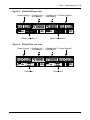
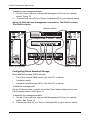
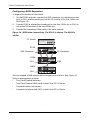
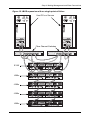
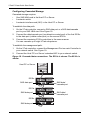
On the VTrak controller, connect a SAS data port or a SAS data/cascade
port to your SAS HBA card. See Figure 18.
2.
Connect the data/cascade port (a subtractive-routed port) of the first E310s
to the data port (a table-routed port) on the second E310s.
3.
Connect the remaining E310s controllers in the same manner.
You can cascade up to eight VTrak subsystems.
To establish the management path:
1.
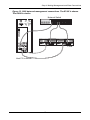
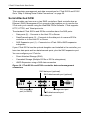
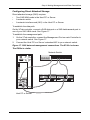
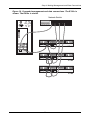
On the VTrak controller, connect the Management Port on each Controller to
your network switch. See Figure 19.
2.
Connect the Host PC’s or Server’s standard NIC to your network switch.
Figure 18. Cascaded data connections. The E310s is shown. The E610s is
similar
Host PC or Server
I
O
E310s
Mgmt
SAS data port
I
Mgmt
SAS data port
UPS
115200
8N1
I
O
E310s
SAS data/
cascade port
O
E310s
UPS
115200
8N1
Mgmt
SAS data port
UPS
115200
8N1
22
SAS data/
cascade port