1
TLP 700TV Front Panel Features
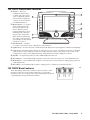
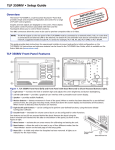
e Buttons — These ten
backlit push-buttons (five
on either side of the screen)
can be configured, with the
Extron Global Configurator
software, to control common
user‑defined functions.
8
5
9
f Motion Sensor — is capped
with a small Fresnel lens
that focuses light onto the
sensor. When no motion
has been detected for a userdefined period of time, the
unit goes into sleep mode.
When motion is detected in
the vicinity of the panel, the
screen display is restored and
all buttons are active.
10
11
6
12
7
13
g Encoder Knob — intended
for volume control but it can be configured for other functions.
h Light Sensor — monitors the level of ambient light and adjusts the screen brightness and button backlighting.
i LCD screen — The 800 x 480 resolution LCD screen has a touch overlay. A graphic user interface is designed
using the Extron GUI Configurator software to display buttons, images or text on the screen. These can be
configured for a range of user‑defined functions, using the Extron Global Configurator software.
j Speaker — A single 2 W speaker provides audible feedback for the user.
k Reset buttons — recessed behind the faceplate. It allows the unit to be reset in any of four different modes.
l Menu button — recessed behind the faceplate. It activates the on‑screen menus for setting up the panel and
calibrating the unit.
m Reset LED — recessed behind the faceplate.
It lights green as an indicator for the Reset modes.
TLP 700TV Base Features
C
Gain
Vid / Y
Gain
Sharp
33-1814-01 A
Three adjustable potentiometers in the base that are used to control
sharpness, and gain for both S-video luminance (Y), and S-video
chrominance (C). If a composite video signal is being used, the gain is
controlled by the center potentiometer (Vid/Y).
TLP 700TV Cable Cubby • Setup Guide
3