1
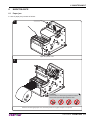
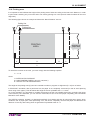
OEM
USER MANUAL
KPM150H
Commands manual:
77200000000800
CUSTOM ENGINEERING S.p.A.
Str. Berettine 2
43010 Fontevivo (PARMA) - Italy
Tel. : +39 0521-680111
Fax : +39 0521-610701
http: www.custom.biz
Customer Service Department:
Email : [email protected]
© 2013 CUSTOM ENGINEERING S.p.A.
– Italy. All rights reserved. Total or partial
reproduction of this manual in whatever
form, whether by printed or electronic
means, is forbidden. While guaranteeing
that the information contained in it has
been carefully checked, CUSTOM ENGINEERING S.p.A. and other entities utilized
in the realization of this manual bear no
responsibility for how the manual is used.
Information regarding any errors found in it
or suggestions on how it could be improved
are appreciated. Since products are subject to continuous check and improvement,
CUSTOM ENGINEERING S.p.A. reserves
the right to make changes in information
contained in this manual without prior
notification.
The pre-installed multimedia contents
are protected from Copyright CUSTOM
ENGINEERING S.p.A. Other company
and product names mentioned herein
may be trademarks of their respective
companies. Mention of third-party products
is for informational purposes only and
constitutes neither an endorsement nor a
recommendation. CUSTOM ENGINEERING S.p.A. assumes no responsibility with
regard to the performance or use of these
products.
THE IMAGES USED IN THIS MAN-
GENERAL SAFETY INFORMATION
Your attention is drawn to the following
actions that could compromise the characteristics of the product:
• Read and retain the instructions which
follow.
• Follow all indications and instructions
given on the device.
• Make sure that the surface on which
the device rests is stable. If it is not, the
device could fall, seriously damaging it.
• Make sure that the device rests on a hard
(non-padded) surface and that there is
sufficient ventilation.
• When positioning the device, make sure
cables do not get damaged.
• Use the type of electrical power supply
indicated on the device label. If uncertain, contact your dealer.
• Make sure the electrical system that
supplies power to the device is equipped
with a ground wire and is protected by a
differential switch.
• Do not block the ventilation openings.
• Do not insert objects inside the device as
this could cause short-circuiting or damage components that could jeopardize
printer functioning.
• Do not carry out repairs on the device
yourself, except for the normal maintenance operations given in the user
manual.
• Make sure that there is an easily-accessible outlet with a capacity of no less
than 10A closely to where the device is
to be installed.
• Periodically perform scheduled maintenance on the device to avoid dirt build-up
that could compromise the correct, safe
operation of the unit.
• Before any type of work is done on the
machine, disconnect the power supply.
• Do not touch the head heating line with
bare hands or metal objects. Do not
perform any operation inside the printer
immediately after printing because the
head and motor tend to become very
hot.
UAL ARE USED AS AN ILLUSTRATIVE EXAMPLES. THEY COULDN’T
REPRODUCE THE DESCRIBED
MODEL FAITHFULLY.
UNLESS OTHERWISE SPECIFIED,
THE INFORMATION GIVEN IN THIS
MANUAL
ARE REFERRED TO ALL MODELS
IN PRODUCTION AT THE ISSUE
DATE OF THIS DOCUMENT.
GENERAL INSTRUCTIONS
CUSTOM ENGINEERING S.p.A. declines
all responsibility for accidents or damage
to persons or property occurring as a result of tampering, structural or functional
modifications, unsuitable or incorrect installations, environments not in keeping
with the equipment’s protection degree or
with the required temperature and humidity
conditions, failure to carry out maintenance
and periodical inspections and poor repair
work.
THE CE MARK AFFIXED TO
THE PRODUCT CERTIFY
THAT THE PRODUCT SATISFIES THE BASIC SAFETY
REQUIREMENTS.
The device is in conformity with the essential Electromagnetic Compatibility and
Electric Safety requirements laid down in
Directives 2006/95/CE and 2004/108/CE
inasmuch as it was designed in conformity
with the provisions laid down in the following Standards:
• EN 55022 Class B (Limits and methods
of measurements of radio disturbance
characteristics of Information Technology Equipment)
• EN 55024 (Information Technology
Equipment – Immunity characteristics –
Limits and methods of measurement)
• EN 60950-1 (Safety of information
equipment including electrical business
equipment)
GUIDELINES FOR
THE DISPOSAL OF
THE PRODUCT
The crossed-out rubbish bin logo means
that used electrical and electronic products
shall NOT be mixed with unsorted municipal waste. For more detailed information
about recycling of this product, refer to the
instructions of your country for the disposal
of these products.
• Do not dispose of this equipment as
miscellaneous solid municipal waste, but
arrange to have it collected separately.
• The re-use or correct recycling of the
electronic and electrical equipment
(EEE) is important in order to protect
the environment and the wellbeing of
humans.
• In accordance with European Directive
WEEE 2002/96/EC, special collection
points are available to which to deliver
waste electrical and electronic equipment and the equipment can also be
handed over to a distributor at the moment of purchasing a new equivalent
type.
• The public administration and producers
of electrical and electronic equipment
are involved in facilitating the processes
of the re-use and recovery of waste electrical and electronic equipment through
the organisation of collection activities
and the use of appropriate planning arrangements.
• Unauthorised disposal of waste electrical
and electronic equipment is punishable
by law with the appropriate penalties.
The format used for this manual improves use of natural resources reducing the quantity of necessary paper to print this
copy.
TABLE OF CONTENTS
INDEX
1 INTRODUCTION .................................................................................................................................................... 7
1.1 Document structure ...................................................................................................................................... 7
1.2 Explanatory notes used in this manual ........................................................................................................ 7
2 DESCRIPTION ....................................................................................................................................................... 9
2.1 Unpacking the device ................................................................................................................................... 9
2.2 Device components: external views ........................................................................................................... 10
2.3 Device components: internal view.............................................................................................................. 12
2.4 Keys functions: power up ........................................................................................................................... 13
2.5 Keys functions: standby ............................................................................................................................. 14
2.6 Status led flashes ....................................................................................................................................... 15
3 INSTALLATION.................................................................................................................................................... 17
3.1 Fastening ................................................................................................................................................... 17
3.2 Additional near paper end sensor .............................................................................................................. 18
3.3 Connections ............................................................................................................................................... 20
3.4 Pinout ......................................................................................................................................................... 21
3.5 Driver.......................................................................................................................................................... 23
4 OPERATION ........................................................................................................................................................ 25
4.1 Adjusting paper width ................................................................................................................................. 25
4.2 Adjusting notch sensor position ................................................................................................................. 26
4.3 Paper roll insertion ..................................................................................................................................... 28
5 CONFIGURATION ............................................................................................................................................... 31
5.1 Configuration mode .................................................................................................................................... 31
5.2 Setup report ............................................................................................................................................... 33
5.3 Printer status .............................................................................................................................................. 34
5.4 Printer parameters ..................................................................................................................................... 35
5.5 Hexadecimal dump .................................................................................................................................... 39
5.6 Calendar clock ........................................................................................................................................... 40
6 MAINTENANCE ................................................................................................................................................... 41
6.1 Paper jam ................................................................................................................................................... 41
6.2 Planning of cleaning operations ................................................................................................................. 43
6.3 Cleaning ..................................................................................................................................................... 44
6.4 Firmware upgrade ...................................................................................................................................... 50
7 SPECIFICATIONS................................................................................................................................................ 53
7.1 Hardware specifications ............................................................................................................................. 53
7.2 Character specifications ............................................................................................................................. 55
7.3 Specifications for RFID reader/writer ......................................................................................................... 55
7.4 Printer dimensions ..................................................................................................................................... 56
7.5 Power supply dimensions cod. 963GE020000003 (optional) .................................................................... 57
7.6 Specifications for ticket with notch ............................................................................................................. 58
7.7 Specifications for ticket with labels............................................................................................................. 59
7.8 Specifications for ticket with hole ............................................................................................................... 59
7.9 Specifications for ticket with RFID Tag (for models with RFID reader) ...................................................... 60
7.10 Character sets in ESC/POS™ emulation ................................................................................................... 61
7.11 Character sets in SVELTA emulation ......................................................................................................... 68
8 CONSUMABLES ................................................................................................................................................. 69
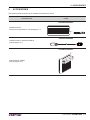
9 ACCESSORIES ................................................................................................................................................... 71
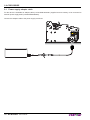
9.1 Power supply adapter cable ....................................................................................................................... 72
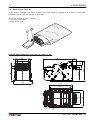
9.2 Stop device ticket kit .................................................................................................................................. 73
User manual
KPM150H 5
TABLE OF CONTENTS
10 ALIGNMENT ........................................................................................................................................................ 75
10.1 Enable alignment ....................................................................................................................................... 76
10.2 Calibration .................................................................................................................................................. 79
10.3 Alignment parameters ................................................................................................................................ 81
10.4 Printing area ............................................................................................................................................... 85
11 TECHNICAL SERVICE ........................................................................................................................................ 87
12 ADVANCED FUNCTIONS ................................................................................................................................... 89
12.1 File sharing................................................................................................................................................. 89
12.2 Drivers installation ...................................................................................................................................... 90
12.3 Logos management ................................................................................................................................... 91
12.4 Fonts management .................................................................................................................................... 92
12.5 Setup .......................................................................................................................................................... 93
6 KPM150H
User manual
1. INTRODUCTION
1
INTRODUCTION
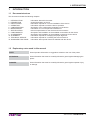
1.1 Document structure
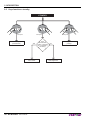
This document includes the following chapters:
1
2
3
4
5
6
7
8
9
10
11
12
INTRODUCTION
DESCRIPTION
INSTALLATION
OPERATION
CONFIGURATION
MAINTENANCE
SPECIFICATION
CONSUMABLES
ACCESSORIES
ALIGNMENT
TECHNICAL SERVICE
ADVANCED FUNCTIONS
information about this document
general description of device
information required for a correct installation of the device
information required to make the device operative
description of the configuration parameters of the device
information for a correct periodic maintenance
technical specification for the device and its accessories
description and installation of the available consumables for the device
description and installation of the available accessories for the device
information required for managing the paper alignment
information required for contacting the technical service
information about special functions available with the device
1.2 Explanatory notes used in this manual
NOTE:
Gives important information or suggestions relative to the use of the printer.
ATTENTION:
Gives information that must be carefully followed to guard against damaging the
printer.
DANGER:
Gives information that must be carefully followed to guard against operator injury
or damage.
User manual
KPM150H 7
1. INTRODUCTION
8 KPM150H
User manual
2. DESCRIPTION
2
DESCRIPTION
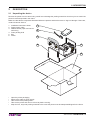
2.1 Unpacking the device
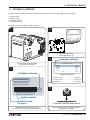
Remove the printer from its carton being careful not to damage the packing material so that it may be re-used if the
printer is to be transported in the future.
Make sure that all the components illustrated below are present and that there are no signs of damage. If there are,
contact Customer Service.
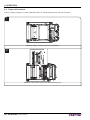
1. Installation instructions sheet
2. Power supply cable
3. Additional near paper end sensor
with wiring
4. Foam packing shell
5. Box
6. Printer
1
2
3
6
4
TUS
STA
FF
LF
AR
NE D
EN
PA
PE
R
5
•
•
•
•
•
Open the printer packaging
Remove the cable of power supply.
Take out the foam packing shell.
Take out the printer and remove it from its plastic covering.
Keep the box, trays and packing materials in the event the printer must be transported/shipped in the future.
User manual
KPM150H 9
2. DESCRIPTION
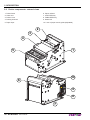
2.2 Device components: external views
1. Printer frame
6. Paper outfeed
2. Cutter unit
7. LINE FEED key
3. Printer cover
8. FORM FEED key
4. Printing head set
9. Status led
5. Paper input
10. Lever of paper mouth guide (adjustable)
2
3
4
1
5
10
6
US
STAT
9
FF
LF
NEA
END
7
10 KPM150H
User manual
R
ER
PA P
8
2. DESCRIPTION
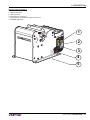
External view connectors
1. RS232 connector
2. USB connector
3. Power Supply connector
4. Connector for external near paper end sensor
5. SD/MMC (optional)
1
US
STAT
2
FF
3
LF
NEA
END
R PA
PER
4
5
User manual
KPM150H 11
2. DESCRIPTION
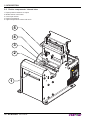
2.3 Device components: internal view
1. Paper presence sensors on output
2. Mobile sensor notch lower
3. Cover open sensor
4. Paper out presence
5. Upper transparence sensor and notch
5
4
3
2
TUS
STA
1
FF
LF
P
PA
AR
NNE D
E
12 KPM150H
User manual
ER
2. DESCRIPTION
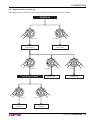
2.4 Keys functions: power up
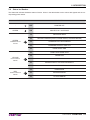
The following figures show the functions of device’s keys according to the operating condition.
POWER UP
LF
FF
LF
Hold down
Hold down
print the
SETUP report
LF
perform the
FONT TEST
FF
LF
Fast push
FF
Fast push
modify
parameter
FF
Fast push
skip the
SETUP mode
enter the SETUP MODE
LF
FF
LF
LF
FF
Fast push
enter the
Clock SETUP
FF
Fast push
next
parameter
User manual
KPM150H 13
2. DESCRIPTION
2.5 Keys functions: standby
STANDBY
LF
FF
LF
Fast push
Advance the paper
(manual feed)
User manual
LF
Fast push
YES
printing
demo ticket
14 KPM150H
FF
Is the
“Notch/B.Mark
Position” parameter
set on “Disabled”?
(see Setup)
FF
Fast push
NO
perform the
ticket alignment
Logos
printing
2. DESCRIPTION
2.6 Status led flashes
The Status led indicates hardware status of device. Given in the table below are the various led signals and the corresponding printer status.
STATUS LED
DESCRIPTION
-
OFF
PRINTER OFF
GREEN
ON
PRINTER ON : NO ERROR
1x
RECEIVING DATA
2x
RECEIPT ERRORS (PARITY, FRAME ERROR, OVERRUN ERROR)
3x
COMMAND NOT RECOGNIZED
4x
COMMAND RECEIPT TIME OUT
5x
NEAR PAPER END
2x
PRINT HEAD OVER HEAT
3x
PAPER END
4x
PEPER JAM
5x
POWER SUPPLY VOLTAGE INCORRECT
6x
COVER OPEN
3x
RAM ERROR
4x
EEPROM ERROR
5x
CUTTER ERROR
GREEN
COMMUNICATION
STATUS
YELLOW
RECOVERABLE
ERROR
RED
UNRECOVERABLE
ERROR
User manual
KPM150H 15
2. DESCRIPTION
16 KPM150H
User manual
3. INSTALLATION
3
INSTALLATION
3.1 Fastening
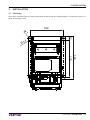
The printer is provided with four fixing holes placed on lateral side (see following figure). To fasten the printer on a
panel, use four M3 screws
102
Ø
7
13
Ø
3,7
140
120
User manual
KPM150H 17
3. INSTALLATION
3.2 Additional near paper end sensor
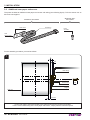
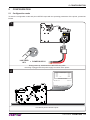
The printer includes an additional near paper end sensor with wiring (see following figure). To fix the sensor use an
M3 screw not supplied.
MATERIAL NOT
INCLUDED
MATERIAL INCLUDED
NPE sensor
NPE wiring
Fixing
screw M3
NPE
sensor board
For the assembly procedure, proceed as follows:
1
B
A
NPE wiring
Spacer
NPE sensor
NPE sensor board
Support
Paper roll
1÷10 mm
Fix the near paper end sensor board to the support using an M3 screw not included.
For the correct functioning of the near paper end sensor, comply with the measures specif
18 KPM150H
User manual
A+B
3. INSTALLATION
2
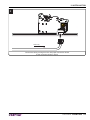
NPE wiring
Connect the wiring coming from the near paper end sensor board
at the connector shown in figure
User manual
KPM150H 19
3. INSTALLATION
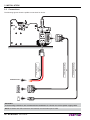
3.3 Connections
USB standard cable
Serial standard cable
Power Supply cable
(supplied)
The following figures show the pollible connections for device.
POWER SUPPLY
RS232
USB
WARNING:
In some using conditions, we recommend the installation of a ferrite core on the power supply cable.
NOTE: If RS232 and USB connectors are inserted, communication port is USB.
20 KPM150H
User manual
3. INSTALLATION
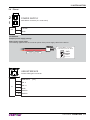
3.4 Pinout
2
1
POWER SUPPLY
Male Molex connector (no. 39-28-1023)
1 +24 Vdc
J13
2 GND
ATTENTION:
Respect power supply polarity.
Note: Power supply cable
The following figure shows the connector pinout of the power supply cable for the device:
Female Molex connector
series 5557 (no.39-01-3022)
Power supply cable
GND
+24 V
4
3
USB INTERFACE
Female USB type B connector
1
2
1 USB-VBUS
(out)
2 PD -0
J1
3 PD +0
4 GND
SH1 SHIELD
SH2 SHIELD
User manual
KPM150H 21
3. INSTALLATION
6
1
9
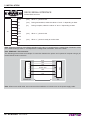
RS232 SERIAL INTERFACE
Female DB9 connector
5
1 DTR
(out)
When “1”, printer is fed.
2 TX
(out)
During transmission, takes the values “0” and “1” depending on data.
3 RX
(in)
During reception, takes the values “0” and “1” depending on data.
(out)
When “1”, printer is fed.
(out)
When “1”, printer is ready to receive data
4 n.c.
J3
5 GND
6 DTR
7 CTS
8 RTS
9 n.c.
Note: Given the presence of the RS232 standard, logic value “0” corresponds to a voltage level of between +3Vdc
and +15Vdc and logic value “1” corresponds to a voltage level of between -3Vdc and -15Vdc.
1
2
3
4
5
6
7
8
9
PRINTER
DCD
RXD
TXD
SIGNAL GND
DSR
CTS
1
2
3
4
5
6
7
8
9
DB9
DB9
Note: KPM150H > PC connection
The following picture shows an example of connection between the printer and a personal computer using 9 pin
female RS232 serial connectors:
PC
Note: When use a serial cable, we recommend the installation of a ferrite core on the power supply cable.
22 KPM150H
User manual
3. INSTALLATION
3.5 Driver
The drivers are available for the following operating system:
OPERATING SYSTEM
INSTALLATION PROCEDURE
Windows XP
Windows VISTA (32/64bit)
From the START menu, press Enter and key-in the path where the SW was
saved on your PC, then click OK. Follow the instructions that appear on the
screen to install the driver.
Windows 7 (32/64bit)
All drivers can be found in the DOWNLOAD section of the web site www.custom.biz.
User manual
KPM150H 23
3. INSTALLATION
24 KPM150H
User manual
4. OPERATION
4
OPERATION
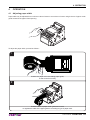
4.1 Adjusting paper width
Paper width may be adjusted from a minimum value of 20mm to a maximum of 54mm using the lever of paper mouth
guide located at the paper infeed opening.
To adjust the paper width, proceed as follows :
1
Position the paper roll in the loading paper guide,
so that it unrolls correctly.
2
Press the lever of paper mouth guide and move it
to regulate the width of the paper guide in according to type of paper used.
User manual
KPM150H 25
4. OPERATION
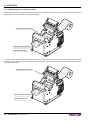
4.2 Adjusting notch sensor position
Printer is provided with a mobile sensor for the detection of alignment notch placed on the non-heat sensitive side of
paper (lower sensor) as shown in the following figure.
MOBILE SENSOR FOR NOTCH
TUS
STA
dir
e
pap of ction
er f
eed
FF
LF
PA
AR
NNE D
E
R
PE
NON-HEAT SENSITIVE SIDE
HEAT SENSITIVE SIDE
In addition, the printer is equipped with another sensor for alignment notch placed on the heat sensitive side of paper
(located upper than the plane of the paper inside the printer). This sensor is positioned on the upper flat under the
print head and is fixed.
UPPER SENSOR FOR NOTCH
TUS
STA
dir
e
pap of ction
er f
eed
FF
LF
P
PA
AR
NNE D
E
NON- HEAT SENSITIVE SIDE
HEAT SENSITIVE SIDE
26 KPM150H
User manual
ER
4. OPERATION
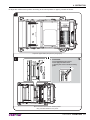
To adjust the mobile sensor position according to the notch position on paper, proceed as follows:
1
Adjust the paper width (see previous paragraphs).
2
ATTENTION:
To avoid damaging the sensor,
not to apply too much force
in moving the sensor inside its sliding
guide.
Move the lower sensor to the desired position
using a small screwdriver or a pencil.
User manual
KPM150H 27
4. OPERATION
4.3 Paper roll insertion
At every change of paper roll, check inside the printer. To change the paper roll, proceed as follows:
1
Adjust the paper width (see previous paragraphs).
2
Adjust the notch sensor position as described in par.4.2.
28 KPM150H
User manual
4. OPERATION
3
ATTENTION:
Make sure the cut is straight.
Position the paper roll, so that it unrolls correctly as shown in figure.
4
VROOM
Insert the paper into the paper infeed opening and wait for it to load automatically.
User manual
KPM150H 29
4. OPERATION
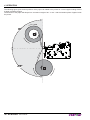
The following figure gives the limit positions of the paper roll related to the printer for a correct paper loading without
a paper roll holder support.
The direction of the paper will always form a maximum angle of 90 ° or -90 ° with the insertion plane of paper inside
the printer.
90°
-90°
30 KPM150H
User manual
5. CONFIGURATION
5
CONFIGURATION
5.1 Configuration mode
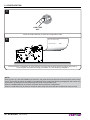
To enter the configuration mode and print a SETUP report with the operating parameters of the printer, proceed as
follows.
1
LF
FF
LINE FEED
+ POWER SUPPLY
KEY
During power-up, hold down the LINE FEED key while
the wiring is plugged into the power supply connector of the printer.
2
KPM150-H printer
SCODE:................................................ ...... <code>
BCODE:................................................ ...... <code>
FCODE: ................................................ ...... <code>
DCODE: ............................................... ...... <code>
UCODE: ............................................... ...... <code>
.................... CPLD .............................. ...... rel 1.00
PRINTER SETTINGS
PRINTER TYPE ................................KPM150-H
Barcode Reader ................................Not present
RFID Module .....................................Not present
PRINTING HEAD TYPE ....................SHECT56
INTERFACE ......................................RS232
PROGRAM MEMORY TEST.............OK
OK
DYNAMIC RAM TEST
EST....
...........
..............O
...OK
K
The device prints a SETUP report.
User manual
KPM150H 31
5. CONFIGURATION
3
LF
FF
LINE FEED
KEY
Press the LINE FEED key to enter the configuration mode.
4
[LF] enter Printer Setup
[FF] exit Setup
Printer Emulation .......... : ESC/POS
S (TM))
Proceed with the configuration by using the keys according the functions printed on paper (see par.2.3).
For description and values of setup parameters, see the following paragraphs.
NOTE:
During power-up, if the LINE FEED key is held down, the printer enters the auto-test routine and prints out the setup
report. The printer will remain in standby in Hexadecimal dump mode (see following paragraphs) until another key
is pressed or characters are received through the printer communication port.
When the FORM FEED key is pressed, the printer enters parameter configuration.
When the LINE FEED key is pressed, the printer exits setup and terminates the Hexadecimal dump function.
32 KPM150H
User manual
5. CONFIGURATION
5.2 Setup report
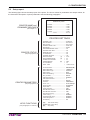
The following figure shows the setup report of the printer. The shown values for parameters are sample values; for
the list and the description of printer parameters see the following paragraphs.
KPM150-H printer
PRINTER NAME and
FIRMWARE RELEASE
(see chapter 11)
SCODE:.................................... .....<code>
BCODE:.................................... .....<code>
FCODE: .................................... .....<code>
DCODE: ................................... .....<code>
UCODE: ................................... .....<code>
................ CPLD ...................... .....rel 1.00
PRINTER SETTINGS
PRINTER STATUS
(see paragraph 5.3)
PRINTER PARAMETERS
(see paragraph 5.4)
KEYS FUNCTIONS
(see paragraphs 2.4 and 2.5)
PRINTER TYPE ............................................ KPM150-H
Barcode Reader ............................................ Not Present
RFID module ................................................. Not Present
PRINTING HEAD TYPE ................................ SHEC T56
INTERFACE .................................................. RS232
PROGRAM MEMORY TEST......................... OK
DYNAMIC RAM TEST................................... OK
EEPROM TEST............................................. OK
CUTTER TEST.............................................. OK
PRINTER HEAD Rav .................................... 700
HEAD VOLTAGE
[V]
= 24.15
HEAD TEMPERATURE
[°C]
= 22
POWER ON COUNTER
= 24
PAPER PRINTED
[cm]
= 2580
CUT COUNTER
= 38
DATE - TIME
= 17/02/12 09:30
Printer Emulation ......................................:
RS232 Baud Rate ....................................:
RS232 Data Length ..................................:
RS232 Parity ............................................:
RS232 Handshaking ................................:
Busy Condition .........................................:
USB Mass Storage ...................................:
USB Address Number ..............................:
Print Mode ................................................:
Autofeed ...................................................:
Chars / inch ..............................................:
Speed / Quality.........................................:
Paper Width..............................................:
Paper Threshold .......................................:
Notch/B.Mark Position ..............................:
Notch/B.Mark Threshold...........................:
Notch Distance [mm] ................................:
Ticket Locking...........................................:
PaperEnd Buffer Clear .............................:
Ticket Management ..................................:
Print Density.............................................:
ESC/POS (TM)
115200 bps
8 bits/chr
None
Xon/Xoff
RxFull
Disabled
0
Normal
CR Disabled
A=15 B=20 cpi
High Speed
54 mm
40%
Bottom
40%
+18.0
Disabled
Disabled
Disabled
0%
[LF]
enter Printer Setup
[LF+FF] enter Clock Setup
[FF]
skip Setup
User manual
KPM150H 33
5. CONFIGURATION
5.3 Printer status
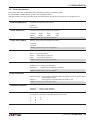
Printer operating status is indicated in the configuration print-out in which, next to the name of the components displayed, the following information is given:
PRINTER TYPE
is given the device model.
Barcode Reader
is given the presence of the barcode reader.
RFID module
is given the presence of the RFID reader/writer.
PRINTING HEAD TYPE
is given the printing head model.
INTERFACE
is given the interface present.
PROGRAM MEMORY TEST
the message OK appears if functioning and NOT OK if faulty.
DYNAMIC RAM TEST
the message OK appears if functioning and NOT OK if faulty.
EEPROM TEST
the message OK appears if functioning and NOT OK if faulty.
CUTTER TEST
the message OK appears if functioning and NOT OK if faulty.
PRINTER HEAD Rav
is given the resistance of a dot head.
HEAD VOLTAGE
is given the voltage of the head.
HEAD TEMPERATURE
is given the temperature of the head.
POWER ON COUNTER
is given the number of power-ups made.
PAPER PRINTED
is given the number of centimeters of paper printed.
CUT COUNTER
is given the number of cuts made.
DATE - TIME
is given the date / time of the device.
34 KPM150H
User manual
5. CONFIGURATION
5.4 Printer parameters
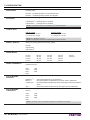
This printer allows the configuration of the parameters listed in the following table.
The parameters marked with the symbol D are the default values.
Settings remain active even after the printer has been turned off and they are stored in non-volatile memory.
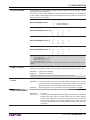
PRINTER EMULATION
Available emulations for the device:
SVELTA D
ESC/POS™
RS232 BAUD RATE
Communication speed of the serial interface:
115200 D
57600
38400
19200
9600
4800
2400
1200
NOTE: Parameter valid only with serial interface.
RS232 DATA LENGTH
Number of bit used for characters encoding:
7 bits/car
8 bits/car D
NOTE: Parameter valid only with serial interface.
RS232 PARITY
Bit for the parity control of the serial interface:
None D = parity bit omitted
Even = even value for parity bit
Odd =
odd value for parity bit
NOTE: Parameter valid only with serial interface.
RS232 HANDSHAKING
Handshaking:
XON/XOFF D = software handshaking
Hardware =
hardware handshaking (CTS/RTS)
NOTE: Parameter valid only with serial interface.
BUSY CONDITION
Activation mode for Busy signal:
OffLine/ RXFull = Busy signal is activated when the printer is both in OffLine status
and the buffer is full
Busy signal is activated when the buffer is full
RXFull D =
NOTE: Parameter valid only with serial interface.
USB MASS STORAGE
Sharing mode from Mass Storage:
Disabled D = sharing mode disabled
Enabled =
sharing mode enabled
USB ADDRESS NUMBER Numerical address code for the univocal identification of the USB device (in case of
more than a USB device connected with the same PC):
0D
1
2
3
4
5
6
7
8
9
User manual
KPM150H 35
5. CONFIGURATION
Printing mode:
PRINT MODE
Normal D = enables printing in normal writing way
Reverse = enables printing rotated 180 degrees
Setting of the Carriage Return character:
AUTOFEED
CR disabled D = Carriage Return disabled
CR enabled = Carriage Return enabled
NOTE: The parameter is printed only withESC/POSTM emulation enabled.
Font selection:
CHARS / INCH
200 dpi model
A = 11 cpi, B = 15 cpi D
A = 15 cpi, B = 20 cpi
300 dpi model
A = 16 cpi, B = 23 cpi
A = 23 cpi, B = 30 cpi
NOTE: CPI = Characters Per Inch
NOTE: The parameter is printed only withESC/POSTM emulation enabled.
SPEED / QUALITY
Setting of printing speed and printing quality:
Normal
High Quality
High Speed D
Width of printing area:
PAPER WIDTH
20 mm
22 mm
24 mm
26 mm
PAPER THRESHOLD
44 mm
46 mm
48 mm
50 mm
52 mm
54 mm D
70%
80%
90%
Position of the notch alignment and choice of appropriate notch sensor:
Disabled D =
Bottom =
Trasparent =
Top =
NOTCH/B.MARK
THRESHOLD
36 mm
38 mm
40 mm
42 mm
Threshold value (in percent) for the recognition of the presence of paper by the paper
presence sensor:
30%
40% D
50%
60%
NOTCH/B.MARK
POSITION
28 mm
30 mm
32 mm
34 mm
the notch alignment is not performed
the notch position is detected by the lower sensor (reflection)
the notch position is detected by sensors both upper and lower (transparence)
the notch position is detected by the upper sensor (reflection)
Threshold value (in percent) for the recognition of the presence of notch by the notch
sensor:
30%
40% D
50%
60%
70%
80%
90%
NOTE: If the “Notch Position” parameter is disabled, this parameter is not printed.
36 KPM150H
User manual
5. CONFIGURATION
NOTCH DISTANCE
“Notch Distance” is the minimum distance (in mm) between the upper edge of ticket
and the notch (see chapter 10).
The numeric value of the distance is made up with the following four parameters
for the setting of three digits (two for the integer part of the number and one for the
decimal part) and of the sign:
Sign setting:
NOTCH DISTANCE SIGN
+ D = positive distance
-=
negative distance
Setting the digit for tens:
NOTCH DISTANCE [mm x 10] 0 D
1
2
3
4
5
6
7
8
9
Setting the digit for units:
NOTCH DISTANCE [mm x 1]
0D
1
2
3
4
5
6
7
8
9
Setting the digit for decimals:
NOTCH DISTANCE [mm x .1]
0D
1
2
3
4
5
6
7
8
9
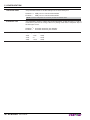
NOTE: For example, to set the notch distance to 15 mm, modify the parameters as follows:
Notch Distance Sign
=+
Notch Distance [mm x 10] = 1
Notch Distance [mm x 1] = 5
Notch Distance [mm x .1] = 0
NOTE: If the “Notch Position” parameter is disabled, the parameters for the “Notch Distance” are not
printed.
TICKET LOCKING
This parameter enables/disables the block of the paper inside the device where the
ticket is not cut with the cutter, but is presented for the manual tear off by the user:
Disabled D = paper block disabled
Enabled =
paper block enabled
NOTE: If the “Notch Position” parameter is disabled, the parameter is not printed.
PAPEREND BUFFER
CLEAR
TICKET MANAGEMENT
Cleaning mode of the data in receive buffer, if the printing is stopped due to lack of paper:
Disabled D = The data remain in the receive buffer. When the paper runs out, the
printer keeps the remaining data in the receive buffer and prints the
remaining portion of the ticket after that the new paper is loaded.
Enabled = When the paper runs out, all data in the receive buffer are deleted.
This parameter allows the ticket management:
Disabled D = no check
Short Label = it is possible to manage labels with length smaller than the distance
between the notch sensor and the printing line; the device always
performs the alignment to the next ticket and does not execute the
paper recovery after cut even if set by Windows driver. After cut paper
recovery management can be set by Windows driver or by $1C $C1
command.
User manual
KPM150H 37
5. CONFIGURATION
USB Virtual COM
This parameter allows to set the USB port as a virtual serial port:
Disabled D = USB port as a virtual serial disabled
Enabled =
USB port as a virtual serial enabled
NOTE: To use this configuration it is necessary to install an additional driver.
AutoDetect Jam
This parameter allows to detect the regular alternation of label and gap, in order to
avoid serious jams due to curling of the roll or peeling of the labels. The printer stops if
the alarm jam occurs.
Disabled D = automatic detection jam disabled
Enabled =
automatic detection jam enabled
PRINT DENSITY
Adjusting the printing density:
-50%
-37%
-25%
38 KPM150H
User manual
-12%
0D
+12%
+25%
+37%
+50%
5. CONFIGURATION
5.5 Hexadecimal dump
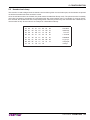
This function is used to diagnose the characters received through the communication port; the characters are printed
out both as hexadecimal codes and ASCII codes.
Once the self-test routine has finished, the printer enters Hexadecimal Dump mode. The printer remains in standby
until a key is pressed or characters are received through the communication port. For example, for every 8 characters received, the hexadecimal and corresponding ASCII codes are printed out (if the characters are underlined, the
receive buffer is full). Shown below is an example of a Hexadecimal Dump:
48
65
61
64
65
63
69
Hexadeci
6D 61
6C 20
64
75
6D 70
mal dump
20
75
63
74
69
66
78
6E
6F
functio
6E
20
30
31
32
33
34
35
n 012345
36
37
38
39
61
62
63
64
6789abcd
65
66
67
68
69
6A
6B
6C
efghijkl
6D 6E
6F
70
71
72
73
74
mnopqrst
75
77
78
79
7A
76
uvwxyz
User manual
KPM150H 39
5. CONFIGURATION
5.6 Calendar clock
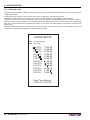
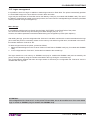
The printer is equipped with a Real Time Clock. During power-up, held down the LINE FEED key to enter in the printer
configuration mode.
Pressing both the LF and FF keys to enter in the clock configuration (see following figure).
Pressing the LINE FEED key to modify date / time; the printer will be print the upated the date and time.
Follow the instructions printed on the paper for the key functionality. The highlighted digit (the number is written in
negative mode) indicates the digit to be modified. Pressing LINE FEED key to modify the value of the highlighted
digit; every single LINE FEED key pressure increases of 1 his value. Once the value 9 is reached the counting starts
again from 0.
Pressing FORM FEED key to move the cursor on the next digit; if the cursor position is on the latest digit you can
proceed to next parameter pressing the FORM FEED key again.
CLOCK SETUP
[LF] to modify date/time
[FF] to next field
01/01/12
01/01/12
01/01/12
01/01/12
01/01/12
01/01/12
01/01/12
01/01/12
01/01/12
01/01/12
01/01/12
01/01/12
12:00:00
12:00:00
12:00:00
12:00:00
12:00:00
12:00:00
12:00:00
12:00:00
12:00:00
12:00:00
12:00:00
12:00:00
Date Time Setting :
01/01/12 12:00:00
40 KPM150H
User manual
6. MAINTENANCE
6
MAINTENANCE
6.1 Paper jam
In case of paper jam proceed as follows:
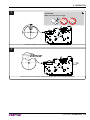
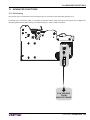
1
Open the printer cover.
2
ATTENTION:
Do not let water or other liquids get inside the machine.
Do not insert any kind of object inside the cutter.
Remove the damaged paper and check the presence for paper scraps in the printer.
User manual
KPM150H 41
6. MAINTENANCE
3
Remove the paper from the paper infeed.
4
Close the printer cover and insert a not damaged paper roll
following instructions of “Changing the paper roll” paragraph (see previous paragraphs).
42 KPM150H
User manual
6. MAINTENANCE
6.2 Planning of cleaning operations
The regular cleaning of the device keeps the print quality and extends its life. The following table shows the recommended planning for the cleaning operations.
EVERY PAPER CHANGE
Printing head
Use isopropyl alcohol
Printing roll
Use isopropyl alcohol
EVERY 5 PAPER CHANGES *
Cutter
Paper path
Use compressed air
Use compressed air or tweezers
Sensors
Use compressed air
EVERY 6 MONTHS OR AS NEEDED *
Case
Use compressed air or a soft cloth
For specific procedures, see the following pages.
NOTE:
If you use the device in dusty environments, you must reduce the intervals between the cleaning operations.
User manual
KPM150H 43
6. MAINTENANCE
6.3 Cleaning
For periodic cleaning of the printer, see the instructions below.
PRINTING HEAD
3
ISOPROPYL ALCOHOL
1
Disconnect the power supply cable.
2
TUS
STA
FF
LF
AP
RP
ER
A
NNE D
E
ATTENTION:
Do not use solvents, or hard brushes.
Do not let water or other liquids get inside the machine.
ON
Clean the printing head by using
a non-abrasive cloth moistened with isopropyl.
ATTENTION:
Do not touch the head heating line with bare hands or
metal objects.
Do not perform any operation inside the printer immediately after printing because the head and motor tend to
become very hot.
Open the printer cover
to the vertical up position.
44 KPM150H
User manual
6. MAINTENANCE
CUTTER
3
1
Disconnect the power supply cable.
2
ATTENTION:
Do not use alcohol, solvents, or hard brushes.
Do not let water or other liquids get inside the machine.
ON
Alcohol,
cohol, solvent
solve
Clean the cutter
by using compressed air.
ATTENTION:
Do not touch the head heating line with bare hands or
metal objects.
Do not perform any operation inside the printer immediately after printing because the head and motor tend to
become very hot.
Open the printer cover
to the vertical up position.
User manual
KPM150H 45
6. MAINTENANCE
PRINTING ROLL
3
1
ISOPROPYL ALCOHOL
Disconnect the power supply cable.
2
ATTENTION:
Do not use solvents, or hard brushes.
Do not let water or other liquids get inside the machine.
ON
Clean the printing roll by using
a non-abrasive cloth moistened with isopropyl.
ATTENTION:
Do not touch the head heating line with bare hands or
metal objects.
Do not perform any operation inside the printer immediately after printing because the head and motor tend to
become very hot.
Open the printer cover
to the vertical up position.
46 KPM150H
User manual
6. MAINTENANCE
SENSORS
3
1
Disconnect the power supply cable.
2
TUS
STA
FF
LF
P
PA
AR
NNE D
E
ER
ATTENTION:
Do not use alcohol, solvents, or hard brushes.
Do not let water or other liquids get inside the machine.
ON
Alcohol,
cohol, solvent
solve
Clean the printer sensors
by using compressed air.
ATTENTION:
Do not touch the head heating line with bare hands or
metal objects.
Do not perform any operation inside the printer immediately after printing because the head and motor tend to
become very hot.
Open the printer cover
to the vertical up position.
User manual
KPM150H 47
6. MAINTENANCE
PAPER PATH
3
1
Disconnect the power supply cable.
2
ATTENTION:
Do not use alcohol, solvents, or hard brushes.
Do not let water or other liquids get inside the machine.
Alcohol,
cohol, solvent
solve
ON
Clean the area involved in the passage of paper
by using compressed air.
ATTENTION:
Do not touch the head heating line with bare hands or
metal objects.
Do not perform any operation inside the printer immediately after printing because the head and motor tend to
become very hot.
Open the printer cover
to the vertical up position.
48 KPM150H
User manual
6. MAINTENANCE
CASE
1
Disconnect the power supply cable.
2
US
STAT
FF
LF
N EA
EN D
PE
R PA
R
ATTENTION:
Do not use alcohol, solvents, or hard brushes.
Do not let water or other liquids get inside the machine.
Alcohol,
cohol, solvent
solve
ON
To clean the device,
use compressed air or a soft cloth.
User manual
KPM150H 49
6. MAINTENANCE
6.4 Firmware upgrade
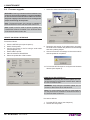
7. Select the serial communication port (ex. COM1):
WARNING: During communication between PC/
printer for the firmware update it is strictly forbidden
to disconnect the communication cable or to remove
the power supply of the devices not to endanger the
proper functioning of the printer.
Note: The latest firmware of the printer is available in
the download area of the web site www.custom.biz.
Note: Install on the PC used for printer upgrading the
UPGCEPRN software available in the download area
of the web site www.custom.biz.
C:\KPM150H.PSW
UPDATE VIA SERIAL INTERFACE
Proceed as follows:
1. Print the SETUP report (see chapter 5).
2. Switch off the printer.
3. Connect the printer to the PC using a serial cable
(see paragraph 3.2).
4. Switch ON the printer.
5. Start the software UPGCEPRN.
6. Select the update file .PSW location :
8. Detecting and setting of the parameters necessary
for serial communication are performed automatically
and then updating begins.
9. After a few minutes a message on the screen warns
that the update is completed.
10. Print a new SETUP report to verify the new firmware
release (see chapter 5).
UPDATE VIA USB INTERFACE
WARNING: Only during the firmware update, the connection between PC and printer must be direct, without
the use of wireless HUB.
WARNING: Only during the firmware update, do not
connect or disconnect other USB devices.
Note: For communication via USB you must install on
PC the printer driver available in the download area of
the web site www.custom.biz.
Proceed as follows:
1. Print the SETUP report (see chapter 5).
2. Switch OFF the printer.
50 KPM150H
User manual
6. MAINTENANCE
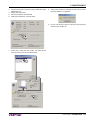
3. Connect the printer to the PC using a USB cable (see
paragraph 3.3).
4. Switch ON the printer.
5. Start the software UPGCEPRN.
6. Select the update file .PSW location :
8. After a few minutes a message on the screen warns
that the update is completed.
9. Print a new SETUP report to verify the new firmware
release (see chapter 5).
7. Select item USB and then select the USB device
among those proposed (ex.KPM150H):
Custom KPM150H
Custom KPM150H
C:\KPM150H.PSW
C:\VKP80III.PSW
User manual
KPM150H 51
6. MAINTENANCE
52 KPM150H
User manual
7. SPECIFICATIONS
7
SPECIFICATIONS
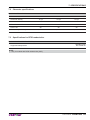
7.1 Hardware specifications
GENERAL
Sensors
Ticket presence, head temperature, notch detector in 3 positions,
translucent gap/hole detector (setting by software),
ticket presence on output, cover open, external near paper end.
MTBF (1)
89 165 hours
Noise level
68,5 dB
Emulations
ESC/POSTM, SVELTA
Printing Driver
Windows XP, VISTA (32/64bit), Windows 7 (32/64bit)
INTERFACES
USB connector
RS232 serial connector
12 Mbit/sec
from 1200 to 115 200 bps
MEMORIES
Receive buffer
64 Kbytes
Flash memory
32 Mbytes
Graphic memory
Memory Card SD/MMC (2)
Logos dynamic management (max 2MB graphic memory)
Capacity = max 2 Gbytes
PRINTER
Resolution
Printing method
Head life (3)
Printing mode
Printing format
203 dpi (8 dot/mm)
Thermal, fixed head (8 dot/mm)
100 Km / 100M pulses
Normal, 90°, 180°, 270°
Height/Width from 1 to 8, bold, reverse, underlined, italic
Character font
ESC/POSTM emulation
PC437, PC850, PC860, PC863, PC865, PC858 (euro), 2 TrueType fonts (4)
Character font (5)
ESC/POS™ emulation
PC437, GB2312, 2 TrueType fonts (4)
(models with simplified chinese font)
Character font (5)
ESC/POS™ emulation
PC437, BIG5, 2 TrueType fonts (4)
(models with traditional chinese font)
Character font (5)
ESC/POS™ emulation
PC437, GB18030-2000, 2 TrueType fonts (4)
(models with extended chinese font)
Character font
SVELTA emulation
20 embedded fonts and 2 TrueType fonts (4)
Printable Barcode
UPCA, UPCE, EAN13, EAN8, CODE39, ITF, CODABAR, CODE93,
CODE128, CODE32, PDF417, DATAMATRIX, AZTEC, QRCODE
Printing speed (3) (6)
High quality = 80 mm/sec
Normal = 117 mm/sec
High speed = 167 mm/sec
User manual
KPM150H 53
7. SPECIFICATIONS
PAPER
Thermal rolls, heat-sensitive side on outside of roll
Fan Fold thermal paper with notch
Type of paper
from 20mm to 54mm (2mm step)
54mm (according to IATA BTP specifications - resolution 740)
Paper width
from 80 g/m2 to 180 g/m2
Paper weight
Recommended paper
KANZAN KPO 460 and KP415
MITSUBISHI TL1767 and TL4000
External roll diameter (7)
max Ø200 mm
Internal roll core diameter
min 50 mm (+1 mm)
Core thickness
2 mm (+1 mm)
Paper end
Not attached to roll core
Core type
Cardboard or plastic
60 mm
Minimum ticket length (8)
CUTTER
Paper cut
Total
Estimated life (3)
1 000 000 cutter number
KPM150H ELECTRICAL SPECIFICATIONS
Power supply
24 Vdc ± 10%
Medium consumption (6)
0,9 A
Standby consumption
0,09 A
POWER SUPPLY ELECTRICAL SPECIFICATIONS (cod.963GE020000003 - OPTIONAL)
Power supply voltage
Frequence
from 90 Vac to 264 Vac
from 47 Hz to 63 Hz
Current (output)
2,5 A
Power
60 W
ENVIRONMENTAL CONDITIONS
Operating temperature
Relative humidity
from 0°C to 50°C
from 10% to 85% (w/o condensation)
Storage temperature
Storage humidity
from -20°C to +70°C
from 10% to 90%
NOTES
(1)
: Electronic board.
(2)
: Only for printer models equipped with SD/MMC.
(3)
: Respecting the regular schedule of cleaning for the device components.
(4)
: “Veramono.ttf” and “Mono.ttf” are installed on printer flash disk. It is possible to install additional TrueType fonts
(see par. FONT MANAGEMENT).
(5)
: For further information refer to the command manual for managing chinese fonts.
(6)
: Referred to a standard CUSTOM receipt (L=10cm, Density = 12,5% dots on).
(7)
: For external rolls diameter higher to Ø100mm it’s recommended to use a paper pretensioning device.
(8)
: Referred to model without stop device ticket. With this accessory installed is 75 mm.
54 KPM150H
User manual
7. SPECIFICATIONS
7.2 Character specifications
ESC/POSTM EMULATION
Character set
Character density
3
11 cpi
15 cpi
20 cpi
35
45
64
Chars / sec
2900
3800
5300
Lines / sec
83
83
83
2,25 x 3
1,75 x 3
1,25 x 3
Number of columns
Characters (L x H mm)-Normal
7.3 Specifications for RFID reader/writer
TRANSPONDER SPECIFICATIONS (1)
IATA RP1740C
ISO 18000-6C
Supported transponders
NOTE
(1)
: Only for models with RFID reader/writer (UHF).
User manual
KPM150H 55
7. SPECIFICATIONS
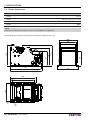
7.4 Printer dimensions
MECHANICAL SPECIFICATIONS
Length
171 mm
Height
122 mm (with printer cover closed)
Width
114 mm
Weight
1850 g
NOTE
Referred to model without paper roll and in the STANDARD configuration.
The following figure shows the dimensions of the printer (dimensions in mm).
171
175,5
140
120
102
13
7
Ø
3,7
Ø
56 KPM150H
User manual
86
119
84
105
122
99,5
88
114
7. SPECIFICATIONS
7.5 Power supply dimensions cod. 963GE020000003 (optional)
Length
127 mm
Height
35,5 mm
56 mm
35,5
Width
AC INLET
56
N.C
2 1
3
GND
+24V
127
DC OUTPUT WIRE
User manual
KPM150H 57
7. SPECIFICATIONS
7.6 Specifications for ticket with notch
PAPER WITH ALIGNMENT NOTCH ON THE NON-HEAT SENSITIVE SIDE
The following figure shows a sample paper with alignment notch placed on the non-heat sensitive side of paper.
The notch can be positioned anywhere across the width of the paper, because the notch detector is a mobile sensor.
7mm
14 mm
L
NON-HEAT SENSITIVE SIDE
5 mm
D1 = 40mm
Notch
Sensor axis
Paper axis
L = represents the paper width used (from 20mm to 54 mm);
D1 = indicates the notch to notch distance
PAPER WITH ALIGNMENT NOTCH ON THE HEAT SENSITIVE SIDE
The following figure shows a sample paper with alignment notch placed on the heat sensitive side of paper. This
sample paper is for the printer models with the upper notch detector
D1 = 40mm
Notch
Sensor axis
Paper axis
7mm
L
14 mm
5 mm
HEAT SENSITIVE SIDE
L = represents the paper width used (from 20mm to 54 mm);
D1 = indicates the notch to notch distance
•
The printer automatically choice the sensor used to detect the paper presence according to the selected notch
sensor.
58 KPM150H
User manual
7. SPECIFICATIONS
7.7 Specifications for ticket with labels
Paper with labels is managed by setting the “Ticket Management” parameter to “Short Label” value (see chapter 10).
The following figure shows an example of paper with labels:
C
B
A
D
PRINTING DIRECTION
Edge used for notch alignment
Ticket margin
where
D = width of paper used (from 20mm to 54mm).
A = space between two labels (A ≥ 3mm)
B = distance from the edge (B ≤ 2mm)
C = the minimum managed length = 40mm (C ≥ 40mm).
7.8 Specifications for ticket with hole
The printer manages tickets with lateral gap. Set the “Notch position” parameter (see printer setup) with “Transparent”
value for print and cut the ticket. The following figure shows an example for ticket with lateral gap.
Sensor axis
Side hole
3
3
7
PRINTING DIRECTION
Ticket margin
where
L = width of paper used (from 20mm to 54mm).
H = minimum height of hole (2mm)
D = minimum width of hole (10mm)
NOTE: The valid format of the ticket is ISO size 54 x 85mm
User manual
KPM150H 59
7. SPECIFICATIONS
7.9 Specifications for ticket with RFID Tag (for models with RFID reader)
The printer models equiped with RFID reader, manages ticket with RFID Tag. RFID (acronym for Radio Frequency
IDentification) is a technology to identify automatically items using radio waves; this system is based on wireless data
capture from RFID tag using appropriate readers. The RFID tag, or transponder, is made up of :
• the microchip that stores the data (including also a unique serial number written);
• an RFID antenna.
Under the paper guide an RFID transceiver module is mounted, provided with antenna, that allows to send and receive RF data to and from the tag. For this application the ticket dimensions are not binding but for good reading is
important that the tag inside the ticket, after alignment, intersects the antenna area. The following figure shows the
antenna’s area and its position under the paper guide in the RFID printer model.
83mm
44mm
Printing line
3
Placement of
Antenna for RFID
module
42,8mm
60 KPM150H
User manual
6,7
7. SPECIFICATIONS
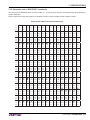
7.10 Character sets in ESC/POS™ emulation
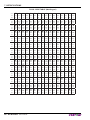
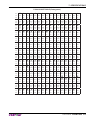
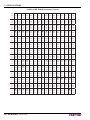
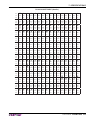
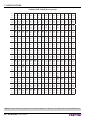
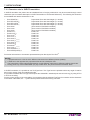
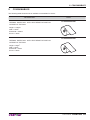
The printer has 3 embedded fonts of varying width: 11, 15, 20 cpi which may be accessed through programming or
control characters.
Each of these fonts offers the following code tables: PC437, PC850, PC860, PC863, PC865, PC858.
PC437 CODE TABLE (Usa, Standard Europe)
Char
SP
!
“
#
$
%
&
‘
(
)
*
+
,
-
.
/
Hex
0020
0021
0022
0023
0024
0025
0026
0027
0028
0029
002A
002B
002C
002D
002E
002F
Dec
32
33
34
35
36
37
38
39
40
41
42
43
44
45
46
47
Char
0
1
2
3
4
5
6
7
8
9
:
;
<
=
>
?
Hex
0030
0031
0032
0033
0034
0035
0036
0037
0038
0039
003A
003B
003C
003D
003E
003F
Dec
48
49
50
51
52
53
54
55
56
57
58
59
60
61
62
63
Char
@
A
B
C
D
E
F
G
H
I
J
K
L
M
N
O
Hex
0040
0041
0042
0043
0044
0045
0046
0047
0048
0049
004A
004B
004C
004D
004E
004F
Dec
64
65
66
67
68
69
70
71
72
73
74
75
76
77
78
79
Char
P
Q
R
S
T
U
V
W
X
Y
Z
[
\
]
^
_
Hex
0050
0051
0052
0053
0054
0055
0056
0057
0058
0059
005A
005B
005C
005D
005E
005F
Dec
80
81
82
83
84
85
86
87
88
89
90
91
92
93
94
95
Char
`
a
b
c
d
e
f
g
h
i
j
k
l
m
n
o
Hex
0060
0061
0062
0063
0064
0065
0066
0067
0068
0069
006A
006B
006C
006D
006E
006F
Dec
96
97
98
99
100
101
102
103
104
105
106
107
108
109
110
111
Char
p
q
r
s
t
u
v
w
x
y
z
{
|
}
~
⌂
Hex
0070
0071
0072
0073
0074
0075
0076
0077
0078
0079
007A
007B
007C
007D
007E
007F
Dec
112
113
114
115
116
117
118
119
120
121
122
123
124
125
126
127
Char
Ç
ü
é
â
ä
à
å
ç
ê
ë
è
ï
î
ì
Ä
Å
Hex
0080
0081
0082
0083
0084
0085
0086
0087
0088
0089
008A
008B
008C
008D
008E
008F
Dec
128
129
130
131
132
133
134
135
136
137
138
139
140
141
142
143
Char
É
æ
Æ
ô
ö
ò
û
ù
ÿ
Ö
Ü
¢
£
¥
₧
ƒ
Hex
0090
0091
0092
0093
0094
0095
0096
0097
0098
0099
009A
009B
009C
009D
009E
009F
Dec
144
145
146
147
148
149
150
151
152
153
154
155
156
157
158
159
Char
á
í
ó
ú
ñ
Ñ
ª
º
¿
⌐
¬
½
¼
¡
«
»
Hex
00A0
00A1
00A2
00A3
00A4
00A5
00A6
00A7
00A8
00A9
00AA
00AB
00AC
00AD
00AE
00AF
Dec
160
161
162
163
164
165
166
167
168
169
170
171
172
173
174
175
Char
░
▒
▓
│
┤
╡
╢
╖
╕
╣
║
╗
╝
╜
╛
┐
Hex
00B0
00B1
00B2
00B3
00B4
00B5
00B6
00B7
00B8
00B9
00BA
00BB
00BC
00BD
00BE
00BF
Dec
176
177
178
179
180
181
182
183
184
185
186
187
188
189
190
191
Char
└
┴
┬
├
─
┼
╞
╟
╚
╔
╩
╦
╠
═
╬
╧
Hex
00C0
00C1
00C2
00C3
00C4
00C5
00C6
00C7
00C8
00C9
00CA
00CB
00CC
00CD
00CE
00CF
Dec
192
193
194
195
196
197
198
199
200
201
202
203
204
205
206
207
Char
╨
╤
╥
╙
╘
╒
╓
╫
╪
┘
┌
█
▄
▌
▐
▀
Hex
00D0
00D1
00D2
00D3
00D4
00D5
00D6
00D7
00D8
00D9
00DA
00DB
00DC
00DD
00DE
00DF
Dec
208
209
210
211
212
213
214
215
216
217
218
219
220
221
222
223
Char
α
ß
Γ
π
Σ
σ
μ
τ
Φ
Θ
Ω
δ
∞
φ
ε
∩
Hex
00E0
00E1
00E2
00E3
00E4
00E5
00E6
00E7
00E8
00E9
00EA
00EB
00EC
00ED
00EE
00EF
Dec
224
225
226
227
228
229
230
231
232
233
234
235
236
237
238
239
Char
≡
±
≥
≤
⌠
⌡
÷
≈
°
∙
·
√
ⁿ
²
■
NBSP
Hex
00F0
00F1
00F2
00F3
00F4
00F5
00F6
00F7
00F8
00F9
00FA
00FB
00FC
00FD
00FE
00FF
Dec
240
241
242
243
244
245
246
247
248
249
250
251
252
253
251
255
User manual
KPM150H 61
7. SPECIFICATIONS
PC850 CODE TABLE (Multilingual)
Char
SP
!
“
#
$
%
&
‘
(
)
*
+
,
-
.
/
Hex
0020
0021
0022
0023
0024
0025
0026
0027
0028
0029
002A
002B
002C
002D
002E
002F
Dec
32
33
34
35
36
37
38
39
40
41
42
43
44
45
46
47
Char
0
1
2
3
4
5
6
7
8
9
:
;
<
=
>
?
Hex
0030
0031
0032
0033
0034
0035
0036
0037
0038
0039
003A
003B
003C
003D
003E
003F
Dec
48
49
50
51
52
53
54
55
56
57
58
59
60
61
62
63
Char
@
A
B
C
D
E
F
G
H
I
J
K
L
M
N
O
Hex
0040
0041
0042
0043
0044
0045
0046
0047
0048
0049
004A
004B
004C
004D
004E
004F
Dec
64
65
66
67
68
69
70
71
72
73
74
75
76
77
78
79
Char
P
Q
R
S
T
U
V
W
X
Y
Z
[
\
]
^
_
Hex
0050
0051
0052
0053
0054
0055
0056
0057
0058
0059
005A
005B
005C
005D
005E
005F
Dec
80
81
82
83
84
85
86
87
88
89
90
91
92
93
94
95
Char
`
a
b
c
d
e
f
g
h
i
j
k
l
m
n
o
Hex
0060
0061
0062
0063
0064
0065
0066
0067
0068
0069
006A
006B
006C
006D
006E
006F
Dec
96
97
98
99
100
101
102
103
104
105
106
107
108
109
110
111
Char
p
q
r
s
t
u
v
w
x
y
z
{
|
}
~
⌂
Hex
0070
0071
0072
0073
0074
0075
0076
0077
0078
0079
007A
007B
007C
007D
007E
007F
Dec
112
113
114
115
116
117
118
119
120
121
122
123
124
125
126
127
Char
Ç
ü
é
â
ä
à
å
ç
ê
ë
è
ï
î
ì
Ä
Å
Hex
0080
0081
0082
0083
0084
0085
0086
0087
0088
0089
008A
008B
008C
008D
008E
008F
Dec
128
129
130
131
132
133
134
135
136
137
138
139
140
141
142
143
Char
É
æ
Æ
ô
ö
ò
û
ù
ÿ
Ö
Ü
ø
£
Ø
×
ƒ
Hex
0090
0091
0092
0093
0094
0095
0096
0097
0098
0099
009A
009B
009C
009D
009E
009F
Dec
144
145
146
147
148
149
150
151
152
153
154
155
156
157
158
159
Char
á
í
ó
ú
ñ
Ñ
ª
º
¿
®
¬
½
¼
¡
«
»
Hex
00A0
00A1
00A2
00A3
00A4
00A5
00A6
00A7
00A8
00A9
00AA
00AB
00AC
00AD
00AE
00AF
Dec
160
161
162
163
164
165
166
167
168
169
170
171
172
173
174
175
Char
░
▒
▓
│
┤
Á
Â
À
©
╣
║
╗
╝
¢
¥
┐
Hex
00B0
00B1
00B2
00B3
00B4
00B5
00B6
00B7
00B8
00B9
00BA
00BB
00BC
00BD
00BE
00BF
Dec
176
177
178
179
180
181
182
183
184
185
186
187
188
189
190
191
Char
└
┴
┬
├
─
┼
ã
Ã
╚
╔
╩
╦
╠
═
╬
¤
Hex
00C0
00C1
00C2
00C3
00C4
00C5
00C6
00C7
00C8
00C9
00CA
00CB
00CC
00CD
00CE
00CF
Dec
192
193
194
195
196
197
198
199
200
201
202
203
204
205
206
207
Char
ð
Ð
Ê
Ë
È
ı
Í
Î
Ï
┘
┌
█
▄
¦
Ì
▀
Hex
00D0
00D1
00D2
00D3
00D4
00D5
00D6
00D7
00D8
00D9
00DA
00DB
00DC
00DD
00DE
00DF
Dec
208
209
210
211
212
213
214
215
216
217
218
219
220
221
222
223
Char
Ó
ß
Ô
Ò
õ
Õ
μ
þ
Þ
Ú
Û
Ù
ý
Ý
¯
´
Hex
00E0
00E1
00E2
00E3
00E4
00E5
00E6
00E7
00E8
00E9
00EA
00EB
00EC
00ED
00EE
00EF
Dec
224
225
226
227
228
229
230
231
232
233
234
235
236
237
238
239
Char
SHY
±
‗
¾
¶
§
÷
¸
°
¨
·
¹
³
²
■
NBSP
Hex
00F0
00F1
00F2
00F3
00F4
00F5
00F6
00F7
00F8
00F9
00FA
00FB
00FC
00FD
00FE
00FF
Dec
240
241
242
243
244
245
246
247
248
249
250
251
252
253
251
255
62 KPM150H
User manual
7. SPECIFICATIONS
PC860 CODE TABLE (Portuguese)
Char
SP
!
“
#
$
%
&
‘
(
)
*
+
,
-
.
/
Hex
0020
0021
0022
0023
0024
0025
0026
0027
0028
0029
002A
002B
002C
002D
002E
002F
Dec
32
33
34
35
36
37
38
39
40
41
42
43
44
45
46
47
Char
0
1
2
3
4
5
6
7
8
9
:
;
<
=
>
?
Hex
0030
0031
0032
0033
0034
0035
0036
0037
0038
0039
003A
003B
003C
003D
003E
003F
Dec
48
49
50
51
52
53
54
55
56
57
58
59
60
61
62
63
Char
@
A
B
C
D
E
F
G
H
I
J
K
L
M
N
O
Hex
0040
0041
0042
0043
0044
0045
0046
0047
0048
0049
004A
004B
004C
004D
004E
004F
Dec
64
65
66
67
68
69
70
71
72
73
74
75
76
77
78
79
Char
P
Q
R
S
T
U
V
W
X
Y
Z
[
\
]
^
_
Hex
0050
0051
0052
0053
0054
0055
0056
0057
0058
0059
005A
005B
005C
005D
005E
005F
Dec
80
81
82
83
84
85
86
87
88
89
90
91
92
93
94
95
Char
`
a
b
c
d
e
f
g
h
i
j
k
l
m
n
o
Hex
0060
0061
0062
0063
0064
0065
0066
0067
0068
0069
006A
006B
006C
006D
006E
006F
Dec
96
97
98
99
100
101
102
103
104
105
106
107
108
109
110
111
Char
p
q
r
s
t
u
v
w
x
y
z
{
|
}
~
⌂
Hex
0070
0071
0072
0073
0074
0075
0076
0077
0078
0079
007A
007B
007C
007D
007E
007F
Dec
112
113
114
115
116
117
118
119
120
121
122
123
124
125
126
127
Char
Ç
ü
é
â
ã
à
Á
ç
ê
Ê
è
Í
Ô
ì
Ã
Â
Hex
0080
0081
0082
0083
0084
0085
0086
0087
0088
0089
008A
008B
008C
008D
008E
008F
Dec
128
129
130
131
132
133
134
135
136
137
138
139
140
141
142
143
Char
É
À
È
ô
ö
ò
Ú
ù
Ì
Õ
Ü
¢
£
Ù
₧
Ó
Hex
0090
0091
0092
0093
0094
0095
0096
0097
0098
0099
009A
009B
009C
009D
009E
009F
Dec
144
145
146
147
148
149
150
151
152
153
154
155
156
157
158
159
Char
á
í
ó
ú
ñ
Ñ
ª
º
¿
Ò
¬
½
¼
¡
«
»
Hex
00A0
00A1
00A2
00A3
00A4
00A5
00A6
00A7
00A8
00A9
00AA
00AB
00AC
00AD
00AE
00AF
Dec
160
161
162
163
164
165
166
167
168
169
170
171
172
173
174
175
Char
░
▒
▓
│
┤
╡
╢
╖
╕
╣
║
╗
╝
╜
╛
┐
Hex
00B0
00B1
00B2
00B3
00B4
00B5
00B6
00B7
00B8
00B9
00BA
00BB
00BC
00BD
00BE
00BF
Dec
176
177
178
179
180
181
182
183
184
185
186
187
188
189
190
191
Char
└
┴
┬
├
─
┼
╞
╟
╚
╔
╩
╦
╠
═
╬
╧
Hex
00C0
00C1
00C2
00C3
00C4
00C5
00C6
00C7
00C8
00C9
00CA
00CB
00CC
00CD
00CE
00CF
Dec
192
193
194
195
196
197
198
199
200
201
202
203
204
205
206
207
Char
╨
╤
╥
╙
╘
╒
╓
╫
╪
┘
┌
█
▄
▌
▐
▀
Hex
00D0
00D1
00D2
00D3
00D4
00D5
00D6
00D7
00D8
00D9
00DA
00DB
00DC
00DD
00DE
00DF
Dec
208
209
210
211
212
213
214
215
216
217
218
219
220
221
222
223
Char
α
ß
Γ
π
Σ
σ
μ
τ
Φ
Θ
Ω
δ
∞
φ
ε
∩
Hex
00E0
00E1
00E2
00E3
00E4
00E5
00E6
00E7
00E8
00E9
00EA
00EB
00EC
00ED
00EE
00EF
Dec
224
225
226
227
228
229
230
231
232
233
234
235
236
237
238
239
Char
≡
±
≥
≤
⌠
⌡
÷
≈
°
∙
·
√
ⁿ
²
■
NBSP
Hex
00F0
00F1
00F2
00F3
00F4
00F5
00F6
00F7
00F8
00F9
00FA
00FB
00FC
00FD
00FE
00FF
Dec
240
241
242
243
244
245
246
247
248
249
250
251
252
253
251
255
User manual
KPM150H 63
7. SPECIFICATIONS
PC863 CODE TABLE (Canadian, French)
Char
SP
!
“
#
$
%
&
‘
(
)
*
+
,
-
.
/
Hex
0020
0021
0022
0023
0024
0025
0026
0027
0028
0029
002A
002B
002C
002D
002E
002F
Dec
32
33
34
35
36
37
38
39
40
41
42
43
44
45
46
47
Char
0
1
2
3
4
5
6
7
8
9
:
;
<
=
>
?
Hex
0030
0031
0032
0033
0034
0035
0036
0037
0038
0039
003A
003B
003C
003D
003E
003F
Dec
48
49
50
51
52
53
54
55
56
57
58
59
60
61
62
63
Char
@
A
B
C
D
E
F
G
H
I
J
K
L
M
N
O
Hex
0040
0041
0042
0043
0044
0045
0046
0047
0048
0049
004A
004B
004C
004D
004E
004F
Dec
64
65
66
67
68
69
70
71
72
73
74
75
76
77
78
79
Char
P
Q
R
S
T
U
V
W
X
Y
Z
[
\
]
^
_
Hex
0050
0051
0052
0053
0054
0055
0056
0057
0058
0059
005A
005B
005C
005D
005E
005F
Dec
80
81
82
83
84
85
86
87
88
89
90
91
92
93
94
95
Char
`
a
b
c
d
e
f
g
h
i
j
k
l
m
n
o
Hex
0060
0061
0062
0063
0064
0065
0066
0067
0068
0069
006A
006B
006C
006D
006E
006F
Dec
96
97
98
99
100
101
102
103
104
105
106
107
108
109
110
111
Char
p
q
r
s
t
u
v
w
x
y
z
{
|
}
~
⌂
Hex
0070
0071
0072
0073
0074
0075
0076
0077
0078
0079
007A
007B
007C
007D
007E
007F
Dec
112
113
114
115
116
117
118
119
120
121
122
123
124
125
126
127
Char
Ç
ü
é
â
Â
à
¶
ç
ê
ë
è
ï
î
‗
À
§
Hex
0080
0081
0082
0083
0084
0085
0086
0087
0088
0089
008A
008B
008C
008D
008E
008F
Dec
128
129
130
131
132
133
134
135
136
137
138
139
140
141
142
143
Char
É
È
Ê
ô
Ë
Ï
û
ù
¤
Ô
Ü
¢
£
Ù
Û
ƒ
Hex
0090
0091
0092
0093
0094
0095
0096
0097
0098
0099
009A
009B
009C
009D
009E
009F
Dec
144
145
146
147
148
149
150
151
152
153
154
155
156
157
158
159
Char
¦
´
ó
ú
¨
¸
³
¯
Î
⌐
¬
½
¼
¾
«
»
Hex
00A0
00A1
00A2
00A3
00A4
00A5
00A6
00A7
00A8
00A9
00AA
00AB
00AC
00AD
00AE
00AF
Dec
160
161
162
163
164
165
166
167
168
169
170
171
172
173
174
175
Char
░
▒
▓
│
┤
╡
╢
╖
╕
╣
║
╗
╝
╜
╛
┐
Hex
00B0
00B1
00B2
00B3
00B4
00B5
00B6
00B7
00B8
00B9
00BA
00BB
00BC
00BD
00BE
00BF
Dec
176
177
178
179
180
181
182
183
184
185
186
187
188
189
190
191
Char
└
┴
┬
├
─
┼
╞
╟
╚
╔
╩
╦
╠
═
╬
╧
Hex
00C0
00C1
00C2
00C3
00C4
00C5
00C6
00C7
00C8
00C9
00CA
00CB
00CC
00CD
00CE
00CF
Dec
192
193
194
195
196
197
198
199
200
201
202
203
204
205
206
207
Char
╨
╤
╥
╙
╘
╒
╓
╫
╪
┘
┌
█
▄
▌
▐
▀
Hex
00D0
00D1
00D2
00D3
00D4
00D5
00D6
00D7
00D8
00D9
00DA
00DB
00DC
00DD
00DE
00DF
Dec
208
209
210
211
212
213
214
215
216
217
218
219
220
221
222
223
Char
α
ß
Γ
π
Σ
σ
μ
τ
Φ
Θ
Ω
δ
∞
φ
ε
∩
Hex
00E0
00E1
00E2
00E3
00E4
00E5
00E6
00E7
00E8
00E9
00EA
00EB
00EC
00ED
00EE
00EF
Dec
224
225
226
227
228
229
230
231
232
233
234
235
236
237
238
239
Char
≡
±
≥
≤
⌠
⌡
÷
≈
°
∙
·
√
ⁿ
²
■
NBSP
Hex
00F0
00F1
00F2
00F3
00F4
00F5
00F6
00F7
00F8
00F9
00FA
00FB
00FC
00FD
00FE
00FF
Dec
240
241
242
243
244
245
246
247
248
249
250
251
252
253
251
255
64 KPM150H
User manual
7. SPECIFICATIONS
PC865 CODE TABLE (Nordic)
Char
SP
!
“
#
$
%
&
‘
(
)
*
+
,
-
.
/
Hex
0020
0021
0022
0023
0024
0025
0026
0027
0028
0029
002A
002B
002C
002D
002E
002F
Dec
32
33
34
35
36
37
38
39
40
41
42
43
44
45
46
47
Char
0
1
2
3
4
5
6
7
8
9
:
;
<
=
>
?
Hex
0030
0031
0032
0033
0034
0035
0036
0037
0038
0039
003A
003B
003C
003D
003E
003F
Dec
48
49
50
51
52
53
54
55
56
57
58
59
60
61
62
63
Char
@
A
B
C
D
E
F
G
H
I
J
K
L
M
N
O
Hex
0040
0041
0042
0043
0044
0045
0046
0047
0048
0049
004A
004B
004C
004D
004E
004F
Dec
64
65
66
67
68
69
70
71
72
73
74
75
76
77
78
79
Char
P
Q
R
S
T
U
V
W
X
Y
Z
[
\
]
^
_
Hex
0050
0051
0052
0053
0054
0055
0056
0057
0058
0059
005A
005B
005C
005D
005E
005F
Dec
80
81
82
83
84
85
86
87
88
89
90
91
92
93
94
95
Char
`
a
b
c
d
e
f
g
h
i
j
k
l
m
n
o
Hex
0060
0061
0062
0063
0064
0065
0066
0067
0068
0069
006A
006B
006C
006D
006E
006F
Dec
96
97
98
99
100
101
102
103
104
105
106
107
108
109
110
111
Char
p
q
r
s
t
u
v
w
x
y
z
{
|
}
~
⌂
Hex
0070
0071
0072
0073
0074
0075
0076
0077
0078
0079
007A
007B
007C
007D
007E
007F
Dec
112
113
114
115
116
117
118
119
120
121
122
123
124
125
126
127
Char
Ç
ü
é
â
ä
à
å
ç
ê
ë
è
ï
î
ì
Ä
Å
Hex
0080
0081
0082
0083
0084
0085
0086
0087
0088
0089
008A
008B
008C
008D
008E
008F
Dec
128
129
130
131
132
133
134
135
136
137
138
139
140
141
142
143
Char
É
æ
Æ
ô
ö
ò
û
ù
ÿ
Ö
Ü
ø
£
Ø
₧
ƒ
Hex
0090
0091
0092
0093
0094
0095
0096
0097
0098
0099
009A
009B
009C
009D
009E
009F
Dec
144
145
146
147
148
149
150
151
152
153
154
155
156
157
158
159
Char
á
í
ó
ú
ñ
Ñ
ª
º
¿
⌐
¬
½
¼
¡
«
¤
Hex
00A0
00A1
00A2
00A3
00A4
00A5
00A6
00A7
00A8
00A9
00AA
00AB
00AC
00AD
00AE
00AF
Dec
160
161
162
163
164
165
166
167
168
169
170
171
172
173
174
175
Char
░
▒
▓
│
┤
╡
╢
╖
╕
╣
║
╗
╝
╜
╛
┐
Hex
00B0
00B1
00B2
00B3
00B4
00B5
00B6
00B7
00B8
00B9
00BA
00BB
00BC
00BD
00BE
00BF
Dec
176
177
178
179
180
181
182
183
184
185
186
187
188
189
190
191
Char
└
┴
┬
├
─
┼
╞
╟
╚
╔
╩
╦
╠
═
╬
╧
Hex
00C0
00C1
00C2
00C3
00C4
00C5
00C6
00C7
00C8
00C9
00CA
00CB
00CC
00CD
00CE
00CF
Dec
192
193
194
195
196
197
198
199
200
201
202
203
204
205
206
207
Char
╨
╤
╥
╙
╘
╒
╓
╫
╪
┘
┌
█
▄
▌
▐
▀
Hex
00D0
00D1
00D2
00D3
00D4
00D5
00D6
00D7
00D8
00D9
00DA
00DB
00DC
00DD
00DE
00DF
Dec
208
209
210
211
212
213
214
215
216
217
218
219
220
221
222
223
Char
α
ß
Γ
π
Σ
σ
μ
τ
Φ
Θ
Ω
δ
∞
φ
ε
∩
Hex
00E0
00E1
00E2
00E3
00E4
00E5
00E6
00E7
00E8
00E9
00EA
00EB
00EC
00ED
00EE
00EF
Dec
224
225
226
227
228
229
230
231
232
233
234
235
236
237
238
239
Char
≡
±
≥
≤
⌠
⌡
÷
≈
°
∙
·
√
ⁿ
²
■
NBSP
Hex
00F0
00F1
00F2
00F3
00F4
00F5
00F6
00F7
00F8
00F9
00FA
00FB
00FC
00FD
00FE
00FF
Dec
240
241
242
243
244
245
246
247
248
249
250
251
252
253
251
255
User manual
KPM150H 65
7. SPECIFICATIONS
PC858 CODE TABLE (Euro symbol)
Char
SP
!
“
#
$
%
&
‘
(
)
*
+
,
-
.
/
Hex
0020
0021
0022
0023
0024
0025
0026
0027
0028
0029
002A
002B
002C
002D
002E
002F
Dec
32
33
34
35
36
37
38
39
40
41
42
43
44
45
46
47
Char
0
1
2
3
4
5
6
7
8
9
:
;
<
=
>
?
Hex
0030
0031
0032
0033
0034
0035
0036
0037
0038
0039
003A
003B
003C
003D
003E
003F
Dec
48
49
50
51
52
53
54
55
56
57
58
59
60
61
62
63
Char
@
A
B
C
D
E
F
G
H
I
J
K
L
M
N
O
Hex
0040
0041
0042
0043
0044
0045
0046
0047
0048
0049
004A
004B
004C
004D
004E
004F
Dec
64
65
66
67
68
69
70
71
72
73
74
75
76
77
78
79
Char
P
Q
R
S
T
U
V
W
X
Y
Z
[
\
]
^
_
Hex
0050
0051
0052
0053
0054
0055
0056
0057
0058
0059
005A
005B
005C
005D
005E
005F
Dec
80
81
82
83
84
85
86
87
88
89
90
91
92
93
94
95
Char
`
a
b
c
d
e
f
g
h
i
j
k
l
m
n
o
Hex
0060
0061
0062
0063
0064
0065
0066
0067
0068
0069
006A
006B
006C
006D
006E
006F
Dec
96
97
98
99
100
101
102
103
104
105
106
107
108
109
110
111
Char
p
q
r
s
t
u
v
w
x
y
z
{
|
}
~
⌂
Hex
0070
0071
0072
0073
0074
0075
0076
0077
0078
0079
007A
007B
007C
007D
007E
007F
Dec
112
113
114
115
116
117
118
119
120
121
122
123
124
125
126
127
Char
Ç
ü
é
â
ä
à
å
ç
ê
ë
è
ï
î
ì
Ä
Å
Hex
0080
0081
0082
0083
0084
0085
0086
0087
0088
0089
008A
008B
008C
008D
008E
008F
Dec
128
129
130
131
132
133
134
135
136
137
138
139
140
141
142
143
Char
É
æ
Æ
ô
ö
ò
û
ù
ÿ
Ö
Ü
ø
£
Ø
×
ƒ
Hex
0090
0091
0092
0093
0094
0095
0096
0097
0098
0099
009A
009B
009C
009D
009E
009F
Dec
144
145
146
147
148
149
150
151
152
153
154
155
156
157
158
159
Char
á
í
ó
ú
ñ
Ñ
ª
º
¿
®
¬
½
¼
¡
«
»
Hex
00A0
00A1
00A2
00A3
00A4
00A5
00A6
00A7
00A8
00A9
00AA
00AB
00AC
00AD
00AE
00AF
Dec
160
161
162
163
164
165
166
167
168
169
170
171
172
173
174
175
Char
░
▒
▓
│
┤
Á
Â
À
©
╣
║
╗
╝
¢
¥
┐
Hex
00B0
00B1
00B2
00B3
00B4
00B5
00B6
00B7
00B8
00B9
00BA
00BB
00BC
00BD
00BE
00BF
Dec
176
177
178
179
180
181
182
183
184
185
186
187
188
189
190
191
Char
└
┴
┬
├
─
┼
ã
Ã
╚
╔
╩
╦
╠
═
╬
¤
Hex
00C0
00C1
00C2
00C3
00C4
00C5
00C6
00C7
00C8
00C9
00CA
00CB
00CC
00CD
00CE
00CF
Dec
192
193
194
195
196
197
198
199
200
201
202
203
204
205
206
207
Char
ð
Ð
Ê
Ë
È
€
Í
Î
Ï
┘
┌
█
▄
¦
Ì
▀
Hex
00D0
00D1
00D2
00D3
00D4
00D5
00D6
00D7
00D8
00D9
00DA
00DB
00DC
00DD
00DE
00DF
Dec
208
209
210
211
212
213
214
215
216
217
218
219
220
221
222
223
Char
Ó
ß
Ô
Ò
õ
Õ
μ
þ
Þ
Ú
Û
Ù
ý
Ý
¯
´
Hex
00E0
00E1
00E2
00E3
00E4
00E5
00E6
00E7
00E8
00E9
00EA
00EB
00EC
00ED
00EE
00EF
Dec
224
225
226
227
228
229
230
231
232
233
234
235
236
237
238
239
Char
SHY
±
‗
¾
¶
§
÷
¸
°
¨
·
¹
³
²
■
NBSP
Hex
00F0
00F1
00F2
00F3
00F4
00F5
00F6
00F7
00F8
00F9
00FA
00FB
00FC
00FD
00FE
00FF
Dec
240
241
242
243
244
245
246
247
248
249
250
251
252
253
251
255
NOTE: To print the Euro (€) symbol, the command sequence is: $1B, $74, $13, $D5 (see Command Reference).
66 KPM150H
User manual
7. SPECIFICATIONS
In ESC/POSTM emulation, it is possible to use TrueType fonts. To be used, a TrueType font must be monospace type
(every character of the font must have the same dimension). The check is made by the printer when the font is selected.
TrueType fonts will be automatically scaled by the printer in order to obtain the same available width for the embedded fonts (11, 15 and 20 cpi).
The quality of TrueType fonts and the correct positioning into the printable area will result from the font producers and
the font implementation.
The available code tables are : PC437, PC850, PC860, PC863, PC865, PC858, PC866, PC852, WPC1252.
For the correct printing of the code tables, it is necessary that the selected TrueType font contains all the characters
in the tables. Otherwise, the ‘ ’ symbol will be printed instead the missing character.
All commands for printing configuration are usable both with TrueType fonts and with embedded fonts.
It is possible to address the TrueType font respects the UNICODETM standard (see www.unicode.org), by using UTF-8
or UTF-16 encoding.
User manual
KPM150H 67
7. SPECIFICATIONS
7.11 Character sets in SVELTA emulation
In SVELTA emulation the printer has 20 embedded fonts of varying width which may be accessed through control
characters (see commands description in SVELTA emulation of Command Reference). The following list shows the
font available and relative dimensions in dot:
•
•
•
•
•
•
•
•
•
•
•
•
•
•
•
•
•
•
•
Font HEL8PT8 (A)
Font HEL10PT8 (A)
Font HEL14PT8 (A)
Font HEL16PT8 (A)
Font 18x24
Font 14x24
Font 10x24
Font 8x12 (B)
Font 8x12-2 (B)
Font 12x12 (B)
Font 14x11 (B)
Font 16x24 (B)
Font 16x24_1 (B) (C)
Font 16x24_2 (B) (C)
Font 20x15 (B)
Font 28x20 (B)
Font 14x24_1 (B) (C)
Font 16x24CN (B) (C)
Font OCRB (20x32) (B)
Proportional Font with fixed height (H = 28 dot)
Proportional Font with fixed height (H = 34 dot)
Proportional Font with fixed height (H = 50 dot)
Proportional Font with fixed height (H = 55 dot)
(Font 18x24 in ESC/POS emulation)
(Font 14x24 in ESC/POS emulation)
(Font 10x24 in ESC/POS emulation)
Fixed Font
Fixed Font
Fixed Font
Fixed Font
Fixed Font
Fixed Font
Fixed Font
Fixed Font
Fixed Font
Fixed Font
Fixed Font
Fixed Font
For further informations to characters representations print directly the Font Test(D).
NOTES:
(A)
A proportional font is a font in which different characters have different pitches (widths).
(B)
A fixed font is the opposite of a proportional font and is a fixed-pitch font.
(C)
The fonts with the same name and dimension contain different characters in different positions from theirs.
(D)
During power-up, if the FORM FEED (FF) key is held down, the printer executes the FONT TEST.
In SVELTA emulation, it is possible to use TrueType fonts. True Type fonts are printable with every angle of rotation
and in bold, reverse, italic and underlined mode.
It is possible to address the TrueType font respects the UNICODETM standard (see www.unicode.org), by using UTF-8
or UTF-16 encoding.
For the correct printing of the code tables, it is necessary that the selected TrueType font contains all the characters
in the tables. Otherwise, the ‘ ’ symbol will be printed instead the missing character.
68 KPM150H
User manual
8. CONSUMABLES
8
CONSUMABLES
The following table shows the list of available consumables for device:
DESCRIPTION
CODE
67300000000340
THERMAL PAPER ROLL WITH HEAT-SENSITIVE SIDE ON
OUTSIDE OF THE ROLL
weight = 140g/m2
width = 54mm
Ø external = 300mm
Ø core = 76mm
67300000000342
THERMAL PAPER ROLL WITH HEAT-SENSITIVE SIDE ON
OUTSIDE OF THE ROLL
weight = 78g/m2
width = 54mm
Ø external = 90mm
Ø core = 50mm
User manual
KPM150H 69
8. CONSUMABLES
70 KPM150H
User manual
9. ACCESSORIES
9
ACCESSORIES
The following table shows the list of available accessories for device:
DESCRIPTION
CODE
963GE020000003
POWER SUPPLY
(for technical specifications, see paragraph 7.1)
26900000000005
POWER SUPPLY ADAPTER CABLE
(see paragraph 9.1)
970AN010000001
STOP DEVICE TICKET
(see paragraph 9.2)
User manual
KPM150H 71
9. ACCESSORIES
9.1 Power supply adapter cable
For the device is available an adapter cable (cod.970AN010000001) supplied as an accessory to be connected to
external power supply 60W (cod 963GE020000003).
Connect the adapter cable to the power supply as follows:
72 KPM150H
User manual
9. ACCESSORIES
9.2 Stop device ticket kit
For the device is available a stop device ticket kit (cod.970AN010000001) supplied as an accessory. The kit makes
it possible to prevent that after printing the ticket falls.
The kit cod. 970AN010000001 includes:
1. Assembly instructions;
2. Stop device ticket.
2
1
PRINTER DIMENSIONS WITH STOP DEVICE TICKET (in mm)
13
175,5
23
22,2
62
86
87,8
122
7,5
13
114
140
3,7
Ø
7
Ø
102
13
75
120
User manual
KPM150H 73
9. ACCESSORIES
74 KPM150H
User manual
10. ALIGNMENT
10 ALIGNMENT
Device is provided with sensors for the use of alignment notch in order to handle:
• roll of tickets with pre-printed fields and a fixed length;
• Fan-Fold module of tickets with pre-printed fields and a fixed length.
The alignment notch may be formed by
• black mark printed on paper (see par.7.6);
• hole between two tickets (see par.7.8);
• gap between two labels (see par.7.7).
All alignment sensors are “reflection” sensors: this kind of sensor emits a band of light and detects the quantity of
light reflected to it.
The presence of the notch is therefore detected by the amount of light that returns to the sensor, considering that the
light is reflected by the white paper and absorbed by the black mark.
To use tickets with holes or labes with gap, it is possible to use the same sensors as “transparence” sensors, coupled
two by two: a beam of light is emitted by the transmitter sensor and the quantity of light which reaches the opposite
receiver sensor is detected.
The presence of the hole/gap is detected evaluating the amount of light that arrives to the opposite sensor, considering that the paper doesn’t allow the beam of light to reach the receiver, whereas a gap or a hole lets the light to reach
the receiver.
The following paragraphs show how to correctly set the configuration parameters of device in order to assure the
alignment.
User manual
KPM150H 75
10. ALIGNMENT
10.1 Enable alignment
Printer is provided with 2 alignment sensors, placed as follows:
• 1 mobile sensor on the lower flat of printer
• 1 sensor on the upper flat of printer.
To guarantee the alignment, it is necessary to correctly choose the sensor to use for the notch detection depending
on the type of notch and its location on the ticket.
To do this, you must enable the parameter “Notch/B.Mark Position” during the Setup procedure (see cap.5) and set
the correct value of this parameter as described in the following table.
SENSOR
USED
(see following
figure)
VALUE OF THE
“NOTCH/B.MARK POSITION”
PARAMETER
USING MODE
OF SENSORS
NOTCH TYPE
NOTCH POSITION ON
TICKET
-
Disabled
-
Alignment disabled
N.A.
1
Bottom
Reflection
Black mark printed on paper
Non-thermal side
2
Top
Reflection
Black mark printed on paper
Lateral thermal side
1+2
Transparent
Transparence
Hole between tickets or
gap between labels
Lateral
upper flat
2
1
lower flat
direction
of paper
feed
The following figures show the usable format of paper and the corresponding sensors used for alignment:
76 KPM150H
User manual
10. ALIGNMENT
paper with black mark on the non-thermal side of
paper
non-thermal
side
paper with black mark on the thermal side of paper
thermal
side
direction
of paper
feed
thermal
side
direction
of paper
feed
2
1
direction
of paper
feed
direction
of paper
feed
upper
flat
lower
flat
User manual
KPM150H 77
10. ALIGNMENT
tickets with hole
paper with labels
thermal
side
thermal
side
direction
of paper
feed
direction
of paper
feed
2
2
1
1
direction
of paper
feed
direction
of paper
feed
lower
flat
78 KPM150H
upper
flat
User manual
lower
flat
upper
flat
10. ALIGNMENT
10.2 Calibration
The sensor calibration occurs automatically and consists in adjusting the quantity of light emitted to match the degree
of whiteness of the paper used and the degree of black of the mark printed on paper.
The device automatically performs the self-calibration during the Setup procedure only if the “Notch/B.Mark Position”
parameter is set to a value other than “Disabled” (see cap.5).
When self-calibration starts, the device performs some paper feeds and then it prints the calibration result and the
value of the PWM duty-cicle of the alignment sensor driver so that it can be perform an optimal notch detection:
Autosetting Notch : OK
PWM Duty Cycle : 85.3%
The “Autosetting Notch” parameter indicates the result of the self-calibration procedure; OK will appear if it has been
successful, NOT OK will appear if the procedure has failed.
After the printing of the procedure result, the device offers the execution of the function of paper characterization
“Characterize Paper” and the change of the “Notch/B.Mark Threshold” parameter which represents the detection
threshold of the notch.
Choosing the “Yes” value for the “Characterize Paper” parameter, the device prints a graphic representation (see following figures) of the outgoing voltage of the alignment sensor (expressed as a percentage) and the “Notch/B.Mark
Threshold” value.
This graphic representation is useful to set the most suitable value to assign to the “Notch/B.Mark Threshold” parameter and then to better identify the optimal threshold value which takes into account the variations of the signal and
the small oscillations around zero.
The following figure shows an example of paper with the non-thermal paper printed with black marks: the outgoing
voltage is constant while passing the white paper between two notches and presents a peak at each black mark.
In this case, the optimal value for the “Notch/B.Mark Threshold” parameter is placed about half of the peak.
NON-THERMAL SIDE
peak
THERMAL SIDE
“Notch/B.Mark
Threshold”
User manual
KPM150H 79
10. ALIGNMENT
The following figure shows an example of paper with holes: the outgoing voltage is constant while passing the paper
between two holes and presents a variation at each hole.
In this case, the optimal value for the “Notch/B.Mark Threshold” parameter is placed about half of the variation.
NON-THERMAL SIDE
“Notch/B.Mark
Threshold”
variation
THERMAL SIDE
The following figure shows an example of paper with the non-thermal paper printed with black marks and other graphics (for example, a barcode): the outgoing voltage is constant while passing the white paper between two notches,
presents a peak at each black mark and presents some “noise” at each barcode.
In this case, the optimal value for the “Notch Threshold” parameter is located about halfway between the peak value
and the maximum value of the “noise”.
NON-THERMAL SIDE
peak
THERMAL SIDE
“Notch/B.Mark
Threshold”
noise
80 KPM150H
User manual
10. ALIGNMENT
If the maximum value of “noise” read by the sensor is very close to the peak value, it might be difficult to place the
value of the “Notch/B.Mark Threshold” at an intermediate point. In these cases, it is mandatory that the portion of
paper between the point of printing end and the front notch is completely white (no graphics). In this way, the only
next graphic detected by the sensor for alignment after the printing end will be the notch.
10.3 Alignment parameters
The “alignment point” is defined as the position inside the ticket to use for the notch alignment. If you use paper with
perforation (FanFold modules), the alignment point corresponds with the edge of the ticket.
The distance between the notch edge and the alignment point is defined as “Notch Distance”. Referring to the front
of the notch, the value of “Notch Distance” can be positive or negative. If the “Notch Distance” value is set to 0, the
alignment point is set at the beginning of the notch.
alignment point = notch front
alignment point
alignment point
PRINTING DIRECTION
+
0
positive values of “Notch Distance”
negative values of “Notch Distance”
The following figure shows an example of paper with alignment point set by a positive value of “Notch Distance”
(“Notch Distance” = + A):
PRINTING DIRECTION
alignment point
+A
0
notch front
User manual
KPM150H 81
10. ALIGNMENT
To set a negative value of the “Notch Distance” parameter is useful in cases where the alignment point refers to the
notch printed on the previous ticket or where the desired cutting line is placed in the middle of the alignment notch (for
example, for paper with holes or gap). In the following images, the value of “Notch Distance” parameter is set to -A.
PRINTING DIRECTION
Notch front
-A
Alignment point
0
PRINTING DIRECTION
-A
Notch front
Alignment point
0
PRINTING DIRECTION
-A
Notch front
0
Alignment point
If the notch is placed on the non-thermal side of paper, the “Notch Distance” value can have a minimum value of -5mm
(negative value) and a maximum of 66mm. This maximum value is imposed by the mechanical distance between the
lower notch sensor and the printing head.
82 KPM150H
User manual
10. ALIGNMENT
The following figure shows a section of the device with the paper path and the distances (in mm) between the alignment sensor, the printing head and the cutter (cutting line), where
A = 26.5mm = distance between the cutting line (cutter) and the printing line (head) on paper
B = 39.7mm = distance between the the printing line (head) and the alignment sensor
B
SENSOR
PRINTING HEAD
CUTTER
A
ESC/POSTM EMULATION
To define the alignment point you need to set the printer parameters that compose the numerical value of the “Notch
Distance” parameter.
For example, to set a notch distance of 15mm between the notch and the alignment point, the parameters must be
set on the following values:
Notch Distance Sign
Notch Distance [mm x 10]
Notch Distance [mm x 1]
Notch Distance [mm x .1]
:+
:1
:5
:0
The “Notch Distance” parameter, may be modified as follows:
• during the Setup procedure of the device (see cap.5)
• by modifying the Setup.ini file (see par.12.9)
• by driver (see par. 12.2)
• by using the $1D $E7 command (for more details, refer to the Commands Manual)
User manual
KPM150H 83
10. ALIGNMENT
SVELTA EMULATION
The ticket features and the alignment parameters, may be modified as follows:
• by using the parameters of the <LHT> command (for more details, refer to the Commands Manual)
• by driver (see par. 12.2)
• by modifying the Setup.ini file (see par.12.5)
The following figure shows the some of parameters for alignment of the Setup.ini file:
• “Ticket X Dimension”
• “Ticket Y Dimension”
• “Notch Width”
• “Notch Distance”
“Ticket X Dimension”
Alignment point
“Ticket Y Dimension”
NON-THERMAL SIDE
paper
axis
“Notch Width”
“Notch Width”
Notch
“Notch Distance”
84 KPM150H
“Notch Distance”
User manual
10. ALIGNMENT
10.4 Printing area
It is important to well calibrate the height of the printing area of ticket according to the inter-notch distance, in order
to print ticket containing only one notch and to not overlay printing to a notch (that will make it useless for the next
alignment).
The following figure shows an example of tickets with “Notch Distance” set to 0:
Cutting line
Printing line
PRINTING
AREA
A
H
direction of
paper feed
D
A
L
To use all the notches on the card, you must comply with the following equation:
L > H+A
where
L = INTER-NOTCH DISTANCE
A = NON-PRINTABLE AREA ( 0mm ≤ A ≤ 26,5mm )
H = HEIGHT OF THE PRINTING AREA
The height of the printing area (H) can be increased to make no progress on alignment (D = 0) but no further.
In ESC/POS™ emulation, after a performed cut, the paper is not completely recovered (in orde to avoid jamming
when using of thin paper). This decreases the height of the non-printable area : A = 10mm.
So, in this emulation, it is important to consider the presence of this non-printable area when you define the layout
of the ticket to print. Otherwise, you can use the command $1C $C1 to recover paper completely (see Commands
Manual for more details).
The SVELTA emulation, instead, it is designed specifically for ticketing and then for using with heavy paper, which
avoids the risk of paper jams. After performing a cut, the device completely recovers the paper and therefore the
distance of recovery after cutting does not generate non-printable areas: A = 0.
User manual
KPM150H 85
10. ALIGNMENT
86 KPM150H
User manual
11. TECHNICAL SERVICE
11 TECHNICAL SERVICE
In case of failure, contact the Technical Service by sending an e-mail to [email protected] detailing:
1. Product code
2. Serial number
3. Hardware release
4. Firmware release
To get the necessary data, proceed as follows:
1
3
KPM150-H printer
SCODE:................................................ ...... <code>
BCODE:................................................ ...... <code>
FCODE: ................................................ ...... <code>
DCODE: ............................................... ...... <code>
UCODE: ............................................... ...... <code>
.................... CPLD .............................. ...... rel 1.00
PRINTER SETTINGS
PRINTER TYPE ................................KPM150-H
Barcode Reader ................................Not present
RFID Module .....................................Not present
PRINTING HEAD TYPE ....................SHECT56
INTERFACE ......................................RS232
PROGRAM MEMORY TEST.............OK
OK
DYNAMIC RAM TES
EST
T....
...........
..............O
...OK
K
US
STAT
FF
LF
TA
HET
ETIC OTTO
D
PRO
N EA
EN D
PE
R PA
R
Print a Setup report
(see paragraphs 5.2).
4
Find the product label located
on the side of the printer.
firmware release
KPM150-H printer
SCODE:................................................ ...... <code>
BCODE:................................................ ...... <code>
FCODE: ................................................ ...... <code>
DCODE: ............................................... ...... <code>
UCODE: ............................................... ...... <code>
.................... CPLD .............................. ...... rel 1.00
2
hardware release
PRINTER SETTINGS
PRINTER TYPE ................................KPM150-H
Barcode Reader ................................Not present
XXXXXXXXXXXXXX
RFID Module .....................................Not p
present
xxxxxx xxx xxxx xxxx
xxxxxx xxx xxxx xxxx
The Setup report shows the firmware release.
Rx
5
0000000000000000000
serial number
product code
(14 digits)
The label shows the product code,
the serial number and the hardware release.
[email protected]
Customer Service Department
Send an e-mail to the Technical Service,
with the data collected.
User manual
KPM150H 87
11. TECHNICAL SERVICE
88 KPM150H
User manual
12. ADVANCED FUNCTIONS
12 ADVANCED FUNCTIONS
12.1 File sharing
The printers can be connected to a PC through a type of connection with USB cable (see par. 3.3).
According to the connection made, it is possible to manage drivers, fonts and logos of the printer and configure the
operating parameters by files sharing from Mass Storage, in case of USB connection.
USB
FILE SHARING
FROM
MASS STORAGE
User manual
KPM150H 89
12. ADVANCED FUNCTIONS
12.2 Drivers installation
Mass Storage
It is possible to install the new driver update directly into the folder “DRIVER” on the Flash Drive of the printer.
You can enter the Flash Drive by files sharing from Mass Storage (see par. 12.1).
However, the relative parameter should be enabled during the configuration process (see chapter 5).
90 KPM150H
User manual
12. ADVANCED FUNCTIONS
12.3 Logos management
It is possible to store new logos in addition to default logos stored on Flash Disk. The printer automatically provides
to convert BMP image to the error-diffusion format in black and white.
Logos may be stored both on Flash Disk and on the Memory Card (only for models with SD/MMC card). The use of
the Memory Card allows to handle more logos (however, the max number of manageable logos is limited by the RAM
memory reserved for logos management).
Mass Storage
It is possible to add the new logo directly into the folder “PICTURES” on the Flash Drive of the printer.
You can enter the Flash Drive by files sharing from Mass Storage (see par. 12.1).
However, the relative parameter should be enabled during the configuration process (see chapter 5).
After adding the logo, open the configuration file “PictList.ini” and add a new line with a number associated to the logo
(to be used with printer’s commands), a letter for the memory unit and the logo file name, as indicated in the instructions written inside the “PictList.ini” file.
To delete a logos stored in the printer, proceed as follows:
1. delete the selected logo from the “Pictures” folder on Flash Disk or SD/MMC card (only for models with SD/MMC
card);
2. in the configuration file “PictList.ini”, delete the line related to the erased logo.
The logos stored into a unit memory or SD/MMC card (only for models with SD/MMC card) and converted by the
printer, can be printed by using the number associated to the logo during the conversion step.
The correspondence between file-name and logo-number is warrant by the configuration file “PIctList.ini” and it is
verifiable with the logo test.
ATTENTION:
The configuration file “PictList.ini” on the printer’s Flash Disk, has to be modified even if the new added
logo is stored on SD/MMC (only for models with SD/MMC card).
User manual
KPM150H 91
12. ADVANCED FUNCTIONS
12.4 Fonts management
It is possible to store new font in addition to default fonts stored on Flash Disk. Fonts may be stored both on Flash
Disk and on the Memory Card (only for models with SD/MMC card).
The use of the Memory Card allows to handle more fonts (however, the max number of manageable fonts is limited
by the RAM memory reserved for fonts management).
Mass Storage
It is possible to add the new font directly into the folder “FONTS” on the Flash Drive of the printer.
You can enter the Flash Drive by files sharing from Mass Storage (see par. 12.1).
However, the relative parameter should be enabled during the configuration process (see chapter 5).
NOTE:
Uploading the new font directly from the “Font” folder of Microsoft® Windows® directory, remember that the displayed
font name into the “Font” folder may not match the real name of the font file.
92 KPM150H
User manual
12. ADVANCED FUNCTIONS
12.5 Setup
Mass Storage
It is possible to configure the default parameters for printer and network setup by editing the “Setup.ini” file on the
printer Flash Drive.
You can enter the Flash Drive by files sharing from Mass Storage (see par. 12.1).
However, the relative parameter should be enabled during the configuration process (see chapter 5).
After editing printer’s parameter, simply save the “Setup.ini” file to make the modifies activated.
The “Setup.ini” file is a configuration file that contains all the configurable parameters listed in text format and divided
into some sections (indicated in square brackets).
The available values for every parameter, are listed after the parameter name. The value marked with the symbol ‘ *
’ is the default one.
To modify printer’s parameters, change the numeric value after the name of parameters. To set the parameter to the
default value, change the numeric value with the symbol D.
The “Setup.ini” file permits the configuration of the following parameters:
[PRINT]
Printer Emulation:
0, 1*
0 = ESC/POSTM
1 = SVELTA
Print Mode:
0*, 1
0 = Normal
1 = Reverse
Autofeed:
0*, 1
0 = CR disabled
1 = CR enable
Chars / inch:
0, 1*
0 = A=11 B=15 cpi
1 = A=15 B=20 cpi
Speed / Quality:
0, 1, 2*
0 = High Quality
1 = Normal
Paper Width:
0*, 1, 2, 3, 4, 5, 6, 7, 8, 9, 0 = 54 mm
10, 11, 12, 13, 14, 15, 16,17 1 = 52 mm
2 = 50 mm
3 = 48 mm
4 = 46 mm
5 = 44 mm
6 = 42 mm
7 = 40 mm
8 = 38 mm
9 = 36 mm
10 = 34 mm
11 = 32 mm
12 = 30 mm
13 = 28 mm
14 = 26 mm
15 = 24 mm
16 = 22 mm
17 = 20 mm
Paper Threshold:
0, 1*, 2, 3, 4, 5, 6
0 = 30 %
1 = 40 %
2 = 50 %
3 = 60 %
4 = 70 %
5 = 80 %
6 = 90 %
Notch/B.Mark Position:
0*, 1, 2, 3
0 = Disabled
1 = Bottom
2 = Transparent
3 = Top
0 = 20 %
1 = 30 %
2 = 40 %
3 = 50 %
4 = 60 %
5 = 70 %
6 = 80 %
7 = 90 %
7 = 7 mm
8 = 8 mm
9 = 9 mm
10 = 10 mm
11 = 11 mm
12 = 12 mm
13 = 13 mm
14 = 14 mm
15 = 15 mm
16 = 16 mm
17 = 17 mm
18 = 18 mm
19 = 19 mm
20 = 20 mm
Notch/B.Mark Threshold: 0, 1, 2*, 3, 4, 5, 6, 7
2 = High Speed
Notch Distance [mm]
Notch/B.Mark Min. Width: 0*, 1, 2, 3, 4, 5, 6, 7, 8, 9, 0 = 0 mm
10, 11, 12, 13, 14, 15, 16,17,1 = 1 mm
18, 19, 20
2 = 2 mm
3 = 3 mm
4 = 4 mm
5 = 5 mm
6 = 6 mm
PaperEnd Buffer Clear:
0*, 1
0 = Disabled
1 = Enabled
User manual
KPM150H 93
12. ADVANCED FUNCTIONS
Ticket Locking:
0*, 1
0 = Disabled
1 = Enabled
Ticket Management:
0*, 1
0 = Disabled
1 = Short Label
AutoDetect Jam:
0*, 1
0 = Disabled
1 = Enabled
Print Density:
0, 1, 2, 3, 4*, 5, 6, 7, 8
0 = - 50 %
1 = - 37 %
2 = - 25 %
3 = - 12 %
4=0%
5 = + 12 %
6 = + 25 %
7 = + 37 %
8 = + 50 %
RS232 Baud Rate:
1, 2, 3, 4, 5, 6, 7, 8*
1 = 1200 bps
2 = 2400 bps
3 = 4800 bps
4 = 9600 bps
5 = 19200 bps
6 = 38400 bps
7 = 57600 bps
8 = 115200 bps
RS232 Data Length:
0*, 1
0 = 8 bits/chr
1 = 7 bits/chr
RS232 Parity:
0*, 1, 2
0 = None
1 = Even
2 = Odd
RS232 Handshaking:
0*, 1
0 = Xon/Xoff
1 = Hardware
Busy Condition:
0*, 1
0 = RxFull
1 = OffLine/RxFull
USB Mass Storage:
0*, 1
0 = Disabled
1 = Enabled
USB Virtual COM:
0*, 1
0 = Disabled
1 = Enabled
USB Address Number:
0*, 1, 2, 3, 4, 5, 6, 7, 8, 9
0=0
1=1
2=2
3=3
4=4
5=5
6=6
7=7
8=8
9=9
[INTERFACE]
[SVELTA]
Ticket X Dimension
Ticket Y Dimension
Notch Distance
Notch Width
Barcode Timeout
Ticket Offset X
Ticket Offset Y
94 KPM150H
User manual
Rev. 1.10
Part Number : 76200000001000
CUSTOM ENGINEERING S.p.A.
World Headquarters
Via Berettine, 2 - 43010 Fontevivo, Parma ITALY
Tel. +39 0521 680111 - Fax +39 0521 610701
[email protected] - www.custom.biz
All rights reserved
www.custom.biz