1
LPOD-R Outdoor Amplifier / Block Up Converter (BUC)
Optional Serial-based Remote Product Management
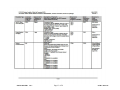
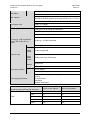
Parameter
Type
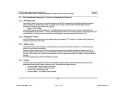
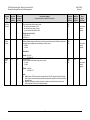
Set RTC
(Real-TimeClock) Date
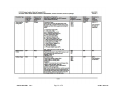
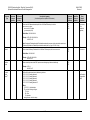
Enable
Statistics
Averaging
Command
(Instruction
Code and
Qualifier)
DAY=
ESA=
Arguments
for Command
or Response
to Query
6 bytes
1 byte
MN-LPODR
Revision 1
Description of Arguments
(Note that all arguments are printable ASCII characters)
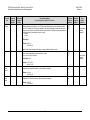
Command or Query.
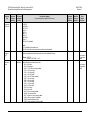
Sets or returns the date in the form ddmmyy, where:
dd = day of the month, between 01 and 31
mm = month of the year, between 01 and 12
yy = year, between 00 and 99 (2000 to 2099)
Example (date = April 24, 2013):
<1/DAY=240413’cr’
>0001/DAY=’cr’’lf’
Command or Query.
Enables or Disables averaging of statistics data at a rate of once per second for 10 seconds. If Disabled, burst values will
be logged instead of averaged values. Command/query is in the form x, where:
0 = Disable
1 = Enable
Response to
Command
(Target to
Controller)
DAY=
DAY?
DAY*
Query
(Instruction
Code and
Qualifier)
DAY?
ESA=
ESA?
ESA*
ESA?
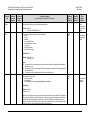
FAR=
FAR?
FAR*
FAR?
Response to
Query
(Target to
Controller)
DAY=ddmmyy
(Same format as
command
arguments)
ESA=x
(Same format as
command
arguments)
Default Value: 0
Firmware
Accept /
Reject
FAR=
1 byte
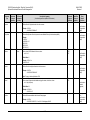
Example: <1/ESA=0’cr’
>0001/ESA=’cr’’lf’
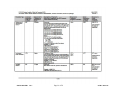
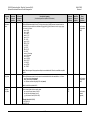
Command or Query.
Accepts or Rejects the Active firmware Image in the form x, where:
A= Accept
R= Reject
Example: <1/FAR=A’cr’
>0001/FAR=’cr’’lf’
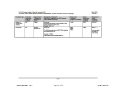
Notes:
1) Accept forces the LPOD-R to de-assert the Unaccepted Firmware Fault (UFF) generated by upload of the Pending
firmware Image to the Active firmware Image, and allows subsequent power-cycles/reboots to occur without affecting
the firmware image.
2) Reject causes the image to be erased on the next power cycle/reboot, and instructs bootmgr to wait until a new
firmware image load is FTPed into the Pending firmware Image.
5–13
FAR=x
(Same format as
command
arguments)