1
4
ScaleLink operating modes
The ScaleLink has 2 modes of operation, Auto Connect and
Direct Connect.
4.1 Auto connect mode
Auto Connect is the default operation mode. ScaleLink
functions are simplified and optimized for connecting to Avery
Weigh-Tronix remote displays and other weighing devices.
In Auto Connect mode, the ScaleLink receives data from a
communicating device (such as a weight indicator) and uses
the same Auto-Learn Technology found in Avery Weigh-Tronix
remote displays to interpret the data format (baud rate, data
bits, parity & stop bits) and output string.
Once the data is received and learned, the ScaleLink reorganizes the data in real-time and wirelessly transmits an
enhanced output string complete with the scale weight, status
data, traffic light control characters and other diagnostic
information.
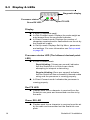
As a diagnostic aid, the Auto-Learned weight is displayed on
the ScaleLink’s display.
4.2 Direct Connect mode
Direct Connect mode is most often used for two way radio
communications and advanced networking applications. The
ScaleLink performs no Auto-Learn so the communication port
and settings must be entered manually.
Input Data from the ScaleLink Com port RECEIVE terminal is
transmitted via the radio exactly as it is received. Also, any data
picked up by the radio is transmitted via the ScaleLink Com
port TRANSMIT terminal exactly as it was received.
Direct Connect mode must be enabled in Set-Up mode (P1.0)
and has the following default communications settings:
l
l
l
l
l
22
RS-232 Communications
9600 Baud
No Parity
8 Data Bits
1 Stop Bit
ScaleLink 2 Installation