1
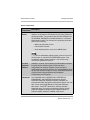
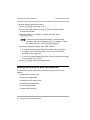
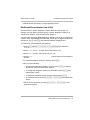
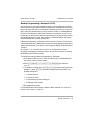
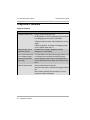
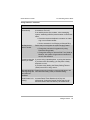
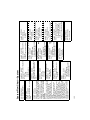
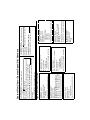
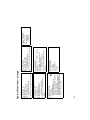
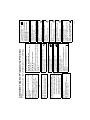
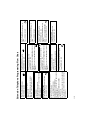
Doorphone 1 Extension
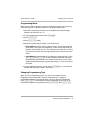
Dial # 6 0 4
Dial any extension # (except 10, 11, or the
first two extensions of any 206 or 308EC
modules)
To remove the doorphone extension:
Press r
To remove the hotline and alert:
Press r
Hotline
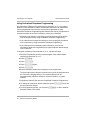
Dial # 6 0 3
Dial the hotline extension # (not ext. 10, 11,
or the first two extensions of any 206 or
308EC modules)
Dial the alerted extension number (not the
hotline) or 7 0 to paging system
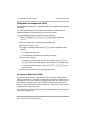
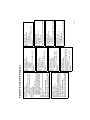
Music-On-Hold
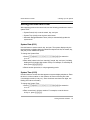
Dial # 6 0 2
Dial 1=Active
2=Not Active
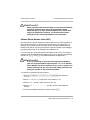
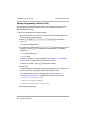
Fax Machine Extensions
Dial # 6 0 1
Dial a system extension #
Dial 1=Assigned
2=Not Assigned
Press n to program another
extension
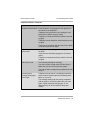
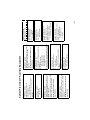
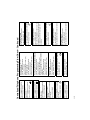
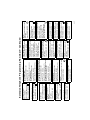
SMDR Record Type
Dial # 6 0 8
Dial 1=All calls
2=Outgoing calls only
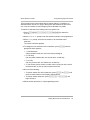
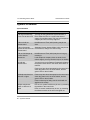
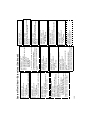
Automated Attendant Extensions
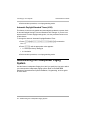
Dial # 6 0 7
Dial a system extension #
Dial 1=Assigned
2=Not Assigned
Press n to program another
extension.
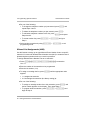
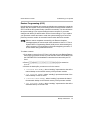
Doorphone Alert Extension
Dial # 6 0 6
Dial any extension # (except a doorphone
extension)
Dial 1=Not an alert
2=Doorphone 1 alert
3=Doorphone 2 alert
4=Doorphones 1 & 2
Press n to identify another extension
(up to 48 alert extensions per doorphone)
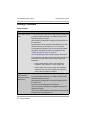
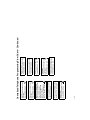
Doorphone 2 Extension
Dial # 6 0 5
Dial any extension (except 10, 11, or the first
two extensions of any 206 or 308EC
modules)
To remove the doorphone extension:
Press r
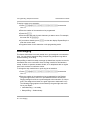
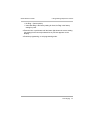
System Flow Chart—Auxiliary Equipment
109
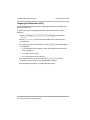
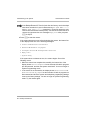
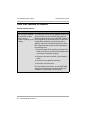
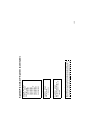
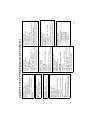
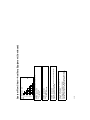
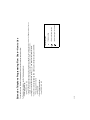
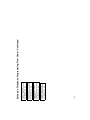
Contact Closure Operation Type
Dial # 6 1 3
Dial a Contact Closure (1 or 2)
Dial 1=1-Second On
2=3-Seconds On
3=5-Seconds On
4=Toggle
Dial # 6 1 2
Dial a group # (1 or 2)
Dial an extension # (10–57)
Dial 1=Assigned to group
2=Not Assigned to group
Contact Closure Group
SMDR Talk Time
Dial # 6 1 1
Dial 1=Active
2=Not Active
SMDR Output Format
Dial # 6 1 0
Dial 1=15 digits
2=24 digits
SMDR Top Of Page
Dial # 6 0 9