1
1 Getting Acquainted
Quick Reference Guide
• 5-slot carrier (509 processor module and up to four line and extension
modules)
You also can have a PARTNER Messaging or PARTNER MAIL VS
module for voice messaging in the 2-slot or 5-slot carriers. This takes the
place of a line and extension module.
Using these lines and extensions, you can add various devices and telephones
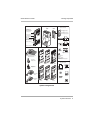
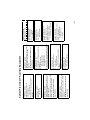
to configure your system to meet your business needs (see the figure, “System
Configurations,” that follows). For detailed information about PARTNER ACS
hardware, see the PARTNER Advanced Communications System Installation,
Programming, and Use guide.
8
System Overview