1
ESM-2850
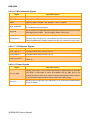
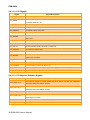
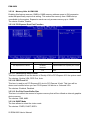
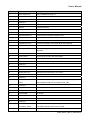
3.5.2.7 Swap Floppy Drive
While system has two floppy drivers installed, this item will be affected. This function is to
assign physical drive B to logical drive A
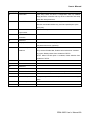
Item
Enabled
Disabled
Description
Assign physical drive B to logical drive A
No change
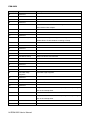
3.5.2.8 Boot Up Floppy Seek
Seeks disk drives during boot up. Disabling seeds boot up.
Item
Enabled
Disabled
Description
Enable Floppy Seek
Disable Floppy Seek
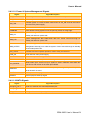
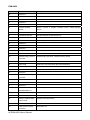
3.5.2.9 Boot Up NumLock Status
Select power on state for NumLock.
Item
On
Off
Description
Enable NumLock
Disable NumLock
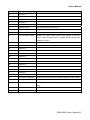
3.5.2.10 Gate A20 Option
Select if chipset or keyboard controller should control Gate A20.
Item
Normal
Fast
Description
A pin in the keyboard controller controls Gate A20
Lets chipset control Gate A20
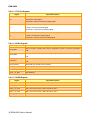
3.5.2.11 Typematic Rate Setting
Key strokes repeat at a rate determined by the keyboard controller. When enabled, the
typematic rate and typematic delay can be selected.
Item
Enabled
Disabled
Description
Enable typematic rate/delay setting
Disable typematic rate/delay setting
3.5.2.12 Typematic Rate (Chars/Sec)
Sets the number of times a second to repeat a key stroke when you hold the key down.
The choice: 6, 8, 10, 12, 15, 20, 24, 30.
3.5.2.13 Typematic Rate (Msec)
Sets the delay time after the key is held down before it begins to repeat the keystroke.
The choice: 250, 500, 750, 1000.
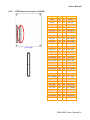
3.5.2.14 Security Option
Select whether the password is required every time the system boots or only when you
enter setup.
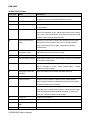
Item
System
Setup
Description
The system will not boot and access to Setup will be denied if the correct password is
not entered at the prompt.
The system will boot, but access to Setup will be denied if the correct password is not
entered at the prompt.
48 ESM-2850 User’s Manual