1
status 3-18
System Setup screen 5-2
T
Tab key 3-10
and selecting layered objects 7-26
tape
color 8-4
color needed 11-19
for cut out labels 11-19
naming new colors 5-8
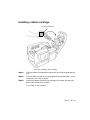
tape cartridge
installing 2-7
tape width guide 2-7
Technical support 1-5
Template Categories screen 6-13
template labels
creating 6-10
following prompts 6-16
printing 11-19
templates
choosing categories 6-13
My Templates option 9-12
selecting 6-14
text list 7-12
creating on PC 12-13
Text list option 7-12
text object 7-5
cutting out 10-6
vertical aligning 7-40
with boundaries 7-42
Text object with boundaries option 7-41
text prompts 6-17
text size 7-9
thumbnail 6-15
toolbar 4-3
transferring files 9-12
Type size buttons 7-7
USB connection 2-2, 12-3
driver for 12-3
USB Driver for BRC Printer 12-3
V
variable text objects
cutting out 10-7
sequence 7-12
setting font size 7-42
text list 7-12
vertical alignment of text objects 7-40
Vertical text option 7-43
W
warranties i-vi
waste-stripping 10-6
weeding 10-6
Weeding option 7-35
Z
Zoom In tool 4-4, 4-6
Zoom Out tool 4-6
U
underlining text 7-8
Undo tool 4-4, 4-9
Unit of measure option 5-6
upgrading the operating system 12-13
uppercase, typing 4-11
¡Index-7