1
RF-[model#] RF-MFH2
Setting up a temporary hotspot
You can set up a secure temporary hotspot to let a maximum of five
devices access your hotspot at one time.
When set up a temporary hotspot, your hotspot generates a
temporary network name and network key that you can use to let
others connect to your mobile hotspot without having to change
the security settings on your secure profile.
To set up a temporary hotspot:
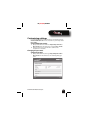
1 Click Wi-Fi on the menu bar, then click Wi-Fi Profile.
2 Click the Profile list S or T to select Temporary Hotspot. You see a
new (temporary) network name (SSID) and network key. In the
example shown below, the temporary network name is Best Buy
Connect xxxx Temp and the temporary network key is 12345.
3 Click Apply. Your mobile hotspot restarts, and you must
reconnect to your wireless network with the temporary network
name and network key.
Members of your workgroup can now use the temporary
network name and network key to connect to your hotspot.
Tip: Click Generate new values to create a new network name and
network key.
RF-MFH2 3G Mobile Hotspot
13