1
RF-[model#] RF-MFH2
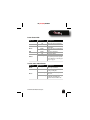
Power button LED
LED color
Not lit
Blue
Green
Red
Amber
LED behavior
—
Description
Your hotspot is not turned on.
Solid
Your hotspot is turned on and roaming.
Solid
Your hotspot is turned on and the battery
is fully charged.
Your hotspot is turned on and in hibernate
mode.
Your battery is critically low.
Blinking
Blinking
Solid
Blinking
The battery is charging.
Your hotspot has experienced an error.
Reset your hotspot to the factory defaults.
For more information, see “Resetting your
hotspot” on page 17.
Service status LED indicator
LED color
Not lit
LED behavior
—
Solid
Slow blinking
Green
Intermittent blinking
RF-MFH2 3G Mobile Hotspot
Description
Your hotspot is not turned on.
Your hotspot is turned on, but it is not
receiving or sending data.
Your hotspot is turned on, but you do not
have service.
Your hotspot is turned on and is sending or
receiving data. The blinking speed
depends on the data transmission rate.
7