1
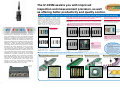
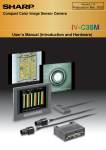
Compact Color Image Sensor Camera IV-C35M
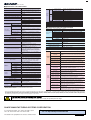
■ Specifications of IV-C35M controller
Image sampling system
Number of pixels
Image memory
No.of assignable object type
Maximum number of reference images
stored / number of whole screens stored
Gray search time
Gray search, edge detection precision
Image processing
Color image
pre-processing
Adjust brightness level
Comparative calculation
between images
Space filter
Binary threshold value
Binary noise elimination
Binary image mask
Positional correction method
Number of measurement programs
Window shape
Distance and angle measurement
Arithmetic operation
NG image memory function
Memory card slot
Calendar/timer
Other functions
Input relays
Output relays
Auxiliary relays
Timers
Counter
Parallel interface
Generalpurpose serial interface
External
interface
Computer link
USB
Image output
Number of cameras
Compatible cameras
Make settings
Measurement
start input
Color filter (R, G, B, and optional)
Color extraction (hue, saturation, and brightness)
Gray search
Adjust saturation level
Gray level changes
Micro PLC
section
9ms *1
Pixel, sub-pixel
Saturation correction
Number of points
Input
Terminal
block
Number of points
External dimentions
Weight
Dividing, subtracting, and filtering
Subtracting, absolute value of difference (between
camera 1 and reference image, between camera 2
and reference image, between camera 1 and
camera 2)
Magnification by "n" processing g(+/-) correction,
histogram expansion, mid-range emphasis
Smoothing (center/average), edge emphasis, edge
extraction, horizontal edge, vertical edge
Fixed and threshold value corrections (variation
difference/variation rate)
Expansion to contraction, contraction to expansion,
area filter
Specified window (rectangle, circle, oval), any binary
image mask
X/Y correction, rotation correction
Maximum 6 per object type (measurement 0 camera 1, measurement 0 - camera 2,
measurements 1 to 4) *2
Rectangle, circle, oval (when using area
measurement by binary conversion, object counting
by binary conversion, object identification by binary
conversion)
Measure distance (between two points, X
coordinate, Y coordinate), measure angle (3 points,
2 points against horizontal line, 2 points against
vertical line), auxiliary point (center, circle center,
gravity center, line over 2 points, crossing point of
two straight lines)
Four basic operations (+, -, X, /), root, absolute
value, TAN, ATAN, maximum, minimum, average ,
total.
Maximum 128 images (8 whole screens)
One (compatible with a 192 Mbyte capacity card)
Year, month, day, hour, minute
Display measuring time, light level monitor function,
crosshair cursor display, change display language
between Japanese and English, Run screen lock
function, display setting menu "yes/no", change
image display (through/freeze), change image
brightness (bright/dark)
Parallel input: 8 points
Parallel output: 8 points, general-purpose serial
interface Computer link: 16 points
Picture taking
element
Method
Connector
Connection to controller
Operation ambient temperature/
Operation ambient humidity
Operation atmosphere
Outside dimensions (mm)
Weight
Color evaluation
Color unevenness
inspection
Color position
Color
measurement
extraction
mode
Area measurement by
binary conversion
Object identification by
binary conversion
Count measurement
by binary conversion
RS232C/RS422 (2.4 to 115.2 kbps)
Color CCD trigger, CCD trigger (gray search)
Trigger input (parallel I/F), general-purpose serial
I/F, keypad trigger (for manual measuring)
C mount
Interline transmission method, 1 CCD color
Full pixel type, partial image scanning is available
33.3 ms [full mode]
1/3 inch
512 (horizontal) × 480 (vertical)
Square
Settable between for each object type, between 1/30
and 1/10,000 sec.
Random shutter
Round, 12-pin male connector
Using custom camera cables (IV-S30KC3: 3 m, IVS30KC5: 5 m)
0 to 45oC/35 to 85% RH (non-condensing)
No corrosive gases or dust
30 (W) × 32 (H) × 40 (D)
50 g (not including the lens)
■ Measurement menus that can be used for various inspections
Input: 8 points, Output: 9 points
Internal trigger
Lens mount method
Method
Reading system
Reading
Size
No. of effective pixels
Pixel shape
Shutter speed (s)
Shutter
8 points, timer setting range: 0.01 to 9.99 seconds
(countdown timer)
8 points, counter setting range: 000 to 999 (counts
down)
Built-in compatibility with certain SHARP, OMRON,
Mitsubishi, and Yokogawa models
USB device node, 12 Mbps
1 channel, EIA 525 lines, 2:1 interlaced
Maximum of 2
Color: IV-C30C5, High-speed monochrome: IVS30C3/IV-S30C4
Using the IV-S30RK1 remote keypad for IV series
and the IV-S30SP parameter setting support
software for IV series
8 points: One external trigger, 5 object type change,
2 exernal input
1 point: + or - common
12/24 VDC
10.8 to 26.4 VDC
9 points: One READY, 8 user spacific logical output
(Y0 to Y7)
1 point: + or - common
12/24 VDC
10.8 to 26.4 VDC
100 mA DC
MOS FET open drain system
2 points: 24 VDC and 0 V
24 VDC (±10%), 12W
Approx. 600 g
130 (W) X100 (D) X 42 (H) mm (excluding
protruding portions)
Approx. 600 g
■ Specifications of the color camera IV-C30C5
Optical system
128 points, special area 18 points
External trigger
Common for input
Rated input voltage
Input voltage range
Common for output
Rated output voltage
output
Load voltage range
Rated max. output current
Output system
Power
Power terminals
Power supply voltage / power consumption
Operating ambient temperature/humidity
600 / 8 screens
Brightness correction
Shading correction
Gray image
pre-processing
16,770,000 colors, 256 level gray scale, binary
conversion, edge detection
512 (horizontal) x 480 (vertical), approx. 240, 000
pixels
One screen for displaying captured images. One
color screen for displaying camera information and
messages
32
Color
filter
mode
*1 This is true when the search area is 256 x 256 pixels, the model is 64 x 64 pixels, and
the compression is set to 3.
*2 Measurement 0 is only used for positional deviation measurements.
Evaluate whether the extracted color matches the
reference color
Evaluate color unevenness based on the size of certain
extracted areas of color that are outside the reference color
range.
Measure the position coordinates of a workpiece with the
same extracted color as the reference color.
Measure the extracted color area on a workpiece.
Check for the existence and measure the size of the
extracted color areas on multiple workpieces
Count the number of separate areas on a workpiece with
extracted color.
Detect flaws or dirt on a workpiece that are the same color
Fault inspection
as was emphasized using a color filter function.
Measure positional deviation between an area on a
Position deviation
workpiece whose color was emphasized (using the color
measurement
filter function) and a reference position.
Degree of match
Evaluate whether a workpiece is good or not good by the
inspection
degree of match with a reference image.
Area measurement by Measure the area of the color on a workpiece that was
binary conversion
emphasized using a color filter.
Count objects by
Count the number of separate colored areas on a
binary conversion
workpiece that were emphasized by using a color filter.
Object identification by Check for the existence and measure the size of the areas
binary conversion
of emphasized color on multiple workpieces.
Evaluate whether workpieces are present or not at multiple
Point measurement
specified points.
Measure the lead width and length, and the distance
Lead inspection
between the leads in an emphasized color.
Measure the number of objects, area, filet diameter and
BGA/CSP inspection distance between centers of gravity on BGA/CSP chips
whose color has been emphasized.
Measure the position and number of workpieces with a
Multiple position
degree of match to the reference image that is larger than
measurement
a specified level.
Measure the degree of match of each workpiece by
Multiple degree of
comparison with a reference image. Count the ones with a
match inspection
degree of match larger than the specified level.
- Windows 95/98/Me/NT4.0/2000 and Excel are registered trademarks of the Microsoft Corporation, USA. - Company names, product names, and merchandise names described in
this leaflet are the trademarks or registered trademarks of each respective company. - The specifications may be changed without prior notice. The color of the actual product may
vary from that shown in this brochure. - Some models in this leaflet may be out of stock. Please contact your sales agent for selection of currently available models. - Images used in
the leaflet may be different from the images actually displayed on the monitor.
To use this device effectively and safely!
- Make sure to read the instruction manual before use. Make sure to supply the specified power and voltage.
SHARP MANUFACTURING SYSTEMS CORPORATION
4-1-33 Atobe Honmachi, Yao, Osaka, 581-8581, Japan
TEL: +81-729-91-0587 FAX: +81-729-91-0626
The details in this pamphlet were correct as of March 2002.
● Information about SHARP control equipments is available at our
web site http://sharp-world.com/sms/
SMS-068E 10803 O.1