1
Win dows 7: C:\Users\Administrator\AppData\Roaming\Moog Music Inc\Sub
Phatty\ Presets Library
Win dows XP: C:\Documents and Settings\USERNAME\Application Data\Moog
PRE FE RE NCES ( PR EFS)
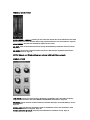
Click the PREFS button to open the preferences window:
Preferenc es w in dow:
If using USB communication, select the MIDI input and MIDI Output in the EDITOR SETTINGS
section to "Moog Sub Phatty". If using DIN MIDI, select the MIDI interface ports used by the
Sub Phatty.
Once the MIDI Input and Output settings are selected, the editor's SUB PHATTY GLOBAL
SETTINGS will update with the connected Sub Phatty's internal global settings.
See pages 12-14 for detailed information on the PREFERENCES window.
No te: Changes made to the editor's global settings are saved to the connected Sub Phatty's
internal memory.
Your Sub Phatty's current firmware version is displayed in the lower left corner of the
Preferences window.
STAN DAL ON E O PE RAT I ON:
The Standalone Editor is useful for creating sounds on your Sub Phatty, sharing presets with
others, or managing your preset library without running a host DAW.
DA W IN TEG RA TI ON:
Launch your DAW application. Create an audio or aux track and instantiate the Sub Phatty
Editor. MIDI IN and OUT must be selected from the PREFS tab in the Sub Phatty plugin.
Automation, control change messages, and sysex information for the Sub Phatty can be fully
embedded and recalled within a track. This allows for extremely expressive sound design that
would be impossible with only two hands.
NOTE: Some DAWs allow the editor and MIDI data to exist on the same track, others require
them to be on separate tracks. Please refer to your DAW's manual for more information.