1
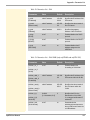
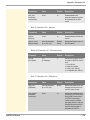
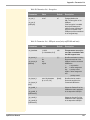
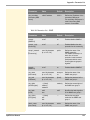
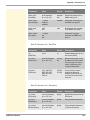
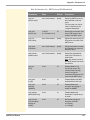
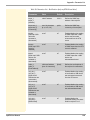
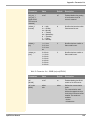
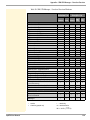
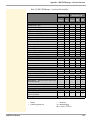
Appendix - Troubleshooting Some functions in the SEH UTN Manager are hidden, enabled or appear dimmed Possible Cause Your user account does not have the required administrative rights. This leads to restricted user rights in the SEH UTN Manager; see: ’SEH UTN Manager - Function Overview’ Ö133. A function is not supported by the connected USB device (e.g. the 'Print-On-Demand' feature is not supported by a hard disk). Start the SEH UTN Manager as administrator. For more information, refer to the documentation of your operating system. A connection to the UTN server cannot be established A common port will be used for the data transfer between the UTN server and the SEH UTN Manager that is installed on the client. Ö54. Possible Cause The port numbers are not identical. The current port number cannot be transferred to the SEH UTN Managers that are installed on the clients. The 'SNMPv1' parameter has been disabled; see: Ö41. The communication is blocked by a firewall. A connection to the USB device cannot be established Possible Cause The access control for USB devices is enabled Ö86. No driver software for the USB device is installed on the client. The USB device is already connected to another client. myUTN User Manual 138