1
WhaleII_general-copy_SEC.book 2 ページ
2004年9月14日 火曜日 午前11時45分
NORMAL COPYING
This section describes the normal copying procedure.
Copying from the reversing automatic document feeder
NOTE
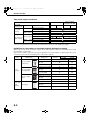
Certain restrictions exist depending on the amount of memory installed and the copy settings. (See "Copy mode
output restrictions" and "Guidelines for the number of scannable originals during sort copying" on page 5-4.)
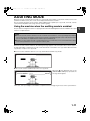
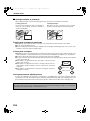
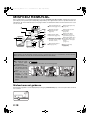
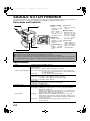
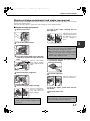
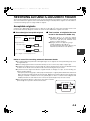
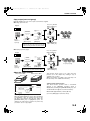
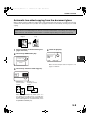
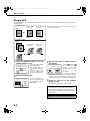
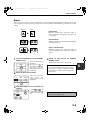
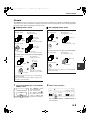
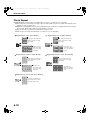
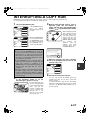
■ 1-sided copies of 1-sided originals
Original
Copy
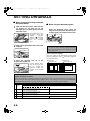
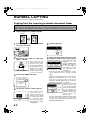
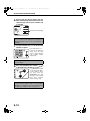
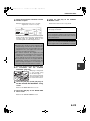
the originals in the document feeder
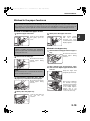
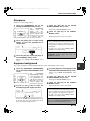
1 Place
tray. (pages 4-6 to 4-9)
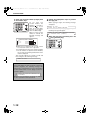
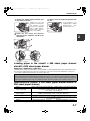
5 Touch the [OK] key.
0
OK
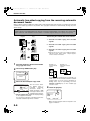
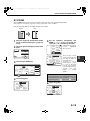
that the 1-sided to 1-sided copy
2 Ensure
mode is selected.
ORIGINAL 8½x11
PLAIN
5½x8½
8½x11
DUPLEX
8½x11
11x17
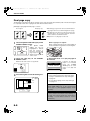
The one-sided to onesided mode is selected
when no icon for a twosided mode appears in
the dashed area on the
display. If the 1-sided to
1-sided copy mode is
already selected, steps
3 to 5 are not needed.
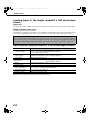
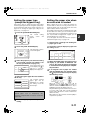
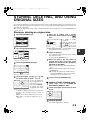
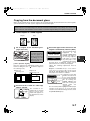
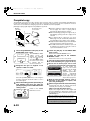
3 Touch the [2-SIDED COPY] key.
2-SIDED COPY
OUTPUT
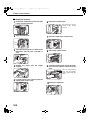
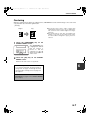
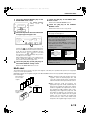
4 Touch the [1-sided to 1-sided copy] key.
It may happen that a
mode other than [1sided to 1-sided copy] is
selected, thus [1-sided
to 1-sided copy] should
be
selected
again.
(Touch the [1-sided to 1sided copy] key so that it
is highlighted.)
5-2
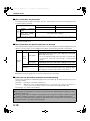
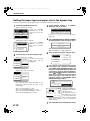
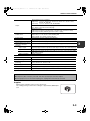
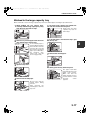
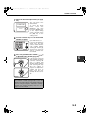
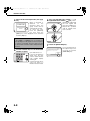
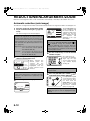
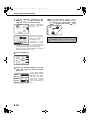
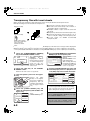
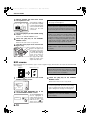
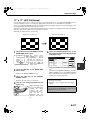
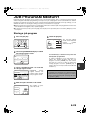
that paper of the same size as the
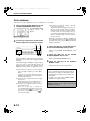
6 Ensure
originals is automatically selected. (*Note)
The selected tray will be
highlighted
or
the
AUTO
8½x11
message "LOAD xxxxxx
PAPER SELECT
PAPER." will appear. If
the message appears,
load paper in a paper
100%
tray with paper of the
required size.
Even if the message above is displayed, copying
can be performed onto the currently selected
paper.
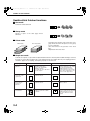
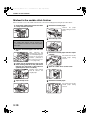
(*Note) The following requirements must be satisfied.
Originals of a standard size (11" x 17", 8-1/2" x
14", 8-1/2" x 11", 8-1/2" x 11"R or 5-1/2" x 8-1/2"
(A3, B4, A4, A4R, B5, B5R or A5)) are set and the
auto paper select function is enabled.
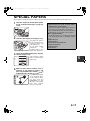
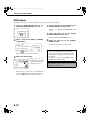
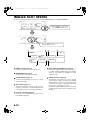
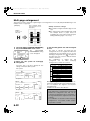
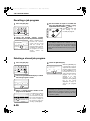
If originals of a size other
PLAIN
than the sizes above are
8½x11
to be copied, manually
RECYCLED select the desired paper
8½x14
size by touching the
[PAPER SELECT] key
11x17
PLAIN
and then touching the
desired
paper
size
selection key.
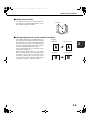
The selected key will be highlighted and the paper
selection screen will close. To close the paper
selection screen without making a selection, touch
the [PAPER SELECT] key.