1
WhaleII_general-copy_SEC.book 9 ページ
2004年9月14日 火曜日 午前11時45分
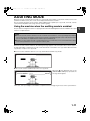
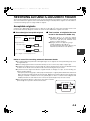
STORING, DELETING, AND USING
ORIGINAL SIZES
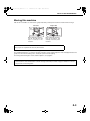
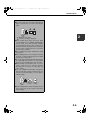
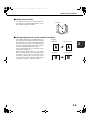
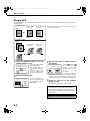
Up to 9 special original sizes can be stored. Stored sizes can be easily called up and are not erased if the power is
turned off. Storing a frequently used original size saves you the trouble of manually setting the size each time you
copy that size of document.
● To cancel an original size storing, using, or deleting operation, press the [CA] key or touch the [ORIGINAL] key
on the screen.
Storing or deleting an original size
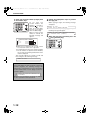
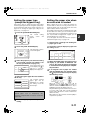
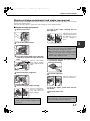
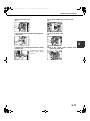
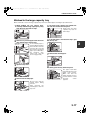
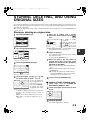
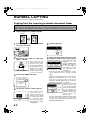
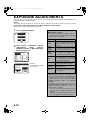
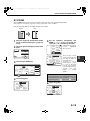
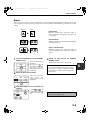
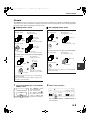
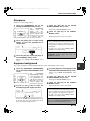
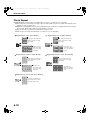
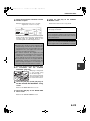
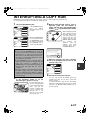
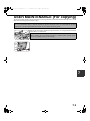
1 Touch the [ORIGINAL] key.
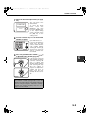
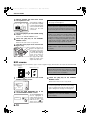
the X (width) and Y (length)
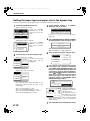
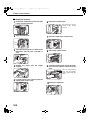
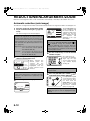
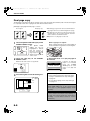
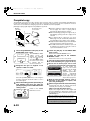
5 Enter
dimensions of the original with the
keys.
AUTO
ORIGINAL
X
X
2 Touch the [CUSTOM SIZE] key.
AUTO
INCH
MANUAL
AUTO
EXPOSURE
COPY RATI
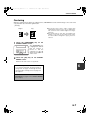
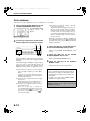
●To cancel the procedure, touch the [CANCEL]
key.
●To delete the selected original size, touch the
[DELETE] key.
●To change the original size stored in the key,
touch the [STORE] key. The screen of step 5
will appear to let you change the size.
CUSTO
SIZE
STORE/DELETE
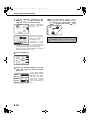
the original size key (
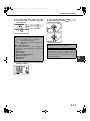
4 Touch
you wish to store or delete.
) that
To store an original size,
touch a key that does not
show a size (
).
STORE/DELETE
(2 1/2 17)
inch
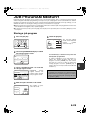
appears that contains the keys [CANCEL],
[DELETE], and [STORE].
MANUA
RECALL
17
you touch a key that shows an
7 When
original size in step 4, a message screen
AUTO
X51/2 Y101/8
initially
To exit, touch the [ORIGINAL] key.
3 Touch the [STORE/DELETE] key.
L
is
key selected in step 4.
100%
E INPUT
X (width)
selected.
the [OK] key.
6 Touch
The original size entered in step 5 is stored in the
AUTO 81/2 x11
PAPER SELE
CUSTOM
SIZE
OK
Enter X and then touch
the (
) key to enter Y.
(2 1/2 11 5/8)
11 5/8 inch
Y
A width of 2-1/2 to 17
inches can be entered in
RECALL
STORE/DELETE
X, and a length of 2-1/2
to 11-5/8 inches can be entered in Y.
AUTO
EXPOSURE
AB
CANCEL
Y
A
Keys that already have
an original size stored
will show the stored size
( X5 Y10 ).
1/
2
1/
8
To delete or change a stored size, touch the key
that shows the size that you wish to delete or
change.
●If you are storing an original size, go to step 5.
●To delete or change an original size, go to
step 7.
8 To exit, touch the [ORIGINAL] key.
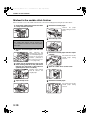
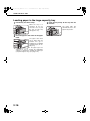
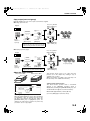
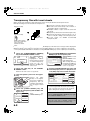
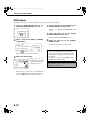
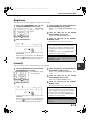
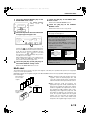
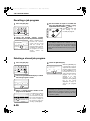
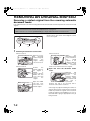
■ USING A STORED ORIGINAL SIZE
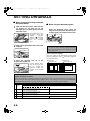
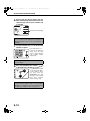
steps 1 to 2 of "STORING
1 Follow
DELETING AN ORIGINAL SIZE".
OR
the original size key that you wish
2 Touch
to use.
X51/2 Y101/8
RECALL
STORE/DELETE
the [OK] key.
3 Touch
The stored original size is called up.
4-9
4