1
• CD-Rom with Send Fax and Fax Server Access System software.
1.2 Connecting the Fax Server Uno
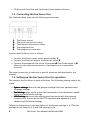
The FaxServer back plate has the following connections.
1.
2.
3.
4.
5.
The Power socket.
The Serial connection socket.
The Ethernet connection socket.
The telephone line
The telephone connection.
Connect the Fax Server Uno as follows.
• Connect the Power supply to the power socket. 1
• Connect the Ethernet plug to the Ethernet socket 3
• Connect the telephone line to the Line socket 4. The Phone socket in 5
allows for the optional connection of a telephone or a second fax
machine.
The serial connection is used only in specific occasions not described in this
manual.
1.3 Setting up the Fax Server Uno for operation
The setup of the Fax Server is done as follows. The following setting have to be
made.
• System settings deal with the general settings like clock, password and
language settings.
• Fax Settings relate to the actual fax transmission, like transmission speed,
top line and dial prefix settings.
• LAN Settings deal with the settings that have to do with the network
connection of the Fax Server like FTP username and password, E-mail
address and IP Number settings.
Follow the instructions in the description of the System settings in § 2 The Fax
settings can be found in § 3 and LAN settings in § 4.
8
Fax Server Uno Manual ©Vidicode 2008