1
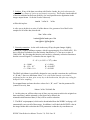
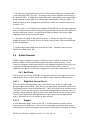
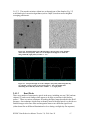
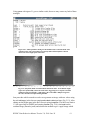
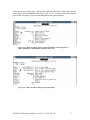
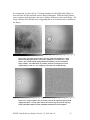
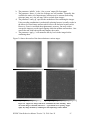
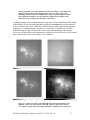
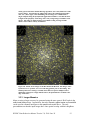
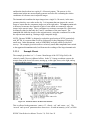
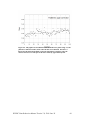
Fig. 2.14: Dome flat for Ks before (left panel) and after (right panel) removal of bad
pixels and the pupil ghost. Note the bright region near [1250:1250] remains.
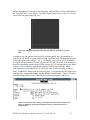
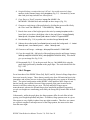
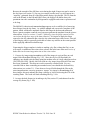
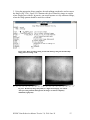
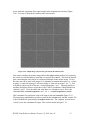
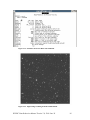
The pupil template can then be used with the task ‘mscred.rmpupil’ (Fig. 2.13) to remove
the pupil ghost from the flat. A representative pupil template (whircpupil.fits) can be
downloaded from the WHIRC webpage, although observers may wish to create their
own. The pupil mask (pupmask.pl, also on the webpage) is a four-line file which restricts
the rmpupil task to the central 600 × 600 pixel region. The ‘outtype’ parameter should be
set to ‘sdiff’ since one is subtracting the ghost, and the 5 pixel smoothing for row and
columns seems to be good. The ‘extfit’ parameter should be set to “” (null) because the
WHIRC images are not multi-extension FITS. The result is shown in Fig. 2.14b.
Observational tests appear to verify this strategy to be effective in removing the effects of
the pupil ghost (Appendix A).
Since the shape of the pupil ghost seems to be independent of the filter to first order, this
procedure should work for all filters using the same pupil template. The rmpupil task fits
the amplitude of the pupil template to the actual amplitude of the pupil ghost
automatically.
2.4.3 Summary of Dome Flat Artifact Removal
1. Combine “lamp on” and “lamp off” flat images for each filter using imcombine
(Fig. 2.3). “Lamp off” images should not be scaled.
2. Subtract the averaged “off” image from the averaged “on” image:
imar flat.k.on – flat.k.off flat.140420.k
3. Normalize flatfield to ~ 1.0 using a reasonably large subregion:
imstat flat.140420.k[500:1500,500:1500]; imar flat.140420.k / <stat> flat.140420.k
WHIRC Data Reduction Manual Version 2.0, 2014 June 26
16