1
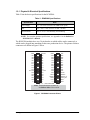
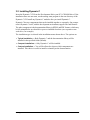
RabbitCore RCM3200 C-Programmable Module with Ethernet Getting Started Manual 019–0117 • 050205–F RabbitCore RCM3200 Getting Started Manual Part Number 019-0117 • 050205–F • Printed in U.S.A. ©2002–2005 Z-World Inc. • All rights reserved. Z-World reserves the right to make changes and improvements to its products without providing notice. Trademarks Rabbit and Rabbit 3000 are registered trademarks of Rabbit Semiconductor. RabbitCore is a trademark of Rabbit Semiconductor. Z-World is a registered trademark of Z-World Inc. Dynamic C is a registered trademark of Z-World Inc. Z-World, Inc. Rabbit Semiconductor 2900 Spafford Street Davis, California 95616-6800 USA 2932 Spafford Street Davis, California 95616-6800 USA Telephone: (530) 757-3737 Fax: (530) 757-3792 Telephone: (530) 757-8400 Fax: (530) 757-8402 www.zworld.com www.rabbitsemiconductor.com RabbitCore RCM3200 Table of Contents Chapter 1. Introduction & Overview 1 1.1 Rabbit 3000 Microprocessor ............................................................................................................... 1 1.2 RCM3200 RabbitCore Modules ......................................................................................................... 2 1.2.1 Physical & Electrical Specifications ........................................................................................... 3 1.3 Development Software........................................................................................................................ 4 1.4 How to Use This Manual .................................................................................................................... 4 1.4.1 Additional Product Information .................................................................................................. 4 1.4.2 Additional Reference Information .............................................................................................. 5 1.4.3 Using Online Documentation ...................................................................................................... 5 Chapter 2. Hardware Setup 7 2.1 Development Kit Contents.................................................................................................................. 7 2.2 Prototyping Board ............................................................................................................................... 8 2.2.1 Prototyping Board Features ......................................................................................................... 9 2.3 Development Hardware Connections ............................................................................................... 11 2.3.1 Attach Module to Prototyping Board ........................................................................................ 11 2.3.2 Connect Programming Cable .................................................................................................... 12 2.3.3 Connect Power .......................................................................................................................... 13 2.4 Run a Sample Program ..................................................................................................................... 14 2.4.1 Troubleshooting ........................................................................................................................ 14 2.5 Where Do I Go From Here?.............................................................................................................. 15 2.5.1 Technical Support ..................................................................................................................... 15 Chapter 3. Software Installation & Overview 17 3.1 An Overview of Dynamic C ............................................................................................................. 17 3.2 Installing Dynamic C ........................................................................................................................ 19 3.3 Sample Programs .............................................................................................................................. 20 3.3.1 Serial Communication ............................................................................................................... 21 3.3.2 Other Sample Programs ............................................................................................................ 23 3.4 Upgrading Dynamic C ...................................................................................................................... 23 3.4.1 Add-On Modules ....................................................................................................................... 23 Getting Started Chapter 4. Using the TCP/IP Features 25 4.1 TCP/IP Connections.......................................................................................................................... 25 4.2 TCP/IP Primer on IP Addresses ........................................................................................................ 27 4.2.1 IP Addresses Explained ............................................................................................................. 29 4.2.2 How IP Addresses are Used ...................................................................................................... 30 4.2.3 Dynamically Assigned Internet Addresses ................................................................................ 31 4.3 Placing Your Device on the Network ............................................................................................... 32 4.4 Running TCP/IP Sample Programs................................................................................................... 33 4.4.1 How to Set IP Addresses in the Sample Programs .................................................................... 34 4.4.2 How to Set Up your Computer’s IP Address for Direct Connect ............................................. 35 4.4.3 Dynamic C Compiler Settings ................................................................................................... 35 4.5 Run the PINGME.C Sample Program............................................................................................... 36 4.6 Running More Sample Programs With Direct Connect.................................................................... 36 4.7 Where Do I Go From Here?.............................................................................................................. 37 Notice to Users 39 Index 41 Schematics 43 RabbitCore RCM3200 1. INTRODUCTION & OVERVIEW The RCM3200 is an advanced module that incorporates the powerful Rabbit 3000® microprocessor, flash memory, static RAM, digital I/O ports, and a 10/100Base-T Ethernet port. This Development Kit has the essentials that you need to design your own microprocessor-based system, and includes a complete Dynamic C software development system. This Development Kit also contains a Prototyping Board that will allow you to evaluate the RCM3200 and to prototype circuits that interface to the RCM3200 RabbitCore™ module. You will also be able to write and test software for the RCM3200 RabbitCore modules, including TCP/IP applications. 1.1 Rabbit 3000 Microprocessor The Rabbit 3000 microprocessor shares its instruction set and conceptual design with the successful Rabbit 2000. The instruction set is based on the Z80/Z180, but has been adapted to be C-friendly and to allow a megabyte of code space. Rabbit processors are fast with compact code. The Rabbit 3000 has an extensive array of on-chip peripherals including 6 serial ports, 56 parallel I/O pins, motion control interfaces, a time/date clock, glueless memory and I/O interfacing, a slave interface, and in-circuit programming. Low-EMI features including a clock spectrum spreader eliminate schedule-wrecking EMI problems. Software development support is based on Z-World’s Dynamic C, and includes extensive libraries for Internet connectivity. Refer to the Rabbit 3000 Microprocessor User’s Manual for complete information on the Rabbit 3000 microprocessor and complete specifications. Getting Started 1 1.2 RCM3200 RabbitCore Modules Throughout this manual, the term RCM3200 refers to the complete series of RCM3200 RabbitCore modules unless other production models are referred to specifically. The RCM3200 RabbitCore modules are designed for use on a customer-supplied motherboard that supplies power and interfaces to real-world I/O devices. Their two 34-pin connection headers provide 52 parallel user I/O lines, shared with five serial ports, along with control lines. A sixth serial port and one additional I/O line are available on the programming header. A fully enabled slave port permits glueless master-slave interface with another Rabbitbased system. The slave port may also be used with non-Rabbit systems, although additional logic may be required. The RCM3200 is equipped with a 10/100Base-T Ethernet port, 512K flash memory, a 256K battery-backed program data SRAM, and a 512K program execution SRAM. There are three RCM3200 production models. If the standard models do not serve your needs, other variations can be specified and ordered in production quantities. Contact your Z-World or Rabbit Semiconductor sales representative for details. Table 1 below summarizes the main features of the RCM3200. Table 1. RCM3200 Features Feature Microprocessor RCM3200 RCM3210 RCM3220 Rabbit 3000 running at Rabbit 3000 running at Rabbit 3000 running at 44.2 MHz 29.5 MHz 44.2 MHz Flash Memory 512K 256K 512K Program Data SRAM 256K 128K 256K Program Execution SRAM 512K — 512K RJ-45 Ethernet Connector, Filter Capacitors, and LEDs Serial Ports Yes No 6 shared high-speed, CMOS-compatible ports: 6 are configurable as asynchronous serial ports; 4 are configurable as clocked serial ports (SPI); 2 are configurable as SDLC/HDLC serial ports; 1 asynchronous serial port is dedicated for programming The RCM3200 can be programed locally, remotely, or via a network using appropriate interface hardware. 2 RabbitCore RCM3200 1.2.1 Physical & Electrical Specifications Table 2 lists the basic specifications for the RCM3200. Table 2. RCM3200 Specifications Specification Data Power Supply 3.15 – 3.45 V DC (255 mA at 44.2 MHz clock speed) Size 1.85" × 2.65" × 0.86" (47 mm × 67 mm × 22 mm) Environmental –40°C to 70°C, 5–95% humidity, noncondensing NOTE: For complete product specifications, see Appendix A in the RabbitCore RCM3200 User’s Manual. The RCM3200 modules have two 34-pin headers to which cables can be connected, or which can be plugged into matching sockets on a production device. The pinouts for these connectors are shown in Figure 1 below. J1 GND PA7 PA5 PA3 PA1 PF3 PF1 PC0 PC2 PC4 PC6-TxA PG0 PG2 PD4 PD2 PD6 n.c. J2 STATUS PA6 PA4 PA2 PA0 PF2 PF0 PC1 PC3 PC5 PC7-RxA PG1 PG3 PD5 PD3 PD7 n.c. /RES PB2 PB4 PB6 PF4 PF6 PE7 PE5 PE3 PE0 PG6 PG4 /IORD SMOD1 VRAM +3.3V n.c. PB0 PB3 PB5 PB7 PF5 PF7 PE6 PE4 PE1 PG7 PG5 /IOWR SMOD0 /RESET_IN VBAT_EXT GND GND n.c. = not connected Note: These pinouts are as seen on the Bottom Side of the module. Figure 1. RCM3200 Connector Pinout Getting Started 3 1.3 Development Software The RCM3200 module uses the Dynamic C development environment for rapid creation and debugging of runtime applications. Dynamic C provides a complete development environment with integrated editor, compiler and source-level debugger. It interfaces directly with the target system, eliminating the need for complex and unreliable in-circuit emulators. Dynamic C must be installed on a Windows workstation with at least one free serial USB or COM port for communication with the target system. NOTE: An RS-232/USB converter is required if you intend to use a USB port on your computer. Z-World and Rabbit Semiconductor offer a suitable converter—more information is available at www.rabbitsemiconductor.com, or you may telephone your Z-World/Rabbit Semiconductor sales representative or authorized distributor. See Chapter 3., “Software Installation & Overview.” for complete information on installing Dynamic C. NOTE: The RCM3200 module requires Dynamic C v7.30 or later for development. A compatible version is included on the Development Kit CD-ROM. 1.4 How to Use This Manual This Getting Started manual is intended to give users a quick but solid start with the RCM3200 module. It does not contain detailed information on the module hardware capabilities, the Dynamic C development environment, or the TCP/IP software support for the integrated Ethernet port. Most users will want more detailed information on some or all of these topics in order to put the RCM3200 module to effective use. 1.4.1 Additional Product Information Detailed information about the RCM3200 will be found in the RabbitCore RCM3200 User’s Manual, provided on the accompanying CD-ROM in both HTML and Adobe PDF format. Some advanced users may choose to skip the rest of this introductory manual and proceed directly with the detailed hardware and software information in the User’s Manual. TIP: We recommend that anyone not thoroughly familiar with Z-World embedded control systems at least read through the rest of this manual to gain the necessary familiarity to make use of the more advanced information. 4 RabbitCore RCM3200 1.4.2 Additional Reference Information In addition to the product-specific information contained in the RabbitCore RCM3200 User’s Manual, several higher level reference manuals are provided in HTML and PDF form on the accompanying CD-ROM. Advanced users will find these references valuable in developing systems based on the RCM3200 module: • Dynamic C User’s Manual • Dynamic C Function Reference Manual • An Introduction to TCP/IP • Dynamic C TCP/IP User’s Manual • Rabbit 3000 Microprocessor User’s Manual 1.4.3 Using Online Documentation We provide the bulk of our user and reference documentation in two electronic formats, HTML and Adobe PDF. We do this for several reasons. We believe that providing all users with our complete library of product and reference manuals is a useful convenience. However, printed manuals are expensive to print, stock and ship. Rather than include and charge for manuals that every user may not want, or provide only product-specific manuals, we choose to provide our complete documentation and reference library in electronic form with every development kit and with our Dynamic C development environment. NOTE: The most current version of Adobe Acrobat Reader can always be downloaded from Adobe’s web site at http://www.adobe.com. We recommend that you use version 4.0 or later. Providing this documentation in electronic form saves an enormous amount of paper by not printing copies of manuals that users don’t need. Finding Online Documents The online documentation is installed along with Dynamic C, and an icon for the documentation menu is placed on the workstation’s desktop. Double-click this icon to reach the menu. If the icon is missing, create a new desktop icon that points to default.htm in the docs folder, found in the Dynamic C installation folder. The latest versions of all documents are always available for free, unregistered download from our web sites as well. Getting Started 5 Printing Electronic Manuals We recognize that many users prefer printed manuals for some uses. Users can easily print all or parts of those manuals provided in electronic form. The following guidelines may be helpful: • Print from the Adobe PDF versions of the files, not the HTML versions. • If your printer supports duplex printing, print pages double-sided. • If you do not have a suitable printer or do not want to print the manual yourself, most retail copy shops (e.g. Kinkos, AlphaGraphics, etc.) will print the manual from the PDF file and bind it for a reasonable charge—about what we would have to charge for a printed and bound manual. 6 RabbitCore RCM3200 2. HARDWARE SETUP This chapter describes the RCM3200 hardware in more detail, and explains how to set up and use the accompanying Prototyping Board. NOTE: This chapter (and this manual) assume that you have the RCM3200 Development Kit. If you purchased an RCM3200 module by itself, you will have to adapt the information in this chapter and elsewhere to your test and development setup. 2.1 Development Kit Contents The RCM3200 Development Kit contains the following items: • RCM3200 module. • Prototyping Board. • AC adapter, 12 V DC, 1 A. (Included only with Development Kits sold for the North American market. A header plug leading to bare leads is provided to allow overseas users to connect their own power supply with a DC output of 8–24 V at 8 W.) • 10-pin header to DE9 programming cable with integrated level-matching circuitry. • Dynamic C CD-ROM, with complete product documentation on disk. • This Getting Started manual. • A bag of accessory parts for use on the Prototyping Board. • Registration card. Getting Started 7 2.2 Prototyping Board The Prototyping Board included in the Development Kit makes it easy to connect an RCM3200 module to a power supply and a PC workstation for development. It also provides some basic I/O peripherals (switches and LEDs), as well as a prototyping area for more advanced hardware development. For the most basic level of evaluation and development, the Prototyping Board can be used without modification. As you progress to more sophisticated experimentation and hardware development, modifications and additions can be made to the board without modifying or damaging the RCM3200 module itself. The Prototyping Board is shown below in Figure 2, with its main features identified. MOTOR/ENCODER J6 PE7 PF0 PF1 PF7 PF6 PF2 PF3 PF5 PF4 PA0 PA1 PB7 PB6 PA2 PA3 PB5 PB4 PA4 PA5 PB3 PB2 PA6 PA7 PE4 /RES RN2 J1 R4 R3 SLAVE UX11 RCM2 RC20 SMT Prototyping Area R8 R12 R6 RC14 RC13 +3.3V Through-Hole Prototyping Area RC22 RC16 R7 UX3 RC12 +3.3V RC23 UX9 RC17 RC21 R9 R11 RC10 R13 R21 Battery RC24 RC19 R10 C3 R5 R2 +5V J15 MASTER RC15 C2 RCM3000/RCM3100/ RCM3200 Master Module Connectors UX10 GND C1 +5V BT1 J3 R1 +DC U5 RC1 PB0 GND C12 GND PE6 2.5 MM JACK D2 U4 RC2 RC11 GND PC0 C11 C10 PC1 GND PE5 +5V PC2 PE4 +5V PC4 PC3 J11 D1 C13 R20 R17 RC18 PD5 PC5 PE3 CURRENT MEASUREMENT OPTION PG0 PD4 PE0 PE1 C17 JP1 PG1 PG6 PG7 DS3 PG4 PG5 +3.3V POWER /IOWR C15 PG2 L1 POWER PD4 PG3 RN5 RCM3000 ETHERNET CORE MODULE RN4 PD5 /IORD RCM1JB GND J9 IrDA Transceiver SM1 SM0 RCM1JA +DC PD2 GND PD6 PD3 GND PD0 PD7 VRAM +5V PD1 +3.3V RN3 NC GND Power Input Power LED +3.3V RN1 GND VBAT EXT /RES IN Voltage Regulators CurrentRCM3000/RCM3100/ RCM3200 Slave Module Measurement Header Connectors Slave Module Extension Headers UX2 GND GND GND PE1 PE3 PC3 PC2 PE4 PE5 PC1 PC0 PE6 PE7 PF0 PF1 PF7 PF6 PF2 PF3 PF5 PF4 PA0 PA1 PB7 PB6 PA2 PA3 PB5 PB4 PA4 PA5 PB3 PB2 PA6 PA7 PB0 /RES STATUS R14 GND +5V UX4 +5 V, 3.3 V, and GND Buses +5V RC7 SMT Prototyping Area C9 U6 C16 DISPLAY BOARD RC25 RC4 RC5 C14 RC27 U3 U3 RC28 RC29 RC26 UX5 RC9 UX7 U1 C5 RCM30/31/32XX SERIES PROTOTYPING BOARD C8 RCM2JA RESET C6 J5 TxB RxB Reset Switch RCM2JB S2 RxC TxC GND J4 Master Module Extension Headers BD6 PC4 BD4 PC5 BD7 PE0 RC6 BD5 PG7 +5V BD2 PD5 BD0 PG0 PD4 BA1 PG2 PG1 PG6 BA3 PD4 PG3 PG4 +5V J8 BD3 PD5 /IORD PG5 +3.3V +3.3V +3.3V GND SM1 SM0 /IOWR +3.3V BD1 PD2 GND PD3 BA0 VRAM /RES LCD VBAT EXT /RES IN +5V PD6 +5V PD7 BPE3 +3.3V R16 GND TP1 PD0 R15 PD1 C4 NC BA2 GND GND GND S3 PG6 RS-232 J10 RS-232 Signal Header DS1 UX13 PG7 C7 DS2 User Switches DISPLAY BOARD User LEDs J7 DISPLAY BOARD LCD/Keypad Module Connections Figure 2. Prototyping Board 8 RabbitCore RCM3200 2.2.1 Prototyping Board Features • Power Connection—A power-supply jack and a 3-pin header are provided for connection to the power supply. Note that the 3-pin header is symmetrical, with both outer pins connected to ground and the center pin connected to the raw V+ input. The cable of the AC adapter provided with the North American version of the Development Kit ends in a plug that connects to the power-supply jack. The header plug leading to bare leads provided for overseas customers can be connected to the 3-pin header in either orientation. Users providing their own power supply should ensure that it delivers 8–24 V DC at 8 W. The voltage regulators will get warm while in use. • Regulated Power Supply—The raw DC voltage provided at the POWER IN jack is routed to a 5 V switching voltage regulator, then to a separate 3.3 V linear regulator. The regulators provide stable power to the RCM3200 module and the Prototyping Board. • Power LED—The power LED lights whenever power is connected to the Prototyping Board. • Reset Switch—A momentary-contact, normally open switch is connected directly to the RCM3200’s /RESET_IN pin. Pressing the switch forces a hardware reset of the system. • I/O Switches and LEDs—Two momentary-contact, normally open switches are connected to the PG0 and PG1 pins of the master RCM3200 module and may be read as inputs by sample applications. Two LEDs are connected to the PG6 and PG7 pins of the master module, and may be driven as output indicators by sample applications. • Prototyping Area—A generous prototyping area has been provided for the installation of through-hole components. +3.3 V, +5 V, and Ground buses run around the edge of this area. Several areas for surface-mount devices are also available. (Note that there are SMT device pads on both top and bottom of the Prototyping Board.) Each SMT pad is connected to a hole designed to accept a 30 AWG solid wire. • Master Module Connectors—A set of connectors is pre-wired to permit installation of the first RCM3000, RCM3100, or RCM3200 module that serves as the primary or “master module.” • Slave Module Connectors—A second set of connectors is pre-wired to permit installation of a second, slave RCM3200, RCM3100, or RCM3000 module. This capability is reserved for future use, although the schematics in this manual contain all of the details an experienced developer will need to implement a master-slave system. • Module Extension Headers—The complete pin sets of both the MASTER and SLAVE RabbitCore modules are duplicated at these two sets of headers. Developers can solder wires directly into the appropriate holes, or, for more flexible development, 26-pin header strips can be soldered into place. See Figure 1 for the header pinouts. Getting Started 9 • RS-232—Two 3-wire or one 5-wire RS-232 serial port are available on the Prototyping Board. Refer to the Prototyping Board schematic (090-0137) for additional details. A 10-pin 0.1-inch spacing header strip is installed at J5 to permit connection of a ribbon cable leading to a standard DE-9 serial connector. • Current Measurement Option—Jumpers across pins 1–2 and 5–6 on header JP1 can be removed and replaced with an ammeter across the pins to measure the current drawn from the +5 V or the +3.3 V supplies, respectively. • Motor Encoder—A motor/encoder header is provided at header J6 for future use. • LCD/Keypad Module—Z-World’s LCD/keypad module may be plugged in directly to headers J7, J8, and J10. 10 RabbitCore RCM3200 2.3 Development Hardware Connections There are four steps to connecting the Prototyping Board for use with Dynamic C and the sample programs: 1. 2. 3. 4. Attach the RCM3200 module to the Prototyping Board. Connect the programming cable between the RCM3200 module and the workstation PC. Connect the module’s Ethernet port to a PC’s Ethernet port, or to an Ethernet network. Connect the power supply to the Prototyping Board. 2.3.1 Attach Module to Prototyping Board Turn the RCM3200 module so that the Ethernet connector end of the module extends off the Prototyping Board, as shown in Figure 3 below. Align the pins from headers J1 and J2 on the bottom side of the module into header sockets RCM2JA and RCM2JB on the Prototyping Board (these sockets were labeled J12 and J13 on earlier versions of the Prototyping Board). MOTOR/ENCODER J6 PF1 C72 R63 R64 PB6 PB5 PB4 PA4 PA5 PB3 PB2 PA6 PA7 PB0 /RES PE4 GND C71 C64 C67 L2 PF1 PF2 PF3 PF4 PA0 PA1 PB6 PA2 PA3 PB5 PB4 PA4 PA5 PB3 PB2 PA6 PA7 PB0 /RES STATUS RC18 C45 C44 C43 R38 +5V RC1 C39 C32 R24 GND +5V U6 C16 BD0 BD2 BD4 BD6 BD3 BD5 BD7 DISPLAY BOARD RC25 RC4 RC5 C14 RC27 U3 U3 RC28 RC29 RC26 UX5 C19 R14 RC9 UX7 U1 C5 RCM30/31/32XX SERIES PROTOTYPING BOARD C8 RCM2JA RESET C4 PF0 PF6 PF5 BA1 PE7 PF7 PB7 RCM2JB BA3 PE6 RCM2JA BD1 PC0 GND PC2 PC1 C9 GND PC4 PC3 PE5 BA0 PC5 PE3 PE4 +5V UX4 +5V GND PE0 PE1 +5V J8 BA2 PG7 /RES LCD PD5 RC7 +5V PD4 RC6 +5V PG6 +3.3V +5V BPE3 PG5 R16 PG0 +3.3V +3.3V TP1 PG1 GND GND +3.3V R15 PG4 C1 C3 /IOWR GND C49 C48 JP5 R28 JP3 JP4 C20 C24 R27 U1 C5 C9 C8 R44 R47 R51 R49 R48 C61 R42 R31 R10 R14 PG2 GND GND R8 RP1 PD4 PG3 UX2 R1 C35 C37 C36 R17 R18 PD2 PD5 /IORD RC2 R7 R9 C29 C28 C27 R19 C16 C15 R20 PD3 SM1 R23 VRAM SM0 R22 R25 PD6 VBAT EXT /RES IN J3 U4 C17 C31 C42 U5 PD7 D1 R29 R37 R39 R40 Y3 R35 U6 +3.3V R9 GND PD0 RC21 R11 PD1 RC22 R13 NC R12 GND R7 RC11 R6 RC16 UX3 RC10 R8 C33 Q1 RC23 UX9 RC17 C23 UX11 RC24 RC20 RC14 RC13 C18 MASTER RCM2 R10 C3 R5 RC12 C4 C57 RC19 J15 SLAVE R41 C2 C30 L1 RC15 R4 R21 C12 C62 C1 R2 +5V +3.3V BT1 UX10 J3 R1 R3 +5V +3.3V PA3 RN2 J1 C68 PA2 Battery RN4 PA1 C53 R74 PB7 PF3 C47 R67 R70 PA0 C59 DS3 DS2 DS1 PF2 PF4 U8 GND R75 PF6 PF5 +DC U5 R58 J4 PF0 PE7 PF7 GND C12 GND PC0 C11 C10 PC1 PE5 2.5 MM JACK D2 U4 R72 C83 PC2 C75 PC4 PC3 C74 PD5 PC5 PE3 R71 PE6 PG0 PD4 PE0 C79 Y4 PE4 PG1 PG6 D1 C13 R20 R17 R69 PE1 C86 SPD LNK ACT RCM3200 PG7 J11 RCM3000 ETHERNET CORE MODULE R73 PG4 PG5 C17 JP1 /IOWR CURRENT MEASUREMENT OPTION PG2 L1 DS3 PD4 PG3 +3.3V POWER PD2 PD5 /IORD VRAM RN5 C15 PD3 SM1 SM0 RCM1JB GND POWER VBAT EXT /RES IN RCM1JA J9 PD6 +DC PD7 GND PD0 +3.3V GND PD1 GND RN3 NC +5V +3.3V RN1 GND C6 RxC TxC GND J5 J4 TxB RxB GND RCM2JB S2 S3 PG6 PG7 DS1 DS2 J10 C7 RS-232 DISPLAY BOARD UX13 J7 DISPLAY BOARD Figure 3. Installing the RCM3200 Module on the Prototyping Board Although you can install a single module into either the MASTER or the SLAVE position on the Prototyping Board, all the Prototyping Board features (switches, LEDs, serial port drivers, etc.) are connected to the MASTER position. We recommend you install a single module in the MASTER position. NOTE: It is important that you line up the pins on headers J1 and J2 of the RCM3200 module exactly with the corresponding pins of header sockets RCM2JA and RCM2JB on the Prototyping Board. The header pins may become bent or damaged if the pin alignment is offset, and the module will not work. Permanent electrical damage to the module may also result if a misaligned module is powered up. Press the module’s pins firmly into the Prototyping Board header sockets. Getting Started 11 2.3.2 Connect Programming Cable The programming cable connects the RCM3200 to the PC running Dynamic C to download programs and to monitor the RCM3200 module during debugging. Connect the 10-pin connector of the programming cable labeled PROG to header J1 on the RCM3200 module as shown in Figure 4. Be sure to orient the marked (usually red) edge of the cable towards pin 1 of the connector. (Do not use the DIAG connector, which is used for a normal serial connection.) NOTE: Be sure to use the programming cable (part number 101-0542) supplied with this Development Kit—the programming cable has blue shrink wrap around the RS-232 converter section located in the middle of the cable. Programming cables with clear or red shrink wrap from other Z-World or Rabbit Semiconductor kits were not designed to work with RCM3200 modules. MOTOR/ENCODER J6 MASTER RC24 R72 C75 RC1 C72 C71 C68 C62 J5 J4 GND RS-232 GND C32 R24 C19 U6 C9 C16 BD6 DISPLAY BOARD RC25 RC4 RC5 C14 RC27 U3 RC28 RC29 RC26 UX5 R14 To PC COM port RC9 UX7 S3 +5V UX4 +5V U3 RCM30/31/32XX SERIES PROTOTYPING BOARD RCM2JB S2 RC7 BD4 RC6 BD2 C45 C44 C43 R38 C39 +5V +5V J8 PG6 PG7 DS1 DS2 UX13 Colored shrink wrap J10 J7 DISPLAY BOARD Colored edge DISPLAY BOARD Programming Cable J3 PROG TxB RxB C7 PROG C16 C15 C6 RxC TxC GND +3.3V +3.3V BD7 C48 JP3 JP4 C28 C27 C24 C20 C1 C5 C8 RCM2JA RESET R28 JP5 R31 C37 C36 PA7 R27 PA5 PA6 /RES STATUS C9 C8 PA3 PA4 PB2 PB0 U1 C4 PA2 PB4 PB3 R42 PB6 PB5 C35 PB7 C29 PA1 C17 PF3 PA0 C33 PF1 PF2 PF4 C30 PF0 PF6 PF5 C23 PE7 PF7 C18 PE6 C12 PC0 C4 PC2 PC1 C3 PC4 PC3 PE5 U1 C5 PC5 PE3 PE4 R10 R14 PE0 PE1 R8 PG7 +3.3V R1 PD5 GND GND R7 R9 PD4 RP1 PG6 R17 R18 PG5 R19 PG0 R20 PG1 U4 PG4 R23 /IOWR R22 PG2 R25 PD4 PG3 C31 PD2 PD5 /IORD D1 PD3 SM1 R29 R37 R39 R40 VRAM SM0 Y3 VBAT EXT /RES IN C42 PD6 R35 PD7 U5 +3.3V GND GND +3.3V U6 GND Q1 PD0 R41 PD1 C53 NC C47 GND BD5 C49 UX2 BD3 C61 RC2 C57 R9 R11 R13 RC11 R51 R49 R48 RC21 RC10 C59 DS3 DS2 DS1 C64 C67 L2 R7 R21 RC22 L1 R74 C83 J4 RC16 UX3 R12 R6 RC17 RC13 RC12 R58 R67 R70 C79 Y4 R8 R63 R64 GND R75 UX9 RC14 RC23 R10 SPD LNK ACT C3 R5 R2 UX11 RCM2 R71 C2 R3 RC20 C86 RC15 RC19 R69 C1 R4 GND BT1 J15 SLAVE UX10 J3 R1 +DC R73 RN2 J1 C11 C10 GND BD0 PE4 BA1 /RES BA3 PA7 PB0 BD1 PA5 PA6 GND PA3 PA4 PB2 GND PA2 PB4 PB3 +5V +3.3V BA0 PB6 PB5 +5V +3.3V GND PB7 Battery BA2 PA1 /RES LCD PF3 PA0 +5V PF1 PF2 PF4 +5V PF0 PF6 PF5 BPE3 PE7 PF7 GND GND PE6 R16 PC0 DIAG PC1 U5 +5V PE5 C12 C74 PE4 2.5 MM JACK D2 U4 +5V PC2 R15 PC4 PC3 TP1 PC5 PE3 RC18 PE0 PE1 R47 PG7 R17 R44 PD5 J3 PG0 PD4 J11 D1 C13 R20 U8 PG2 PG1 PG6 JP1 PG3 PG4 CURRENT MEASUREMENT OPTION /IORD PG5 C17 RCM3000 ETHERNET CORE MODULE RN4 SM0 /IOWR L1 DS3 PD4 RN5 POWER PD2 PD5 +3.3V POWER PD3 SM1 RCM1JB GND C15 VRAM VBAT EXT /RES IN RCM1JA J9 PD6 +DC PD7 GND PD0 +3.3V GND PD1 GND RN3 NC +5V +3.3V RN1 GND Figure 4. Connect Programming Cable to RCM3200 Connect the other end of the programming cable to a COM port on your PC. NOTE: Some PCs now come equipped only with a USB port. It may be possible to use an RS-232/USB converter with the programming cable supplied with your RabbitCore module. An RS-232/USB converter is available through the Z-World Web store. 12 RabbitCore RCM3200 2.3.3 Connect Power When all other connections have been made, you can connect power to the Prototyping Board. Connect the wall transformer to jack J11 on the Prototyping Board as shown in Figure 5 below. 3-pin power connector MOTOR/ENCODER J6 C11 C10 SLAVE MASTER UX11 C72 J4 C64 C67 C62 PB0 /RES STATUS J5 TxB RxB GND C24 GND U6 C16 BD4 BD6 DISPLAY BOARD RC25 RC4 RC5 C14 RC27 U3 RC28 RC29 RC26 UX5 R14 RC9 RCM30/31/32XX SERIES PROTOTYPING BOARD RCM2JB S2 S3 PG6 J10 DS1 UX13 PG7 C7 RS-232 BD7 C45 C44 C43 R38 C39 TP1 C19 C20 GND J4 C9 U3 R24 C28 C27 C6 RxC TxC +5V C32 JP4 JP3 C37 C36 R28 JP5 R31 R27 C16 C15 C5 C8 RCM2JA RESET BD5 C48 R42 C35 C33 C29 C30 C23 C17 C12 C18 C1 PA7 C9 C8 PA6 C4 PB2 C4 PA5 PB3 C3 PA3 PA4 U1 C5 PA1 PA2 PB4 R10 R14 PF3 PA0 PB6 RC7 +5V UX4 UX7 R8 PF2 PF4 RC6 R1 PF6 PF5 PB5 U1 +5V +5V J8 R7 R9 PF7 PB7 RP1 PF1 +3.3V +3.3V R17 R18 PC0 PF0 GND GND +3.3V R19 PC2 PC1 PE7 R20 PC4 PC3 PE5 PE6 U4 PC5 PE3 PE4 R23 PE0 PE1 R22 PG7 R29 PD5 C31 PD4 R37 R39 PG6 R25 PG5 D1 PG0 R40 PG2 PG1 Y3 PD4 PG3 PG4 C42 PD2 PD5 /IORD R35 PD3 SM1 U5 VRAM SM0 /IOWR GND GND +3.3V U6 PD6 +3.3V Q1 PD7 GND VBAT EXT /RES IN BD2 C49 UX2 BD0 RC2 R41 PD0 C53 PD1 C47 NC BA1 C61 L1 R9 R11 R13 R51 R49 R48 RC21 RC11 GND GND R72 C68 R7 UX3 RC22 L2 RC16 RC10 C57 DS3 DS2 DS1 RC13 RC12 R12 R6 RC17 R21 RC1 R74 C83 R67 R70 R8 RC14 RC23 R58 GND R71 UX9 RC24 R75 RC20 R10 C3 R5 R2 SPD LNK ACT R3 RC19 C86 C2 R4 RCM2 BA3 RC15 BD3 UX10 GND R1 +3.3V GND PA7 J3 C1 +3.3V C71 PE4 R63 R64 PA6 /RES C79 Y4 PB2 RN2 J1 Battery BT1 R69 PB0 +DC R73 PB3 GND J15 GND PA5 BD1 PA4 GND PB4 BA0 PA3 PB5 BA2 PA1 PA2 /RES LCD PF3 PA0 PB6 +5V PF1 PF2 PF4 +5V PF0 PF6 PF5 +5V BPE3 PE7 PF7 PB7 +5V GND PE6 R16 PC0 +5V PC1 U5 C75 PE5 C12 C74 PE4 2.5 MM JACK D2 U4 +5V PC2 R15 PC4 PC3 RC18 PD5 PC5 PE3 R47 PG0 PD4 PE0 PE1 R44 PG1 PG6 PG7 J3 PG4 PG5 C59 /IOWR J11 D1 C13 R20 R17 U8 PG2 CURRENT MEASUREMENT OPTION PG3 JP1 /IORD C17 RCM3000 ETHERNET CORE MODULE RN4 SM0 L1 DS3 PD4 +3.3V POWER PD2 PD5 RN5 C15 PD3 SM1 RCM1JB GND POWER VRAM RCM1JA J9 PD6 +DC PD7 GND PD0 +3.3V GND PD1 GND VBAT EXT /RES IN RN3 NC +5V +3.3V RN1 GND DS2 DISPLAY BOARD J7 DISPLAY BOARD Figure 5. Power Supply Connections Plug in the wall transformer. The power LED on the Prototyping Board should light up. The RCM3200 and the Prototyping Board are now ready to be used. NOTE: A RESET button is provided on the Prototyping Board to allow hardware reset without disconnecting power. To power down the Prototyping Board, unplug the power connector from J11. You should disconnect power before making any circuit adjustments in the prototyping area, changing any connections to the board, or removing the RCM3200 from the Prototyping Board. 2.3.3.1 Overseas Development Kits Development kits sold outside North America include a header connector that may be connected to 3-pin header J9 on the Prototyping Board. The connector may be attached either way as long as it is not offset to one side. The red and black wires from the connector can then be connected to the positive and negative connections on your power supply. The power supply should deliver 8 V–24 V DC at 8 W. Getting Started 13 2.4 Run a Sample Program If you already have Dynamic C installed, you are now ready to test your programming connections by running a sample program. The RCM3200 runs at 44.2 MHz, and has a fast program execution SRAM to ensure that the memory where any programs run can handle the higher clock speed. In order to run Dynamic C applications in the fast SRAM, you will need to set the compiler to run the application in the program execution SRAM by selecting Code and BIOS in Flash, Run in RAM from the Dynamic C Options > Project Options > Compiler menu. Find the file PONG.C, which is in the Dynamic C SAMPLES folder. To run the program, open it with the File menu (if it is not still open), compile it using the Compile menu, and then run it by selecting Run in the Run menu. The STDIO window will open and will display a small square bouncing around in a box. This program shows that the CPU is working. The sample program described in Section 4.5, “Run the PINGME.C Sample Program,” tests the TCP/IP portion of the board. 2.4.1 Troubleshooting If Dynamic C appears to compile the BIOS successfully, but you then receive a communication error message when you compile and load the sample program, it is possible that your PC cannot handle the higher program-loading baud rate. Try changing the maximum download rate to a slower baud rate as follows. • Locate the Serial Options dialog in the Dynamic C Options > Project Options > Communications menu. Select a slower Max download baud rate. If a program compiles and loads, but then loses target communication before you can begin debugging, it is possible that your PC cannot handle the default debugging baud rate. Try lowering the debugging baud rate as follows. • Locate the Serial Options dialog in the Dynamic C Options > Project Options > Communications menu. Choose a lower debug baud rate. If there are any other problems: • Check to make sure you are using the PROG connector, not the DIAG connector, on the programming cable. • Check both ends of the programming cable to ensure that they are firmly plugged into the PC and the programming port on the RCM3200. • Ensure that the RCM3200 module is firmly and correctly installed in its connectors on the Prototyping Board. • Select a different COM port within Dynamic C. From the Options menu, select Project Options, then select Communications. Select another COM port from the list, then click OK. Press <Ctrl-Y> to force Dynamic C to recompile the BIOS. If Dynamic C still reports it is unable to locate the target system, repeat the above steps until you locate the active COM port. 14 RabbitCore RCM3200 2.5 Where Do I Go From Here? We recommend that you proceed to the next chapter and install Dynamic C (if you do not already have it installed), then run the PONG.C sample program to verify that the RCM3200 module and the Prototyping Board are set up and functioning correctly. If everything appears to be working, we recommend the following sequence of action: 1. Run all of the sample programs described in Section 3.3 to get a basic familiarity with Dynamic C and the RCM3200 module’s capabilities. 2. For further development, refer to the RabbitCore RCM3200 User’s Manual for details of the module’s hardware and software components. A documentation icon should have been installed on your workstation’s desktop; click on it to reach the documentation menu. You can create a new desktop icon that points to default.htm in the docs folder in the Dynamic C installation folder. 3. For advanced development topics, refer to the Dynamic C User’s Manual and the Dynamic C TCP/IP User’s Manual, also in the online documentation set. 2.5.1 Technical Support NOTE: If you purchased your RCM3200 through a distributor or through a Z-World or Rabbit Semiconductor partner, contact the distributor or partner first for technical support. If there are any problems at this point: • Use the Dynamic C Help menu to get further assistance with Dynamic C. • Check the Z-World/Rabbit Semiconductor Technical Bulletin Board at www.zworld.com/support/bb/. • Use the Technical Support e-mail form at www.zworld.com/support/questionSubmit.shtml. Getting Started 15 16 RabbitCore RCM3200 3. SOFTWARE INSTALLATION & OVERVIEW Dynamic C is an integrated development system for writing embedded software. It runs on an IBM-compatible PC and is designed for use with Z-World controllers and other controllers based on the Rabbit microprocessor. Chapter 3 walks you through the sample programs associated with the RCM3200. 3.1 An Overview of Dynamic C Dynamic C has been in use worldwide since 1989. It is specially designed for programming embedded systems, and features quick compile and interactive debugging in the real environment. A complete reference guide to Dynamic C is contained in the Dynamic C User’s Manual. You have a choice of doing your software development in the flash memory or in the data SRAM included on the RCM3200. The flash memory and SRAM options are selected via the “BIOS Memory Setting” from the Options > Project Options > Compiler menu. The advantage of working in RAM is to save wear on the flash memory, which is limited to about 100,000 write cycles. The disadvantage is that the code and data might not both fit in RAM. NOTE: An application can be compiled directly to the battery-backed data SRAM, but should be run from the program execution SRAM after the programming cable is disconnected. Your final code must always be stored in flash memory for reliable operation. For RCM3200 modules running at 44.2 MHz, which have a fast program execution SRAM that is not battery-backed, you should select Code and BIOS in Flash, Run in RAM from the Dynamic C Options > Project Options > Compiler menu to store the code in flash and copy it to the fast program execution SRAM at run-time to take advantage of the faster clock speed. This option optimizes the performance of RCM3200 modules running at 44.2 MHz. NOTE: Do not depend on the flash memory sector size or type. Due to the volatility of the flash memory market, the RCM3000 and Dynamic C were designed to accommodate flash devices with various sector sizes. Developing software with Dynamic C is simple. Users can write, compile, and test C and assembly code without leaving the Dynamic C development environment. Debugging occurs while the application runs on the target. Alternatively, users can compile a program to an image file for later loading. Dynamic C runs on PCs under Windows 95, 98, 2000, NT, Me, and XP. Programs can be downloaded at baud rates of up to 460,800 bps after the program compiles. Getting Started 17 Dynamic C has a number of standard features. • Full-feature source and/or assembly-level debugger, no in-circuit emulator required. • Royalty-free TCP/IP stack with source code and most common protocols. • Hundreds of functions in source-code libraries and sample programs: X Exceptionally fast support for floating-point arithmetic and transcendental functions. X RS-232 and RS-485 serial communication. X Analog and digital I/O drivers. X I2C, SPI, GPS, encryption, file system. X LCD display and keypad drivers. • Powerful language extensions for cooperative or preemptive multitasking • Loader utility program to load binary images into Z-World targets in the absence of Dynamic C. • Provision for customers to create their own source code libraries and augment on-line help by creating “function description” block comments using a special format for library functions. • Standard debugging features: X Breakpoints—Set breakpoints that can disable interrupts. X Single-stepping—Step into or over functions at a source or machine code level, µC/OS-II aware. X Code disassembly—The disassembly window displays addresses, opcodes, mnemonics, and machine cycle times. Switch between debugging at machine-code level and source-code level by simply opening or closing the disassembly window. X Watch expressions—Watch expressions are compiled when defined, so complex expressions including function calls may be placed into watch expressions. Watch expressions can be updated with or without stopping program execution. X Register window—All processor registers and flags are displayed. The contents of general registers may be modified in the window by the user. X Stack window—shows the contents of the top of the stack. X Hex memory dump—displays the contents of memory at any address. X STDIO window—printf outputs to this window and keyboard input on the host PC can be detected for debugging purposes. printf output may also be sent to a serial port or file. 18 RabbitCore RCM3200 3.2 Installing Dynamic C Insert the Dynamic C CD from the Development Kit in your PC’s CD-ROM drive. If the installation does not auto-start, run the setup.exe program in the root directory of the Dynamic C CD. Install any Dynamic C modules after you install Dynamic C. Dynamic C has two components that can be installed together or separately. One component is Dynamic C itself, with the development environment, support files and libraries. The other component is the documentation library in HTML and PDF formats, which may be left uninstalled to save hard drive space or installed elsewhere (on a separate or network drive, for example). The installation type is selected in the installation menu shown above. The options are: • Typical Installation — Both Dynamic C and the documentation library will be installed in the specified folder (default). • Compact Installation — Only Dynamic C will be installed. • Custom Installation — You will be allowed to choose which components are installed. This choice is useful to install or reinstall just the documentation. Getting Started 19 3.3 Sample Programs To help familiarize you with the RCM3200 modules, Dynamic C includes several sample programs in the Dynamic C SAMPLES\RCM3200 directory. Loading, executing and studying these programs will give you a solid hands-on overview of the RCM3200’s capabilities, as well as a quick start with Dynamic C as an application development tool. The SAMPLES\TCPIP directory has sample programs that demonstrate more advanced TCP/IP programming for Z-World’s Ethernet-enabled Rabbit-based boards. Follow the instructions included with the sample program to connect the RCM3200 and the other hardware identified in the instructions. The RCM3200 module must be installed on the Prototyping Board as shown in Figure 3. To run a sample program, open it with the File menu (if it is not still open), then compile and run it by selecting Run in the Run menu (or press F9). The RCM3200 must be connected to a PC using the programming cable. If you are using an RCM3200 or RCM3220, remember to allow the compiler to run the application in the program execution SRAM by selecting Code and BIOS in Flash, Run in RAM from the Dynamic C Options > Project Options > Compiler menu. More complete information on Dynamic C is provided in the Dynamic C User’s Manual. • CONTROLLED.C—uses the STDIO window to demonstrate digital outputs by toggling LEDs DS1 and DS2 on the Prototyping Board on and off. Parallel Port G bit 6 = LED DS1 Parallel Port G bit 7 = LED DS2 Once you have compiled and run this program, you will be prompted via the Dynamic C STDIO window to select LED DS1 or DS2. Use your PC keyboard to make your selection. Once you have selected the LED, you will be prompted to select to turn the LED either ON or OFF. A logic low will light up the LED you selected. • FLASHLED1.c—demonstrates the use of costatements to flash LEDs DS1 and DS2 on the Prototyping Board at different rates. Once you have compiled and run this program, LEDs DS1 and DS2 will flash on/off at different rates. • FLASHLED2.c—demonstrates the use of cofunctions and costatements to flash LEDs DS1 and DS2 on the Prototyping Board at different rates. Once you have compiled and run this program, LEDs DS1 and DS2 will flash on/off at different rates. • TOGGLESWITCH.c—demonstrates the use of costatements to detect switches using the press-and-release method of debouncing. LEDs DS1 and DS2 on the Prototyping Board are turned on and off when you press switches S2 and S3. 20 RabbitCore RCM3200 • IR_DEMO.c—Demonstrates sending Modbus ASCII packets between two Prototyping Board assemblies via the IrDA transceivers with the IrDA transceivers facing each other. Note that this sample program will only work with the RCM30/31/32XX Prototyping Board. First, compile and run this program on one Prototyping Board assembly, then remove the programming cable and press the RESET button on the Prototyping Board so that the first RabbitCore module is operating in the Run mode. Then connect the programming cable to the second Prototyping Board assembly with the RCM3200 and compile and run the same sample program. With the programming cable still connected to the second Prototyping Board assembly, press switch S2 on the second Prototyping Board to transmit a packet. Once the first Prototyping Board assembly receives a test packet, it will send back a response packet that will be displayed in the Dynamic C STDIO window. The test packets and response packets have different codes. Once you have loaded and executed these five programs and have an understanding of how Dynamic C and the RCM3200 modules interact, you can move on and try the other sample programs, or begin building your own. 3.3.1 Serial Communication The following sample programs can be found in the SAMPLES\RCM3200\SERIAL folder. • FLOWCONTROL.C—This program demonstrates hardware flow control by configuring Serial Port C (PC3/PC2) for CTS/RTS with serial data coming from TxB at 115,200 bps. One character at a time is received and is displayed in the STDIO window. To set up the Prototyping Board, you will need to tie TxB and RxB together on the RS-232 header at J5, and you will also tie TxC and RxC together using the jumpers supplied in the Development Kit as shown in the diagram. RxC TxC J5 TxB RxB GND A repeating triangular pattern should print out in the STDIO window. The program will periodically switch flow control on or off to demonstrate the effect of no flow control. • PARITY.C—This program demonstrates the use of parity modes by repeatedly sending byte values 0–127 from Serial Port B to Serial Port C. The program will switch between generating parity or not on Serial Port B. Serial Port C will always be checking parity, so parity errors should occur during every other sequence. RxC TxC J5 TxB RxB GND To set up the Prototyping Board, you will need to tie TxB and RxC together on the RS-232 header at J5 using the jumpers supplied in the Development Kit as shown in the diagram. The Dynamic C STDIO window will display the error sequence. Getting Started 21 • SIMPLE3WIRE.C—This program demonstrates basic RS-232 serial communication. Lower case characters are sent by TxC, and are received by RxB. The characters are converted to upper case and are sent out by TxB, are received by RxC, and are displayed in the Dynamic C STDIO window. RxC TxC J5 TxB RxB GND To set up the Prototyping Board, you will need to tie TxB and RxC together on the RS-232 header at J5, and you will also tie RxB and TxC together using the jumpers supplied in the Development Kit as shown in the diagram. • SIMPLE5WIRE.C—This program demonstrates 5-wire RS-232 serial communication with flow control on Serial Port C and data flow on Serial Port B. To set up the Prototyping Board, you will need to tie TxB and RxB together on the RS-232 header at J5, and you will also tie TxC and RxC together using the jumpers supplied in the Development Kit as shown in the diagram. RxC TxC J5 TxB RxB GND Once you have compiled and run this program, you can test flow control by disconnecting TxC from RxC while the program is running. Characters will no longer appear in the STDIO window, and will display again once TxC is connected back to RxC. • SWITCHCHAR.C—This program demonstrates transmitting and then receiving an ASCII string on Serial Ports B and C. It also displays the serial data received from both ports in the STDIO window. To set up the Prototyping Board, you will need to tie TxB and RxC together on the RS-232 header at J5, and you will also tie RxB and TxC together using the jumpers supplied in the Development Kit as shown in the diagram. RxC TxC J5 TxB RxB GND Once you have compiled and run this program, press and release S2 and S3 on the Prototyping Board. The data sent between the serial ports will be displayed in the STDIO window. Two sample programs, SIMPLE485MASTER.C and SIMPLE485SLAVE.C, are available to illustrate RS-485 master/slave communication. To run these sample programs, you will need a second Rabbit-based system with RS-485, and you will also have to add an RS-485 transceiver such as the SP483E and bias resistors to the RCM30/31/32XX Prototyping Board. PC0 PC1 PD4 GND DI A RO RS-485 CHIP B DE Vcc 485+ Vcc /RE bias 681 W termination 220 W bias 681 W 485 The diagram shows the connections. You will have to connect PC0 and PC1 (Serial Port D) on the RCM30/31/32XX Prototyping Board to the RS-485 transceiver, and you will connect PD4 to the RS-485 transceiver to enable or disable the RS-485 transmitter. 22 RabbitCore RCM3200 The RS-485 connections between the slave and master devices are as follows. • RS485+ to RS485+ • RS485– to RS485– • GND to GND • SIMPLE485MASTER.C—This program demonstrates a simple RS-485 transmission of lower case letters to a slave RCM3200. The slave will send back converted upper case letters back to the master RCM3200 and display them in the STDIO window. Use SIMPLE485SLAVE.C to program the slave RCM3200. • SIMPLE485SLAVE.C—This program demonstrates a simple RS-485 transmission of lower case letters to a master RCM3200. The slave will send back converted upper case letters back to the master RCM3200 and display them in the STDIO window. Use SIMPLE485MASTER.C to program the master RCM3200. 3.3.2 Other Sample Programs Section 4.5 describes the TCP/IP sample programs, and the RabbitCore RCM3200 User’s Manual provides sample programs for the optional LCD/keypad module that can be installed on the Prototyping Board. 3.4 Upgrading Dynamic C Dynamic C patches that focus on bug fixes are available from time to time. Check the Web sites • www.zworld.com/support/ or • www.rabbitsemiconductor.com/support/ for the latest patches, workarounds, and bug fixes. 3.4.1 Add-On Modules Dynamic C installations are designed for use with the board they are included with, and are included at no charge as part of our low-cost kits. Z-World offers add-on Dynamic C modules for purchase, including the popular µC/OS-II real-time operating system, as well as PPP, Advanced Encryption Standard (AES), and other select libraries. In addition to the Web-based technical support included at no extra charge, a one-year telephone-based technical support module is also available for purchase. Getting Started 23 24 RabbitCore RCM3200 4. USING THE TCP/IP FEATURES 4.1 TCP/IP Connections Programming and development can be done with the RCM3200 RabbitCore modules without connecting the Ethernet port to a network. However, if you will be running the sample programs that use the Ethernet capability or will be doing Ethernet-enabled development, you should connect the RCM3200 module’s Ethernet port at this time. Before proceeding you will need to have the following items. • If you don’t have Ethernet access, you will need at least a 10Base-T Ethernet card (available from your favorite computer supplier) installed in a PC. • Two RJ-45 straight through Ethernet cables and a hub, or an RJ-45 crossover Ethernet cable. The Ethernet cables and a 10Base-T Ethernet hub are available from Z-World in a TCP/IP tool kit. More information is available at www.zworld.com. NOTE: Although 10Base-T is the minimum required, 10/100Base-T or 100Base-T is recommended to allow you to work with the full speed capabilities of the RCM3200. 1. Connect the AC adapter and the programming cable as shown in Chapter 2, “Hardware Setup.” 2. Ethernet Connections There are four options for connecting the RCM3200 module to a network for development and runtime purposes. The first two options permit total freedom of action in selecting network addresses and use of the “network,” as no action can interfere with other users. We recommend one of these options for initial development. • No LAN — The simplest alternative for desktop development. Connect the RCM3200’s Ethernet port directly to the PC’s network interface card using an RJ-45 crossover cable. A crossover cable is a special cable that flips some connections between the two connectors and permits direct connection of two client systems. A standard RJ-45 network cable will not work for this purpose. • Micro-LAN — Another simple alternative for desktop development. Use a small Ethernet 10Base-T hub and connect both the PC’s network interface card and the RCM3200’s Ethernet port to it, using standard network cables. Getting Started 25 The following options require more care in address selection and testing actions, as conflicts with other users, servers and systems can occur: • LAN — Connect the RCM3200’s Ethernet port to an existing LAN, preferably one to which the development PC is already connected. You will need to obtain IP addressing information from your network administrator. • WAN — The RCM3200 is capable of direct connection to the Internet and other Wide Area Networks, but exceptional care should be used with IP address settings and all network-related programming and development. We recommend that development and debugging be done on a local network before connecting a RabbitCore system to the Internet. TIP: Checking and debugging the initial setup on a micro-LAN is recommended before connecting the system to a LAN or WAN. The PC running Dynamic C through the serial port on the RCM3200 does not need to be the PC with the Ethernet card. 3. Apply Power Plug in the AC adapter. The RCM3200 module is now ready to be used. 26 RabbitCore RCM3200 4.2 TCP/IP Primer on IP Addresses Obtaining IP addresses to interact over an existing, operating, network can involve a number of complications, and must usually be done with cooperation from your ISP and/or network systems administrator. For this reason, it is suggested that the user begin instead by using a direct connection between a PC and the RCM3200 board using an Ethernet crossover cable or a simple arrangement with a hub. (A crossover cable should not be confused with regular straight through cables.) In order to set up this direct connection, the user will have to use a PC without networking, or disconnect a PC from the corporate network, or install a second Ethernet adapter and set up a separate private network attached to the second Ethernet adapter. Disconnecting your PC from the corporate network may be easy or nearly impossible, depending on how it is set up. If your PC boots from the network or is dependent on the network for some or all of its disks, then it probably should not be disconnected. If a second Ethernet adapter is used, be aware that Windows TCP/IP will send messages to one adapter or the other, depending on the IP address and the binding order in Microsoft products. Thus you should have different ranges of IP addresses on your private network from those used on the corporate network. If both networks service the same IP address, then Windows may send a packet intended for your private network to the corporate network. A similar situation will take place if you use a dial-up line to send a packet to the Internet. Windows may try to send it via the local Ethernet network if it is also valid for that network. The following IP addresses are set aside for local networks and are not allowed on the Internet: 10.0.0.0 to 10.255.255.255, 172.16.0.0 to 172.31.255.255, and 192.168.0.0 to 192.168.255.255. The RCM3200 board uses a 10/100Base-T type of Ethernet connection, which is the most common scheme. The RJ-45 connectors are similar to U.S. style telephone connectors, except they are larger and have 8 contacts. An alternative to the direct connection using a crossover cable is a direct connection using a hub. The hub relays packets received on any port to all of the ports on the hub. Hubs are low in cost and are readily available. The RCM3200 board uses 10 Mbps or 100 Mbps Ethernet, so the hub or Ethernet adapter must be either a 10 Mbps unit or a 10/100 unit that adapts to either 10 or 100 Mbps. In a corporate setting where the Internet is brought in via a high-speed line, there are typically machines between the outside Internet and the internal network. These machines include a combination of proxy servers and firewalls that filter and multiplex Internet traffic. In the configuration below, the RCM3200 board could be given a fixed address so any of the computers on the local network would be able to contact it. It may be possible to configure the firewall or proxy server to allow hosts on the Internet to directly contact the controller, but it would probably be easier to place the controller directly on the external network outside of the firewall. This avoids some configuration complications by sacrificing some security. Getting Started 27 Hub(s) T1 in Adapter Ethernet Firewall Proxy Server Network Ethernet Typical Corporate Network RCM3200 Board If your system administrator can give you an Ethernet cable along with its IP address, the netmask and the gateway address, then you may be able to run the sample programs without having to setup a direct connection between your computer and the RCM3200 board. You will also need the IP address of the nameserver, the name or IP address of your mail server, and your domain name for some of the sample programs. 28 RabbitCore RCM3200 4.2.1 IP Addresses Explained IP (Internet Protocol) addresses are expressed as 4 decimal numbers separated by periods, for example: 216.103.126.155 10.1.1.6 Each decimal number must be between 0 and 255. The total IP address is a 32-bit number consisting of the 4 bytes expressed as shown above. A local network uses a group of adjacent IP addresses. There are always 2N IP addresses in a local network. The netmask (also called subnet mask) determines how many IP addresses belong to the local network. The netmask is also a 32-bit address expressed in the same form as the IP address. An example netmask is: 255.255.255.0 This netmask has 8 zero bits in the least significant portion, and this means that 28 addresses are a part of the local network. Applied to the IP address above (216.103.126.155), this netmask would indicate that the following IP addresses belong to the local network: 216.103.126.0 216.103.126.1 216.103.126.2 etc. 216.103.126.254 216.103.126.255 The lowest and highest address are reserved for special purposes. The lowest address (216.102.126.0) is used to identify the local network. The highest address (216.102.126.255) is used as a broadcast address. Usually one other address is used for the address of the gateway out of the network. This leaves 256 - 3 = 253 available IP addresses for the example given. Getting Started 29 4.2.2 How IP Addresses are Used The actual hardware connection via an Ethernet uses Ethernet adapter addresses (also called MAC addresses). These are 48-bit addresses and are unique for every Ethernet adapter manufactured. In order to send a packet to another computer, given the IP address of the other computer, it is first determined if the packet needs to be sent directly to the other computer or to the gateway. In either case, there is an IP address on the local network to which the packet must be sent. A table is maintained to allow the protocol driver to determine the MAC address corresponding to a particular IP address. If the table is empty, the MAC address is determined by sending an Ethernet broadcast packet to all devices on the local network asking the device with the desired IP address to answer with its MAC address. In this way, the table entry can be filled in. If no device answers, then the device is nonexistent or inoperative, and the packet cannot be sent. IP addresses are arbitrary and can be allocated as desired provided that they don’t conflict with other IP addresses. However, if they are to be used with the Internet, then they must be numbers that are assigned to your connection by proper authorities, generally by delegation via your service provider. Each RCM3200 RabbitCore module has its own unique MAC address, which consists of the prefix 0090C2 followed by the code that appears on the label affixed to the RCM3200 module. For example, a MAC address might be 0090C2C002C0. TIP: You can always verify the MAC address on your board by running the sample program DISPLAY_MAC.C from the SAMPLES\TCPIP folder. 30 RabbitCore RCM3200 4.2.3 Dynamically Assigned Internet Addresses In many instances, there are no fixed IP addresses. This is the case when, for example, you are assigned an IP address dynamically by your dial-up Internet service provider (ISP) or when you have a device that provides your IP addresses using the Dynamic Host Configuration Protocol (DHCP). The RCM3200 RabbitCore modules can use such IP addresses to send and receive packets on the Internet, but you must take into account that this IP address may only be valid for the duration of the call or for a period of time, and could be a private IP address that is not directly accessible to others on the Internet. These private address can be used to perform some Internet tasks such as sending e-mail or browsing the Web, but usually cannot be used to participate in conversations that originate elsewhere on the Internet. If you want to find out this dynamically assigned IP address, under Windows 98 you can run the winipcfg program while you are connected and look at the interface used to connect to the Internet. Many networks use private IP addresses that are assigned using DHCP. When your computer comes up, and periodically after that, it requests its networking information from a DHCP server. The DHCP server may try to give you the same address each time, but a fixed IP address is usually not guaranteed. If you are not concerned about accessing the RCM3200 from the Internet, you can place the RCM3200 on the internal network using a private address assigned either statically or through DHCP. Getting Started 31 4.3 Placing Your Device on the Network In many corporate settings, users are isolated from the Internet by a firewall and/or a proxy server. These devices attempt to secure the company from unauthorized network traffic, and usually work by disallowing traffic that did not originate from inside the network. If you want users on the Internet to communicate with your RCM3200, you have several options. You can either place the RCM3200 directly on the Internet with a real Internet address or place it behind the firewall. If you place the RCM3200 behind the firewall, you need to configure the firewall to translate and forward packets from the Internet to the RCM3200. 32 RabbitCore RCM3200 4.4 Running TCP/IP Sample Programs We have provided a number of sample programs demonstrating various uses of TCP/IP for networking embedded systems. These programs require you to connect your PC and the RCM3200 board together on the same network. This network can be a local private network (preferred for initial experimentation and debugging), or a connection via the Internet. RCM3200 Board User’s PC Ethernet crossover cable Direct Connection (network of 2 computers) Getting Started RCM3200 Board Ethernet cables Hub To additional network elements Direct Connection Using a Hub 33 4.4.1 How to Set IP Addresses in the Sample Programs With the introduction of Dynamic C 7.30 we have taken steps to make it easier to run many of our sample programs. Instead of the MY_IP_ADDRESS and other macros, you will see a TCPCONFIG macro. This macro tells Dynamic C to select your configuration from a list of default configurations. You will have three choices when you encounter a sample program with the TCPCONFIG macro. 1. You can replace the TCPCONFIG macro with individual MY_IP_ADDRESS, MY_NETMASK, MY_GATEWAY, and MY_NAMESERVER macros in each program. 2. You can leave TCPCONFIG at the usual default of 1, which will set the IP configurations to 10.10.6.100, the netmask to 255.255.255.0, and the nameserver and gateway to 10.10.6.1. If you would like to change the default values, for example, to use an IP address of 10.1.1.2 for the RCM3200 board, and 10.1.1.1 for your PC, you can edit the values in the section that directly follows the “General Configuration” comment in the TCP_CONFIG.LIB library. You will find this library in the LIB/TCPIP directory. 3. You can create a CUSTOM_CONFIG.LIB library and use a TCPCONFIG value greater than 100. Instructions for doing this are at the beginning of the TCP_CONFIG.LIB file. There are some other “standard” configurations for TCPCONFIG that let you select different features such as DHCP. Their values are documented at the top of the TCP_CONFIG.LIB library. More information is available in the Dynamic C TCP/IP User’s Manual. IP Addresses Before Dynamic C 7.30 Most of the sample programs such as shown in the example below use macros to define the IP address assigned to the board and the IP address of the gateway, if there is a gateway. #define #define #define #define MY_IP_ADDRESS "10.10.6.170" MY_NETMASK "255.255.255.0" MY_GATEWAY "10.10.6.1" MY_NAMESERVER "10.10.6.1" In order to do a direct connection, the following IP addresses can be used for the RCM3200: #define MY_IP_ADDRESS "10.1.1.2" #define MY_NETMASK "255.255.255.0" // #define MY_GATEWAY "10.10.6.1" // #define MY_NAMESERVER "10.10.6.1" In this case, the gateway and nameserver are not used, and are commented out. The IP address of the board is defined to be 10.1.1.2. The IP address of your PC can be defined as 10.1.1.1. 34 RabbitCore RCM3200 4.4.2 How to Set Up your Computer’s IP Address for Direct Connect When your computer is connected directly to the RCM3200 board via an Ethernet connection, you need to assign an IP address to your computer. To assign the PC the address 10.10.6.101 with the netmask 255.255.255.0, do the following. Click on Start > Settings > Control Panel to bring up the Control Panel, and then double-click the Network icon. Depending on which version of Windows you are using, look for the TCP/IP Protocol/Network > Dial-Up Connections/Network line or tab. Doubleclick on this line or select Properties or Local Area Connection > Properties to bring up the TCP/IP properties dialog box. You can edit the IP address and the subnet mask directly. (Disable “obtain an IP address automatically.”) You may want to write down the existing values in case you have to restore them later. It is not necessary to edit the gateway address since the gateway is not used with direct connect. RCM3200 Board IP 10.10.6.101 Netmask 255.255.255.0 User’s PC Ethernet crossover cable Direct Connection PC to RCM3200 Board 4.4.3 Dynamic C Compiler Settings If you are using an RCM3200 or RCM3220, remember to allow the compiler to run the application in the program execution SRAM by selecting Code and BIOS in Flash, Run in RAM from the Dynamic C Options > Project Options > Compiler menu. Getting Started 35 4.5 Run the PINGME.C Sample Program Connect the crossover cable from your computer’s Ethernet port to the RCM3200 board’s RJ-45 Ethernet connector. Open this sample program from the SAMPLES\TCPIP\ICMP folder, compile the program, and start it running under Dynamic C. When the program starts running, the green LNK light on the RCM3200 board should be on to indicate an Ethernet connection is made. (Note: If the LNK light does not light, you may not have a crossover cable, or if you are using a hub perhaps the power is off on the hub.) The next step is to ping the board from your PC. This can be done by bringing up the MSDOS window and running the pingme program: ping 10.10.6.100 or by Start > Run and typing the entry ping 10.10.6.100 Notice that the red ACT light flashes on the RCM3200 board while the ping is taking place, and indicates the transfer of data. The ping routine will ping the board four times and write a summary message on the screen describing the operation. 4.6 Running More Sample Programs With Direct Connect The sample programs discussed here are in the Dynamic C SAMPLES\RCM3200\TCPIP\ folder. • BROWSELED.C—This program demonstrates a basic controller running a Web page. Two “LEDs” are created on the Web page, and two buttons on the Prototyping Board then toggle them. Users can change the status of the lights from the Web browser. The LEDs on the Prototyping Board match the ones on the Web page. As long as you have not modified the TCPCONFIG 1 macro in the sample program, enter the following server address in your Web browser to bring up the Web page served by the sample program. http://10.10.6.100. Otherwise use the TCP/IP settings you entered in the TCP_CONFIG.LIB library. • ECHOCLIENT.C—This program demonstrates a basic client that will send a packet and wait for the connected server to echo it back. After every number of sends and receives, transfer times are shown in the STDIO window. Use ECHO_SERVER.C to program a server controller. • ECHOSERVER.C—This program demonstrates a basic server that will echo back any data sent from a connected client. Use ECHO_CLIENT.C to program a client controller. • ENET_AD.C—This program demonstrates Ethernet communication between two single-board computers. The program sends an A/D voltage value to the second singleboard computer via Ethernet for display. Use ENET_MENU.C to program the other single-board computer. 36 RabbitCore RCM3200 • ENET_MENU.C—This program demonstrates how to implement a menu system using a highlight bar on a graphic LCD display and to communicate it to another single-board computer via Ethernet. Use ENET_AD.C to program the other single-board computer with analog inputs and outputs. • MBOXDEMO.C—Implements a Web server that allows e-mail messages to be entered and then shown on the LCD/keypad module. • SMTP.C—This program allows you to send an E-mail when a switch on the Prototyping Board is pressed. Follow the instructions included with the sample program. • PINGLED.C—This program demonstrates ICMP by pinging a remote host. It will flash LEDs DS1 and DS2 on the Prototyping Board when a ping is sent and received. 4.7 Where Do I Go From Here? NOTE: If you purchased your RCM3200 through a distributor or through a Z-World or Rabbit Semiconductor partner, contact the distributor or Z-World partner first for technical support. If there are any problems at this point: • Use the Dynamic C Help menu to get further assistance with Dynamic C. • Check the Z-World/Rabbit Semiconductor Technical Bulletin Board at www.zworld.com/support/bb/. • Use the Technical Support e-mail form at www.zworld.com/support/questionSubmit.shtml. If the sample programs ran fine, you are now ready to go on. Additional sample programs are described in the Dynamic C TCP/IP User’s Manual. Please refer to the Dynamic C TCP/IP User’s Manual to develop your own applications. An Introduction to TCP/IP provides background information on TCP/IP, and is available on the CD and on Z-World’s Web site. Getting Started 37 38 RabbitCore RCM3200 NOTICE TO USERS Z-WORLD PRODUCTS ARE NOT AUTHORIZED FOR USE AS CRITICAL COMPONENTS IN LIFESUPPORT DEVICES OR SYSTEMS UNLESS A SPECIFIC WRITTEN AGREEMENT REGARDING SUCH INTENDED USE IS ENTERED INTO BETWEEN THE CUSTOMER AND Z-WORLD PRIOR TO USE. Life-support devices or systems are devices or systems intended for surgical implantation into the body or to sustain life, and whose failure to perform, when properly used in accordance with instructions for use provided in the labeling and user’s manual, can be reasonably expected to result in significant injury. No complex software or hardware system is perfect. Bugs are always present in a system of any size. In order to prevent danger to life or property, it is the responsibility of the system designer to incorporate redundant protective mechanisms appropriate to the risk involved. All Z-World products are 100 percent functionally tested. Additional testing may include visual quality control inspections or mechanical defects analyzer inspections. Specifications are based on characterization of tested sample units rather than testing over temperature and voltage of each unit. Z-World products may qualify components to operate within a range of parameters that is different from the manufacturer’s recommended range. This strategy is believed to be more economical and effective. Additional testing or burn-in of an individual unit is available by special arrangement. User’s Manual 39 40 RabbitCore RCM3200 INDEX A H S additional information online documentation .......... 5 references ............................ 5 compile options ..................... 17 hardware connections ........... 11 install RCM3200 on Prototyping Board ................. 11 power supply ..................... 13 programming cable ........... 12 hardware reset ....................... 13 D I Development Kit ..................... 7 Dynamic C ........................ 4, 17 compile options ................. 17 installing ............................ 19 sample programs ............... 20 standard features ............... 18 debugging ...................... 18 telephone-based technical support .......................... 23 upgrades and patches ........ 23 IP addresses .......................... 29 how to set in sample programs ....................................... 34 how to set PC IP address ... 35 sample programs ................... 20 getting to know the RCM3200 CONTROLLED.C ........ 20 FLASHLED1.C ............ 20 FLASHLED2.C ............ 20 IR_DEMO.C ................. 21 TOGGLESWITCH.C .... 20 how to run TCP/IP sample programs ................. 33, 34 how to set IP address ........ 34 LCD/keypad module ......... 23 PONG.C ...................... 14, 15 serial communication FLOWCONTROL.C ..... 21 PARITY.C .................... 21 SIMPLE3WIRE.C ........ 22 SIMPLE485MASTER.C 23 SIMPLE485SLAVE.C .. 23 SIMPLE5WIRE.C ........ 22 SWITCHCHAR.C ........ 22 TCP/IP BROWSELED.C .......... 36 DISPLAY_MAC.C ....... 30 ECHOCLIENT.C .......... 36 ECHOSERVER.C ......... 36 ENET_AD.C ................. 36 ENET_MENU.C ........... 37 MBOXDEMO.C ........... 37 PINGLED.C .................. 37 PINGME.C .................... 36 SMTP.C ........................ 37 software sample programs ............... 20 specifications physical and electrical ......... 3 C E Ethernet cables ...................... 25 Ethernet connections ....... 25, 27 10/100Base-T .................... 27 10/100Base-T Ethernet card 25 additional resources .......... 37 direct connection ............... 27 Ethernet cables .................. 27 Ethernet hub ...................... 25 IP addresses ................. 27, 29 MAC addresses ................. 30 steps ............................ 25, 26 F features Prototyping Board ........... 8, 9 M MAC addresses ..................... 30 P pinout RCM3200 ............................ 3 power supply connections ....................... 13 programming cable RCM3200 connections ..... 12 Prototyping Board ................... 8 expansion area ..................... 9 features ............................ 8, 9 mounting RCM3200 ......... 11 R RCM3200 mounting on Prototyping Board ............................ 11 reset ....................................... 13 T TCP/IP primer ....................... 27 technical support ................... 15 U USB/serial port converter ..... 12 Getting Started 41 42 RabbitCore RCM3200 SCHEMATICS 090-0152 RCM3200 Schematic www.zworld.com/documentation/schemat/090-0152.pdf 090-0137 Prototyping Board Schematic www.zworld.com/documentation/schemat/090-0137.pdf 090-0156 LCD/Keypad Module Schematic www.zworld.com/documentation/schemat/090-0156.pdf 090-0128 Programming Cable Schematic www.zworld.com/documentation/schemat/090-0128.pdf The schematics included with the printed manual were the latest revisions available at the time the manual was last revised. The online versions of the manual contain links to the latest revised schematic on the Web site. You may also use the URL information provided above to access the latest schematics directly. Getting Started 43