1
ADSL/VoIP Gateway User’s Guide
3
Connecting your device
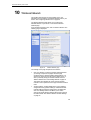
This chapter provides basic instructions for connecting the
ADSL/VoIP Gateway to a computer or LAN and to the Internet.
In addition to configuring the device, you need to configure the
Internet properties of your computer(s).. For more details, see
the following sections:
•
Configuring Ethernet PCs on page 88
•
Configuring Wireless PCs on page 95
This chapter assumes that you have already established a DSL
service with your Internet service provider (ISP). These
instructions provide a basic configuration that should be
compatible with your home or small office network setup. Refer
to the subsequent chapters for additional configuration
instructions.
Connecting the Hardware
This section describes how to connect the device to the wall
phone port, the power outlet and your computer(s) or network.
WARNING
Before you begin, turn the power off for all devices. These
include your computer(s), your LAN hub/switch (if applicable),
and the ADSL/VoIP Gateway.
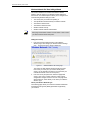
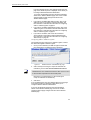
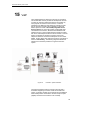
The diagram below illustrates the hardware connections. The
layout of the ports on your device may vary from the layout
shown. Refer to the steps that follow for specific instructions.
16