1
DLP ™ Digital Projector User’s Guide
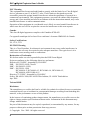
Remote Control Instruction
Laser aperture
(pointer/beam)
Power LED
Power ON/OFF
Laser pointer ON
Mouse cursor
(4 directional arrows)
Left mouse button
Right mouse button
ENGLISH
Up direction
Enter button
Left direction
Down direction
Right direction button
Keystone correction
Volume (+/-)
Setup menu
Mute sound
Auto sync
Zoom (+)
Video source: ie,
composite or component
Zoom (-)
Status of video information:
ie, resolution, frequency.
Blank screen
Freeze screen
WARNING:
To reduce the risk of injury to the eyes, do not look directly into the
laser light emitted from the aperture on the Remote Control and do not
point the laser light into anyone’s eyes. This remote control is equipped
with a Class IIIA laser that emits radiation.
NOTE:
Do not leave the remote control close to the cooling fan outlet of the
projector.
For the information of remote control transmission range, please refer
page 28.
11