1
DLP ™ Digital Projector User’s Guide
OSD Menu
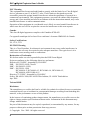
Use the On-Screen-Display Menus shown below to adjust the projected image. To access and
adjust the On-Screen-Menu do the following:
1. Press the Menu button on the remote control to select one of six on-screen menus: Main
Menu, Setup Menu, Color Manager Menu, Language Menu, Utility Menu, and Status
Menu.
2. Press arrow keys Left / Right (W/X) for main menu selection, and use arrow keys
upward / downward (S/T ) for sub-menu or for adjustment selection.
3. Press the “menu” button to exit an OSD menu.
Main Menu
ENGLISH
PC Mode
Video Mode
Contrast
Use arrow keys Left / Right (W/X) to adjust the contrast.
Adjustment range: from min-max (0 – 100) by 50 steps.
(Default value: factory calibrated)
Brightness
Use arrow keys Left / Right (W/X) to adjust the brightness.
Adjustment range: from dark – light (0-100) by 50 steps.
(Default value: factory calibrated)
Horizontal
Position
Use arrow keys Left / Right (W/X) to adjust the position in
horizontal direction.
Adjustment range: from left – right (0-100).
(Default value: centre position)
Vertical Position
Use arrow keys Left / Right (W/X) to adjust the position in vertical
direction.
Adjustment range: from bottom – top (0-100).
(Default value: centre position)
Reset
Use ↵ button to reset to default value.
In PC mode to reset contrast, brightness to default value.
In Video mode to reset contrast, brightness to default value.
21