1
DLP ™ Digital Projector User’s Guide
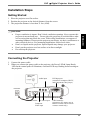
Connecting Input and Output Devices
The cables are color coded to assist you in making the connections.
You can connect more than one image source at a time. The input source will be detected
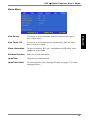
automatically when enable the “Auto Source” function is enabled in the Status Menu of the
OSD MENU. Manually pressing the “Source” button key operates selection.
The illustration below shows the ports and appropriate cables for connecting external devices
to the projector.
Power outlet
Computer (Desktop)
Computer (Notebook)
Power Cable
Audio Cable
(Stereo to Stereo)
Video Cable
VCR
S-Video
Cable
Computer Cable (DVI to
D-Sub 15 pin VGA)
Remote Mouse
Cable
Audio Cable
Stereo Mini Jack to
RCAx2 (Red/White)
Component Video
Cable DVI-I to HDTV
DVD player
HDTV/Component Video
14