1
i
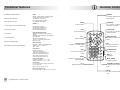
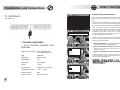
Technical features
Mobile DVB-T signal reception
Autotracking/Autosearch
Favourite Channels List
DVB-T
1 audio stereo output
1 video input
1 audio stereo input
Audio/video digital quality
Easy and fast plug-and-play installation
OSF IPDC ESG compliant
UHF bandwith, channels 21-69
COFDM 2k/4k/8k supported
6,8 mhZ bandwidth support
Video Decoding and OSD
Advanced high definition video decoding
(H264)
Advanced standard definition video decoding
(H264/MPEG2)
Resolution: 720x576 for PAL
16:9/4:3, 3:2 Letterbox and Pan/Scan
65K Colour OSD
Audio Decoding
Advanced multi-channel audio decoding
(MPEG 1, 2, MP 3, AAC/AAC+)
Stereo / MTS
Connections
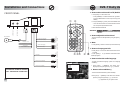
IR Remote Connector
Antenna-In : Fakra type 2x
Audio stereo Output (RCA L/R) 1x
Composite Video Output (RCA) 2x
Stereo Audio Input (RCA L/R) 1x
Composite Video Input (RCA) 1x
Safety and Reliability
Operation temperature : -5 C ~ +55 C
Storage temperature : -45 C ~ +85 C
Comsuptions
0.7 A in full operation powering two antennas
0.65 A in stand by
500 microA when off (car key off)
Mechanical Specification
Dimensions (WxDxH): 148mm x 107mm x 35mm
24
(*) applicable only to Q100TH model
SEARCH
to manually search/track a
tuned channel
ISO/IEC 13818-1 MPEG-2 Transport Stream
ETS 300 744 DVB-T Full Compliance
VHF (Band III) / UHF 21-69
DVB-T COFDM 2k/8k supported
7,8 mhZ bandwidth support
DVB-H (*)
2 video output for two separated monitor
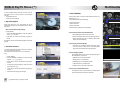
Remote Control
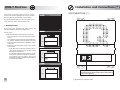
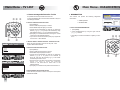
STAND-BY
to put the unit on stand-by
and switch to a/v input
SCANto start autoscan
LISTto view channel list
UP BUTTON
to view info on a program or
navigation button
LIST
P+/-zapping channels
SCAN
P+
info
CHANNEL
P
LEFT BUTTONnavigation or volume adjust
button
EXITto exit from the selected
option
BACKto return to the previous page
(where available)
0…9alpha/numerical button
SEARCH
OK
OK
to select a function or to
confirm the selection
MENU
EXIT
1
2
3
@?!.
abc
def
4
5
6
ghi
jkl
mno
7
8
9
pqrs
tuv
wxyz
0
MUTE
BACK
V+
_+ *
RIGHT BUTTON
navigation or volume adjust
button
DOWN BUTTON
navigation button
TV
RADIO
-RED (*)
Options list
-BLUE, GREEN
navigation buttons
-TV/RADIO - YELLOW
to switch between TV/Radio
listing
MUTE
to switch on/off the audio
input
5