1
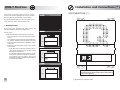
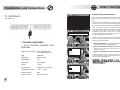
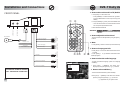
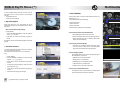
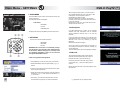
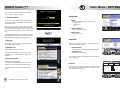
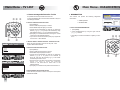
Installation and Connections DVB-T Daily Use v How to select a channel in a TV/Radio List FRONT PANEL • Press [LIST] to show the Tv List › Press [GREEN] to switch between the general TV LIST and the FAVOURITE TV LIST if previously preset [see MENU] • Press [TV/RADIO] (yellow) to show the RADIO LIST › Press the same button to switch between the Radio List and the previously selected TV LIST RJ11 PORT SCAN P+ OK +12V/24V BATTERY - Yellow AUDIO IN R (rigth) AUDIO IN L (left) VIDEO IN VIDEO OUT 1 (FRONT) VIDEO OUT 2 (REAR) TO CAR AUDIO EXTERNAL AUDIO SOURCE SYSTEM AUDIO OUT L (left) BRAKE - Green 1 2 3 @?!. abc def 4 5 6 ghi jkl mno 7 8 9 pqrs tuv wxyz 0 MUTE BACK EXTERNAL VIDEO SOURCE AUDIO OUT R (rigth) WARNING: +5V PHANTOM POWER IS PRESENT IN ALL “ANTENNA IN” CONNECTORS WARNING: channels marked in red are temporarily not available due to lack of network coverage V+ v How to adjust the volume level MENU EXIT GND - Black • Select the desired channel info P IR RECEIVER +12V/24V KEY - Red A/V CHANNEL FRONT REAR MONITOR MONITOR ANTENNA IN 2 ANTENNA IN 1 LIST _+ * The volume level can be adjusted by using the [VOL+] [VOL-] buttons v Mute • Press [MUTE] button to switch on/off the audio output TV RADIO v How to view program info • Press [info] to view short informations about the selected program • Press [BLUE] selected program to get detailed informations about the v How to select the audio language FAVOURITE TV To select the desired language (when more languages are available): TV LIST 1 Channel TV • Press [info] + [GREEN] and select the desired language by using the up/down[5] [6] buttons 2 Channel TV 3 Channel TV 4 Channel TV 15 16 Channel TV Channel TV v How to select subtitles (*) 7 Channel TV [GREEN] to change list To select the desired subtitle (when available): 20 • Press [info] + [GREEN] and select the desired subtitle option by using the up/down[5] [6] buttons (*) applicable only to Q100T model 9