1
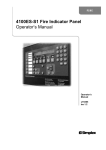
SIMPLEX 4100 FIRE INDICATOR PANEL
OPERATOR MANUAL
Page vii
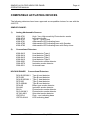
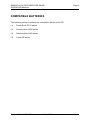
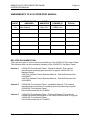
COMPATIBLE ACTUATING DEVICES
The following detectors have been approved as compatible devices for use with the
4100 FIP.
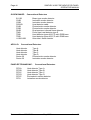
SIMPLEX RANGE:
1)
Analog Addressable Sensors
4098-9701
4098-9716
4098-9731
4098-9781
4098-9782
4098-9783
2)
High / Very High sensitivity Photoelectric smoke
Ionisation smoke
Type A / Type B Heat
Addressable LED Indicating base
Addressable LED Indicating base with Sounder
Addressable LED Indicating base with Relay driver
Conventional Detectors
4098-9413
4098-9414
4098-9415
4098-9416
2098-9201
2098-9576
2098-9211
HOCHIKI RANGE:
Heat detector Type A
Heat detector Type B
Heat detector Type C
Heat detector Type D
Photoelectric smoke detector
Ionisation smoke detector
Universal base.
Conventional Detectors
DCA-B-60R MK V
DFE-60B
DCA-B-90R MK 1
DFE-90D
DFG-60BLKJ
SPA-AB
SIH-AM
SLK-A
SLG-AM MK 1
HF-24A MK 1
YBC-R/3A
YBF-RL/4AH4
Document No: 4100-M001
Type A heat detector
Type B heat detector
Type C heat detector
Type D heat detector
Type B heat detector
Beam type smoke detector
Ionisation smoke detector
Photoelectric smoke detector
Photoelectric smoke detector
Ultraviolet smoke detector
Plain - non indicating base
LED Indicating base
May 1997
Issue 1.0