1
Custom User Codes
User Code Authority Levels
User Code Level: 9 only.
Function: Allows you to add, delete, and change a user's (person
operating the system) user code or authority level.
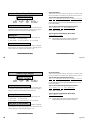
There are several characteristics associated with each user code that
define its capabilities within the system.
125
34812
User Number
User Code
7
User Level
User Number - Every user is numbered. This number identifies them
to the system and can be transmitted to the central station when they
arm or disarm areas.
User Code - Each user also has a 3 to 5 digit number they enter into
the Security Command keypad when arming or disarming the system.
NOTE: A User Code cannot begin or end with zero, or begin with 98,
or be in the range of 1 to 299.
User Names - Each code may also be programmed with the users
name. Up to 16 characters may be entered.
Areas -Each user may be assigned their specific areas into the
burglary or access control system.
User Level - The user is also assigned a level of authority (1 to 9) or
customized authority by the person administrating the system that
determines the areas and functions the user can access.
Important: Each area must have at least one user with a level 9
authority in order to be able to add or delete user codes.
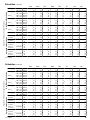
The table to the right lists system functions users are allowed to
access based on the authority level assigned to their codes.
*
Menu Options
1
2
Sensor Reset
Armed Areas
Zone Status
System Status
Display Events
Door Access
Arm & Disarm
Alarm Silence
System Test
Zone Monitor
Outputs ON/OFF
Extend
Bypass Zones
Schedules
Set Time
User Codes
*
*
*
*
*
*
*
*
*
*
*
*
+
+
3
✓
✓
✓
✓
✓
✓
✓
✓
4
✓
✓
✓
✓
✓
✓
✓
✓
✓
✓
5
✓
✓
✓
✓
✓
✓
✓
✓
✓
✓
✓
6
✓
✓
✓
✓
✓
✓
✓
✓
✓
✓
✓
✓
✓
7
✓
✓
✓
✓
✓
✓
✓
✓
✓
✓
✓
✓
✓
✓
8
✓
✓
✓
✓
✓
✓
✓
✓
✓
✓
✓
✓
✓
✓
✓
9
✓
✓
✓
✓
✓
✓
✓
✓
✓
✓
✓
✓
✓
✓
✓
✓
= These functions can only be accessed during certain schedules.
+ = Arming allowed anytime. Disarming allowed outside of a schedule
but an Unauthorized Entry report is sent to the central station.
Programming Custom User Codes
In addition to the preset authority levels, you can also create custom
authority levels by selecting the CUSTOM option at the time the user
is being added to the system. This option allows you to assign specific
User Menu access to individual users.
16
User Menu
User Code Authority Levels
Custom User Codes
Menu Options
User Code Level: 9 only.
Sensor Reset
Armed Areas
Zone Status
System Status
Display Events
Door Access
Arm & Disarm
Alarm Silence
System Test
Zone Monitor
Outputs ON/OFF
Extend
Bypass Zones
Schedules
Set Time
User Codes
Function: Allows you to add, delete, and change a user's (person
operating the system) user code or authority level.
There are several characteristics associated with each user code that
define its capabilities within the system.
125
34812
User Number
User Code
7
User Level
User Number - Every user is numbered. This number identifies them
to the system and can be transmitted to the central station when they
arm or disarm areas.
User Code - Each user also has a 3 to 5 digit number they enter into
the Security Command keypad when arming or disarming the system.
NOTE: A User Code cannot begin or end with zero, or begin with 98,
or be in the range of 1 to 299.
User Names - Each code may also be programmed with the users
name. Up to 16 characters may be entered.
Areas -Each user may be assigned their specific areas into the
burglary or access control system.
*
1
*
*
*
*
*
*
2
3
4
5
6
7
8
9
*
*
*
*
*
*
+
+
✓
✓
✓
✓
✓
✓
✓
✓
✓
✓
✓
✓
✓
✓
✓
✓
✓
✓
✓
✓
✓
✓
✓
✓
✓
✓
✓
✓
✓
✓
✓
✓
✓
✓
✓
✓
✓
✓
✓
✓
✓
✓
✓
✓
✓
✓
✓
✓
✓
✓
✓
✓
✓
✓
✓
✓
✓
✓
✓
✓
✓
✓
✓
✓
✓
✓
✓
✓
✓
✓
✓
✓
✓
✓
✓
✓
✓
✓
✓
✓
✓
✓
✓
✓
✓
✓
✓
= These functions can only be accessed during certain schedules.
User Level - The user is also assigned a level of authority (1 to 9) or
customized authority by the person administrating the system that
determines the areas and functions the user can access.
+ = Arming allowed anytime. Disarming allowed outside of a schedule
Important: Each area must have at least one user with a level 9
authority in order to be able to add or delete user codes.
In addition to the preset authority levels, you can also create custom
authority levels by selecting the CUSTOM option at the time the user
is being added to the system. This option allows you to assign specific
User Menu access to individual users.
The table to the right lists system functions users are allowed to
access based on the authority level assigned to their codes.
16
but an Unauthorized Entry report is sent to the central station.
Programming Custom User Codes
User Menu