1
Call Handling
1-61
Chapter 1: Basic System Features
Hot Desk
Allows users to share a 24-button digital phone with others while maintaining their own settings
and log in information. The station used for Hot Desk purposes may also be referred to as a
"Dummy Station". For example, a Hot Desk can be used in a call center or marketing
department where people on different shifts share a working place with one another.
IMPORTANT:
Available for digital and IP phones only.
CONDITIONS
•
Each user must log out when they are no longer using the station so that it will be available
to users who share the station.
•
A dummy station will display "DUMMY STATION (xxx)" (where xxx = the physical station
number).
•
A dummy station only allows login operation; all other operations are not allowed.
•
Logout operation is only allowed for dummy stations where a user has logged-in.
•
Total number of users is limited by the system station capacity. The total number of Hot
Desk users cannot be greater than the total number of stations. Furthermore, the number
of Hot Desk users must be one station less than the number of installed stations (for
example, if there are 12 stations installed, there can only be 11 Hot Desk users).
•
Each Hot Desk user must have his/her own password.
•
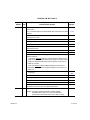
Saved database information for each user includes:
-
Station Number
-
Station Attributes
-
CO Routing (Ring Assign, DID routing)
-
Hunt Group Membership
-
Voice Mail
•
If a user attempts to log in at another station without logging out of another Hot Desk
station, the previously used station automatically returns to the "dummy state".
•
The Hot Desk automatically logs off if there is no activity at the digital phone within the
Auto Log Out Timer (see ADMIN PROGRAMMING).
•
The button map of the Hot Desk will not be changed even when a user logs on to a
different type of digital phone. However, it is recommended that the same type of digital
phone is used for the Hot Desk station.
•
Only 24-button digital phones can be used as dummy stations.
•
A modem should not be associated with a dummy station.
•
If a system reset occurs, any users currently logged in will be automatically logged out.
Release 3.5
SBX IP Programming & Operations Guide
June 2010