1
MAXTOR SHARED STORAGE II WINDOWS INSTALLATION
Introduction
About this Guide
Thank you for selecting the Maxtor Shared Storage II Drive.
The following symbols and conventions are used in this guide:
Connecting this storage solution to your network in a home or
small office is a simple and economical way for users to
share and backup files. Your new Maxtor Shared Storage II
drive offers a winning combination of capacity, simplicity of
use and helpful software features that automate configuration, privacy and more. The simple installation allows you to
start using your drive as quickly as possible. You can also
change settings on your drive at any time, and manage user
access through web browsers.
Shared Storage II Features
Instantly add storage to your network, back up files across
every compatible computer on your network, and stream
music, videos and photos from your drive to your home
entertainment system.
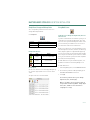
Bold
Used for menu, command, and keyboard selections you make and
screens you will see.
Italics
Used for emphasis and to identify new terms.
Components
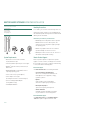
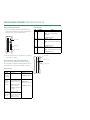
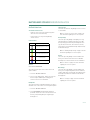
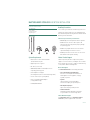
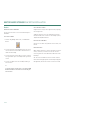
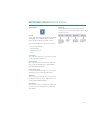
Before installing, review the solution features in Figure 1.
FIGURE 1 SOLUTION FEATURES
1. Status Lights
2. Power Switch
3. Power Connector
4. USB 2.0 Ports
5. Ethernet Port
6. Security Lock
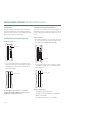
Simple Installation and Setup
– Automatically configure the drive to your network
– Manage the drive using our simple user interface
– Connect and share additional hard drives using the
drive’s 2 USB ports
– Easily store and share access to files, photos, music
and videos
– Organize files automatically using Drag and Sort™
– Give users full access to public folders, while keeping
others private
– Get backup and storage status for all users with
SimpleView™
– Back up user files/folders to an external USB drive
– Protect data on all of your networked PCs using
Maxtor® Backup
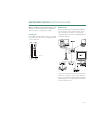
– Playback of Videos, Music and Photos
– Use our media streaming feature to play digital photos,
music and video on a networked home entertainment
system - even without turning on your computer
– Connect automatically through a UPnP™ AV
compatible digital media adapter
PAGE 1