1
PRELIMINARY
Modes of Operation-Description
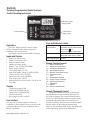
Standard Digital Touchpad Control
Heat Mode
Unit will call for heating based on the type of
the heat source it has: heat pump in reverse cycle or
electric.
1) Hot Start:
Hot Start is possible when the control has not
called for heat in more than (2) hours or during power-
on-reset. During Hot Start, the user’s set point is raised
4°F (Ts + 4°F). The unit will only call for heat if room
temperature differential calls for heat.
The unit will continue in Hot Start Mode until the new set point is satisfied (with a 1°F differential) or unit has run for at least 20 minutes. After one or both conditions are met, the set point will be reset to the user’s setting and the unit will run in regular heat mode. Hot start is not available with the Sleep feature. The fan will operate per the Fan Mode and Speed setting.
2) Hot Keep:
When the water valve closes, the indoor fan will operate per the user mode (Constant or Cycle) and speed setting.
3) Sleep Function:
Sleep time is user adjustable from 1 to 15 hours in one hour increments, in a closed loop via the touch pad, by pressing the Sleep button repeatedly. The Sleep Mode can be terminated by pressing the On/Off button.
The Sleep Function will lower the temperature
setting with time. Changing the Mode or a changeover
from Heat to Cool will reset the Sleep Timer.
The Sleep function will be deactivated by Poweron-reset, or by pressing any button on the Touchpad
except Sleep.
4) Fan Mode:
In the Fan Mode, the fan will operate continuously at the user’s speed setting. The compressor and outdoor fan will not operate. In single motor units, the outdoor fan will run along with the indoor fan.
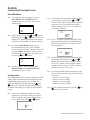
Set Up Mode
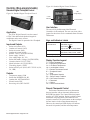
To enter the Set Up Mode, simultaneously press the
Mode, Up and Down buttons for 5 seconds. To change
settings, press the Up or Down button. To move from
one screen to another, press the Mode button.
To exit Set Up, press the Mode Up and Down
buttons simultaneously for 5 seconds or control will
automatically exit Set Up in 15 seconds.
Settings within the Set Up Mode are as follows:
IM 934 Applied PTAC / Page 24 of 44
Control Selection:
To view the Control Selection Screen, press and
hold the Up and Down buttons for 5 seconds. The
setting may be changed by pressing either the Up or
Down button. The “tP” setting is the default setting
and indicates the touchpad control.
Temperature Limit Settings
To advance from Control Selection to Temperature
Limit Settings, press the Mode button once. To set the
Cool Minimum set point, press and hold Fan Cycle
button and adjust the setting with the Up or Down
buttons. The minimum setting is 60°F.
To set the Heat Maximum set point, press and hold
Fan Speed button and adjust the setting with the Up or
Down buttons. Maximum setting is 85°F.
The Display will show the upper operating limits
first. The default settings are Cool min. = 60°F and
Heat max. = 85°F.
Hydronic Valve Operation
To advance from Temperature Limit Settings to
Hydronic Valve operation, press the Mode button
once. To toggle the setting, press either the Up or
Down button. Settings are “no” (normally open) and
“nc” (normally closed). Default setting is “no”.
Indoor Air Sensor Reading
To advance from Hydronic Valve operation to
Indoor Air Sensor Reading, press the Mode Button
once. The control readout will show room temperature.
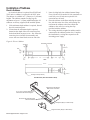
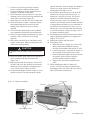
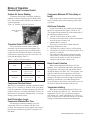
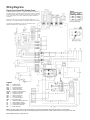
Figure 35. Indoor Air and Indoor Coil Sensor
Locations
Indoor
Coil Sensor (ICS)
Indoor
Air Sensor (IAS)