1
Virtual 1.5.4
title of the folder open in each or the name of the
document with an image of its creator application's icon.
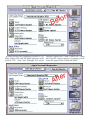
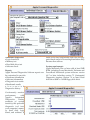
This is what Virtual 1.5.1 does: In the little window in one corner of your screen, (see pictures),
it draws as many virtual screens as you like, and
the windows of open applications inside them.
When you instruct Virtual to switch virtual
screens, it moves the application windows so as
to give you the illusion of working on the new
virtual screen.
Here's one I'm sure you'll like. I started using this
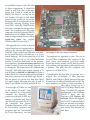
on the all-in-one 68LC040 Mac Performa mentioned in the previous article. This model has a
small but very sharp 14-inch colour screen that
only runs at 640 by 480
pixels. After getting used
to the extra real estate I
enjoy with two monitors
connected to the PPC 6500
in the Double Click
Editing Room, I found it a
bit stifling to go back to
having the use of just one
little screen on the
Performa when out “in
the field”, so to speak. As
you can see from the pictures I have installed
Virtual on the PowerPC
Performa 580CD and can
toggle between virtual
desktops as if I had four
monitors attached to this
Mac Performa. In each
desktop I have a different
window open and the
Virtual window shows the
Virtual allows you to do a great deal besides
switching screens. You can move your windows
around by dragging their representations in
Virtual, place them in different virtual screens to