1
B - Connecting.
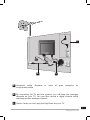
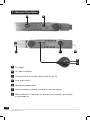
Simply connect your VCR to the VCR scart of your receiver.
To record a channel, start by playing the channel on your TV. You should then
start recording on the AV channel of the VCR (0, AV, EXT etc). If necessary,
refer to your VCR manual to make sure you are doing everything correctly.
For your information, this channel can normally be found on many VCRs by
selecting channel 1 and by then pressing the PROG - key once or twice.
To play a tape, the receiver should be on standby. Simply insert the tape and
start playing. The image will appear on the screen. If this is not the case,
press the TV/VCR key on your VCR remote.
ANT
VCR
REMINDER !
18
[email protected].
You cannot record a channel other than the one you are watching.