1
93
¦
Note If you want to capture video with closed captioning or AFD, see
“Settings for capturing Matrox 4VANC closed captioning” on page 88, or
“Settings for capturing Matrox 4VANC AFD” on page 90.
Setting your edit-to-tape settings
For frame-accurate edit-to-tape using Final Cut Pro with Matrox MXO2, set the
edit-to-tape settings as follows:
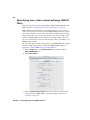
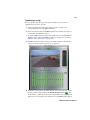
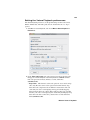
1 Open Final Cut Pro and choose File > Edit To Tape.
2 In the Edit To Tape window, click the Device Settings tab.
3 From the Device Control menu, select a Matrox MXO2 device control
preset. To create or edit an MXO2 device control preset, see “Creating and
editing MXO2 device control presets” on page 87.
4 If you’ll be performing an insert edit, from the Capture/Input menu, select
a Matrox MXO2 capture preset that is compatible with your tape. This is
required to allow you to preview your tape to see what the edit will look like
in Final Cut Pro’s Edit to Tape window. To create or edit an MXO2 capture
preset, see “Creating and editing MXO2 capture presets” on page 86.
¦
Note To preview video from your tape, you must connect video and audio
outputs from your recorder to the corresponding inputs on MXO2, and then
set the MXO2 A/V input settings accordingly (see “Specifying your A/V input
settings” on page 57).
5 To avoid having black frames recorded at the end of an insert edit, make sure
that Editing, instead of Mastering, is selected as the edit-to-tape mode. To
do this, in the Edit To Tape window, click the Video tab, and then select
Editing from the Mode menu.
6 When performing an edit-to-tape on some RS-422 devices, a delay may
occur between the time that Final Cut Pro starts to play back your project
and the time the device starts recording. To ensure that your edit-to-tape does
not miss any frames, you can delay the playback of your project by adjusting
the Playback Offset setting for the device control preset that you selected in
step 3 (see “Creating and editing MXO2 device control presets” on page 87).
Working with Apple Final Cut Pro