1
DIGIGRID MGB/MGO
INTRODUCTION
Thank you for choosing a DiGiGrid MGB or MGO audio interface for SoundGrid systems. In order to get the most out of your DiGiGrid
product, please take some time to read this user guide. We also suggest that you become familiar with the Waves support site (www.
wavesupport.net), where you will find an extensive answer base, the latest tech specs, detailed installation guides, software updates,
and current information about licensing and registration.
About SoundGrid and DiGiGrid MGB/MGO
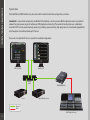
SoundGrid is a scalable infrastructure that provides a variety of cost-effective, high-quality solutionsfor recording studios and live
sound consoles. It can be configured in many ways and with many hardware possibilities to provide a very flexible work environment. This framework is managed by the SoundGrid Studio Application or MultiRack SoundGrid, which configures the network,
assigns and manages I/Os, controllers and servers, and patches audio throughout the system. Any user, anywhere on the SoundGrid
network, has access to any of the network’s I/O devices. Adding a SoundGrid DSP server enables recording and monitoring with very
low latency and moves processing away from the host computer to the server.
A single Ethernet cable connects all devices in the SoundGrid network.
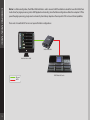
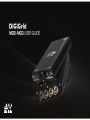
The DiGiGrid MGB and MGO MADI-to-SoundGrid interfaces are used for connecting MADI-enabled devices to a Waves SoundGrid
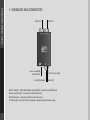
network for plugin processing and/or DAW playback and recording. The MGB unit is equipped with MADI BNC connections; MGO is
equipped with MADI optical connections.
■
■
■
■
■
■
■
3
S upported sample rates: 44.1, 48, 88.2 and 96 kHz
1
12/128-channel I/O @ 48 kHz
5
6/64-channel I/O @ 96 kHz
S upports 56- and 64-channel modes
Supports double wire (48k frame) and single wire (96k frame) signals @ 96 kHz
Clock synchronization via word clock input, MADI (Port 1 or Port 2), SoundGrid (Sync over Ethernet), Internal
1 SoundGrid port (RJ45)