1
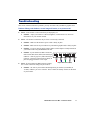
Troubleshooting This section contains solutions to problems you may encounter with your Matrox graphics card. Problem: Wrong color balance, screen image off-center, or no picture at all Cause – Your monitor’s video controls may be improperly set. ; Solution – Adjust your monitor’s controls (brightness, contrast and so on). For more information, see your monitor manual. Cause – The monitor connections may be loose or incorrectly connected. ; Solution – Make sure the monitor’s power cable is firmly in place. ; Solution – Make sure the 15-pin connector to your Matrox graphics card is firmly in place. ; Solution – If you are using an Apple monitor, make sure the adapter is firmly attached to your monitor cable and your Millennium II card. ; Solution – If your monitor uses BNC connectors, make sure the Red, Green, Blue, Horizontal Sync (HSYNC – white or gray wire), and Vertical Sync (VSYNC – black wire) connections are firmly in place and plugged into the correct input. Cause – If your monitor uses BNC input (see picture), one or more connection settings may be incorrect. ; Bayonet Nut Connect (BNC) Solution – Set each of your monitor’s RGB input and sync switches (if available) to 75 ohms, with the sync set to “external”. These controls are usually switches on the back of your monitor. Matrox Millennium II for Mac – Installation Guide 11