1
<P=002>
PRECAUTIONS
■ General
■ Care of compact discs
● Please ensure that the equipment is positioned in a well
ventilated area and ensure that there is at least 5 cm of
free space along the sides, top and back of the equipment.
● Do not use oil, solvents, petrol, paint thinners or insecticides on the unit.
● Do not expose the unit to moisture, to temperatures
higher than 60˚C (140˚F) or to extreme low temperatures.
● Keep the unit away from direct sunlight, strong magnetic
fields, excessive dust, humidity and electronic/electrical
equipment (home computers, facsimiles, etc.) which
generates electrical noise.
● Hold the AC power plug by the head when removing it
from the AC socket, since pulling the lead can damage
internal wires.
● Remove the AC power plug from the wall socket before
cleaning the heads, pinch rollers, etc.
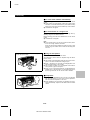
This unit contains dangerous voltages.
Do not remove the outer cover, as this may result in
electric shock. Refer internal service to your local SHARP
service facility.
● Use the unit on a firm, level surface free from vibration,
and do not place anything on the top of the unit.
● If the unit does not work properly whilst in use, set the
ON/STAND-BY switch to STAND-BY, then disconnect
the AC power lead from the AC socket. Plug the AC
power lead back in, and then set the ON/STAND-BY
switch to ON.
● If a lightning storm is taking place near you, it is suggested that you disconnect the AC power lead from the
AC socket for safety.
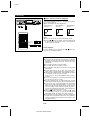
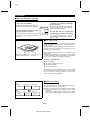
Compact discs are fairly resistant to damage, however mistracking can occur due to an accumulation of dirt on the
disc surface.
Follow the guidelines below for maximum enjoyment from
your CD collection and player.
● Do not write on either side of the disc, particularly the
non-label side. Signals are read from the non-label side.
Do not mark this surface.
● Keep your discs away from direct sunlight, heat, and excessive moisture.
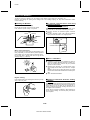
● Always hold the CDs by the edges. Fingerprints, dirt, or
water on the CDs can cause noise or mistracking. If a
CD is dirty or does not play properly, clean it with a soft,
dry cloth, wiping straight out from the centre, along the
radius.
Warning:
The voltage used must be the same as that specified on
this unit. Using this product with a higher voltage than that
which is specified is dangerous and may result in a fire or
other type of accident causing damage. SHARP will not be
held responsible for any damage resulting from use of this
unit with a voltage other than that which is specified.
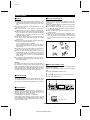
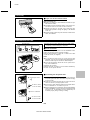
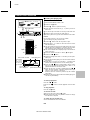
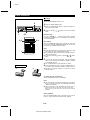
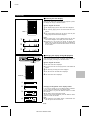
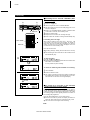
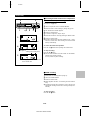
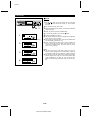
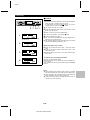
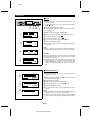
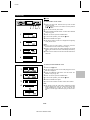
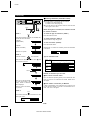
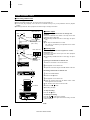
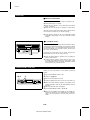
■ About the transport card
This unit is shipped with a transport card in place to prevent
damage during shipping.
Before using, follow these steps to remove the transport
card:
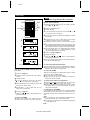
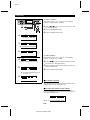
1
2
3
■ Volume control
It is advisable to avoid exposure to high volume levels, which
occur whilst turning the unit on with the volume control setting up high, or whilst continually listening at high volumes.
Set the ON/STAND-BY switch to ON.
Press the
7 button of the disc 1 to open the disc tray.
Remove the transport card.
1
2
DISC-1
1
DISC-2
2
DISC-3
3
TUNING
CURSOR
CD PLAY
ON/STAND-BY
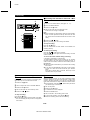
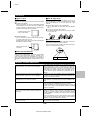
■ Condensation
CD
MD
VOLUME
3D SURROUND TUNER
MODE ON/OFF (BAND)
TRACK
START
NAME / TIMER /
TOC EDIT DELETE DISPLAY
1 2 3
CD
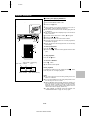
Sudden temperature changes, storage or operation in an
extremely humid environment may cause condensation inside the cabinet (CD pickup, MD pickup, etc.) or on the
transmitter window on the remote control.
Condensation can cause the unit to malfunction.
If this happens, leave the power on with no disc in the unit
until normal playback is possible (about 1 hour) or wipe off
any condensation on the transmitter window with a soft cloth
before operating the unit.
MD DIGITAL EDIT
3
Transport card
1
2
DISC-2
TUNING
CURSOR
3
CD PLAY
DISC-3
MD
ENTER
ON/STAND-BY
E-2
MD-ZV30H TINSZ0217AWZZ
CD
/
NAME / TIMER DISPLAY
TOC EDIT DELETE
VOLUME
TUNER
3D SURROUND (BAND)
MODE ON/OFF
TRACK
CD
START
MD DIGITAL EDIT
REC
ENTER
REC