1
<P=005>
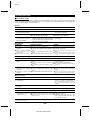
TROUBLESHOOTING
■ If a problem occurs
If this unit functions abnormally during operation, first check the following items. If the unit continues to function abnormally,
or if an abnormality appears other than listed below, turn off the player’s power and disconnect the AC power plug, then
consult your SHARP dealer or service personnel.
●General
SYMPTOM
● The clock is wrong.
POSSIBLE CAUSE
REMEDY
● Did a power failure occur?
● When a button is pressed,
the unit does not respond.
● No sound is heard.
● Try setting it again.
● Turn the power off and on again, and
then retry the operation.
● Is the volume level is set to "0"?
● Are the headphones connected?
● Increase the volume level.
● Disconnect the headphones.
● Radios make unusual noise ● When a radio or TV which uses an indoor ● It is recommended that you use an exaerial is placed near the unit, the picture
or the picture on the TV
ternal aerial.
on the TV screen may be distorted or the
screen is distorted.
radio may not function properly.
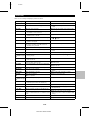
●CD playback
SYMPTOM
POSSIBLE CAUSE
REMEDY
● Even though a disc has been ●
loaded, "NO DISC" or "ERROR" ●
is displayed.
●
● Playback stops in the middle of
a track, or playback is not per- ●
formed properly.
● Playback sounds are skipped.
The disc is loaded up-side down.
The disc is very dirty.
The disc which does not satisfy the standards.
Is the unit located near excessive vibrations?
● Has condensation formed inside the unit?
●MD recording and playback
SYMPTOM
POSSIBLE CAUSE
● Load the disc with the correct side up.
● Clean the disc.
● Load the correct disc.
● Place the unit on a firm, level surface free from
vibration.
● Remove the disc and leave the power turned
on. The unit should function properly in about
1 hour.
REMEDY
● A re c or di n g c an n o t be ● Is the MiniDisc protected against accidental ● Slide the accidental erase prevention tab back
erasure?
to its original position.
made.
● Did you try to make recording on a playback-only ● Replace it with a recordable disc.
MiniDisc?
● Put in another recordable disc with recording
space on it.
● Can you see the "TOC FULL" message in the display?
● Even though a disc has been ● The disc is very dirty.
● Clean the disc.
loaded, "NO DISC" or "ERROR" ● Is the unit located near excessive vibra- ● Place the unit on a firm, level surface free from
is displayed.
vibration.
tions?
● Pl a y b a c k s o u n d s a re ● Has condensation formed inside the unit? ● Remove the disc and leave the power turned
on. The unit should function properly inabout 1
skipped.
hour.
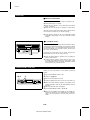
●Radio reception
SYMPTOM
POSSIBLE CAUSE
REMEDY
● Radios make unusual noise
consecutively.
● When the unit receives a radio broadcast near
● The preset channel cannot ● Did a power failure occur?
be called.
● Preset the channel again.
●Remote control
SYMPTOM
a TV set, a computer or a wordprocessor, it
may pick up noise. If this happens, try to move
the unit from the place where the noise is
picked up.
POSSIBLE CAUSE
REMEDY
● The remote control does ● The batteries (polarity) are not inserted properly. ● Insert properly.
not function or does not ● The batteries inside the remote control are dead. ● Replace the batteries.
operate properly.
● The remote control is operated from an incorrect ● Operate it within a range of 0.2 m (8")
to 6 m (20’) and within an angle of 15°
distance or angle.
to either side of centre.
● The power cannot be turned on ● Is the AC power lead plugged in?
from the remote control.
E-40
MD-ZV30H TINSZ0217AWZZ
● Connect the AC power lead.