1
MODEL: MX-4100N
MX-4101N
MX-5000N
MX-5001N
DIGITAL FULL COLOUR MULTIFUNCTIONAL SYSTEM
Quick Start Guide
Before using the machine
Functions of the machine and
procedures for placing originals and
loading paper.
Copying
Using the copy function.
Printing
Using the printer function.
Faxing
Using the fax function.
Scanning
Using the scan function.
Document filing
Storing jobs as files on the hard
drive.
System settings
Configuring settings to make the
machine easier to use.
Troubleshooting
Keep this manual close at hand for reference
whenever needed.
Frequently asked questions and
how to clear paper misfeeds.
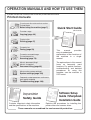
OPERATION MANUALS AND HOW TO USE THEM
3 printed manuals and a manual in PDF format are provided with the machine.
Printed manuals
To learn the parts of the machine and how to use them
To load paper
Before using the machine (page 7)
Quick Start Guide
(this manual)
To make a copy
Copying (page 23)
To print a file
Printing (page 47)
To send a fax
Faxing (page 59)
This
manual
provides
easy-to-understand
explanations of the functions of
the machine in a single
manual.
To send a scanned image
To use Internet fax
Scanning (page 79)
What is document filing?
What is it used for?
The explanations in this manual
focus on frequently used
functions. For special functions,
troubleshooting, and detailed
procedures for using the
machine, see the manuals in
PDF format.
Document filing (page 95)
What are the system settings?
System settings (page 103)
Frequently asked questions and how to
clear paper misfeeds
Troubleshooting (page 109)
Please read before
using the machine.
Safety Guide
Contains important safety information
and the specifications of the machine.
Software Setup
Guide / Sharpdesk
Installation Guide
Explains the procedures for installing the
printer driver and scanner driver.
These manuals are combined for environmental protection.
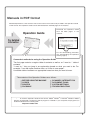
Manuals in PDF format
Detailed explanations of the functions that can be used on the machine are provided in the Operation Guide
in PDF format. The Operation Guide can be downloaded from the Web pages in the machine.
Download the Operation Guide
from the Web pages in the
machine.
Operation Guide
For detailed
information
For the downloading procedure,
see "Downloading the Operation
Guide" (page 3).
Convenient methods for using the Operation Guide
The first page contains a regular table of contents as well as an "I want to..." table of
contents.
"I want to..." lets you jump to an explanation based on what you want to do. For
example, "I use the copier function often, so I'd like to save paper".
Use either table of contents as appropriate based on what you want to know.
The contents of the Operation Guide are as follows:
BEFORE USING THE MACHINE
COPIER
PRINTER
FACSIMILE
SCANNER / INTERNET FAX
DOCUMENT FILING
SYSTEM SETTINGS
TROUBLESHOOTING
*
To view the Operation Guide in PDF format, Adobe® ReaderTM or Acrobat® Reader of Adobe
Systems Incorporated is required. If neither program is installed on your computer, the programs can
be downloaded from the following URL:
http://www.adobe.com/
1
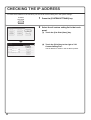
CHECKING THE IP ADDRESS
To check the IP address of the machine, print out the all custom setting list in the system settings.
SYSTEM
SETTINGS
System Settings
Admin Password
Exit
List Print
(User)
Total Count
Default Settings
Paper Tray
Settings
Address Control
Fax Data
Receive/Forward
Printer Condition
Settings
Document Filing
Control
USB-Device Check
(1)
1
Press the [SYSTEM SETTINGS] key.
2
Select the all custom setting list in the touch
panel.
(1) Touch the [List Print (User)] key.
System Settings
List Print (User)
All Custom Setting List:
Printer Test Page:
PCL Symbol Set List
Back
Print
(2)
Print
Sending Address List:
Individual List
Document Filling Folder List:
2
Print
Print
(2) Touch the [Print] key to the right of "All
Custom Setting List".
The IP address is shown in the list that is printed.
ACCESSING THE WEB SERVER IN THE
MACHINE
When the machine is connected to a network, the machine's built-in Web server can be accessed from a Web
browser on your computer.
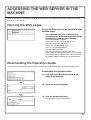
Opening the Web pages
Access the Web server in the machine to open
the Web pages.
Start a Web browser on a computer that is
connected to the same network as the machine
and enter the IP address of the machine.
Recommended Web browsers
Internet Explorer: 6.0 or higher (Windows®)
Netscape Navigator: 9 (Windows®)
Firefox: 2.0 or higher (Windows®)
Safari: 1.5 or higher (Macintosh)
The Web page will appear.
The machine settings may require that user
authentication be performed in order to open the Web
page. Please ask the administrator of the machine for
the password that is required for user authentication.
Downloading the Operation Guide
The Operation Guide, which is a more detailed manual, can be downloaded from the machine's Web pages.
Downloading the Operation Guide.
(1) Click [Operation Manual Download] in the
menu of the Web page.
(1)
(2) Select the desired language.
(2)
(3) Click the [Download] button.
The Operation Guide is downloaded.
(3)
3
TABLE OF CONTENTS
CHECKING THE IP ADDRESS. . . . . . . . . . . . . . . . . . . . . . . . . . . . . . . . . . . . . . . . . . . . . . . . . . . . . .2
ACCESSING THE WEB SERVER IN THE MACHINE . . . . . . . . . . . . . . . . . . . . . . . . . . . . . . . . . . . .3
Before using the machine
PART NAMES AND FUNCTIONS . . . . . . . . . . . . . . . . . . . . . . . . . . . . . . . . . . . . . . . . . . . . . . . . . . .8
OPERATION PANEL . . . . . . . . . . . . . . . . . . . . . . . . . . . . . . . . . . . . . . . . . . . . . . . . . . . . . . . . . . . .10
USING THE TOUCH PANEL . . . . . . . . . . . . . . . . . . . . . . . . . . . . . . . . . . . . . . . . . . . . . . . . . . . . . .12
USER AUTHENTICATION . . . . . . . . . . . . . . . . . . . . . . . . . . . . . . . . . . . . . . . . . . . . . . . . . . . . . . . .14
HOME SCREEN . . . . . . . . . . . . . . . . . . . . . . . . . . . . . . . . . . . . . . . . . . . . . . . . . . . . . . . . . . . . . . . .15
IMAGE CHECK FUNCTION (PREVIEW) . . . . . . . . . . . . . . . . . . . . . . . . . . . . . . . . . . . . . . . . . . . . .16
PLACING ORIGINALS . . . . . . . . . . . . . . . . . . . . . . . . . . . . . . . . . . . . . . . . . . . . . . . . . . . . . . . . . . .17
CHANGING PAPER IN A TRAY . . . . . . . . . . . . . . . . . . . . . . . . . . . . . . . . . . . . . . . . . . . . . . . . . . . .18
Copying
BASE SCREEN OF COPY MODE . . . . . . . . . . . . . . . . . . . . . . . . . . . . . . . . . . . . . . . . . . . . . . . . . .24
MAKING COPIES . . . . . . . . . . . . . . . . . . . . . . . . . . . . . . . . . . . . . . . . . . . . . . . . . . . . . . . . . . . . . . .25
2-SIDED COPYING (Automatic Document Feeder). . . . . . . . . . . . . . . . . . . . . . . . . . . . . . . . . . . .26
COPYING ON SPECIAL PAPER (Bypass Copy) . . . . . . . . . . . . . . . . . . . . . . . . . . . . . . . . . . . . . .27
MAKING COLOUR COPIES (Colour Mode) . . . . . . . . . . . . . . . . . . . . . . . . . . . . . . . . . . . . . . . . . .29
SELECTING THE EXPOSURE AND IMAGE TYPE . . . . . . . . . . . . . . . . . . . . . . . . . . . . . . . . . . . . .30
FITTING THE COPY IMAGE TO THE PAPER (Automatic Ratio Selection) . . . . . . . . . . . . . . . . .31
ENLARGEMENT/REDUCTION (Preset Ratios / Zoom) . . . . . . . . . . . . . . . . . . . . . . . . . . . . . . . . .33
INTERRUPTING A COPY RUN (Interrupt Copy) . . . . . . . . . . . . . . . . . . . . . . . . . . . . . . . . . . . . . .35
STORING COPY OPERATIONS (Job Programs) . . . . . . . . . . . . . . . . . . . . . . . . . . . . . . . . . . . . . .36
SPECIAL MODES . . . . . . . . . . . . . . . . . . . . . . . . . . . . . . . . . . . . . . . . . . . . . . . . . . . . . . . . . . . . . . .38
SELECTING A SPECIAL MODE . . . . . . . . . . . . . . . . . . . . . . . . . . . . . . . . . . . . . . . . . . . . . . . . . . .39
CONVENIENT COPY FUNCTIONS . . . . . . . . . . . . . . . . . . . . . . . . . . . . . . . . . . . . . . . . . . . . . . . . .40
Printing
PRINTING . . . . . . . . . . . . . . . . . . . . . . . . . . . . . . . . . . . . . . . . . . . . . . . . . . . . . . . . . . . . . . . . . . . . .48
CANCELLING PRINTING (AT THE MACHINE) . . . . . . . . . . . . . . . . . . . . . . . . . . . . . . . . . . . . . . . .53
SELECTING PRINT SETTINGS . . . . . . . . . . . . . . . . . . . . . . . . . . . . . . . . . . . . . . . . . . . . . . . . . . . .54
CONVENIENT PRINTER FUNCTIONS. . . . . . . . . . . . . . . . . . . . . . . . . . . . . . . . . . . . . . . . . . . . . . .56
4
Faxing
BASE SCREEN OF FAX MODE . . . . . . . . . . . . . . . . . . . . . . . . . . . . . . . . . . . . . . . . . . . . . . . . . . . .60
SENDING A FAX. . . . . . . . . . . . . . . . . . . . . . . . . . . . . . . . . . . . . . . . . . . . . . . . . . . . . . . . . . . . . . . .61
CHANGING THE SIZE OF A FAX . . . . . . . . . . . . . . . . . . . . . . . . . . . . . . . . . . . . . . . . . . . . . . . . . .62
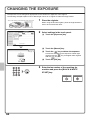
CHANGING THE EXPOSURE . . . . . . . . . . . . . . . . . . . . . . . . . . . . . . . . . . . . . . . . . . . . . . . . . . . . .64
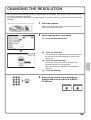
CHANGING THE RESOLUTION. . . . . . . . . . . . . . . . . . . . . . . . . . . . . . . . . . . . . . . . . . . . . . . . . . . .65
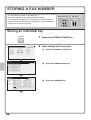
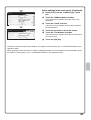
STORING A FAX NUMBER . . . . . . . . . . . . . . . . . . . . . . . . . . . . . . . . . . . . . . . . . . . . . . . . . . . . . . .66
FORWARDING RECEIVED FAXES (Fax Data Forward) . . . . . . . . . . . . . . . . . . . . . . . . . . . . . . . .68
CONVENIENT DIALLING METHODS . . . . . . . . . . . . . . . . . . . . . . . . . . . . . . . . . . . . . . . . . . . . . . .69
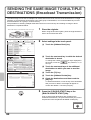
SENDING THE SAME FAX TO MULTIPLE DESTINATIONS (Broadcast Transmission). . . . . . .72
SPECIAL FAX MODES . . . . . . . . . . . . . . . . . . . . . . . . . . . . . . . . . . . . . . . . . . . . . . . . . . . . . . . . . . .74
SELECTING A SPECIAL MODE . . . . . . . . . . . . . . . . . . . . . . . . . . . . . . . . . . . . . . . . . . . . . . . . . . .75
CONVENIENT FAX FUNCTIONS . . . . . . . . . . . . . . . . . . . . . . . . . . . . . . . . . . . . . . . . . . . . . . . . . . .76
Scanning
NETWORK SCANNER FUNCTION . . . . . . . . . . . . . . . . . . . . . . . . . . . . . . . . . . . . . . . . . . . . . . . . .80
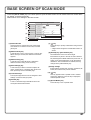
BASE SCREEN OF SCAN MODE . . . . . . . . . . . . . . . . . . . . . . . . . . . . . . . . . . . . . . . . . . . . . . . . . .81
SCANNING AN ORIGINAL . . . . . . . . . . . . . . . . . . . . . . . . . . . . . . . . . . . . . . . . . . . . . . . . . . . . . . . .82
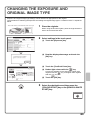
CHANGING THE EXPOSURE AND ORIGINAL IMAGE TYPE . . . . . . . . . . . . . . . . . . . . . . . . . . . .83
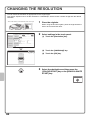
CHANGING THE RESOLUTION. . . . . . . . . . . . . . . . . . . . . . . . . . . . . . . . . . . . . . . . . . . . . . . . . . . .84
CHANGING THE FILE FORMAT . . . . . . . . . . . . . . . . . . . . . . . . . . . . . . . . . . . . . . . . . . . . . . . . . . .85
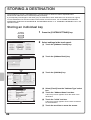
STORING A DESTINATION . . . . . . . . . . . . . . . . . . . . . . . . . . . . . . . . . . . . . . . . . . . . . . . . . . . . . . .86
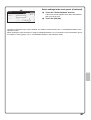
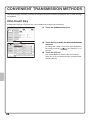
CONVENIENT TRANSMISSION METHODS . . . . . . . . . . . . . . . . . . . . . . . . . . . . . . . . . . . . . . . . . .88
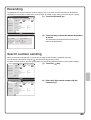
SENDING THE SAME IMAGE TO MULTIPLE DESTINATIONS (Broadcast Transmission) . . . .90
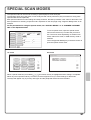
SPECIAL SCAN MODES . . . . . . . . . . . . . . . . . . . . . . . . . . . . . . . . . . . . . . . . . . . . . . . . . . . . . . . . .91
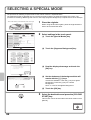
SELECTING A SPECIAL MODE . . . . . . . . . . . . . . . . . . . . . . . . . . . . . . . . . . . . . . . . . . . . . . . . . . .92
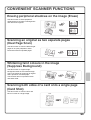
CONVENIENT SCANNER FUNCTIONS. . . . . . . . . . . . . . . . . . . . . . . . . . . . . . . . . . . . . . . . . . . . . .93
5
Document filing
DOCUMENT FILING . . . . . . . . . . . . . . . . . . . . . . . . . . . . . . . . . . . . . . . . . . . . . . . . . . . . . . . . . . . . .96
QUICKLY SAVING A JOB (Quick File) . . . . . . . . . . . . . . . . . . . . . . . . . . . . . . . . . . . . . . . . . . . . . .98
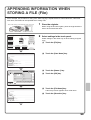
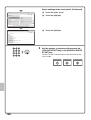
APPENDING INFORMATION WHEN STORING A FILE (File) . . . . . . . . . . . . . . . . . . . . . . . . . . . .99
SAVING A DOCUMENT ONLY (Scan to HDD) . . . . . . . . . . . . . . . . . . . . . . . . . . . . . . . . . . . . . . .101
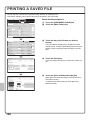
PRINTING A SAVED FILE . . . . . . . . . . . . . . . . . . . . . . . . . . . . . . . . . . . . . . . . . . . . . . . . . . . . . . .102
System settings
SYSTEM SETTINGS . . . . . . . . . . . . . . . . . . . . . . . . . . . . . . . . . . . . . . . . . . . . . . . . . . . . . . . . . . . .104
SYSTEM SETTINGS MENU . . . . . . . . . . . . . . . . . . . . . . . . . . . . . . . . . . . . . . . . . . . . . . . . . . . . . .106
Troubleshooting
FREQUENTLY ASKED QUESTIONS. . . . . . . . . . . . . . . . . . . . . . . . . . . . . . . . . . . . . . . . . . . . . . .110
REMOVING MISFEEDS . . . . . . . . . . . . . . . . . . . . . . . . . . . . . . . . . . . . . . . . . . . . . . . . . . . . . . . . .114
6
Before using the machine
This section provides general information about the machine, including the
names and functions of the parts of the machine and its peripheral devices,
and the procedures for placing originals and loading paper.
X PART NAMES AND FUNCTIONS . . . . . . . . . . . . . . . . . . 8
X OPERATION PANEL . . . . . . . . . . . . . . . . . . . . . . . . . . . 10
X USING THE TOUCH PANEL . . . . . . . . . . . . . . . . . . . . . 12
X USER AUTHENTICATION . . . . . . . . . . . . . . . . . . . . . . . 14
X HOME SCREEN . . . . . . . . . . . . . . . . . . . . . . . . . . . . . . . 15
X IMAGE CHECK FUNCTION (PREVIEW). . . . . . . . . . . . 16
X PLACING ORIGINALS. . . . . . . . . . . . . . . . . . . . . . . . . . 17
X CHANGING PAPER IN A TRAY . . . . . . . . . . . . . . . . . . 18
7
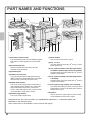
PART NAMES AND FUNCTIONS
(1)
(2)
(5)
(1)
(6)
(1) Automatic document feeder
This automatically feeds and scans multiple originals.
Both sides of 2-sided originals can be scanned at
once.
(2) Document feeder tray
Place the originals in this tray when using the
automatic document feeder.
(3) Operation panel
(4) Output tray (centre tray)
Copy jobs and print jobs are delivered to this tray.
(When a finisher or saddle stitch finisher is installed,
the output tray (centre tray) cannot be used.)
(5) Saddle Stitch Finisher*
This can be used to staple output. The machine is
also equipped with the staple function, which folds
paper and staples it at the centre, and the fold
function, which folds paper in half. A punch module
can be installed to punch holes in output.
(6) Finisher(Large Stacker)*
This can be used to staple output.
(7)
(2)
(8)
(3)
(4)
(9) (10) (11)
(12)
(7) Punch module*
This is used to punch holes in output.
(8) Tray 1 / Tray 2
Up to 500 sheets of paper (80 g/m2 (21 lbs.)) can be
loaded in each tray.
(9) Tray 3 (when a stand/1 x 500 sheet paper drawer
or stand/2 x 500 sheet paper drawer is installed)*
This holds paper. Up to 500 sheets (80 g/m2 (21 lbs.))
of paper can be loaded.
(10) Tray 4 (when a stand/2 x 500 sheet paper drawer
is installed)*
This holds paper. Up to 500 sheets (80 g/m2 (21 lbs.))
of paper can be loaded.
(11) Tray 5 (when a large capacity tray is installed)*
Up to 3500 sheets (80 g/m2 (21 lbs.)) of paper can be
loaded. When a stand/1 x 500 sheet paper drawer is
installed, this is tray 4.
(12) Finisher*
This can be used to staple output. A punch module
can be installed to punch holes in output.
* Peripheral device. For more information, see "PERIPHERAL DEVICES" in "1. BEFORE USING THE
MACHINE" in the Operation Guide.
Some options may not be available in some countries and regions.
8
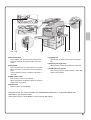
(13)
(14)
(15)
(16)
(13) Document glass
This is used to scan books and other originals that
cannot be scanned using the automatic document
feeder.
(14) Keyboard*
This is a keyboard that is incorporated into the machine.
When not used, it can be stored under the operation
panel.
Use the keyboard to enter a password, file name, or
other text.
(17)
(18)
(19)
(17) Bypass tray
Special types of paper can be fed from the bypass
tray.
(18) Exit tray unit (right tray)*
When installed, output can be delivered to this tray.
(19) USB connector (type A)
This is used to connect a USB memory or other USB
device to the machine.
(15) Main power switch
This is used to power on the machine.
When using the fax or Internet fax functions, keep this
switch in the "on" position.
(16) Front cover
Open to replace a toner cartridge.
* Peripheral device. For more information, see "PERIPHERAL DEVICES" in "1. BEFORE USING THE
MACHINE" in the Operation Guide.
Some options may not be available in some countries and regions.
9
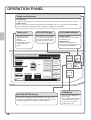
OPERATION PANEL
Image send indicators
LINE indicator
This lights up during transmission or reception in fax mode. The indicator also lights up during transmission in scan mode.
DATA indicator
When a received fax cannot be printed because of a problem such as out of paper, the indicator blinks.
The indicator lights steadily when there is data that is waiting to be transmitted.
Touch panel
[JOB STATUS] key
Print mode indicators
Messages and keys
appear in the LCD
display.
Operations are
performed by touching
the keys with your
fingers.
Press this key to view the job
status screen. You can check
the status of jobs and cancel
jobs in the job status screen.
READY indicator
Print data can be received when
this indicator is lit.
COPY
IMAGE SEND
DATA indicator
This blinks while print data is
being received and lights steadily
while printing is taking place.
DOCUMENT
FILING
Ready to scan for copy.
0
Job Status
JOB STATUS
MFP Status
Special Modes
Colour Mode
020/015
Full Colour
2-Sided Copy
Copying
SYSTEM
SETTINGS
Plain
A4
Exposure
1.
2.
3.
4.
Auto
A4
A4R
B4
A3
Output
File
Quick File
005/000
PRINT
READY
DATA
IMAGE SEND
LINE
DATA
Waiting
010/000
HOME
Waiting
Copy Ratio
Original
Paper Select
100%
Auto
Auto
A4
Plain
A4
010/000
Preview
Waiting
Copying
[HOME] key
[SYSTEM SETTINGS] key
Press this key to display the system settings screen. The system
settings can be adjusted to make the machine easier to use, such
as configuring paper tray settings and storing addresses.
10
Touch this key to display the
home screen.
Keys of frequently used functions
can be registered in this screen
for quick access, making the
machine easier to use.
Numeric keys
[CLEAR] key
These are used to enter the number of
copies, fax numbers, and other
numbers.
Press this key to return
settings such as the number
of copies to "0".
[LOGOUT] key (
)
When user authentication is enabled,
press this key to log out after using
the machine. When using the fax
function, this key can be pressed to
send tone signals on a pulse dial line.
[#/P] key (
)
Press this key to use a job program
when using the copier function. When
using the fax function, press this key
to dial using a program.
Main power indicator
This indicator lights when the
main power is switched on.
[COLOUR START] key
[POWER] key
Use this key to copy or scan an
original in colour.
Use this key to turn the
machine power on and
off.
LOGOUT
[CLEAR ALL] key
Press this key to redo an operation from
the beginning.
All settings will be cleared and operation
will return to the initial state.
[POWER SAVE] key
Use this key to activate power save mode. The
[POWER SAVE] key blinks when the machine is in
power save mode. This key is also used to
deactivate power save mode.
[STOP] key
[BLACK & WHITE START] key
Press this key to stop a copy job or scanning of
an original.
Use this key to copy or scan an original in black and
white. This key is also used to send a fax in fax mode.
11
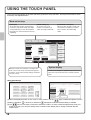
USING THE TOUCH PANEL
The touch keys that appear in the touch panel are grouped for easy operation. The layout and functions of the
touch keys are explained below.
Mode select keys
[COPY] key
To use the copy function, touch this key
to switch to copy mode. Keep your finger
on the [COPY] key to view the machine's
total page use count and amount of toner
remaining.
COPY
[DOCUMENT FILING] key
When you wish to print or send a file
stored on the hard drive, touch this
key to switch to document filing
mode.
[IMAGE SEND] key
To use the scan or fax
function, touch this key to
switch to image send mode.
IMAGE SEND
DOCUMENT
FILING
Ready to scan for copy.
Job Status
0
MFP Status
Colour Mode
Special Modes
020/015
Full Colour
2-Sided Copy
Copying
Plain
A4
Exposure
1.
2.
3.
4.
Auto
A4
A4R
B4
A3
Output
005/000
Waiting
File
010/000
Quick File
Waiting
Copy Ratio
Original
Paper Select
100%
Auto
Auto
A4
Plain
A4
010/000
Preview
Waiting
Copying
When the mode of the machine is changed, the
base screen of the newly selected mode appears.
Functions can be selected and settings checked in
the base screen.
System display
This shows the brightness adjustment key for the touch
panel, the entry mode when text is entered, and other
items.
Using general keys
OK
Special Modes
Cancel
Job Settings / Print
file-01
Margin Shift
Name 1
A4
F. Colour
Dual Page
Copy
Erase
Paper Select
Job
Build
Pamphlet Copy
Covers/Inserts
Transparency
Inserts
Tandem
Copy
1
2
Number of Prints
Auto
(3)
Multi Shot
1
(1~999)
Print and Delete the Data
Output
Print and Save the Data
2-Sided
Book Copy
Tab Copy
Card Shot
(1)
Special Modes
(1) When the displayed screen is one of two or more screens, use the
(2) When a checkbox
is touched, a checkmark
(2)
B/W Print
keys to switch through the screens.
will appear to indicate that the setting is enabled.
(3) The
keys can be used to increase or decrease a value. To make a value change quickly, keep your
finger on the key. You can also directly touch a numeric value display key to change a number with the
numeric keys.
12
Checking the status of the machine
The touch panel has a key for checking the status of the machine.
"Job Status" display
Display selection key
This shows the first 4 print jobs in the print queue (the
job in progress and jobs waiting to be printed).
The type of job, the set number of copies, the number of
copies completed, and the job status appear.
The status display can be switched between "Job
Status" and "MFP Status".
If the job status screen is displayed, the status
display automatically changes to the "MFP Status".
COPY
IMAGE SEND
DOCUMENT
FILING
Ready to scan for copy.
0
Job Status
Job Status
MFP Status
MFP Status
Special Modes
Colour Mode
020/015
Full Colour
2-Sided Copy
Copying
Plain
A4
Exposure
Auto
Output
A4
A4R
B4
A3
1.
2.
3.
4.
File
Quick
Quick File
File
005/000
Waiting
Maintenance
infomation
DC DC DC
DC
DC
DC
DC
DC
DC
010/000
Waiting
Copy Ratio
Original
Paper Select
100%
Auto
Auto
A4
Plain
A4
010/000
Preview
Waiting
Copying
"MFP Status" display
This shows machine system information.
"Maintenance Information"
This shows machine maintenance information by means of codes.
Job status display
The mode icon of the reserved job or job in progress, the tray being used to feed paper, and the job status appear. This
can be touched to show the job status screen.
Print Job
Job Queue
Scan to
Fax Job
Sets / Progress
Internet Fax
Status
1
Computer01
002/001
Printing
2
0312345678
002/000
Waiting
3
0312345678
002/000
Waiting
4
Copy
002/000
Waiting
Spool
Job Queue
1
Complete
Jobs are displayed as a list of touch keys. The
job keys appear in the order that they will be
run. A job key can be touched to select it.
1
Detail
Priority
A selected job can be given priority and run
ahead of other jobs, or a job waiting in the
queue can be cancelled.
Stop/Delete
13
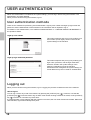
USER AUTHENTICATION
When user authentication is enabled in the system settings, you must log in before using the machine. User
authentication is initially disabled.
When you have finished using the machine, log out.
User authentication methods
There are two methods for performing user authentication: login by user number and login by login name and
password. Ask the administrator of the machine for the information that is required to log in.
For details on user authentication, see "USER AUTHENTICATION" in "1. BEFORE USING THE MACHINE" in
the Operation Guide.
Login by user number
User Authentication
OK
This method requires that you log in by entering your
user number (5 to 8 digits), which is stored in the
system settings of the machine.
Admin Login
Login by login name and password
User Authentication
Login Name
User Name
Password
Auth to:
OK
This method requires that you log in by entering your
login name, password, and the login destination,
which are stored in the system settings of the
machine. Depending on how the machine
administrator has configured the system settings, an
e-mail address may also be used for authentication.
Login Locally
Logging out
When you have finished using the machine, log out. Logging out prevents unauthorised use of the machine.
How to log out
You can log out from any mode of the machine by pressing the [LOGOUT] key ( ). However, note that the
[LOGOUT] key ( ) cannot be used to log out when a fax number is being entered in fax mode, as the [LOGOUT]
key ( ) functions as a numeric key at this time.
If a preset duration of time elapses after the machine is last used, the auto clear function will activate. When auto
clear activates, logout automatically takes place.
14
HOME SCREEN
When the [HOME] key is pressed on the operation panel, the home screen appears in the touch panel.
1st screen
2nd screen
(2)
(1)
(2)
COPY
COPY
IMAGE SEND
DOCUMENT
FILING
IMAGE SEND
DOCUMENT
FILING
Home Screen
Total Count
Address Control
Document Filing
Control
Paper Tray Settings
My Menu
04/04/2010 11:40
(3)
(1) [My Menu] key
Touch this to move to the second home screen.
(2) Mode select keys
Use these keys to switch between copy, image send,
document filing, and Sharp OSA modes.
(3) Title
This shows the title of the home screen.
(4)
(5)
(4) Shortcut key
A registered function appears as a shortcut key.
The key can be touched to select the registered
function.
(5) User name
This shows the name of the logged in user.
The user name appears when user authentication is
enabled on the machine.
Shortcuts to functions can be registered as keys in the home screen. When a shortcut key is touched, the screen
for that function appears. Register frequently used functions in the home screen to quickly and conveniently
access those functions. When user authentication is used, the home screen of "Favourite Operation Group" can
be displayed.
Register keys that you wish to show in the home screen in the system settings.
For details on home screen settings, see "Favourite Operation Group Registration" and "Home Screen Settings"
in "7. SYSTEM SETTINGS" in the Operation Guide.
15
IMAGE CHECK FUNCTION (PREVIEW)
The image check function allows you to view scanned images and received faxes on the touch panel.
Convenient uses of image check
You can view images scanned for copying, fax / image send, and Scan to HDD of document filing. This allows you
to check the effect of special modes and correct problems before copying or transmission takes place.
"Printing only faxes that are needed"
You can check a received fax before printing it. If you don't need the fax, you can delete it without printing it,
allowing you to save paper and toner.
"Checking the content of a file stored in the machine"
Before printing or sending a file stored using the document filing function, you can check the content of the file. A
preview can be displayed directly from the Job Settings menu, making it easy to move from image preview to
execution of the job.
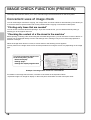
When the image check function is used, a screen similar to the following screen appears.
The key names in the image check screen and the procedures for using the screen vary depending on the image
type.
Image Check
The content of the data appears here.
In the touch panel, you can
• Scroll the display
• Change pages
• Change the display magnification
0123456789
Back
04/04/2010
11:12
1 / 3
Display Rotation
0001
0010
Print
Example: The image check screen for a received fax
For details on the image check function, see each of the modes in the Operation Guide.
*A preview image is an image for display on the touch panel. It will differ from the actual print result.
16
PLACING ORIGINALS
The automatic document feeder can be used to automatically scan many originals at once. This saves you the
trouble of manually feeding each original.
For originals that cannot be scanned using the automatic document feeder, such as a book or a document with
notes attached, use the document glass.
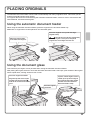
Using the automatic document feeder
When using the automatic document feeder, place the originals in the document feeder tray.
Make sure an original has not been placed on the document glass.
Place the originals face up with the edges
aligned evenly.
The indicator line indicates approximately
how many originals can be placed. The placed
originals must not be higher than this line.
Adjust the original guides
to the width of the originals.
Using the document glass
Take care that your fingers are not pinched when closing the automatic document feeder.
After placing the original, be sure to close the automatic document feeder. If left open, parts outside of the original
will be copied black, causing excessive use of toner.
Place the original face down.
To place a thick original such as
a book, push up the far edge of
the automatic document feeder
and then close the automatic
document feeder slowly.
Align the top left corner of the
original with the tip of the
mark in the far left corner of the
glass.
Place the original
face down.
17
CHANGING PAPER IN A TRAY
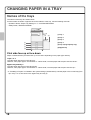
Names of the trays
The names of the trays are shown below.
For the number of sheets of paper that can be loaded in each tray, see the following manuals:
• Operation Guide, "Paper Tray Settings" in "7. SYSTEM SETTINGS"
• Safety Guide, "SPECIFICATIONS"
(6)
(5)
(1) Tray 1
(2) Tray 2
(3) Tray 3
(1)
(2)
(3)
(4)
(4) Tray 4
(5) Tray 5 (large capacity tray)
(6) Bypass tray
Print side face up or face down
Paper is loaded with the print side face up or face down depending on the paper type and tray.
Trays 1 to 4
Load the paper with the print side face up.
However, if the paper type is "Pre-Printed" or "Letter Head", load the paper with the print side face down*.
Bypass tray and tray 5
Load the paper with the print side face down.
However, if the paper type is "Pre-Printed" or "Letter Head", load the paper with the print side face up*.
* If "Disabling of Duplex" is enabled in the system settings (administrator), load the paper in the normal way (face
up in trays 1 to 4; face down in the bypass tray and tray 5).
18
Loading paper in a tray
To change the paper in a tray, load the desired paper in the tray and then change the tray settings in the machine
to specify the loaded paper. The procedure for changing the tray paper size is explained below. As an example,
the paper in tray 1 is changed from B4 (8-1/2" x 14") size plain paper to A4 (8-1/2" x 11") size recycled paper.
Gently pull out the paper tray.
If paper remains in the tray, remove it.
Move the two guides on the tray. For
example, move the guides from B4
(8-1/2" x 14") to A4 (8-1/2" x 11").
Insert the paper with the print side face
up.
Fan the paper well before inserting it.
Otherwise, multiple sheets may feed at
once and cause a misfeed.
Insert the paper and then gently push the
tray into the machine.
Do not load as shown below.
Indicator line
The indicator line indicates the maximum
height of the paper that can be loaded in
the tray. When loading paper, make sure
that the stack is not higher than the
indicator line.
19
Changing the tray settings
When you change the paper in a tray, the tray settings in the system settings must also be changed.
SYSTEM
SETTINGS
System Settings
Admin Password
Total Count
Default Settings
List Print
(User)
Paper Tray
Settings
Address Control
Fax Data
Receive/Forward
Document Filing
Control
USB-Device Check
(1)
Printer Condition
Settings
Exit
1
Press the [SYSTEM SETTINGS] key.
2
Configure the tray settings in the touch panel.
(1) Touch the [Paper Tray Settings] key.
System Settings
Paper Tray Settings
Back
(2) Touch the [Tray Settings] key.
Back
(3) Touch the [Change] key in "Tray 1".
Tray Settings
(2)
Paper Type Registration
Auto Tray Switching
Custom Size Registration (Bypass)
Tray Settings
Tray 1
Type
Plain
Size
Change
B4
(3)
Paper Property
Fixed Paper Side
Copy
Disable Duplex
Print
Disable Staple
Feeding Approved Job
Fax
Disable Punch
I-Fax
Doc. Filing
System Settings
Tray Settings
Tray:
Type:
Size:
Cancel
Recycled
Auto-AB
A3,A4,A4R,B4,B5,B5R,
216x330(8 1/2x13)
Paper Property:
Print
Copy
I-Fax
Fax
OK
(6)
Tray 1
(4)
(5)
(4) Select [Recycled] from the "Type" select box.
(5) Make sure that [Auto-AB] is selected in the
"Size" select box.
For more information, see "Paper Tray Settings" in
"7. SYSTEM SETTINGS" in the Operation Guide.
(6) Touch the [OK] key.
The above steps change the paper settings for tray 1 to
A4 recycled paper.
20
Loading paper in other trays
Bypass tray
The side to be
copied on must
be face down!
When loading A3W, A3, or B4 size paper, pull out
the tray extension.
The maximum number of sheets that can be loaded
in the bypass tray is approximately 100 for plain
paper and approximately 20 for envelopes.
Example: Loading an envelope
Place paper that is A5 (7-1/4" x 10-1/2") or smaller
in the horizontal orientation.
Only the address side of envelopes can be printed on.
Place envelopes with the address side face down.
Special types of paper that cannot be loaded in other trays can be loaded in the bypass tray.
For detailed information on the bypass tray, see "LOADING PAPER IN THE BYPASS TRAY" in "1. BEFORE
USING THE MACHINE" in the Operation Guide.
21
Large capacity tray
The paper size of tray 5 can only be changed by a service technician.
Gently pull out the paper tray.
Insert the paper with the print side face
down.
Fan the paper well before inserting it.
Otherwise, multiple sheets may feed at
once and cause a misfeed.
Insert the paper and then gently push the
tray into the machine.
Do not load as shown below.
22
Indicator line
The indicator line indicates the maximum
height of the paper that can be loaded in
the tray. When loading paper, make sure
that the stack is not higher than the
indicator line.
Copying
This section explains the basic procedures for using the copier function.
This section also introduces the various types of copying that can be
performed using the special modes.
X BASE SCREEN OF COPY MODE . . . . . . . . . . . . . . . . . 24
X MAKING COPIES. . . . . . . . . . . . . . . . . . . . . . . . . . . . . . 25
X 2-SIDED COPYING (Automatic Document Feeder) . . 26
X COPYING ON SPECIAL PAPER (Bypass Copy). . . . . 27
X MAKING COLOUR COPIES (Colour Mode). . . . . . . . . 29
X SELECTING THE EXPOSURE AND IMAGE TYPE . . . 30
X FITTING THE COPY IMAGE TO THE PAPER
(Automatic Ratio Selection) . . . . . . . . . . . . . . . . . . . . . 31
X ENLARGEMENT/REDUCTION (Preset Ratios /
Zoom) . . . . . . . . . . . . . . . . . . . . . . . . . . . . . . . . . . . . . . . 33
X INTERRUPTING A COPY RUN (Interrupt Copy) . . . . . 35
X STORING COPY OPERATIONS (Job Programs) . . . . 36
X SPECIAL MODES . . . . . . . . . . . . . . . . . . . . . . . . . . . . . 38
X SELECTING A SPECIAL MODE . . . . . . . . . . . . . . . . . . 39
X CONVENIENT COPY FUNCTIONS . . . . . . . . . . . . . . . . 40
23
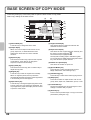
BASE SCREEN OF COPY MODE
Touch the [COPY] key in the touch panel to open the base screen of copy mode.
Select copy settings in the base screen.
(7)
(8)
Ready to scan for copy.
Colour Mode
(1)
(10)
2-Sided Copy
(11)
Output
(12)
Plain
A4
Exposure
(4)
Special Modes
Full Colour
(2)
(3)
(9)
0
1.
2.
3.
4.
Auto
A4
A4R
B4
A3
5.
A4
File
Copy Ratio
Original
Paper Select
100%
Auto
Auto
A4
Plain
(5)
A4
Quick File
(13)
Preview
(14)
(6)
(1) [Colour Mode] key
Touch this key to change the colour mode.
(2) Output display
When one or more output functions such as sort,
group, staple sort, or saddle stitch have been
selected, this shows the icons of the selected
functions.
(3) [Exposure] key
This shows the current copy exposure and exposure
mode settings. Touch this key to change the
exposure or exposure mode setting.
(4) [Copy Ratio] key
This shows the current copy ratio. Touch this key to
adjust the copy ratio.
(5) [Original] key
Touch this key to enter the original size manually.
When an original is placed, this key shows the
automatically detected original size. If the original size
is set manually, the set size appears.
(6) [Paper Select] key
Touch this key to change the paper (tray) that is used.
The tray, paper size, and paper type will appear. The
tray images in the paper size display can be touched
to open the same screen.
(7) Original feed display
This appears when an original is inserted in the
automatic document feeder.
(8) Paper select display
This shows the size of paper loaded in each tray and
the amount of paper remaining
.
The selected tray is highlighted.
The tray that is feeding paper is indicated in green.
Do not pull out a tray while paper is being fed from the
tray. This will cause a paper misfeed.
(9) Number of copies display
This shows the number of copies set.
(10) [Special Modes] key
Touch this key to select special modes such as
Margin Shift, Erase, and Dual Page Copy.
(11) [2-Sided Copy] key
Touch this key to select the 2-sided copying function.
(12) [Output] key
Touch this to select an output function such as sort,
group, offset, staple sort, saddle stitch, punch, or fold.
(13) Customized keys
The keys that appear here can be changed to show
settings or functions that you prefer.
(14) [Preview] key
Touch to view a preview image of a copy in the touch
panel before printing the copy.
24
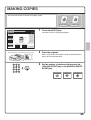
MAKING COPIES
This is the most basic procedure for making copies.
1-sided original
COPY
IMAGE SEND
1
DOCUMENT
FILING
Ready to scan for copy.
0
1-sided copy
Touch the [COPY] key.
The base screen of copy mode appears.
Special Modes
Colour Mode
Full Colour
2-Sided Copy
Plain
A4
Exposure
1.
2.
3.
4.
Auto
A4
A4R
B4
A3
Output
File
Quick File
Copy Ratio
Original
Paper Select
100%
Auto
Auto
A4
Plain
Preview
The side to be scanned must be face up!
2
Place the originals.
When using the document glass, place the original with the
side to be scanned face down.
3
Set the number of copies and then press the
[COLOUR START] key or the [BLACK & WHITE
START] key.
Correct sets
Cancel scanning
Cancel copying
25
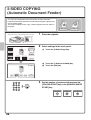
2-SIDED COPYING
(Automatic Document Feeder)
You can use the automatic document feeder to make automatic
2-sided copies without the bother of manually turning the originals over
and re-inserting them.
This section explains how to copy 1-sided originals onto both sides of
the paper.
1-sided original
The side to be scanned must be face up!
Special Modes
Colour Mode
Full Colour
1
Place the originals.
2
Select settings in the touch panel.
2-Sided Copy
(1) Touch the [2-Sided Copy] key.
Plain
A4
Exposure
1.
2.
3.
4.
Auto
A4
A4R
B4
A3
2-sided copy
(1)
Output
File
Quick File
Copy Ratio
Original
Paper Select
100%
Auto
Auto
A4
Plain
A4
2-Sided Copy
Preview
(2) Touch the [1-Sided to 2-Sided] key.
OK
(3) Touch the [OK] key.
(3)
Binding
Change
(2)
3
Set the number of copies and then press the
[COLOUR START] key or the [BLACK & WHITE
START] key.
Correct sets
26
Cancel scanning
Cancel copying
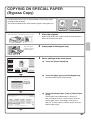
COPYING ON SPECIAL PAPER
(Bypass Copy)
Use the bypass tray to copy on special media such as heavy paper,
envelopes, and tab paper.
This section explains how to load A4 heavy paper in the bypass tray.
Original
The side to be scanned must be face up!
1
Copy on heavy paper
Place the originals.
When using the document glass, place the original with the
side to be scanned face down.
The side to be
copied on must
be face down!
Colour Mode
Special Modes
Full Colour
2-Sided Copy
Plain
A4
Exposure
1.
2.
3.
4.
Auto
Output
A4
A4R
B4
A3
2
Insert paper in the bypass tray.
3
Select settings in the touch panel.
(1) Touch the [Paper Select] key.
File
Quick File
Copy Ratio
Original
Paper Select
100%
Auto
Auto
A4
Plain
A4
Preview
(1)
(2) Touch the paper type key of the bypass tray.
OK
Paper Select
Here the [Plain] key has been touched.
Bypass Tray
Paper Tray
1. A4
Plain
2. A4R
Plain
A4
Plain
3. B4
Plain
4. A3
Plain
(2)
Paper Select
Cancel
Bypass Tray Type/Size Setting
Select the paper type.
1
Plain
Pre-Printed
Recycled
Letter Head
Pre-Punched
Colour
Thin Paper
Labels
Heavy Paper 1
Heavy Paper 2
Transparency
Tab Paper
Envelope
(3)
Glossy Paper
2
(3) Touch the [Heavy Paper 1] key or [Heavy Paper
2] key.
If the weight of the loaded paper is 106 g/m2 to
209 g/m2 (28 lbs. bond to 110 lbs. index), touch the
[Heavy Paper 1] key. If the weight is 210 g/m2 to
256 g/m2 (110 lbs. index to 140 lbs. index), touch the
[Heavy Paper 2] key.
Heavy Paper 1: 106 - 209 g/m2 (28 lbs.bond. - 110 lbs.index)
Heavy Paper 2: 210 - 256 g/m2 (110 - 140 lbs.index)
27
Select settings in the touch panel. (Continued)
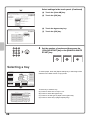
(4) Touch the [Auto-AB] key.
Paper Select
Bypass Tray Type/Size Setting
OK
Heavy Paper 2
(5) Touch the [OK] key.
(5)
Size
Type
12x18(A3W),11x17,8½x14
8½x11,8½x11R,5½x8½R
7¼x10½R,A3,A4,B4,B5
A3W(12x18),A3,A4,A4R,A5R,B4
B5,B5R,216x330(8½x13)
11x17,8½x11
Auto-Inch
Auto-AB
(4)
X420 Y297
Custom Size
Manual
(6) Touch the bypass tray key.
OK
Paper Select
(7) Touch the [OK] key.
(7)
Bypass Tray
Paper Tray
1. A4
Plain
2. A4R
Plain
3. B4
Plain
4. A3
Plain
A4
Plain
(6)
4
Set the number of copies and then press the
[COLOUR START] key or the [BLACK & WHITE
START] key.
Correct sets
Cancel scanning
Cancel copying
Selecting a tray
Special Modes
Colour Mode
Full Colour
To select paper, touch the [Paper Select] key or the image of the
machine in the base screen of copy mode.
2-Sided Copy
Plain
A4
Exposure
1.
2.
3.
4.
Auto
A4
A4R
B4
A3
2.
Output
A4
File
Quick File
Copy Ratio
Original
Paper Select
100%
Auto
Auto
A4
Plain
A4
Preview
OK
Paper Select
Bypass Tray
Paper Tray
1. A4
Plain
3. A4R
Plain
3. B4
Plain
4. A3
Plain
A4
Plain
(B)
(C)
Large Capacity Tray
5. A4
(A)
28
Plain
(D)
Touch a key to select a tray.
(A) Touch to select one of trays 1 to 4.
(B) Touch to select the bypass tray.
(C) Touch to set the type of paper in the bypass tray.
(D) Touch to select tray 5 (large capacity tray).
MAKING COLOUR COPIES (Colour Mode)
When colour and black & white originals are mixed together, you can
have the machine automatically detect whether each original is colour
or black & white and make each copy accordingly.
The procedure for copying with the colour mode set to "Auto" for
automatic detection of colour and black & white is explained below.
Original
The side to be scanned must be face up!
1
Copy
Place the originals.
When using the document glass, place the original with the
side to be scanned face down.
Special Modes
Colour Mode
Full Colour
2
2-Sided Copy
(1) Touch the [Colour Mode] key.
Plain
A4
(1)
Exposure
1.
2.
3.
4.
Auto
A4
A4R
B4
A3
Select settings in the touch panel.
Output
File
Quick File
Copy Ratio
Original
Paper Select
100%
Auto
Auto
A4
Plain
A4
Colour Mode
Preview
(2) Touch the [Auto] key.
OK
(3) Touch the [OK] key.
(3)
Full Colour
Single Colour
Auto
2 Colour
(2)
3
Set the number of copies and press the
[COLOUR START] key.
Correct sets
Cancel scanning
Cancel copying
29
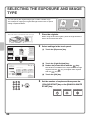
SELECTING THE EXPOSURE AND IMAGE
TYPE
You can specify the original image type to obtain a clearer copy.
The example of copying an original with light colours such as pencil
writing is explained below.
Light original
The side to be scanned must be face up!
1
Exposure adjustment
Place the originals.
When using the document glass, place the original with the
side to be scanned face down.
Colour Mode
Special Modes
Full Colour
2
2-Sided Copy
(1) Touch the [Exposure] key.
Plain
A4
Exposure
1.
2.
3.
4.
Auto
A4
A4R
B4
A3
Select settings in the touch panel.
Output
File
Quick File
(1)
Copy Ratio
Original
Paper Select
100%
Auto
Auto
A4
Plain
A4
(2) Touch the [Light Original] key.
OK
Exposure
3
(3) Darken the printed result with the
(4)
Auto
Manual
1
Preview
5
Text
Text/
Prtd.Photo
Text/Photo
Printed
Photo
Photo
Map
Light
Original
(3)
(2)
(4) Touch the [OK] key.
Scan
Resolution
3
Set the number of copies and then press the
[COLOUR START] key or the [BLACK & WHITE
START] key.
Correct sets
30
key.
Nine levels are available for the exposure. Darken light
originals with the
key, and lighten dark originals
with the
key.
Original Image Type
Cancel scanning
Cancel copying
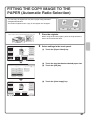
FITTING THE COPY IMAGE TO THE
PAPER (Automatic Ratio Selection)
You can copy an original onto any size of paper using automatic
enlargement/reduction.
This section explains how to copy an A4 original onto A3 paper.
A4
The side to be scanned must be face up!
1
A3
Place the originals.
When using the document glass, place the original with the
side to be scanned face down.
Colour Mode
Special Modes
Full Colour
2-Sided Copy
Plain
A4
Exposure
1.
2.
3.
4.
Auto
A4
A4R
B4
A3
Output
2
Select settings in the touch panel.
(1) Touch the [Paper Select] key.
File
Quick File
Copy Ratio
Original
Paper Select
100%
Auto
Auto
A4
Plain
A4
Preview
(1)
(2) Touch the tray that has the desired paper size.
OK
Paper Select
(3)
(3) Touch the [OK] key.
Bypass Tray
Paper Tray
1. A4
Plain
2. A4R
Plain
3. B4
Plain
4. A3
Plain
A4
Plain
(2)
Colour Mode
Special Modes
(4) Touch the [Auto Image] key.
Full Colour
2-Sided Copy
Plain
A4
Exposure
1.
2.
3.
4.
Auto
A4
A4R
B4
A3
Output
File
Quick File
Copy Ratio
Original
100%
Auto
Auto Image
A4
Paper Select
A3
Plain
Preview
(4)
31
3
Set the number of copies.
Correct sets
4
Press the [COLOUR START] key or the
[BLACK & WHITE START] key.
Cancel scanning
32
Cancel copying
ENLARGEMENT/REDUCTION
(Preset Ratios / Zoom)
For precise adjustment of the copy size, you can select a preset ratio
and/or adjust the ratio in increments of 1%.
As an example, this section explains how to reduce the image to 55%.
55%
Original
The side to be scanned must be face up!
1
Ratio-specified copy
Place the originals.
When using the document glass, place the original with the
side to be scanned face down.
Colour Mode
Special Modes
Full Colour
2-Sided Copy
Plain
A4
Exposure
1.
2.
3.
4.
Auto
Output
A4
A4R
B4
A3
2
Select settings in the touch panel.
(1) Touch the [Copy Ratio] key.
File
Quick File
Copy Ratio
Original
Paper Select
100%
Auto
Auto
A4
Plain
(1)
A4
Preview
(2) Touch the
OK
Copy Ratio
B4
A3
B5
A4
70%
100
B5
B4
A5
A4
81%
Zoom
A4
A3
B5
B4
86%
%
115%
B5
B4
A4
A3
122%
A5
A4
B5
B4
141%
B5
A4
B4
A3
key.
1
2
100%
Auto Image
(2)
XY Zoom
(3) Touch the [50%] key.
OK
Copy Ratio
Touch the preset ratio key that is closest to 55% (the
desired ratio).
(5)
25%
55
50%
Zoom
(3)
XY Zoom
200%
400%
(4)
100%
Auto Image
%
2
2
(4) Set the copy ratio to 55% with the
key.
The
key decreases the ratio in increments of 1%,
and the
key increases the ratio in increments of
1%.
(5) Touch the [OK] key.
33
3
Set the number of copies.
Correct sets
4
Press the [COLOUR START] key or the
[BLACK & WHITE START] key.
Cancel scanning
34
Cancel copying
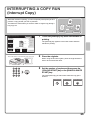
INTERRUPTING A COPY RUN
(Interrupt Copy)
When the machine is printing, you can temporarily interrupt the job and
perform a copy job that you wish to prioritize.
This feature is useful when you need to make an urgent copy during a
long copy run.
Original
Printing
Copies in progress from tray 4.
Ready to scan for next copy job.
Interrupt
7
1
Special Modes
Colour Mode
Full Colour
2-Sided Copy
Exposure
1.
2.
3.
4.
Auto
A4
A4R
B4
A3
Touch the [Interrupt] key while the machine is
printing.
The [Interrupt] key appears in the base screen while the
machine is printing.
Plain
A4
Interrupt
Output
File
Quick File
Copy Ratio
Original
Paper Select
100%
Auto
Auto
A4
Plain
Preview
The side to be scanned must be face up!
2
Place the originals.
When using the document glass, place the original with the
side to be scanned face down.
3
Set the number of copies and then press the
[COLOUR START] key or the [BLACK & WHITE
START] key.
The interrupted copy job will resume when the copy job is
finished.
Correct sets
Cancel scanning
Cancel copying
35
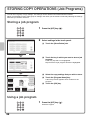
STORING COPY OPERATIONS (Job Programs)
You can store a group of copy settings. The settings can be retrieved and used whenever needed.
When you frequently use the same group of settings, this saves you the trouble of manually selecting the settings
each time you need to use them.
Storing a job program
Exit
Job Programs
1
Press the [#/P] key (
2
Select settings in the touch panel.
).
Press program number.
1
2
(1) Touch the [Store/Delete] tab.
1
3
4
4
5
6
7
8
9
10
11
12
Recall
Store/Delete
(1)
(2) Touch the key in which you want to store a job
program.
Exit
Job Programs
Press program number.
1
2
4
6
(2)
4
5
7
8
9
10
11
12
Touch any key that is not highlighted.
Keys that have a job program stored are highlighted.
1
3
Recall
Store/Delete
To store, make selections and press
[OK], to delete, press [Cancel].
(5)
Cancel
(3) Select the copy settings that you wish to store.
OK
(4) Touch the [Program Name] key.
Special Modes
Colour Mode
A text entry screen appears. Enter a name for the
program.
Full Colour
2-Sided Copy
Plain
A4
Exposure
1.
2.
3.
4.
Auto
A4
A4R
B4
A3
Output
(5) Touch the [OK] key.
Program Name
(4)
Copy Ratio
Original
Paper Select
100%
Auto
Auto
A4
Plain
Preview
(3)
Using a job program
1
Press the [#/P] key (
Place the original.
36
).
Exit
Job Programs
2
Press program number.
1
2
3
4
5
6
7
8
9
10
11
12
After selecting the job program, set the number of copies
and press the [COLOUR START] key or [BLACK & WHITE
START] key to begin copying.
1
4
Recall
Touch the key of the desired job program.
Store/Delete
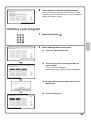
Deleting a job program
Exit
Job Programs
1
Press the [#/P] key (
2
Select settings in the touch panel.
).
Press program number.
1
2
1
3
(1) Touch the [Store/Delete] tab.
4
4
5
7
8
9
10
11
12
6
Recall
Store/Delete
(1)
Exit
Job Programs
Press program number.
1
3
1
(2)
6
4
2
4
5
7
8
9
10
11
12
Recall
(2) Touch the key of the job program that you
wish to delete.
Touch a key that is highlighted.
Keys that have a job program stored are highlighted.
Store/Delete
(3) Read the displayed message and touch the
[Delete] key.
A job program has been already stored
in this location.
Cancel
Delete
Store
(3)
(4) Touch the [Exit] key.
Exit
Job Programs
(4)
Press program number.
1
2
3
4
5
6
1
4
7
8
9
10
11
12
Recall
Store/Delete
37
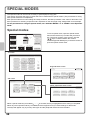
SPECIAL MODES
The special modes can be used for a variety of special-purpose copy jobs.
This section introduces the types of copies that can be made with the special modes. (The procedures for using
each special mode are not explained.)
Each special mode has its own settings and steps, however, the basic procedure is the same for all modes. The
basic procedure for selecting a special mode is explained on the next page using "Margin Shift" as an example.
For the procedures for using the special modes, see "SPECIAL MODES" in "2. COPIER" in the Operation
Guide.
Special modes
Special Modes
Colour Mode
Full Colour
2-Sided Copy
Plain
A4
Exposure
1.
2.
3.
4.
Auto
A4
A4R
B4
A3
Output
File
Quick File
Copy Ratio
Original
Paper Select
100%
Auto
Auto
A4
Plain
A4
To use a special mode, open the special modes
menu and touch the key of mode that you wish to
use. The menu consists of two screens. Use the
keys to switch between the screens.
Touch the [Special Modes] key in the base screen to
open the special modes menu.
Preview
1st screen
OK
Special Modes
Margin Shift
Pamphlet Copy
Erase
Job
Build
Dual Page
Copy
Tandem
Copy
Covers/Inserts
Transparency
Inserts
Multi Shot
Book Copy
Tab Copy
Card Shot
1
2
Image edit menu screen
OK
Image Edit
Photo Repeat
A3
Full Bleed
Multi-Page
Enlargement
Centring
Mirror
Image
B/W
Reverse
2nd screen
OK
Special Modes
Stamp
Image Edit
File
Quick File
Original
Count
Mixed Size
Original
Colour
Adjustments
Proof Copy
Colour adjustments menu screen
2
2
OK
Colour Adjustments
Slow Scan
Mode
RGB Adjust
Sharpness
Suppress
Background
Colour Balance
Brightness
Intensity
When a special mode key encircled by
is touched, the key is highlighted and the setting is completed.
When any other special mode key is touched, a screen appears to let you select settings for that mode.
The keys that appear vary by country and region and the peripheral devices that are installed.
38
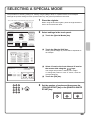
SELECTING A SPECIAL MODE
The procedure for selecting settings for "Adding margins (Margin Shift)" is explained below as an example.
Although the specific settings for each special mode vary, the general procedure is the same.
The side to be scanned must be face up!
1
Place the originals.
When using the document glass, place the original with the
side to be scanned face down.
Special Modes
Colour Mode
Full Colour
(1)
2
2-Sided Copy
(1) Touch the [Special Modes] key.
Plain
A3
Exposure
1.
2.
3.
4.
Auto
Output
A4
A4R
B4
A3
Select settings in the touch panel.
File
Quick File
Copy Ratio
Original
Paper Select
100%
Auto
Auto
A4
Plain
A4
Preview
Special Modes
Margin Shift
Erase
Shifting the left margin by 15 mm will be explained as
an example.
Dual Page
Copy
1
(2)
Tandem
Copy
Job
Build
Pamphlet Copy
Covers/Inserts
Transparency
Inserts
Multi Shot
Book Copy
Tab Copy
Card Shot
2
(3) Select 15 mm for the front side and 15 mm for
the reverse side using the
keys.
OK
Special Modes
Margin Shift
Right
(2) Touch the [Margin Shift] key.
OK
Cancel
Left
Down
Side 1
15
OK
(4)
The margin shift position is initially set to "Right".
To change the position to "Left" or "Down", touch the
corresponding key.
Side 2
(0~20)
mm
15
(0~20)
mm
(4) Touch the [OK] key.
(3)
3
Set the number of copies and then press the
[COLOUR START] key or the [BLACK & WHITE
START] key.
Correct sets
Cancel scanning
Cancel copying
39
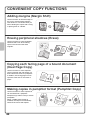
CONVENIENT COPY FUNCTIONS
Adding margins (Margin Shift)
Use this function to shift the image on
the copy to create binding margins.
This function is convenient when you
will be binding the copies with a string
or placing them in a binder.
Erasing peripheral shadows (Erase)
Use this function to erase peripheral
shadows that occur when making
copies of books and other thick
originals.
With erase
Without erase
Copying each facing page of a bound document
(Dual Page Copy)
Use this function to make separate
copies of the left and right pages of a
bound document such as a pamphlet.
In addition, two facing pages can be
copied to each side of one sheet of
paper.
Making copies in pamphlet format (Pamphlet Copy)
Use this function to make copies that
can be folded into a pamphlet.
Pamphlet copy makes it easy to create
pamphlets.
When a saddle stitch finisher is
installed, the output is automatically
folded at the centre and stapled.
3
4
6
8
40
4
1
2
5
7
5
2
7
1
3
5
7
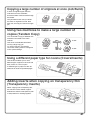
Copying a large number of originals at once (Job Build)
A stack of originals higher than the
indicator line on the automatic
document feeder cannot be fed through
the feeder.
The job build function lets you divide
the stack of originals into sets, feed
each set, and copy the sets as a single
job.
Using two machines to make a large number of
copies (Tandem Copy)
You can divide a copy job between two
machines connected to the same
network.
This saves considerable time when
running a large copy job.
To use this function, the tandem
connection setting must be configured
in the system settings.
2 sets
4 sets
2 sets
Using a different paper type for covers (Covers/Inserts)
This function enables you to use a
different type of paper for the front and
back covers of a set of copies.
A different type of paper can also be
added as an insert at specified pages.
Inser
t
Inser
t
Cove
r
Back
cove
r
Adding inserts when copying on transparency film
(Transparency Inserts)
When copying onto transparency film,
this function inserts sheets of paper
between the sheets of transparency film
to keep them from sticking together.
Pape
r
inser
t
Pape
r
inser
t
Pape
r inse
rt
41
Copying multiple pages onto one sheet of paper
(Multi Shot)
Use this function to copy two or four
original pages onto one sheet of paper.
12
34
1 2
3 4
Copying a pamphlet (Book Copy)
Use this function to copy a book,
pamphlet, or other bound original. The
copies will be arranged in the same
pamphlet-style layout.
When a saddle stitch finisher is
installed, the output is automatically
folded at the centre and stapled.
1
3
5
7
1
3
5
7
Copying captions onto tab paper (Tab Copy)
Use this function to copy captions onto
the tabs of tab paper.
Original
Tab paper
INDEX
INDEX
Copying both sides of a card onto one sheet of
paper (Card Shot)
Use this function to copy the front and
reverse side of a card onto one sheet of
paper.
Front
Back
42
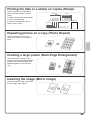
Printing the date or a stamp on copies (Stamp)
Date print
Stamp
Text
Text
Planning Meeting
1
2
3
Watermark
AL
Page
Page number
number
CONFIDENTIAL
DE
NT
I
04/04/2010
CO
NF
I
Use this function to print the date, a
stamp, the page number, or text on
copies.
In addition, specific text can be added
to a copy as a watermark.
A colour can be selected to print a
stamp or text in colour.
Repeating photos on a copy (Photo Repeat)
Use this function to print up to 24
copies of one photo on one sheet of
paper.
Creating a large poster (Multi-Page Enlargement)
Use this function to enlarge a copy
image and print it using multiple sheets
of paper. The sheets of paper can be
attached together to form one large
copy.
Inverting the image (Mirror Image)
Use this function to make a copy that is
a mirror image of the original.
43
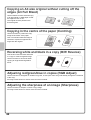
Copying an A3 size original without cutting off the
edges (A3 Full Bleed)
Use this feature to make a full-size copy
of an A3 original on A3W paper so that
the edges are not cut off.
The original must be placed on the
document glass.
Copying in the centre of the paper (Centring)
Use this function to position the copy
image at the centre of the paper.
This is convenient when the image is
reduced or copied onto paper that is
larger than the original.
Reversing white and black in a copy (B/W Reverse)
This function reverses black and white
in a copy to create a negative image.
Use this function to save toner when
copying an original with large black
areas.
Adjusting red/green/blue in copies (RGB Adjust)
Use this function to strengthen or weaken red, green, or blue (one colour only) and thereby change the overall hue
of the copy.
An image of this function is shown at the end of this manual.
Adjusting the sharpness of an image (Sharpness)
Use this function to sharpen or soften a copy image.
An image of this function is shown at the end of this manual.
44
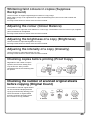
Whitening faint colours in copies (Suppress
Background)
Use this function to suppress light background areas of a copy image.
When making a copy of an original that has a light coloured background, this can be used to whiten the
background.
An image of this function is shown at the end of this manual.
Adjusting the colour (Colour Balance)
Use this function to adjust the colour balance in a colour copy. The densities of the four colours cyan, magenta,
yellow, and black can be adjusted.
An image of this function is shown at the end of this manual.
Adjusting the brightness of a copy (Brightness)
Use this function to adjust the brightness of a copy.
An image of this function is shown at the end of this manual.
Adjusting the intensity of a copy (Intensity)
Use this function to adjust the intensity of a copy.
An image of this function is shown at the end of this manual.
Checking copies before printing (Proof Copy)
Regardless of the number of copies
specified, this function initially prints
only the first set. After you have
checked the first set, the remaining sets
are printed.
5 sets
Check
1 set
4 sets
Checking the number of scanned original sheets
before copying (Original Count)
The number of scanned original sheets
can be counted and displayed before
copying is executed. By allowing you to
check the number of original sheets
that were scanned, this helps reduce
the occurrence of copy mistakes.
Scan
originals
4 sheets
4
sheets
Check
4 sheets
45
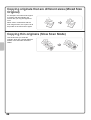
Copying originals that are different sizes (Mixed Size
Original)
For example, even when a B5 original
is mixed in with A4 originals, this
function lets you copy all originals at
once.
When used in combination with the
auto image function, the copies can all
be printed on the same size of paper.
B5
B5
A4
Copying thin originals (Slow Scan Mode)
This function lets you scan thin
originals, which are normally difficult to
handle, in the automatic document
feeder.
46
A4
Printing
This section explains the basic procedure for printing using the printer
driver of the machine. The settings that can be selected in the printer driver
are also introduced.
The explanations of screens and procedures are primarily for Windows
Vista® in Windows® environments, and Mac OS X v10.4 in Macintosh
environments. The window varies depending on the operating system
version, the printer driver version, and the application.
X PRINTING. . . . . . . . . . . . . . . . . . . . . . . . . . . . . . . . . . . . 48
X CANCELLING PRINTING (AT THE MACHINE) . . . . . . 53
X SELECTING PRINT SETTINGS. . . . . . . . . . . . . . . . . . . 54
X CONVENIENT PRINTER FUNCTIONS . . . . . . . . . . . . . 56
47
PRINTING
This section explains the basic procedures for printing.
Windows
The following example explains how to print a A4 size document from WordPad, which is a standard accessory
program in Windows.
To install the printer driver and configure settings in a Windows environment, see "2. SETUP IN A WINDOWS
ENVIRONMENT" in the Software Setup Guide.
For information on the available printer drivers and the requirements for their use, see "PRINTER FUNCTION OF
THE MACHINE" in "3. PRINTER" in the Operation Guide.
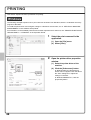
1
(1)
Select the print command in the
application.
(1) Open the [File] menu.
(2) Select [Print].
(2)
2
Open the printer driver properties
window.
(1) Select the printer driver of the
machine.
(2) Click the [Preferences] button.
(1)
(2)
48
In Windows 2000, the [Preferences]
button does not appear. Click the tabs in
the "Print" dialog box to adjust the
settings on the tabs.
In Windows 98/Me/NT 4.0, click the
[Properties] button.
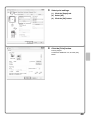
3
Select print settings.
(1) Click the [Paper] tab.
(1)
(2) Select [A4].
(3) Click the [OK] button.
(2)
(3)
4
Click the [Print] button.
Printing begins.
In Windows 98/Me/NT 4.0, click the [OK]
button.
49
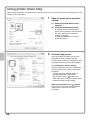
Using printer driver help
When selecting settings in the printer driver properties window, you can display Help to view explanations of the
settings. (Only in Windows)
1
Open the printer driver properties
window.
(1) Select the printer driver of the
machine.
(2) Click the [Preferences] button.
In Windows 2000, the [Preferences]
button does not appear. Click the tabs in
the "Print" dialog box to adjust the
settings on the tabs.
In Windows 98/Me/NT 4.0, click the
[Properties] button.
(1)
(2)
2
Click the [Help] button.
The Help window will open to let you view
explanations of the settings on the tab.
To view Help for settings in a dialog box, click
the green text at the top of the Help window.
To view Help for a specific setting
Click the setting that you wish to learn about
and press the [F1] key. Help for that setting
will appear.
* To view Help for a particular setting in
Windows 98/Me/NT 4.0/2000/XP/
Server 2003, click the
button in the
upper right-hand corner of the printer driver
window and then click the setting.
When the information icon ( ) appears
The icon can be clicked to show prohibited
combinations of functions and other
information.
50
Macintosh
The following example explains how to print an A4 size document from "TextEdit" ("SimpleText" in Mac OS 9),
which is a standard accessory program on Macintosh computers.
In a Macintosh environment, the PS3 expansion kit must be installed to use the machine as a network printer.
To install the printer driver and configure settings in a Macintosh environment, see "3. SETUP IN A MACINTOSH
ENVIRONMENT" in the Software Setup Guide.
Setting the paper size
Select paper settings in the printer driver before selecting the print command.
1
(1)
Open the page setup window in
TextEdit.
(1) Open the [File] menu.
(2) Select [Page Setup].
In Mac OS 9, select [Print] from the [File]
menu of SimpleText.
(2)
2
Select paper settings.
(1) Make sure the correct printer is
selected.
(1)
The machine name that appears in the
"Format for" menu is normally
[SCxxxxxx]. ("xxxxxx" is a sequence of
characters that varies depending on your
machine model.)
(2)
(2) Select [A4].
(3) Click the [OK] button.
(3)
51
Printing a file
1
(1)
Execute printing from TextEdit.
(1) Open the [File] menu.
(2) Select [Print].
In Mac OS 9, select [Print] from the [File]
menu of SimpleText.
(2)
2
(1)
Select print settings and click the
[Print] button.
(1) Make sure the correct printer is
selected.
(2)
(3)
The machine name that appears in the
"Printer" menu is normally [SCxxxxxx].
("xxxxxx" is a sequence of characters
that varies depending on your machine
model.)
(2) Select print settings.
Click
next to [Copies & Pages] and
select each setting that you wish to
configure from the pull-down menu. The
screen for the selected setting will
appear.
If the settings do not appear in Mac OS X
v10.5 to 10.5.1, click
next to the
printer name.
In Mac OS 9, click
next to [General]
and select a setting from the pull-down
menu. The screen for the selected
setting will appear.
(3) Click the [Print] button.
Printing begins.
52
CANCELLING PRINTING
(AT THE MACHINE)
You can cancel a print job if you cancel before printing actually begins.
JOB STATUS
Scan to
Print Job
(1)
Job Queue
Internet Fax
Fax Job
Sets / Progress
Status
Computer01
020 / 001
Printing
Computer02
020 / 000
Waiting
002 / 000
(3)
Waiting
Copy
002 / 000
Waiting
Copy
002 / 000
Waiting
Copy
002 / 000
Waiting
Copy
002 / 000
Waiting
Copy
002 / 000
Waiting
0312345678
1
Press the [JOB STATUS] key.
2
Select settings in the touch panel.
Spool
Job Queue
1
Complete
1
(2)
Detail
Priority
Stop/Delete
(4)
(1) Touch the [Print Job] tab.
(2) Change the print job status mode to [Spool] or
[Job Queue].
Touch this key to change modes. The selected mode
will be highlighted.
(3) Touch the key of the print job that you wish to
cancel.
(4) Touch the [Stop/Delete] key.
Delete the job?
(5) Touch the [Yes] key.
Computer02
No
Yes
(5)
53
SELECTING PRINT SETTINGS
To use the print function of the machine, the settings in the printer driver properties window must be configured.
See "PRINTING" (page 48) for the procedure for opening the printer driver properties window and the basic
procedure for printing.
Windows
The procedure for selecting settings in the printer driver is explained below using "Fitting the print image to the
paper (Fit To Paper Size)" as an example.
The Fit To Paper Size function is used to automatically enlarge or reduce the print image to fit the selected paper
size. In this example, an A4 size image will be printed on A3 size paper.
The procedures for configuring printer driver settings vary by setting. For more information on each setting,
see "FREQUENTLY USED FUNCTIONS" and "CONVENIENT PRINTING FUNCTIONS" in "3. PRINTER" in
the Operation Guide.
Select print settings.
(1) Click the [Paper] tab.
(1)
(2) Select [A4].
Select the size of the print image.
(3) Select [Fit To Paper Size].
(2)
Select the size of paper that you want to
print on.
(3)
(5) Click the [OK] button.
(4)
(5)
54
(4) Select [A3].
This completes the settings. Start printing.
Macintosh
The procedure for selecting printer driver settings is explained below using "Printing multiple images on one page
(N-Up Printing)" as an example.
This function reduces the size of each page to let you print multiple pages on one sheet of paper. The example of
printing two pages on one sheet of paper with borderlines is explained.
The procedures for configuring printer driver settings vary by setting. For more information on each setting,
see "FREQUENTLY USED FUNCTIONS" and "CONVENIENT PRINTING FUNCTIONS" in "3. PRINTER" in
the Operation Guide.
Select print settings.
(1) Select [Layout].
(1)
(2) Select [2].
(2)
(3) Select the order of the pages.
(3)
(4) Select the desired type of
borderline.
(4)
55
CONVENIENT PRINTER FUNCTIONS
Printing on both sides of the paper (2-sided printing)
Use this function to print on both sides of
the paper. You can use 2-sided printing to
reduce the number of printed sheets when
you are printing a large number of pages
or when you wish to conserve paper.
12
34
1 3
Fitting the print image to the paper (Fit To Paper Size)
Use this function to enlarge or reduce the
print image to fit the paper size.
This is convenient for such purposes as
enlarging an A4 or letter size document to
A3 or ledger size paper to make it easier
to view, and to print when the same size of
paper as the print image is not loaded in
the machine.
A4
A3
Printing multiple images on one page
(N-Up Printing)
Use this function to print multiple pages on
a single sheet of paper by reducing the
size of the print images.
This is convenient when you wish to show
an overall view of multiple pages or
conserve paper.
12
34
Stapling printed pages (Staple)
Use this function to staple printed output.
(When a saddle stitch finisher or finisher is
installed.)
56
1 2
3 4
Punching holes in output (Punch)
Use this function to punch holes in output.
(When a punch module and saddle stitch
finisher or finisher are installed.)
Printing a colour image in greyscale (Black and White Print)
Use this function to print colour images in
greyscale.
This lets you save colour toner when
colour printing is not necessary, such as
when you only need to check the contents
of a document.
The machine also has these functions
For information on each of these functions, see "CONVENIENT PRINTING FUNCTIONS" in "3. PRINTER" in the Operation Guide.
Convenient functions for creating pamphlets and posters
• Creating a pamphlet (Pamphlet/Pamphlet Staple)
• Increasing margin (Margin Shift)
• Creating a large poster (Poster Printing)
Functions to adjust the size and orientation of the image
• Rotating the image 180 degrees (Rotate 180 degrees)
• Enlarging/reducing the print image (Zoom / XY-Zoom)
• Adjusting line width when printing (Line Width Settings)
• Reversing the image (Mirror Image)
Colour mode adjustment function
• Adjusting the brightness and contrast of the image (Colour Adjustment)
• Printing faint text or lines in black (Text To Black/Vector To Black)
• Selecting colour settings to match the image (Advanced Colour)
Functions to combine text and images
• Adding a watermark to printed pages (Watermark)
• Printing an image over the print data (Image Stamp)
• Creating overlays for print data (Overlays)
Print functions for special purposes
• Printing specified pages on different paper (Different Paper)
• Adding inserts when printing on transparency film (Transparency Inserts)
• Printing a carbon copy (Carbon Copy)
• Printing text on tabs of tab paper (Tab Printing)
• Printing so that a specific page is the front page when using two-sided printing (Chapter Inserts)
• Printing with the output folded in half (Fold)
Convenient printer functions
• Using two machines to print a large print job (Tandem Print)
• Saving and using print files (Retention/Document Filing)
57
Faxing
This section explains the basic procedures for using the fax function of the
machine. In addition, special modes that can be used with the fax function
are introduced.
The facsimile expansion kit is required to use the fax function.
X BASE SCREEN OF FAX MODE . . . . . . . . . . . . . . . .
60
X SENDING A FAX . . . . . . . . . . . . . . . . . . . . . . . . . . . .
61
X CHANGING THE SIZE OF A FAX . . . . . . . . . . . . . . .
62
X CHANGING THE EXPOSURE . . . . . . . . . . . . . . . . . .
64
X CHANGING THE RESOLUTION . . . . . . . . . . . . . . . .
65
X STORING A FAX NUMBER . . . . . . . . . . . . . . . . . . . .
66
X FORWARDING RECEIVED FAXES (Fax Data
Forward). . . . . . . . . . . . . . . . . . . . . . . . . . . . . . . . . . .
68
X CONVENIENT DIALLING METHODS . . . . . . . . . . . .
69
X SENDING THE SAME IMAGE TO MULTIPLE
DESTINATIONS
(Broadcast Transmission) . . . . . . . . . . . . . . . . . . . .
72
X SPECIAL FAX MODES . . . . . . . . . . . . . . . . . . . . . . .
74
X SELECTING A SPECIAL MODE . . . . . . . . . . . . . . . .
75
X CONVENIENT FAX FUNCTIONS . . . . . . . . . . . . . . .
76
59
BASE SCREEN OF FAX MODE
Touch the [IMAGE SEND] key in the touch panel to open the base screen of fax mode. If the fax screen does not
appear, touch the [Fax] tab.
Select fax settings in the base screen.
Ready to send.
(1)
(2)
(3)
(4)
(5)
Scan
Internet Fax
Address Book
Original
Direct TX
Fax
Scan:
Exposure
Auto
Sub Address
Resolution
Standard
Address Review
Special Modes
Speaker
Resend
USB Mem. Scan
PC Scan
Send:
Auto
(8)
(9)
Auto
(10)
(11)
(12)
File
Quick File
(6)
Preview
(13)
(14)
Auto Reception
Fax Memory:100%
(7)
(1) Send mode tabs
(9) [Resend] key / [Next Address] key
The destinations of the most recent eight
transmissions by Scan to E-mail, fax and/or Internet
fax (including Direct SMTP addresses) are stored. To
select one of these destinations, touch the desired
destination. After a destination is selected, this key
changes to the [Next Address] key.
Use these tabs to change the mode of the image send
function. To switch to fax mode, touch the [Fax] tab.
(2) [Address Book] key
Touch this key to dial using a one-touch key or group
key. When the key is touched, the address book
screen appears.
(3) [Direct TX] key
Touch this key to send a fax by direct transmission.
When the [Direct TX] key is not highlighted, normal
transmission (memory TX mode) is selected.
(10) Image settings
Image settings (original size, exposure, resolution)
can be selected.
(11)
(4) [Sub Address] key
Touch this key to enter a sub-address and passcode
for F-code transmission.
(5) Customized keys
The keys that appear here can be changed to show
settings or functions that you prefer.
(6) [Preview] key
Touch to check the image that will be sent in the
touch panel before transmission.
(7)
key
Touch this key to retrieve a destination using a search
number.*
* 3-digit number assigned to a destination when it is stored.
(8) [Speaker] key / [Pause] key / [Space] key
Touch this key to dial using the speaker.
When entering a fax number to be dialled, the key
changes to the [Pause] key. When entering a
sub-address, the key changes to the [Space] key.
60
key
This key appears when a special mode or 2-sided
scanning is selected. Touch the key to display the
selected special modes.
(12) [Special Modes] key
Touch this key to use a special mode.
(13)
key /
key /
key
When "Hold Setting for Received Data Print" or
"Received Data Image Check Setting" is enabled in
the system settings (administrator), this will appear
when a fax is received.
: Only "Hold Setting for Received Data Print" is
enabled
: Only "Received Data Image Check Setting" is
enabled
: Both settings are enabled
(14) This shows the currently selected fax reception
mode and the amount of free memory remaining.
SENDING A FAX
The basic procedure for sending faxes is explained below.
In fax mode, colour originals are sent as black and white images.
Transmission
Original
COPY
IMAGE SEND
1
DOCUMENT
FILING
Ready to send.
Scan
Address Book
Direct TX
Internet Fax
Original
Fax
Scan:
Exposure
Auto
Sub Address
Resolution
Standard
Address Review
Special Modes
Speaker
Resend
USB Mem. Scan
PC Scan
Auto
Send:
Transmission result
Touch the [IMAGE SEND] key.
The base screen of fax mode appears.
If the fax screen does not appear, touch the [Fax] tab.
Auto
File
Quick File
Preview
Auto Reception
Fax Memory:100%
The side to be scanned must be face up!
2
Place the originals.
When using the document glass, place the original with the
side to be scanned face down.
3
Enter the fax number of the receiving fax
machine and press the [BLACK & WHITE
START] key.
In fax mode, the [COLOUR START] key cannot be used to
send a fax.
Correct a mistake
Cancel scanning
61
CHANGING THE SIZE OF A FAX
The size of the original and the transmission size can be specified before transmission.
This is convenient when faxing an original that is small and difficult to read.
The procedure for faxing both sides of an A4 original at A3 size is explained below.
The side to be scanned must be face up!
1
Place the originals.
When using the document glass, place the original with the
side to be scanned face down.
Scan
Internet Fax
Address Book
Fax
Scan:
Original
Direct TX
Exposure
(1)
Auto
Sub Address
Resolution
Standard
Address Review
Special Modes
USB Mem. Scan
Auto
A4
PC Scan
Send:
Auto
2
Select settings in the touch panel.
(1) Touch the [Original] key.
File
Quick File
Auto Reception
Fax Memory:100%
Preview
OK
Fax/Original
(2) Touch the [2-Sided Booklet] key.
This key is used to send a 2-sided original.
Scan Size
Auto
100% Send Size
A4
(3) Touch the [Send Size] key.
Auto
(3)
Image Orientation
2-Sided
Booklet
2-Sided
Tablet
(2)
OK
Fax/Original
(5)
Auto
Manual
A5
(5) Touch the [OK] key.
Manual
B5R
B4
AB
Inch
A5R
A4
A3
B5
A4R
(4)
216x340
216x343
OK
Fax/Original
(6)
Scan Size
Auto
141% Send Size
A4
A3
Image Orientation
2-Sided
Booklet
62
2-Sided
Tablet
(4) Touch the desired send size key (example:
A3).
(6) Touch the [OK] key.
3
Enter the fax number of the first destination.
Correct a mistake
4
Press the [BLACK & WHITE START] key.
Cancel scanning
63
CHANGING THE EXPOSURE
The exposure can be changed as appropriate for the darkness or lightness of the original.
The following example explains how to darken light colours in an original to make the image clearer.
The side to be scanned must be face up!
1
Place the originals.
When using the document glass, place the original with the
side to be scanned face down.
Scan
Address Book
Internet Fax
Fax
USB Mem. Scan
Scan:
Original
Auto
A4
Send:
PC Scan
Auto
2
Select settings in the touch panel.
(1) Touch the [Exposure] key.
Direct TX
Exposure
Auto
Sub Address
Resolution
(1)
Standard
Address Review
Special Modes
File
Quick File
Auto Reception
Fax Memory:100%
Preview
(2) Touch the [Manual] key.
OK
Fax/Exposure
(3) Touch the
(4)
Manual
(2)
1
3
key to darken the exposure.
5 levels are available for the exposure. Darken light
originals with the
key, and lighten dark originals
with the
key.
Auto
(4) Touch the [OK] key.
5
(3)
3
Enter the fax number of the receiving fax
machine and press the [BLACK & WHITE
START] key.
Correct a mistake
64
Cancel scanning
CHANGING THE RESOLUTION
The resolution can be selected to match the characteristics of the original, such as text or photo, the size of the
text, and the darkness of the image.
The following example explains how to set the resolution to [Fine] and [Half Tone] when sending an original with
small text.
The side to be scanned must be face up!
1
Place the originals.
When using the document glass, place the original with the
side to be scanned face down.
Scan
Address Book
Internet Fax
Original
Fax
Scan:
Direct TX
Exposure
Auto
Sub Address
Resolution
Standard
Address Review
Special Modes
USB Mem. Scan
Auto
A4
Send:
PC Scan
Auto
2
Select settings in the touch panel.
(1) Touch the [Resolution] key.
(1)
File
Quick File
Preview
Auto Reception
Fax Memory:100%
(2) Touch the [Fine] key.
Fax/Resolution
OK
The resolution increases (producing a clearer image) in
the following order: [Standard], [Fine], [Super Fine],
[Ultra Fine].
(4)
Standard
Fine
Super Fine
(2)
Half Tone
Ultra Fine
(3)
(3) Touch the [Half Tone] key.
Select [Half Tone] for a photo or illustration with
shading to further improve the image.
[Half Tone] cannot be selected when [Standard] is
selected.
(4) Touch the [OK] key.
3
Enter the fax number of the receiving fax
machine and press the [BLACK & WHITE
START] key.
Correct a mistake
Cancel scanning
65
STORING A FAX NUMBER
You can store fax numbers in one-touch keys.
Stored fax numbers can be retrieved quickly and easily.
If you frequently send faxes to the same group of fax machines, the
numbers of those fax machines can be stored as a group (multiple fax
numbers can be stored in one key).
One-touch keys
Group key
A Corp.
Storing an individual key
SYSTEM
SETTINGS
System Settings
Admin Password
Total Count
Default Settings
List Print
(User)
Paper Tray
Settings
Address Control
Fax Data
Receive/Forward
Printer Condition
Settings
Document Filing
Control
(1)
USB-Device Check
Exit
1
Press the [SYSTEM SETTINGS] key.
2
Select settings in the touch panel.
(1) Touch the [Address Control] key.
System Settings
Address Control
(2) Touch the [Address Book] key.
Back
Address Book
(2)
Custom Index
Program
F-Code Memory Box
Back
Address Book
Add New
Sort Address
(3)
AAA AAA
BBB BBB
1
CCC CCC
DDD DDD
2
EEE EEE
FFF FFF
GGG GGG
HHH HHH
Index Switch
All
ABC
Sorting Order
Search Number
III III
Freq.
66
JJJ JJJ
ABCD
EFGH
IJKL
MNOP
QRSTU
VWXYZ
etc.
(3) Touch the [Add New] key.
Select settings in the touch panel. (Continued)
System Settings
Cancel
Address Control
(4)
Address Type:
Fax
Search Number:
1
Address Name
(Required):
KKK KKK
Initial (Optional):
K
(4) Select [Fax] from the "Address Type" select
box.
(5) Touch the "Address Name" text box.
(1-999)
A text entry screen appears. Enter the name of the
destination.
(5)
(6)
Key Name:
Custom Index:
OK
(7)
User 1
Register this Address to be added to the [Frequent Use] index.
(6) Touch the "Initial" text box.
A text entry screen appears. Enter search characters
for the destination.
System Settings
Address Control
Cancel
OK
(9)
Register this Address to be added to the [Frequent Use] index.
Fax Number (Required):
0123456789
Transmission Mode:
Transmission Speed:
33.6 kbps
Transmission Mode: None
(8)
(7) Touch the scroll bar to move the screen.
(8) Touch the "Fax Number" text box.
A text entry screen appears. Enter the fax number that
you wish to store.
(9) Touch the [OK] key.
The items in the above step must be entered. For details on items entered, see "7. SYSTEM SETTINGS" in the
Operation Guide.
When sending the same document or image to multiple destinations, it is convenient to store a destination group.
For details on storing groups, see "7. SYSTEM SETTINGS" in the Operation Guide.
67
FORWARDING RECEIVED FAXES
(Fax Data Forward)
When the machine cannot print because it is out of paper or out of toner, received faxes can be forwarded to
another fax machine.
To use this function, the fax number of the destination machine must be stored in "Set the Telephone Number for
Data Forwarding" in the system settings (administrator).
SYSTEM
SETTINGS
System Settings
Admin Password
Total Count
Default Settings
List Print
(User)
Paper Tray
Settings
Address Control
Fax Data
Receive/Forward
Printer Condition
Settings
Document Filing
Control
USB-Device Check
Exit
1
Press the [SYSTEM SETTINGS] key.
2
Select settings in the touch panel.
(1) Touch the [Fax Data Receive/Forward] key.
(1)
(2) Touch the [Fax Settings] key.
System Settings
Fax Data Receive/Forward
Fax Settings
Back
(2)
I-Fax Settings
System Settings
Cancel
Fax Settings
Receive Setting:
OK
(3) Touch the [Execute] key in "Forward Received
Data".
Auto Reception
Multiple Set Print
Staple
Forward Received Data:
Execute
(3)
(4) Touch the [OK] key.
Transfer the received data to another device?
Cancel
OK
(4)
68
CONVENIENT DIALLING METHODS
Easy to use one-touch keys and the resend function can be used to prevent dialling errors and save time.
One-touch keys
A fax number stored in a one-touch key can be retrieved by a simple touch of the key.
A one-touch key for a group can be selected to automatically transmit to each of the destinations stored in the
group.
Scan
Internet Fax
Address Book
Original
Fax
Scan:
USB Mem. Scan
Auto
Direct TX
(1)
Exposure
Auto
Sub Address
Resolution
Standard
Address Review
Special Modes
A4
Send:
PC Scan
(1) Touch the [Address Book] key.
Auto
File
Quick File
Auto Reception
Fax Memory:100%
Preview
5
10
15
Condition
Settings
Address Review
(2) Touch the key of the desired destination.
Cc
To
(3)
AAA AAA
1
BBB BBB
2
DDD DDD
CCC CCC
(2)
Address Entry
EEE EEE
Global
Address Search
GGG GGG
HHH HHH
Sub Address
III III
JJJ JJJ
Sort Address
Freq.
ABCD
FFF FFF
EFGH
IJKL
MNOP
To change the number of one-touch keys displayed in
the screen, touch the 5 10 15 key. Select 5, 10, or
15 keys.
(3) Touch the [To] key.
QRSTU
VWXYZ
etc.
Preview
69
Resending
The [Resend] key can be touched to transmit to one of the eight most recent destinations used for transmission.
Resending is not possible in some cases, such as when an image is sent using a one-touch key for a group.
Ready to send.
Scan
Resend
Speaker
Internet Fax
Address Book
Fax
Original
Scan:
Exposure
Auto
Sub Address
Resolution
Standard
Address Review
Special Modes
Direct TX
USB Mem. Scan
A4
Auto
Send:
(1) Touch the [Resend] key.
(1)
PC Scan
Auto
File
Quick File
Auto Reception
Fax Memory:100%
Preview
Cancel
Resend
No.01
AAA AAA
No.02
BBB BBB
No.03
No.05
CCC CCC
No.04
DDD DDD
EEE EEE
No.06
No.07
FFF FFF
GGG GGG
No.08
HHH HHH
(2)
(2) Touch the key of the desired destination.
The destinations that appear also include Scan to
E-mail and Internet fax destinations.
Speed dialling
When you store an individual key or a group key, a 3-digit search number is assigned to the key.
You can select a destination using the
key and the 3-digit search number.
To check a search number, print the appropriate list in the sending address list menu in the system settings.
Ready to send.
Scan
Address Book
Internet Fax
Fax
Original
Scan:
Exposure
Auto
Sub Address
Resolution
Standard
Address Review
Special Modes
Direct TX
Resend
Speaker
USB Mem. Scan
Auto
A4
Send:
(1) Touch the
key.
PC Scan
Auto
File
Quick File
Auto Reception
Fax Memory:100%
Preview
(1)
Enter search number.(001-999)
Scan
Address Book
Internet Fax
(2)
Fax
Original
Scan:
Exposure
Auto
Sub Address
Resolution
Standard
Address Review
Special Modes
Direct TX
USB Mem. Scan
Auto
File
Quick File
Preview
70
Auto Reception
Fax Memory:100%
A4
Send:
PC Scan
Auto
(2) Enter the 3-digit search number with the
numeric keys.
Dialling using the speaker
When the speaker is used to dial, fax transmission is started after the number is dialled and the connection is
established. If a person answers, you will be able to hear his or her voice, but you will not be able to speak.
Telephone mode.
Scan
Address Book
Speaker Volume
Address Review
Internet Fax
Original
Fax
Scan:
Exposure
Auto
Resolution
Standard
Speaker
Resend
USB Mem. Scan
PC Scan
Auto
A4
Send:
Auto
Special Modes
File
Touch the [Speaker] key.
You will hear the dial tone through the machine's speaker.
Dial the fax number of the destination with the numeric keys
or with the [Address Book] key.
When the connection is established, press the [BLACK &
WHITE START] key to send the fax.
Quick File
Preview
Fax Memory:100%
Fax Manual
Reception
71
SENDING THE SAME FAX TO MULTIPLE
DESTINATIONS (Broadcast Transmission)
The same document/image can be sent to multiple fax mode, scan
mode, and Internet fax mode destinations in a single operation. If you
frequently send documents/images to the same group of destinations,
it is recommended that you store those destinations as a group in a
one-touch key.
The following procedure explains how to enter a fax number with the
numeric keys and then select a destination that is stored in a
one-touch key.
The side to be scanned must be face up!
1
Transmission
Original
Broadcast
Place the originals.
When using the document glass, place the original with the
side to be scanned face down.
2
Enter the fax number of the first destination.
Correct a mistake
Scan
Internet Fax
Address Book
Original
Fax
Scan:
USB Mem. Scan
Auto
Direct TX
(1)
Exposure
Auto
Sub Address
Resolution
Standard
Address Review
Special Modes
A4
Send:
PC Scan
Auto
3
Select settings in the touch panel.
(1) Touch the [Address Book] key.
File
Quick File
Auto Reception
Fax Memory:100%
Preview
5
10
15
Condition
Settings
Cc
To
(3)
AAA AAA
BBB BBB
CCC CCC
DDD DDD
1
Address Review
2
(4)
EEE EEE
Global
Address Search
GGG GGG
HHH HHH
Sub Address
III III
JJJ JJJ
Address Entry
Sort Address
Freq.
Preview
72
(2)
ABCD
FFF FFF
EFGH
IJKL
MNOP
QRSTU
VWXYZ
etc.
(2) Touch the one-touch key in which the desired
destination is stored.
To change the number of one-touch keys displayed in
the screen, touch the 5 10 15 key. Select 5, 10, or
15 keys.
(3) Touch the [To] key.
(4) Touch the [Address Review] key.
Select settings in the touch panel. (Continued)
Address Review
(5) Check the destinations and then touch the
[OK] key.
OK
(5)
001 0123456789
To delete a destination, touch the key of the destination
that you wish to delete. A message will appear to
confirm the deletion. Touch the [Yes] key.
002 CCC CCC
1
1
To
Cc
4
Press the [BLACK & WHITE START] key.
Cancel scanning
73
SPECIAL FAX MODES
The special modes can be used for a variety of special-purpose fax transmission jobs.
The following pages show the types of fax transmissions that can be performed. (The procedures for using each
special mode are not explained.)
Each special mode has its own settings and steps, however, the basic procedure is the same for all modes. The
basic procedure for selecting a special mode is explained on the next page using "Erase" as an example.
For the procedures for using the special modes, see "SPECIAL MODES" in "4. FACSIMILE" in the
Operation Guide.
Special modes
Scan
Internet Fax
Address Book
Original
Fax
Scan:
Direct TX
Exposure
Auto
Sub Address
Resolution
Standard
Address Review
Special Modes
USB Mem. Scan
A4
Auto
Send:
PC Scan
Auto
To use a special mode, open the special modes
menu and touch the key of mode that you wish to
use. The menu consists of two screens. Use the
keys to switch between the screens.
Touch the [Special Modes] key in the base screen to
open the special modes menu.
File
Quick File
Auto Reception
Fax Memory:100%
Preview
1st screen
2nd screen
OK
Fax/Special Modes
Program
Erase
Dual Page
Scan
OK
Fax/Special Modes
Verif.
Stamp
Transaction
Report
1
Timer
Job
Build
Original
Count
2in1
Mixed Size
Original
File
Card Shot
2
2
Own Name
Select
Memory Box
Polling
2
Slow Scan
Mode
Quick File
When a special mode key encircled by
is touched, the key is highlighted and the setting is completed.
When any other special mode key is touched, a screen appears to let you select settings for that mode.
The keys that appear vary by country and region and the peripheral devices that are installed.
74
SELECTING A SPECIAL MODE
The procedure for selecting a special mode for fax is explained below.
The settings that must be selected vary for each special mode, however, the general procedure is the same. The
procedure for erasing shadows at the edges of the image when sending a fax is explained below as an example.
The side to be scanned must be face up!
1
Place the originals.
When using the document glass, place the original with the
side to be scanned face down.
Scan
Internet Fax
Address Book
Original
Fax
Scan:
Exposure
Auto
Sub Address
Resolution
Standard
Address Review
Special Modes
File
(1)
Direct TX
USB Mem. Scan
Auto
PC Scan
Send:
A4
Auto
2
Select settings in the touch panel.
(1) Touch the [Special Modes] key.
Quick File
Auto Reception
Fax Memory:100%
Preview
Program
Timer
Job
Build
Original
Count
Erase
(2)
2in1
Mixed Size
Original
File
The erase settings will be configured to erase a width
of 15 mm around the edges of the original.
Dual Page
Scan
1
Card Shot
2
Slow Scan
Mode
Quick File
Cancel
Centre
Erase
(3) Set the erasure width to 15 mm with the
keys.
OK
Fax/Special Modes
Erase
Edge
Erase
(2) Touch the [Erase] key.
OK
Fax/Special Modes
Edge+Centre
Erase
(4)
OK
The erase area is set to "Edge Erase" by default.
To select "Centre Erase", "Edge+Centre Erase", or
"Side Erase", touch the appropriate key.
Edge
15
(0~20)
mm
(4) Touch the [OK] key.
Side Erase
(3)
3
Enter the fax number of the receiving fax
machine and press the [BLACK & WHITE
START] key.
Cancel scanning
75
CONVENIENT FAX FUNCTIONS
Erasing peripheral shadows (Erase)
Use this function to erase peripheral
shadows that occur when faxing books
and other thick originals.
Without erase
Transmission
Transmission
With erase
Sending the left and right pages of a bound
document as two separate pages (Dual Page Scan)
Use this function to send the left and right
pages of a pamphlet or other bound
document as two separate pages.
Transmission
Sending two original pages as a single page (2in1)
Use this function to reduce two original
pages to half their size and send them as
a single page.
12
34
Transmission
1 234
Sending the front and reverse sides of a card as a
single page (Card Shot)
Use this function to send the front and
reverse sides of a card as a single page in
a single transmission.
Front
Transmission
Back
76
Sending a large number of pages as a single
transmission job (Job Build)
A stack of originals higher than the
indicator line on the automatic document
feeder cannot be fed through the feeder.
The job build function lets you divide the
stack of originals into sets, feed each set,
and send the sets as a single
transmission.
Transmission
Sending a fax directly from a computer (PC-Fax)
A document on a computer can be sent
via the machine as a fax. Select the
PC-Fax driver as the printer driver on your
computer and then select the Print
command in the software application.
Image data for transmission will be
created and sent as a fax.
This function can only be used on a
Windows computer.
Transmission
For more information, see the Help file for the PC-Fax driver.
The machine also has these functions
• Forwarding a received fax to a network address (Inbound Routing Settings)
☞ Operation Guide "FAX RECEPTION" in "4. FACSIMILE"
• Sending a fax at a specified time (Timer)
• Storing fax operations (Program)
• Changing the print settings for the transaction report (Transaction Report)
• Temporarily changing the sender information (Own Name Select)
• Transmitting originals of different sizes (Mixed Size Original)
• Faxing thin originals (Slow Scan Mode)
• Checking the number of scanned original sheets before transmission (Original Count)
• Calling a fax machine and initiating fax reception (Polling)
• Sending a fax when another machine polls your machine (Polling Memory)
• Stamping scanned originals (Verification Stamp)
☞ Operation Guide "SPECIAL MODES" in "4. FACSIMILE"
• Performing F-code communication
☞ Operation Guide "PERFORMING F-CODE COMMUNICATION" in "4. FACSIMILE"
• Connecting and using an existing phone (Extension Phone Connection)
☞ Operation Guide "USING AN EXTENSION PHONE" in "4. FACSIMILE"
77
Scanning
This section explains the uses of the network scanner function and the
basic procedure for using scan mode. In addition, special modes that can
be used with the network scanner function are introduced.
The Internet fax expansion kit is required to use the Internet fax function.
X NETWORK SCANNER FUNCTION . . . . . . . . . . . . . . . . 80
X BASE SCREEN OF SCAN MODE . . . . . . . . . . . . . . . . . 81
X SCANNING AN ORIGINAL . . . . . . . . . . . . . . . . . . . . . . 82
X CHANGING THE EXPOSURE AND ORIGINAL IMAGE
TYPE. . . . . . . . . . . . . . . . . . . . . . . . . . . . . . . . . . . . . . . . 83
X CHANGING THE RESOLUTION . . . . . . . . . . . . . . . . . . 84
X CHANGING THE FILE FORMAT . . . . . . . . . . . . . . . . . . 85
X STORING A DESTINATION. . . . . . . . . . . . . . . . . . . . . . 86
X CONVENIENT TRANSMISSION METHODS. . . . . . . . . 88
X SENDING THE SAME IMAGE TO MULTIPLE
DESTINATIONS (Broadcast Transmission) . . . . . . . . 90
X SPECIAL SCAN MODES . . . . . . . . . . . . . . . . . . . . . . . . 91
X SELECTING A SPECIAL MODE . . . . . . . . . . . . . . . . . . 92
X CONVENIENT SCANNER FUNCTIONS . . . . . . . . . . . . 93
79
NETWORK SCANNER FUNCTION
The network scanner function of the machine can be used to transmit scanned images by a variety of methods.
The network scanner function has the following modes.
USB memory mode
Scan modes
Use this mode to save an
image to USB memory
To send an image to
an e-mail address, use
Scan to E-mail
Internet fax mode
To upload an image to an FTP server, use
Scan to FTP
Scan the original,
and then...
Use this mode to send a fax via
the Internet
The machine supports Direct SMTP.
To send an image to a
shared folder on your
computer, use
Scan to Network Folder
To process an image in a
specific application, use
PC scan mode
Use this mode to scan a
photo while making
corrections on your computer
A TWAIN-compliant software
application can be used.
Scan to Desktop
Data entry mode
Use this mode for an applicationlinked document solution
• Modes that can be used will vary depending on your model and the expansion kits that are installed.
• The explanations in this manual are centred on the Scan to E-mail function of scan mode.
☞ Operation Guide "5. SCANNER / INTERNET FAX"
80
BASE SCREEN OF SCAN MODE
Touch the [IMAGE SEND] key in the touch panel to open the base screen of scan mode. If the scan screen does
not appear, touch the [Scan] tab.
Select various scan settings in the base screen.
(8)
(1)
(2)
Scan
Address Book
Internet Fax
Original
Fax
Scan:
USB Mem. Scan
Auto
PC Scan
Send:
(3)
Address Entry
(4)
Send Settings
Resolution
200X200dpi
Address Review
File Format
PDF
PDF
File
Colour Mode
Auto/Greyscale
Mono2
Quick File
Special Modes
(5)
(6)
Exposure
Auto
Auto
(9)
(10)
(11)
Preview
(7)
(1) Send mode tabs
(7)
Touch this key to specify a destination using a search
number*.
* 3-digit number assigned to a destination when it is
stored.
Use these keys to change the mode of the image
send function. To switch to scan mode, touch the
[Scan] tab.
(2) [Address Book] key
Touch this key to use a one-touch key or a group key.
When the key is touched, the address book screen
appears.
(8) [Resend] key / [Next Address] key
The destinations of the most recent eight
transmissions by Scan to E-mail, fax and/or Internet
fax (including Direct SMTP addresses) are stored. To
select one of these destinations, touch the desired
destination. After a destination is selected, this key
changes to the [Next Address] key.
(3) [Address Entry] key
Touch this key to manually enter a destination
address instead of using a one-touch key.
(4) [Send Settings] key
Touch this key to select or enter the subject, file
name, sender name, or message text, which have
been previously stored in the Web page.
(5) Customized keys
The keys that appear here can be changed to show
settings or functions that you prefer.
(6) [Preview] key
Touch to check the image that will be sent in the
touch panel before transmission.
key
(9) Image settings
Image settings (original size, exposure, resolution, file
format, and colour mode) can be selected.
(10)
key
This key appears when a special mode or 2-sided
scanning is selected. Touch the key to display the
selected special modes.
(11) [Special Modes] key
Touch this key to use a special mode.
81
SCANNING AN ORIGINAL
The basic operation for scanning is explained below.
This section explains how to send a scanned file by e-mail.
Scan
transmission
Original
COPY
IMAGE SEND
Ready to send.
Scan
(2)
Address Book
Address Entry
1
DOCUMENT
FILING
(1)
Internet Fax
Original
Exposure
Resend
Fax
USB Mem. Scan
Auto
Scan:
Send:
Scanned image
Select settings in the touch panel.
(1) Touch the [IMAGE SEND] key.
PC Scan
(2) Touch the [Scan] tab.
Auto
Auto
The base screen of scan mode appears.
Send Settings
Resolution
200X200dpi
Address Review
File Format
PDF
PDF
File
Colour Mode
Auto/Greyscale
Mono2
Quick File
Special Modes
Preview
The side to be scanned must be face up!
2
Place the originals.
When using the document glass, place the original with the
side to be scanned face down.
Scan
Address Book
Address Entry
Internet Fax
Original
Exposure
Fax
USB Mem. Scan
Auto
Scan:
A4
Send:
PC Scan
Auto
3
Select settings in the touch panel.
(1) Touch the [Address Entry] key.
Auto
Send Settings
(1)
Resolution
200X200dpi
Address Review
File Format
PDF
PDF
File
Colour Mode
Auto/Greyscale
Mono2
Quick File
Special Modes
Preview
(2) Touch the [To] key.
A text entry screen will appear. Enter the e-mail
address of the recipient and touch the [OK] key.
Select addressee type.
To
Cc
(2)
4
Press the [COLOUR START] key or [BLACK &
WHITE START] key.
Cancel scanning
82
CHANGING THE EXPOSURE AND
ORIGINAL IMAGE TYPE
Exposure and original image type settings can be selected as appropriate for the original.
The procedure for darkening the exposure and setting the original image type to "Text/Prtd. Photo" is explained
below.
The side to be scanned must be face up!
1
Place the originals.
When using the document glass, place the original with the
side to be scanned face down.
Scan
Internet Fax
Address Book
Fax
Original
Address Entry
Scan:
Exposure
USB Mem. Scan
Auto
A4
PC Scan
Auto
Send:
2
Select settings in the touch panel.
(1) Touch the [Exposure] key.
Auto
Send Settings
Resolution
(1)
200X200dpi
Address Review
File Format
PDF
PDF
File
Colour Mode
Auto/Greyscale
Mono2
Quick File
Special Modes
Preview
(2) Read the displayed message and touch the
[OK] key.
When Fax/I-Fax address is included,
exposure setting shared is selected,
and Original Image Type is disabled.
OK
(2)
Scan/Exposure
Text
5
(4)
Printed
Photo
Text/
Prtd.Photo
(3)
Photo
key.
5 levels are available for the exposure. Darken light
originals with the
key, and lighten dark originals
with the
key.
Original Image Type
Manual
3
(4) Darken light colours with the
(5)
Auto
1
(3) Touch the [Text/Prtd. Photo] key.
OK
Text/Photo
Map
(5) Touch the [OK] key.
Moiré Reduction
3
Select the destination and then press the
[COLOUR START] key or the [BLACK & WHITE
START] key.
Cancel scanning
83
CHANGING THE RESOLUTION
You can select the resolution as appropriate for the original type.
This section explains how to set the resolution to "300X300dpi", which creates a clearer image than the default
resolution.
The side to be scanned must be face up!
1
Place the originals.
When using the document glass, place the original with the
side to be scanned face down.
Scan
Address Book
Address Entry
Internet Fax
Original
Exposure
Fax
Scan:
USB Mem. Scan
Auto
A4
Send:
PC Scan
Auto
2
Select settings in the touch panel.
(1) Touch the [Resolution] key.
Auto
Send Settings
Resolution
200X200dpi
Address Review
File Format
(1)
PDF
PDF
File
Colour Mode
Auto/Greyscale
Mono2
Quick File
Special Modes
Preview
(2) Touch the [300X300dpi] key.
OK
Scan/Resolution
(3) Touch the [OK] key.
(3)
100X100dpi
200X200dpi
300X300dpi
(2)
400X400dpi
600X600dpi
3
Select the destination and then press the
[COLOUR START] key or the [BLACK & WHITE
START] key.
Cancel scanning
84
CHANGING THE FILE FORMAT
The file format (file type and compression method) for sending a scanned image is specified when the destination
is stored in a one-touch key; however, you can change the format at the time of transmission.
The procedure for sending a scanned image in full colour TIFF format is explained below.
The side to be scanned must be face up!
1
Place the originals.
When using the document glass, place the original with the
side to be scanned face down.
Scan
Internet Fax
Address Book
Fax
Address Entry
USB Mem. Scan
Auto
Scan:
Original
A4
PC Scan
Auto
Send:
2
(1) Touch the [File Format] key.
Auto
Exposure
Send Settings
Resolution
200X200dpi
Address Review
File Format
PDF
PDF
File
Colour Mode
Auto/Greyscale
Mono2
Quick File
Special Modes
(1)
Select settings in the touch panel.
(2) Read the displayed message and touch the
[OK] key.
Select a file format to apply it to
all scan destinations.
OK
(2)
(3) Change the mode to Colour/Greyscale mode.
Scan/File Format
OK
File Type
PDF
Compression Mode
Encry.
None
TIFF
MH (G3)
XPS
MMR (G4)
B/W
Colour/Grey
(3)
Programmed
Specified Pages per File
(1-99)
Scan/File Format
PDF
TIFF
XPS
(4)
(4) Touch the [TIFF] key.
OK
File Type
Compression Ratio
Encry.
High
U-fine
JPEG
(6)
(5) Touch the [High] key.
Low
This sets the compression to high.
A higher compression ratio creates a smaller file size.
Medium
B/W
High
Colour/Grey
(6) Touch the [OK] key.
(5)
Programmed
Specified Pages per File
(1-99)
3
Select the destination and press the [COLOUR
START] key.
If the file type is set to [Encrypt PDF], you will be prompted to
enter a password when you start transmission.
Cancel scanning
85
STORING A DESTINATION
The procedure for storing e-mail addresses in one-touch keys for Scan to E-mail is explained below.
Stored e-mail addresses can be retrieved quickly and easily.
If you frequently send images to the same group of destinations, those destinations can be stored as a group.
To store destinations for the other modes of the network scanner function, see "STORING DESTINATION
ADDRESSES FOR EACH SCAN MODE IN THE ADDRESS BOOK" in "5. SCANNER / INTERNET FAX" in the
Operation Guide.
Storing an individual key
SYSTEM
SETTINGS
System Settings
Admin Password
Total Count
Default Settings
List Print
(User)
Paper Tray
Settings
Address Control
Fax Data
Receive/Forward
Printer Condition
Settings
Document Filing
Control
(1)
USB-Device Check
Exit
1
Press the [SYSTEM SETTINGS] key.
2
Select settings in the touch panel.
(1) Touch the [Address Control] key.
(2) Touch the [Address Book] key.
System Settings
Address Control
Back
Address Book
(2)
Custom Index
Program
F-Code Memory Box
Add New
(3)
Index Switch
(3) Touch the [Add New] key.
Back
Address Book
Sort Address
All
AAA AAA
BBB BBB
1
CCC CCC
DDD DDD
2
EEE EEE
FFF FFF
GGG GGG
HHH HHH
ABC
Sorting Order
Search Number
III III
JJJ JJJ
Freq.
ABCD
EFGH
IJKL
MNOP
QRSTU
VWXYZ
etc.
System Settings
Cancel
Address Control
Address Type:
E-mail
Search Number:
1
Address Name
(Required):
KKK KKK
Initial (Optional):
K
(4)
(4) Select [E-mail] from the "Address Type" select
box.
(5) Touch the "Address Name" text box.
(1-999)
Key Name:
Custom Index:
OK
(5)
A text entry screen appears. Enter the name of the
destination.
(6)
User 1
Register this Address to be added to the [Frequent Use] index.
(7)
(6) Touch the "Initial" text box.
A text entry screen appears. Enter search characters
for the destination.
(7) Touch the scroll bar to move the screen.
86
Select settings in the touch panel. (Continued)
System Settings
Address Control
Cancel
OK
(9)
E-mail Address
(Required):
[email protected]
(8)
File Format:
File Type:
Black & White:
PDF
Compression Mode MMR(G4)
(8) Touch the "E-mail Address" text box.
A text entry screen appears. Enter the E-mail address
that you want to store.
(9) Touch the [OK] key.
Medium
Colour/Greyscale: Compression Ratio
The items in the above step must be entered. For details on items entered, see "7. SYSTEM SETTINGS" in the
Operation Guide.
When sending the same document or image to multiple destinations, it is convenient to store a destination group.
For details on storing groups, see "7. SYSTEM SETTINGS" in the Operation Guide.
87
CONVENIENT TRANSMISSION METHODS
One-touch sending, resending, and other convenient transmission functions that make it easy to send an image
are available.
One-touch key
A destination stored in a one-touch key can be retrieved by a simple touch of the key.
Scan
Internet Fax
Address Book
Original
Fax
USB Mem. Scan
A4
Auto
Scan:
Send:
(1)
Exposure
Send Settings
Resolution
200X200dpi
Address Review
File Format
PDF
PDF
File
Colour Mode
Auto/Greyscale
Mono2
Quick File
Special Modes
Address Entry
PC Scan
(1) Touch the [Address Book] key.
Auto
Auto
Preview
5
10
15
Condition
Settings
AAA AAA
Address Review
CCC CCC
(2) Touch the key in which the desired destination
is stored.
(3)Cc
To
1
BBB BBB
2
(2)
DDD DDD
Address Entry
EEE EEE
FFF FFF
Global
Address Search
GGG GGG
HHH HHH
Sort Address
III III
Freq.
Preview
88
(3) Touch the [To] key.
JJJ JJJ
ABCD
EFGH
IJKL
MNOP
To change the number of one-touch keys displayed in
the screen, touch the 5 10 15 key. Select 5, 10, or
15 keys.
QRSTU
VWXYZ
etc.
If an e-mail address is stored in the one-touch key,
select [To] or [Cc] to specify the type of recipient after
selecting the key.
Resending
The [Resend] key can be touched to send an image to one of the most recent 8 transmission destinations.
Resending is not possible in some cases, such as when an image is sent using a one-touch key for a group.
Ready to send.
Resend
Internet Fax
Scan
Address Book
Original
Address Entry
Exposure
Fax
Scan:
USB Mem. Scan
Auto
A4
Send:
(1) Touch the [Resend] key.
(1)
PC Scan
Auto
Auto
Send Settings
Resolution
200X200dpi
Address Review
File Format
PDF
PDF
File
Colour Mode
Auto/Greyscale
Mono2
Quick File
Special Modes
Preview
Cancel
Resend
No.01
AAA AAA
No.02
BBB BBB
No.03
CCC CCC
No.04
DDD DDD
No.05
EEE EEE
No.06
FFF FFF
No.07
GGG GGG
No.08
HHH HHH
(2)
(2) Touch the key in which the desired destination
is stored.
The destinations that appear also include fax and
Internet fax destinations.
Search number sending
When you store an individual key or a group key, a 3-digit search number is assigned to the key.
You can select a destination using the
key and the 3-digit search number.
To check a search number, print the appropriate list in the sending address list menu in the system settings.
Scan
Address Book
Address Entry
Internet Fax
Original
Exposure
Fax
Scan:
USB Mem. Scan
Auto
A4
Send:
Resolution
200X200dpi
Address Review
File Format
PDF
PDF
File
Colour Mode
Auto/Greyscale
Mono2
Quick File
Special Modes
Address Book
Address Entry
key.
(1)
Enter search number.(001-999)
Scan
(1) Touch the
Auto
Auto
Send Settings
Preview
PC Scan
Internet Fax
(2)
Original
Exposure
Fax
Scan:
USB Mem. Scan
Auto
A4
Send:
PC Scan
Auto
(2) Enter the 3-digit search number with the
numeric keys.
Auto
Send Settings
Resolution
200X200dpi
Address Review
File Format
PDF
PDF
File
Colour Mode
Auto/Greyscale
Mono2
Quick File
Special Modes
Preview
89
SENDING THE SAME IMAGE TO MULTIPLE
DESTINATIONS (Broadcast Transmission)
The same image can be sent to multiple scan mode, Internet fax mode, and fax mode destinations in a single
operation. If you frequently send images to the same group of destinations, it is recommended that you store
those destinations as a group in a one-touch key.
The procedure for selecting multiple destinations stored in one-touch keys and sending an image to those
destinations is explained below.
The side to be scanned must be face up!
1
Place the originals.
When using the document glass, place the original with the
side to be scanned face down.
Scan
Internet Fax
Address Book
Original
Fax
USB Mem. Scan
A4
Auto
Scan:
Send:
Auto
2
Select settings in the touch panel.
(1) Touch the [Address Book] key.
(1)
Exposure
Send Settings
Resolution
200X200dpi
Address Review
File Format
PDF
PDF
File
Colour Mode
Auto/Greyscale
Mono2
Quick File
Special Modes
Address Entry
PC Scan
Auto
Preview
5
10
15
Condition
Settings
(2) Touch the one-touch key in which the desired
destination is stored.
(4) Cc
To
AAA AAA
BBB BBB
CCC CCC
DDD DDD
1
Address Review
To change the number of one-touch keys displayed in
the screen, touch the 5 10 15 key. Select 5, 10, or
15 keys.
2
(5)
EEE EEE
Global
Address Search
GGG GGG
Address Entry
FFF FFF
(2)
HHH HHH
III III
Sort
Address
Preview
Freq.
JJJ JJJ
ABCD
EFGH
IJKL
(3)
MNOP
QRSTU
VWXYZ
(3) Touch the one-touch keys of the additional
destinations to which you want to send the
image.
etc.
Preview
(4) Touch the [To] key.
Address Review
OK
(5) Touch the [Address Review] key.
(6)
001 EEE EEE
002 HHH HHH
(6) Check the destinations and then touch the
[OK] key.
1
1
To
To delete a destination, touch the key of the destination
that you wish to delete. A message will appear to
confirm the deletion. Touch the [Yes] key.
Cc
3
Press the [COLOUR START] key or the
[BLACK & WHITE START] key.
If fax or Internet fax destinations are included in the
broadcast transmission, the [COLOUR START] key cannot
be pressed. Press the [BLACK & WHITE START] key.
Cancel scanning
90
SPECIAL SCAN MODES
The special modes can be used for a variety of special-purpose scan send jobs.
The following pages show the types of scan send jobs that can be performed. (The procedures for using each
special mode are not explained.)
Each special mode has its own settings and steps, however, the basic procedure is the same for all modes. The
basic procedure for selecting a special mode is explained on the next page using "Suppress Background" as an
example.
For the procedures for using the special modes, see "SPECIAL MODES" in "5. SCANNER / INTERNET
FAX" in the Operation Guide.
Scan
Internet Fax
Address Book
Fax
Original
Address Entry
Scan:
USB Mem. Scan
A4
Auto
Send:
PC Scan
Auto
Auto
Exposure
Send Settings
Resolution
200X200dpi
Address Review
File Format
PDF
PDF
File
Colour Mode
Auto/Greyscale
Mono2
Quick File
Special Modes
To use a special mode, open the special modes
menu and touch the key of mode that you wish to
use. The menu varies depending on whether scan
mode, Internet fax mode, or USB memory mode is
selected.
Touch the [Special Modes] key in the base screen to
open the special modes menu.
Preview
Scan mode
1st screen
2nd screen
OK
Scan/Special Modes
Program
Timer
Job
Build
Original
Count
Erase
Suppress
Background
Mixed Size
Original
File
Verif.
Stamp
Dual Page
Scan
Card Shot
Scan/Special Modes
OK
Blank Page
Skip
1
2
2
2
Slow Scan
Mode
Quick File
When a special mode key encircled by
is touched, the key is highlighted and the setting is completed.
When any other special mode key is touched, a screen appears to let you select settings for that mode.
The keys that appear vary by country and region and the peripheral devices that are installed.
91
SELECTING A SPECIAL MODE
The procedure for selecting a special mode for the scanner function is explained below.
The settings that must be selected vary for each special mode, however, the general procedure is the same. The
procedure for selecting "Whitening faint colours in the image (Suppress Background)" is explained here as an example.
The side to be scanned must be face up!
1
Place the originals.
When using the document glass, place the original with the
side to be scanned face down.
Scan
Internet Fax
Address Book
Fax
Original
Address Entry
Scan:
Exposure
USB Mem. Scan
A4
Auto
Send:
PC Scan
Auto
2
Select settings in the touch panel.
(1) Touch the [Special Modes] key.
Auto
Send Settings
Resolution
200X200dpi
Address Review
File Format
PDF
PDF
File
Colour Mode
Auto/Greyscale
Mono2
Quick File
Special Modes
Preview
(1)
(2) Touch the [Suppress Background] key.
Scan/Special Modes
OK
Program
Erase
Timer
Suppress
Background
Dual Page
Scan
1
Card Shot
(2) Size
Mixed
Job
Build
Slow Scan
Mode
Original
Original
Count
File
2
Quick File
(3) Read the displayed message and touch the
[OK] key.
This function may not apply if
sent by Black & White [Start].
(Mono2 selection)
OK
(3)
(4) Set the darkness of the background that will
remain with the [-] [+] keys.
OK
Scan/Special Modes
Cancel
Suppress Background
OK
(5)
Light areas of the original may be suppressed as background.
1
3 levels are available. Touch the [-] key for a lighter
background. Touch the [+] key for a darker
background.
Here "1" is set for the lightest background.
3
(4)
(5) Touch the [OK] key.
3
Select the destination and press the [COLOUR
START] key.
This function cannot be used when the colour mode is set to
[Mono2].
Cancel scanning
92
CONVENIENT SCANNER FUNCTIONS
Erasing peripheral shadows on the image (Erase)
Use this function to erase peripheral
shadows that occur when scanning books
and other thick originals.
Scan
Without erase
Scan
With erase
Scanning an original as two separate pages
(Dual Page Scan)
Use this function to scan the left and right
pages of an open pamphlet or other
bound document as separate pages.
Scan
Whitening faint colours in the image
(Suppress Background)
Use this function to suppress light
background areas in the scanned image.
This is convenient for scanning an original
that is printed on coloured paper.
This function does not operate in black
and white mode.
Scan
Scanning both sides of a card onto a single page
(Card Shot)
Use this function to scan the front and
back of a card as a single image.
Front
Scan
Back
93
Scanning many originals at once (Job Build)
A stack of originals higher than the
indicator line on the automatic document
feeder cannot be fed through the feeder.
The job build function lets you divide the
stack of originals into sets, feed each set,
and send the sets as a single
transmission.
Scan
Sending two pages as a single page (2in1)
Use this function to reduce two original
pages to half their size and send them as
a single page.
This is a special function in Internet fax
mode.
12
34
Scan
1 234
The machine also has these functions
For detailed information on each of these functions, see "SPECIAL MODES" and "INTERNET FAX RECEPTION
FUNCTIONS" in "5. SCANNER / INTERNET FAX" in the Operation Guide.
• Sending an image at a specified time (Timer Transmission)
• Storing scan operations (Program)
• Scanning thin originals (Slow Scan Mode)
• Scanning originals of different sizes (Mixed Size Original)
• Checking the number of scanned original sheets before transmission (Original Count)
• Stamping scanned originals (Verification Stamp)
• Eliminating blank pages from a transmission (Blank Page Skip)
• Changing the print settings for the transaction report (Transaction Report)
• Forwarding a received Internet fax to a network address (Inbound Routing Settings)
94
Document filing
The document filing function is used to store the document or print image
on the hard drive when performing a copy, print, or other job. A stored file
can be called up and used whenever needed.
This section introduces several of the document filing functions.
X DOCUMENT FILING . . . . . . . . . . . . . . . . . . . . . . . . . . . . 96
X QUICKLY SAVING A JOB (Quick File) . . . . . . . . . . . . . 98
X APPENDING INFORMATION WHEN STORING A
FILE (File). . . . . . . . . . . . . . . . . . . . . . . . . . . . . . . . . . . . . 99
X SAVING A DOCUMENT ONLY (Scan to HDD). . . . . . . 101
X PRINTING A SAVED FILE . . . . . . . . . . . . . . . . . . . . . . . 102
95
DOCUMENT FILING
The document filing function allows you to save the document image of a copy or image send job, or the data of a
print job, as a file on the machine's hard drive.
The stored file can be retrieved and printed or transmitted as needed.
Uses of the document filing function
Copy
Fax
Print
Scan
Files that you want to store for later use
Store quickly
and easily
Store and manage
Quick File
File
Scan to HDD
Using Quick File, you can easily
copy or send a document and
store the document data on the
hard drive at the same time.
When File is used, a user name
and file name can be appended
to the stored file. You can also
select which folder the file is
stored in, for easy file
management.
Use Scan to HDD to store a
document on the hard drive
without performing printing or
transmission. Like File, a user
name, file name, and folder can
be specified.
Quick File Folder
Files saved with Quick File are
stored in this folder.
Main Folder / Custom Folder
If a folder is not specified when a file is saved with File or Scan to HDD,
the file is stored in the main folder. In addition to the main folder, files
can be saved in custom folders. Custom folders are created in the
system settings.
Stored files can be printed or transmitted whenever needed.
A file that has been stored using the printer driver cannot be transmitted.
96
The document filing function is convenient in these
situations
In this situation...
You prepared copies of a many-page
handout for a meeting, but the number of
participants suddenly increases and you
need to quickly prepare more copies of the
handout.
Colour Mode
Special Modes
Full Colour
2-Sided Copy
Plain
A4
Exposure
1.
2.
3.
4.
Auto
A4
A4R
B4
A3
Output
File
Quick File
Copy Ratio
Original
Paper Select
100%
Auto
Auto
A4
Plain
A4
Document filing is convenient
Preview
It takes time to scan all of the pages of the
handout. And the copy settings must be
selected again. In this situation, there is no
need to panic. Simply print the file that you
stored using document filing. There is no
need to scan the originals or select the
copy settings again.
In this situation...
Forms for daily or weekly reports
are kept in the office, but they are
often used up and you have to
print more using the original file.
File Retrieve
File
Information
Scan to HDD
Original
Exposure
Document filing is
convenient
HDD Status
Auto
Scan:
Resolution
200X200dpi
Comp. Ratio
Medium
Colour Mode
Ex Data Access
A4
Store:
Auto
Auto
Auto
Mono2
Special Modes
Preview
If you store the forms for daily or
weekly reports together in a folder,
users can obtain a form using the
Web page or the operation panel
of the machine.
Features that make the document filing function even more convenient
When user authentication is enabled, "My Folder" can be specified in the user information of the users. When a
user retrieves a stored file, "My Folder" appears first, saving the user the trouble of selecting the folder.
For information on setting up "My Folder", see "User List" in "7. SYSTEM SETTINGS" in the Operation Guide.
97
QUICKLY SAVING A JOB (Quick File)
As an example, the procedure for using "Quick File" while copying is explained below.
Quick File is the easiest way to save a file using the document filing function.
The side to be scanned must be face up!
1
Place the originals.
When using the document glass, place the original with the
side to be scanned face down.
Colour Mode
Special Modes
Full Colour
2
Plain
A4
Exposure
1.
2.
3.
4.
Auto
Output
A4
A4R
B4
A3
File
(1) Touch the [Quick File] key.
Quick File
Copy Ratio
Original
Paper Select
(1)
100%
Auto
Auto
A4
Plain
Preview
A4
Select settings in the touch panel.
Select settings in the same way as when making a regular
copy.
2-Sided Copy
(2) Touch the [OK] key.
Scanned data is automatically stored
in the quick file folder. Do not store
confidential data to the folder.
OK
(2)
3
Set the number of copies and then press the
[COLOUR START] key or the [BLACK & WHITE
START] key.
The file is stored on the hard drive at the same time as the
copy is made.
Correct sets
98
Cancel scanning
Cancel copying
APPENDING INFORMATION WHEN
STORING A FILE (File)
As an example, the procedure for using "File" while copying is explained below. Unlike Quick File, a file name,
user name, and folder can be specified when saving a file.
The side to be scanned must be face up!
1
Place the originals.
When using the document glass, place the original with the
side to be scanned face down.
Special Modes
Colour Mode
Full Colour
2-Sided Copy
Plain
A4
Exposure
1.
2.
3.
4.
Auto
Output
A4
A4R
B4
A3
File
(1)
Quick File
Copy Ratio
Original
Paper Select
100%
Auto
Auto
A4
Plain
A4
2
Select settings in the touch panel.
Select settings in the same way as when making a regular
copy.
(1) Touch the [File] key.
Preview
Cancel
OK
(2) Touch the [User Name] key.
Cancel
OK
(3) Touch the [Name 1] key.
File Information
Confidential
Password
User Name
(2)
User Unknown
File Name
Copy_04042010_112030
Stored to:
Main Folder
User Name
6
12
18
Name 1
(4)
Name 2
1
Name 3
(3)
Name 4
Name 5
Name 6
Name 7
Name 8
Name 9
Name 10
Name 11
All
ABC
(4) Touch the [OK] key.
2
Name 12
ABCD
EFGH
IJKL
MNOP
QRSTU
VWXYZ
etc.
User
File Information
Cancel
OK
(5) Touch the [File Name] key.
A text entry screen appears. Enter a file name.
Confidential
(6) Touch the [Stored to:] key.
Password
User Name
(5)
Name 1
File Name
file-01
Stored to:
Main Folder
(6)
99
Select settings in the touch panel. (Continued)
(7) Touch the [User 1] key.
OK
Stored to:
(8)
(8) Touch the [OK] key.
Main Folder
User 1
User 3
User 2
(7)
2
User 4
User 5
User 6
User 7
User 8
User 9
User 10
All Folders
1
ABCD
File Information
EFGHI
JKLMN
OPQRST
UVWXYZ
Cancel
(9) Touch the [OK] key.
OK
(9)
Confidential
Password
User Name
Name 1
File Name
file-01
Stored to:
User 1
3
Set the number of copies and then press the
[COLOUR START] key or the [BLACK & WHITE
START] key.
The file is stored on the hard drive at the same time as the
copy is made.
Correct sets
100
Cancel scanning
Cancel copying
SAVING A DOCUMENT ONLY
(Scan to HDD)
You can save a document without performing a copy, print, or send job.
The procedure for storing a document in the main folder is explained below.
COPY
1
DOCUMENT
FILING
IMAGE SEND
Touch the [DOCUMENT FILING] key.
The base screen of document filing mode appears.
File Retrieve
Scan to HDD
HDD Status
Ex Data Access
Search
Folder Select
Main Folder
Quick File Folder
User 1
User 2
User 3
User 4
User 5
User 6
User 7
User 8
1
2
User 9
All Folders
User 10
ABCD
EFGHI
JKLMN
OPQRST
UVWXYZ
The side to be scanned must be face up!
2
Place the originals.
When using the document glass, place the original with the
side to be scanned face down.
File Retrieve
Scan to HDD
HDD Status
3
Ex Data Access
Search
Folder Select
Main Folder
Touch the [Scan to HDD] tab.
Quick File Folder
1
User 1
User 2
User 3
User 4
User 5
User 6
User 7
User 8
User 9
All Folders
File Retrieve
File
Information
2
User 10
ABCD
EFGHI
Scan to HDD
Original
Exposure
JKLMN
HDD Status
Auto
Scan:
UVWXYZ
The Scan to HDD base screen appears.
To specify a user name, file name, and folder, touch the [File
Information] key.
Ex Data Access
A4
Store:
Auto
Auto
Resolution
200X200dpi
Comp. Ratio
Medium
Colour Mode
OPQRST
Auto
Mono2
Special Modes
Preview
4
Press the [COLOUR START] key or [BLACK &
WHITE START] key.
101
PRINTING A SAVED FILE
You can retrieve a file stored by document filing and print or transmit the file.
This section explains how to retrieve and print a file stored in the main folder.
Select the file and print it.
DOCUMENT
FILING
IMAGE SEND
COPY
(1)
File Retrieve
Scan to HDD
HDD Status
(1) Touch the [DOCUMENT FILING] key.
Ex Data Access
Main Folder
User 1
(2) Touch the [Main Folder] key.
Search
Folder Select
Quick File Folder
(2)
2
User 3
User 4
User 5
User 6
User 7
User 8
User 10
User 9
All Folders
File Retrieve
1
User 2
ABCD
EFGHI
Scan to HDD
JKLMN
OPQRST
HDD Status
UVWXYZ
Ex Data Access
Search
Main Folder
File Name
User Name
Back
Date
1
file-01
Name 1
04/04/2010
Name 2
04/04/2010
file-03
Name 3
04/04/2010
file-04
Name 4
04/04/2010
file-05
Name 5
04/04/2010
(3)
file-02
Switch Display
2
(3) Touch the key of the file that you wish to
retrieve.
Touch the [Switch Display] key to display the switch
display screen. Touch the [Thumbnail] key in the switch
display screen to display thumbnail images in the file
keys.
Multi-File Print
All Files
(4) Touch the [Print] key.
Cancel
Job Settings
file-01
Name 1
A4
F. Colour
Select the job.
Print
Send
(4)
Move
Delete
Property
Change
Touch the [Image Check] key to check the content of a
file.
Image Check
Detail
(5) Touch the [Print and Save the Data] key.
Cancel
Job Settings / Print
file-01
Name 1
A4
F. Colour
Paper Select
Auto
Number of Prints
1
(1~999)
Output
(5)
2-Sided
Special Modes
102
B/W Print
Print and Delete the Data
Print and Save the Data
When [Print and Save the Data] is selected, the file is
saved after printing.
To delete the file after printing it, select [Print and
Delete the Data].
System settings
The system settings let you adjust the operation of the machine to suit the
needs of your workplace. This section briefly introduces several of the
system settings.
For detailed explanations of the system settings, see "7. SYSTEM
SETTINGS" in the Operation Guide.
X SYSTEM SETTINGS . . . . . . . . . . . . . . . . . . . . . . . . . . . 104
X SYSTEM SETTINGS MENU. . . . . . . . . . . . . . . . . . . . . . 106
103
SYSTEM SETTINGS
The date and time can be set, fax and scan destinations can be stored, document filing folders can be created,
and various other settings related to the operation of the machine can be configured in the system settings
screen.
The procedure for opening the system settings screen and the items in the screen are explained below.
For detailed explanations of the system settings, see "7. SYSTEM SETTINGS" in the Operation Guide.
Displaying the system settings screen
Press the [SYSTEM SETTINGS] key.
SYSTEM
SETTINGS
System Settings
Admin Password
Total Count
Default Settings
List Print
(User)
Paper Tray
Settings
Address Control
Fax Data
Receive/Forward
Printer Condition
Settings
Document Filing
Control
USB-Device Check
Exit
The system settings screen will appear.
The keys that appear will vary depending on what peripheral
devices are installed.
What you can do in the system settings
Settings
Description
Total Count
This displays the total number of pages printed by job type such as copy jobs
and print jobs.
Default Settings
This lets you set the clock and change the software keyboard used for text
entry.
List Print (User)
This lets you print lists showing the machine status and settings.
Paper Tray Settings
This is used to set the type and size of paper used in each tray, and to store
new paper types.
Address Control
Destinations for the image send function can be stored in one-touch keys, and
settings can be stored in program keys.
Fax Data Receive/Forward
This is used to configure settings for receiving faxes and Internet faxes, and
settings for forwarding received faxes and Internet faxes.
Printer Condition Settings
This is used to configure settings for printing without using the printer driver
and settings for the printer function.
Document Filing Control
This is used to store, edit, and delete custom folders for the document filing
function.
USB-Device Check
This is used to check the connection status of a USB device.
104
System settings (administrator)
The system settings (administrator)* are system settings that can only be configured by the administrator of the
machine. To configure these settings, the administrator password must be entered.
However, when user authentication is enabled, users who log in with certain user rights may be able to configure
these settings without entering the administrator password. Check with your administrator.
* Although the manuals for the machine indicate system settings that require administrator rights as "system
settings (administrator)", this is only for convenience in explaining the settings. The word "administrator" does
not appear in the touch panel or elsewhere on the machine.
For the items of the system settings (administrator), see "7. SYSTEM SETTINGS" in the Operation Guide. (You
can also refer to the "SYSTEM SETTINGS MENU" on the next page.)
105
SYSTEM SETTINGS MENU
System Settings
Total Count
Job Count
Device Count
Default Settings
Clock Adjust
Keyboard Select
List Print (User)
All Custom Setting List
Printer Test Page
Sending Address List
Document Filing Folder List
Paper Tray Settings
Tray Settings
Paper Type Registration
Auto Tray Switching
Custom Size Registration (Bypass)
Address Control
Address Book
Custom Index
Program
F-Code Memory Box
Fax Data Receive/Forward
Fax Settings
I-Fax Settings
Printer Condition Settings
Printer Default Settings
PCL Settings
Document Filing Control
PostScript Settings
USB-Device Check
User Control
Copies
Initial Resolution Setting
N-Up Print
Orientation
Disable Blank Page Print
Fit To Page
Default Paper Size
Line Thickness
Output
Default Output Tray
2-Sided Print
Quick File
Default Paper Type
Colour Mode
Actions when the Limit of Pages
for Output Jobs
Automatically print stored jobs
after login
The Number of User Name
Displayed Setting
Default Network Authentication
Server Setting
Amend User Information
User Authentication Setting
Other Settings
Entering Administrator's Password
User Control
User List
Page Limit Group List
Authority Group List
User Information Print
A Warning when Login Fails Control Access in LDAP Server
Disabling of Printing by Invalid User Display Usage Status after Login
User Count
Energy Save
Toner Save Mode
Operation Settings
Other Settings
MFP Display Pattern Setting
Preview Setting
Auto Power Shut-Off
Auto Power Shut-Off Timer
Preheat Mode Setting
Keys Touch Sound
Default Display Setting
Auto Clear Setting
Disabling of Job Priority Operation Disabling of Covers/Inserts Mode
Message Time Setting
Disabling of Bypass Printing Initial Original Count Setting
Display Language Setting
Key Operation Setting
Original Feeding Mode
Tandem Connection Setting
Disabling of Clock Adjustment
Remote Operation Settings
Soft Keyboard Template Setting
Device Control
Other Settings
Registration Adjustment
Saddle Stitch Position Adjust Detect Standard in Auto Colour Mode Optimization of a Hard Disk
Original Size Detector Setting
Disabling of Devices
Fusing Control Settings
Auto Paper Selection Setting Auto Switching of Finisher Trays Clear All Job Log Data
Disabling of Document Feeder Disabling of Tray Settings
Disabling of Punch
Disabling of Duplex
Disabling of Colour Mode
Disabling of Finisher
Disabling of Large Capacity Cassette Disabling of Offset
Disabling of Optional Paper Drawer Disabling of Stapler
Copy Function Settings
Initial Status Settings
Other Settings
Colour Adjustments
Network Settings
Printer Settings
Copy Exposure Adjustment
Card Shot Settings
Auto Selection Setting of Tray that is
Supplied the Paper
Rotation Copy Setting
Automatic Saddle Stitch
B/W 600dpi x 600dpi Scanning
Mode for Document Feeder
Add or Change Extra Preset Ratios Initial Tab Copy Setting
B/W Quick Scan from Document Glass
Setting a Maximum Number of Copies Disabling Deletion of Job Programs
Initial Margin Shift Setting
Disabling of Bypass-Tray in Duplex Copy
Erase Width Adjustment
Disabling of Auto Paper Selection
IPv4 Settings
Enable TCP/IP
Enable EtherTalk
Reset the NIC
IPv6 Settings
Enable NetWare
Enable NetBEUI
Ping Command
Default Settings
Prohibit Notice Page Printing Print Density Level
Prohibit Test Page Printing
Job Spool Queuing
CMYK Exposure Adjustment
A4/Letter Size Auto Change Bypass Tray Settings
Interface Settings
Auto Colour Calibration
106
Hexadecimal Dump Mode
USB Port Emulation Switching Port Switching Method
I/O Timeout
Enable Network Port
Enable USB Port
Network Port Emulation Switching
Image Send Settings
Operation Settings
Other Settings
Default Display Settings
Scan Complete Sound Setting Default Verification Stamp
Address Book Default Selection
The Number of File Name/Subject/Body
Keys Displayed Setting
The Number of Direct Address Keys
Displayed Setting
Initial Resolution Setting
Erase Width Adjustment
Default Exposure Settings Disable Switching of Display Order
Settings to Disable Registration
Settings to Disable Transmission
Own Name and Destination Set
Scan Settings
Other Settings
Default Address Setting
I-Fax Settings
I-Fax Default Settings
I-Fax Send Settings
Hold Setting for Received Data Print
Disable Registering Destination
from Operation Panel
Disable Registration of Program
Disable Destination Registration
Using Global Address Search
Disable Registering Destination
on Web Page
Disable Registration of Memory Box
Disable Registration Using
Network Scanner Tool
Disable [Resend] on Image Send Mode Disable Direct Entry
Disable PC-Fax Transmission
Disable Selection from Address Book Disable PC-I-Fax Transmission
Default Sender Set
Compression Mode at Broadcasting Bcc Setting
Default Colour Mode Settings
Maximum Size of E-mail
Attachments (E-mail)
Disable Scan Function
Initial File Format Setting
Maximum Size of Data Attachments
(FTP/Desktop/Network Folder)
Pre-Setting Mail Signature
Auto Wake Up Print
Original Print on Transaction Report Body Text Print Select Setting
Compression Setting
Transaction Report Print Select Setting Pre-Setting Mail Signature
Speaker Volume Setting
Activity Report Print Select Setting
I-Fax Reception Report On/Off Setting Maximum Size of E-mail Attachments Recall in Case of Line Busy
I-Fax Receive Settings
I-Fax Reception Report Request
Timeout Setting
Rotation Sending Setting
Number of Resend Times at
Reception Error
Printing Page Number at Receiver
Recall in Case of Communication
Error
Auto Receive Reduce Setting Letter Size RX Reduce Print POP3 Communication Timeout Setting
Duplex Reception Setting Receiving Date & Time Print Reception Check Interval Setting
Allow/Reject Mail or Domain
Name Setting
Fax Settings
Must Input Next Address Key at
Broadcast Setting
Set Address for Data Forwarding A3 RX Reduce
Fax Default Settings
I-Fax Output Setting
Dial Mode Setting
Remote Reception Number Setting Distinctive Ring Detection
Auto Wake Up Print
Original Print on Transaction Report
Pause Time Setting
Transaction Report Print Select
Setting
Fax Dest. Confirmation Mode Activity Report Print Select Setting
Speaker Settings
Fax Send Settings
Auto Reduction Sending Setting Printing Page Number at Receiver Recall in Case of Communication Error
Fax Receive Settings
Allow/Reject Number Setting
Fax Polling Security
Document Filing Settings
Other Settings
Document Output Options
Automatic Deletion of File Settings
ECM
Rotation Sending Setting
Date/Own Number Print Position Setting
Quick On Line Sending
Recall in Case of Line Busy
Number of Calls in Auto Reception Print Style Setting
A3 RX Reduce
Switching from Manual to
Automatic Reception
Fax Output Settings
Set the Telephone Number for
Data Forwarding
Duplex Reception Setting Letter Size RX Reduce Print
Auto Receive Reduce Setting Receiving Date & Time Print
Default Mode Settings
Default Exposure Settings Disable Stamp for Reprinting
Sort Method Setting
Initial Resolution Settings
Batch Print Settings
Administrator Authority Setting Colour Data Compression Ratio Setting Erase Width Adjustment
Delete All Quick Files
Scan Complete Sound Setting Card Shot Settings
Default Colour Mode Settings Default Output Tray
List Print (Administrator)
Administrator Settings List
Image Sending Activity Report Data Receive/Forward List Web Settings List
Metadata Set List
Security Settings
SSL Settings
IPsec Settings
Enable/Disable Settings
IEEE802.1X Setting
* This menu shows the overall structure of the
system settings. For detailed setting items, see
"7. SYSTEM SETTINGS" in the Operation
Guide.
Change Administrator Password
Product Key
Data Backup
Storage Backup
Device Cloning
Storing/Callling of System Settings
Restore Factory Defaults
Store Current Configuration Restore Configuration
Sharp OSA Settings
External Account Setting
USB Driver Settings
Animation Play Speed Setting
107
Troubleshooting
This sections contains answers to frequently asked questions and explains
how to remove paper misfeeds.
X FREQUENTLY ASKED QUESTIONS . . . . . . . . . . . . . . 110
X REMOVING MISFEEDS . . . . . . . . . . . . . . . . . . . . . . . . . 114
109
FREQUENTLY ASKED QUESTIONS
Making a copy of a non-standard size original
The procedure for making a copy of a payment slip or other non-standard
size original is explained below.
The "Centring" special mode of copy mode can be selected to position the
copied image in the centre of the paper.
1 Place the originals.
If the X dimension
(width) of the
document is less than
140 mm (5-1/2") or
the Y dimension
(height) is less than
131 mm (5-5/32"),
place the original on
the document glass.
For a thin original,
use "Slow Scan
Mode".
3 Place paper in the bypass tray.
The bypass tray is used here to copy
onto paper that is not loaded in any of
the paper trays of the machine.
2 Enter the original size.
From the base screen of copy mode,
touch [Original] then [Size Input].
OK
Original
Cancel
Size Input
X
200
(25-432)
mm
Y
150
(25-297)
mm
OK
4 Select the bypass tray.
From the base screen of copy mode,
touch [Paper Select] and then "Bypass
tray paper type".
Paper Select
Cancel
Bypass Tray Type/Size Setting
Select the paper type.
Plain
Pre-Printed
Recycled
1
2
Letter Head
Pre-Punched
Colour
Thin Paper
Labels
Heavy Paper 1
Heavy Paper 2
Transparency
Tab Paper
Envelope
Glossy Paper
Heavy Paper 1: 106 - 209 g/m2 (28 lbs.bond, -110 lbs.index)
Heavy Paper 2: 210 - 256 g/m2 (110 - 140 lbs.index)
Type : Recycled
Size : A4
OK
Paper Select
Bypass Tray
Paper Tray
1. A4
Plain
2. A4R
Plain
3. B4
Plain
4. A3
Plain
A4
Recycled
110
Printing on an envelopes
The procedure for printing on an envelope is explained below. Only the
name and address side of an envelope can be printed on.
It is recommended that you do a test print to check the print result before
using an envelope.
1 Place paper in the bypass tray.
2 Tray Settings.
Tray Settings
Back
Bypass
Type
Envelope
Change
5
COM-10
Size
5
Paper Property
Print on the name
and address side
Fixed Paper Side
Disable Staple
Disable Duplex
Disable Punch
Feeding Approved Job
Copy
Print
Fax
I-Fax
Doc. Filing
Type : Envelope
Size : Select the envelope size
3 Select settings in the printer driver.
(1)
(2) Select the size of the envelope in
"Paper Size".
(2)
(3)
(3) Select "Bypass Tray" from "Paper
Source" in "Paper Selection".
(4) Select [Envelope] in "Paper Type".
(4)
If needed, select the "Rotate 180 degrees"
checkbox (
) in "Image Orientation" on the
[Main] tab.
(5)
111
Changing the paper size used for a print job
When the size of paper specified for a print job is not loaded in any of the
machine's paper trays, follow the steps below to change the paper size.
Paper Empty
1 Check details on the job.
Print Job
Job Queue
Scan to
Internet Fax
Fax Job
Sets / Progress
Status
Spool
1
Copy
020 / 001
Copying
2
Computer01
020 / 000
Paper Empty
3
Copy
002 / 000
Waiting
4
1234567890
001 / 000
Waiting
Job Queue
1
Complete
1
Detail
Press the [JOB STATUS] key on the operation panel to
display the job status screen.
Select the job whose status is [Paper Empty] and touch
the [Detail] key.
To delete the job, you can press the [Stop/Delete] key.
Priority
Stop/Delete
OK
Detail
Computer01
020 / 000
Paper Empty
Check the paper size specified for the job in the detail
screen, and touch the [Paper Select] key.
Colour / B/W: Full Colour
A5
Plain
Paper:
Paper Select
Output:
Special
Modes:
2 Change the paper size used for the job.
OK
Paper Select
Bypass Tray
Paper Tray
1. A4
Plain
2. A4R
Plain
3. B4
Plain
4. A3
Plain
Plain
112
Select the paper size on which you wish to print the job
from the set paper sizes.
To avoid cutting off part of the image, select a paper size
that is larger than the paper size specified for the job.
Adjusting the volume of the ringer
If the ringing sound made when the machine receives a fax is too loud or too
soft, follow the steps below to adjust the volume.
The fax ringer volume is adjusted in the system settings (administrator).
Press the [SYSTEM SETTINGS] key on the operation panel,
touch [Image Send Settings] - [Fax Settings] - [Fax Default Settings] [Speaker Settings] - [Ringer Volume] in that order, and then select the
desired volume.
Checking the machine's communication record
To check the machine's record of communication using the image send
function, follow the steps below to print the image sending activity report.
The image sending activity report is printed from the system settings
(administrator).
Press the [SYSTEM SETTINGS] key on the operation panel,
and then touch [List Print (Administrator)] - [Image Sending Activity
Report] to print the report.
113
REMOVING MISFEEDS
When a paper misfeed occurs, the message "A misfeed has occurred." will appear in the touch panel and printing
and scanning will stop. In this event, touch the [Information] key in the touch panel. When the key is touched,
instructions for removing the misfeed will appear. Follow the instructions. When the misfeed is cleared, the
message will automatically clear.
The blinking
mark in the image at left indicates the approximate position of the misfeed.
Touch the [Information] key to display the following
screen.
Misfeed location
A misfeed has occurred.
Information
OK
(D)
Misfeed Removal
Open the center cover and remove the misfed originals.
Exit
(A)
(A) Instructions for removing the misfeed appear
here.
(B) Animation showing what to do.
(C) Display the previous screen or the next screen.
(D) This closes the information screen.
The information screen cannot be closed until the
misfeed is removed.
(B)
Next
Back
(C)
• While the message appears, printing and scanning cannot be resumed.
• If the message does not clear even after the misfeed has been removed, the causes below are possible. Check
once again.
- The misfeed was not correctly removed.
- A torn piece of paper remains in the machine.
- A cover or unit that was opened or moved to remove the misfeed was not returned to its original position.
For detailed procedures for removing misfeeds, see "REMOVING MISFEEDS" in "8. TROUBLESHOOTING" in
the Operation Guide.
114
Please note
• For information on your operating system, please refer to your operating system manual or the online Help function.
• The explanations of screens and procedures in a Windows environment are primarily for Windows Vista®. The screens may
vary depending on the version of the operating system or the software application.
• The explanations of screens and procedures in a Macintosh environment are based on Mac OS X v10.4 in the case of Mac OS
X. The screens may vary depending on the version of the operating system or the software application.
• Wherever "MX-xxxx" appears in this manual, please substitute your model name for "xxxx".
• Considerable care has been taken in preparing this manual. If you have any comments or concerns about the manual, please
contact your dealer or nearest authorised service representative.
• This product has undergone strict quality control and inspection procedures. In the unlikely event that a defect or other problem
is discovered, please contact your dealer or nearest authorised service representative.
• Aside from instances provided for by law, SHARP is not responsible for failures occurring during the use of the product or its
options, or failures due to incorrect operation of the product and its options, or other failures, or for any damage that occurs due
to use of the product.
• This manual contains references to the fax function. However, please note that the fax function is not available in some
countries and regions.
Warning
• Reproduction, adaptation or translation of the contents of the manual without prior written permission is prohibited, except as
allowed under copyright laws.
• All information in this manual is subject to change without notice.
Illustrations and the operation panel and touch panel shown in this manual
The peripheral devices are generally optional, however, some models include certain peripheral devices as standard equipment.
The explanations in this manual assume that a right tray and stand/2 x 500 sheet paper drawer are installed on the MX-5000N.
For some functions and procedures, the explanations assume that devices other than the above are installed.
The display screens, messages, and key names shown in the manual may differ from those on the actual
machine due to product improvements and modifications.
115
About the colour adjustments menu
Images depicting "Colour Adjustments" in the special modes of copy mode are shown below.
RGB Adjust
Sharpness
Red R+
Green G+
Blue B+
Soft
Suppress Background
Colour Balance
C Cyan+
Y Yellow+
Brightness
Darker
Sharp
M Magenta+
K Black+
Intensity
Brighter
Intensity -
Intensity +
For details on "Colour Adjustments", see "[Colour Adjustments] KEY" in "2. COPIER" in the Operation Guide.
MX-4100N MX-4101N MX-5000N MX-5001N
Quick Start Guide
PRINTED IN FRANCE
TINSE4335GHZZ