1
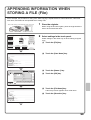
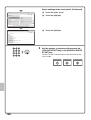
Select settings in the touch panel. (Continued)
System Settings
Cancel
Address Control
(4)
Address Type:
Fax
Search Number:
1
Address Name
(Required):
KKK KKK
Initial (Optional):
K
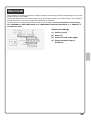
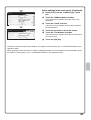
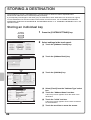
(4) Select [Fax] from the "Address Type" select
box.
(5) Touch the "Address Name" text box.
(1-999)
A text entry screen appears. Enter the name of the
destination.
(5)
(6)
Key Name:
Custom Index:
OK
(7)
User 1
Register this Address to be added to the [Frequent Use] index.
(6) Touch the "Initial" text box.
A text entry screen appears. Enter search characters
for the destination.
System Settings
Address Control
Cancel
OK
(9)
Register this Address to be added to the [Frequent Use] index.
Fax Number (Required):
0123456789
Transmission Mode:
Transmission Speed:
33.6 kbps
Transmission Mode: None
(8)
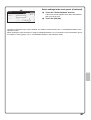
(7) Touch the scroll bar to move the screen.
(8) Touch the "Fax Number" text box.
A text entry screen appears. Enter the fax number that
you wish to store.
(9) Touch the [OK] key.
The items in the above step must be entered. For details on items entered, see "7. SYSTEM SETTINGS" in the
Operation Guide.
When sending the same document or image to multiple destinations, it is convenient to store a destination group.
For details on storing groups, see "7. SYSTEM SETTINGS" in the Operation Guide.
67