1
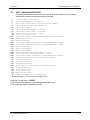
Chapter 5 Printer Commands 5.3.6 SAVING FORMAT COMMANDS The printer can store up to 128 format files in RAM. Once stored, these files can be loaded from memory at very high speeds. With the use of battery backed RAM socket, the printer will retain these format files after the removal of power. The printer can be configured through software dip switch 2 (see Section 5.3.1), to automatically process the file at power up. The printer treats these files exactly as if they were sent through the communication port. The maximum number of stored files depends on the size of the files and the amount of memory installed in the printer. The standard 512K RAM configuration offers 448K of format storage area . ^A XX ^D 54 Command Send Saved Format File to Serial Port: ^A selects which one (1-128). XX 58 Process Saved Format: ^A selects which user entered format (1-128) is to be printed. XX 59 Save Format File: ^A selects which slot (1-128) in which the user entered format is to be placed. The format file must be terminated by an ESC (1B hex) character. XX 66 Clear Single Stored Label Format: ^A select which slot to clear (1-128). 100 Clear User RAM: This command will clear all downloaded fonts, graphics, and stored label formats. This command must be issued before saving format files or when saved format files need to be changed. There is no way to erase or change a single slot. USAGE: Before sending the first downloadable format file, graphic, or font, the RAM must be initiated by sending ^D100. When this command is issued, all previously saved files will be erased. Therefore, it also works as a memory clear operation. Only use this command before sending the first file or when a total RAM clear is needed. Next send the ^A1^D59 command sequence. This indicates to the printer that file #1 of a possible 128 is being sent to the printer. After this command, follows the format file. The format file must be terminated with an escape character (1B hex) so that the printer knows that the complete file has been sent down. To access the stored file, serially send ^A1^D58, where ^A1 indicates the number of the file that is accessed. The printer will now process the stored file. All proceeding files sent to the printer to be saved also receive the ^AX^D59 command, where X denotes the number of the file. Be sure that the ^D100 command is not sent again. This will erase all stored files. 412 Operators Manual 49