1
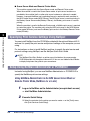
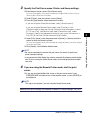
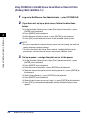
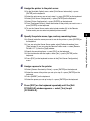
Series
Network Guide
Please read this guide before operating this equipment.
After you finish reading this guide, store it in a safe place for future reference.
ENG
LASER CLASS 700 Series
Network Guide
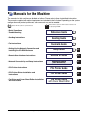
Manuals for the Machine
The manuals for this machine are divided as follows. Please refer to them for detailed information.
The manuals supplied with optional equipment are included in the list below. Depending on the system
configuration and product purchased, some manuals may not be needed.
Guides with this symbol are printed manuals.
• Basic Operations
• Troubleshooting
CD-ROM
Guides with this symbol are PDF manuals included on the
accompanying CD-ROM.
Reference Guide
\
• Sending Instructions
• Fax Instructions
• Setting Up the Network Connection and
Installing the CD-ROM Software
• Remote User Interface Instructions
• Network Connectivity and Setup Instructions
• PCL Printer Instructions
• PCL Printer Driver Installation and
Instructions
• Fax Driver and Cover Sheet Editor Installation
and Instructions
The machine illustration on the cover may differ slightly from your machine.
Sending Guide
Facsimile Guide
Setup Guide
CD-ROM
Remote UI Guide
CD-ROM
Network Guide
(This Document)
CD-ROM
PCL Printer Guide
CD-ROM
PCL Driver Guide
CD-ROM
Fax Driver Guide
with Cover Sheet Editor
CD-ROM
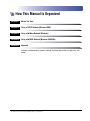
How This Manual Is Organized
Chapter 1
Before You Start
Chapter 2
Using a TCP/IP Network (Windows/UNIX)
Chapter 3
Using a NetWare Network (Windows)
Chapter 4
Using a NetBIOS Network (Windows 95/98/Me)
Chapter 5
Appendix
Includes troubleshooting, network settings, software information, the glossary, and
index.
Considerable effort has been made to ensure that this manual is free of inaccuracies and omissions. However, as we are constantly improving our
products, if you need an exact specification, please contact Canon.
Contents
Preface . . . . . . . . . . . . . . . . . . . . . . . . . . . . . . . . . . . . . . . . . . . . . . . . . . . . . . . . . vii
How to Use This Manual . . . . . . . . . . . . . . . . . . . . . . . . . . . . . . . . . . . . . . . . . . . vii
Symbols Used in This Manual . . . . . . . . . . . . . . . . . . . . . . . . . . . . . . . . . . . . . vii
Keys Used in This Manual . . . . . . . . . . . . . . . . . . . . . . . . . . . . . . . . . . . . . . . . vii
Displays Used in This Manual . . . . . . . . . . . . . . . . . . . . . . . . . . . . . . . . . . . . . viii
Abbreviations Used in This Manual . . . . . . . . . . . . . . . . . . . . . . . . . . . . . . . . . viii
Legal Notices . . . . . . . . . . . . . . . . . . . . . . . . . . . . . . . . . . . . . . . . . . . . . . . . . . . . .ix
Trademarks. . . . . . . . . . . . . . . . . . . . . . . . . . . . . . . . . . . . . . . . . . . . . . . . . . . . . ix
Copyright . . . . . . . . . . . . . . . . . . . . . . . . . . . . . . . . . . . . . . . . . . . . . . . . . . . . . . ix
Disclaimers. . . . . . . . . . . . . . . . . . . . . . . . . . . . . . . . . . . . . . . . . . . . . . . . . . . . . x
Chapter 1
Before You Start
System Environment Requirements . . . . . . . . . . . . . . . . . . . . . . . . . . . . . . . . 1-2
System Requirements for Printing . . . . . . . . . . . . . . . . . . . . . . . . . . . . . . . . . 1-2
Checking Your Network Environment. . . . . . . . . . . . . . . . . . . . . . . . . . . . . . . .
Sample Windows Network . . . . . . . . . . . . . . . . . . . . . . . . . . . . . . . . . . . . . . .
Using a NetWare Server . . . . . . . . . . . . . . . . . . . . . . . . . . . . . . . . . . . . . .
Without Using a NetWare Server . . . . . . . . . . . . . . . . . . . . . . . . . . . . . . .
Sample UNIX Network . . . . . . . . . . . . . . . . . . . . . . . . . . . . . . . . . . . . . . . . . .
Using a Network with Different Types of Computers . . . . . . . . . . . . . . . . . . .
Chapter 2
1-4
1-4
1-4
1-5
1-6
1-7
Using a TCP/IP Network (Windows/UNIX)
TCP/IP Network Setup Procedures. . . . . . . . . . . . . . . . . . . . . . . . . . . . . . . . . . 2-2
Specifying Protocol Settings . . . . . . . . . . . . . . . . . . . . . . . . . . . . . . . . . . . . . . 2-3
Preparation for Protocol Settings . . . . . . . . . . . . . . . . . . . . . . . . . . . . . . . . . . 2-3
Specifying Network Settings from the Operation Panel . . . . . . . . . . . . . . . . . 2-4
Setting the Host Name . . . . . . . . . . . . . . . . . . . . . . . . . . . . . . . . . . . . . . . 2-9
Setting the Domain Name . . . . . . . . . . . . . . . . . . . . . . . . . . . . . . . . . . . 2-10
Checking the Current Network Settings . . . . . . . . . . . . . . . . . . . . . . . . . 2-12
Using NetSpot . . . . . . . . . . . . . . . . . . . . . . . . . . . . . . . . . . . . . . . . . . . . . . . 2-13
Using a Web Browser (Remote UI) . . . . . . . . . . . . . . . . . . . . . . . . . . . . . . . 2-14
Using ARP/PING Commands . . . . . . . . . . . . . . . . . . . . . . . . . . . . . . . . . . . 2-19
Using an FTP Client . . . . . . . . . . . . . . . . . . . . . . . . . . . . . . . . . . . . . . . . . . . 2-20
Setting Up a Computer for Printing . . . . . . . . . . . . . . . . . . . . . . . . . . . . . . . .
Connecting to a TCP/IP Network . . . . . . . . . . . . . . . . . . . . . . . . . . . . . . . . .
Installing the Printer Driver and Specifying the Printer’s Location . . . . . . . .
Printer Connection Method (LPD/Raw) . . . . . . . . . . . . . . . . . . . . . . . . . . . .
iv
2-22
2-22
2-22
2-23
Windows 95/98/Me. . . . . . . . . . . . . . . . . . . . . . . . . . . . . . . . . . . . . . . . . .2-23
Windows 2000/XP . . . . . . . . . . . . . . . . . . . . . . . . . . . . . . . . . . . . . . . . . .2-27
Windows NT 4.0 . . . . . . . . . . . . . . . . . . . . . . . . . . . . . . . . . . . . . . . . . . . .2-32
UNIX. . . . . . . . . . . . . . . . . . . . . . . . . . . . . . . . . . . . . . . . . . . . . . . . . . . . .2-35
Printer Connection Method (IPP) . . . . . . . . . . . . . . . . . . . . . . . . . . . . . . . . . .2-37
Windows 95/98/Me/2000/XP . . . . . . . . . . . . . . . . . . . . . . . . . . . . . . . . . .2-37
Print Server Settings . . . . . . . . . . . . . . . . . . . . . . . . . . . . . . . . . . . . . . . . . . .2-40
Printer Management . . . . . . . . . . . . . . . . . . . . . . . . . . . . . . . . . . . . . . . . . . . . .2-42
Using NetSpot . . . . . . . . . . . . . . . . . . . . . . . . . . . . . . . . . . . . . . . . . . . . . . . .2-42
Using the Remote UI . . . . . . . . . . . . . . . . . . . . . . . . . . . . . . . . . . . . . . . . . . .2-42
Using an FTP Client. . . . . . . . . . . . . . . . . . . . . . . . . . . . . . . . . . . . . . . . . . . .2-43
Chapter 3
Using a NetWare Network (Windows)
NetWare Network Setup Procedures . . . . . . . . . . . . . . . . . . . . . . . . . . . . . . . . .3-2
NetWare Print Service Settings . . . . . . . . . . . . . . . . . . . . . . . . . . . . . . . . . . . . .3-3
Print Services. . . . . . . . . . . . . . . . . . . . . . . . . . . . . . . . . . . . . . . . . . . . . . . . . .3-3
Specifying Print Service Settings Using NetSpot. . . . . . . . . . . . . . . . . . . . . . .3-4
Setup Using NetWare Administrator or PCONSOLE . . . . . . . . . . . . . . . . . . . .3-4
Using NetWare Administrator in the NDS Queue Server Mode or
Remote Printer Mode (NetWare 4.x or Later) . . . . . . . . . . . . . . . . . . . . . . .3-4
Using PCONSOLE in the NDS Queue Server Mode or Remote
Printer (Bindery) Mode (NetWare 3.x) . . . . . . . . . . . . . . . . . . . . . . . . . . . .3-6
Protocol Settings . . . . . . . . . . . . . . . . . . . . . . . . . . . . . . . . . . . . . . . . . . . . . . . . .3-9
Using NetSpot . . . . . . . . . . . . . . . . . . . . . . . . . . . . . . . . . . . . . . . . . . . . . . . . .3-9
Using a Web Browser (Remote UI) . . . . . . . . . . . . . . . . . . . . . . . . . . . . . . . .3-10
Using an FTP Client. . . . . . . . . . . . . . . . . . . . . . . . . . . . . . . . . . . . . . . . . . . .3-10
Setting Up a Computer for Printing . . . . . . . . . . . . . . . . . . . . . . . . . . . . . . . . .3-11
Connecting to a NetWare Network . . . . . . . . . . . . . . . . . . . . . . . . . . . . . . . .3-11
Installing the Printer Driver. . . . . . . . . . . . . . . . . . . . . . . . . . . . . . . . . . . . . . .3-11
Printer’s Location Setting . . . . . . . . . . . . . . . . . . . . . . . . . . . . . . . . . . . . . . . .3-11
Chapter 4
Using a NetBIOS Network (Windows 95/98/Me)
NetBIOS Network Setup Procedures . . . . . . . . . . . . . . . . . . . . . . . . . . . . . . . . .4-2
Setting Up a Computer for Printing . . . . . . . . . . . . . . . . . . . . . . . . . . . . . . . . . .4-3
Connecting to a NetBIOS Network . . . . . . . . . . . . . . . . . . . . . . . . . . . . . . . . .4-3
Installing the Printer Driver. . . . . . . . . . . . . . . . . . . . . . . . . . . . . . . . . . . . . . . .4-4
Printer’s Location Setting . . . . . . . . . . . . . . . . . . . . . . . . . . . . . . . . . . . . . . . . .4-4
Chapter 5
Appendix
Troubleshooting. . . . . . . . . . . . . . . . . . . . . . . . . . . . . . . . . . . . . . . . . . . . . . . . . .5-2
How to Uninstall Software . . . . . . . . . . . . . . . . . . . . . . . . . . . . . . . . . . . . . . . . .5-5
v
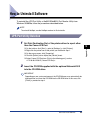
LPR Port Utility Deletion. . . . . . . . . . . . . . . . . . . . . . . . . . . . . . . . . . . . . . . . . 5-5
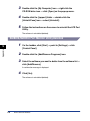
NetBIOS/NetBEUI Port Monitor Utility Deletion . . . . . . . . . . . . . . . . . . . . . . . 5-6
Overview of Network Setting Items . . . . . . . . . . . . . . . . . . . . . . . . . . . . . . . . . 5-7
Using the Operation Panel . . . . . . . . . . . . . . . . . . . . . . . . . . . . . . . . . . . . . . . 5-7
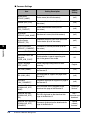
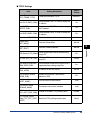
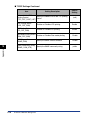
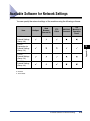
Using NetSpot, Remote UI, or FTP Client . . . . . . . . . . . . . . . . . . . . . . . . . . . 5-7
Available Software for Network Settings . . . . . . . . . . . . . . . . . . . . . . . . . . . . 5-13
Glossary . . . . . . . . . . . . . . . . . . . . . . . . . . . . . . . . . . . . . . . . . . . . . . . . . . . . . . 5-14
Index . . . . . . . . . . . . . . . . . . . . . . . . . . . . . . . . . . . . . . . . . . . . . . . . . . . . . . . . . 5-21
vi
Preface
Thank you for purchasing the Canon LASER CLASS 700 Series. Please read this manual
thoroughly before operating the machine in order to familiarize yourself with its capabilities,
and to make the most of its many functions. After reading this manual, store it in a safe place
for future reference.
How to Use This Manual
Symbols Used in This Manual
The following symbols are used in this manual to explain procedures, restrictions,
handling precautions, and instructions that should be observed for safety.
IMPORTANT
Indicates operational requirements and restrictions. Be sure to read
these items carefully in order to operate the machine correctly, and to
avoid damage to the machine.
NOTE
Indicates a clarification of an operation, or contains additional
explanations for a procedure. Reading these notes is highly
recommended.
Keys Used in This Manual
The following symbols and key names are a few examples of how keys to be
pressed are expressed in this manual. The operation panel keys on the machine
are indicated within brackets.
Start
Press [Start].
Data
Registration
Press [Data Registration].
vii
Displays Used in This Manual
Screen shots of computer operation screens used in this manual may differ from
the ones you actually see, depending on the model or options that come with your
machine.
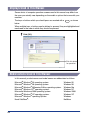
The keys or buttons which you should press are marked with a
below.
, as shown
When multiple keys or buttons can be clicked or pressed, they are highlighted and
mentioned in the order in which they should be pressed.
Click [OK].
Click this button
for operation.
Abbreviations Used in This Manual
In this manual, product names and model names are abbreviated as follows:
Microsoft® Windows® 95 operating system:
Microsoft® Windows® 98 operating system:
Microsoft® Windows® Millennium Edition operating system:
Microsoft® Windows NT® operating system:
Microsoft® Windows® 2000 operating system:
Microsoft® Windows® XP operating system:
Microsoft® Windows® operating System:
Novell NetWare®:
viii
Windows 95
Windows 98
Windows Me
Windows NT
Windows 2000
Windows XP
Windows
NetWare
Legal Notices
Trademarks
Canon, the Canon logo, LASER CLASS, and NetSpot are trademarks of Canon Inc.
Adobe and Acrobat are trademarks of Adobe Systems Incorporated.
PCL, HP, and HP-UX are trademarks of Hewlett-Packard Company.
IBM is a trademark of International Business Machines Corporation.
Linux is a trademark of Linus Torvalds.
Microsoft, MS-DOS, the Windows logo, Windows, and Windows NT are registered
trademarks of Microsoft Corporation in the United States and other countries.
Netscape is a trademark of Netscape Communications Corp.
NetWare and Novell are registered trademarks of Novell, Inc.
IPX/SPX, NDS, NDPS, and Novell Client are trademarks of Novell, Inc.
Red Hat is a trademark of Red Hat Software, Inc.
Solaris, Sun, SunOS, and Sun Microsystems are trademarks of Sun Microsystems in the
United States and other countries.
Turbolinux and its logo are trademarks of Turbolinux, Inc.
UNIX is a registered trademark exclusively licensed to X/Open Company, Ltd. in the United
States and other countries.
Ethernet is a trademark of Xerox Corporation.
Other product and company names herein may be the trademarks of their respective
owners.
Copyright
Copyright 2002 by Canon Inc. All rights reserved.
No part of this publication may be reproduced or transmitted in any form or by any means,
electronic or mechanical, including photocopying and recording, or by any information
storage or retrieval system without the prior written permission of Canon Inc.
ix
Disclaimers
The information in this document is subject to change without notice.
CANON INC. MAKES NO WARRANTY OF ANY KIND WITH REGARD TO THIS MATERIAL, EITHER
EXPRESS OR IMPLIED, EXCEPT AS PROVIDED HEREIN, INCLUDING WITHOUT LIMITATION
THEREOF, WARRANTIES AS TO MARKETABILITY, MERCHANTABILITY, FITNESS FOR A
PARTICULAR PURPOSE OF USE OR AGAINST INFRINGEMENT OF ANY PATENT. CANON INC.
SHALL NOT BE LIABLE FOR ANY DIRECT, INCIDENTAL, OR CONSEQUENTIAL DAMAGES OF ANY
NATURE, OR LOSSES OR EXPENSES RESULTING FROM THE USE OF THIS MATERIAL.
x
Before You Start
1
CHAPTER
This chapter describes what you need to know before you start using the machine, including
the network system environments the machine is compatible with, and how to check the
network system environment you are using.
System Environment Requirements . . . . . . . . . . . . . . . . . . . . . . . . . . . . . . . . . . . . . . . . 1-2
System Requirements for Printing . . . . . . . . . . . . . . . . . . . . . . . . . . . . . . . . . . . . . . . . . . . . . . . . 1-2
Checking Your Network Environment. . . . . . . . . . . . . . . . . . . . . . . . . . . . . . . . . . . . . . . . 1-4
Sample Windows Network . . . . . . . . . . . . . . . . . . . . . . . . . . . . . . . . . . . . . . . . . . . . . . . . . . . . . 1-4
Sample UNIX Network. . . . . . . . . . . . . . . . . . . . . . . . . . . . . . . . . . . . . . . . . . . . . . . . . . . . . . . . . 1-6
Using a Network with Different Types of Computers. . . . . . . . . . . . . . . . . . . . . . . . . . . . . . . . . . 1-7
1-1
System Environment Requirements
This section describes the system environments that your machine is compatible
with.
Before You Start
1
System Requirements for Printing
The following network and system environments are compatible with your machine
when printing:
■ Printing Using a TCP/IP Network:
Compatible OS:
Microsoft Windows 95/98/Me
Microsoft Windows NT Server 4.0
Microsoft Windows NT Workstation 4.0
Microsoft Windows 2000 Server
Microsoft Windows 2000 Professional
Microsoft Windows XP
Solaris Version 1.1x (SunOS Version 4.1x) or later
Solaris Version 2.5x (SunOS Version 5.5x) or later
HP-UX Version 10.x or later
IBM-AIX Version 4.x or later
Red Hat Linux 6.1 or later
Compatible Computers: Windows 95/98/Me/NT/2000; IBM PC compatible computers
■ Printing Using a NetWare Network:
Compatible Servers:
Novell NetWare Version 3.2/4.1/4.11/4.2/5.0/5.1/6.0
Compatible Clients:
Microsoft Windows 95/98/Me/XP
Microsoft Windows NT Server 4.0
Microsoft Windows NT Workstation 4.0
Microsoft Windows 2000 Server
Microsoft Windows 2000 Professional
Compatible Computers: IBM PC compatible computers
1-2
System Environment Requirements
■ Printing Using a NetBIOS Network:
Compatible OS:
Microsoft Windows 95/98/Me
Compatible Computers:
IBM PC compatible computers
Required Memory for Computers: More than 16 MB
IMPORTANT
If you are using Windows NT, install Service Pack 5 or later.
Before You Start
1
System Environment Requirements
1-3
Checking Your Network Environment
Refer to the following diagram examples to confirm the network environment that is
connected to your machine. Then, perform the necessary operations to set up that
environment.
Before You Start
1
Sample Windows Network
Using a NetWare Server
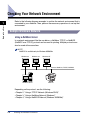
In a network environment like the one below, a NetWare, TCP/IP, or NetBIOS
(NetBIOS over TCP/IP) protocol can be used for printing. Multiple protocols can
also be used at the same time.
NOTE
NetBIOS is available only for Windows 95/98/Me.
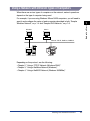
Windows 95
Windows 98
Windows NT
Protocol: NetWare, TCP/IP, NetBIOS
NetWare Server
Machine
Depending on the protocol, see the following:
• Chapter
2, "Using a TCP/IP Network (Windows/UNIX)"
• Chapter
3, "Using a NetWare Network (Windows)"
• Chapter 4, "Using a NetBIOS Network (Windows 95/98/Me)"
1-4
Checking Your Network Environment
Without Using a NetWare Server
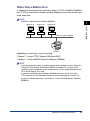
In a network environment like the one below, either a TCP/IP or NetBIOS (NetBIOS
over TCP/IP) protocol can be used for printing. Multiple protocols can also be used
at the same time.
NOTE
NetBIOS is available only for Windows 95/98/Me.
Windows 98
1
Windows NT
Before You Start
Windows 95
Protocol: TCP/IP, NetBIOS
Machine
Depending on the protocol, see the following:
• Chapter
2, "Using a TCP/IP Network (Windows/UNIX)"
• Chapter 4, "Using a NetBIOS Network (Windows 95/98/Me)"
NOTE
• Once you set up the machine as a network printer, each computer can print directly to it.
Using the TCP/IP protocol with Windows 2000/XP or Windows NT as a print server
provides efficient management of your network printer. For the detailed procedure, see
“Print Server Settings,” on p. 2-40.
• In a network comprising only of Windows 95/98/Me computers that do not use the
TCP/IP protocol, can use the NetBIOS protocol only for connecting to a network and
printing. For detailed information, see Chapter 4, "Using a NetBIOS Network (Windows
95/98/Me)."
Checking Your Network Environment
1-5
Sample UNIX Network
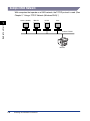
With computers that operate on a UNIX network, the TCP/IP protocol is used. (See
Chapter 2, "Using a TCP/IP Network (Windows/UNIX).")
Solaris (SunOS)
IBM-AIX
HP-UX
Linux
Before You Start
1
Protocol: TCP/IP
Machine
1-6
Checking Your Network Environment
Using a Network with Different Types of Computers
When there are various types of computers on the network, network operations
depend on the type of computer being used.
Windows
Solaris
Protocol: TCP/IP, NetWare, NetBIOS
NetWare Server
1
Before You Start
For example, if you are using Windows 98 and UNIX computers, you will need to
specify and configure the setup of each computer described in both “Sample
Windows Network,” on p. 1-4 and “Sample UNIX Network,” on p. 1-6.
Machine
Depending on the protocol, see the following:
• Chapter
2, "Using a TCP/IP Network (Windows/UNIX)"
• Chapter 3, "Using a NetWare Network (Windows)"
• Chapter 4, "Using a NetBIOS Network (Windows 95/98/Me)"
Checking Your Network Environment
1-7
Before You Start
1
1-8
Checking Your Network Environment
Using a TCP/IP Network
(Windows/UNIX)
2
CHAPTER
This chapter describes the settings and procedures necessary to connect and use the
machine with a TCP/IP network.
TCP/IP Network Setup Procedures . . . . . . . . . . . . . . . . . . . . . . . . . . . . . . . . . . . . . . . . . 2-2
Specifying Protocol Settings . . . . . . . . . . . . . . . . . . . . . . . . . . . . . . . . . . . . . . . . . . . . . . . 2-3
Preparation for Protocol Settings . . . . . . . . . . . . . . . . . . . . . . . . . . . . . . . . . . . . . . . . . . . . . . . . .2-3
Specifying Network Settings from the Operation Panel . . . . . . . . . . . . . . . . . . . . . . . . . . . . . . . .2-4
Using NetSpot . . . . . . . . . . . . . . . . . . . . . . . . . . . . . . . . . . . . . . . . . . . . . . . . . . . . . . . . . . . . . .2-13
Using a Web Browser (Remote UI) . . . . . . . . . . . . . . . . . . . . . . . . . . . . . . . . . . . . . . . . . . . . . .2-14
Using ARP/PING Commands . . . . . . . . . . . . . . . . . . . . . . . . . . . . . . . . . . . . . . . . . . . . . . . . . . .2-19
Using an FTP Client . . . . . . . . . . . . . . . . . . . . . . . . . . . . . . . . . . . . . . . . . . . . . . . . . . . . . . . . . .2-20
Setting Up a Computer for Printing. . . . . . . . . . . . . . . . . . . . . . . . . . . . . . . . . . . . . . . . . 2-22
Connecting to a TCP/IP Network . . . . . . . . . . . . . . . . . . . . . . . . . . . . . . . . . . . . . . . . . . . . . . . .2-22
Installing the Printer Driver and Specifying the Printer’s Location . . . . . . . . . . . . . . . . . . . . . . .2-22
Printer Connection Method (LPD/Raw) . . . . . . . . . . . . . . . . . . . . . . . . . . . . . . . . . . . . . . . . . . .2-23
Printer Connection Method (IPP) . . . . . . . . . . . . . . . . . . . . . . . . . . . . . . . . . . . . . . . . . . . . . . . .2-37
Print Server Settings . . . . . . . . . . . . . . . . . . . . . . . . . . . . . . . . . . . . . . . . . . . . . . . . . . . . . . . . . .2-40
Printer Management . . . . . . . . . . . . . . . . . . . . . . . . . . . . . . . . . . . . . . . . . . . . . . . . . . . . 2-42
Using NetSpot . . . . . . . . . . . . . . . . . . . . . . . . . . . . . . . . . . . . . . . . . . . . . . . . . . . . . . . . . . . . . .2-42
Using the Remote UI . . . . . . . . . . . . . . . . . . . . . . . . . . . . . . . . . . . . . . . . . . . . . . . . . . . . . . . . .2-42
Using an FTP Client . . . . . . . . . . . . . . . . . . . . . . . . . . . . . . . . . . . . . . . . . . . . . . . . . . . . . . . . . .2-43
2-1
TCP/IP Network Setup Procedures
To use a TCP/IP network, it is necessary to perform the following procedures.
1
2
Connect the network cable. (See Chapter 1, “Before You Start Using This
Machine,” in the PCL Printer Guide.)
Using a TCP/IP Network (Windows/UNIX)
Connect the network cables in accordance to the directions specified in the PCL Printer Guide.
2
Specify the protocol settings. (See “Specifying Protocol Settings,” on p. 2-3.)
Specify the machine’s protocol settings using one of the following methods:
• The machine’s operation panel (Data Registration menu)
• NetSpot (Canon software provided with the optional Network Kit III)
• A web browser (Remote UI)
• ARP/PING commands
• An FTP Client
3
Specify the computer settings for printing. (See “Setting Up a Computer for
Printing,” on p. 2-22.)
Connect each computer you want to use for printing to a TCP/IP network, and install the printer driver
software.
IMPORTANT
• It is recommended that the Network Administrator perform steps 1 and 2 above.
• If you are printing using a TCP/IP network, you can use the following print applications:
- LPD (Line Printer Daemon)
- FTP (File Transfer Protocol)
- Raw (Windows 2000/XP only)
- IPP (Internet Printing Protocol) (Windows 95/98/Me/2000/XP only)
• This machine does not come with printer driver software that can be used for each UNIX
platform.
• If you are configuring the basic protocol settings for the first time, use the operation panel
on your LASER CLASS 700 Series machine.
2-2
TCP/IP Network Setup Procedures
Specifying Protocol Settings
Preparation for Protocol Settings
• The
machine’s operation panel (Data Registration menu)
(Canon software provided with the optional Network Kit III)
• The Remote UI
• ARP/PING commands
• An FTP Client
• NetSpot
IMPORTANT
• Before you enter the IP address of your machine, contact your Network Administrator to
allocate your IP address. Enter the correct IP address to avoid network problems.
• In order to perform the following operations in this section, the machine’s MAC address is
necessary. To check the MAC address from the printer’s operation panel, follow the
procedure below to make a test print.
1. Press [PRT.Message] ➞ [Go] on the operation panel to take the printer offline.
2. Press [Menu] until <TEST MENU> appears.
3. Press [Item] until <PRINT EN CONFIG> appears ➞ press [Enter/Cancel].
• Before you perform the following operations in this section, make sure that the machine is
connected to a power source, and connected to the network.
• If you are using NetSpot or ARP/PING commands, the following steps directly allocate
the IP address of the machine. You can also use DHCP, BOOTP, or RARP to specify the
IP address. When the machine is started or reset, it checks whether DHCP, BOOTP, or
RARP is being used. Then, the machine allocates the IP address using the first available
procotol.
• It is not necessary for you to perform the following operations in this section, if you are
using the machine to automatically allocate the IP address. However, if you are
reallocating the IP address, or if DHCP, BOOTP, or RARP cannot be used, perform the
following operations in this section.
Specifying Protocol Settings
2-3
2
Using a TCP/IP Network (Windows/UNIX)
Before you specify the machine’s protocol settings, it is necessary to specify the IP
address of the machine to enable communication between the machine and your
computers. You can use any of the following to specify the settings. Specify the
settings using one of the following methods:
Specifying Network Settings from the Operation Panel
Use the procedures described in this section to specify the following network
settings:
• IP
Address (automatically or manually)
• Subnet Mask
• Default Gateway
• DNS
Server Address
• DNS Dynamic Setting
• Host Name
Using a TCP/IP Network (Windows/UNIX)
2
• Domain
Name
IMPORTANT
Specified settings from the operation panel become effective after the machine has been
restarted (When you disconnect the power cord, then connect it again).
NOTE
• For specific network settings, contact your Network Administrator.
• Althrough you may specify the network settings from the operation panel of the machine,
it is much easier to specify these settings from the Remote UI. (See "Using a Web
Browser (Remote UI)," on p.2-14).
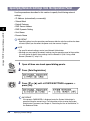
Data
Registration
Set
1
Open all three one-touch speed dialing panels.
2
Press [Data Registration].
3
Press [▼] or [▲] until <6.SYSTEM SETTINGS> appears ➞
press [Set].
➞
IMPORTANT
If the prompt <PASSWORD> is displayed, enter the System Administrator’s
password using the numeric keys. For information on how to enter the System
Administrator’s password, see Chapter 4, “Restricting the Use of the Machine,” in
the Reference Guide.
2-4
Specifying Protocol Settings
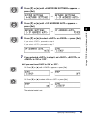
Set
4
Press [▼] or [▲] until <4.NETWORK SETTINGS> appears ➞
press [Set].
➞
5
Press [▼] or [▲] until <1.IP ADDRESS AUTO.> appears ➞
press [Set].
2
➞
Set
6
Press [▼] or [▲] to select <AUTO> or <FIXED> ➞ press [Set].
If you select <FIXED>, proceed to step 8.
If you select <AUTO>, proceed to step 7.
➞
7
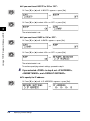
If you selected <AUTO> in step 6, set <DHCP>, <BOOTP>, or
<RARP> to ‘ON’ or ‘OFF’.
● If you want to set DHCP to ‘ON’ or ‘OFF’:
Set
❑ Press [▼] or [▲] until <1.DHCP> appears ➞ press [Set].
➞
Set
❑ Press [▼] or [▲] to select <ON> or <OFF> ➞ press [Set].
➞
The selected mode is set.
Specifying Protocol Settings
2-5
Using a TCP/IP Network (Windows/UNIX)
Set
● If you want to set BOOTP to ‘ON’ or ‘OFF’:
❑ Press [▼] or [▲] until <2.BOOTP> appears ➞ press [Set].
Set
➞
❑ Press [▼] or [▲] to select <ON> or <OFF> ➞ press [Set].
Set
➞
Using a TCP/IP Network (Windows/UNIX)
2
The selected mode is set.
● If you want to set RARP to ‘ON’ or ‘OFF’:
❑ Press [▼] or [▲] until <3.RARP> appears ➞ press [Set].
Set
➞
❑ Press [▼] or [▲] to select <ON> or <OFF> ➞ press [Set].
Set
➞
The selected mode is set.
To continue specifying network settings, proceed to step 9.
8
If you selected <FIXED> in step 6, set <IP ADDRESS>,
<SUBNET MASK>, and <DEFAULT GATEWAY>.
● To specify the IP address:
Set
❑ Press [▼] or [▲] until <2.IP ADDRESS> appears ➞ press [Set].
➞
2-6
Specifying Protocol Settings
1
2
3
4
5
6
7
8
9
0
❑ Enter the IP address of the machine using the numeric keys ➞ press [Set].
Enter a series of four numbers, delimited by periods (.) from 0 to 255.
Example: 192.168.203.115
Set
➞
The message <DATA ENTRY OK> appears on the LCD display for a few
seconds.
2
Using a TCP/IP Network (Windows/UNIX)
● To specify the subnet mask:
❑ Press [▼] or [▲] until <3.SUBNET MASK> appears ➞ press [Set].
Set
➞
1
2
3
4
5
6
7
8
9
0
❑ Enter the subnet mask using the numeric keys ➞ press [Set].
Enter a series of four numbers, delimited by periods (.).
Example: 255.255.255.0
Set
➞
The message <DATA ENTRY OK> appears on the LCD display for a few
seconds.
● To specify the default gateway:
❑ Press [▼] or [▲] until <4.DEFAULT GATEWAY> appears ➞ press [Set].
Set
➞
1
2
3
4
5
6
7
8
9
❑ Enter the default gateway address using the numeric keys ➞ press [Set].
Enter a series of four numbers, delimited by periods (.).
0
Set
➞
The message <DATA ENTRY OK> appears on the LCD display for a few
seconds.
Specifying Protocol Settings
2-7
9
Set
Press [▼] or [▲] until <5.DNS SERVER ADD.> appears ➞
press [Set].
2
➞
1
2
3
4
5
6
7
8
9
0
Set
10 Enter the DNS server address using the numeric keys ➞
press [Set].
Enter a series of four numbers, delimited by periods (.).
Example: 192.168.1.0
➞
The message <DATA ENTRY OK> appears on the LCD display for a few seconds.
▼
NOTE
• You can delete the number you entered by pressing C (Clear).
• If an address or number has previously been entered, press C (Clear) before you
enter a new number.
• You can move the cursor by pressing [ ] or [ ].
Set
11 Press [▼] or [▲] until <6.DNS DYNAMIC SET> appears ➞
press [Set].
➞
2-8
▼
Using a TCP/IP Network (Windows/UNIX)
▼
▼
NOTE
• You can delete the number you entered by pressing C (Clear).
• If an address or number has previously been entered, press C (Clear) before you
enter a new number.
• You can move the cursor by pressing [ ] or [ ].
Specifying Protocol Settings
Set
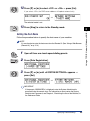
12 Press [▼] or [▲] to select <OFF> or <ON> ➞ press [Set].
If you select <ON>, the DNS server address will update automatically,
➞
The selected mode is set.
13 Press [Stop] to return to the Standby mode.
2
Setting the Host Name
Follow the procedure below to specify the host name of your machine.
NOTE
It is much easier to enter the host name from the Remote UI. (See “Using a Web Browser
(Remote UI),” on p. 2-14.)
1
Open all three one-touch speed dialing panels.
Data
Registration
2
Press [Data Registration].
Set
3
Press [▼] or [▲] until <6.SYSTEM SETTINGS> appears ➞
press [Set].
➞
IMPORTANT
If the prompt <PASSWORD> is displayed, enter the System Administrator’s
password using the numeric keys. For information on how to enter the System
Administrator’s password, see Chapter 4, “Restricting the Use of the Machine,” in
the Reference Guide.
Specifying Protocol Settings
2-9
Using a TCP/IP Network (Windows/UNIX)
Stop
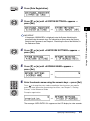
4
Set
Press [▼] or [▲] until <4.NETWORK SETTINGS> appears ➞
press [Set].
➞
5
Set
Press [▼] or [▲] until <7.HOST NAME> appears ➞ press [Set].
Using a TCP/IP Network (Windows/UNIX)
2
➞
1
2
3
4
5
6
7
8
9
6
Enter the host name using the numeric keys ➞ press [Set].
Press
to change the entry mode according to the characters you need to
enter. For more information on entering characters, see Chapter 2, “Getting
Started,” in the Reference Guide.
0
Set
Example: hostname
➞
The message <DATA ENTRY OK> appears on the LCD display for a few seconds.
NOTE
You cannot enter any symbols, except for a “-” (hyphen) for the host name.
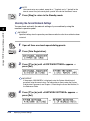
Setting the Domain Name
Follow the procedure below to specify the domain name of your machine.
NOTE
It is much easier to enter the domain name from the Remote UI. (See “Using a Web
Browser (Remote UI),” on p. 2-14.)
1
2-10
Open all three one-touch speed dialing panels.
Specifying Protocol Settings
3
Set
Press [Data Registration].
Press [▼] or [▲] until <6.SYSTEM SETTINGS> appears ➞
press [Set].
➞
2
IMPORTANT
If the prompt <PASSWORD> is displayed, enter the System Administrator’s
password using the numeric keys. For information on how to enter the System
Administrator’s password, see Chapter 4, “Restricting the Use of the Machine,” in
the Reference Guide.
4
Set
Press [▼] or [▲] until <4.NETWORK SETTINGS> appears ➞
press [Set].
➞
5
Set
Press [▼] or [▲] until <8.DOMAIN NAME> appears ➞
press [Set].
➞
1
2
3
4
5
6
7
8
9
0
Set
6
Enter the domain name using the numeric keys ➞ press [Set].
Press
to change the entry mode according to the characters you need to
enter. For more information on entering characters, see Chapter 2, “Getting
Started,” in the Reference Guide.
Example: organization
➞
The message <DATA ENTRY OK> appears on the LCD display for a few seconds.
Specifying Protocol Settings
2-11
Using a TCP/IP Network (Windows/UNIX)
2
Data
Registration
NOTE
You cannot enter any symbols, except for a “-” (hyphen) and a “.” (period) for the
domain name. Also, you cannot place a period at the end of the domain name.
7
Stop
Press [Stop] to return to the Standby mode.
Checking the Current Network Settings
You can check and verify the network settings of your machine by using the
machine’s operation panel.
Using a TCP/IP Network (Windows/UNIX)
2
IMPORTANT
Specified settings from the operation panel become effective after the machine has been
restarted.
Data
Registration
Set
1
Open all three one-touch speed dialing panels.
2
Press [Data Registration].
3
Press [▼] or [▲] until <6.SYSTEM SETTINGS> appears ➞
press [Set].
➞
IMPORTANT
If the prompt <PASSWORD> is displayed, enter the System Administrator’s
password using the numeric keys. For information on how to enter the System
Administrator’s password, see Chapter 4, “Restricting the Use of the Machine,” in
the Reference Guide.
Set
4
Press [▼] or [▲] until <4.NETWORK SETTINGS> appears ➞
press [Set].
➞
2-12
Specifying Protocol Settings
Set
5
Press [▼] or [▲] until <9.VIEW IP ADDRESS> appears ➞
press [Set].
➞
6
Press [▼] or [▲] to scroll through the settings you want to
check.
2
Each time you press [▼] or [▲], the specified IP Address, Subnet Mask, Default
Gateway, DNS Server Address, Host Name, and Domain Name are displayed in
sequence.
You can return to the NETWORK SETTINGS menu by pressing
Set
(Set).
NOTE
You can also check the current network settings by printing a User’s Data List. For
instructions on how to print the User’s Data List and for an output sample, see
Chapter 12, “Printing Lists and Reports,” in the Facsimile Guide.
Using NetSpot
Instead of using the operation panel of your machine, you can install NetSpot from
the CD-ROM provided with the optional Network Kit III, and use it to specify the
protocol settings on the computer you are using.
For instructions on how to install NetSpot and how to specify the protocol settings
using NetSpot, see the NetSpot Quick Start Guide.
NOTE
The NetSpot Quick Start Guide is an online manual included on the accompanying
CD-ROM provided with the optional Network Kit III. You can use Adobe Acrobat Reader
to display and printout the guide for your convenience.
Specifying Protocol Settings
2-13
Using a TCP/IP Network (Windows/UNIX)
Set
Using a Web Browser (Remote UI)
Instead of using the operation panel of your machine, or NetSpot, you can use a
web browser (Remote UI) to specify the protocol settings.
NOTE
If you change the IP address from the Remote UI, the change will not be reflected on the
display of your machine. You can confirm the change of the IP address by selecting
<VIEW IP ADDRESS> from the NETWORK SETTINGS menu, or by printing the User’s
Data List.
Using a TCP/IP Network (Windows/UNIX)
2
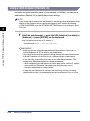
1
Start the web browser ➞ enter the URL below in [Location] or
[Address] ➞ press [ENTER] on the keyboard.
http://<machine host name or IP address >/
Input Example: http://192.168.203.115/
IMPORTANT
• Make sure you are using Netscape Navigator/Communicator 4.04 or later, or
Internet Explorer 4.01 SP1 or later for your web browser.
• You cannot set this machine’s protocol settings through Netscape Communicator
4.08 with Turbolinux 4.0. You have to use a different version or web browser.
• If you are using a connection via a proxy server, follow these directions: (The
settings may differ depending on the network environment.)
- When configuring your web browser to use the proxy server, add the IP address
of the machine to “Exception” (the address not using the proxy server).
- Set up the web browser to accept cookies.
• If more than one Remote UI is running at the same time, only the last setting
specified will be valid. It is recommended that only one Remote UI run at a time.
2-14
Specifying Protocol Settings
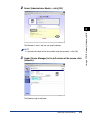
2
Select [Administrator Mode] ➞ click [OK].
The Remote UI starts, and you can specify settings.
NOTE
If a password has been set for the machine, enter the password ➞ click [OK].
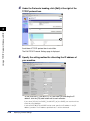
3
Under [Device Manager] in the left column of the screen, click
[Network].
The Network page is displayed.
Specifying Protocol Settings
2-15
Using a TCP/IP Network (Windows/UNIX)
2
4
Under the Protocols heading, click [Edit] at the right of the
TCP/IP protocol box.
Using a TCP/IP Network (Windows/UNIX)
2
Scroll down if TCP/IP protocol box is not visible.
The Edit TCP/IP Protocol Settings page is displayed.
5
Specify the setting method for allocating the IP address of
your machine.
To use [Use DHCP], [Use BOOTP], or [Use RARP] for allocating the IP
address, click the [On] radio button next to each selection.
If you select [Off] for [Use DHCP], [Use BOOTP], or [Use RARP], the machine will not
check for these protocols.
If neither DHCP, BOOTP, nor RARP can be used, specify the IP address in the [IP
Address] text box. The IP address specified here, is the one allocated.
2-16
Specifying Protocol Settings
IMPORTANT
This machine enables you to have the machine directly allocate an IP address, or
you can use DHCP, BOOTP, or RARP to specify the IP address. When the machine
is started or reset, it checks whether DHCP, BOOTP, or RARP is being used, and
then allocates the IP address using the first available protocol.
6
Specify the IP Address, Subnet Mask, and Gateway Address.
In [IP Address], enter the machine’s IP address. In [Subnet Mask] and [Gateway
Address], enter the subnet mask and gateway address used by the TCP/IP
network.
NOTE
If you are using DHCP, BOOTP, or RARP, some of the items above are not used.
The values obtained from DHCP, BOOTP, or RARP are listed in the respective text
boxes automatically.
7
Specify the LPD settings.
● For [LPD Print]:
❑ Select [On] or [Off].
● For [LPD Banner]:
❑ Select whether to enable or disable the banner page (the separator page of
each print job).
[Off]:
[Auto]:
The banner page is always disabled, regardless of the
banner page output settings.
The banner page is enabled only for print jobs set to output
a banner page, and disabled for print jobs not set to output
a banner page.
[On (Print Last)]: The banner page is always enabled, regardless of the
banner page output settings. The banner page is output on
the last page.
Specifying Protocol Settings
2-17
2
Using a TCP/IP Network (Windows/UNIX)
NOTE
• It takes about one to two minutes for the machine to check whether DHCP, BOOTP
or RARP can be used. It is recommended that you set unused protocols to ‘Off’.
• Depending on whether you use DHCP, BOOTP, or RARP to allocate the IP
address, you need to start the DHCP server, BOOTP daemon, or RARP daemon.
NOTE
Depending on the operating system or LPR (Line Printer Remote) being used, it
may not be possible to specify the banner page output settings. If this occurs, you
can specify the settings for banner page output by selecting any option other than
[Auto].
8
2
For [IPP Print], [IPP URL], [Raw Mode Print], and [Raw Mode
Bi-direction], specify the IPP (Internet Printing Protocol) and
Raw settings.
Using a TCP/IP Network (Windows/UNIX)
Usually, there is no need to make changes.
9
If you are using DNS, specify the DNS settings.
❑ Enter the IP address of the DNS server in [DNS Server Address].
❑ Select [On] or [Off] for [DNS Dynamic Update] if you want the DNS server
address information to update automatically.
❑ Enter the host name of the machine in [DNS Host Name].
Input Example: sales_printer
❑ Enter the domain name belonging to the machine in [DNS Domain Name].
Input Example: sales_dept.xyz_company.co.jp
NOTE
• The machine uses DNS (Domain Name System) when the DNS dynamic update
function is set to ‘On’ in step 10).
• The DNS dynamic update function automatically registers the names specified in
[DNS Host Name] and [DNS Domain Name] in the DNS server for the machine.
• You can use this function in an environment with a DNS server that can perform
dynamic registration (dynamic DNS server).
• If using LPR to specify the DNS Host Name and DNS Domain Name settings, you
can use the machine without specifying the IP address of the machine.
10 In [SNMP Access] and [SNMP Community String], specify the
SNMP (Simple Network Management Protocol) settings.
[SNMP Access]:
Select [On] or [Off] to enable SNMP operation.
[SNMP Community String]: Enter [public], [canon_admin], or [canon_user] to
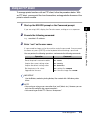
define the community you want to belong to.
2-18
Specifying Protocol Settings
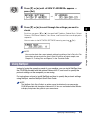
11 Click [OK].
The settings become valid after you reset the print server or restart the machine.
To reset the print server, under [Device Manager], on the left column of the
screen, select [Network] ➞ click [Reset].
The protocol settings are complete.
Using ARP/PING Commands
Instead of using the operation panel of your machine, NetSpot, or the Remote UI,
you can use ARP/PING commands to specify the protocol settings.
1
Start up the MS-DOS prompt or the Command prompt.
If you are using UNIX, display the Console screen, and then log on as a
superuser.
2
Execute the following command to add a static entry to the
arp table.
arp -s <IP Address> <MAC Address>
IP Address:
Specify the IP address you want to allocate to the machine.
The IP address consists of four numbers delimited by periods,
ranging from 0 to 255.
Specifying Protocol Settings
2-19
Using a TCP/IP Network (Windows/UNIX)
2
MAC Address:
Specify the MAC Address of the machine. Every second digit
is separated by “-” (“:” for UNIX).
Input Example (Windows): arp -s 172.20.88.125 00-00-85-05-70-31
Input Example (UNIX): arp -s 172.20.88.125 00:00:85:05:70:31
NOTE
• If you are using IBM-AIX, enter "arp -s ether <IP Address> <MAC Address>."
• Note that in IBM-AIX language, the word “ether” means Ethernet.
3
Using a TCP/IP Network (Windows/UNIX)
2
Execute the applicable command below to set the IP address
for the network board.
ping <IP Address> -l 479 (for Windows)
ping -s <IP Address> 479 (for Solaris 1.x/2.x)
ping <IP Address> 479 (for IBM-AIX)
ping <IP Address> 487 (for HP-UX)
ping -s 479 <IP Address> (for Red Hat Linux)
ping -s 480 <IP Address> (for Turbolinux)
IP Address: Specify the same IP address that you specified in step 2 above.
Input Example (Windows): ping 172.20.88.125 -l 479
NOTE
• The term “-l” above is not “1” (one), but is the small letter of “L”.
• To set the subnet mask and gateway address, you must use an FTP Client. For
details on the procedure, proceed to step 1 in “Using an FTP Client,” on p. 2-43.
Using an FTP Client
You can use an FTP Client to specify the subnet mask and gateway address.
1
Start up the MS-DOS prompt or the Command prompt.
If you are using UNIX, display the Console screen, and then log on as a
superuser.
2
Execute the following command.
ftp <machine’s IP address>
2-20
Specifying Protocol Settings
3
Enter “root” as the user name.
● If a password has been set for the machine:
❑ Enter the password for the machine ➞ press [ENTER] on the keyboard.
● If no password has been set:
❑ Press [ENTER] on the keyboard without entering a password.
4
Execute the following command to download the config
(configuration) file.
get config
5
Edit the downloaded config file using Notepad (or similar
program).
For an explanation of each item, see “Overview of Network Setting Items,” on p.
5-7.
6
Execute the following command to upload the config file.
put config CONFIG
7
To confirm the settings, execute the following command to
reset the print server.
get reset
You can also confirm that the settings are valid by restarting the machine.
The protocol settings are complete.
Specifying Protocol Settings
2-21
2
Using a TCP/IP Network (Windows/UNIX)
NOTE
• You can log on using a user name other than “root” (blank, etc.). However, you can
only view the config file, but cannot overwrite it.
• You cannot log on as “Anonymous.”
Setting Up a Computer for Printing
After you have completed the protocol settings of the machine, you are ready to set
up each computer on the network for printing.
Using a TCP/IP Network (Windows/UNIX)
2
Connecting to a TCP/IP Network
All computers that use the printer must have TCP/IP client software installed and
must be enabled for TCP/IP network use. For details, see the manuals provided
with the operating system.
Installing the Printer Driver and Specifying the Printer’s
Location
NetSpot is software for specifying printer and network settings. To print from a
computer, you must install a printer driver and specify the printer’s location. The
printer’s location may differ depending on the print application used for printing. Use
the following information as a guide to determine the print application you are
using, and then perform the necessary operations.
• LPD
(Line Printer Daemon)
LPD is the print application generally used with TCP/IP. See “Printer Connection
Method (LPD/Raw),” on p. 2-23 to install the printer driver and specify the printer’s
location setting.
• Raw
Raw is a print application used with Windows 2000/XP. It can print at higher
speeds than LPD. See “Printer Connection Method (LPD/Raw),” on p. 2-23 to
install the printer driver and specify the printer’s location setting.
• IPP (Internet Printing Protocol)
IPP is a print application that can be used with Windows 95/98/Me/2000/XP. It
uses the HTTP (Hypertext Transfer Protocol) to print using Internet/intranet
connections. See “Printer Connection Method (IPP),” on p. 2-37 to install the
printer driver and specify the printer’s location setting.
• FTP (File Transfer Protocol)
FTP is a print application that prints files by copying them to the printer using FTP
client software. For details, see “Printer Management,” on p. 2-42.
2-22
Setting Up a Computer for Printing
IMPORTANT
If you are printing with IPP, the [Pause Printing and Cancel All Documents] settings on
the Printer menu in the Windows print queue cannot be used. (To view the print queue,
on the taskbar, click [Start] ➞ point to [Settings] ➞ click [Printers] ➞ double-click the icon
of the machine.)
NOTE
Configuring Windows 2000/XP or Windows NT as a print server provides efficient
management of your network printer. For the detailed procedure, see “Print Server
Settings,” on p. 2-40.
Printer Connection Method (LPD/Raw)
To print from a computer using LPD or Raw print applications, you must install a
printer driver and specify the printer’s location. Follow the procedure below to install
the printer driver, select the printer port settings, and specify the printer’s location
(Network or Local).
Windows 95/98/Me
1
Install the printer driver. (See Chapter 1, “Before You Start
Using This Machine,” in the PCL Driver Guide.)
When the dialog box for selecting the printer’s location appears, select [Local
printer]. Do not select [Network printer].
The port selection can be changed after installation. You can select any port,
such as [LPT1].
2
Install the LPR Port Utility from the CD-ROM supplied with the
optional Network Kit III.
❑ Insert the CD-ROM supplied with the optional Network Kit III into the CD-ROM
drive.
❑
❑
❑
❑
Double-click the [My Computer] icon.
Right click the CD-ROM drive icon ➞ click [Open] on the pop-up menu.
Double-click the [Lprport] folder.
Double-click the [Setup.exe] icon.
The Install program starts.
❑ Follow the on screen instructions to install the LPR Port Utility.
IMPORTANT
Depending on your system environment, the CD-ROM menu may automatically be
displayed after you insert the CD-ROM into the CD-ROM drive. In this case, click
[Finish] ➞ proceed to step 3.
Setting Up a Computer for Printing
2-23
Using a TCP/IP Network (Windows/UNIX)
2
3
Open the printer’s Properties dialog box.
❑ On the taskbar, click [Start] ➞ point to [Settings] ➞ click [Printers].
❑ Right click the printer icon of the printer you installed in step 1.
❑ On the pop-up menu, click [Properties].
Using a TCP/IP Network (Windows/UNIX)
2
2-24
Setting Up a Computer for Printing
Specify the Spool settings.
❑ Click the [Details] tab to display the [Details] sheet.
❑ Click [Spool Settings] to open the [Spool Settings] dialog box.
2
Using a TCP/IP Network (Windows/UNIX)
4
❑ Select [Spool print jobs so program finishes printing faster].
❑ Click [OK].
Setting Up a Computer for Printing
2-25
5
Specify the port settings.
❑ Click [Add Port] to open the [Add Port] dialog box.
Using a TCP/IP Network (Windows/UNIX)
2
❑ Select [Other].
❑ Under [Click the type of port you want to add], select [Canon LPR Port] ➞
click [OK].
The [Add LPR Port] dialog box opens.
2-26
Setting Up a Computer for Printing
❑ Enter the host name or IP address of the printer in [Host Name or IP Address].
❑ Enter “LP” in [Printer Name] ➞ click [OK].
6
Click [OK] to enable the settings.
The printer driver and location settings are complete.
Windows 2000/XP
1
Install the printer driver. (See Chapter 1, “Before You Start
Using This Machine,” in the PCL Driver Guide.)
When the dialog box for selecting the type of printer appears, select [Local
printer] ➞ [Automatically detect and install my Plug and Play printer]. Do not
select [Network printer].
The port selection can be changed after installation. You can select any port,
such as [LPT1].
Setting Up a Computer for Printing
2-27
2
Using a TCP/IP Network (Windows/UNIX)
IMPORTANT
Before setting the port, check that the machine is connected to the network, and
that the machine is connected to a power source.
2
Open the printer’s Properties dialog box.
● If you are using Windows 2000:
❑ On the taskbar, click [Start] ➞ point to [Settings] ➞ click [Printers].
❑ Right click the printer icon of the printer you installed in step 1.
❑ On the pop-up menu, click [Properties].
Using a TCP/IP Network (Windows/UNIX)
2
● If you are using Windows XP:
❑ On the taskbar, click [Start] ➞ click [Printers and Faxes].
❑ Right click the printer icon of the printer you installed in step 1.
❑ On the pop-up menu, click [Properties].
2-28
Setting Up a Computer for Printing
Specify the port settings.
❑ Click the [Ports] tab to display the [Ports] sheet.
❑ Click [Add Port] to open the [Printer Ports] dialog box.
2
❑ From [Available port types], select [Standard TCP/IP Port] ➞ click [New Port].
The Add Standard TCP/IP Printer Port Wizard starts.
Setting Up a Computer for Printing
2-29
Using a TCP/IP Network (Windows/UNIX)
3
❑ Click [Next].
❑ In [Printer Name or IP Address], enter the printer’s IP address or host name ➞
click [Next].
After the computer has confirmed that there is a printer at the IP address you entered,
the Completing the Add Standard TCP/IP Printer Port Wizard window appears.
If the dialog box displays <Additional Port Information Required>, follow the instructions
on the screen to search again, or select [Standard-Canon Network Printing Device with
P9100] from the Device Type drop-down list ➞ click [Next] to exit the Wizard.
❑ Click [Finish].
❑ Click [Close] to close the [Printer Ports] dialog box.
2
Using a TCP/IP Network (Windows/UNIX)
4
If you want to use Raw, change the port configuration
information.
If you are using LPR, this step is not required.
❑ Click [Configure Port].
2-30
Setting Up a Computer for Printing
❑ Select [Raw] under [Protocol] ➞ enter the port number under the [Raw
Settings] ➞ click [OK].
5
Using a TCP/IP Network (Windows/UNIX)
2
Click [OK] to enable the settings.
The printer driver and location settings are complete.
Setting Up a Computer for Printing
2-31
Windows NT 4.0
1
Check that [Microsoft Windows TCP/IP Printing] is installed.
❑ Right click the [Network Neighborhood] icon on the screen ➞ click [Properties].
❑ Click the [Services] tab to display the [Services] sheet.
If [Microsoft TCP/IP Printing] is not included in Network Services, proceed to step 2.
Otherwise, skip to step 3.
2
2
If necessary, install [Microsoft TCP/IP Printing].
Using a TCP/IP Network (Windows/UNIX)
❑ Click [Add].
❑ Select [Microsoft TCP/IP Printing] from [Network Service] ➞ click [OK].
2-32
Setting Up a Computer for Printing
❑ When the [Windows NT Setup] dialog box appears, insert the Windows NT
setup disk or specify the location of the necessary files NT needs to copy ➞
click [Continue].
After the files have been copied, the [Network] dialog box opens.
❑ Click [Close].
❑ When asked if you want to restart your computer, click [Yes].
NOTE
You must restart Windows NT for the changes to take affect.
2
Install the printer driver. (See Chapter 1, “Before You Start
Using This Machine,” in the PCL Driver Guide.)
When the dialog box for selecting printer management appears, select [My
Computer]. Do not select [Network printer server].
The port selection can be changed after installation. You can select any port,
such as [LPT1].
4
Open the printer’s Properties dialog box.
❑ On the taskbar, click [Start] ➞ point to [Settings] ➞ click [Printers].
❑ Right click the printer icon of the printer you installed in step 3.
❑ On the pop-up menu, click [Properties].
Setting Up a Computer for Printing
2-33
Using a TCP/IP Network (Windows/UNIX)
3
5
Specify the port settings.
❑ Click the [Ports] tab to display the [Ports] sheet.
❑ Click [Add Port] to open the [Printer Ports] dialog box.
Using a TCP/IP Network (Windows/UNIX)
2
❑ From [Available Printer Ports], select [LPR Port] ➞ click [New Port].
The [Add LPR compatible printer] dialog box opens.
❑ Enter the IP address or host name of the printer in [Name or address of server
providing lpd].
❑ Enter “LP” in [Name of printer or print queue on that server] ➞ click [OK].
2-34
Setting Up a Computer for Printing
6
Click [Close] on the [Printer Ports] dialog box.
7
Click [OK] to enable the settings.
The printer driver and location settings are complete.
UNIX
NOTE
Printing using LPD is explained below. For an explanation of the printing procedure using
FTP, see “Printer Management,” on p. 2-42.
1
Log on to a workstation as a superuser.
2
Set up the spooling system.
● Example using Solaris 1.x
❑ Add the following to the /etc/printcap file:
<Print queue name>|<comment>:\
:lp=<device special file>:\
:sd=<spool directory>:\
:rm=<machine IP address or host name>:
Input Example:
print_queue_name|comments:\
:lp=/var/spool/print_queue_name/.null:\
:sd=/var/spool/print_queue_name:\
:rm=printer_host_name:
Setting Up a Computer for Printing
2-35
Using a TCP/IP Network (Windows/UNIX)
2
This part describes the procedure for the TCP/IP Network by using UNIX
computers.
● Example using Solaris 2.x
❑
❑
❑
❑
❑
❑
Start the admintool utility.
Select [Browse] ➞ [Printers].
Select [Edit] ➞ [Add. Select Access to Printer].
In [Printer Name], enter the desired print queue name.
In [Print Server], enter the printer host name or IP address.
Click [OK].
● Example using Red Hat Linux
2
Using a TCP/IP Network (Windows/UNIX)
❑ Start the Printer Configuration utility from the Control Panel.
❑ Select [Add] ➞ [Other Unix (lpd) Queue] ➞ click [OK].
❑ In [Printer Name], [Remote Host], and [Remote Queue], enter the desired print
queue name, print IP address or name, and “LP” for [Remote Queue].
❑ To use a filter, select the filter. If there is no appropriate filter for your machine,
temporarily select a filter, exit the Printer Configuration utility ➞ change the
postscript.cfg file in the spool directory to match your machine. For details, see
the ghostscript manual.
● Example using Turbolinux
❑
❑
❑
❑
Execute the turboprintcfg command.
Select [Add] ➞ [Remote LPD Queue] ➞ click [OK].
Enter the desired print queue name ➞ click [Continue].
Select [Configure] from [LPD Settings] ➞ enter the machine’s host name or IP
address in [Remote Host name], and “LP” in [Remote Queue].
❑ Return to the initial screen ➞ click [Save and Exit].
❑ If you do not want to use a filter, open the /etc/printcap file ➞ delete one line
starting with “:if=” in the added print queue’s section.
❑ If you want to use a filter, change the postscript.cfg file in the spool directory to
match your machine. For details, see the ghostscript manual.
● Example using HP-UX
❑
❑
❑
❑
Start the SAM utility.
Select [Printers and Plotters] ➞ [Printers/Plotters] from the menu.
Select [Add Remote Printer/Plotter] from the [Actions] menu.
Enter the desired print queue name in [Printer Name], and the printer’s host
name or IP address in [Remote System Name].
❑ Enter “LP” in [Remote Printer Name].
❑ Select [Remote Printer] if your computer is running on a BSD System.
❑ Click [OK].
2-36
Setting Up a Computer for Printing
● Example using IBM-AIX
❑
❑
❑
❑
Start the SMIT utility.
Select [Print Spooling] ➞ [Print Queue Addition] ➞ click [Remote].
Select [Standard Process Addition].
Enter the desired additional print queue name in [Queue Name] and the
printer’s host name or IP address in [Remote Server Host Name].
❑ Enter “LP” in [Remote Server Queue Name].
❑ Enter “BSD” in [Remote Server Print Spooler Type].
The host computer settings are complete.
Printer Connection Method (IPP)
To print from a computer using the IPP (Internet Printing Protocol) print application,
you must know the printer’s IP address to specify the printer’s location on the
network.
Windows 95/98/Me/2000/XP
NOTE
For Windows 95/98/Me, install the IPP Client software for Windows 95/98/Me
provided by Microsoft, then restart your computer.
Setting Up a Computer for Printing
2-37
2
Using a TCP/IP Network (Windows/UNIX)
NOTE
• The admintool utility, SAM utility, and SMIT utility are apart of the operating system
you are using. For specific operating instructions, see the appropriate operating
system manual.
• The above procedures are only examples. The setup procedures for your system
environment may differ.
1
Start the Add Printer Wizard.
❑ On the taskbar, click [Start] ➞ point to [Settings] ➞ click [Printers].
❑ Double-click the [Add Printer] icon.
Using a TCP/IP Network (Windows/UNIX)
2
The Add Printer Wizard starts.
2
Enter the URL of your printer.
❑ Click [Next].
A dialog box for selecting the location of your printer appears.
❑ Select [Network printer] ➞ click [Next].
A dialog box for specifying the network path or queue name appears.
❑ If you are using Windows 95/98/Me, enter the network path or queue name in
[Network path or queue name] ➞ click [Next] ➞ proceed to the last procedure
in step 2.
NOTE
You can also click [Browse] to browse for the location of your printer on the
network.
2-38
Setting Up a Computer for Printing
❑ If you are using Windows 2000, select [Connect to a printer on the Internet or
on your intranet] ➞ enter the URL (the IP address of your printer) in [URL] ➞
click [Next].
http://<the machine IP address or printer name>/printer
A dialog box for selecting the printer’s manufacturer and printer’s name
appears.
❑ Click [Have Disk] ➞ specify the folder on the CD-ROM that contains the printer
driver.
3
Follow the instructions on the screen to complete the
installation.
The printer location settings are complete.
Setting Up a Computer for Printing
2-39
Using a TCP/IP Network (Windows/UNIX)
2
Print Server Settings
If Windows NT or Windows 2000/XP computers are on your network, the following
procedure enables you to set up a print server so that you can efficiently manage
your network printers. Once a print server is set up, print jobs can be managed by
the print server. Also, by setting up an alternate driver for the print server, printer
drivers can be installed on each computer via the network.
2
1
From the printer’s pop-up menu, display the [Sharing] sheet.
Using a TCP/IP Network (Windows/UNIX)
❑ On the taskbar, click [Start] ➞ point to [Settings] ➞ click [Printers].
❑ Right click the printer icon you want to use for printing and sharing on the
network.
❑ On the pop-up menu, click [Sharing].
2-40
Setting Up a Computer for Printing
2
Specify the Sharing settings.
❑ Click the [Sharing] tab to display the [Sharing] sheet.
❑ Select the [Shared] radio button ➞ enter a share name in [Share Name].
❑ If you are using Windows NT, select the printer driver you want to install from
[Alternate Drivers]. If you are using Windows 2000/XP, click [Additional Drivers]
➞ select the printer driver you want to install.
When the alternate driver is installed, additional windows open for entering
the location of the file containing the printer driver. Follow the instructions in
these windows.
IMPORTANT
If you are using Windows NT, the use of the alternate driver function requires the
installation of Windows NT Service Pack 5 or later.
NOTE
To install the printer driver on another computer, use the Add Printer Wizard
window for selecting the printer’s location ➞ select [Network printer] ➞ select the
shared printer for the computer selected as the print server.
3
Click [OK] on the [Sharing] sheet to enable the shared printer
settings.
The shared printer settings are complete.
Setting Up a Computer for Printing
2-41
Using a TCP/IP Network (Windows/UNIX)
2
Printer Management
The machine enables you to use any one of the following software programs to
check the machine’s status, and to specify settings from your computer.
• NetSpot
Using a TCP/IP Network (Windows/UNIX)
2
• Remote
UI (a web browser)
• An FTP client
Using NetSpot
You can use NetSpot to manage various network printers on your computer. For
instructions on how to install NetSpot and manage network printers, see the
NetSpot Quick Start Guide.
NOTE
The NetSpot Quick Start Guide is an online manual included on the accompanying
CD-ROM provided with the optional Network Kit III. You can use Adobe Acrobat Reader
to display and print out the guide for your convenience.
Using the Remote UI
You can use the Remote UI (User Interface) installed in the machine to manage its
functions remotely from a web browser.
For instructions on how to start the Remote UI, see step 1 of “Using a Web Browser
(Remote UI),” on p. 2-14. For instructions on how to use the Remote UI to manage
print functions, see Chapter 2, “Remote UI Functions,” in the Remote UI Guide.
2-42
Printer Management
Using an FTP Client
To manage printer functions with an FTP client, follow the procedure below. With
an FTP client, you can print files from the machine, and upgrade the firmware of the
printer’s network module.
Start up the MS-DOS prompt or the Command prompt.
If you are using UNIX, display the Console screen, and log on as a superuser.
2
Execute the following command.
ftp <machine’s IP address>
3
Enter “root” as the user name.
If a password has been set for the machine, enter the password. If no password
has been set, press [ENTER] on the keyboard without entering a password.
You can perform the following operations, and execute the following commands:
Operation
Print a file
Reset the printer’s network module
Acquire the current setting values
Acquire the default setting values
Set the printer to file values
Upgrade the firmware
put
get
get
get
put
put
Command
<file name to be printed>PRINTER
reset
config
defaults
<setting file> CONFIG
<firmware image file> FLASH
IMPORTANT
Use the Bindery mode for printing bindery files created with a Windows printer
driver.
NOTE
• You can log on using a user name other than “root” (blank, etc.). However, you can
only view the config file, but cannot overwrite it.
• You cannot log on to the FTP Client as “Anonymous.”
Printer Management
2-43
2
Using a TCP/IP Network (Windows/UNIX)
1
Using a TCP/IP Network (Windows/UNIX)
2
2-44
Printer Management
Using a NetWare Network
(Windows)
3
CHAPTER
This chapter describes settings and procedures for using the machine with a NetWare
network.
NetWare Network Setup Procedures . . . . . . . . . . . . . . . . . . . . . . . . . . . . . . . . . . . . . . . .3-2
NetWare Print Service Settings . . . . . . . . . . . . . . . . . . . . . . . . . . . . . . . . . . . . . . . . . . . .3-3
Print Services . . . . . . . . . . . . . . . . . . . . . . . . . . . . . . . . . . . . . . . . . . . . . . . . . . . . . . . . . . . . . . . 3-3
Specifying Print Service Settings Using NetSpot . . . . . . . . . . . . . . . . . . . . . . . . . . . . . . . . . . . . 3-4
Setup Using NetWare Administrator or PCONSOLE . . . . . . . . . . . . . . . . . . . . . . . . . . . . . . . . . 3-4
Protocol Settings . . . . . . . . . . . . . . . . . . . . . . . . . . . . . . . . . . . . . . . . . . . . . . . . . . . . . . . .3-9
Using NetSpot. . . . . . . . . . . . . . . . . . . . . . . . . . . . . . . . . . . . . . . . . . . . . . . . . . . . . . . . . . . . . . . 3-9
Using a Web Browser (Remote UI). . . . . . . . . . . . . . . . . . . . . . . . . . . . . . . . . . . . . . . . . . . . . . 3-10
Using an FTP Client . . . . . . . . . . . . . . . . . . . . . . . . . . . . . . . . . . . . . . . . . . . . . . . . . . . . . . . . . 3-10
Setting Up a Computer for Printing . . . . . . . . . . . . . . . . . . . . . . . . . . . . . . . . . . . . . . . . .3-11
Connecting to a NetWare Network . . . . . . . . . . . . . . . . . . . . . . . . . . . . . . . . . . . . . . . . . . . . . . 3-11
Installing the Printer Driver . . . . . . . . . . . . . . . . . . . . . . . . . . . . . . . . . . . . . . . . . . . . . . . . . . . . 3-11
Printer’s Location Setting . . . . . . . . . . . . . . . . . . . . . . . . . . . . . . . . . . . . . . . . . . . . . . . . . . . . . 3-11
3-1
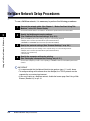
NetWare Network Setup Procedures
To use a NetWare network, it is necessary to perform the following procedures.
1
Connect the network cable. (See Chapter 1, “Before You Start Using This
Machine,” in the PCL Printer Guide.)
Connect the network cables in accordance to the directions specified in the PCL Printer Guide.
3
Using a NetWare Network (Windows)
2
Specify the NetWare print service settings.
(See “NetWare Print Service Settings,” on p. 3-3.)
Specify the NetWare print service settings, using one of the following methods:
• NetSpot (Canon software provided with the optional Network Kit III)
• NWADMIN or PCONSOLE (Novell software provided with NetWare)
3
Specify the protocol settings. (See “Protocol Settings,” on p. 3-9.)
Specify the machine’s protocol settings on the computer using one of the following methods:
• NetSpot (Canon software provided with the optional Network Kit III)
• Remote UI (a web browser)
• An FTP client
4
Specify the computer settings for printing.
(See “Setting Up a Computer for Printing,” on p. 3-11.)
Connect each computer you want to use for printing to a NetWare network, and install the printer driver
software.
IMPORTANT
• It is recommended that the Network Administrator perform steps 1, 2, and 3 above.
• To configure settings with software other than NetSpot, the TCP/IP protocol must be
supported by your network environment.
• If you want to print on a NetWare network, disable the banner page. See ‘Using a Web
Browser (Remote UI),’ on p.2-14.
3-2
NetWare Network Setup Procedures
NetWare Print Service Settings
To print using a NetWare network, you need to specify the print service settings,
which includes the print server and queue settings. You can use any of the software
programs listed below to specify the print service settings from your computer.
Specify these settings using the easiest method.
(Canon software provided with the optional Network Kit III)
or PCONSOLE (Novell software provided with NetWare)
• NWADMIN
3
IMPORTANT
• To specify the print service settings from NetSpot or NWADMIN, the computer must have
Novell Client (NetWare Client by Novell) installed.
• The following procedures explain a sample NetWare setup procedure. Depending on
your system environment, the actual setup procedure may be different.
Print Services
Before specifying the print service settings, refer to the information described below
to determine the type of print service you are using.
NOTE
• Usually with NetWare 4.x or later, it is recommended that you use the NDS (Novell
Directory Services) print service. With NetWare 3.x, it is recommended that you use the
Bindery print service. This manual describes procedures for these two print services only.
• With NetWare 5.x, you can use NDPS (Novell Distributed Print Services). If you want to
use NDPS, the gateway should be the Novell printer gateway provided with NetWare.
This manual does not describe NDPS settings. For NDPS settings, see the NetWare
manual.
• NDPS settings are not available for use with NetSpot, use NWADMIN to specify these
settings.
■ NDS (Novell Directory Service) and Bindery Mode
This machine supports both NDS and the Bindery print service.
Determine the appropriate mode according to the network environment you are using. (If
you are using NetWare 3.x, only the Bindery mode is available.)
NetWare Print Service Settings
3-3
Using a NetWare Network (Windows)
• NetSpot
■ Queue Server Mode and Remote Printer Mode
This machine supports both the Queue Server mode and Remote Printer mode.
When the machine is used in the Queue Server mode, all print server functions are
provided by the machine itself; no other print server hardware or software is needed.
However, a separate NetWare user’s operating license is required for each machine. In
the NDS Queue Server mode (NDS PServer), the NDS print server is used for printing. In
the Bindery Queue Server mode (Bindery PServer), the Bindery print server is used for
printing.
When the machine is used in the Remote Printer mode, a NetWare print server is required
to control the printer. The machine prints using the NDS print server in the NDS Remote
Printer mode (NPrinter), and uses the Bindery print server in the Bindery Remote Printer
mode (RPrinter).
Using a NetWare Network (Windows)
3
Specifying Print Service Settings Using NetSpot
You can install NetSpot from the CD-ROM provided with the optional Network Kit III,
and use it to specify the print service and protocol settings on the computer you are
using.
For instructions on how to install NetSpot and how to specify the print service and
protocol settings using NetSpot, see the NetSpot Quick Start Guide.
NOTE
The NetSpot Quick Start Guide is an online manual included on the accompanying
CD-ROM provided with the optional Network Kit III. You can use Adobe Acrobat Reader
to display and printout the guide for your convenience.
Setup Using NetWare Administrator or PCONSOLE
Instead of using NetSpot, you can use NetWare Administrator or PCONSOLE to
specify the NetWare print service settings.
Using NetWare Administrator in the NDS Queue Server Mode or
Remote Printer Mode (NetWare 4.x or Later)
1
2
Log on to NetWare as the Administrator (or equivalent access)
➞ start NetWare Administrator.
Execute Quick Setup.
❑ Select the container for the printer you want to create ➞ on the [Tools] menu,
click [Print Services Quick Setup].
3-4
NetWare Print Service Settings
3
Specify the Print Server name, Printer, and Queue settings.
❑ Enter the print server name in [Print Server name].
To use an existing print server, click the button to the right of [Print Server name] ➞
select the print server from the list box.
❑ Under [Printer], enter the printer’s name in [Name].
❑ From the [Type] window, select the printer’s location.
- If you are using the Queue Server mode, select [Other/Unknown].
❑ Under [Print Queue], enter the queue name in [Name]. In [Volume], enter the
volume in which the queue is placed.
To use an existing print server, click the button to the right of [Volume] ➞ select the print
server from the list box.
❑ Click [Create] ➞ exit NetWare Administrator.
NOTE
• Be sure to remember the name of the print server. You need it to specify the
printer’s protocol settings.
• If you perform the Quick Setup, the machine automatically allocates printer number
zero. If you are using the Queue Server mode, do not change the printer number
from zero.
4
If you are using the Remote Printer mode, start the print
server.
❑ If you are using the NetWare file server as the print server, enter “Load
PSERVER.NLM” in the file server on the console screen ➞ press [ENTER] on
the keyboard.
NOTE
This step is not required, if you are using the Queue Server mode.
NetWare print service settings are complete. Proceed to “Protocol Settings,” on p. 3-9.
NetWare Print Service Settings
3-5
3
Using a NetWare Network (Windows)
- If you are using the Remote Printer mode, select [Parallel] ➞ click
[Communication] to open the [Parallel Communication] dialog box ➞ select
[LPT1] from [Port], and [Manual load] under [Connection type]. Under
[Interrupts], specify the appropriate setting for your system environment ➞
click [OK] to close the [Parallel Communication] window.
Using PCONSOLE in the NDS Queue Server Mode or Remote Printer
(Bindery) Mode (NetWare 3.x)
1
2
Log on to NetWare as the Administrator ➞ start PCONSOLE.
If you have not set up a print server, follow the directions
below.
❑ On the [Available Options] menu, select [Print Server Information] ➞ press
[ENTER] on the keyboard.
❑ Press [INSERT] on the keyboard.
❑ Enter the name of the print server ➞ press [ENTER] on the keyboard.
❑ Press [ESC] on the keyboard to return to the [Available Options] menu.
Using a NetWare Network (Windows)
3
NOTE
• Be sure to remember the name of the print server you are creating. You need it to
specify the printer’s protocol settings.
• To use the machine in the Queue Server mode in a multiple NetWare server
environment, use the same print server name for each NetWare server.
3
Set up a queue ➞ assign the print server to the queue.
❑ On the [Available Options] menu, select [Print Queue Information] ➞ press
[ENTER] on the keyboard.
❑ Press [INSERT] on the keyboard.
❑ Enter the name of the queue ➞ press [ENTER] on the keyboard.
❑ Select the name of the queue from the existing queue list ➞ press [ENTER] on
the keyboard.
❑
❑
❑
❑
3-6
Select [Queue Servers] ➞ press [ENTER] on the keyboard.
Press [INSERT] on the keyboard.
Select the print server you set up in step 2 ➞ press [ENTER] on the keyboard.
Press [ESC] on the keyboard repeatedly until the [Available Options] menu
appears.
NetWare Print Service Settings
4
Assign the printer to the print server.
❑ On the [Available Option] menu, select [Print Server Information] ➞ press
[ENTER] on the keyboard.
❑
❑
❑
❑
Select the print server you set up in step 2 ➞ press [ENTER] on the keyboard.
Select [Print Server Configuration] ➞ press [ENTER] on the keyboard.
Select [Printer Configuration] ➞ press [ENTER] on the keyboard.
From [Configured Printers], select the number of the printer you want to use ➞
press [ENTER] on the keyboard.
❑ To use the Queue Server mode, select printer number [0]. In the Remote
Printer mode, you can select any desired printer number.
3
Specify the printer name, type, and any remaining items.
❑ In [Name], enter the name you want to use for the printer ➞ press [ENTER] on
the keyboard.
❑ If you are using the Queue Server mode, select [Defined elsewhere] from
[Type] window. If you are using the Remote Printer mode ➞ select [Remote
Parallel, LPT 1] from the [Type] window.
❑ Specify the remaining items ➞ press [ESC] on the keyboard.
❑ In the confirmation box that opens, select [Yes] ➞ press [ENTER] on the
keyboard.
❑ Press [ESC] on the keyboard to return to the [Print Server Configuration]
menu.
6
Assign a queue to the printer.
❑ Select [Queues Serviced by Printer] ➞ press [ENTER] on the keyboard.
❑ Select the name of the printer you set up in step 5 ➞ press [ENTER] on the
keyboard.
❑ Press [INSERT] on the keyboard.
❑ Select the queue you set up in step 3 ➞ press [ENTER] on the keyboard.
7
Press [ESC] on the keyboard repeatedly until the [Exit
PCONSOLE] window appears ➞ select [Yes] to quit
[PCONSOLE].
NetWare Print Service Settings
3-7
Using a NetWare Network (Windows)
5
8
If you are using the Remote Printer mode, start the print
server.
❑ If you are using a NetWare file server as the print server, enter “Load
PSERVER.NLM (print server name)” on the file server on the console screen
➞ press [ENTER] on the keyboard.
❑ If you are using a dedicated print server, enter “PSERVER.EXE” ➞ enter the
print server name ➞ press [ENTER] on the keyboard.
NOTE
This step is not required if you are using the Queue Server mode.
3
Using a NetWare Network (Windows)
NetWare print service settings are complete. Proceed to “Protocol Settings,” on p. 3-9.
3-8
NetWare Print Service Settings
Protocol Settings
You can specify the machine’s protocol settings on your computer using software.
The following software programs can be used to specify the network protocol
settings for your machine.
• NetSpot
(Canon software provided with the optional Network Kit III)
UI
• An FTP client
• Remote
IMPORTANT
• Before you enter the IP address of your machine, contact your Network Administrator to
allocate your IP address. Enter the correct IP address to avoid network problems.
• In order to connect to a NetWare network, install the printer driver, or set up the printer’s
location, the machine’s MAC address is necessary. To check the MAC address from the
printer’s operation panel, follow the procedure below to make a test print.
1. Press [PRT.Message] ➞ [Go] on the operation panel to take the printer offline.
2. Press [Menu] until <TEST MENU> appears.
3. Press [Item] until <PRINT EN CONFIG> appears ➞ press [Enter/Cancel].
• Before you perform the following operations in the next section, make sure that the
machine is connected to a power source, and connected to the network.
NOTE
If you change the IP address from the Remote UI, the change will not be reflected on the
display of the machine. You can confirm the change of the IP address by selecting
<VIEW IP ADDRESS> from the NETWORK SETTINGS menu, or by printing the User’s
Data List.
Using NetSpot
Instead of using the operation panel of your machine, you can install NetSpot from
the CD-ROM provided with the optional Network Kit III, and use it to specify the
protocol settings on the computer you are using.
For instructions on how to install NetSpot and how to specify the protocol settings
using NetSpot, see the NetSpot Quick Start Guide.
NOTE
The NetSpot Quick Start Guide is an online manual included on the accompanying
CD-ROM provided with the optional Network Kit III. You can use Adobe Acrobat Reader
to display and printout the guide for your convenience.
Protocol Settings
3-9
Using a NetWare Network (Windows)
3
Using a Web Browser (Remote UI)
Instead of using the NetSpot, you can use a web browser (Remote UI) to specify
the protocol settings. For detailed procedure, see “Using a Web Browser (Remote
UI),” on p. 2-14.
NOTE
To specify the protocol settings using Remote UI from NetWare computers, you can
select Frame type. There are four frame types: Ethernet 802.2, Ethernet 802.3, Ethernet
II, and Ethernet SNAP.
Using a NetWare Network (Windows)
3
1
Start the web browser ➞ enter the URL below in [Location] or
[Address] ➞ press [ENTER] on the keyboard.
2
Select [Administrator Mode] ➞ click [OK].
❑ Under [Device Manager] in the left column of the screen, click [Network].
❑ Under the Protocols heading, click [Edit] at the right of the TCP/IP protocol box.
❑ Specify the setting method for allocating the IP address of your machine.
3
Click [OK].
Using an FTP Client
You can use an FTP Client to specify the protocol settings. For detailed procedure,
see “Using an FTP Client,” on p. 2-20.
1
2
Start up the MS-DOS prompt or the Command prompt.
Execute the following command.
ftp <machine’s IP address>
❑ Enter “root” as the user name.
❑ Execute the following command to download the config (configuration) file.
get config
❑ Edit the downloaded config file using Notepad (or similar program).
❑ Execute the following command to upload the config file.
put config CONFIG
❑ To confirm the settings, execute the following command to reset the print
server.
get reset
3-10
Protocol Settings
Setting Up a Computer for Printing
After you have completed setting the NetWare print service settings and printer
protocol settings of the machine, you are ready to set up each computer on the
network for printing.
Connecting to a NetWare Network
Using a NetWare Network (Windows)
3
All computers that use the printer must have NetWare client software installed, and
must be enabled for NetWare Network use. For details, see the manuals provided
with the operating system.
Installing the Printer Driver
NetSpot is software for specifying printer and network settings. To print from a
computer you must install a printer driver. (See Chapter 1, “Before You Start Using
This Machine,” in the PCL Driver Guide.) During the installation procedure, select
[Network printer] as the printer’s location, and select the print queue that you
created in “NetWare Print Service Settings,” on p. 3-3.
Printer’s Location Setting
To set the printer’s location, follow the procedure below.
NOTE
If you set up the printer’s location when you installed the printer driver, this step is not
necessary.
1
Open the printer’s Properties dialog box.
❑ On the taskbar, click [Start] ➞ point to [Settings] ➞ click [Printers].
❑ Right click the printer icon you want to use for printing.
❑ On the pop-up menu, click [Properties].
2
Specify the printer’s location.
❑ Click the [Details] tab or the [Port] tab to display the [Details] sheet or the [Port]
sheet.
NOTE
The [Port] appears on Windows 2000/XP, and the [Details] appears on Windows
95/98/Me.
3-11
Setting Up a Computer for Printing
❑ Set the printer port to the print queue you created in “NetWare Print Service
Settings,” on p. 3-3.
❑ Click [OK].
Using a NetWare Network (Windows)
3
3-12
Setting Up a Computer for Printing
Using a NetBIOS Network
(Windows 95/98/Me)
4
CHAPTER
This chapter describes the settings and procedures necessary to connect and use the
machine with a NetBIOS network.
NetBIOS Network Setup Procedures. . . . . . . . . . . . . . . . . . . . . . . . . . . . . . . . . . . . . . . . 4-2
Setting Up a Computer for Printing . . . . . . . . . . . . . . . . . . . . . . . . . . . . . . . . . . . . . . . . . 4-3
Connecting to a NetBIOS Network . . . . . . . . . . . . . . . . . . . . . . . . . . . . . . . . . . . . . . . . . . . . . . . 4-3
Installing the Printer Driver . . . . . . . . . . . . . . . . . . . . . . . . . . . . . . . . . . . . . . . . . . . . . . . . . . . . . 4-4
Printer’s Location Setting . . . . . . . . . . . . . . . . . . . . . . . . . . . . . . . . . . . . . . . . . . . . . . . . . . . . . . . 4-4
4-1
NetBIOS Network Setup Procedures
To use a NetBIOS network, it is necessary to perform the following procedures.
1
Connect the network cable. (See Chapter 1, “Before You Start Using This
Machine,” in the PCL Printer Guide.)
Connect the network cables in accordance to the directions specified in the PCL Printer Guide.
2
Specify the computer settings for printing.
(See “Setting Up a Computer for Printing,” on p. 4-3.)
Connect each computer you want to use for printing to a NetBIOS network, and install the printer driver
software.
Using a NetBIOS Network (Windows 95/98/Me)
4
IMPORTANT
• It is recommended that the Network Administrator perform step 1 above.
• The machine does not support NetBIOS over TCP/IP (NetBT). If you are using a TCP/IP
network, use the TCP/IP protocol for printing. (See Chapter 2, “Using a TCP/IP Network
(Windows/UNIX).”)
4-2
NetBIOS Network Setup Procedures
Setting Up a Computer for Printing
After you have connected the network cable, you are ready to set up each
computer on your network for printing.
Connecting to a NetBIOS Network
All computers that use the printer must have NetBEUI Client software installed, and
must be enabled for use on a NetBIOS network. To check whether NetBEUI Client
software is installed, follow the procedure below.
1
2
Right click the [Network Neighborhood] icon on the computer
screen ➞ click [Properties].
Check that [NetBEUI] is in [The following network
components are installed].
If NetBEUI is not installed, click [Add] to install NetBEUI Client software.
Setting Up a Computer for Printing
4-3
Using a NetBIOS Network (Windows 95/98/Me)
4
Installing the Printer Driver
To print from a computer, you must install a printer driver. (See Chapter 1, “Before
You Start Using This Machine,” in the PCL Driver Guide.) During the installation
procedure, select [Local printer]. Do not select [Network printer].
The port selection can be changed after installation. You can select any port, such
as [LPT1].
Printer’s Location Setting
To set up the printer’s location, follow the procedure below.
4
Using a NetBIOS Network (Windows 95/98/Me)
1
Install the NetBIOS/NetBEUI Port Monitor Utility on the
CD-ROM provided with the optional Network Kit III.
❑ Insert the CD-ROM supplied with the optional Network Kit III into the CD-ROM
drive.
❑
❑
❑
❑
Double-click the [My Computer] icon.
Right click the CD-ROM drive icon ➞ click [Open] on the pop-up menu.
Double-click the [Portmon] folder.
Double-click the [Setup.exe] icon.
The install program starts.
❑ Follow the on screen instructions to complete the installation of the
NetBIOS/NetBEUI Port Monitor Utility software.
NOTE
Depending on your system environment, the CD-ROM menu may be automatically
displayed after you insert the CD-ROM into the CD-ROM drive. In this case, click
[End] ➞ proceed to step 2.
2
Open the printer’s properties dialog box.
❑ On the taskbar, click [Start] ➞ point to [Settings] ➞ click [Printers].
❑ Right click the printer icon you want to use for printing.
4-4
Setting Up a Computer for Printing
❑ On the pop-up menu, click [Properties].
3
Using a NetBIOS Network (Windows 95/98/Me)
4
Specify the Spool settings.
❑ Click the [Details] tab to display the [Details] sheet.
❑ Click [Spool Settings] to open the [Spool Settings] dialog box.
❑ Select [Spool print jobs so the program finishes printing faster].
Setting Up a Computer for Printing
4-5
❑ Click [OK].
4
Select [CANONxxxxxx (CANON Port)] from the Print to the
following port drop-down list.
Using a NetBIOS Network (Windows 95/98/Me)
4
NOTE
• “xxxxxx” is the last six digits of the MAC address of the machine. To check the
MAC address from the printer’s operation panel, follow the procedure below to
make a test print.
1. Press [PRT.Message] ➞ [Go] on the operation panel to take the printer offline.
2. Press [Menu] until <TEST MENU> appears.
3. Press [Item] until <PRINT EN CONFIG> appears ➞ press [Enter/Cancel].
• If [CANONxxxxxx (CANON Port)] is not displayed in the Print to the following port
drop-down list, see “Troubleshooting,” on p. 5-2.
4-6
Setting Up a Computer for Printing
5
Click [OK] to enable the settings.
The printer driver and location settings are complete.
Using a NetBIOS Network (Windows 95/98/Me)
4
Setting Up a Computer for Printing
4-7
Using a NetBIOS Network (Windows 95/98/Me)
4
4-8
Setting Up a Computer for Printing
Appendix
5
CHAPTER
This chapter describes how to resolve printing problems, how to uninstall software, an
overview of network setting items, the glossary, and index.
Troubleshooting. . . . . . . . . . . . . . . . . . . . . . . . . . . . . . . . . . . . . . . . . . . . . . . . . . . . . . . . .5-2
How to Uninstall Software . . . . . . . . . . . . . . . . . . . . . . . . . . . . . . . . . . . . . . . . . . . . . . . . .5-5
LPR Port Utility Deletion . . . . . . . . . . . . . . . . . . . . . . . . . . . . . . . . . . . . . . . . . . . . . . . . . . . . . . . 5-5
NetBIOS/NetBEUI Port Monitor Utility Deletion. . . . . . . . . . . . . . . . . . . . . . . . . . . . . . . . . . . . . . 5-6
Overview of Network Setting Items . . . . . . . . . . . . . . . . . . . . . . . . . . . . . . . . . . . . . . . . . .5-7
Using the Operation Panel . . . . . . . . . . . . . . . . . . . . . . . . . . . . . . . . . . . . . . . . . . . . . . . . . . . . . 5-7
Using NetSpot, Remote UI, or FTP Client . . . . . . . . . . . . . . . . . . . . . . . . . . . . . . . . . . . . . . . . . . 5-7
Available Software for Network Settings . . . . . . . . . . . . . . . . . . . . . . . . . . . . . . . . . . . . .5-13
Glossary . . . . . . . . . . . . . . . . . . . . . . . . . . . . . . . . . . . . . . . . . . . . . . . . . . . . . . . . . . . . .5-14
Index . . . . . . . . . . . . . . . . . . . . . . . . . . . . . . . . . . . . . . . . . . . . . . . . . . . . . . . . . . . . . . . .5-21
5-1
Troubleshooting
This section describes how to resolve basic printing problems.
Unable to Print from a TCP/IP Network
Appendix
5
Cause 1
The machine and network cable are not properly connected.
Remedy
Check all connections, then restart the machine.
Check that the machine is connected to the network using the proper cable.
(See Chapter 1, “Before You Start Using This Machine,” in the PCL Printer
Guide.)
Cause 2
The TCP/IP network is not set up properly.
Remedy
Confirm that the IP addresses are set up properly. Check if the IP addresses
are using DHCP, BOOTP, or RARP, and confirm that these protocols are
operating.
Cause 3
The computer that is printing is not set up properly.
Remedy
Check the following:
• Confirm that the proper printer driver has been installed. If you are printing
from Windows 95/98/Me, each computer must have a printer driver installed.
For instructions on installing printer drivers, see Chapter 1, “Before You Start
Using This Machine,” in the PCL Driver Guide.
• Confirm that the correct printer is set as the output destination for the
computer that is printing. In Windows 95/98/Me, confirm the output destination
for the printer from the Control Panel or Print Manager.
• If you are using LPD with Windows 95/98/Me, confirm that the spooling
settings have been made correctly. (See steps 3 to 5 in “Windows 95/98/Me,”
on p. 2-23.)
5-2
Cause 4
The name of the file being printed is too long.
Remedy
Usually LPR (or the Microsoft TCP/IP Printer, if you are using Windows
NT/2000/XP), sends jobs either under the name of the application software
used for printing, or the specified file name. However, a job name that is longer
than 255 characters, cannot be sent to the printer. To correct this, rename the
file with a shorter name.
Troubleshooting
Unable to Print from a NetWare Network
Cause 1
The machine and network cable are not connected properly.
Remedy
Check all connections, then restart the machine.
Check that the machine is connected to the network using the proper cable.
(See Chapter 1, “Before You Start Using This Machine,” in the PCL Printer
Guide.)
Cause 2
The NetWare network is not set up properly.
Remedy
Check the following:
• Confirm that the NetWare file server is running.
• Confirm that there is sufficient disk space on the NetWare file server. Large
files cannot be printed if there is insufficient disk space.
• Start NetSpot, NWADMIN, or PCONSOLE, and confirm that the print queue is
set up properly and is active.
• Confirm that the network settings of the machine are set correctly. (See
Cause 3
Remedy
The computer that is printing is not set up properly.
Check the following:
• Confirm that the proper printer driver has been installed. If you are printing
from Windows 95/98/Me, each computer must have a printer driver installed.
For instructions on installing printer drivers, see Chapter 1, “Before You Start
Using This Machine,” in the PCL Driver Guide.
• Confirm that the correct printer is set as the output destination for the
computer that is printing. In Windows 95/98/Me, confirm the output destination
for the printer from the Control Panel or Print Manager.
Cause 4
Data transmission is not possible from the NetWare server to the machine on
another subnet.
Remedy
When the NetWare server transmits data to the machine, the NCP (Network
Control Protocol) Burst Mode is used. But depending on the network
environment, the NetWare server may fail to transmit data to a printer on
another subnet. In this case, set the NCP Burst Mode of the printer protocol to
‘Off’. The NCP Burst Mode cannot be set using NetSpot; use a web browser or
an FTP client to set it. (See “Protocol Settings,” on p. 3-9.)
Troubleshooting
5-3
5
Appendix
"Protocol Settings," on p. 3-9).
Check the following network settings in particular:
- A valid frame type is selected from the Frame Type drop-down list. (See
“Using a Web Browser (Remote UI),” on p. 2-14.)
- Print Server Name and Printer Number are correctly specified. (See “Setup
Using NetWare Administrator or PCONSOLE,” on p. 3-4.)
Unable to Print from a NetBIOS Network or the Printer Port Name is not displayed in the
Print to the following port drop-down list.
5
Cause 1
The machine and network cable are not connected properly.
Remedy
Check all connections, then restart the machine.
Check that the machine is connected to the network using the proper cable.
(See Chapter 1, “Before You Start Using This Machine,” in the PCL Printer
Guide.)
Cause 2
The computer that is printing is on a different subnet to the machine.
Remedy
The machine uses the NetBEUI protocol for printing, so printing cannot be
performed in a network environment with a router between the computer that is
printing and the machine. Use a different protocol for printing, or print from the
machine without going through the router.
Cause 3
The computer that is printing is not set up properly.
Remedy
Check the following:
Appendix
• Confirm that the proper printer driver is installed in each computer. For
instructions on installing printer drivers, see Chapter 1, “Before You Start Using
This Machine,” in the PCL Driver Guide.
• Confirm that the correct printer is set as the output destination for the
computer that is printing, and that the spool settings have been set properly.
(See "Printer’s Location Setting," on p. 3-11).
•In Windows 95/98/Me, confirm the output destination for the printer from the
Control Panel or Print Manager.
5-4
Troubleshooting
How to Uninstall Software
To uninstall the LPR Port Utility or NetBIOS/NetBEUI Port Monitor Utility from
Windows 95/98/Me, follow the procedures described below.
NOTE
To uninstall NetSpot, see the NetSpot readme. txt file for details.
LPR Port Utility Deletion
Set Print Destination Port of the printer driver to a port other
than the Canon LPR Port.
❑
❑
❑
❑
❑
2
On the taskbar, click [Start] ➞ point to [Settings] ➞ click [Printers].
Right click the printer icon of the printer you installed in step 1.
On the pop-up menu, click [Properties].
Click the [Details] tab to display the [Details] sheet.
Select Canon LPR Port from [Print to the following port], such as
<172.20.88.125@LP (Canon LPR Port)>.
Insert the CD-ROM supplied with the optional Network Kit III
into the CD-ROM drive.
IMPORTANT
Depending on your system environment, the CD-ROM menu may automatically be
displayed after you insert the CD-ROM into the CD-ROM drive. In this case, click
[Finish] ➞ proceed to step 4.
How to Uninstall Software
5
Appendix
1
5-5
3
Double-click the [My Computer] icon ➞ right click the
CD-ROM drive icon ➞ click [Open] on the pop-up menu.
4
Double-click the [Lprport] folder ➞ double-click the
[UnInstLP.exe] icon ➞ select [Uninstall].
5
Follow the instructions on the screen to uninstall the LPR Port
Utility.
The software is uninstalled (deleted).
NetBIOS/NetBEUI Port Monitor Utility Deletion
1
Appendix
5
2
3
On the taskbar, click [Start] ➞ point to [Settings] ➞ click
[Control Panel].
Double-click the [Add/Remove Programs] icon.
Select the software you want to delete from the software list ➞
click [Add/Remove].
A confirmation message is displayed.
4
Click [Yes].
The software is uninstalled (deleted).
5-6
How to Uninstall Software
Overview of Network Setting Items
This section provides an overview of the various network setting items if you use
the operation panel, NetSpot, Remote UI, and FTP Client.
Using the Operation Panel
You can change the settings of the machine from the operation panel. Below is a
brief overview of the network settings.
■ System Settings
Item
Setting Description
DefaultSetting
5
IP Address Auto
FIXED, AUTO (DHCP,
BOOTP, RARP: On, Off)
IP Address
IP address
192.168.0.215
Subnet Mask
IP address
0.0.0.0
Default Gateway
IP address
0.0.0.0
DNS Server Add.
IP address
0.0.0.0
DNS Dynamic Set
On, Off
OFF
Host Name
Enter the host name of the
machine
(null)
Domain Name
Enter the domain name of
your network
(null)
Appendix
Network Settings
FIXED
Using NetSpot, Remote UI, or FTP Client
You can change the settings of the machine using NetSpot, the Remote UI, or an
FTP Client. The setting items you can change are shown below.
NOTE
• The information in parenthesis in the table below is specific to the FTP client. (Example:
“Device Name (DEVICE_NAME)” is displayed as the Device Name for NetSpot and
Remote UI programs. “DEVICE_NAME” is displayed for the config file of the FTP client.)
• Items with an asterisk cannot be set using NetSpot. Set them using the operation panel
on the machine or the Remote UI.
Overview of Network Setting Items
5-7
■ Common Settings
Item
Appendix
5
Setting Description
Device Name
(DEVICE_NAME)
Device name (0 to 32 characters)
(null)
Location (SYS_LOC)
Device installation location (0 to 32
characters)
(null)
Administrator
(SYS_CONTACT)
Device administrator name (0 to 32
characters)
(null)
Serviceman
Serviceman’s name (0 to 64 characters)
(SERVICE_MAN_NAME)
(null)
Telephone Number Of
Service Center
(SERVICE_TEL)
Telephone number of your local authorized
Canon dealer (0 to 64 characters)
(null)
Service Comments
(SERVICE_COMMENT)
Comments by service personnel (0 to 64
characters)
(null)
Password (ROOT_PWD)
Device password (0 to 15 characters)
(null)
Permit End User’s Job
Operation
(USER_JOB_CONT)*
Decide whether to permit operating print
jobs in the general User mode
Off
Display Language
(DISP_LANG)
Default language configuration for web
browsing
Link (LINK_NAME)*
Link name displayed on support link page of
the Remote UI
(null)
URL (LINK_URL)*
URL displayed on support link page of the
Remote UI
(null)
Comments
(LINK_COMMENT)*
Comments displayed on support link page of
the Remote UI
(null)
Download Site Link
(DOWNLOAD_SITE_
NAME)
The Link name that is displayed on the
download site page of the Remote UI
Download Site URL
(DOWNLOAD_SITE_
URL)
The URL displayed on the download site
page of the Remote UI
Download Site Comments
Comments displayed on the download site
(DOWNLOAD_SITE_
page of the Remote UI
COMMENT)
5-8
Default
Setting
Overview of Network Setting Items
English
“Download
Service”
http://
www.canon.com
/download/
“Update
network
firmware”
■ TCP/IP Settings
Setting Description
Default
Setting
Frame Type
(TCP_FRAME_TYPE)
Frame type used with TCP/IP
Use DHCP (DHCP_ENB)
Decide whether DHCP is used in setting the
IP address
Off
Use BOOTP
(BOOTP_ENB)
Decide whether BOOTP is used in setting
the IP address
Off
Use RARP (RARP_ENB)
Decide whether RARP is used in setting the
IP address
Off
IP address (INT_ADDR)
IP address of the machine
0.0.0.0
Subnet Mask
(NET_MASK)
Enter the Subnet Mask
0.0.0.0
Gateway Address
(DEF_ROUT)
Enter the Gateway Address
0.0.0.0
LPD Banner (LPD_BANN)
Banner page output method when printing
using LPD
IPP URL (IPP_PRT_URI)
URL (1 to 255 characters) when printing
using IPP
Raw Mode Bi-directional
(RAW_BIDIR_ENB)
Decide whether bidirectional transmission is
supported when printing using Raw
DNS Server Address
(DNS_ADDR)
IP address of the DNS server
DNS Dynamic Update
(DDNS_ENB)
Whether the machine is dynamically
updated to DNS
Off
DNS Host Name
(HOST_NAME)
The host name of the machine
(null)
DNS Domain Name
(DOMAIN_NAME)
The domain name for the machine
(null)
Ethernet II
5
Appendix
Item
Off
Printer
On
0.0.0.0
TCP Printing Status
Enables or Disables TCP printing control
(TCP_PRT_CONT_ENB)
Disable
TCP Printing Control
Mode (TCP_PRT_CONT_ Specify the TCP printing control mode
MODE)
Permit
Overview of Network Setting Items
5-9
■ TCP/IP Settings Continued
Item
Setting Description
Address List for TCP
Specify the address list for the TCP printing
Printing Control
control
(TCP_PRT_CONT_LIST)
5-10
(null)
LPD Printing Status
(LPD_PRT_ENB)
Enables or Disables LPD printing
Enable
IPP Printing Status
(IPP_PRT_ENB)
Enables or Disables IPP printing
Enable
Raw Mode Printing Status
Enables or Disables Raw mode printing
(RAW_PRT_ENB)
Enable
SNMP Agent Status
(SNMP_ENB)
Specify the SNMP access condition
Enable
Public Community String
(SNMP_COM_STR)
Specify the SNMP community string
public
Appendix
5
Default
Setting
Overview of Network Setting Items
■ NetWare Settings
Item
Setting Description
Default
Setting
Frame Type
(NW_FRAME_TYPE)
Frame type used for NetWare
NCP Burst Mode
(NCP_BURST_MODE)
Decide whether the NCP burst mode is
used (Leave it on normally)
On
Print Server Name
(PSERVER_BINDERY_
NAME)
The name of the NetWare print server
being used
(null)
NetWare Server Name
(PSERVER_BINDERY)
The name of the NetWare file server of the
NetWare print server
(null)
Polling Interval
(BINDERY_JOB_
CHECK_DELAY)
Interval for checking a job sent to the
printer in the Bindery mode (1 to 15
seconds)
802.2
Bindery PServer
5 seconds
5
NDS PServer
The name of the NetWare print server
being used
(null)
NDS Tree
(PSERVER_NDS_
TREE)
The name of the NDS tree for the NetWare
print server
(null)
Context Name
(PSERVER_NDS_
CONTEXT)
The context Name (1 to 255 characters) of
the NetWare print server
(null)
Polling Interval
(NDS_JOB_CHECK_
DELAY)
Interval for checking a job sent to the
printer in the NDS Queue Printer mode
(1 to 255 seconds)
5 seconds
Print Server Name
(RPRINTER_PS_
NAME)
The name of the NetWare print server
being used
(null)
Printer Number
(RPRINTER_NO)
The number of printers (0 to 15) that are
connected to the NetWare print server
Appendix
Print Server Name
(PSERVER_NDS_
NAME)
RPrinter
0
NPrinter
Print Server Name
(NPRINTER_PS_
NAME)
The name of the NetWare print server
being used
Printer Number
(NPRINTER_NO)
The number of printers (0 to 254) that are
connected to the NetWare print server
(null)
Overview of Network Setting Items
0
5-11
■ NetBIOS Settings
Item
Base Protocol
(LSLM_ENB)
Appendix
5
5-12
Overview of Network Setting Items
Setting Description
Protocol used for communication (if
NetBIOS is used)
Default
Setting
NetBEUI
On
Available Software for Network Settings
You can specify the network settings of the machine using the following software:
Item
NetSpot
Web
Browser
(Remote UI)
FTP
Client
ARP/PING
Commands
The
Machine’s
Operation
Panel
NetWare
Protocol Settings
(See p. 3-9.)
TCP/IP
Preparation for
Protocol Settings
(See p. 2-3.)
Appendix
5
TCP/IP
Protocol Settings
(See p. 2-3.)
NetBIOS
Protocol Settings
(See p. 4-3.)
✔: Available
X: Not Available
Available Software for Network Settings
5-13
Glossary
ARP
The ARP command is used to display or modify the contents of the ARP table. The
table is built by the Address Resolution Protocol (ARP), and is used to map IP
addresses to Ethernet addresses. To view the contents of the ARP table use the -a
command option. Store new entries in the table with the -s option, and delete
unwanted entries with -d.
Banding
Specifies the method for the Banding operation performed in the printer driver. As
Banding defines the output image data of a page by processing it in rectangular
bitmap sections called Bands, you can print a document faster. If [On] is selected,
Banding is constantly performed; but if [Auto] is selected, Banding is performed only
when necessary.
Appendix
5
BOOTP
BOOTstrap Protocol. A protocol that enables a client machine to automatically obtain
network setup information from a server over a TCP/IP network. BOOTP enables a
client to automatically allocate such information as the host name, domain name, and
IP address, so that it is not necessary to enter these items manually.
Buffer size
The size of a data area, or buffer, shared by devices or programs working at different
speeds or with different priorities. The buffer is designed to prevent one device or
process from being held up by another. For this to be possible, the buffer must be set
up correctly.
Container object
An object in the directory tree of a NetWare network which can hold other objects. An
organizational unit such as a company department is a container object. This
organizational unit can contain objects representing network resources, such as
workstations, servers, and printers.
Context
In NetWare, this indicates the location of an object existing in the directory tree.
5-14
Glossary
Cookie
A file left on a user’s computer when the user visits a web site. A cookie allows the
web site to recognize the user on subsequent visits. Cookies are generally used to
enable a user to automatically sign on to certain web sites and to customize the
features offered by such sites.
Daemon
A process that runs in the background and performs a specified operation, at
predetermined times or in response to certain events. Typical daemons include print
spoolers and automated network information system protocols.
DHCP
Dynamic Host Configuration Protocol. A protocol that automatically specifies the
network settings of a client on a TCP/IP network. Many of these network settings
required to set up TCP/IP, which is the standard protocol of the Internet, can be made
automatically.
DNS
DNS server
Domain Name System server. The system that maintains a database that translates
the domain names of Internet servers, such as “www.w3.org,” into Internet Protocol
(IP) addresses, such as “18.176.0.26.”
Domain
Management concept that divides large scale networks into groups for identifying
individual computers and users. The Internet is managed by classifying domains
according to country, type (business, organization, education, etc.), or company.
Ethernet
An industry-standard local area network (LAN) system for connecting together
multiple computers. Data is sent from one computer to another by breaking it into
packets, and a packet reaches its destination smoothly without any collision with
other packets.
File server
A personal computer or workstation to which two or more users on client personal
computers can gain access via a local area network (LAN) in order to share and use
its hard disk drive.
Frame type
The packet format that the network adapter of a computer uses to communicate over
a network. On an Ethernet network, there are four frame types: Ethernet 802.2,
Ethernet 802.3, Ethernet ll, and Ethernet SNAP.
Glossary
5-15
Appendix
5
Domain Name System. The system that associates the IP address assigned to a
computer with the domain name.
FTP
File Transfer Protocol. A client-server protocol enabling a user to transfer files on one
computer to and from another computer over a TCP/IP network. The File Transfer
Protocol also governs the client program with which the user transfers files.
Gateway Address
The default address of a network or Web site. It provides a single domain name and
point of entry to the site.
HP-GL/2
A graphics language that allows computer applications to draw graphic images using
printers. Images in HP-GL/2 are represented as vector graphics. Vector objects
describe an image in terms of geometric shapes, such as lines and polygons, and
fills. HP-GL/2 is supported by your Canon machine.
HTTP
Hypertext Transfer Protocol. The client-server TCP/IP protocol used on the World
Wide Web for the transfer of HTML (Hypertext Markup Language) documents across
the Internet.
Appendix
5
Internet Protocol (IP)
The underlying set of networking rules that describes how data is transmitted across
the Internet. Internet Protocol allows data from one computer to be split into packets,
and sent to another computer with a specific IP address.
IP address
Internet Protocol address. A 32-bit numeric address used by IP (internet protocol) to
specify a computer on the Internet. The IP address is usually written as four numbers
delimited by periods. An example is 128.121.4.5.
IPP
Internet Printing Protocol. A protocol used between a client and a print server for
carrying out remote printing over the Internet.
LAA
Locally Administered Address. When a device is powered ON, its network address is
presented to the network. The default network address assigned by the manufacturer
at the time of production is known as the Universally Administered Address (UAA),
while an address specified by the network administrator to override the UAA is the
Locally Administered Address (LAA). Each LAA must be unique on a Local Area
Network.
LAN
Local Area Network. It is a network system formed by linking a server, workstations,
and computers, which are all located in the same building or some other relatively
limited area.
5-16
Glossary
Log on
Entering a user name and password as a means of user authentication to start a
computer session or access to a service.
LPD
Line Printer Daemon. A daemon is a program that runs, without human intervention,
to accomplish a given task. The Line Printer Daemon controls the flow of print jobs to
a printer.
MAC address
Media Access Control address. The hardware address of the network adapter of a
computer connected to a local area network.
NCP Burst Mode
Aids in the transmitting of TCP/IP packets between a personal computer and the
Internet in a Point-to-Point Protocol. Its main function is to negotiate the network-layer
details related to the transmission.
A feature introduced in Novell NetWare 4.0 that provides access to directories that
may be located on one or more servers.
NetBEUI
NetBIOS Enhanced User Interface. NetBEUI is a network protocol originally designed
by IBM and later extended by Microsoft and Novell. In a small network, NetBEUI is
more efficient than other protocols, such as TCP/IP. It is supported by IBM operating
systems and Microsoft Windows to provide services such as file sharing and printing.
NetBIOS
Network Basic Input Output System. A program that allows applications on different
computers to communicate within a local area network (LAN). NetBIOS is used in
Ethernet, Token Ring, and Windows NT networks.
NetWare
Novell NetWare. Novell Inc.’s client-server network operating system for the IBM PC.
NetWare uses the IPX/SPX, NetBEUI, or TCP/IP network protocols. NetWare
supports MS-DOS, Microsoft Windows, OS/2, and Macintosh clients. NetWare for
Unix gives users access to Unix hosts.
OS/2
A family of multitasking operating systems developed by IBM for Intel x86-based
computers. OS/2 provides both a graphic user interface similar to Windows as well as
a command line interface similar to DOS. Add-ons to OS/2 allow it to run DOS and
Windows applications.
Glossary
5-17
Appendix
5
NDS (Novell Directory Services)
Packet Signature
Encrypted signatures used when exchanging data packets to guarantee that a packet
really came from the computer that it claims to have come from. Packet Signature is
designed to prevent packet forgery and unauthorized Supervisor access to a
NetWare server.
PING
The PING command is used to test basic connectivity. By default, the Windows 95
version of PING sends four packets that are each 32 bytes long. Four packets are
enough to prove connectivity. To send a different number of packets, specify the
number with the -n command line argument. Send packets of a different length with
the -l argument. For example, the command ping -n 10 -l 1002 peanut.nuts.com
sends ten packets that are each 1002 bytes long.
Protocol
A set of rules that govern the transmission of data across a network. Examples of
protocols are FTP, DHCP, BOOTP, RARP, IPP, and TCP/IP.
5
Proxy server
Appendix
A server that provides a cache of files available on remote servers that are slow or
expensive to access. The term “proxy server” normally refers to a World Wide Web
server that, on receiving a URL, tries to supply the requested file from its cache. If it
cannot locate the file there, the proxy server would bring it from the remote server and
also save a copy in its cache so that the next request can be obtained locally.
Queue Server mode
When the printer is used in NetWare’s queue server mode, all print server functions
are provided by the printer itself, and no other print server hardware or software is
required.
RARP
Reverse Address Resolution Protocol. A protocol that associates a network adapter
address (MAC address) with an Internet Protocol (IP) address.
Raster
Raster graphics describes an image as a pattern of dots, compared to vector
graphics which represents an image as a geometrical formula. Each row of color dots
in the mosaic of color dots constitutes one raster graphic. In a printer, a raster graphic
is used as the master image from which a page is printed, because the image can be
transferred to paper by printing one raster at a time.
Raw
This is a print application used with Windows 2000/XP. It can print at higher speeds
than LPD.
5-18
Glossary
RIP (Raster Image Processor)
The hardware and/or software functions of a printer that convert vector graphic
descriptions from a computer into raster graphic images that can be printed.
Scope ID
The Scope ID is a character string value that is appended to the NetBIOS name, and
is used for all NetBIOS over TCP/IP communications. It provides a way for a computer
to communicate only with others sharing the same Scope ID.
SMB
Server Message Block. A protocol that provides file and printer sharing over a
network for Windows computers.
SNMP (Simple Network Management Protocol)
The network management protocol of TCP/IP. Agents, which can be hardware or
software, monitor the activity of various devices on the network and report to the
network console workstation. The information received about each device is
maintained in a structure known as a management information block.
Normally, a host has no control over the route taken by a packet it sends. Source
routing is a technique whereby the sender of a packet can specify the route that a
packet should take through the network to its destination.
Spooling
Simultaneous Peripheral Operations On-Line. Spooling means putting jobs in a
buffer, which is a special area in memory or on a disk. Because devices access data
at different rates, the buffer provides a waiting station where the data can wait until
the device for which it is meant is ready to access it.
Subnet Mask
SUBNETwork mask. The method used to determine which subgroup, or subnet, an IP
address belongs to on TCP/IP networks, all devices whose IP addresses have the
same prefix would belong to the same subnet. Dividing a network into subnets is
useful for both security and performance reasons.
Switching hub
A network connection box to which a number of computers can be connected. The
switching hub forwards a data packet from the network to the appropriate computer
according to the packet’s address. Conventional hubs simply send every packet to
every connected computer. Since a switching hub forwards packets only to their
intended recipients, it provides greater efficiency.
TCP/IP
Acronym for Transmission Control Protocol/Internet Protocol. The protocol used to
connect to the Internet and to wide area networks.
Glossary
5-19
Appendix
5
Source Routing
UAA
Universally Administered Address. (See definition for LAA).
URL
Uniform Resource Locator. A standard way of specifying the location of an object,
usually a web page, on the Internet. The URL for a web page would look something
like this: “http://www.w3.org/default.html”. Here, “http:” indicates that a web page is
being accessed, “http://www.w3.org” is the address of the server containing the web
page, and “default.html” is the file name under which the web page is stored on the
server.
Vector Graphics
(See definition for Raster.)
WAN
Wide Area Network. A geographically widespread network that relies on
communications capabilities to link the various network segments.
5
WINS
Appendix
Windows Internet Name Service. A service for associating a NetBIOS name, which is
a computer name or printer name on a NetBIOS network, with an IP address. To use
WINS, a WINS server is required.
5-20
Glossary
Index
Add Printer Wizard, 2-38
Administrator Mode, 2-15, 3-10
ARP, 2-19, 5-14
ARP/PING Commands, 2-3, 2-19, 5-13
Available Software Network Settings, 5-13
Settings, 2-18
DNS server, 5-15
Address, 2-18, 5-7
Domain, 5-15
Domain Name, 5-7
Setting of, 2-10
Dynamic registration, 2-18
B
E
Banding, 5-14
Banner page, 2-17, 3-2
Bindery Mode, 2-43, 3-3, 3-6
Bindery PServer, 3-4, 5-11
BOOTP, 2-3, 2-16, 5-2, 5-14
Buffer size, 5-14
Ethernet, 5-15
Exception, 2-14
C
CANON LPR Port, 2-26
CANON Port, 4-6
Checking Network Environment, 1-4
Command prompt, 2-19, 2-20, 2-43, 3-10
Common Settings, 5-8
Config File, 2-21, 3-10
Container object, 5-14
Context, 5-14
Cookies, 2-14, 5-15
D
Daemon, 2-17, 5-15
Default Gateway, 5-7
DHCP, 2-3, 2-16, 5-2, 5-15
DNS, 5-15
Dynamic Set, 5-7
5
Appendix
A
F
File server, 5-15
Frame Type, 5-3, 5-15
FTP, 2-2, 2-22, 5-16
FTP Client, 2-20, 2-42, 3-10, 5-7, 5-13
G
Gateway Address, 2-17, 5-16
H
Host Name, 5-7
Setting of, 2-9
HP-GL/2, 5-16
HP-UX, 2-20, 2-36
HTTP, 5-16
Index
5-21
I
Microsoft Windows TCP/IP Printing, 2-32
MS-DOS prompt, 2-19, 2-20, 2-43, 3-10
IBM-AIX, 2-20, 2-37
Installing the Printer Driver, 4-4
Internet Protocol (IP), 5-16
IP Address, 2-19, 5-16
Auto Setting, 5-7
Setting, 2-3, 5-7
Troubleshooting, 5-2
IPP, 5-16
Setting, 2-2, 2-22
IPP Client software, 2-37
IPP Print, 2-18
IPP URL, 2-18
L
Appendix
5
LAA, 5-16
LAN, 5-16
Log on, 5-17
LPD, 2-2, 2-22, 2-23, 5-17
LPD Banner, 2-17
LPD Print, 2-17
LPR, 2-30, 2-34, 5-2
LPR Port Utility
Deleting, 5-5
Installing, 2-23
LPT1, 2-33
M
MAC address, 2-20, 5-17
Checking, 2-3, 3-9, 4-6
Setting ARP/PING, 2-20
Microsoft Windows
2000 Professional, 1-2
2000 Server, 1-2
2000/XP, 2-27
95/98/Me, 1-2, 2-23
NT 4.0, 2-32
NT Server 4.0, 1-2
NT Workstation 4.0, 1-2
XP, 1-2
5-22
Index
N
NCP Burst Mode, 5-3, 5-17
NDPS, 3-3
NDS, 3-3, 5-17
PServer, 3-4, 5-11
Queue Server Mode, 3-4, 3-6
NetBEUI, 5-17
Client Software, 4-3
Port Monitor Utility, 4-4, 5-6
Protocol, 5-4
NetBIOS, 5-17
Network, 1-3, 5-4
Network Connecting Method, 4-3
Network Setup, 4-2
Port Monitor Utility, 4-4, 5-6
Protocol, 1-4, 1-5, 5-13
Settings, 5-12
NetSpot, 2-3, 2-13, 3-3, 3-4, 3-9, 5-7, 5-13
NetSpot Quick Start Guide, 2-13, 3-4, 3-9
NetWare, 1-2, 1-4, 3-4, 5-17
Administrator, 3-4
File Server, 3-5, 5-3
Network, 1-2, 3-2, 3-3, 3-11, 5-3
network environment (Checking), 1-4
Print Server, 3-3, 3-4
Protocol, 1-4, 5-13
Settings, 5-11
NetWare 3.x, 3-3, 3-6
NetWare 4.x, 3-3
NetWare 4.x or later, 3-3, 3-4
NetWare 5.x, 3-3
Network
Connecting to, 2-22
Network Kit III, 2-13, 3-9
Network Settings, 5-7, 5-13
Checking, 2-12
Specifying, 2-4
Network with Various Types of Computers, 1-7
Novell Client, 3-3
Novell NetWare, 1-2
NPrinter, 3-4, 5-11
O
Online manual, 2-13, 3-4, 3-9
Operation Panel, 2-4, 5-7
OS/2, 5-17
P
Packet Signature, 5-18
PCONSOLE, 3-3, 3-4, 3-6
PING, 5-18
Ping, 2-20
Port Number, 2-31
Print Server Name, 5-3
Print Server Settings, 2-40
Print Service Settings, 3-3, 3-4
Printer Connection Method, 2-23, 2-37
Printer Driver
Installing, 2-22, 3-11, 4-4
Printer Management
FTP Client, 2-43
NetSpot, 2-42
Remote UI, 2-42
Printer Number, 3-5, 5-3
Printer Port Name, 5-4
Printer’s Location, 2-22, 3-11, 4-4
Printing with
a NetWare Network, 1-2
a TCP/IP Network, 1-2
Protocol, 5-18
Protocol Settings, 2-3, 3-9
Preparation for, 2-3
Proxy server, 2-14, 5-18
Q
Queue Server Mode, 3-4, 5-18
R
RARP, 2-3, 2-16, 5-2, 5-18
Raster, 5-18
Raw, 2-2, 2-22, 2-23, 2-30, 5-18
Raw Mode Bi-direction, 2-18
Raw Mode Print, 2-18
Red Hat Linux, 2-20, 2-36
Remote Printer Mode, 3-4, 3-6, 3-8
Remote UI, 2-14, 5-7
Reset the printer’s network module, 2-43
RIP (Raster Image Processor), 5-19
Root, 2-21
RPrinter, 3-4, 5-11
S
Scope ID, 5-19
Service Pack 5, 1-3, 2-41
Services, 2-32
Setting Up Computer for Printing, 2-22, 3-11, 4-3
Sharing, 2-40
SMB, 5-19
SNMP, 5-19
SNMP Access, 2-18
SNMP Community String, 2-18
Software Available for Network Settings, 5-13
Solaris, 1-2, 2-20, 2-35
Source Routing, 5-19
Spool print jobs, 2-25, 4-5
Spooling, 2-35, 4-5, 5-19
Subnet Mask, 2-17, 5-7, 5-19
Switching hub, 5-19
System Requirements for Printing, 1-2
System Settings, 5-7
T
TCP/IP, 1-2, 1-5, 5-13, 5-19
Network, 1-2, 2-2, 5-2
Protocol, 1-4, 1-5, 1-6
Settings, 5-9, 5-10
Turbolinux, 2-14, 2-20, 2-36
Index
5-23
5
Appendix
NWADMIN, 3-3
Types of Print Service, 3-3
U
UAA, 5-20
Uninstall Software, 5-5
UNIX, 2-35, 2-43
UNIX Network, 1-6
Upgrade Firmware, 2-43
URL, 2-14, 3-10, 5-20
Using a Network With Various Types of
Computers, 1-7
V
Appendix
5
Vector Graphics, 5-20
W
WAN, 5-20
Web Browser (Remote UI), 2-14, 3-10, 5-13
Windows Network, 1-4
WINS, 5-20
5-24
Index
CANON INC.
30-2, Shimomaruko 3-chome, Ohta-ku, Tokyo 146-8501, Japan
CANON U.S.A., INC.
One Canon Plaza, Lake Success, NY 11042, U.S.A.
CANON CANADA INC.
6390 Dixie Road Mississauga, Ontario L5T 1P7, Canada
CANON EUROPA N.V.
Bovenkerkerweg 59-61 P.O. Box 2262, 1180 EG Amstelveen, The Netherlands
CANON FRANCE S.A.
17, quai du President Paul Doumer 92414 Courbevoie Cedex, France
CANON (U.K.) LTD.
Woodhatch, Reigate, Surrey, RH2 8BF, United Kingdom
CANON DEUTSCHLAND GmbH
Europark Fichtenhain A10, 47807 Krefeld, Germany
CANON ITALIA S.p.A.
Palazzo L Strada 6 20089 Milanofiori Rozzano (MI) Italy
CANON LATIN AMERICA, INC.
703 Waterford Way, Suite 400, Miami, Florida 33126, U.S.A.
CANON AUSTRALIA PTY. LTD
1 Thomas Holt Drive, North Ryde, Sydney, N.S.W. 2113, Australia
CANON SINGAPORE PTE. LTD.
79 Anson Road #09-01/06, Singapore 079906
CANON HONGKONG CO., LTD
9/F, The Hong Kong Club Building, 3A Chater Road, Central, Hong Kong
HT1-2190-000-V.1.0
C CANON INC. 2002
120V