1
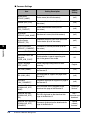
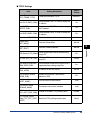
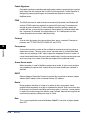
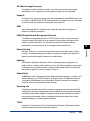
■ NetWare Settings
Item
Setting Description
Default
Setting
Frame Type
(NW_FRAME_TYPE)
Frame type used for NetWare
NCP Burst Mode
(NCP_BURST_MODE)
Decide whether the NCP burst mode is
used (Leave it on normally)
On
Print Server Name
(PSERVER_BINDERY_
NAME)
The name of the NetWare print server
being used
(null)
NetWare Server Name
(PSERVER_BINDERY)
The name of the NetWare file server of the
NetWare print server
(null)
Polling Interval
(BINDERY_JOB_
CHECK_DELAY)
Interval for checking a job sent to the
printer in the Bindery mode (1 to 15
seconds)
802.2
Bindery PServer
5 seconds
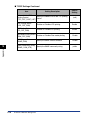
5
NDS PServer
The name of the NetWare print server
being used
(null)
NDS Tree
(PSERVER_NDS_
TREE)
The name of the NDS tree for the NetWare
print server
(null)
Context Name
(PSERVER_NDS_
CONTEXT)
The context Name (1 to 255 characters) of
the NetWare print server
(null)
Polling Interval
(NDS_JOB_CHECK_
DELAY)
Interval for checking a job sent to the
printer in the NDS Queue Printer mode
(1 to 255 seconds)
5 seconds
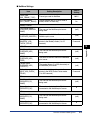
Print Server Name
(RPRINTER_PS_
NAME)
The name of the NetWare print server
being used
(null)
Printer Number
(RPRINTER_NO)
The number of printers (0 to 15) that are
connected to the NetWare print server
Appendix
Print Server Name
(PSERVER_NDS_
NAME)
RPrinter
0
NPrinter
Print Server Name
(NPRINTER_PS_
NAME)
The name of the NetWare print server
being used
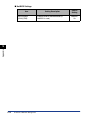
Printer Number
(NPRINTER_NO)
The number of printers (0 to 254) that are
connected to the NetWare print server
(null)
Overview of Network Setting Items
0
5-11