1
3.3
System Control
3.3.1
LCM (SL5650)
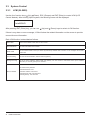
Use the four function keys, (Up), (Down), ESC (Escape) and ENT (Enter) to control LCM (LCD
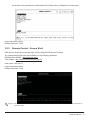
Control Module). After booting up the system, the following screen will be displayed.
xxx.xxx.xxx.xxx
IntelliRAID
After pressing ENT (Enter) key, you can use
(Up) and
(Down) keys to select a LCM function.
If there is any alarm or error message, LCM will show the related information on the screen to provide
users with more information.
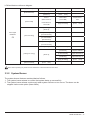
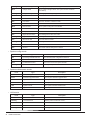
Each LCM function is described as follows:
Alarm Mute
To turn off the alarm sound when an error occurs
Reset/Shutdown
To reset or shutdown the controller
Quick Install
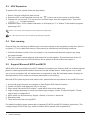
To use “Quick Install” to set up a volume by three steps. Please refer to section 4.3 for configure via the webbased GUI
View IP Setting
To view current IP address, subnet mask and gateway
Change IP Config
To set up the IP address, subnet mask and gateway. You can choose to use DHCP server (for IP address
allocation) or manually specify the IP address
Reset to Default
To restore factory defaults:
Default Password: 1234
Default IP address: 192.168.0.1
Default subnet mask: 255.255.255.0
Default gateway: 192.168.0.254
22
RAID Introduction