1
TIS-Office ToolBox 2
User Guide
TIS-Office ToolBox
User Guide
Imprint
The information contained in this documentation is subject to change without
prior notice. In doing so, Siemens VDO Trading GmbH does not enter into any
obligation. The description is based on the information available at the time this
documentation was printed. We reserve the right to change technical details in
the description, information and illustrations in this manual.
TIS-Office Toolbox • Edition 07/2007
Siemens VDO Trading GmbH shall accept no liability for program errors and
for incorrect information in the documentation or for any consequential
damages arising from this.
Microsoft Internet Explorer® is a registered trademark of the Microsoft®
Corporation.
Windows is a registered trademark of the Microsoft® Corporation.
Acrobat® is a registered trademark of the Adobe Systems Incorporated.
In the following, the above trademarks are partly used without indicating their
respective owners.
© by Siemens VDO Trading GmbH. All rights reserved.
Responsible for the content
Siemens VDO Trading GmbH
Service & Special Solutions
Postfach 16 40
78006 Villingen-Schwenningen
Germany
Internet http://www.siemensvdo.com
E-Mail
[email protected]
TU00-0881-01410 02
© Siemens VDO Trading GmbH
II
TIS-Office ToolBox
User Guide
Document history
Document history
Date
Chapter/ page
Subject, change, action taken
07/2007
Revision
TIS-Office 2.6.
V
System requirements revised
7
Access description supplemented
TIS-Office Toolbox • Edition 07/2007
Release: 07/26/2007
TU00-0881-01410 02
© Siemens VDO Trading GmbH
III
TIS-Office ToolBox
User Guide
Table of contents
Table of contents
Requirements and security .................................................... V
Introduction .............................................................................1
Functional overview ....................................................................................... 2
Characteristics at a glance ............................................................................ 3
About this document ..................................................................................... 5
Important note on data protection .................................................................. 6
Starting and closing ToolBox 2 .............................................7
Start and login ............................................................................................... 7
Exiting and closing ........................................................................................ 9
Company manager features ...................................................9
TIS-Office Toolbox • Edition 07/2007
Backup and Restore .................................................................................... 10
Configure DB ............................................................................................. 17
Check Data Integrity .................................................................................... 19
ReIndex/Compress DB ............................................................................. 22
Database administrator features .........................................24
Drop Database ........................................................................................... 24
KiscanDB Converter ................................................................................. 26
TIS-Office Upgrades
................................................................................ 35
Automatic Transfer Settings ......................................................................... 37
Glossary ..................................................................................43
Index ........................................................................................45
TU00-0881-01410 02
© Siemens VDO Trading GmbH
IV
TIS-Office ToolBox
User Guide
Requirements and security
Requirements and security
System requirements
TIS-Office Toolbox • Edition 07/2007
As TIS-Office ToolBox 2 is installed with TIS-Office, the same requirements
must be met:
Operating system
Windows® 2000 Professional
(current Service Pack)
Windows® XP Professional
(current Service Pack)
Windows Vista
Database
MSDE200RelA / Microsoft® SQL Server 2005
Express / Microsoft® SQL Server 2005.
Browser
Microsoft® Internet Explorer® from Version 6.0
Security
Logging in
The access data, i.e. user name and password, must be entered correctly to
start TIS-Office ToolBox 2 and start a function.
The security precautions below should be taken to protect your data access:
•
You should change the initialisation password you received from your
service partner.
•
Do not disclose your password to third parties. The members of staff of
your service partner or Siemens VDO Trading GmbH will never ever ask
you for this password.
•
Store your personal data access (user, password) in a safe place.
•
We recommend that you change the password regularly. For information
on how to change the password please refer to the online Help.
Closing ToolBox 2
Always close TIS-Office ToolBox 2 correctly by selecting [Exit].
TU00-0881-01410 02
© Siemens VDO Trading GmbH
V
TIS-Office ToolBox
User Guide
Introduction
Introduction
TIS-Office is a fleet management office application intended for fleet company
office staff, fleet managers and authorities. Its various modules include
functions for managing master data, analysing tachograph data, generating
driver, vehicle and security reports, configuring the system, setting tachograph
and scanner parameters and defining user settings.
TIS-Office ToolBox 2 provides all the necessary functions for maintaining
TIS-Office databases, e.g. from various companies managed in TIS-Office.
TIS-Office Toolbox • Edition 07/2007
Database structure
Important
All TIS-Office databases have the same structure and are called "TISOffice" by
default. You can thus select any company code for the databases that you
create to manage your companies. Modifying the company code does not
affect database allocation.
Siemens VDO Trading GmbH and/or its service partner will not support
TIS-Office databases that have been managed using other tools than
TIS-Office ToolBox 2.
Installation
TIS-Office ToolBox 2 is installed automatically when installing the TIS-Office
application (stand-alone and client installation). Further steps need not be
carried out.
Target audience
This user guide has been written for you, the TIS-Office database administrator
or company manager responsible for maintaining TIS-Office database(s). It
has devised to enable you to maintain databases using the TIS-Office
ToolBox 2 utility.
In addition to this manual, the following TIS-Office documentation is available:
TU00-0881-01410 02
•
Installation Guide
•
TIS-Office - First steps…
•
Online Help.
© Siemens VDO Trading GmbH
1
TIS-Office ToolBox
User Guide
Introduction
Functional overview
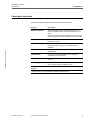
TIS-Office ToolBox 2 provides the functions mentioned below:
Function
Description
Backup and Restore
Saves a backup file of a TIS-Office database, e.g. to
archive a database status before compressing it in TISOffice.
TIS-Office Toolbox • Edition 07/2007
Restores any backup of the database later, if you find that
certain reports have not been created in time for example.
ConfigureDB
Connects the TIS-Office application with a database
located on a server.
Check data integrity
Checks the database for invalid tachograph data, i.e.
logical errors after you have converted a KISCAN
database.
ReIndex/CompressDB
Reorganises the index of a database and thus eliminate
fragmentation.
Drop Database *
Removes a TIS-Office database of one company
completely from the computer.
KISCAN-DB Converter *
Converts a KISCAN database to the TIS-Office database
format.
TISOffice Upgrades *
Upgrades your database from an older TIS-Office version
to the current TIS-Office database format.
Automatic Transfer
Settings *
TISFileTransfer Service settings.
* These functions are only available to database administrators.
TU00-0881-01410 02
© Siemens VDO Trading GmbH
2
TIS-Office ToolBox
User Guide
Introduction
Characteristics at a glance
TIS-Office databases
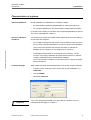
During installation two databases are created by default:
•
the administration database (TISAdminDB) for meta information and
•
the TIS-Office database for the (automatically created) default company.
If you add a new company in TIS-Office, the corresponding database is created
and can be managed with ToolBox 2.
Access to TIS-Office
ToolBox 2
You must log in to access the ToolBox 2 utility. Depending on the user, different
access rights are assigned:
•
The company manager has full access to all TIS-Office functions and has
the role of the company administrator. He has only access to his database.
TIS-Office Toolbox • Edition 07/2007
This access mode provides the features necessary to maintain the
database for the company you are assigned to in TIS-Office.
•
The database administrator is not assigned to any company. He has
access to all company databases and performs all functions to maintain
company databases and the administration database.
This access provides in addition to the features for the company manager
advanced features.
Company manager
Important
TU00-0881-01410 02
Start ToolBox and enter the credentials below to log in as a company manager:
•
Company Code: Company code to access the company database, e.g.
TISOFFICE
•
User ID: ADMIN
•
Password: admin123
If you have changed the ADMIN user’s login data in TIS-Office, the new
credentials will also apply to ToolBox 2.
© Siemens VDO Trading GmbH
3
TIS-Office ToolBox
User Guide
Database administrator
TIS-Office Toolbox • Edition 07/2007
Important
Introduction
Start ToolBox and enter the credentials below to log in as a database
administrator:
•
User ID: TISOFFICEDBA
•
Password: dbasvsso
The company code must not be entered when logging on as a database
administrator.
A separate log file named "TISAdmin.log" is saved in the path entered when
TIS-Office is installed, e.g. "C:/Program Files/Siemens/TIS-Office/Logs".
Under this path you will find the ToolBox 2 activity log (protocol) that can help
you if any errors have occurred.
In case of severe TIS-Office database problems you can send a copy of this
log file to your service partner.
For more information on how to log in please refer to Chapter "Start and login"
on Page 7.
TU00-0881-01410 02
© Siemens VDO Trading GmbH
4
TIS-Office ToolBox
User Guide
Introduction
TIS-Office Toolbox • Edition 07/2007
About this document
What you should know
This document has been written for the TIS-Office administrator. It assumes
that the administrator has gained practical experience of how to manage data
with TIS-Office and SQL databases.
Uniform structure
The uniform structure of the sections that describe this application should make
it easier for you to start using the programme.
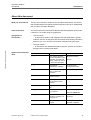
Typographical
conventions
•
The left column …
... is reserved for what we call marginal notes that emphasise a specific
subject in the form of categories and should thus make finding information
easier for you. You can also access these categories using the index.
•
The right column …
... is reserved for the detailed description using text, pictures of TIS-Office
dialogue boxes (screens) and tables.
Symbols and characters
used
TU00-0881-01410 02
Symbol
Description
Example
"…"
Menu entries, functions
and text information on the
application and also field
names, if these are part of
an instruction description
"Browse for Folder";
(…)
Amendments,
explanations, examples
TIS (Tachograph
Information Services)
> … and …:
Menu items, followed by a
colon if a tab is also
referred to
"[Start] > All Programs"
[…]
Buttons that must be used
to start an action
Click on [Close] to…
•
Work steps without a
specific order and first
level lists
•
are not numbered
...
–
Stages or second level
lists
–
If an action …
bold typeface
Work steps and login data,
e.g. password
1. Click on [OK].
italic typeface
References to a chapter,
the title of a chapter or a
marginal note
See also "About this
document"
small capitals
Keys used to operate the
program
Confirm your entry with
RETURN or ENTER.
© Siemens VDO Trading GmbH
"Server"
Password: admin123
5
TIS-Office ToolBox
User Guide
Introduction
Symbol
Description
Example
Condition
Conditions that must be
met in order to carry out an
instruction or a programme
command successfully
Before logging on for the
first time you must ensure
that …
Tip
Practical tips for working
with the TIS-Office
ToolBox 2 and this
documentation
For further information on
analysing tachograph
charts …
Notes on the application,
explanations on
programme connections
and background
knowledge
If your password or user
name is not accepted,
then …
Warning of operating
errors that you definitely
must heed in order to avoid
errors or data loss
Before deleting an entry
you should…
Important
TIS-Office Toolbox • Edition 07/2007
Caution
Important
Please note that all descriptions and screen shots are based on Windows XP's
standard layout.
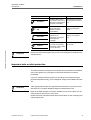
Important note on data protection
The Data Protection Act requires personal data to be protected from fraudulent
use by third parties. Any infringement of the Data Protection Act will be
prosecuted.
If you use a data processing system for recording, processing and storing
personal data electronically, you are obliged to comply with the Data Protection
Act.
Important
Take appropriate technical and organisational measures to protect personal
data stored in TIS-Office databases against unauthorised access.
Back up the data regularly in machine readable form to ensure that it can be
restored without incurring too much work.
Please refer to the TIS-Office online help for information on how to manage and
change passwords.
TU00-0881-01410 02
© Siemens VDO Trading GmbH
6
TIS-Office ToolBox
User Guide
Starting and closing ToolBox 2
Starting and closing ToolBox 2
Start and login
When TIS-Office is installed, you can create a short cut for ToolBox 2 either on
your desktop or on the Quick launch bar.
Tip
You must log in to access ToolBox 2:
Starting ToolBox 2
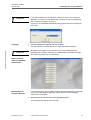
1
Select "[Start] > All Programs > TIS-Office > ToolBox 2".
TIS-Office Toolbox • Edition 07/2007
The login screen will be displayed.
Company code
2
Enter the login data for
–
the company manager or
–
database administrator
and click on [OK].
The main window will be displayed; see also Page 8.
The graphical interface is shown in the language defined for the company
manager in TIS-Office.
TU00-0881-01410 02
© Siemens VDO Trading GmbH
7
TIS-Office ToolBox
User Guide
Starting and closing ToolBox 2
If you start ToolBox 2 for the first time or want to access a new company’s
database, you must enter the default data; please also refer to the Marginal
note "Company manager" on Page 3.
Important
If you log in as a database administrator the language selection is displayed
every time.
Language
3
Select the appropriate language and click on [OK].
TIS-Office Toolbox • Edition 07/2007
The main window corresponding to your login data will be displayed.
By default, only English can be selected. If you have selected another
language when installing TIS-Office or installed further TIS-Office language
files, these languages can be selected too.
Important
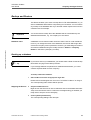
Main window for
TIS-Office Database
Administrator
Main Window for
Company Manager
If you have logged in as a company manager the [Drop Database], [KiscanDB
Converter] and [TISOffice Upgrades] and [Automatic Transfer Settings]
buttons are not available.
4
Decide what to do next and click on the appropriate button.
The corresponding dialogue box will open.
TU00-0881-01410 02
© Siemens VDO Trading GmbH
8
TIS-Office ToolBox
User Guide
Company manager features
Exiting and closing
To exit ToolBox 2:
Logout
•
Click on [Exit] in the main window.
You will be logged out and ToolBox 2 will be closed.
Company manager features
TIS-Office Toolbox • Edition 07/2007
You can only carry out the functions described in this chapter for the company
to which you are assigned as a company manager or company administrator.
For the database administrator functions please refer to Chapter "Database
administrator features" from Page 24.
If you are the company manager for more than one company, you can only
manage the database to which you are currently logged on. If you want to work
on another database, you must exit ToolBox 2 and log in with the appropriate
login data, please also refer to the Marginal note "Company manager" on
Page 3.
Important
Always restore TIS-Office databases using the Restore function in Toolbox.
TIS-Office does not recognise databases that have been restored using MS
SQL Enterprise Manager.
It is strongly advisable to save a backup file of all databases before carrying out
any of the functions described in this manual. You can save this backup on an
external storage, for example on a DVD or a ZIP drive.
Use the backup function described in Chapter "Backup and Restore" on
Page 10 to save a backup.
It is recommended that you close the TIS-Office application before working with
ToolBox 2. This applies to all clients working with the database that is to be
managed.
TU00-0881-01410 02
© Siemens VDO Trading GmbH
9
TIS-Office ToolBox
User Guide
Company manager features
Backup and Restore
This feature enables you to save a backup file of a TIS-Office database, e.g. to
archive a database status before compressing it in TIS-Office. You can restore
any backup of the database later if you find that certain reports have not been
created in time for example.
You should save a backup file of the database that is to be deleted by the
database administrator, e.g. if a company is to be closed.
Important
TIS-Office Toolbox • Edition 07/2007
Database name
A database can be restored either under the same name or under a different
name. If you change the name of the database, this will not affect login data
such as the company code or password. However, you must assign a renamed
and restored database using the modify function in Utilities > Company
Details in TIS-Office (“Company“ module).
Backing up a database
If you want to archive your databases, you should create a folder for the backup
files before carrying out the backup function.
Tip
If you manage different companies as a database administrator, you could
create a separate folder for each company.
To backup a TIS-Office database:
1
Start ToolBox 2 and enter the appropriate login data.
Please refer to the Marginal note "Access to TIS-Office ToolBox 2" on Page 3.
The corresponding main window will be opened.
Stopping the Service
2
Stop the TIS-Office Service.
Right-click on the Service icon in the notification area on the taskbar and select
“Stop“ from the shortcut menu. Confirm the message asking you whether you
really want to stop the service with [OK].
3
Click on [Backup And Restore].
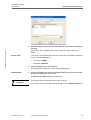
The corresponding dialogue box will open.
TU00-0881-01410 02
© Siemens VDO Trading GmbH
10
TIS-Office ToolBox
User Guide
Company manager features
TIS-Office Toolbox • Edition 07/2007
4
Select the "Backup" option and enter the name of the server where the database
is located.
With a stand-alone installation the current computer name is entered by
default.
Server name
If you work in a TIS-Office client / server environment, the default access data
for the TIS-Office database is:
5
•
User name: ADMIN
•
Password: admin123
Select the database you want to back up.
The backup will be taken only for the selected database(s).
Backup folder
6
Click on the button to the right of the "BackUp Folder" box and select the folder
to which the backup file is to be saved.
The Browse for Folder dialogue box will open.
The backup folder must already exist on the computer.
Important
TU00-0881-01410 02
You can also enter the complete path by typing it into the BackUp Folder box.
© Siemens VDO Trading GmbH
11
TIS-Office ToolBox
User Guide
Company manager features
7
Select the folder and click on [OK].
TIS-Office Toolbox • Edition 07/2007
The dialogue box will close and the complete path is displayed in the BackUp
Folder box.
Start backup
function
8
Click on [Backup] to start the backup function.
A message will be displayed telling you that backup has been successful.
9
Confirm the message with [OK].
The backup is saved under the database name to which the current date is
added, e.g. "SV_TIS-Office_14Feb2007.bkp".
If an error has occurred, a corresponding message will be displayed. When you
have confirmed the message, you can debug and repeat the backup. Possible
errors could be:
Tip
Starting the Service
10
•
Server name not correct.
•
Server does not belong to the company to which the manager is assigned.
•
User name and password not correct.
•
Folder permission has not been set for the backup folder.
Start the TIS-Office Service.
Right-click on the Service icon in the notification area on the taskbar and select
“Start“ from the shortcut menu. Confirm the message asking you whether you
want to start the service with [OK].
11
Click on [Cancel] to close the "Backup and Restore Utility for Company Manager"
dialogue box.
You will return to the main window where you can select another function.
TU00-0881-01410 02
© Siemens VDO Trading GmbH
12
TIS-Office ToolBox
User Guide
Company manager features
Restoring a database
You can restore any database backup that matches the TIS-Office database
structure. This could also be a "repaired" or simply a backup database.
Stop the TIS-Office application before performing the restore function. This
also applies to all clients in a client / server installation.
Condition
If you want to restore a database, you must have administrator rights on the
computer where the database is located.
In any case you should save a backup of the current database before restoring
an (earlier) version; see Chapter "Backing up a database" on Page 10. This is
particularly recommended if you are not sure where to find the data you are
looking for in the version that is to be restored.
TIS-Office Toolbox • Edition 07/2007
Important
To restore a TIS-Office database:
1
Start TIS-Office ToolBox 2 and enter the appropriate login data.
Please refer to the Marginal note "Access to TIS-Office ToolBox 2" on Page 3.
The corresponding main window will open.
Stopping the Service
2
Stop the TIS-Office Service.
Right-click on the Service icon in the notification area on the taskbar and select
“Stop“ from the shortcut menu. Confirm the message asking you whether you
really want to stop the service with [OK].
3
Click on [Backup And Restore].
The corresponding dialogue box will open.
The databases you are currently working with are displayed.
TU00-0881-01410 02
© Siemens VDO Trading GmbH
13
TIS-Office ToolBox
User Guide
Company manager features
Displaying the
databases used
TIS-Office Toolbox • Edition 07/2007
4
Select the "Restore" option and enter the name of the server where the database
is to be restored.
With a stand-alone installation the current computer name is entered by
default.
Server name
Selecting backup file
If you work in a client/server installation of TIS-Office the default access data
for the TIS-Office database is:
5
•
user name: ADMIN
•
password: admin123
Click on the button to the right of the "Restore File Path" box, select the path and
backup database file that you want to restore.
The Open dialogue box will be displayed to search for the backup file.
Important
TU00-0881-01410 02
You can also enter the complete path (including the name of the backup file)
by typing it into the Restore File Path box. In this case you can skip Step 6.
© Siemens VDO Trading GmbH
14
TIS-Office ToolBox
User Guide
Company manager features
TIS-Office Toolbox • Edition 07/2007
6
Select the file and click on [Open].
The dialogue box will close and the complete path is displayed in the
Restore File Path box.
Do not enter the name of a database that does not belong to TIS-Office. This
will overwrite the database which can then no longer be used with the
corresponding application.
Caution
Please note:
•
Only select backup files created with the current TIS-Office version. The
restore operation will fail if the structure of the selected database backup
does not match the TIS-Office database structure.
•
Only use TIS-Office database names that you are allowed to manage as
the fleet manager.
When entering the name of the currently used database, the TIS-Office
database will be overwritten with the backup data. So don't forget to back up
the currently used database before using the restore function.
The "TISAdminDB" (administration database) must always be restored with
the same name. If it is restored with a different name, the application might
become inaccessible.
7
Enter the name of the database that is to be restored, for example "TIS-Office".
If you enter
TU00-0881-01410 02
•
the database name of the current database, this database will be
overwritten with the backup data.
•
a new database name, you must assign this new database in TIS-Office
later using the modify function in Utilities > Company Details. This
requires the "Company" module to be activated.
© Siemens VDO Trading GmbH
15
TIS-Office ToolBox
User Guide
Start restore
function
Company manager features
8
Click on [Restore] to start the restore function.
If the database name already exists, you will be prompted to confirm that you
want to overwrite the existing database.
A message will be displayed telling you that the restore operation has been
successful.
9
Confirm the message with [OK].
The restored database is listed in the database box.
If an error has occurred, a corresponding message will be displayed. When you
have confirmed the message, you should stop MSDE/SQL Server and repeat
the restore operation.
Tip
Starting the Service
10
Start the TIS-Office Service.
TIS-Office Toolbox • Edition 07/2007
Right-click on the Service icon in the notification area on the taskbar and select
“Start“ from the shortcut menu. Confirm the message asking you whether you
want to start the service with [OK].
11
Click on [Cancel] to close the “Backup and Restore Utility for TISOFFICE DBA“
dialogue box.
You will return to the main window where you can select another function or
close ToolBox by clicking on [Exit].
Important
TU00-0881-01410 02
If you have restored a database under a different database name, remember
to assign this restored database in TIS-Office using the modify function in
Utilities > Company Details. This function is part of the “Company“ module.
© Siemens VDO Trading GmbH
16
TIS-Office ToolBox
User Guide
Company manager features
Configure DB
This feature is used to connect the TIS-Office application with a database
located on a server. The function saves the server name to the registry. When
starting TIS-Office later, it will connect to the database server automatically.
Select this function if you have moved the TIS-Office server from one computer
to another and also if you have upgraded the TIS-Office installation from a
stand-alone installation to a client / server installation. In this case you must
perform this function on each client.
The TIS-Office clients must have access to the server computer where the
TIS-Office database is installed.
Condition
TIS-Office Toolbox • Edition 07/2007
You must have administrator rights on the server computer where the
TIS-Office database is located. For further information please refer to the
TIS-Office Installation Guide.
To configure a database:
1
Start TIS-Office ToolBox 2 and enter the appropriate login data.
Please refer to Marginal note "Access to TIS-Office ToolBox 2" on Page 3.
The corresponding main window will be opened.
2
Click on [ConfigureDB].
The ConfigureDB Utility dialogue box will open.
Server name
3
Enter the name of the server where the TIS-Office database is located and confirm
your entry with [OK].
A warning message will be displayed.
After you have confirmed this message, ToolBox establishes a connection to
the TIS-Office database on the server using the default password.
TU00-0881-01410 02
© Siemens VDO Trading GmbH
17
TIS-Office ToolBox
User Guide
Company manager features
4
Confirm the message with [Yes].
The connection to the database server will be established.
5
Confirm the message with [OK].
TIS-Office Toolbox • Edition 07/2007
ToolBox 2 will be closed.
TU00-0881-01410 02
© Siemens VDO Trading GmbH
18
TIS-Office ToolBox
User Guide
Company manager features
Check Data Integrity
This feature is used to check the database for invalid chart data. This could be
required after converting a KISCAN database into TIS-Office database format.
Tip
For database security reasons you should perform this function at regular
intervals.
TIS-Office Toolbox • Edition 07/2007
You can search for
Tip
•
Chart without modes: The system checks for chart totals without
corresponding activity data. These charts can be deleted.
•
Chart Total Not Same As Mode Total: The system checks for differences
between the totals for each activity on the chart and the corresponding
totals in the modes list, e.g. for driving time etc. These charts can be
recalculated.
A log file is saved every time this function is performed. For each listed entry
displayed in the Check Data Integrity dialogue box a corresponding entry is
added to the log file.
You will find the log file in your TIS-Office application folder, e.g.
"C:/Program Files/Siemens/TIS-Office/Logs".
Before deleting any chart data record you can check the log file for details.
Important
TU00-0881-01410 02
You should always save a backup file of the database before deleting any chart
data records.
© Siemens VDO Trading GmbH
19
TIS-Office ToolBox
User Guide
Company manager features
To check chart data integrity:
1
Start ToolBox 2 and enter the appropriate login data.
Please refer to the Marginal note "Access to TIS-Office ToolBox 2" on Page 3.
The corresponding main window will open.
2
Click on [Check Data Integrity].
TIS-Office Toolbox • Edition 07/2007
The corresponding dialogue box will open.
Company code
3
Select the TIS-Office database that contains the chart data to be checked.
The assigned database is displayed by default.
Integrity options
4
Select the
–
"Chart without modes" check box if you want to search only for chart data
sets with missing mode details and/or
–
"Chart Total Not Same As Mode Total" check box if you want to search for
chart data records with inconsistent totals.
If you select both options the result will be displayed in a single dialogue box.
However, you can start each function separately to create only one of the result
lists.
Start the check
function
5
Click on [Check] to start the function.
A dialogue box with separate list boxes for each of the functions will be
displayed showing the charts with invalid data.
If the list boxes are empty no invalid data records have been found.
TU00-0881-01410 02
© Siemens VDO Trading GmbH
20
TIS-Office Toolbox • Edition 07/2007
TIS-Office ToolBox
User Guide
Company manager features
If you have selected one of the options only, the dialogue box will show either
the Chart without modes group box or the Chart Total Not Same As Mode
Total group box.
Important
6
Select an entry from the list and click on
–
[Delete] if you want to delete a chart data record without modes.
The selected chart data record will be deleted from the list and from the
database.
–
[Recalculate] if you want to recalculate chart data.
The total of the selected chart will be recalculated and saved in the
database.
A log file is created for both operations, containing information for each row
shown in the lists.
–
[Cancel] to close the dialogue box.
You will return to the Check Data Integrity dialogue box.
7
Click on [Cancel] to close the "Check Data Integrity" dialogue box.
You will return to the main window where you can select another function.
TU00-0881-01410 02
© Siemens VDO Trading GmbH
21
TIS-Office ToolBox
User Guide
Company manager features
ReIndex/Compress DB
This feature is used to reorganise the index of a database and thus eliminate
fragmentation. With large databases this can take some time.
You should perform this function
TIS-Office Toolbox • Edition 07/2007
Tip
•
after you have compressed a database in the TIS-Office application using
the corresponding function,
•
after you have checked data integrity and deleted or recalculated chart
data records,
•
if working with TIS-Office has become too slow, e.g. when generating a
report.
This function will not compress the database in the same way as the compress
function in TIS-Office. No driver activity data will be deleted.
Do not stop the process by clicking on [Cancel]. This could irrevocably destroy
the database.
Caution
To re-index/compress a database:
1
Start TIS-Office ToolBox 2 and enter the appropriate login data.
Please refer to the Marginal note "Access to TIS-Office ToolBox 2" on Page 3.
The corresponding main window will open.
2
Click on [ReIndex/CompressDB].
The TIS-Office Compress/IndexRebuild dialogue box will open.
"Compress/
IndexRebuild"
dialogue box for
company manager
TU00-0881-01410 02
© Siemens VDO Trading GmbH
22
TIS-Office ToolBox
User Guide
Company manager features
"Compress/
IndexRebuild"
dialogue box for
database
administrator
If you are logged in as database administrator you can select a database.
TIS-Office Toolbox • Edition 07/2007
Start re-index
function
3
Click on [Compress].
A progress bar will show the process and a corresponding message will be
displayed when compressing is complete.
Do not stop the process by clicking on [Cancel]. This could irrevocably destroy
the database.
Caution
4
Click on [OK] to confirm the message that compression has been successful and
then click on [Cancel] to close the dialogue box.
You will return to the main window where you can select another function.
TU00-0881-01410 02
© Siemens VDO Trading GmbH
23
TIS-Office ToolBox
User Guide
Database administrator features
Database administrator features
In addition to the functions described in Chapter "Company manager features",
there are functions that can only be carried out by the database administrator.
For information on the login credentials please refer to the Marginal note
"Database administrator".
It is highly recommended to save a backup copy of any database that is to be
deleted, converted or upgraded. You can save this backup file on an external
storage medium such as a DVD or ZIP drive.
Important
TIS-Office Toolbox • Edition 07/2007
To save a backup copy use the backup function described in Chapter "Backup
and Restore" on Page 10 .
Drop Database
You use this feature to remove a company’s TIS-Office database from the
computer completely. This database can then only be restored with a
previously saved backup copy.
The default TIS-Office database cannot be deleted.
Important
To delete a database:
1
Start ToolBox 2 and enter the login data for the database administrator.
Please refer to the Marginal note "Access to TIS-Office ToolBox 2" on Page 3.
The Main Window For TISOffice DBA window will open.
2
Click on [Drop Database].
A dialogue box to select the database and to start the function will open.
TU00-0881-01410 02
© Siemens VDO Trading GmbH
24
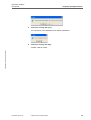
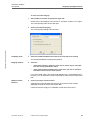
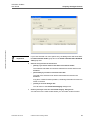
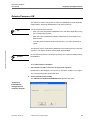
TIS-Office ToolBox
User Guide
Database administrator features
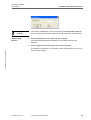
If you delete a database by clicking on [Drop] it will be physically removed
from the computer and can be restored only with a previously saved backup.
Caution
Start the Drop
function
3
Select the database from the list box and click on [Drop].
A message will be displayed to indicate the successful removal of the
database.
4
Click on [OK] to close the message and then click on [Cancel].
TIS-Office Toolbox • Edition 07/2007
The dialogue box will close. You will return to the main window where you can
select another function.
TU00-0881-01410 02
© Siemens VDO Trading GmbH
25
TIS-Office ToolBox
User Guide
Database administrator features
KiscanDB Converter
It is, of course, possible to change from KISCAN to TIS-Office without losing
any data stored in your database. However, you must convert your KISCAN
database to the TIS-Office database format.
TIS-Office Toolbox • Edition 07/2007
Proceed as follows:
Important
•
Backup your KISCAN database, e.g. on an external storage.
•
Transfer the tables; see Chapter "KISCAN database conversion to ANSI
format" on Page 30.
•
Install TIS-Office 2 as described in the Installation Guide.
•
Start ToolBox 2 and convert the KISCAN database; see Chapter "KISCAN
database conversion to TIS-Office format" on Page 33.
•
Start TIS-Office and check the data, e.g. the master records.
The KISCAN paradox tables must be in ANSI format. If not, you must convert
them using KISCAN. Only then can you migrate the KISCAN database using
the ToolBox 2 converter function.
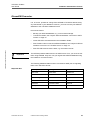
The following database tables must be converted to ANSI prior to migrating
them to the TIS-Office format:
Required data
TU00-0881-01410 02
Data Required
Data Type
Paradox Table Name
Driver Data
Master Data
Chauffeur.db
Vehicle Data
Master Data
Vehicle.db
Vehicle Change Data
Reference Data
Tournee.db
Activity Data
Transaction Data
Activitie.db
Chart Data
Transaction Data
Disque.db
Agency Data
Master Data
Societe.db
© Siemens VDO Trading GmbH
26
TIS-Office ToolBox
User Guide
Database administrator features
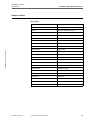
Database fields
Driver Data
TIS-Office Toolbox • Edition 07/2007
:
TU00-0881-01410 02
KISCAN Data Field
Description
Code Number
Reference number
Vehicle
Vehicle assigned to the driver
Hiring Date
Hiring date
Leaving Date
Leaving date
Department
Site to which the driver is assigned
Title
Title
Name
Surname
Forname
Forename
Maiden Name
Maiden name
Birth Date
Date of birth
Birth City
Place of birth
Birth Country
Native country
Nationality
Nationality
Number
National insurance number
Family
Marital status
Child's Number
Number of children
Address
Address1
Address
Address2
Postal Code
Postal code
City
City
Phone
Phone
Comment
Comment
© Siemens VDO Trading GmbH
27
TIS-Office ToolBox
User Guide
Database administrator features
TIS-Office Toolbox • Edition 07/2007
Vehicle Data
KISCAN Data Field
Description
Vehicle Code
Vehicle code, internal number
License#
Registration number
Vehicle Type
Transport type, e.g. "Goods"
Service Date
Registration date
Brand
Manufacturer
Brand Type
Model
Under Carriage
VIN
Department
Site to which the vehicle is assigned
Kilometer
Last odometer entry
Last Kilometer
Date of last odometer entry
Comments
Comments
Vehicle Changes (charts with data for more than one vehicle)
KISCAN Data Field
Description
Disc Code
Route#
Vehicle
Trailer
1st Crew
2nd Crew
Start Km
End Km
Start City
End City
Start Fuel
End Fuel
Treatment Ok
The driver code must be determined using the chart number.
Important
TU00-0881-01410 02
Route# is a consecutive number. If a driver has changed vehicles, the
tachograph chart’s Route# (route number) will be modified too.
© Siemens VDO Trading GmbH
28
TIS-Office ToolBox
User Guide
Database administrator features
Activity Data
KISCAN Data Field
Description
Activity Date
Activity date
Start Time
Start time of the activity
Duration
Duration
Activity
Activity type, e.g. driving time
Read KM
Distance
Read CONS
Fuel consumption
TIS-Office Toolbox • Edition 07/2007
Chart Data
KISCAN Data Field
Description
Reading Date
Date when chart data has been entered
Reading Time
Time read from the chart
Modify Date
Modification date of the chart
Modify Time
Modification time of the chart
Sites
TU00-0881-01410 02
KISCAN Data Field
Description
Code
Reference, internal number for a site
Name
Name
Address
Address1
Address
Address2
Postal Code
Postal code
City
City
Phone
Phone
Fax
Fax
Represent Name
Contact
Comments
Comments
© Siemens VDO Trading GmbH
29
TIS-Office ToolBox
User Guide
Database administrator features
KISCAN database conversion to ANSI format
If more than one database has been maintained in KISCAN, each database
must be converted individually.
Important
To convert the KISCAN tables to the ANSI format:
1
In Explorer copy all database files of the relevant company from the "Base1"
folder to the "BaseInit" folder.
TIS-Office Toolbox • Edition 07/2007
Copying KISCAN
database files
You will find the "Base1" and the "BaseInit" folder in the KISCAN folder.
2
Start "bdecfg32.exe" with a double click.
The BDE Configuration Utility - IDAPA32.CFG window will open.
TU00-0881-01410 02
© Siemens VDO Trading GmbH
30
TIS-Office ToolBox
User Guide
TIS-Office Toolbox • Edition 07/2007
Parameters
Database administrator features
3
Select the "Driver" tab and then "PARADOX" from the "Driver Name" list.
4
Set the "LANGDRIVER" parameter to "Paradox 'ascii'".
5
Click on the "System" tab.
6
Set the "LANGDRIVER" parameter to "Pdox ANSI Intl850".
7
Open the "File" menu, save the settings and close the window.
The Explorer window is displayed again.
TU00-0881-01410 02
© Siemens VDO Trading GmbH
31
TIS-Office ToolBox
User Guide
Database administrator features
8
Start "BdeLang.exe" with a double click.
TIS-Office Toolbox • Edition 07/2007
The PARADOX Tables : LangDriver Modification window will open.
9
Check the settings as shown in the screen above and select the "LangDriver
Modification (DBE)" check box.
The [Initialization of Files using the new LangDriver] button will be made
available.
Start conversion
10
Click on [Initialization of Files using the new LangDriver] to start the conversion
process and confirm the security message with [OK].
A progress bar will show the conversion process. When it is complete, a
corresponding message is displayed.
11
Confirm the message with [OK].
The message box and the window will close.
You can now start migrating the database; see Page 33.
TU00-0881-01410 02
© Siemens VDO Trading GmbH
32
TIS-Office ToolBox
User Guide
Database administrator features
KISCAN database conversion to TIS-Office format
To convert the KISCAN database:
1
Start ToolBox 2 and enter the login data for the database administrator.
Please refer to the Marginal note "Access to TIS-Office ToolBox 2" on Page 3.
The Main Window For TISOffice DBA window will open.
2
Click on [KiscanDB Converter].
TIS-Office Toolbox • Edition 07/2007
The Migration: KISCAN TO TIS-Office DB Converter dialogue box will open.
Convert KISCAN
database
3
Specify the details for converting the KISCAN database:
–
"KISCAN DB Directory": Browse for the "BaseInit" folder.
–
"TIS-Office DB": e.g. "TIS-Office - TIS-Office".
If you manage databases from different companies, you must select the
database to which the KISCAN data is to be migrated.
4
Select
–
"Complete" to migrate all tachograph charts, drivers, vehicles and sites from
KISCAN to TIS-Office.
–
"Append" and set the start and end date to migrate data records between
these dates to the TIS-Office database only.
If this option is selected, you can enter a period from which chart data will
be imported into TIS-Office.
Important
TU00-0881-01410 02
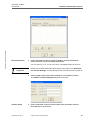
With Append you can select the site to which the database is assigned, e.g.
"TISOffice", from the Default Site box.
© Siemens VDO Trading GmbH
33
TIS-Office ToolBox
User Guide
Start conversion
Database administrator features
5
Click on [Start].
If you have selected Complete, the message below will be displayed.
If you have selected Append, you can skip step 5.
6
Click on [Yes] to continue converting the database.
If you click on [No] the process will stop and you can change the settings.
7
Confirm the message that conversion has been successful with [OK] and close
ToolBox 2 with [Exit].
TIS-Office Toolbox • Edition 07/2007
The Main Window for TISOffice DBA window will close. You can now start
TIS-Office to check the data.
Tip
TU00-0881-01410 02
You can open a log file by clicking on [View Log] in the Migration: ... dialogue
box. This log file includes details of the conversion process.
© Siemens VDO Trading GmbH
34
TIS-Office ToolBox
User Guide
Database administrator features
TIS-Office Upgrades
You can use a database created with an earlier TIS-Office version without
losing any data. However, you must restore the database using the ToolBox
Restore function and then upgrade it to the database format of the current
TIS-Office version.
If you have not selected the installation program's update function when
updating TIS-Office, you must use this function to upgrade your databases.
For information on how to restore a database please refer to Chapter "Backup
and Restore" on Page 10.
Create a backup copy of the database before performing a database upgrade.
TIS-Office Toolbox • Edition 07/2007
Important
To upgrade the earlier TIS-Office version database:
1
Start ToolBox 2 and enter the login data for the database administrator.
Please refer to the Marginal note "Access to TIS-Office ToolBox 2" on Page 3.
The Main Window For TISOffice DBA window will open.
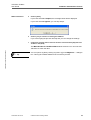
Stopping the Service
2
Stop the TIS-Office Service.
Right-click on the Service icon in the notification area on the taskbar and select
"Stop" from the shortcut menu. Confirm the message asking you whether you
really want to stop the service with [OK].
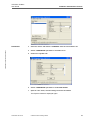
3
Click on [TISOffice Upgrades].
The corresponding dialogue box will open.
Upgrade settings
Start upgrade
TU00-0881-01410 02
4
5
Select
–
the database that you want to upgrade, e.g. "TISOFFICE", under "Company
Code".
–
the upgrade file indicating the database version to be upgraded.
Click on [OK] and confirm the message that the upgrade has been completed
successfully with [OK].
© Siemens VDO Trading GmbH
35
TIS-Office ToolBox
User Guide
Database administrator features
6
Repeat steps 3 and 4 for each TIS-Office database.
If you have created several companies, you must upgrade all the relevant
databases.
Important
Please remember to upgrade the administrator database (TISAdminDB) too.
Starting the service
7
Start the TIS-Office Service.
Right-click on the Service icon in the notification area on the taskbar and select
"Start" from the shortcut menu. Confirm the message asking you whether you
want to start the service with [OK].
Click on [Exit] to close ToolBox.
9
Start TIS-Office and enter the software keys for all modules you work with.
TIS-Office Toolbox • Edition 07/2007
8
TU00-0881-01410 02
© Siemens VDO Trading GmbH
36
TIS-Office ToolBox
User Guide
Database administrator features
Automatic Transfer Settings
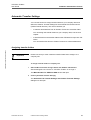
You use this function to assign transfer folders to your company sites and
define the Outdoor Terminal settings for the automatic file transfer service
(TISFileTransfer Service). This service enables you
•
to transfer download files from an Outdoor Terminal to a transfer folder.
You can assign the transfer folders to your company sites; see the next
chapter.
•
to transfer files from the transfer folders to the IFS folder for import into TISOffice.
You can transfer files from an Outdoor Terminal or a Downloadterminal.
TIS-Office Toolbox • Edition 07/2007
Assigning transfer folders
Please note that you must create the transfer folder first to assign it to a
company site.
Important
To assign a transfer folder to a company site:
1
Start ToolBox 2 and enter the login data for the database administrator.
See the Marginal note "Access to TIS-Office ToolBox 2" on Page 3.
The Main Window For TISOffice DBA window will open.
2
Click on [Automatic Transfer Settings].
The Automatic File Transfer Settings and Outdoor Terminal Settings
dialogue box will open.
TU00-0881-01410 02
© Siemens VDO Trading GmbH
37
TIS-Office Toolbox • Edition 07/2007
TIS-Office ToolBox
User Guide
Transfer interval
Database administrator features
3
Under "Transfer Files Every" modify the download file transfer interval to suit
your company requirements.
You can select 4, 8, 12, 16, 20 or 24 hours. The default setting is 24 hours.
Please note that this setting also applies to the download interval on the
Outdoor Terminal Settings tab; see also the Marginal note "Download
interval" on Page 41.
Important
Transfer folder
4
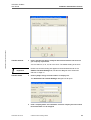
Click on [Add] to assign a transfer folder to a company site.
The Automatic File Transfer Settings dialogue box will open.
5
TU00-0881-01410 02
Under "Company Name" and "Site Name" select the company and site to which
the transfer folder is to be assigned.
© Siemens VDO Trading GmbH
38
TIS-Office ToolBox
User Guide
Database administrator features
6
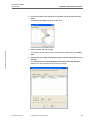
Click on the button to the right of the "Folder Path" box to specify the transfer
folder.
The Browse for Folder dialogue box will open.
TIS-Office Toolbox • Edition 07/2007
7
Select the folder and click on [OK].
The dialogue box will close and the transfer folder is displayed under Folder
Path.
8
Click on [OK] and confirm the message telling you that the settings will be saved
with [OK].
The Automatic File Transfer Settings and Outdoor Terminal Settings
dialogue box will be displayed in the foreground again.
TU00-0881-01410 02
© Siemens VDO Trading GmbH
39
TIS-Office ToolBox
User Guide
Database administrator features
You can modify the transfer folder assignment at any time. Just select the
relevant entry from the list and click on [Modify].
Important
9
10
Perform Step 4 to Step 8 again to assign a transfer folder to any other site.
Proceed by
–
making the necessary settings for transferring files from an Outdoor Terminal
Start with Step 5 described in the next Chapter "Outdoor Terminal transfer
settings".
–
or complete the automatic file transfer setting process.
Close the Automatic File Transfer Settings and Outdoor Terminal
Settings dialogue box with [OK].
TIS-Office Toolbox • Edition 07/2007
Outdoor Terminal transfer settings
To specify the Outdoor Terminal transfer settings:
1
Start ToolBox 2 and enter the login data for the database administrator.
See the Marginal note "Access to TIS-Office ToolBox 2" on Page 3.
The Main Window For TISOffice DBA window will open.
2
Click on [Automatic Transfer Settings].
The Automatic File Transfer Settings and Outdoor Terminal Settings
dialogue box will open.
3
TU00-0881-01410 02
Switch to the "Outdoor Terminal Settings" tab.
© Siemens VDO Trading GmbH
40
TIS-Office Toolbox • Edition 07/2007
TIS-Office ToolBox
User Guide
Download interval
Database administrator features
4
Under "Download Files Every" modify the Outdoor Terminal download file
transfer interval to suit your company requirements.
You can select 4, 8, 12, 16, 20 or 24 hours. The default setting is 24 hours.
Please note that the download interval setting is the same as for Automatic
File Transfer Settings; see also Marginal note "Transfer interval" on Page 38.
Important
5
Click on [Add] to specify the transfer settings for a new Outdoor Terminal.
The Outdoor Terminal Settings dialogue box will open.
Transfer folder
TU00-0881-01410 02
6
Under "Folder Path" select the transfer folder where the Outdoor Terminal
download files are to be stored.
© Siemens VDO Trading GmbH
41
TIS-Office ToolBox
User Guide
Database administrator features
Important
The transfer folders must have already been assigned to a company site. If not,
you cannot make a selection here.
See also Chapter "Assigning transfer folders" on Page 37.
TCP/IP settings
7
Enter the Outdoor Terminal's TCP/IP settings into the IP Address, Gateway and
Subnet Mask boxes.
Please contact your network administrator for the correct TCP/IP settings.
Important
8
Click on [OK] and confirm the message telling you that the settings will be saved
with [OK].
TIS-Office Toolbox • Edition 07/2007
The Automatic File Transfer Settings and Outdoor Terminal Settings
dialogue box will be displayed in the foreground again.
You can modify the Outdoor Terminal settings at any time. Just select the
relevant entry from the list and click on [Modify].
Important
9
10
TU00-0881-01410 02
Perform Step 5 to Step 8 again to specify the settings for any other Outdoor
Terminal.
Close the Automatic File Transfer Settings and and Outdoor Terminal Settings
dialogue box with [OK].
© Siemens VDO Trading GmbH
42
TIS-Office ToolBox
User Guide
Glossary
TIS-Office Toolbox • Edition 07/2007
Glossary
*.bkp
File extension for database backup files.
*.ldf
File extension for database transaction log (protocol) files.
*.mdf
File extension for database files. These files contain the database contents.
Administrator database
Database that controls queries to the company database and maintains functions. In
TIS-Office it is called "TISAdminDB".
ANSI
American National Standards Institute
ASCII
American Standard Code for Information Interchange
Backup
Copy of a database used to archive a certain status.
Data integrity
Every database has a fixed structure for storing data entered and delivering results to
specific queries. To ensure chart data integrity too, the "Check Data Integrity" function
is also available.
Database administrator
In TIS-Office ToolBox the administrator (DBA) can carry out advanced functions , e.g.
convert KISCAN data. With a stand-alone installation the company manager functions
in ToolBox 2 are absolutely sufficient for database maintenance.
Database server
Server computer in a client / server installation on which the TIS-Office database is
located.
DB
Database
DBA
Database Administrator
Fleet database /
company database
Database of a specific company where digital tachograph or chart data relating to
drivers, vehicles, charts etc. is stored.
Index
An SQL index is a subset of the data contained in table columns that are arranged
logically either in ascending or descending order. The index is used to sort (ORDER
BY clause), group (GROUP BY clause) and join data. An SQL index is an encoded
logical file.
The system can retrieve data more quickly using the index.
Local server
With a stand-alone installation the local server is the computer on which TIS-Office is
installed.
Log file
A file listing events that have occurred. The raw log file information can be helpful if
technical support staff requires more specific information.
Migration
Data migration means transferring data between different environments (storage
types, formats or computer systems). Generally, programs are used to migrate the
data automatically. Data migration is required if organisations change computer
systems or upgrade to new systems.
TU00-0881-01410 02
© Siemens VDO Trading GmbH
43
TIS-Office ToolBox
User Guide
MSDE
Glossary
MSDE = Microsoft SQL Server Desktop Engine
SQL Server version with a limited number of database management functions, limited
data size (2 GB) and limited number of parallel access operations (max. 5 parallel
processes).
Re-index
An index is a separate database file that stores information on the fields used in
database tables. Thus, frequent queries can be performed more quickly.
An index can get fragmented when data is being modified. This fragmentation can
cause query performance problems.
The reindex function reduces fragmentation by rearranging the index pages and
compacting the rows on these pages.
Restore
This function enables you to ’install’ a database that replaces the current database.
SQL
SQL (Structured Query Language)
SQL is an ANSI (American National Standards Institute) standard computer language
for accessing and manipulating database systems. SQL statements are used to
retrieve and update data in a database.
TIS-Office Toolbox • Edition 07/2007
(Source: www.w3schools.com)
SQL Server 2005 Express
Replacement of MSDE 2000 with less limitation.
Transfer
The movement of data from one location to another. A modern definition would be the
transfer of data from one environment to another.
(Source: www.wikipedia.org)
TU00-0881-01410 02
© Siemens VDO Trading GmbH
44
TIS-Office ToolBox
User Guide
Index
Index
A
D
Access ............................................................................ 3
– company manager.................................................... 3
– database administrator............................................. 4
ANSI.............................................................................. 31
Append data from KISCAN database............................ 33
Automatic Transfer Settings .......................................... 37
Data protection................................................................ 6
Database
– ANSI....................................................................... 31
– backup.................................................................... 10
– configure ................................................................ 17
– connect to server.................................................... 17
– conversion of KISCAN database ............................ 26
– delete ..................................................................... 24
– format ..................................................................... 30
– format conversion................................................... 33
– KISCAN.................................................................. 30
– migration ................................................................ 33
– parameters ............................................................. 31
– re-index .................................................................. 22
– restore .................................................................... 13
– server name ........................................................... 17
– table format ............................................................ 31
– TIS-Office ................................................................. 3
– transfer format ........................................................ 30
– upgrade .................................................................. 35
Database administrator
– compress/index-rebuild .......................................... 23
– drop database ........................................................ 24
– features .................................................................. 24
– server access data ................................................. 11
– server name ........................................................... 11
Delete database ............................................................ 24
Drop Database .............................................................. 24
B
TIS-Office Toolbox • Edition 07/2007
Backup .......................................................................... 10
Backup folder ................................................................ 11
C
Change from TIS-Office 1 to 2 ...................................... 35
Characteristics, TIS-Office ToolBox 2 ............................. 3
Chart data
– missing mode ......................................................... 20
– recalculate.............................................................. 21
– total ........................................................................ 20
Check data integrity ...................................................... 19
Company manager
– backup and restore................................................. 10
– check data integrity ................................................ 19
– compress/index-rebuild .......................................... 22
– configure database................................................. 17
– features .................................................................... 9
– re-index database................................................... 22
company manager
– access to ToolBox 2 ................................................. 3
Compress database ...................................................... 22
Compress/IndexRebuild
– company manager.................................................. 22
– database administrator........................................... 23
Configure database....................................................... 17
Conversion
– KISCAN tables ....................................................... 32
Convert
– database ................................................................ 26
– KISCAN database .................................................. 33
TU00-0881-01410 02
© Siemens VDO Trading GmbH
E
Exit .................................................................................. 9
F
Features
– company manager.................................................... 9
– database administrator........................................... 24
45
TIS-Office ToolBox
User Guide
Index
G
Q
Glossary........................................................................ 43
Quit ToolBox 2 ................................................................ 9
I
R
Imprint ............................................................................. II
Integrity of chart data .................................................... 19
Introduction ..................................................................... 1
Recalculate chart total................................................... 21
Re-index........................................................................ 22
Restore ......................................................................... 13
– backup file selection ............................................... 14
– server access data ................................................. 14
– server name ........................................................... 14
– stop database server.............................................. 13
TIS-Office Toolbox • Edition 07/2007
K
KISCAN......................................................................... 26
– conversion.............................................................. 33
– database files ......................................................... 30
– transfer ................................................................... 30
KISCAN conversion
– database fields
– activity data ..................................................... 29
– chart data ........................................................ 29
– driver data ....................................................... 27
– site data........................................................... 29
– vehicle change data ........................................ 28
– vehicle data ..................................................... 28
– required data .......................................................... 26
L
Login ............................................................................... 7
– company code .......................................................... 7
– company manager.................................................... 3
– data .......................................................................... 7
– database administrator............................................. 4
Logout ............................................................................. 9
M
Main window for company manager................................ 8
Main window for database administrator ......................... 8
Manual conventions
– symbols and characters ........................................... 5
– typographical conventions ........................................ 5
Missing mode ................................................................ 20
O
Outdoor Terminal .......................................................... 37
– settings................................................................... 40
TU00-0881-01410 02
© Siemens VDO Trading GmbH
S
Security .......................................................................... V
Start ................................................................................ 7
– backup function ...................................................... 12
– checking function.................................................... 20
– conversion........................................................ 32, 34
– drop function .......................................................... 25
– re-index function..................................................... 23
– restore function....................................................... 16
– upgrade .................................................................. 35
symbols and characters .................................................. 5
System requirements ..................................................... V
T
TIS-Office database upgrade ........................................ 35
ToolBox 2
– close......................................................................... 9
– desktop icon ............................................................. 7
– installation ................................................................ 1
– start .......................................................................... 7
Total differences............................................................ 20
Transfer
– KISCAN database .................................................. 30
Transfer folder............................................................... 37
Typographical conventions.............................................. 5
U
Update KISCAN to TIS-Office ....................................... 26
Upgrade installation ...................................................... 35
Upgrade of database..................................................... 35
Upgrade settings ........................................................... 35
User information, about this document............................ 5
46
TIS-Office ToolBox
User Guide
W
TIS-Office ToolBox • Edition 07/2007
What you should know .................................................... 5
TU00-0881-01410 02
© Siemens VDO Trading GmbH
47