1
Overview
2
Section 2
Overview
The eView provides annunciation and control while operating on the COMMS ( + , - ) terminals of the eLAN and
Elite Panel. The COMMS ( +, - ) terminals provide an RS485 communication path to devices such as the VES eView.
Front-panel controls and indicators of the eView are identical to those provided on the eLAN and Elite Panel.
Operate Access Level 2 on the eView exactly as performed on the eLAN and Elite Panel.
The RS485 communication path does not support the simultaneous operation of Level 2 on multiple eViews.
Operate Level 2 on one eView at a time when multiple eViews are connected on the RS485 communication path.
The buzzer of the eView can annunciate and silence in unison with the eLAN and the Elite Panel. The buzzer can also
annunciate or silence locally using the front-panel controls of the eView.
Controls and Indicators
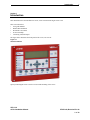
The figure below illustrates controls and indicators of the VES eView:
Figure 2-1
Controls and Indicators
13:30 Friday 12 May 2008
AUTO CONFIGURED PANEL
Enable
Access
USE ARROW KEYS TO ENABLE PANEL
PRESS ? FOR HELP
1 2 3
4 5 6
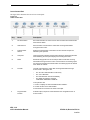
Key
Description
1
LCD display
2
Left-panel-indicators
3
Upper-control-pad
4
Lower-control-pad
5
Right-panel-indicators
6
Access level keyswitch
VES, LLC
eView Installation Manual
VF3510-00, Revision E01.06
6 of 16